Kaizen #187 - Building a Timer and Worklog Widget (Part 1)

Howdy Tech Wizards!
Welcome back to a fresh week of Kaizen!
This time, we are diving into a two-part series where you will learn how to build a Timer and Worklog Widget for Zoho CRM. This widget helps track active work time and log multitasking sessions using Zoho CRM APIs, Client Script, Functions, and Workflows.
Why It Matters?
Zoho CRM effectively captures stage/status transitions, like tracking when a case moves from Open to In Progress or On Hold. However, in dynamic work environments, employees juggle multiple work items and engage in impromptu tasks or conversations.
Let’s take the On Hold status as an example.
While it can be used to indicate pauses in progress, it does not always align with real-world workflows. Consider these scenarios:
Not all interruptions justify a status change
Moving the case to On Hold for every minor detour (to clarify something with a colleague or respond to another emergency work item) would be impractical and could lead to under reporting actual work hours. Over time, this untracked effort adds up, creating a gap in visibility.
Frequent status changes may dilute their meaning
In many teams, On Hold signifies a legitimate blocker like waiting on customer input or an external dependency. Using it frequently to reflect quick shifts in attention could compromise that clarity.
A timer widget solves this by:
- Capturing hands-on work items.
- Logging context switches (unrelated tasks) with descriptive entries.
- Feeding structured entries into a custom module for reporting and subform sync.
Business Scenario: IT Service Desk & Ticket Resolution
A tech support team uses the Cases module to resolve customer issues. Some tickets are straightforward; others require follow-ups, escalations, or cross-team coordination. While CRM timestamps (like stage transitions or picklist tracking) track when changes happen, they do not reflect how long someone actively worked on a case.
This Timer Widget can be the ultimate solution to track down the active time spent on each case through out the day.
What are we Building?
By the end of this two-part guide, you will know how to:
- Build a timer widget to track time per task or any CRM record.
- Log work sessions into a custom module every time the timer is started/stopped.
- Automatically populate a subform in the corresponding record module using workflows and Deluge functions.
- Leverage the Reports module to analyze work patterns, SLA adherence, and productivity trends.
In Part I, we will focus on:
-> Building and configuring the Timer Widget.
-> Capturing each timed session as a record in a custom module.
Prerequisites
1. Create a Custom Module
Create a custom module named Timer Entries to log work details and generate reports from the Reports module. A new record will be added to this module each time a timer is started.
Set up the following custom fields in the Timer Entries module:
Custom Fields | Data Type |
Start Time | DateTime |
End Time | DateTime |
Total Duration (in mins.) | Formula DateBetween(${Timer Entries.Start Time},${Timer Entries.End Time},'Minutes') |
Related to Case | Lookup to Cases module |
Work Description | Multi Line |

2. Add a custom picklist option
Add a custom picklist option called In Progress to the Status picklist field in the Cases module for precisely identifying the status of the cases.
Follow this Add/Remove Picklist Values help section for more details.

3. Setup Custom Views for Contextual Filtering
To streamline the widget experience and ensure users only see relevant records to associate while tracking time, set up two smart custom views—one in the Cases module and another in the Timer Entries module.
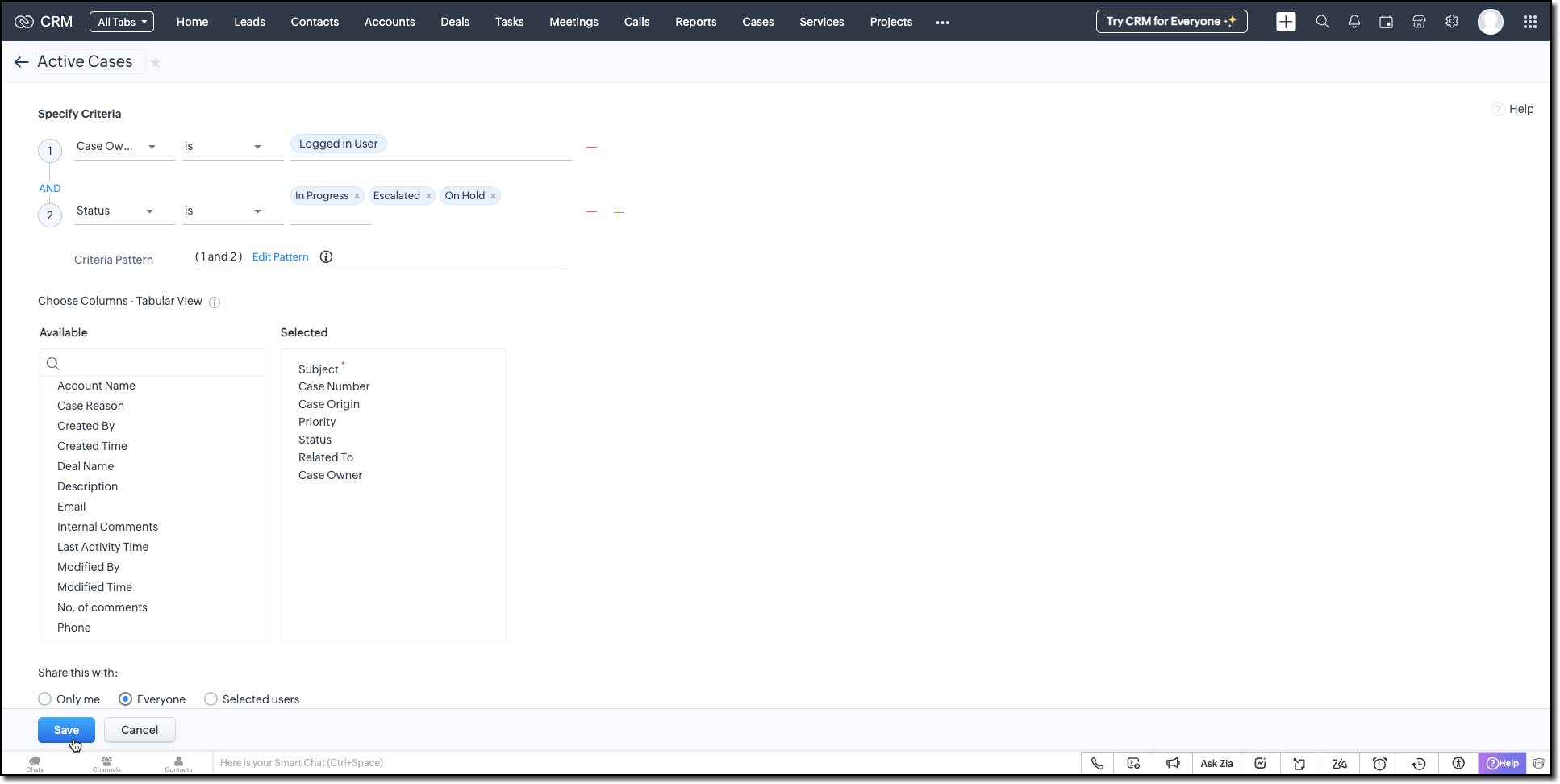
Active Cases View (Cases Module)
Create a custom view in the Cases module to list only the active tickets the logged-in user is working on. Use the following criteria tips:
- Use the Status field to filter records with values like In Progress, On Hold, or Escalated.
- Use the Case Owner field to show records that are assigned only to the currently logged-in user.
This view powers the drop-down inside the widget where users select the case they want to start the timer for.
Active Timers View (Timer Entries Module)
Set up a second custom view in the Timer Entries module to track entries where the timer has been started but not yet stopped. These represent active timers. Use the following logic for criteria:
- The End Time field is empty (i.e., timer still running).
- Timer Entry owner field matches the logged-in user.
This view is used internally by the widget to detect if a timer is already running and update the same entry once the timer is stopped.
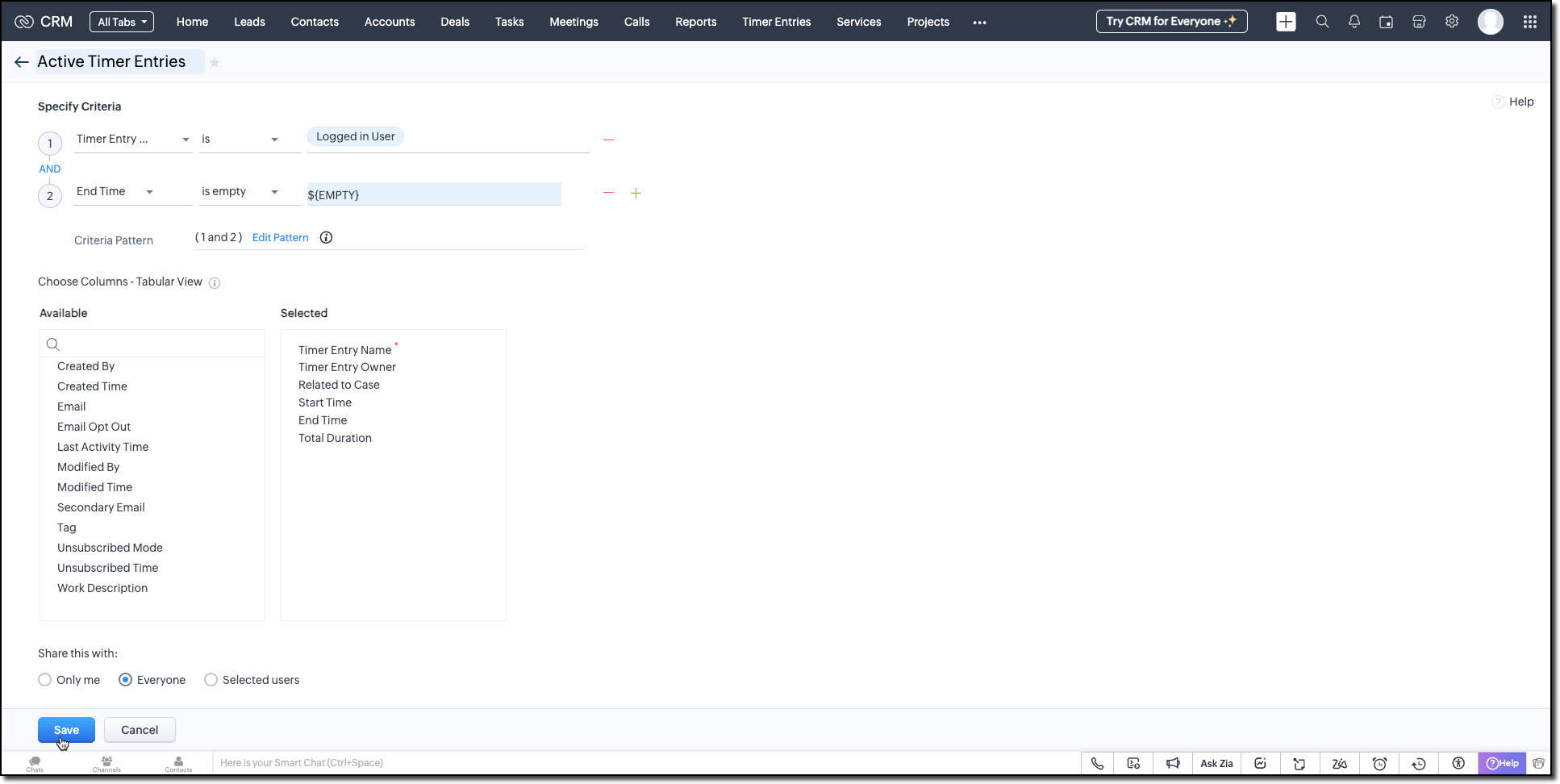
Follow the Managing List View help page and use the specifications shown in the following image.
Building the Timer Widget
Step -1: Review Basics
Refer to our earlier Kaizen on CLI Installation, Creating a Widget Project, and Internal hosting of the same.
Step 2 - Develop the Widget
After initializing your widget project using CLI, implement the timer logic:
Fetching Active Cases
On page load, the populateRecordsDropdown function initiates a Get Records API call to the Cases module, using the Active Cases custom view ID. This fetches all active case records assigned to the logged-in user.
These records are then listed in a dropdown, allowing users to quickly select the relevant case they are about to work on.
async function populateRecordsDropdown() { const recordsDropdown = document.getElementById("moduleRecords"); recordsDropdown.innerHTML = ""; try { const recordsResponse = await ZOHO.CRM.API.getAllRecords({ Entity: casesModule, cvid: casesCVID, per_page: 10 }); if (recordsResponse.data && recordsResponse.data.length > 0) { recordsResponse.data.forEach(record => { const option = document.createElement("option"); option.value = record.id; option.textContent = record.Subject || "Unnamed Record"; recordsDropdown.appendChild(option); }); } else { const placeholderOption = document.createElement("option"); placeholderOption.value = ""; placeholderOption.textContent = "No records found"; placeholderOption.disabled = true; placeholderOption.selected = true; recordsDropdown.appendChild(placeholderOption); } } catch (error) { console.error("Error fetching records:", error); } } |
Starting the Timer and Creating an Entry
Once the user starts the timer, The createRecord function triggers a Create Record API call to log the session in the Timer Entries custom module. The record captures the start time and the related case and description (if provided).
Even if no details are entered or case is selected, a timer entry is still created with the start time. This ensures that spontaneous work sessions are tracked and not lost.
async function createRecord(startTime) { try { const workDescription = document.getElementById("workDescription").value; const selectedRecordId = document.getElementById("moduleRecords").value; const selectedRecordText = document.getElementById("moduleRecords").options[ document.getElementById("moduleRecords").selectedIndex ].text; const data = { Start_Time: startTime, Owner: currentUserId, Work_Description: workDescription, Related_to_Case: selectedRecordId, Name: selectedRecordText }; const response = await ZOHO.CRM.API.insertRecord({ Entity: timerModule, APIData: data }); console.log("Start time recorded successfully"); } catch (error) { console.error("Error creating record:", error); } } |
Stopping the Timer and Updating the Entry
When the timer is stopped, the widget uses the Active Timer Entry custom view to locate the most recent Timer Entry record created by the logged-in user that does not have an end time.
The updateRecord is then triggered to update that active entry using the Update Record API call. It updates the End time of the session and the related case, descriptions, if it was not already provided when the timer was started.
async function updateRecord(endTime) { try { const workDescription = document.getElementById("workDescription").value; const selectedRecordId = document.getElementById("moduleRecords").value; const response = await ZOHO.CRM.API.getAllRecords({ Entity: timerModule, cvid: timerEntriesCVID, per_page: 1 }); const latestRecord = response.data[0]; if (latestRecord) { const recordId = latestRecord.id; const data = { id: recordId, End_Time: endTime, Work_Description: workDescription, Related_to_Case: selectedRecordId }; await ZOHO.CRM.API.updateRecord({ Entity: timerModule, APIData: data, RecordID: recordId }); console.log("End time updated successfully"); } } catch (error) { console.error("Error updating record:", error); } } |
Step 3 - Validate and Pack the Widget
- Follow the steps given in the Widget help page to validate and package the widget.
- Go to Zoho CRM > Setup > Developer Hub > Widgets and click Create New Widget.
- Fill in the required details as shown in this image and ensure to select Button as the widget type.

Step 4 - Associate it with Flyout
- Go to Setup > Developer Space > Client Script. Click New Script.
- Enter a name and description for the script. Choose Command type in Category.

- Create a Flyout and render a widget within it using its details like the API name of the widget, title, size, and animation type. You can get the Widget API name from the widget's detail page.
let allowedUserEmails = []; allowedUserEmails.push('user1_email_address'); allowedUserEmails.push('user2_email_address'); allowedUserEmails.push('user3_email_address'); let currentUserEmail = $Crm.user.email; if (allowedUserEmails.indexOf(currentUserEmail) == -1) { ZDK.Client.showMessage('Command access resticted', { type: 'error' }); return false; } ZDK.Client.createFlyout('myFlyout', {header: 'Timer', animation_type: 4, height: '600px', width: '500px', top: '10px', left: '10px', bottom: '10px', right: '10px' }); ZDK.Client.getFlyout('myFlyout').open({ api_name: 'Timer', type: 'widget' }); return true; |
Refer to Creating a Client Script help page for more details.
Try It Out!
A complete working code sample of this widget is attached to this post.
Now, let us see how this Timer widget works:
1. Start the Timer
Open the widget and select an active case from the dropdown. As soon as you start the timer, a new record will be automatically created in the Timer Entries module to capture the session.

2. Stop the Timer
When the task is complete, provide a description of the work you have done and stop the timer. The same Timer Entry record (created when the timer was started) will be updated automatically with the end time and your work description.
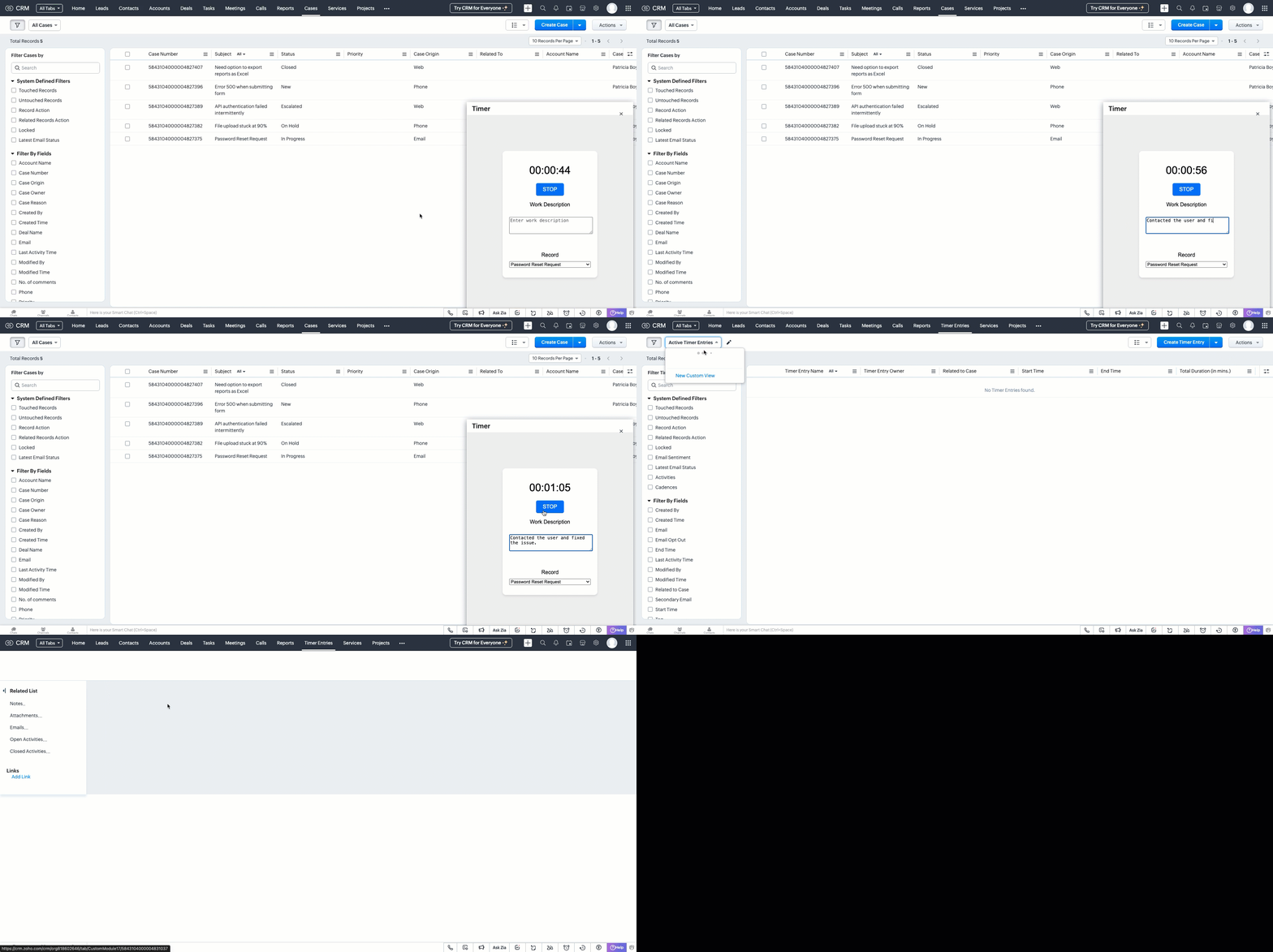
This forms the foundation for accurate time tracking at the record level.
In Part 2, we will show how to:
-> Use a workflow and Deluge function to transfer these entries into the Work Log subform inside the relevant Cases record.
-> Use CRM Reports to slice and dice work time for better SLA and productivity insights.
In the meantime, would you like us to address any of your pain-points or have a topic to discuss? Let us know in the comments or reach out to us via support@zohocrm.com.
Until next time, Happy Coding!
-----------------------------------------------------------------------------------------------------------------
Related Reading
- Custom Fields - Working with Custom Fields and Working with Picklist Field
- Widget - An Overview, CLI Installation, Working with Widgets, JS SDKs, Mobile Compatibility of Widgets and Kaizens
- Core APIs - GET Records, POST Records and UPDATE Records
- Client Script - An Overview, Creating a Client Script, Best Practices and Troubleshooting
-----------------------------------------------------------------------------------------------------------------

Previous Kaizen: Client Script Support for Subforms | Kaizen Collection: Directory
Topic Participants
Kiruthiga G
Sticky Posts
Kaizen #217 - Actions APIs : Tasks
Welcome to another week of Kaizen! In last week's post we discussed Email Notifications APIs which act as the link between your Workflow automations and you. We have discussed how Zylker Cloud Services uses Email Notifications API in their custom dashboard.Kaizen #216 - Actions APIs : Email Notifications
Welcome to another week of Kaizen! For the last three weeks, we have been discussing Zylker's workflows. We successfully updated a dormant workflow, built a new one from the ground up and more. But our work is not finished—these automated processes areKaizen #152 - Client Script Support for the new Canvas Record Forms
Hello everyone! Have you ever wanted to trigger actions on click of a canvas button, icon, or text mandatory forms in Create/Edit and Clone Pages? Have you ever wanted to control how elements behave on the new Canvas Record Forms? This can be achievedKaizen #142: How to Navigate to Another Page in Zoho CRM using Client Script
Hello everyone! Welcome back to another exciting Kaizen post. In this post, let us see how you can you navigate to different Pages using Client Script. In this Kaizen post, Need to Navigate to different Pages Client Script ZDKs related to navigation A.Kaizen #210 - Answering your Questions | Event Management System using ZDK CLI
Hello Everyone, Welcome back to yet another post in the Kaizen Series! As you already may know, for the Kaizen #200 milestone, we asked for your feedback and many of you suggested topics for us to discuss. We have been writing on these topics over the
Nederlandse Hulpbronnen

Recent Topics
Updating an Invoice Line Item's Discount Account via API Call / Deluge Custom Function
I need help updating an invoice line item's discount account via API. Below is a screenshot of the line item field I am referring to. Now the field to the left of the highlighted field (discount account) is the sales income account. I am able to modifySend e-mail with attachments
Dear Zoho, How is that possible in Zoho Flow to send an e-mail with attachment? Just a simple example: Zoho Flow checks my Zoho mails and if the conditions starts the trigger then I would like to send an email with the original email's attachment. Any idea? BR, AdamHow to I get checkboxes on a subform to update via deluge
Hello, would someone be able to tell me what I'm doing wrong here? I am trying to take the contents of a Deals subform and add them to an invoice then update the checkbox on each row so that 'add to invoice' is unticked and 'invoiced' is ticked. The outputUnified customer portal login
As I'm a Zoho One subscriber I can provide my customers with portal access to many of the Zoho apps. However, the customer must have a separate login for each app, which may be difficult for them to manage and frustrating as all they understand is thatZoho Projects - Task Owner filter at Project level
Hi Projects Team, The feature requests I would like to raise is the ability to create a custom view at the project level for projects with tasks owned by a user or users. For example "Ashley's Projects" custom view might contain a list of project in whichCadences
I have just started using Cadences for follow-up up email pipeline. Is it just me or do you find the functionality very basic? For example, it will tell me (if I go looking for it) if someone has replied to a follow-up and been unenrolled; but it won'tWould be really awesome to have Created Time and Modified Time showing for custom functions list
It would be SO HELPFUL to be able to sort custom functions by created time/ modified time. Also seeing a created by/ modified by with the little profile picture would be supremely helpful as well. Just really hard sometimes to find a function you wereTicket Export Does Not Include Ticket Threads
Dear Zoho Desk Support Team, I hope you’re doing well. I would like to report an issue regarding the ticket export functionality in Zoho Desk. Currently, when exporting tickets, the ticket threads or conversation history are not included — only the ticketPayments made notification
This is a really wonderful feature but we can only use it for about 50% of payments made & have to revert to sending statements which is a real chore. Credits applied to the bills paid in the notification aren't included & this causes great confusion in the accounts receivable departments. Please, please add this required feature asap ! .....Ability to add VAT to Retainer Invoices
Hello, I've had a telephone conversation a month ago with Dinesh on this topic and my request to allow for the addition of VAT on Retainer Invoices. It's currently not possible to add VAT to Retainer Invoices and it was mutually agreed that there is absolutely no reason why there shouldn't be, especially as TAX LAW makes VAT mandatory on each invoice in Europe! So basically, what i'm saying is that if you don't allow us to add VAT to Retainer Invoices, than the whole Retainer Invoices becomesZOHO DESK link with Power BI
HI, I am using ZOHO Desk for last two years and now my client is asking to integrate ZOHO desk data to Power BI so that they can use Data for reporting. Kindly guide in details so that i can give access to ZOHO desk export data for more visibility.URLs being masked despite disabling tracking
Hey, We had disabled click tracking from an email update we are sharing with our users. Despite this, the URL the end user is receiving is masked, and looks like "https://qksyl-cmpzourl.maillist-manage.net/click/1d8e72714515cda6/1d8e72714515ca70" insteadDashboard Autorefesh
Good day, I am a dashboard that displays the number of tickets based on "Product Name". This dashboard is displayed on a big TV for the team to monitor. Can the dashboard auto-refresh every few minutes to display the new values? Currently, we have closedDeferred/ Unearned revenue
Dear Zoho Team, Just in case you have missed out my query posted few days ago: We issue invoices relating to 12-month web hosting service. When we issue the invoice, we should record the entire amount of the invoice as DEFERRED/UNEARNED REVENUE (ie. $10Bigin Android app update: Zoho Books integration
Hello everyone! We’re excited to introduce Zoho Books integration on the latest version(v1.8.5) Bigin Android app. Once the integration is completed in the web(bigin.zoho.com), the Zoho Books tab will be visible in detail View of Contacts, Companies,Audit Log enhancements: Increased retention period, better user visibility, and more
Hello everyone, The Audit Log brings in the following enhancements which improve the overall ability to manage data. Why did we make these updates? Extended Data Retention: Audit data can now be filtered and exported for a 60-day period, doubling theQuestion Regarding Managing Sale Items in Zoho Books
Good day, I was wondering about something. Right now, Zoho Books doesn’t seem to have a way to flag certain items as being on sale. For example, if I want a list of specific items to be on sale from October 1 to October 12, the user would have to exportSystem flaws and lack of response from Zoho
I have had to go on here as no-one is replying to my emails regarding my problem (been 10 days and no email reply) and your chat facility online through your Zoho Books software opens and closes immediately, so not functioning properly. I actually calledCustomer Grouping
Hi, how can I group multiple customers into single group. So that I can have idea of accounts receivables of all the customers in single group. Like if there are multiple subsidiaries of same company we have having a business with, and want to view theTwo currencies
More and more I am finding that internattional payments' fees are unpredictable. I would like, on my invoices that are in a foreign currency (eg. USD$ or EUR€) for there to be a GBP£ TOTAL display alongside the invoice's currency total. This would makeGST Slabs Redefined: Stay Compliant Using Zoho Books!
Hello Everyone! The Government of India is rolling out new GST rates, a major reform aimed at simplifying the current tax structure starting 22 September 2025. GST will move from four slabs (5%, 12%, 18%, 28%) to two main slabs (5% and 18%), plus a specialNeed Inactive accounts to be visible in Reports in Zoho Books
I N=need Inactive accounts to be visible in Reports in Zoho Books to do recons of the accounts but when i see the same they are not visible in the Accountant - Account Transactions reportEdit item custom fields
Getting this error : Transactions have been created with the custom field. Hence it cannot be deleted. Not trying to delete it, just trying to change which modules to show in or to not show at all in transactions !Zoho Books - How to Invoke a Custom Function in Schedulers
We have multiple schedulers that send emails to customers in batches. Currently, we are maintaining the same code across several schedulers. Is it possible to use a custom function inside a scheduler script? If yes, how can we invoke the custom functionUse Zoho Books to bill for work done in Zoho Desk??
I'm trying to see if something is possible (and if yes, how). We use Zoho One to manage our business. We have a lot of clients that will put in a ticket (via portal) to have work done. Out techs will pick up the ticket, do the work, and then log the timeZoho Finance Suite - Customer Custom Tabs - Dynamic Link
Hi Finance Suite team, When creating a Custom Tab for a Client Portal, there is no option to add dynamic parameters. This would be very helpful for adding Zoho Analytics dashboards which can be dynamically filtered through the URL to only show informationModular Permission Levels
We need more modular Permissions per module in Books we have 2 use cases that are creating problems We need per module export permission we have a use case where users should be able to view the sales orders but not export it, but they can export otherBlueprint or Validation Rules for Invoices in Zoho Books
Can I implement Blueprint or Validation Rules for Invoices in Zoho Books? Example, use case could be, Agent confirms from client that payment is done, but bank only syncs transactions tomorrow. in this case, Agent can update invoice status to done, andFeature Enhancement Request – Text Formatting Options in Item Description (Zoho Books/Quotes Module)
Dear Zoho Development Team, Greetings from Radiant360 Integrated Technical Services LLC. We would like to bring to your attention a functional limitation we've encountered within the Item Table / Quote Description section of Zoho Books (and Zoho CRM Quotes).Bank Receipt Catagorization
Hi, how can I match a bank deposit to multiple customer's invoices ? For e.g. A single person paid to us on behalf of different five customers. I need to keep the separated invoices for each customerPayment on a past due balance
Scenario: Customer is past due on their account for 4 months. We suspend their billing in Zoho books. Customer finally logs into the portal and enters a new credit card. We associate that cardwith their subscription, which will permit the card to be usedHow to export all line-item descriptions for a specific item in Zoho Books?
I am trying to audit a specific item (“Item X”) that has been invoiced multiple times with different line-level descriptions. Here’s the situation: I am using Zoho Books (Professional). Each invoice may contain the same item but with different descriptionsList of hidden features
Hi Friends, I had another support chat today and low and behold the feature that I wanted just simply needed to be "enabled". I thought I'd share, and maybe see if others had some similar experiences. 1. This one is from 5 ish years ago. I asked if thereHow to change a BAS that has been filed
I have discovered that a group of expense transactions were accidentally placed in a asset account rather than an expense account. As a result I need to adjust the transaction and consequently most of my BAS to correct the error. Because the BAS haveHow to Export PDF with a custom Template
I need to export Sales Order with a Custom Template I have created How can I do it? I see an API to export the PDF but how can I choose which template to choose to generate the PDFAssociate email with a potential or project.
I have a pivotal requirement to associate emails from various suppliers (contacts) with different potentials or projects, on an email by email basis as they come in. This question appears to have been raised before but I cannot find a definitive yes "it can be done". Could anyone please tell me, yes or no. If the later I can stop wasting time and look at alternative crm systems. I would love not to have to do this. Thanks in advance.Function with Search Records was working until a few weeks ago, around when "Connected Records" was released
I have a custom function that has been running for nearly a year now, which suddenly stopped working around the time Zoho released the "Connected Records" update. The function is no longer finding the record using the searchRecords function. I've changedIs CRM On Premise available
Hi Zoho team, Can you please let me know that CRM Zoho is available for On Premise as well? Thanks, DevashishHow to sync from Zoho Projects into an existing Sprint in Zoho Sprints?
Hi I have managed to integrate Zoho Projects with Zoho Sprints and I can see that the integration works as a project was created in Zoho Sprints. But, what I would like to do is to sync into an existing Zoho Sprints project. Is there a way to make thatOnline Assessment or any aptitude test
This video is really helpful! I have one question — if I share an assessment form link (through email or with the application form on my career page), how does Zoho Recruit evaluate it? Can a candidate use Google or external help while taking the test,Next Page