Kaizen #59 - Creating alerts and custom messages using Client Script
Hello everyone!
We are happy to resume our Zoho CRM Developer Community series - The Kaizen series!
Welcome back to the new start of Kaizen!
What is Client Script?
The Client Script feature gives you a seamless platform for achieving and extending your business cases in Zoho CRM by allowing Java Script code execution in your browser. It enables you to configure events for the UI components and define the actions once those events are triggered.
The ZDK Client Functions available in Client Script are,
ZDK Client Function | Description |
showMessage | To display a text message on create/clone/edit/detail(canvas) page. |
showConfirmation | To display a confirmation box with accept and reject message on create/clone/edit/detail(canvas) page. |
showAlert | To show alert message on create/clone/edit/detail(canvas) page. |
openMailer | To open mailer component from detail(canvas) page. |
Use Case
Let us consider that you want to achieve the following using Client Script.
- Calculate age based on Date of Birth and display the message "Age is more than 80" whenever the age is above 80 in create page of Policyholder module.
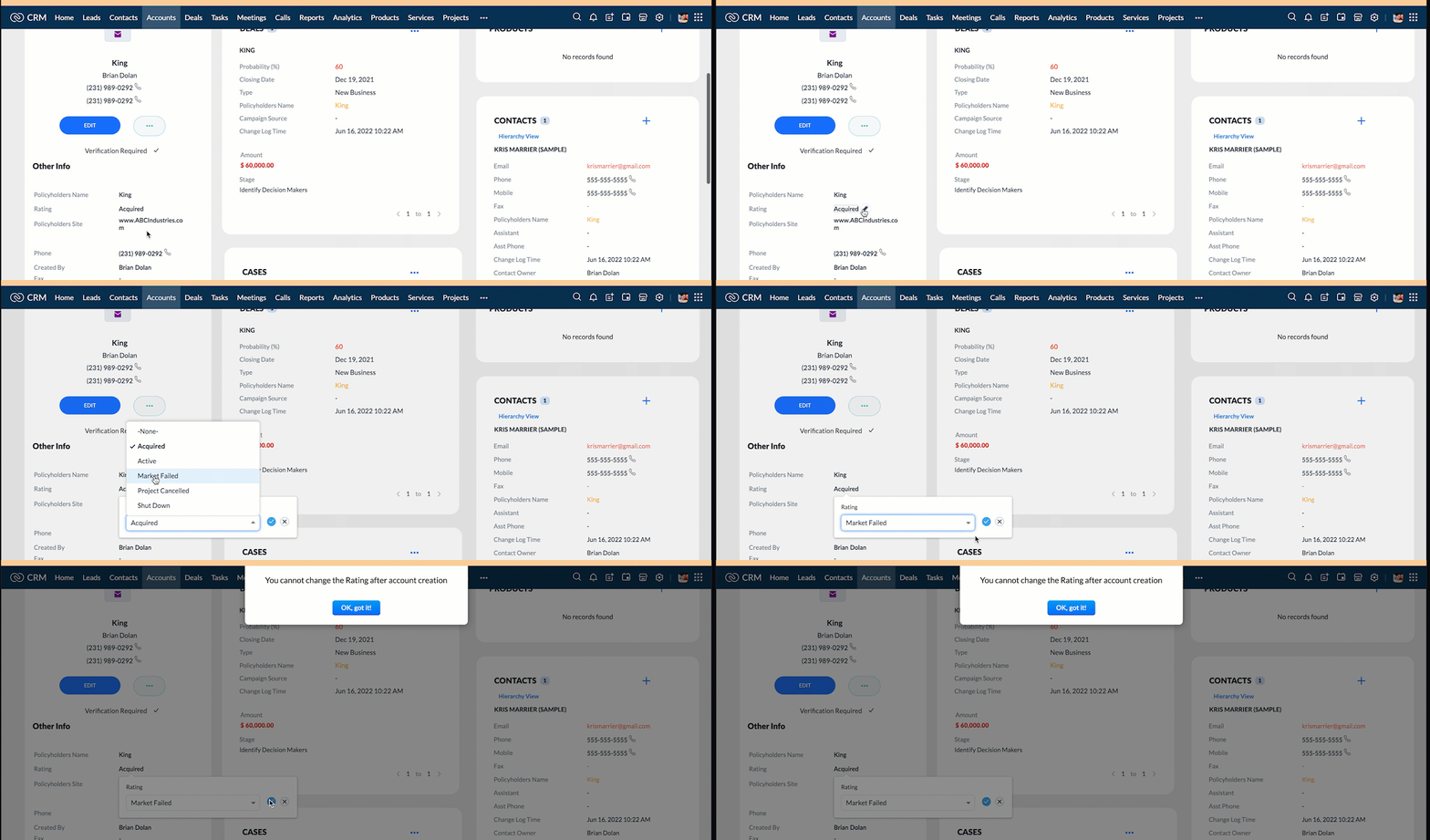
- Show the alert message "You cannot change the Rating of a verified account" whenever you try to update the field Rating in Accounts module.
- When you click the mail button on detail(canvas) page, ask for confirmation and open a mailer window.
Solution using Client Script
Note:
The solution listed in this post includes detail(canvas) page and create page.
To create a canvas page,
- Go to Setup > Customization > Canvas
- Click Create Record Detail Page.
- On the Create a Custom Record pop up that appears, select the module as "Accounts" and select the required layout for the canvas page
- Choose a template from the gallery and click Select.
- Enter a name and save the canvas page.
- Click Canvas Assignment and assign the page to the required profiles.
- Click here for more details on creating a canvas page(Customizing the record detail page).
1. Calculate age based on Date of Birth and display the message "Age is more than 80" whenever the age is above 80 in create page of Policyholder module
- Go to Setup > Developer Space > Client Script. Click +New Script.
- Specify the details to create a script and click Next.
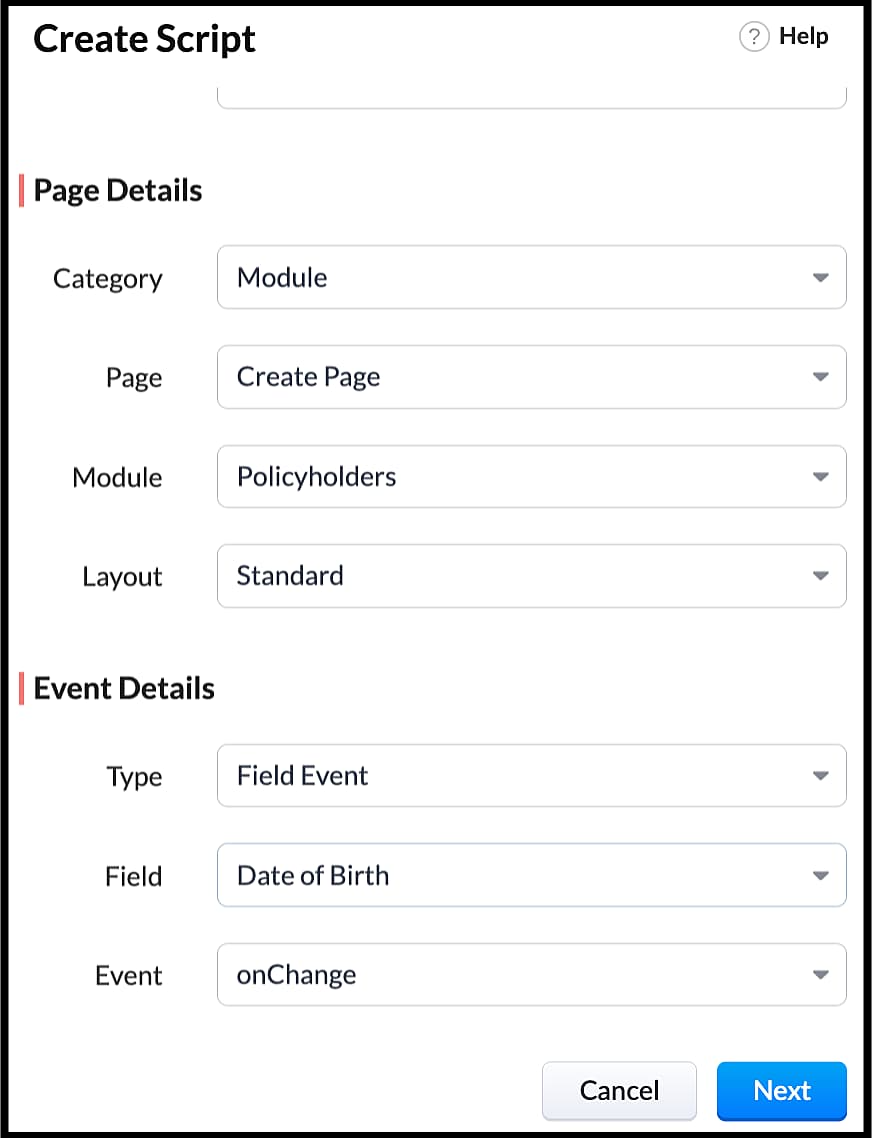
- Enter the following script in the Client Script IDE and click save.
- function getAge(dateString)
- {
- var today = new Date();
- var birthDate = new Date(dateString);
- var age = today.getFullYear() - birthDate.getFullYear();
- var m = today.getMonth() - birthDate.getMonth();
- if (m < 0 || (m === 0 && today.getDate() < birthDate.getDate()))
- {
- age--;
- }
- return age;
- }
- let age = getAge(value);
- var age_field = ZDK.Page.getField("Age");
- var category_field = await ZDK.Page.getField("Category");
- age_field.setValue(age);
- if (age > 80) {
- ZDK.Client.showMessage('Age is more than 80', { type: 'info' });
- }
- You can see the code working from the create page. You can also see how the client script works using the Run component of the Client Script IDE.
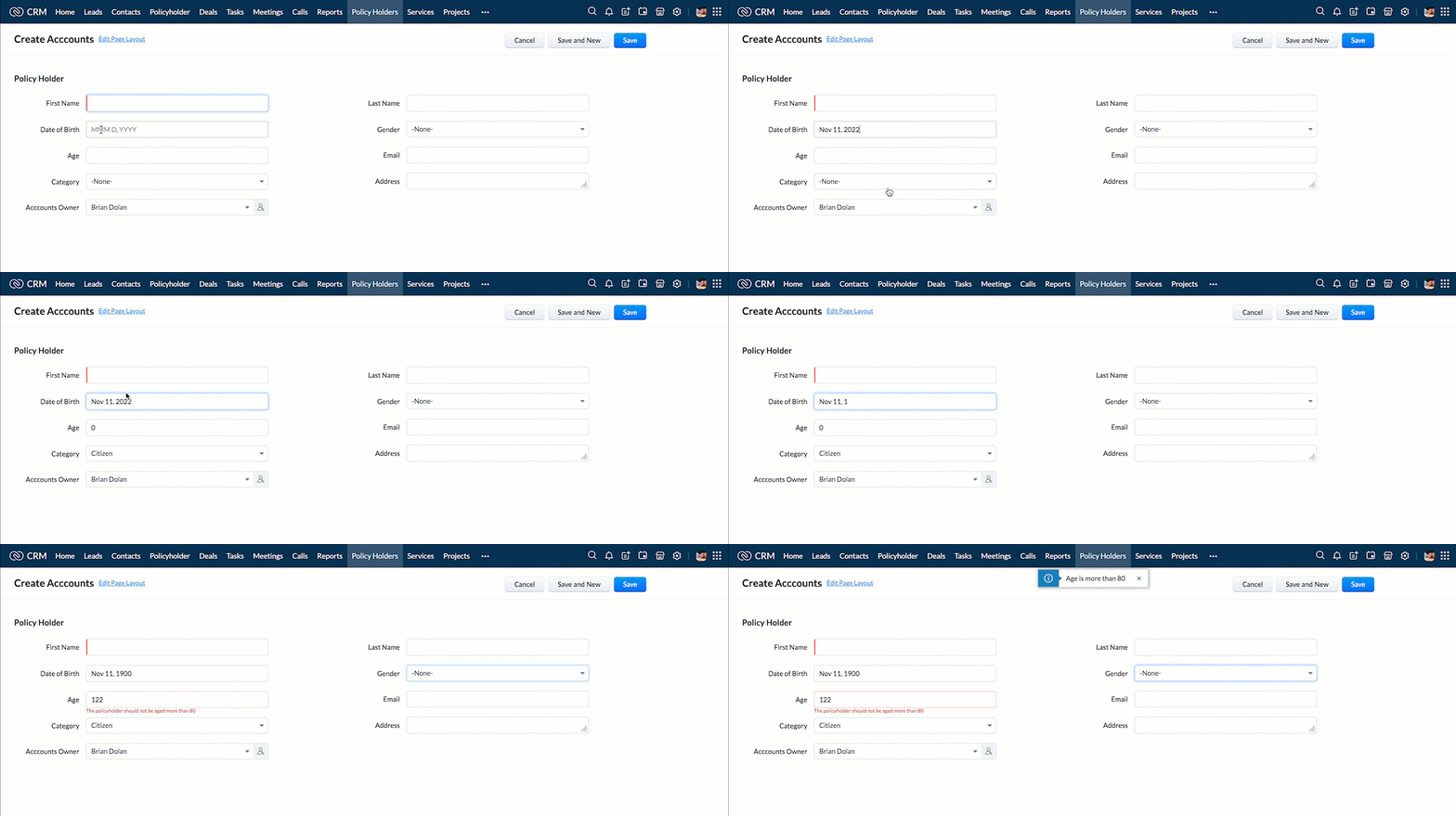
- You can use any of the following types in showMessage() function
Possible 'type' | Script |
info | ZDK.Client.showMessage('message', { type: 'info' }); |
warning | ZDK.Client.showMessage('message', { type: warning }); |
| error | ZDK.Client.showMessage('message', { type: error }); |
success | ZDK.Client.showMessage('message', { type: success }); |
2. Show the alert message whenever you try to update the field Rating
- Go to Setup > Developer Space > Client Script. Click +New Script.
- Specify the details to create a script and click Next.
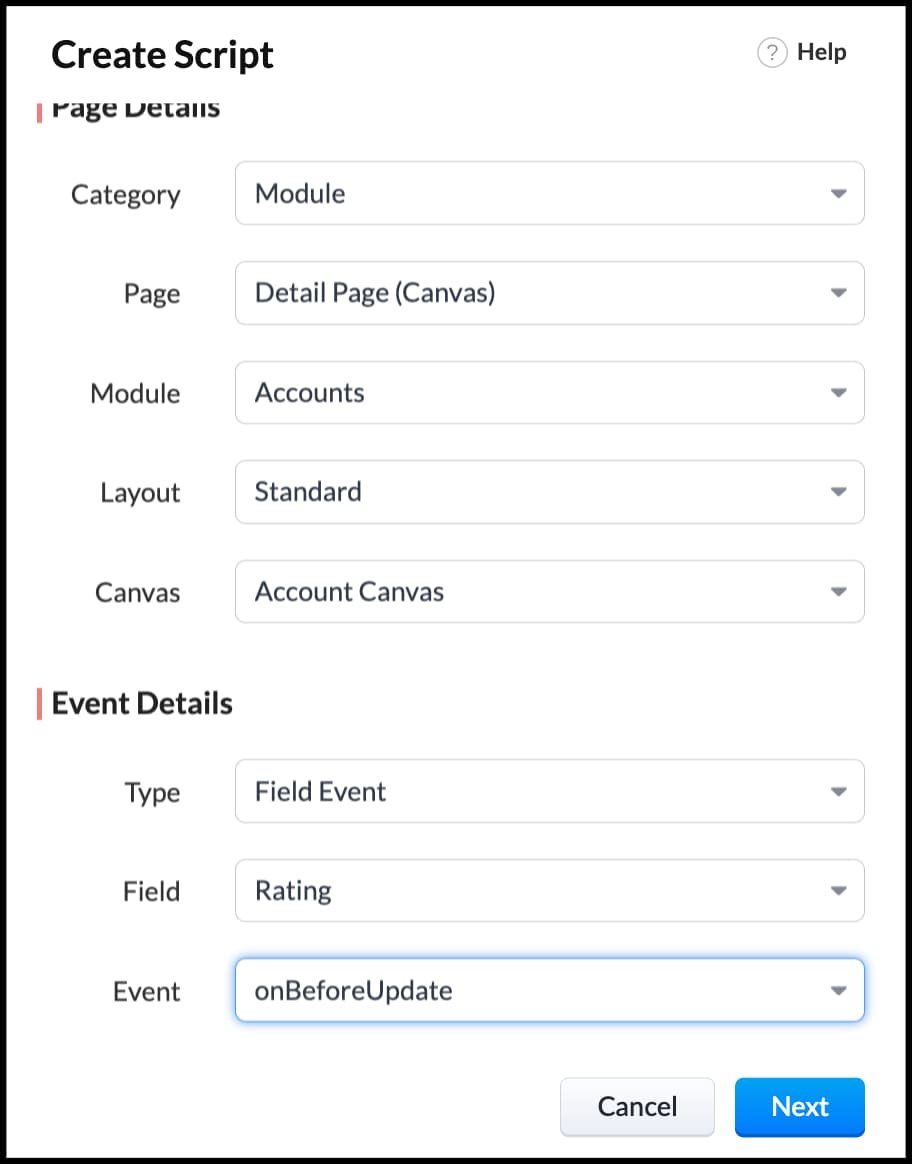
- Enter the following script in the Client Script IDE and click save.
- ZDK.Client.showAlert('You cannot change the Rating after account creation');
- Here is how the Client Script works. You can also see how the client script works using the Run component of the Client Script IDE.
3. Configure the mailer box with the click of a button
First of all, you need to add the button to the detail(canvas) page.
- Go to Setup > Customization > Canvas.
- Right click on the Canvas page for Accounts module and click Edit.
- Click Elements, drag and drop the button wherever required and specify a label for the button.
- Right click on the button, select Add Element ID and enter the ID of the button in the pop up that appears.
- Once the button is created, you can configure Client Script in two ways:
- Right click on the button--> Add Client Script-->onClick. The Client Script IDE appears with the event type as Canvas Button Event.
(or)
- Go to Setup > Developer Space > Client Script. Click +New Script.
- Specify the details to create a script and click Next.
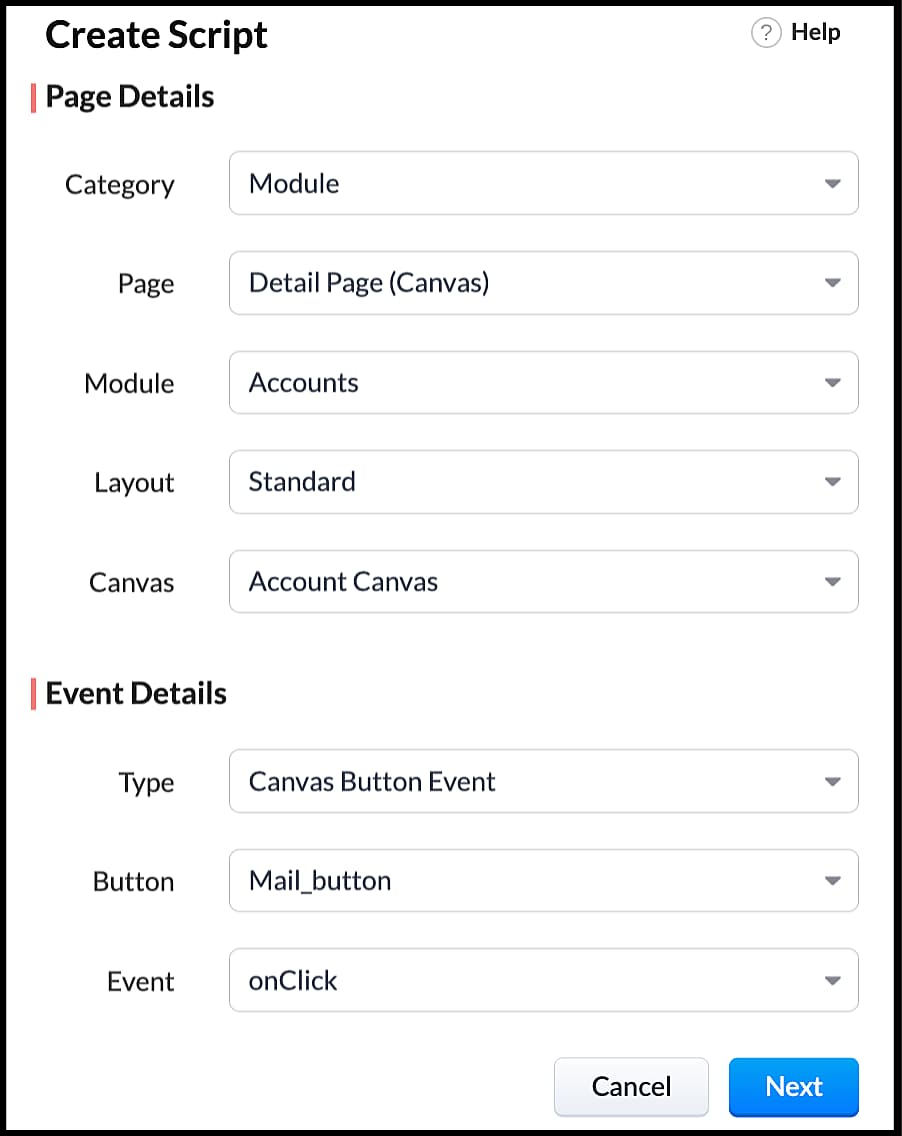
- Enter the following script and click save.
- var isProceed = ZDK.Client.showConfirmation('Do you want to open the mailer window?','Proceed','Cancel');
- //If user clicks Proceed button
- if (isProceed) {
- ZDK.Client.openMailer({ from: '', to: [{ email: '', label: 'ABC Industries' }], cc: [{ email: '', label: 'ABC Industries' }], subject: 'Greetings from ABC Industries!', body: ' ' });
- }
- The showConfirmation() function will return a boolean value based on the user selection. You should capture this boolean value using a variable and write the actions based on the boolean value returned. Here the variable isProceed will capture the user response and based on that boolean value, the mailer box will get displayed.
- Here is how the client Script works,
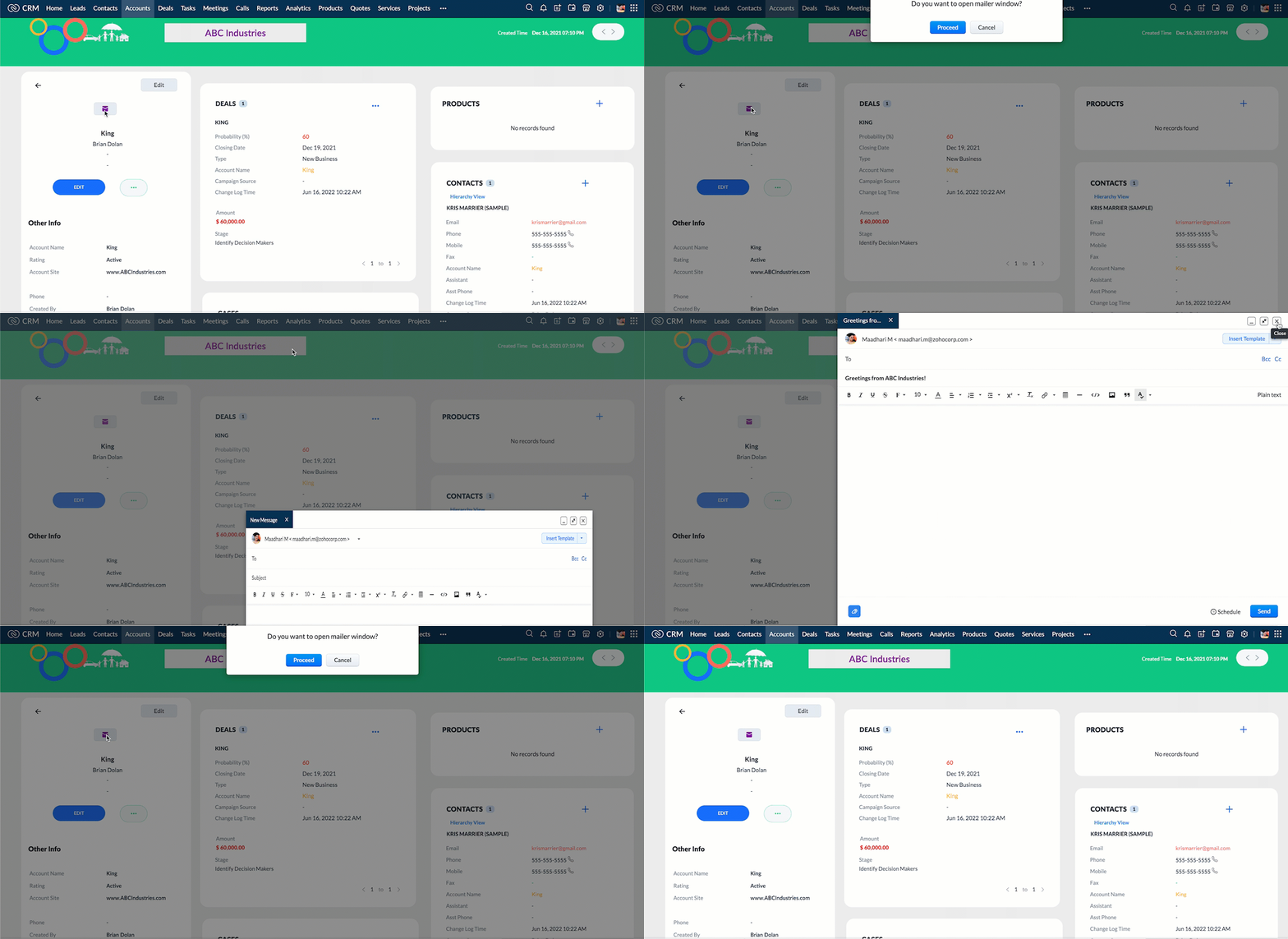
We hope you found this post useful. We will meet you next week with another interesting topic!
If you have any questions let us know in the comment section.
Cheers!
Click here for more details on Client Script in Zoho CRM.
Related Links
Topic Participants
Maadhari M
tbiedma
Joe Sweeney
Anz
Jason
Sticky Posts
How to reach the official Zoho Support channels and avoid fake ones.
Dear Customers, Thanks a lot for choosing Zoho! Our applications are built to help achieve your day-to-day business goals. We are committed to engaging with you, to understand and develop solutions that enhance your productivity. We are happy and ready to help you use our services effectively. Understanding and avoiding fake support Just like using popular bank names and financial applications for phishing purposes, using Zoho and claiming to be providing Zoho Support or services with false numbersFunction #35: Close all tasks associated with a lead and create a new task.
Welcome back everyone! Last week, we learnt how to close all tasks of a deal depending upon the deal stage. This week, let's look at a custom function that lets you close all of the tasks associated with a lead while simultaneously creating a new task, like when you need to halt all progress towards a lead while the lead is not available at the moment but create a reminder task. Business scenario: The success of a company, in one way or another, is determined by the leads it gets. Each lead is justZoho CRM Webinar - Redesigning Daily User Experiences with Canvas
<br> Your users across roles use the CRM for day-to-day tasks that are necessary. Whether they perform their tasks on time, the right way, or at all depends on a lot of factors, including User Experience. Many businesses struggle with rigid layouts,Join us at the Canada ZUG Meetup: What’s New in Zoho CRM
Hello Zoho Community! Start your year with fresh insights into Zoho CRM’s latest updates and tools. Whether you're a CRM beginner or a experienced user, this meetup is crafted to help you optimise your processes and leverage new features. Explore practicalCRM Hack #2: Automate sending of birthday greetings to your customers.
Hello everyone! What sets you apart as a sales person is your ability to add that personal touch to your business relationship with your customers. Sending a gift on a special day, or leaving a note wishing them on their birthdays, are small, yet significant actions that show your customers that you care. And these are actions done without any expectations :) You must be engaging with a lot of customers and it is highly unlikely that they all are your friends on Facebook or some social channel,
Nederlandse Hulpbronnen

Recent Topics
Zoho CRM strips whitespace in text fields
When editing field text with multiple spaces: CRM - both UI and API trim / compress the whitespace to a single space when saving: Is this known / expected / documented behaviour?WeTravel + Zoho CRM Integration - Has Anyone Built a Connector or Extension?
Hi all, I'm exploring options for integrating Zoho CRM with WeTravel (booking & payment platform for tour operators). Zapier seems to be the common method but seems limited. I'm wondering if anyone in the community has developed a more comprehensive solution,Career site URL - Suggestion to modify URL of non-english job posting
Hi, I would like to suggest making a few modification to career sites that are not in english. Currently, the URL are a mix of different languages and are very long. It makes for very unprofessional looking URLs... Here is an example of one of our URLUplifted homepage experience
Editions: All editions. Availability update: 17th February 2026: All editions in the CA and SA DC | JP DC (Free, Standard and Professional editions) 23 February 2026: JP (All Editions) | AU, CN (Free, Standard, Professional editions) 27 February 2026:Cliq iOS can't see shared screen
Hello, I had this morning a video call with a colleague. She is using Cliq Desktop MacOS and wanted to share her screen with me. I'm on iPad. I noticed, while she shared her screen, I could only see her video, but not the shared screen... Does Cliq iOS is able to display shared screen, or is it somewhere else to be found ? RegardsHow to update "Lead Status" to more than 100 records
Hello Zoho CRM, How do I update "Lead Status" to more than 100 records at once? To give you a background, these leads were uploaded or Imported at once but the lead status record was incorrectly chosen. So since there was a way to quickly add records in the system no matter how many they are, we are also wondering if there is a quicker way to update these records to the correct "Lead Status". I hope our concern makes sense and that there will be a fix for it. All the best, JonathanIntroducing Contract Settings & Backdated Contracts in Zoho Contracts
We are rolling out updates that give you more control over how contracts are created and managed in Zoho Contracts. From defining default workflows with Contract Settings to aligning agreements with real timelines using Backdated Contracts, these enhancementsCelebrating our customers on International Client's Day
Hi everyone, Every customer is part of our Zoho Desk family, and we wouldn’t want to miss celebrating you on this special day. This International Client's Day, we’d like to take a moment to appreciate every customer who has helped us grow and build meaningfulZoho Books | Product updates | February 2026
Hello users, We’ve rolled out new features and enhancements in Zoho Books. From Advanced Reporting Tags to the ability to mark projects as completed, explore the latest updates designed to improve your bookkeeping experience. Introducing Advanced ReportingFaster Ticket Response with use of Snippets in comments
Hello everyone, Responding to tickets often involves repeating the same messages, whether it is sharing updates with customers or leaving notes for internal collaboration. To make this easier and more consistent, we are allowing agents to use snippetsImproving Zoho Creator's email deliverability
Hi all, We're pleased to announce updates to email handling in Zoho Creator to improve the deliverability of the emails sent from the Creator platform. These updates have been designed keeping in mind the fact that emails from domains with strong senderWhat's New in Zoho Billing | February 2026
February brings a powerful set of updates to Zoho Billing, from smarter subscription management and flexible payment options to better reporting and more control over your hosted pages. Here's everything that's new this February. Create SubscriptionsReassign Partially Saved Entries
Hi, I would like to be able to go to Partially Saved Entries and like the option to delete them I would like the option to multi-select and be able to reassign them to another user to complete (Such as when a user has left the company). Thanks DanCan we rely on order of returned ids when inserting multiple records?
Hello! API https://www.zoho.com/crm/developer/docs/api/v8/insert-records.html does not mention that the response array will match the input array*, keeping this important information implicit and someone might have doubts to rely on it. (*the responseDisplaying only unread tickets in ticket view
Hello, I was wondering if someone might be able to help me with this one. We use filters to display our ticket list, typically using a saved filter which displays the tickets which are overdue or due today. What I'd really like is another filter thatWhat is a realistic turnaround time for account review for ZeptoMail?
On signing up it said 2-3 business days. I am on business-day 6 and have had zero contact of any kind. No follow-up questions, no approval or decline. Attempts to "leave a message" or use the "Contact Us" form have just vanished without a trace. It stillBest Way to Manage Approvals Within Blueprint Stages?
Hi, I am working on a requirement involving Blueprint and approval logic in Zoho CRM and would appreciate some guidance. I understand that approval processes do not trigger when a record is currently within a blueprint, which makes it challenging to implementZoho Books: tax is not automatically pulled from product-data anymore - why?
Hi, until a short time ago, you could set a default taxrate for each product/item. This taxrate automatically appeared each time the item was chosen in an invoice or quote. Why does this not work anymore? The field is still there at the product record,Issue creating a YTD report with last years numbers
I am looking to create a widget to compare the YTD leads we have in 2023 to the YTD leads we had in 2022. I'm having issues with the aggregate formula creation to gain access to the 2022 Leads YTD data point. Feeling like this is a common view of dataBrand Studio Projects in Analytics
Hi All, Currently pulling my hair out over trying to link together some social media posts for a reporting dashboard in Analytics, so I thought I'd see if anyone on here had a solution. Our Marketing Team created a LinkedIn campaign in Zoho Brand Studio,Manage Testing Process in Zoho Sprints
Agile framework supports a robust quality assurance system that incorporates continuous testing throughout the development lifecycle of the product. The agile testing team focuses on planning the testing around the development, identifying defects earlyAnnouncing the Zohotshots of the ZDC Hackathon 2025
Hey everyone, The wait is finally over! After weeks of building, experimenting, and pushing creative boundaries, we’re excited to announce the winners of the second edition of the ZDC Hackathon. This edition brought together an incredible community ofMajor journey crash and not loading. Zoho Marketing Automation
Hi all. Last night (19MAR, 2026) Marketing Automation for a specific journey completely crashed, and since the crash the specific journey has failed to load at all (blank journey canvas, no journey appears, no menu accessible) but other separate journey'sDynamic image in form works in the app but not on the customer portal.
img = frm_Fichas[ID == input.Nombre].Foto; imgno = Nophoto[ID2 = 1].Image; if(len(img) > 1) { img = img.replaceAll("/sharedBy/appLinkName/",zoho.appuri); img = img.replaceAll("viewLinkName","Fichas_de_personal_public"); img = img.replaceAll("fieldName","Foto");Candidate Assessments, no workflows.
I have an issue where I would like to trigger a workflow based on a candidate assessment being completed. Sometimes a returning candidate will complete a second assessment, on completion the status of the candidate will be updated to "Unqualified" ifMail Merge in Zoho Desk
Hello Team, Do we have an option of mail merge within Zoho Desk like we have in Zoho CRM? We have a requirement to generate some pdf file in the form of mail merge doc from the ticket.Workdrive backup and default storage selection
Hi community, I have been informed by Zoho that workdrive will be the default storage mechanism for crm and projects. These 2 Apps seem to have different design on how they interact with workdrive for storage. 1. Crm: seems to have files saves at theSync your CRM Tasks with Zoho Projects
Zoho Projects integration with Zoho CRM helps you manage your tasks more efficiently. You can create all project related activities right inside your CRM using this integration. Create new portal or associate an existing portal, add projects to the portal,Tax in Quote
Each row item in a quote has a tax value. At the total numbers at the bottom, there is also a Tax entry. If you select tax in both of the (line item, and the total), the tax doubles. My assumption is that the Tax total should be totalling the tax fromZoho vault filling in a form it's not supposed to fill in
Hey there, I have a problem with ZOHO Vault autofill. In a software package, we have these options: For some reason zoho vault always replaces what's in the top option and fills a 2fa password in there, and then saves that value.. Meaning whatever wasZoho Booking Integration with Desk
Just wanting to share something in case it helps someone else who may run into a similar use case as we did. Issue: Currently, the Zoho Booking integration with desk will drop a comment into the ticket when a customer books a time, however it won't changeLet us view and export the full price books data from CRM
I quote out of CRM, some of my clients have specialised pricing for specific products - therefore we use Price Books to manage these special prices. I can only see the breakdown of the products listed in the price book and the specialised pricing forWorkDrive issues with Windows Explorer Not Responding
We are using WorkDrive to collaborate on editing video content. We have a lot of files and quite a few are a few gigs. Recently anytime I try and work with the files Explorer freezes for a couple minutes whether it's dragging the files into Premiere orSyncing calendar with Google Calendar doesn't work when events are sent to auto repeat
Hi... The ZOHO CRM -- GOOGLE CALENDAR sync is broken. If I create a single event on either side, sync works, but if I create an event with auto repeat on either side it doesn't work. Furthermore, events created before the sync don't show up in the calendar.Organization wide Account and Contacts Visibility/Sharing Capabilities?
Has anyone figured out a way to make visibility or sharing of Accounts and Contacts to be available across the entire organization without having to have every individual user edit their Sharing permissions? For our sales folks they need to be able toQuickbooks Integrations Stopped Working
All of our Quickbooks integrations have stopped working. I am checking in to see if: a) this is a known issue b) if anyone else is having this issue. As usual, Zoho support is unavailable.Notification of Interaction Assignment
If a user is assigned an interaction, they should be notified via email. These are almost useless because if I assign an interaction for someone to respond to, they dont know that I assigned it to them without me telling them or them logging in and discoveringCountries List Global Set- Complete with Phone Country Code and Continent.
Dear Zoho Team I saw your recent addition to the Global Sets regarding the Countries list and states. While working on it, why didn't you also add things like Continent and Phone Country Code? Also, some ISO codes from some Countries/regions are misCustom Display Field for Lookup Dropdowns in Zoho CRM
Could Zoho CRM support changing the display field in lookup dropdowns, like Zoho Creator does? This would make it much easier to select the right record by showing a more useful field instead of only the default one. It would improve speed, clarity, andMessage as bot
I would like to be able to send a Cliq message truly as a bot. the current implementation of this function, while it sends the message as a bot it sends that message inside a chat from the user how authenticated the flow cliq connection instead of directlyNext Page