Pré-recrutement - Créer une offre d'emploi

Nous avons vu jusqu'à présent les différents paramètres à configurer sur votre application Zoho Recruit. Nous poursuivons aujourd'hui avec comment programmer un post à pourvoir, publier sur les sites d'emploi et le site-web carrière.
Poste à pourvoir
Page d'accueil
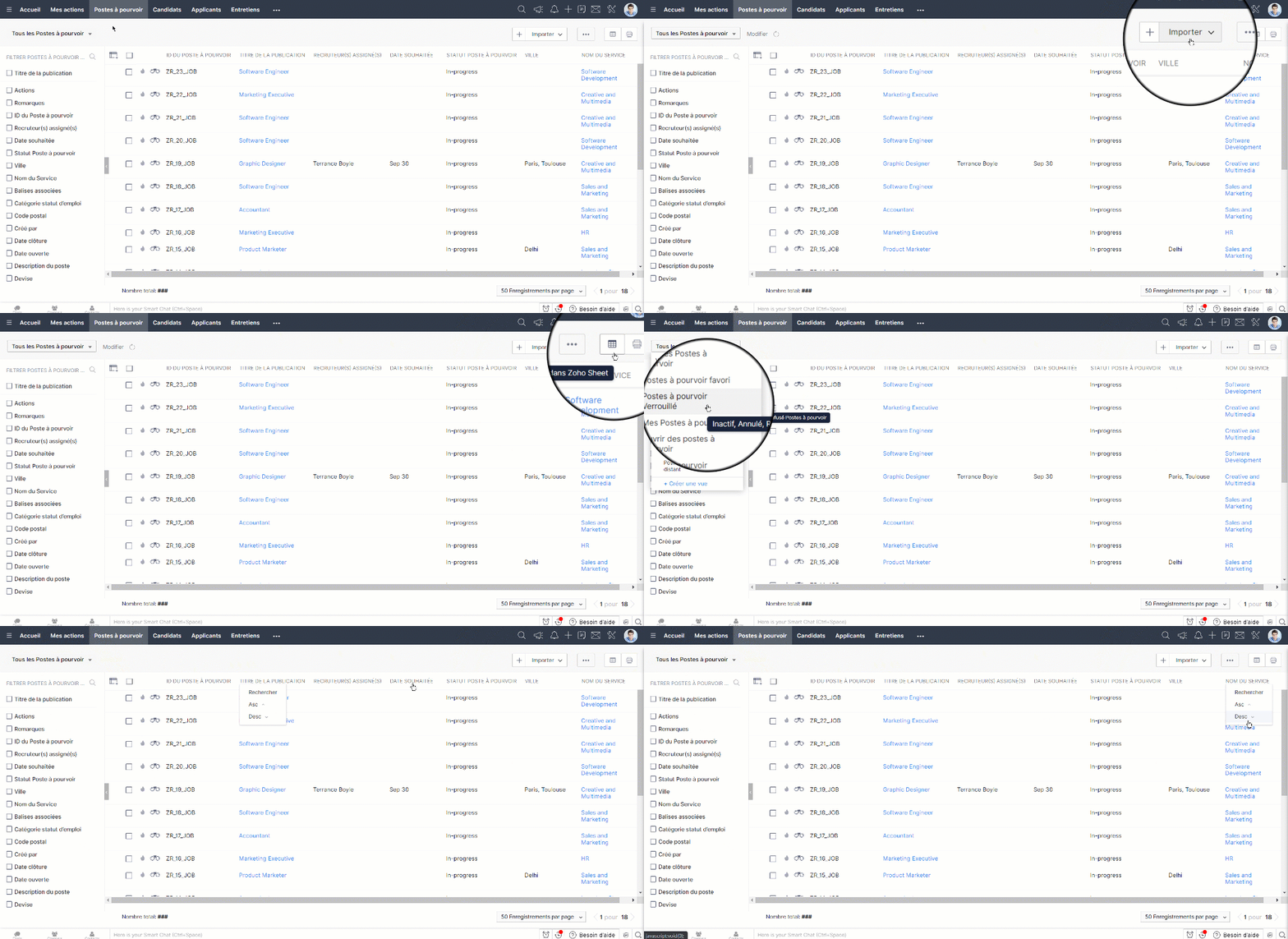
La page d'accueil du module "Poste à pourvoir" vous permet de faire les activités suivantes:
- Les enregistrements sont affichés dans des vues de liste. Définissez vos propres vues personnalisées en fonction de vos besoins. Certaines vues de liste définies par le système sont déjà disponibles, telles que "Tous les postes à pourvoir, postes à pourvoir récents, Postes à pourvoir à distance", etc.
- L'onglet "Créer une vue" vous permet de personnaliser un vue en fonction de votre besoin.
- Sélectionner les enregistrements en cochant le cas : vous pouvez faire les activités telles que "Ajouter une balise", "Créer une tâche" ou "Supprimer les enregistrements".
- Trier les enregistrements par ordre alphabétique ou selon les autres critères disponibles.
- Imprimer les postes à pourvoir avec les détails nécessaires.
Créer un poste à pourvoir
Zoho Recruit vous permet de créer des postes à pourvoir en :
- Saisissant des données dans le formulaire des détails manuellement.
- Important des offres d'emploi à partir des fichiers CSV ou XLS.
Créer un poste à pourvoir de manière manuelle
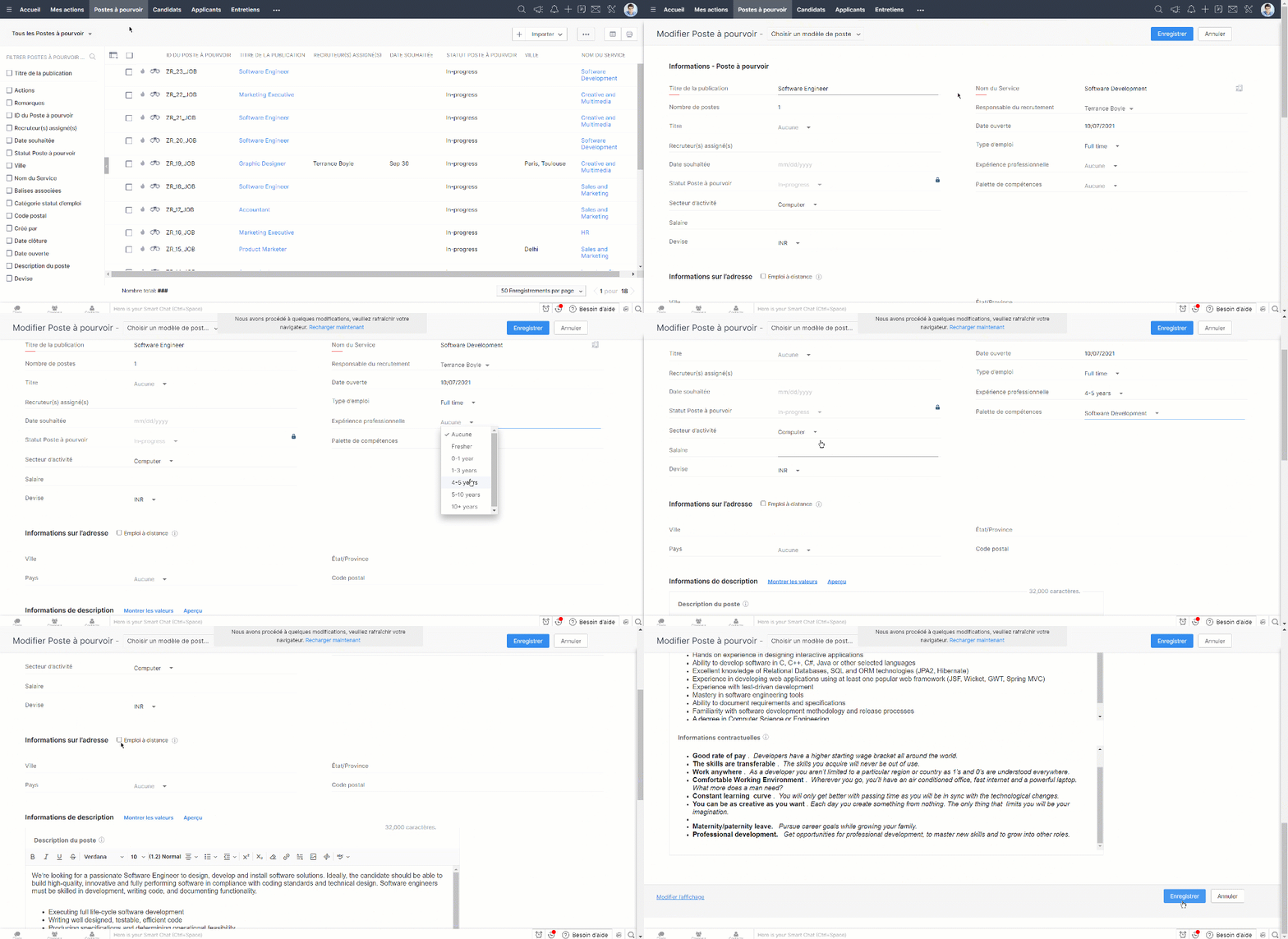
- Cliquez sur " + " et saisissez les détails affichés sur l'écran et enregistrez.
- Vous pouvez aussi sélectionner les modèles en fonction de postes que vous avez créés depuis la liste déroulante en haut de la page.
Cloner un poste à pourvoir
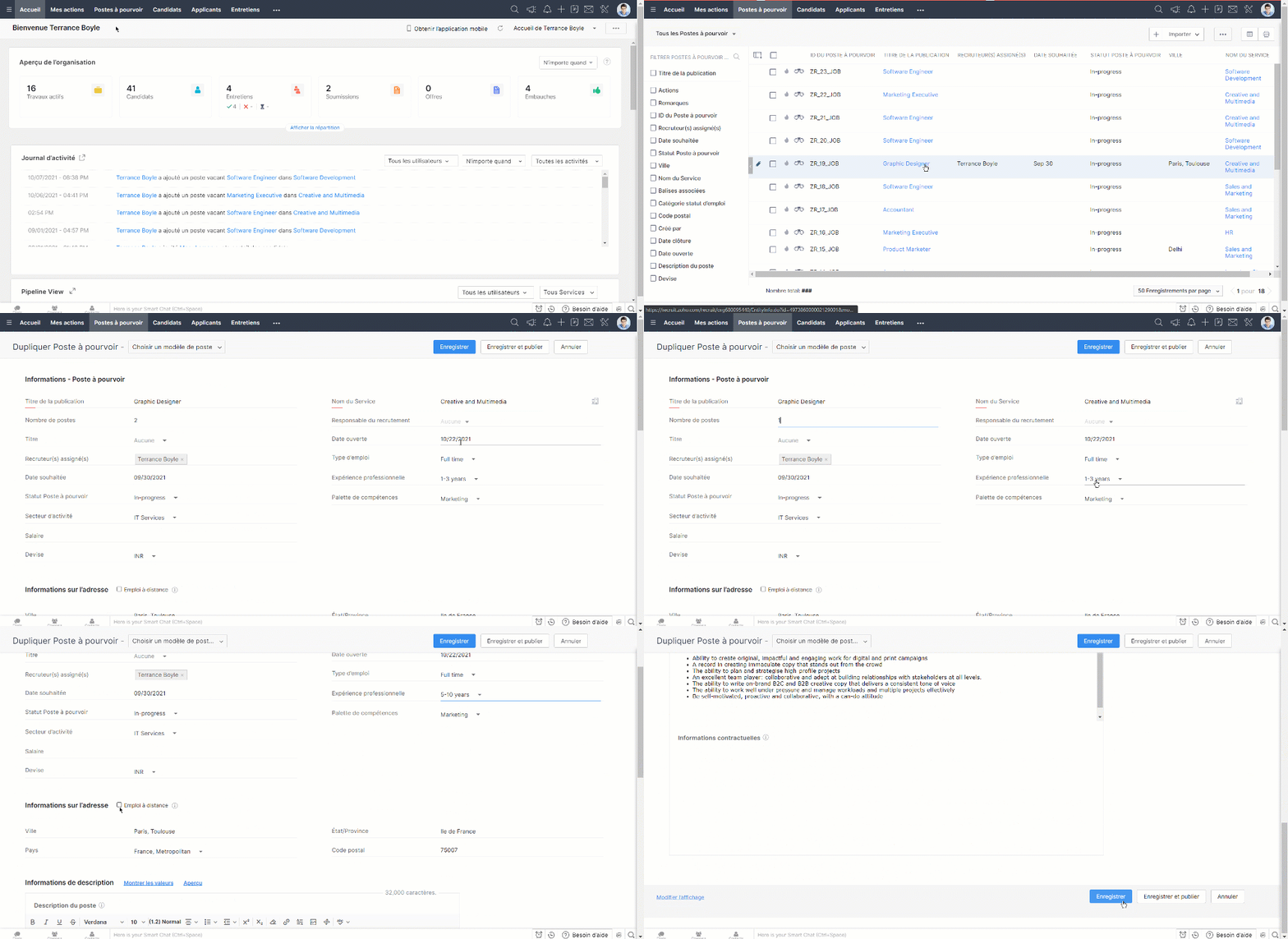
- Sélectionnez le poste que vous voulez cloner à partir des anciens postes créés.
- Cliquez sur " Plus " en haut de la page et cliquez sur "cloner".
- Modifiez des détails si nécessaire et enregistrez.
Intérêt d'un site-web carrière
Le recrutement est en constante évolution et recruter les meilleurs talents sur un marché est toujours un travail complexe pour le ou la responsable RH. Les sites de carrière ne sont plus seulement les pages d'offres d'emploi statiques ; un bon site de carrière fonctionnel peut effectivement servir de centre de recrutement pour faire connaître aux candidats votre entreprise et vos possibilités d'emploi et interagir avec eux. Quelques avantages d'un site de carrière :
- Créer une visibilité de marque
- Limiter le coût et le temps d'embauche
- Créer et suivre une base de données des candidats
- Toucher un public plus large
- Garder la confidentialité
- Recrutement flexible, durable et accessible
- Compatibilité SEO
Établir votre site d'emploi sur Zoho Recruit
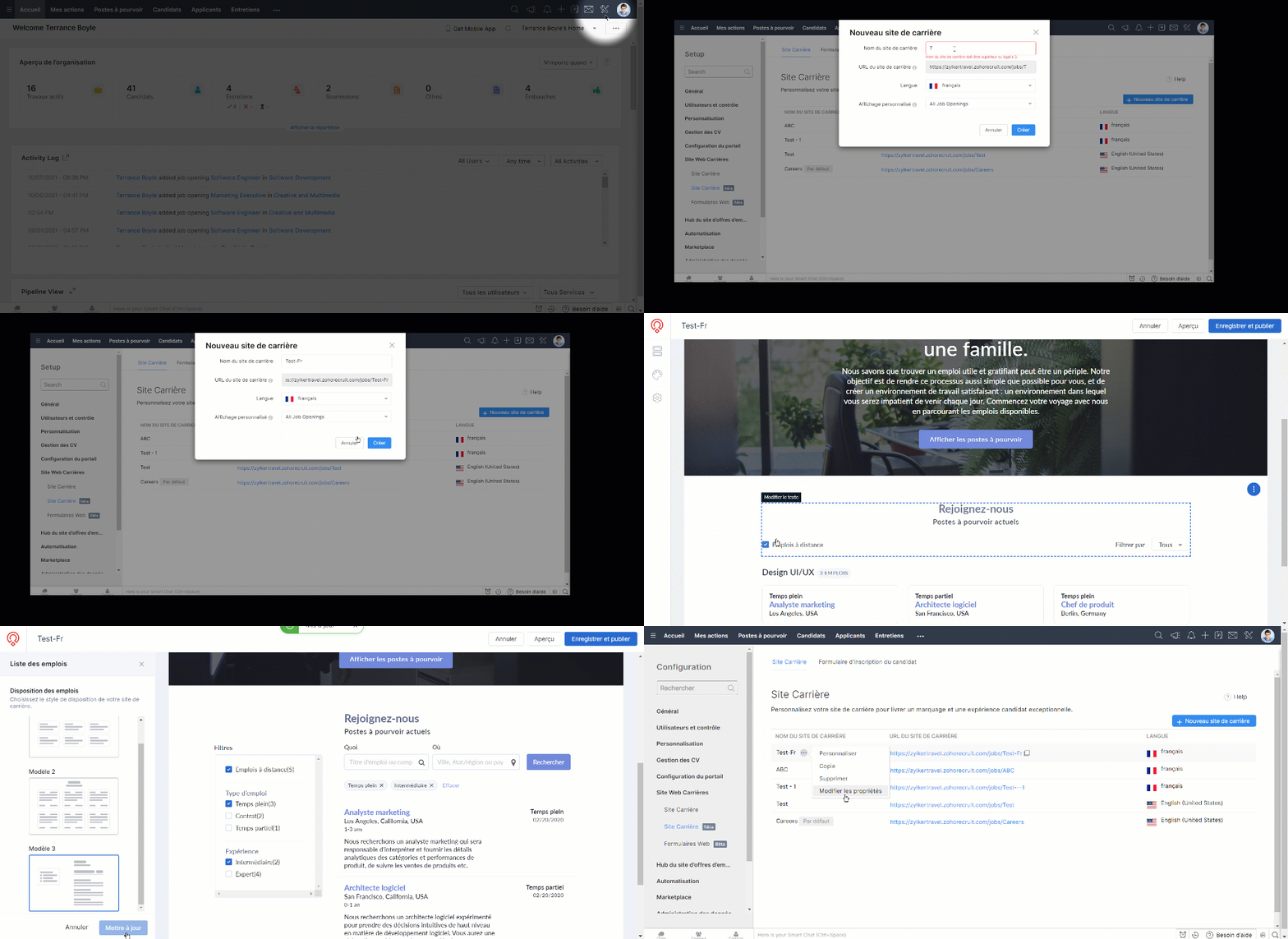
- Depuis l'onglet "Paramètres" sélectionnez "Site Carrière".
- Cliquez sur " + Nouveau site de carrière".
- Saisissez touts les détails demandés tels que le nom, la langue et l'affichage, cliquez sur "Créer".
- Vous serez sur la section éditeur de site-web. Voici, vous pouvez personnaliser votre site-web carrière, et enregistrez une fois que vous avez fini.
Personnaliser les modèles d'emploi
- Allez Paramétres > Career Site
- Depuis plus sélectionnez "Personnaliser" à côté du nom de site-web en question.
- Dans le volet latéral gauche, cliquez sur Sections > Emplois.
- Cliquez sur "Modifier la mise en page".
- Choisissez un parmi les trois modèles proposés.
- Cliquez sur "Mettre à jour".
Intégrer votre site-web carrière existant
Vous pouvez intégrer votre site-web carrière au travers d'API
Intérêt des sites d'emploi
Les organisations et les recruteurs utilisent beaucoup les sites d'emploi pour afficher les postes vacants et consulter les bases de données de CV. Quelques avantages des sites d'emploi pour les organisations :
- Atteindre un large éventail de gens.
- Créer une visibilité de marque.
- Augmenter la visibilité de vos offres d'emploi.
- Rechercher directement des candidats sur une liste de sites d'emploi.
- Accéder rapidement et facilement aux CV.
- Personnaliser la liste des sites d'emploi.
Configurer les sites d'emploi sur Zoho Recruit
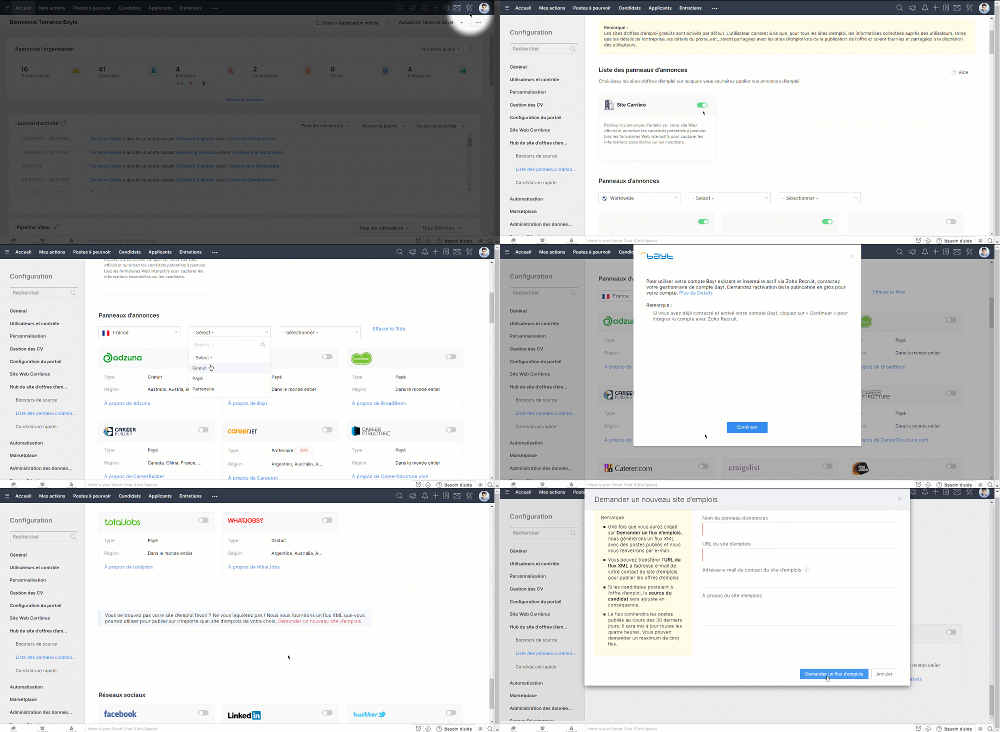
- Zoho Recruit s'intègre avec plusieurs sites d'emploi, soit gratuit soit payant, voire Partenaire.
- Allez sur Paramètres > Site d'offres d'emploi > Liste de panneau d'annonce.
- Sélectionnez et activez les sites d'emploi parmi les disponible.
- Lorsqu'un site d'emploi particulier n'est pas disponible dans la liste, vous pouvez le demander depuis l'onglet " Demander un nouveau site d'emploi".
- Saisissez les détails demandés et l'équipe support Zoho One reviendra vers vous.
Publier une offre d'emploi
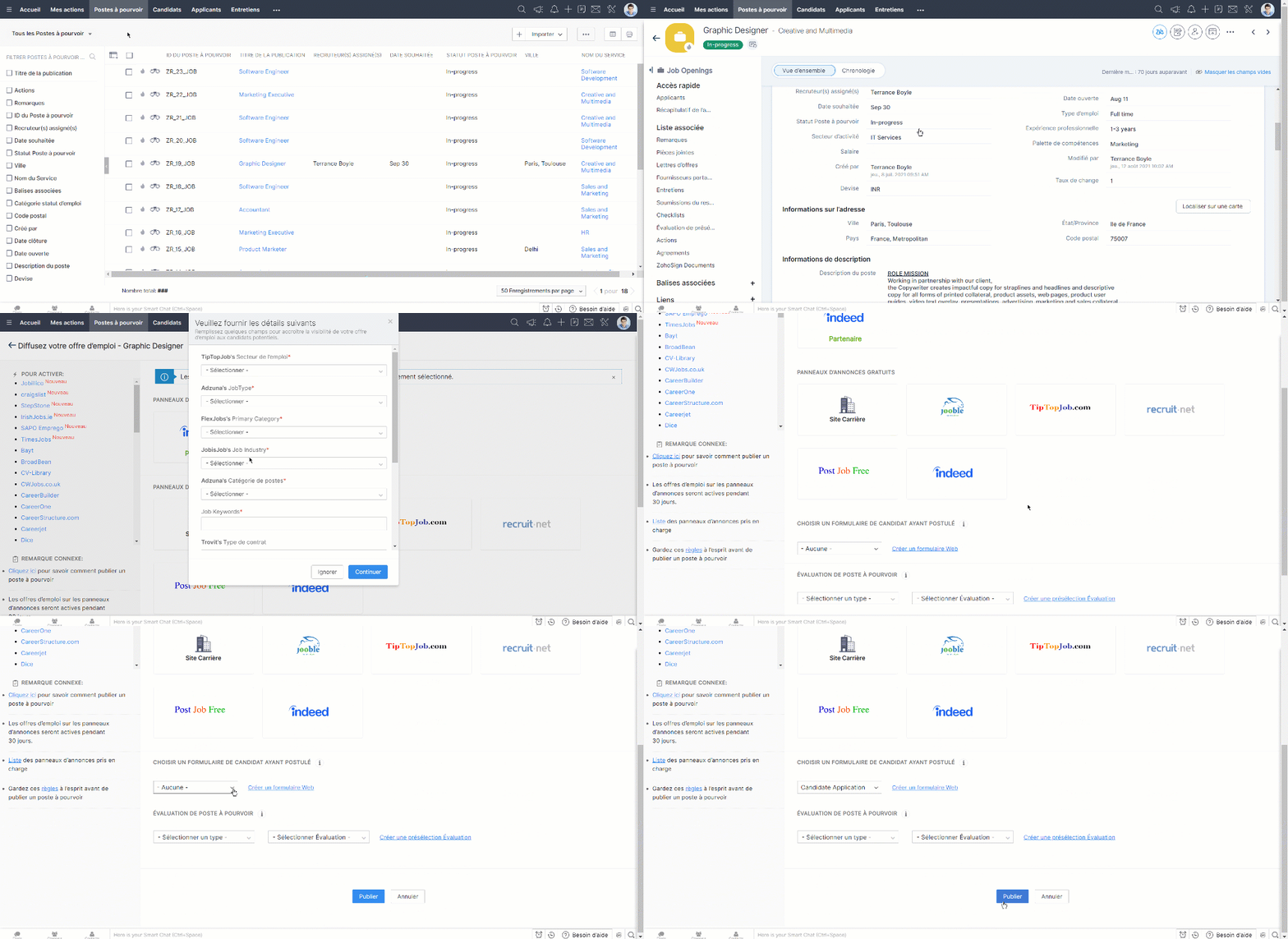
- Depuis l'onglet Postes à Pourvoir, sélectionnez l'offre que vous voulez publier.
- Cliquez sur l'onglet "Publier".
- Vous serez dirigé vers la section de sites d'emploi.
- Sélectionnez l'emplacement où vous voulez publier l'offre d'emploi et publiez.
- Lorsque vous voulez ajouter un formulaire à remplir par les candidats, vous pouvez le faire depuis la section "Choisir un formulaire de candidat" sur cette page.
Nous continuerons d'en découvrir les étapes suivantes dans nos prochains articles. En attendant, n'hésitez pas à poser vos questions en commentaire.
L'équipe Zoho France
Topic Participants
Kinjal Lodaya
Line GIRAUDO
Sticky Posts
Collaboration sans faille avec Zoho One
Bonjour à tous, Dans cet article nous allons voir comment Zoho One permet une collaboration à différents niveaux . La façon dont nous travaillons évolue. À mesure que les entreprises se mondialisent, la plupart des activités sont menées en équipe.
Nederlandse Hulpbronnen

Recent Topics
Ability to add VAT to Retainer Invoices
Hello, I've had a telephone conversation a month ago with Dinesh on this topic and my request to allow for the addition of VAT on Retainer Invoices. It's currently not possible to add VAT to Retainer Invoices and it was mutually agreed that there is absolutely no reason why there shouldn't be, especially as TAX LAW makes VAT mandatory on each invoice in Europe! So basically, what i'm saying is that if you don't allow us to add VAT to Retainer Invoices, than the whole Retainer Invoices becomesTime Log Reminder
Tracking the time spent on tasks and issues is one of the most important functions of a timesheet. However, users may forget to update the time logs because they have their own goals to achieve. But, time logs must be updated at regular intervals to keep[Early-access] Introducing Zoho's CommandCenter - Cross-Zoho business process automation
Resources to help Webinar recording | Documentation Feature Restrictions Currently available on early-access only for US data center accounts Features Role CommandCenter as a Service uses signals across Zoho services to propel the movement of recordsTip #58- Accessibility Controls in Zoho Assist: Learning- 'Insider Insights'
Learning should be clear and interruption-free for everyone. Timely feedback plays an important role in helping users understand actions as they happen, without breaking their focus. In this post, we’ll explore the final section of Accessibility: Learning.ZIA "Generate Content" action doesn't have contexual data from the ticket
"Generate Content" action doesn't have contexual data from the ticket. I try to get AI to help me with this ticket but it doesn't seem to have any ticket information as context. Although the ticket has a lot of information in it.Zoho Desk - Zoho FSM Integration issue on Mobile and iPad
Hello Team, I am trying to create a Work Order (WO) using the Zoho FSM integration (Add-on Service) that is integrated with Zoho Desk. The issue is that the integration is not working on mobile devices and iPads. While I am able to create the WO, Request,E-File Form 1099 Directly With the IRS From Zoho Books
The Form 1099 filing season has begun, and businesses are required to e-file certain forms with the IRS to report payments made to vendors and contractors. If your business made qualifying payments during the year, you must e-file the appropriate FormCan I hide empty Contact fields from view?
Some contacts have a lot of empty fields, others are mostly filled. Is there a way I can hide/show empty fields without changing the actual Layout? I would like to de-clutter my view, and also be able to add information later as I am able. I would be willing to learn to code a button, but I am highly confused about it and thus worried it would be beyond me. I've looked at a lot of the developer documents and I'm not able to make a lot of sense of them. Thank you in advance to anyone who knows theSuggestions for showing subscribed Topics in CRM (contact record)
We have several Topics set up in ZMA. We also have a sync set up between ZMA and CRM. I'd like to display the subscribed topics on the CRM Contact record. This will allow the Sales team (who uses CRM) to see at a glance what topics a Contact is subscribedReplies sometimes creating separate ticket
Sometimes when a customer responds to an email coming from Zoho Desk, instead of adding a reply to the original ticket, a separate ticket is created. This happens even though the response subject line contained the ticket number, and the person respondingRe-hide fields when option is unselected
Hi all Can anyone help me with this - when I create a 'show' field rule for when a dropdown option is selected, how to I make it so the 'show' option re-hides if that option is no longer selected?Allow Attaching Quartz Recordings to Existing Zoho Support Tickets
Hi Zoho Team, We would like to request an enhancement to how Zoho Quartz recordings integrate with Zoho Support tickets. Current Behavior: At the moment, each Quartz recording automatically creates a new support ticket. However, in many real-world scenarios:Custom Fields
There is no way to add a custom field in the "Timesheet" module. Honestly, the ability to add a custom field should be available in every module.Consultant-Only Booking Page
Zoho Bookings does not allow for Meeting Type OR Workspace-Wide booking pages to be turned off. This is detrimental to organizations that have territory-based or assigned accounts, because if prospects can go to these booking pages and either select theAll new Address Field in Zoho CRM: maintain structured and accurate address inputs
The address field will be available exclusively for IN DC users. We'll keep you updated on the DC-specific rollout soon. It's currently available for all new sign-ups and for existing Zoho CRM orgs which are in the Professional edition. Latest updateCall result pop up on call when call ends
I’d like to be able to create a pop up that appears after a call has finished that allows me to select the Call Result. I'm using RingCentral. I have seen from a previous, now locked, thread on Zoho Cares that this capability has been implemented, butCustom Sorting based on other columns in table
I need the ability to apply custom sorting to a text-based dimension in the X axis where the sorting is based on another column in the table. For example, I have a chart report where the X axis is a text label. I would like to be able to sort those textFeature Request: Enable Custom PDF Layout Editor for All Modules (Including Package Slips)
Hello Zoho Community and Product Team, I am writing to share a suggestion that would significantly enhance the customization capabilities within Zoho Books. We all appreciate the power of the Custom PDF Layouts (the "New" template engine) that allowsIs there a way to invoke deluge function from within a widget?
Hi! I have custom functions in deluge and I was wondering whether there is any way to call this function through a widget? Something like on click of a button inside a widget, run the deluge custom function. Would this be possible?Can a default task Priority be set?
The "Priority" field in the Task layout does not allow a default to be set. Is there another way of doing it? Because the current default is "None" and the Zoho Kanban board design has selected this field as critical information to surface by includingAdding a threshold to a line chart based on date range
I have a line chart that is tracking a percentage over time. It also has a filter for 50 different clients. I would like to create a threshold that is based on a portion of the date range. As I understand it, this would be done by adding a column to theResize Signature field dynamically
On the tablet, it is perfect. But on smaller mobile devices and PCs, both web and application, it is too small for people to sign. Is there any plan to make the signature field size dynamically in the future update?Super Admin Logging in as another User
How can a Super Admin login as another user. For example, I have a sales rep that is having issues with their Accounts and I want to view their Zoho Account with out having to do a GTM and sharing screens. Moderation Update (8th Aug 2025): We are workingZoho Creator Application - New User Not able to access the application
In Zoho Creator, The newly added user not able to access the " Added Application" - User has received the Invitation Email, but while clicking "confirm Account" in the invitation Email, the following error message has appeared. "Sorry! you cannot acceptDeleting Salutation Field
We have updated our lead input screen and 'Salutation' has appeared. This is not visible in the 'Edit Pgae Layout' screen so cannot be moved to 'List of Removed Fields' Salutation is visible in the list in 'Customization - Fields' however I can only 'Edit' or 'Replace' I cannot delete and I do not need this field on my lead input screen. Please can you advise how to get rid of this. Screen shots can be provided if needed. Thank you TashaAuto-Generate & Update Asset Serial Numbers using a custom function (Assets Module)
Hello Team, I’ve been working on a script to automate one of our processes in Zoho FSM, and the core functionality has been successfully implemented. However, I’m encountering an issue related to serial number allocation, which is not working as expected.Partner with HDFC And Sbi Bank.
Hdfc and sbi both are very popular bank if zoho books become partner with this banks then many of the zoho books users will benefit premium features of partnered banks.Zoho Mail iOS app update: Access Delegated Mailbox.
Hello everyone! You can now access the delegated mailbox from within the iOS version of the Zoho Mail app. To access the delegated mailbox: Open the Zoho Mail app. Go on to the 'Email' module. Tap the profile picture. Choose the delegated mailbox PleaseHow to convert Lead's country field from Text to Pick List
Hi, I would like to change the default country field in ZCRM from text to pick list. It looks like not I can't delete default country field and recreate it as pick list nor can i create an new custom field country because such a label belong to default field. So what do I have to do? Any ideas? LHow create a draft via workflow?
I wish to create a workflow rule for specific emails that creates a draft response - not an automatic email reply, but just a draft with a set response ready to be verified by an agent who can then manually select recipients. Alternatively, the workflowNew feature: Invite additional guests for your bookings
Hello everyone, Greetings from Zoho Bookings! We are happy to announce the much-awaited feature Guest Invite, which enhances your booking experience like never before. This feature allows additional participants to be invited for the bookings to makeImproved Contact Sync flow in Google Integration with Zoho CRM
Hello Everyone, Your contact sync in Google integration just got revamped! We have redesigned the sync process to give users more control over what data flows into Google and ensure that this data flows effortlessly between Zoho CRM and Google. With thisImage field in custom module
Hi guy, Is there any hope of adding a custom image field in the custom module? We created a custom module to keep track of assets, and it would be helpful if we could attach an image to the record. Thanks RudyCannot reorder fields in Page Layout in Expenses and Purchase Requests
It is very inconvenient that the custom fields in Page Layout cannot be re-ordered. The only way is to remove the fields and re-create them; however, it is impractical. This would affect the reports and dashboards we are having. Not able to re-order theالخصم على مستوى فاتورة المبيعات
السلام عليكم ورحمة الله وبركاته مطلوب في إنشاء خصم على مستوى فاتورة المبيعات وليس على مستوى البند أريد معرفة الطريقة؟VAT and Taxes option not available
Dear ZOHO Team , The VAT and Taxes options in my ZOHO books account not available,I tried to find how to enable or check the way to use this option but unfortunately couldn't find it anywhere ,I'm in UAE ,kindly let me know what to do to solve this issueDefault Tagging on API-generated Transactions
If one assigns tags to an Item or Customer, those tags get auto-populated in each line item of an Invoice or Sales Order when one creates those documents. However, if one creates the Sales Order or Invoice via the API (either directly coding or usingDirect Feed (Bank)
Is Direct feed integration for AlRajhi and ADCB bank supported by Zoho Books in GCC/SaudiSales Order, Invoice and Payment numbers
Hi zoho friends, it is me again, the slow learner. I'm wondering if there is a way to have it so the Sales order, invoice and payment numbers are all the same? It would be easier for me if they were the same number so there is not so many reference numbersMS Teams for daily call operations
Hello all, Our most anticipated and crucial update is finally here! Organizations using Microsoft Teams phone system can now integrate it effectively with Zoho CRM for tasks like dialling numbers and logging calls. We are enhancing our MS Teams functionalityNext Page