This will be long, Please bear with me - Next Gen Layout - Search
In general, I think that Zoho are going in the right direction with the Next Gen UI. The latest update brings some nice improvements and all-in-all from a user's perspective I think the improvements are generally very good.
However, there are some areas of the UI which have been sorely neglected or are simply baffling. The following may come off a blunt and it is a bit of a read, so please bear with me. I'll focus on 2 main areas - The navigation sidebar, and search.
NAVIGATION SIDEBAR:
However, there are some areas of the UI which have been sorely neglected or are simply baffling. The following may come off a blunt and it is a bit of a read, so please bear with me. I'll focus on 2 main areas - The navigation sidebar, and search.
NAVIGATION SIDEBAR:
1. Completely unnecessary settings access.
I really can't understand why module and system settings are exposed in the navigation sidebar. For some users such as system devs or admins, this may be a welcome feature. Personally, I'm rarely focused on settings for a single module, I'm usually focused on many areas of the backend.
For users, this should absolutely be a very big NO. There is absolutely no reason a normal user should have those settings exposed and so freely accessible. by all means, have the feature, but it should be an opt-in setting, not a default setting.
2. Meaningful quick access actions missing
I really can't understand why module and system settings are exposed in the navigation sidebar. For some users such as system devs or admins, this may be a welcome feature. Personally, I'm rarely focused on settings for a single module, I'm usually focused on many areas of the backend.
For users, this should absolutely be a very big NO. There is absolutely no reason a normal user should have those settings exposed and so freely accessible. by all means, have the feature, but it should be an opt-in setting, not a default setting.
2. Meaningful quick access actions missing
Why oh why do we have a UI where users get quick access to create a client script, but have no 'Create Record' action?
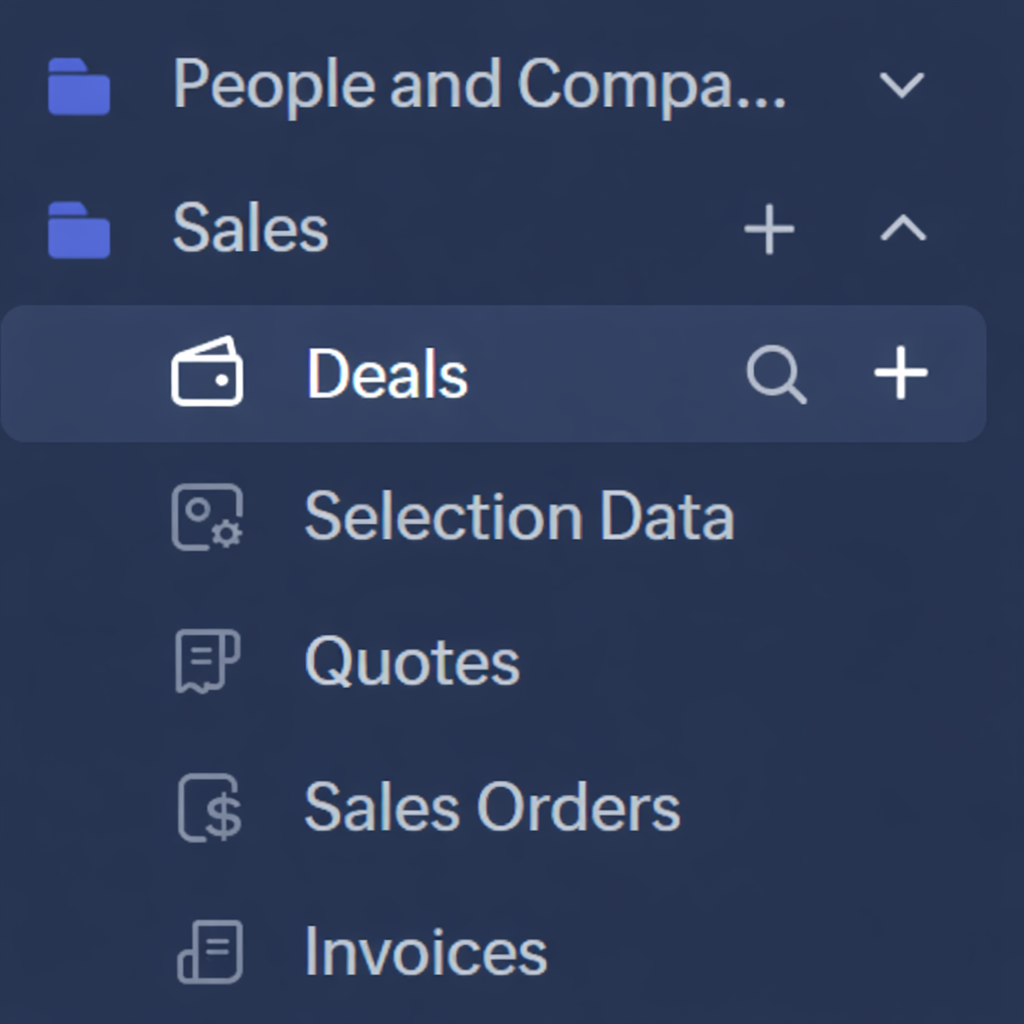
It would be far more logical to have a '+' next to the module name for creating a new record (The search Icon I'll get to in the next section).
user: "I want to create a new Deal"
action: Hover over "Deal" in sidebar --> Click '+' --> New Deal
3. Quick Access to add module to folder
user: "I want to create a new Deal"
action: Hover over "Deal" in sidebar --> Click '+' --> New Deal
3. Quick Access to add module to folder
The '+' on the Folder level of the sidebar is, I feel, completely unnecessary. Icons, Actions, Features, whatever term you want to use, should always be frequently used actions.
Frequently Used > One-and-done
Frequently Used > One-and-done
Setting up your folders is something that is done once and rarely updated. There is no need to have quick access to adding modules to a folder when no new module has been added to the folder for months, or even years. Setting up your folders is what I would consider a "one-and-done" type of task. if that's buried down a level or 2 in a menu, it doesn't matter because you so very rarely use the function.
Putting "one-and-done" actions in your UI but hiding features used every day is not efficient or helping anyone with productivity.
Putting "one-and-done" actions in your UI but hiding features used every day is not efficient or helping anyone with productivity.
4. Alternate to #2 Above
As an alternate to having a '+' next to each module, you could also use the '+' at the folder level to create a record for any module under the folder, a bit like this...

This is a far more logical use of the folder level + icon to me instead of the rarely used 'Add Module'
SEARCH:
As an alternate to having a '+' next to each module, you could also use the '+' at the folder level to create a record for any module under the folder, a bit like this...
This is a far more logical use of the folder level + icon to me instead of the rarely used 'Add Module'
SEARCH:
Search in Zoho CRM has been neglected for far too long. And it's not that it's not effective, in my opinion, Zoho search's problem is that it's TOO EFFECTIVE most of the time.
If I'm searching for a record, I simply get too many search results. I don't WANT to search all modules all the time. If I'm searching for a Deal, I don't want to make multiple clicks. I want it to be as effortless and intuitive as possible.
1. Exclude/Include all modules from "All modules"
There are back-end modules and records that I never or very rarely need to search. One improvement is to make the default search to be "Frequent Modules" and allow users to set-up which modules fall into the Frequent category, or, let ZIA figure it out from usage patterns.
If I'm searching for a record, I simply get too many search results. I don't WANT to search all modules all the time. If I'm searching for a Deal, I don't want to make multiple clicks. I want it to be as effortless and intuitive as possible.
1. Exclude/Include all modules from "All modules"
There are back-end modules and records that I never or very rarely need to search. One improvement is to make the default search to be "Frequent Modules" and allow users to set-up which modules fall into the Frequent category, or, let ZIA figure it out from usage patterns.
'Frequent Modules' should be the default search which should drastically cut down on irrelevant results
2. Why are we hiding the search type from the search bar?
Why can't we have the search type/filter in the header along with the search bar? You see it as soon as you click in the search field anyway. Why not show that all the time?
3. Set default search area
Users should be able to set the default module search for themselves. As an extension of 'Frequent Modules', if a particular user primarily only searches Accounts, then let them set that as the default instead of 'All Modules'. Or let them set multiple modules as their default.
Asking the user to have to constantly select the same setting over and over again is inefficient and causes unnecessary friction.
4. Search quick access in navigation bar.
Asking the user to have to constantly select the same setting over and over again is inefficient and causes unnecessary friction.
4. Search quick access in navigation bar.
Another logical use of the navigation bar is to add a search icon. After all, the navigation bar is for, well, navigating the system.
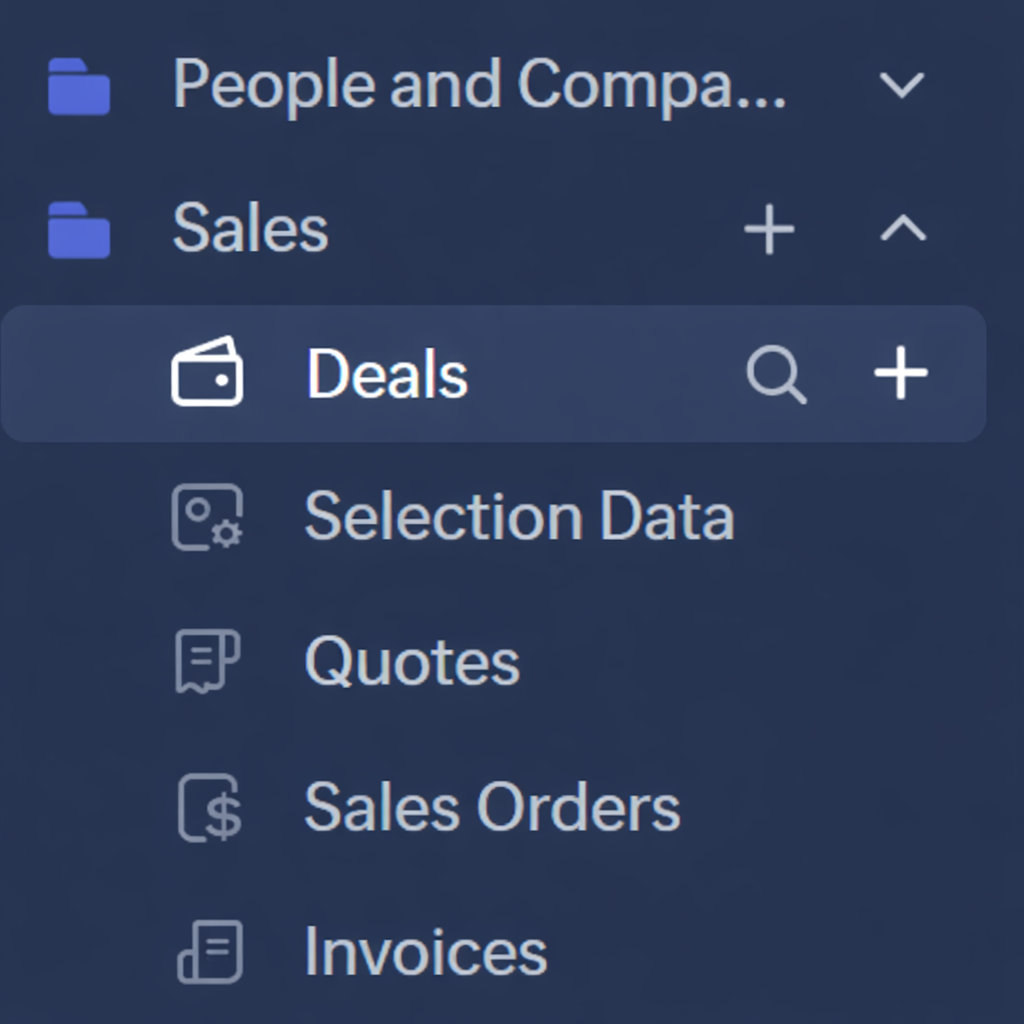
If you had a search icon next to the module, then you could have the search window pre-filtered to that module you clicked the search icon for.
Need to search within deals? Click the search icon next to deals.
Having a search bar pop up would be bad UI, but have that pop up the main search window with 'Deals' pre-selected would be much more intuitive
5. Search Module should be pre-selected to be the module you're currently within
If you're in a list of deals, there's a high chance that you're doing something related to deals. So why not pre-select the search module to be the module you're currently in? Again, make this a per-user setting in a new 'Search Settings'. Yes, I know there's the filters which can be used for search, but if you're just wanting to do a quick search within deals, the filters are clunky.
6. Have Module Categories that match the folders in the Navigation Bar
Having the folders in the left navigation bar is great. Why not make these more of a global grouping, starting with search. So in my case, I've got a folder for "People and Companies" and "Sales" which include certain modules.... It would be great if these were selection you can make from the Module dropdown in the search.
So users could search for "Sales" records, and the only modules included in the search results would be those included in the "Sales" navigation folder.
Anyway that's all from me. I'm interested to hear your thoughts.
Need to search within deals? Click the search icon next to deals.
Having a search bar pop up would be bad UI, but have that pop up the main search window with 'Deals' pre-selected would be much more intuitive
5. Search Module should be pre-selected to be the module you're currently within
If you're in a list of deals, there's a high chance that you're doing something related to deals. So why not pre-select the search module to be the module you're currently in? Again, make this a per-user setting in a new 'Search Settings'. Yes, I know there's the filters which can be used for search, but if you're just wanting to do a quick search within deals, the filters are clunky.
6. Have Module Categories that match the folders in the Navigation Bar
Having the folders in the left navigation bar is great. Why not make these more of a global grouping, starting with search. So in my case, I've got a folder for "People and Companies" and "Sales" which include certain modules.... It would be great if these were selection you can make from the Module dropdown in the search.
So users could search for "Sales" records, and the only modules included in the search results would be those included in the "Sales" navigation folder.
Anyway that's all from me. I'm interested to hear your thoughts.
Topic Participants
Rodger Brehaut
shanmugaraja M
Sticky Posts
Enhancement to ICR’s field prompting: Preferred data extraction using advanced field prompting
Dear Customers, We hope you’re well A quick background Intelligent Character Recognition (ICR) comes as part of Zia’s optical recognition capability called Zia Vision. When we introduced it last April, the data extraction was training-based and was applicableGood news! Calendar in Zoho CRM gets a face lift
Dear Customers, We are delighted to unveil the revamped calendar UI in Zoho CRM. With a complete visual overhaul aligned with CRM for Everyone, the calendar now offers a more intuitive and flexible scheduling experience. What’s new? Distinguish activitiesAccessibility in Zoho CRM: Not just a feature—a way to empower
For instructions on setting up these controls, please check this help document: Configuring accessibility controls. Hello everyone, Today (December 3, 2024), on the International Day of Persons with Disabilities, we begin our journey towards a CRM thatScaling the customer journey: What's new in CommandCenter
Dear Customers, The last time we connected about CommandCenter, it was about the tool's new controls and revamped UI. Personally, the overhaul of the UI from the last update, still excites me. Today, we're here with news about its scalability and addedZoho CRM's sales trend and sales follow-up trend dashboards are now customizable
Dear Customers, We're here with good news! Sales trend and sales follow-up trend are two system-defined dashboards that help you understand trends and anomalies in your sales outreach and conversion efforts. They use Zia's intelligence to identify patterns
Nederlandse Hulpbronnen

Recent Topics
Updating Sales orders on hold
Surely updating irrelevant fields such as shipping date should be allowed when sales orders are awaiting back orders? Maybe the PO is going to be late arriving so we have to change the shipment date of the Sales order ! Not even allowed through the api - {"code":36014,"message":"Sales orders that have been shipped or on hold cannot be updated."}Zoho Social API for generating draft posts from a third-party app ?
Hello everyone, I hope you are all well. I have a question regarding Zoho Social. I am developing an application that generates social media posts, and I would like to be able to incorporate a feature that allows saving these posts as drafts in Zoho Social.Deleting unwanted ticket replies
Hello, In a Zoho Desk Ticket thread, sometimes one of the recipients has auto-reply activated. This creates a new message in the Ticket thread that not only pollutes the thread, but most importantly cannot be replied properly because usually auto-reply e-mails don't do "reply all", so the other recipients are not included. I want to delete such a message in the Ticket thread. I searched the help of Zoho Desk, but only found a way to mark as Spam (https://help.zoho.com/portal/kb/articles/marking-support-tickets-as-spam)Connectivity issues with Google Calendar and third-party integrations
Description: We are currently experiencing a critical failure with Zoho CRM third-party connections. This issue is heavily affecting our primary workflow. Symptoms: Sync Failure: Existing Zoho CRM to Google Calendar connections have been failing for approximatelyCreate formula calculations in Assemblies for scaling quantities
Something we have been encountering with our composite items is dealing with scaling of quantity of one or more items within the composite assembly relative to the number of complete units being sold. I.e. running the equation 2(n-1) on one of the assemblyAdvanced email configuration - agent's name vs. department name
We currently have all four Advanced Configuration options turned ON at the Global-level (Channels > Email > Advanced Configuration) - including the "Show Agent name in Ticket replies and outgoing emails" option. We also had that same option turned ONZoho Recruit mailserver get blocked by Microsoft!
Hi, We have experienced this issue twice now, where Zoho Recruit outbound IP addresses are being blocked by Microsoft. We are confident that Microsoft is the blocking party, as all outbound emails to candidates with @hotmail.com, @live.com, and @outlook.comLogged out
Hi, just been working on a sheet when a pop up box appeared telling me I'm going to be logged out in x number of seconds and if I reload I may lose any edits, or words to that effect. It did indeed log me out and I did indeed lose my last edits. Any ideaInfinite loop of account verification
Hi I can't do anything on my zoho account. I always get this message Hi Sheriffo Ceesay As a security measure, you need to link your phone number with this account and verify it to proceed further. When ever I supply the details, it displays that the number is associated with another account. I don't have any other account on zoho so this is really annoying.Issue updating Multi-Select Picklist via API (saves as string instead of checking boxes)
Hi everyone, I'm hoping someone can point out what I'm doing wrong here. I'm stuck trying to update a custom multi-select field via the Desk API and it's driving me a bit crazy. I have a multi-select picklist called "Buy years" with options like 2023,Subform edits don't appear in parent record timeline?
Is it possible to have subform edits (like add row/delete row) appear in the Timeline for parent records? A user can edit a record, only edit the subform, and it doesn't appear in the timeline. Is there a workaround or way that we can show when a userPage variable not receiving URL parameter in Creator 6 HTML snippet Deluge — Canada DC
I have a Creator 6 app on Canada DC. I'm trying to pass a URL parameter to an HTML snippet page via Deluge but the variable always returns empty. Setup: Page: MYC_Meeting_Tool Page variable declared: submission_id, type Text Page Script tab contains:Zoho Campaigns API endpoint for contact details
there is some REST API support for Zoho Campaigns, however, I am not able to find an endpoint for "get contact details". in particular, I'd like to access contact's subscription status and also their topic. ideally there is all profile available includingMigrating Documentation from Notion to Zoho Help Centre
Hi there, We have a large chunk of documentation that currently sits on Notion. However, we are eager to move this into our Zoho Help Centre/Knowledge Base. What is the most efficient way of achieving this?Can't add attachment on email template
The attachment does show up. This is my template. Hi ${Cases.Assigned Programmers}, Please be reminded about the following task that has been assigned to you. Subject : ${Cases.Subject} Description : ${Cases.Description} Ticket # : ${Cases.Request Id}Edit a previous reconciliation
I realized that during my March bank reconciliation, I chose the wrong check to reconcile (they were for the same amount on the same date, I just chose the wrong check to reconcile). So now, the incorrect check is showing as un-reconciled. Is there any way I can edit a previous reconciliation (this is 7 months ago) so I can adjust the check that was reconciled? The amounts are exactly the same and it won't change my ending balance.Custom CSS for Zoho CRM Team Bookings embeded widget
Hello, we are adding Zoho CRM Team Bookings (crm.zoho.com) in our public website. We know that we can change Theme Color, Font Color and Background Color: Zoho CRM Booking Styling But is it possible to change other CSS attributes e.g. Font Family, likeStandard practice rerun updated deluge function over existing recordes
Hi folks, we have a function which is triggered via webhook from a third-party solution which then calls another api with a contact-id and gets a json payload back and then parses that data to custom fields in our CRM to the record id. As requirementsSpecifying time increments on a Date/Time field
Hi all, Im using a Date/Time field in my CRM module. At the moment the increments are 30 minutes. How can I change these to be 15 minutes? ThanksNimble enhancements to WhatsApp for Business integration in Zoho CRM: Enjoy context and clarity in business messaging
Dear Customers, We hope you're well! WhatsApp for business is a renowned business messaging platform that takes your business closer to your customers; it gives your business the power of personalized outreach. Using the WhatsApp for Business integrationSort by Project Name?
How the heck do you sort by project name in the task list views??? Seems like this should be a no-brainer?Maximum limit of bank accounts
I'm currently setting up Zoho Books in order to migrate at the start of our next financial year (April) and while adding bank accounts I've tried to add a second account from the same bank and receive an error about the maximum limit of bank accounts.Account and Email and Password
I'm signing up as a Partner so I can move my website clients across to a separate email server from their current cPanel one.. So I have a Zoho account and then I moved one of my emails across to that account to test the import process... So the questionZoho Sprints iOS and Android app update: Global view. Screen capture control, file encryption, tags enhancement(iOS)
Hello everyone! We are excited to introduce new features in the latest version(v2.1) of the Zoho Sprints iOS app update. Let’s take a quick look at what’s new. 1. Global view Global view brings all your project items into one centralised space. You canCreating Restaurant Inventory Management on Zoho
Hi, We run a small cloud kitchen and are interested to use Zoho for Inventory and Composite Item tracking for our food served and supplied procured to make food items. Our model is basically like subway where the customer can choose breads, veggies,Price Managment
I have been in discussions with Zoho for some time and not getting what I need. Maybe someone can help explain the logic behind this for me as I fail to understand. When creating an item, you input a sales rate and purchase rate. These rates are justHow do I create an update to the Cost Price from landed costs?
Hi fellow Zoho Inventory battlers, I am new to Zoho inventory and was completely baffled to find that the cost price of products does not update when a new purchase order is received. The cost price is just made up numbers I start with when the productonly 100 entry download entries in Zoho Form
Is there a way to download more than 100 entries in a form at a time? It is capped (unless I am not doing the export correctly). This is very frustrating as I want to make sure I don't miss a record when downloading data. Thanks!Zoho FSM Premium Edition is Here
As your field service operations grow, so do the complexities — managing large distributed teams, keeping sensitive data secure, generating the right reports at the right time, and ensuring every technician dispatched is the right fit for the job. TheSeeking a WhatsApp Business App (not API) Zoho CRM integration
We have a business need to integrated WhatsApp Business App (not API) into Zoho CRM to centrally manage communications between our Sales team and Leads & Contact. Is there a reputable integration available for this scenario of ours? Core features we wouldAuto-sync field of lookup value
This feature has been requested many times in the discussion Field of Lookup Announcement and this post aims to track it separately. At the moment the value of a 'field of lookup' is a snapshot but once the parent lookup field is updated the values diverge.How are other Books users integrating crypto and digital assets into Books?
If my company owns some digital assets I would want those to exist in Books as assets, and also be able to change the value as needed when generating reports. My company would also be receiving payment in cryptocurrencies and may sell at the time of paymentLets Talk Recruit: Key takeaways from our India community meetups
Welcome back to Let's Talk Recruit — the series where we bring you real stories, product insights, and community highlights from the world of recruitment. Our last post covered how Resume Harvester can take the follow-up out of hiring. This edition isApproval Workflow for Purchase Orders Abrir
The requirement is , that all purchase orders greater than or equal to 5000 go through an approval process from certain people, but within books I only see that the approvers can be by levels or any approver but we cannot enter a rule like these. CanUnable to create new finance account in Zoho Books Android app due to missing account number field.
Free plan I have enabled a setting via the website requiring unique account codes to be specified for all accounts. When using the android app, go to expenses, new expense, select account, new account. Promoted to enter the Account name and description.How to Fetch data from Sales Order and Insert into Purchase Order with Deluge
Hello, I am wanting to write a Deluge script that would take the shipping address on a Sales Order and upon conversion to a Sales Order automatically insert it into that corresponding PO. I am new to Deluge but understand that it has great capabilities.Google Drive shared folder
My deluge script has stopped working, no longer collecting files from Google Drive - have these connections finally been deprecated ?? They seem to be active but errors occur when updating them ?Zoho Desk: Mobile Updates | Q1 2026
Hello everyone, Greetings! As we gear up for the end of Q1, we are excited to share a quick journey into all that released in the first quarter of 2026. We have brought in a few enhancements in the mobile apps that improve overall user experience andCRM x WorkDrive: We're rolling out the WorkDrive-powered file storage experience for existing users
Release plan: Gradual rollout to customers without file storage add-ons, in this order: 1. Standalone CRM 2. CRM Plus and Zoho One DCs: All | Editions: All Available now for: - Standalone CRM accounts in Free and Standard editions without file storageAdditional Address - Company Name
It would be very helpful to have a "Company Name" field in the Additional Address shipping section. In a situation where you drop-ship orders to a different address or different company entirely, it may be necessary to list the company name of the receiver. I understand that the Attention field can be used for that purpose, but that's not really the intended purpose of that field.Next Page