Zoho Desk integrates with Qntrl for effective task management
Hello everyone,
We are happy to announce that you can now integrate your Zoho Desk account with Qntrl. This integration provides an effective way to manage tasks, collaborate, streamline processes, and deliver projects on time which helps to collaborate with different teams and resolve tickets on time to ensure SLA upkeep.
Let's find out what this integration offers.
What is Qntrl?
Qntrl is a workflow automation tool that streamlines business processes and boosts productivity across teams. Users can create custom workflows and automate repetitive tasks to enhance efficiency.
Consider a scenario where the support team gets a request to book flight tickets. The operations team handles the bookings and coordinates with the airlines. They use Zoho Desk and Qntrl to manage their processes. Blueprints allow them to streamline tasks, such as verifying the request, checking flight availability, reviewing accommodation options, and assessing the travel budget.
By integrating Desk with Qntrl, both teams can collaborate and maintain consistent communication. Most importantly, the integration allows both teams to have full visibility into the status of each task.
The support agent can directly raise a Qntrl card from the Desk interface, and the operations team can utilize the same card to run their process in Qntrl. When the operations team updates the work status, the agent will be able to view it within the card and proactively communicate the progress to the customer.
Benefits of integration Qntrl with Zoho Desk
- Improved interdepartmental collaboration: Collaborate with multiple teams across the organization and communicate effectively.
- Better visibility: Track task details, such as assignee and status, to monitor progress easily.
Integrating Zoho Desk with Qntrl
The admin must install the Qntrl integration from the Marketplace and configure their preferences. During integration, the following aspects can be set as required:
- Selecting a Qntrl account and linking it with the Desk account.
- Selecting the specific departments and profiles in Desk that can sync with the Qntrl board. This ensures that only the appropriate users have access to sensitive information.

- Mapping the departments in the desk with the respective Qntrl boards. This ensures that the agents have access to the relevant information and can plan their tasks accordingly; it also enhances communication and collaboration.

- Adding Qntrl cards from a ticket. The Qntrl extension is displayed as a widget on the ticket detail page. Agents can use it to link the ticket to an existing Qntrl card or create a new card directly.
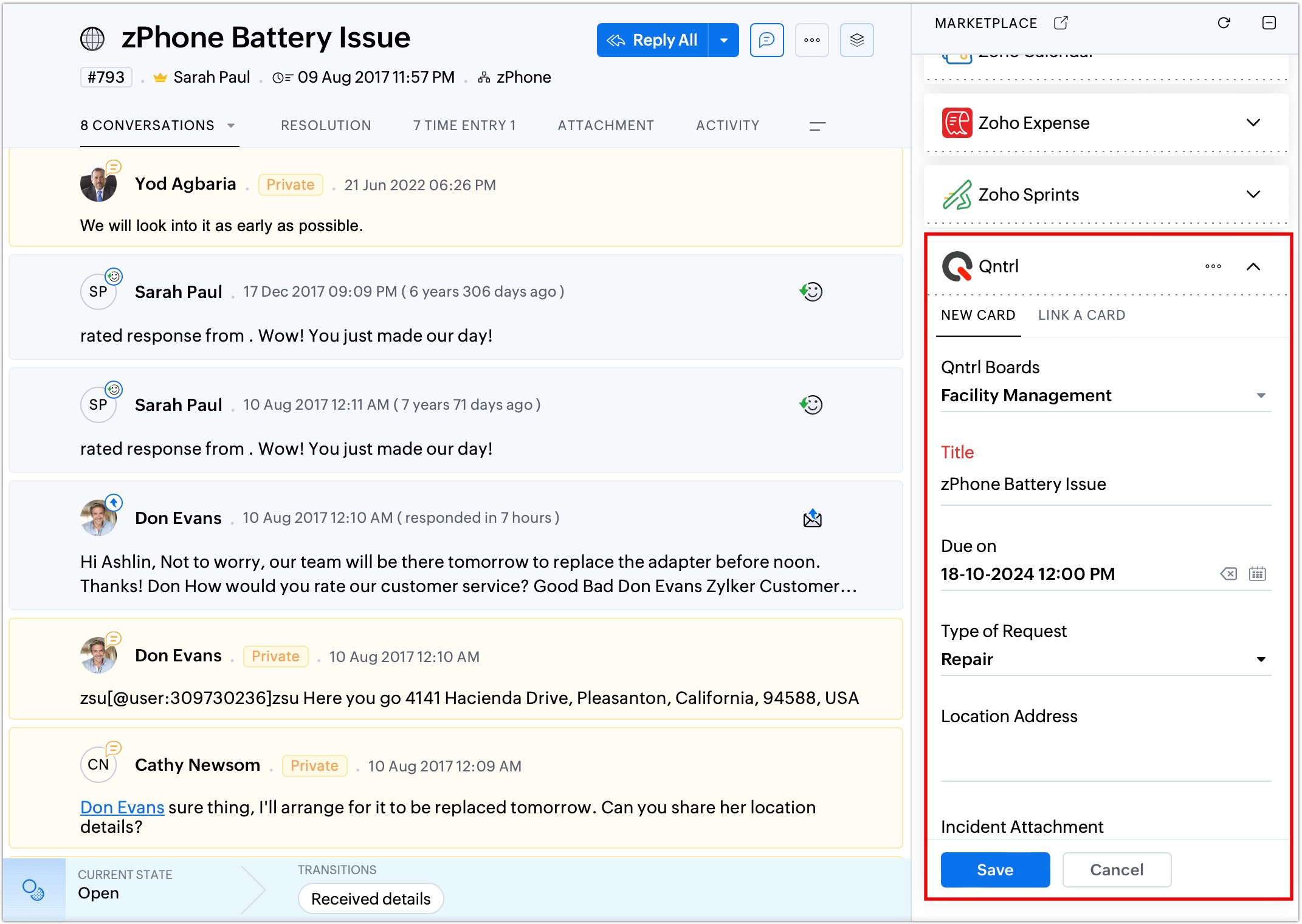
While adding the card the agent must provide the requirement in the given fields and associate it to an appropriate Qntrl board.
The image below shows how the card created from Desk is visualized in the Qntrl board.

Below, you can see the blueprint applied to the Qntrl process by the operations team that manages its process through Qntrl.

Updates made to the card are automatically reflected in the left pane in the ticket detail view page, such as:
- Adding comments
- Updating the assignee
- Modifying the due date or status
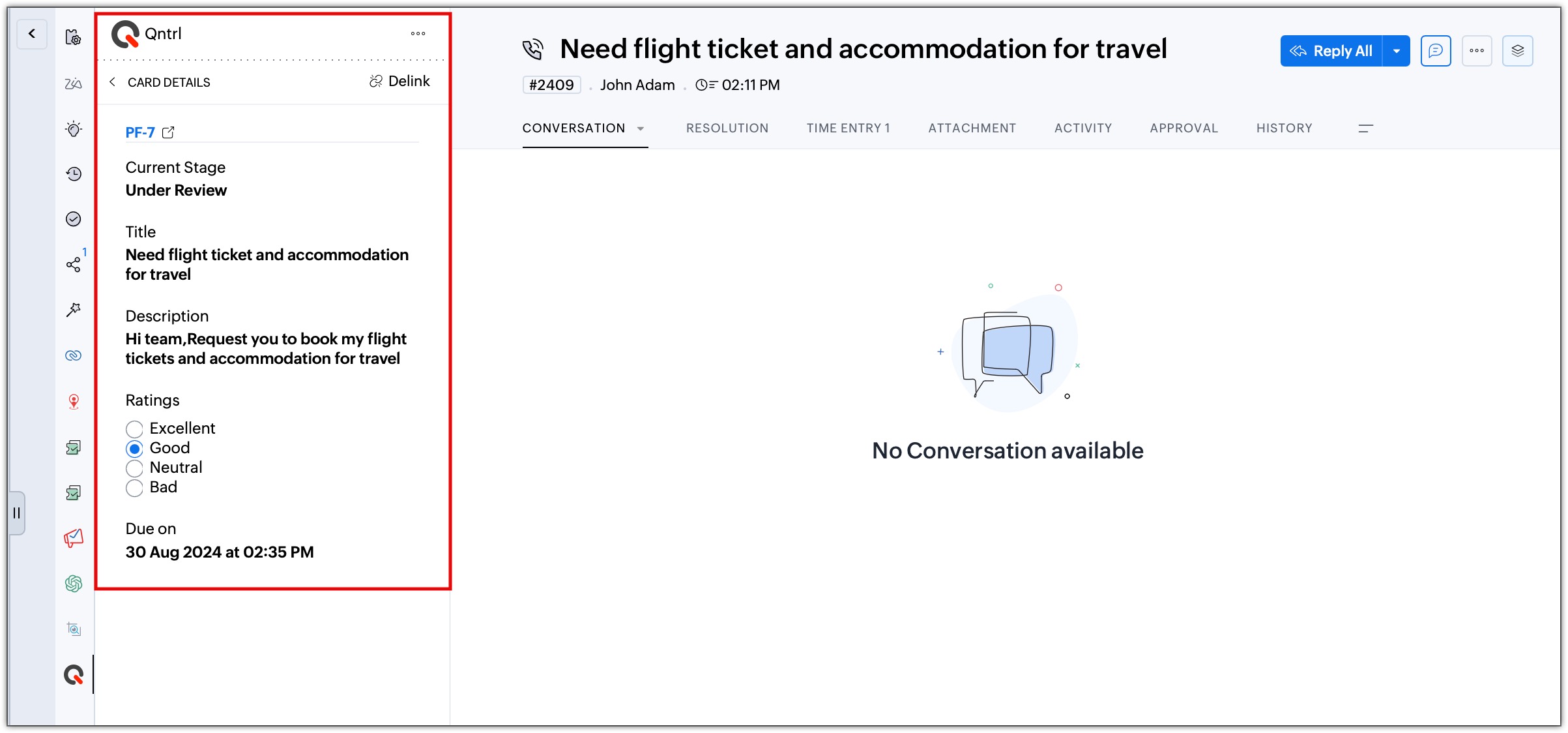
Using the Delink option, the card can be removed from the ticket any time, giving agents the flexibility to retain only the relevant cards in the ticket.
Kindly refer to the help doc: Integrating Zoho Desk with Qntrl to learn more about configuration and business cases.
This integration is now available for all users across DC.
Regards,
B. Akshaya
Zoho Desk | User Education
Topic Participants
Akshaya B
Delor Sani
Shivani | Zoho Desk
Sticky Posts
2024 Email Authentication Standards: Elevating Security with Google and Yahoo
In contemporary email communication, email authentication plays a pivotal role in mitigating email fraud, spam, and phishing attacks. Brace yourself for a new level of security. Starting February 2024, Gmail and Yahoo will be implementing robust emailUsing Agent Email Address as From Address
Currently, while replying to a ticket, it is possible for agents to choose their own email addresses as 'from' addresses. Although we built this just for that little extra flexibility, in hindsight, it hasn't figured much in conventional usage. Almost all businesses prefer that responses to their customers' tickets be sent from the common support/service email address and NOT from those of individual agents. During personal interactions at events, some of you have even made passing mentions aboutEdit and Delete options in Comments
A lot of teams have been using ticket comments extensively to collaborate everyday. Notification Center further improved this experience by bringing real-time updates. As we continue to build more improvements to this experience, we've shipped a small-yet-importantWebinar 2: Supercharged customer support for growing business
Join us for this webinar and learn how to step up your support game using a real-time communication platform to generate happier, more successful customers. In this live webinar, we will will discuss the importance of SalesIQ for your support team and how it can help you: Understand your customers better and their journeys to proactively support and engage them even before they ask for help. Integrating real time conversations into Zoho Desk’s Support, providing a conversational customer serviceCustomize Colors of your Customer Self Service Portal
You asked for it. We heard you. We're happy to roll out the most sought after feature request, Customizing the Colors of your Customer Self-service Portal. Now you can set the color of your customer portal to mimic your company's web site, so that your customers visiting the portal will not feel alienated by the default theme. Go ahead and configure the color of the header, tabs, fonts and background according to your needs. You can either choose between default color themes like Blue, Grey, Green
Nederlandse Hulpbronnen

Recent Topics
Knowledge base printing
I saw a posting about printing the knowledge base as I was looking for the answer, but we would like the ability to print out the entire knowledge base with a click, keeping the same organization format. Bonus would include an index of keywords andSearch not working!
I have items in my notebook tagged but when I search for a tag nothing comes up! Any fix for this?Zoho Books | Product updates | January 2026
Hello users, We’ve rolled out new features and enhancements in Zoho Books. From e-filing Form 1099 directly with the IRS to corporation tax support, explore the updates designed to enhance your bookkeeping experience. E-File Form 1099 Directly With theUpdates for Zoho Campaigns: Merge tag, footer, and autoresponder migration
Hello everyone, We'd like to inform you of some upcoming changes with regard to Zoho Campaigns. We understand that change can be difficult, but we're dedicated to ensuring a smooth transition while keeping you all informed and engaged throughout the process.Sharing my portal URL with clients outside the project
Hi I need help making my project public for anyone to check on my task. I'm a freelance artist and I use trello to keep track on my client's projects however I wanted to do an upgrade. Went on here and so far I'm loving it. However, I'm having an issue sharing my url to those to see progress. They said they needed an account to access my project. How do I fix this? Without them needing an account.How do i integrate google analytics to Zoho Campaigns?
Looking to track Zoho Traffic from email Current topic is outdatedHow do teams manage meeting follow-ups across Zoho tools?
We’re using Zoho tools for collaboration and tracking, but managing meeting notes, action items, and follow-ups across teams is still challenging. Curious how others are handling this within Zoho workflows. Are there best practices or integrations thatCustomize Colors used on graphs and charts according to users desire.
It would be great if we could customize the graph's colors as we see fit. I hate that yellow is always the default color!Let us view and export the full price books data from CRM
I quote out of CRM, some of my clients have specialised pricing for specific products - therefore we use Price Books to manage these special prices. I can only see the breakdown of the products listed in the price book and the specialised pricing forMejoras urgentes para ZOHO MEETING
Tengo unos meses usando Zoho Meeting. En general, es buena, pero hay cosas vitales que no logra cumplir con mínima calidad. 1) Calidad de audio y video: urge mejoras. Audio con retraso, imagen borrosa, mal recorte de silueta con fondos virtuales. Además,Multiple header in the quote table???
Hello, Is it possible in Zoho CRM to add multiple headers or sections within the Quote product table, so that when the quote is printed it shows separate sections (for example “Products” and “Services”)? To clarify, I’m asking because: This does not appearSaving sent email campaign as PDF
I'm looking to add all campaigns sent to an archive folder in sharepoint. Is there anyway to accomplish this in Zoho Flow ? I'm falling at the first hurdle ... can I automatically save a sent campaign as a PDF to a folder location ?Exporting All Custom Functions in ZohoCRM
Hello, All I've been looking for a way to keep about 30 functions that I have written in Zoho CRM updated in my own repository to use elsewhere in other instances. A github integration would be great, but a way to export all custom functions or any wayConditional Layouts On Multi Select Field
How we can use Conditional Layouts On Multi Select Field field? Please help.Appreciation to Qntrl Support Team
We are writing this topic to appreciate the outstanding level of support from Qntrl Team. We have been using Qntrl since 2022 after shifting from another similar platform. Since we joined Qntrl, the team has shown a high level of professionalism, support,How can I hide "My Requests" and "Marketplace" icon from the side menu
Hello everybody, We recently started using the new Zoho CRM for Everyone. How can I hide "My Requests" and "Marketplace" from the side menu? We don't use these features at the moment, and I couldn't find a way to disable or remove them. Best regards,Whatsapp Integration on Zoho Campaign
Team: Can the messages from Zoho Campaign delivered through Whatsapp... now customers no longer are active on email, but the entire campaign module is email based.... when will it be available on whatsapp.... are there any thirdparty providers who canMandatory Field - but only at conversion
Hello! We use Zoho CRM and there are times where the "Lead Created Date & Time" field isn't populated into a "Contractor" (Account is the default phrase i believe). Most of my lead tracking is based on reading the Lead Created field above, so it's importantEnable Free External Collaboration on Notecards in Zoho Notebook
Hi Zoho Notebook Team, I would like to suggest a feature enhancement regarding external collaboration in Zoho Notebook. Currently, we can share notes with external users, and they are able to view the content without any issue. However, when these externalUsing data fields in Zoho Show presentations to extract key numbers from Zia insights based on a report created
Is it possible to use data fields in Zoho Show presentations along with Zoho Analytics to extract key numbers from Zia insights based on a report created? For example, using this text below: (note that the numbers in bold would be from Zia Insights) RevenueFree webinar: AI-powered agreement management with Zoho Sign
Hi there! Does preparing an agreement feel like more work than actually signing it? You're definitely not alone. Between drafting the document, managing revisions, securing internal approvals, and rereading clauses to make sure everything still reflectsWhatsApp Channels in Zoho Campaigns
Now that Meta has opened WhatsApp Channels globally, will you add it to Zoho Campaigns? It's another top channel for marketing communications as email and SMS. Thanks.CRM For Everyone - Bring Back Settings Tile View
I've been using CRM for Everyone since it was in early access and I just can't stand the single list settings menu down the left-hand side. It takes so much longer to find the setting I need. Please give users the option to make the old sytle tile viewLets have Dynamics 365 integration with Zohobooks
Lets have Dynamics 365 integration with ZohobooksAdd notes in spreadsheet view
It would be great if we could Add/edit notes in the spreadsheet view of contacts/leads. This would enable my sales teams to greatly increase their number of calls. Also viewing the most recent note in the Contact module would also be helpful.Opening balances - Accounts Receivable and Payable
Our accounting year starts on 1st August 2013 and I have a Trial Balance as at that date, including Accounts Receivableand Accounts Payable balances, broken down by each customer and supplier. Q1 - do I show my opening balance date as 31st July 2013 orCancel Subscription
Hi , Im want to cancel my account but without success please help me to do itMaking an email campaign into a Template
I used a Zoho Campaign Template to create an email. Now I want to use this email and make it a new template, but this seems to be not possible. Am I missing something?Direct Access and Better Search for Zoho Quartz Recordings
Hi Zoho Team, We would like to request a few enhancements to improve how Zoho Quartz recordings are accessed and managed after being submitted to Zoho Support. Current Limitation: After submitting a Quartz recording, the related Zoho Support ticket displaysMultiple Cover Letters
We are using the staffing firm edition of Recruit and we have noticed that candidates cannot add more than one cover letter. This is a problem as they might be applying for multiple jobs on our career site and when we submit their application to a client,URGENT: Deluge issue with Arabic text Inbox
Dear Deluge Support, We are facing an issue that started on 12/Feb/2026 with custom functions written using Deluge within Qntrl platform. Currently, custom functions do not accept Arabic content; it is replaced with (???) characters. Scenario 1: If weFile Conversion from PDF to JPG/PNG
Hi, I have a question did anyone every tried using custom function to convert a PDF file to JPG/PNG format? Any possibility by using the custom function to achieve this within zoho apps. I do know there are many third parties API provide this withNow in Zoho One: Orchestrate customer journeys across apps with Zoho CommandCenter
Hello Zoho One Community! We’re excited to introduce Zoho CommandCenter as a new capability available in Zoho One. For the whole customer journey As Zoho One customers adopt more apps across sales, marketing, finance, and support, a common challenge emerges:annualy customer report
we need a report per customer that looks like this invoic number cleaning laundry repair management 01 january xxx euro xx euro xx euro xxx euro 02 february xxx euro xxx euro x euro xxxx euro and so on the years 12 months is that possible to make andTotals for Sales Tax Report
On the sales tax report, the column totals aren't shown for any column other than Total Tax. I can't think of a good reason that they shouldn't be included for the other columns, as well. It would help me with my returns, for sure. It seems ludicrousFree Webinar: Zoho Sign for Zoho Projects: Automate tasks and approvals with e-signatures
Hi there! Handling multiple projects at once? Zoho Projects is your solution for automated and streamlined project management, and with the Zoho Sign extension, you can sign, send, and manage digital paperwork directly from your project workspace. JoinExported Report File Name
Hi, We often export reports for information. It is time consuming to rename all the reports we export on a weekly basis, as when exported their default name is a seemingly random string of numbers. These numbers may be important, I'm not sure, but I amAutomatic Refresh on Page?
Hi everyone, We use a page as a dashboard which shows data for the laboratory and tasks pending etc. Is there a way to set the page to automatically refresh on a X time? Many thanks TOGHow do I edit the Calendar Invite notifications for Interviews in Recruit?
I'm setting up the Zoho Recruit Interview Calendar system but there's some notifications I don't have any control over. I've turned off all Workflows and Automations related to the Calendar Scheduling and it seems that it's the notification that is sentAdd RTL and Hebrew Support for Candidate Portal (and Other Zoho Recruit Portals)
Dear Zoho Recruit Team, I hope you're doing well. We would like to request the ability to set the Candidate Portal to be Right-to-Left (RTL) and in Hebrew, similar to the existing functionality for the Career Site. Currently, when we set the Career SiteNext Page