Automate a CRM workflow with Zoho Cliq

Imagine having a virtual assistant that provides rapid updates to your team through Zoho Cliq, helping you stay on top of your sales processes. After returning from a client meeting filled with updates and action items, managing this information together can feel overwhelming, especially when juggling multiple roles and responsibilities.
Business benefits
- Notification of deal closures: Ensures the sales team is promptly informed when a deal is closed to celebrate wins, update forecasts, and maintain team morale.
- Product and development feedback: Quickly communicate client requests or demo glitches to the product and development teams to enhance product offerings and resolve issues.
- Managerial updates: Keep managers in the loop with meeting outcomes to strategize the next steps or escalate issues.
- Syncing with the team: Link CRM updates directly to team chat channels to ensure all team members are updated about lead statuses. This reduces the need for multiple app switches, enhances real-time collaboration, coordinates efforts, and aligns strategies.
Let's examine an example of Zoho CRM workflow automation for a new lead created with a Zoho Cliq bot.
Step 1 : Bot creation
- Navigate to the top right corner of your profile, click on it, and select "Bots and Tools".
- To create a new bot, click on "Create Bot" on the right under the "Bots" section.
- Provide a name and description for the bot, then enable channel configuration settings during setup.
Step 2 : Bot webhook URL retrieval
- Webhook tokens are listed under the Bots & Tools section along with all the other internal tools. When navigated to the webhook tokens module, you will be required to authenticate using 2FA, verify your identity, and click Continue.
- After authentication, you can create, edit, and manage your Webhook Tokens as needed.
- Generate a webhook token and retrieve the bot's webhook URL as specified below.
ⓘ Learn more about webhook tokens in Zoho Cliq
Step 3 : Configuration of CRM workflow rule
Workflow rules in Zoho CRM are actions (email notifications, tasks, and field updates) executed when certain specified conditions are met. These rules automate sending email notifications, assigning tasks, and updating specific fields of a record when a rule is triggered.
ⓘ Learn more about configuring workflow rules in Zoho CRM
Similarly, you can set up and configure new workflow rules for events like the update of a lead status or the assignment of a lead to any sales representative (Lead owner ).

Step 4 : Setting up bot incoming webhook handler
- Go back to Cliq and find the bot you created under the "Bots and Tools" section. Then, access the bot's incoming webhook handler.

- The incoming webhook handler is designed to allow third-party services, such as Zoho CRM, to post messages directly to your bot.
- Copy and paste the below code and click "Save".
Pre-requisites:
To post an alert to the channel, you need the unique names of both the channel and the bot, as we are using zoho.cliq.postToChannelAsBot deluge task in the code below. Follow the steps to retrieve these names.
How to obtain or locate the channel unique name in Cliq?
- Navigate to the top right corner of the preferred channel and locate the three dots. Click it.
- In the menu that appears, select "Channel info" and a pop-up will open, displaying detailed channel information. Hover over the "Connectors" section and click it.
- Under "API Parameters," you will find the channel unique name.
How to obtain or locate the bot unique name in Cliq?
- Navigate to "Bots & Tools", and under the bots section, select the bot you prefer.
- Copy the API endpoint URL. The bot's unique name is located after "bots/" and before the next slash "/".
- Example:
- URL: https://cliq.zoho.com/company/2345678/api/v2/bots/crmupdatesincliq/message
- The bot unique name in the above example is crmupdatesincliq
- info params;
- eventType = params.get("event-type");
- leadName = params.get("Lead Name");
- company = params.get("Company");
- leadStatus = params.get("Lead Status");
- title = params.get("Title");
- email = params.get("Email");
- phone = params.get("Phone");
- leadSource = params.get("Lead Source");
- industry = params.get("Industry");
- leadId = params.get("Lead ID");
- if(eventType.equalsIgnoreCase("Lead Created"))
- {
- response = {"text":"🎯Heads up! A new lead has been successfully added to your list. Prepare to engage and convert!","card":{"title":"🚀 New Lead Added!","thumbnail":"https://i.imgur.com/jDagRms.png","theme":"modern-inline"},"slides":{{"type":"text","title":"Lead Details :","data":"🏆 Lead Name : " + leadName + "\n💼 Company : " + company + "\n⏱️ Lead Status : *" + leadStatus + "*"},{"type":"label","title":"","data":{{"📧 *Email*":email},{"☎️ *Phone*":phone},{"🏢 *Industry*":industry},{"📣 *Lead Source*":leadSource}}}}};
- // Use zoho.cliq.postToChannelAsBot(${channel_unique_name}, ${bot_unique_name}, response);
- zoho.cliq.postToChannelAsBot("clientleadupdates","crmupdatesincliq",response);
- }
- if(eventType.equalsIgnoreCase("Lead Assigned"))
- {
- leadOwner = params.get("Lead Owner");
- response = {"text":"🚀📈Promising prospect assigned to " + leadOwner + ". Opportunity awaits!","card":{"title":"🎯 New lead generated","thumbnail":"https://i.imgur.com/UisAlKn.png","theme":"modern-inline"},"slides":{{"type":"text","title":"Lead Details :","data":"🏆 Lead Name : " + leadName + "\n💼 Company : " + company + "\n⏱️ Lead Status : *" + leadStatus + "*"}}};
- zoho.cliq.postToChannelAsBot("clientleadupdates","crmupdatesincliq",response);
- }
- if(eventType.equalsIgnoreCase("Lead Status Updated"))
- {
- response = {"text":"✅💼 Great news! Lead status is now Qualified. Ready to engage!","card":{"title":"✅ Lead qualified","thumbnail":"https://i.imgur.com/d2jhClm.png","theme":"modern-inline"},"slides":{{"type":"text","title":"Lead Details :","data":"🏆 Lead Name : " + leadName + "\n💼 Company : " + company + "\n⏱️ Lead Status : *" + leadStatus + "*"}}};
- zoho.cliq.postToChannelAsBot("clientleadupdates","crmupdatesincliq",response);
- }
- return Map();
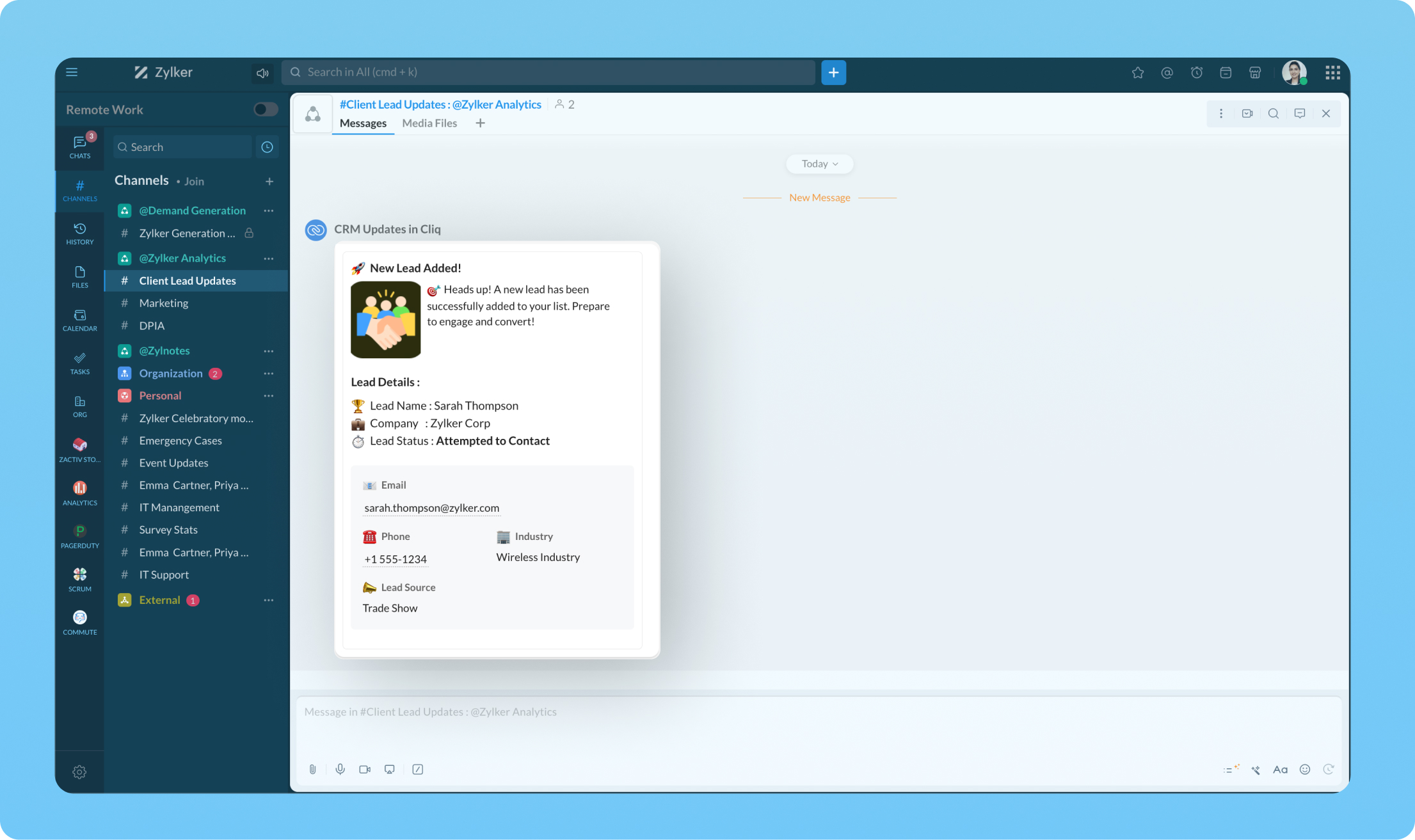
Transform your workflow experience with ease! Imagine having the ability to set up custom automation that sends instant messages to your team channels whenever a deal is sealed or a new lead steps on board.
We're here to help, so don't hesitate to reach out to support@zohocliq.com with any questions or if you need assistance in crafting even more tailored workflows.
Topic Participants
Harsha SS
Sticky Posts
Automating Employee Birthday Notifications in Zoho Cliq
Have you ever missed a birthday and felt like the office Grinch? Fear not, the Cliq Developer Platform has got your back! With Zoho Cliq's Schedulers, you can be the office party-cipant who never forgets a single cake, balloon, or awkward rendition ofCustomer payment alerts in Zoho Cliq
For businesses that depend on cash flow, payment updates are essential for operational decision-making and go beyond simple accounting entries. The sales team needs to be notified when invoices are cleared so that upcoming orders can be released. In contrast,Accelerate Github code reviews with Zoho Cliq Platform's link handlers
Code reviews are critical, and they can get buried in conversations or lost when using multiple tools. With the Cliq Platform's link handlers, let's transform shared Github pull request links into interactive, real-time code reviews on channels. ShareApp Spotlight : PagerDuty for Zoho Cliq
App Spotlight brings you hand-picked apps to enhance the power of your Zoho apps and tools. Visit the Zoho Marketplace to explore all of our apps, integrations, and extensions. In today's fast-paced world, seizing every moment is essential for operationalAutomate your status with Cliq Schedulers
Imagine enjoying your favorite homemade meal during a peaceful lunch break, when suddenly there's a PING! A notification pops up and ruins your moment of zen. Even worse, you might be in a vital product development sprint, only to be derailed by a "quick
Recent Topics
Sortie de Zoho TABLE ??
Bonjour, Depuis bientôt 2 ans l'application zoho table est sortie en dehors de l'UE ? Depuis un an elle est annoncée en Europe Mais en vrai, c'est pour quand exactement ??Rename Record Summary PDF in SendMail task
So I've been tasked with renaming a record summary PDF to be sent as part of a sendmail task. Normally I would offer the manual solution, a user exports the PDF and uploads it to a file upload field, however this is not acceptable to the client in thisLimitation with Dynamic Email Attachment Capture
I've discovered a flaw in how Zoho Creator handles email attachments when using the Email-to-Form feature, and I'm hoping the Zoho team can address this in a future update. The Issue According to the official documentation, capturing email attachmentsRecruit API search
Hi all, Attempting to call the search api endpoint from Postman using the word element as mentioned in api docs Search Records - APIs | Online Help - Zoho Recruit When making the call to /v2/Candidates/search?word=Saudi receive response of { "code": "MANDATORY_NOT_FOUND",Text/SMS With Zoho Desk
Hi Guys- Considering using SMS to get faster responses from customers that we are helping. Have a bunch of questions; 1) Which provider is better ClickaTell or Screen Magic. Screen Magic seems easier to setup, but appears to be 2x as expensive for United States. I cannot find the sender id for Clickatell to even complete the configuration. 2) Can customer's reply to text messages? If so are responses linked back to the zoho ticket? If not, how are you handling this, a simple "DO NOT REPLY" asCustom Field in Zoho Projects pulling into Analytics
We have a client that we have built our their new business process using Zoho Projects, and we have build a lot of custom fields with their their Projects where they are capturing specific data points that we want to be able to track and pull data, asMarketer's Space - Holiday season email marketing tips you should know
Hello Marketers! Welcome back to another post in Marketer's Space! 'Tis the season—that time of the year everyone eagerly anticipates. While most look forward to relaxing, marketers will be super-busy from late November to early January. Mistakes canZia Competitor Alerts made easy with Zia's suggestions
Hi everyone, In addition to the existing manually added competitors, Zia will now find your competitors for you - instantly. Earlier, you had to identify competitors through research manually, support tickets, or tradeshows—a time-consuming process thatAdd Custom Field Inside Parts Section
How to Add Custom Field Inside Parts Section in Workorder like Category and Sub- CategoryZoho CRM Community Digest October 2025 | Part 2
Hello Everyone! From new mobile capabilities and smarter integrations to real-world workflow fixes and developer insights, all the highlights from the second half of October is covered right here. Let’s dive in. Product Updates: Zoho CRM Mobile Updates:MTA - BAD IP reputation by outlook/hotmail
Messages to Microsoft email servers are bouncing back due to poor reputation. Message: 4.7.650 The mail server [136.143.188.206] has been temporarily rate limited due to IP reputation. For e-mail delivery information see https://postmaster.live.com (S775)Understanding Zoho Contracts
Effective contract management relies on systems that are structured, organized, and reliable. Every feature, workflow, rule, and restriction in Zoho Contracts are designed the way they are to ensure consistency, compliance, and control across every stageTip of the Week #76– Automate your inbox during vacation in Zoho TeamInbox
When you're on vacation or away from your desk, the last thing you want is for important emails to be missed or left unanswered. The good news is, you can easily set up rules in Zoho TeamInbox to assign incoming messages automatically to a teammate who'sDomain restriction for User Management actions in Zoho One
Greetings, Zoho One Admins! To strengthen account security further and safeguard user management settings, we are imposing domain-based restrictions for user account-focused admin actions in Zoho One. In addition to password reset of user, organizationZoho Mail iOS app update: Signature
Hello everyone! In the latest version(3.1.7) of the Zoho Mail app update, we have brought in support to create, edit and remove signature within the app. You can create signature from the compose screen as well as from within the Settings module(insideCopy paste from word document deletes random spaces
Hello Dear Zoho Team, When copying from a word document into Notebook, often I face a problem of the program deleting random spaces between words, the document become terribly faulty, eventhough it is perfect in its original source document (and withoutDesktop app doesn't support notecards created on Android
Hi, Does anybody have same problem? Some of last notecards created on Android app (v. 6.6) doesn't show in desktop app (v. 3.5.5). I see these note cards but whith they appear with exclamation mark in yellow triangle (see screenshot) and when I try toApproval Button in Subform
Hi Team, I’m working on a subform-based requirement where users will submit requests, and these requests must go through approval by multiple team managers. Each line item in the subform needs to be individually approved or declined based on the user'sZOHO Mail App Not working
There seems to be an issue with Zoho Mail App today. It is not connecting to server, internet is working fine, tried uninstalling app and reinstalling, loading circle keeps spinning round. Is there an update on the way?Setting checkbox value on template in Sign from Creator
Good day, Please help me understand how do I set a tick from a checkbox in Creator into a checkbox on a Sign template. Below is the only values on the Sign template and the code from Creator, "field_boolean_data": {}, "field_date_data": {}, "field_radio_data":Zoho Projects - Unread Comment Icon
Hi Projects Team, It would be great if there was a notification I con on the comments icon so it's easy to see which tasks have new comments. Something like a red circle with a number of unread comments would be great. Thanks for considering my feedZoho Projects - Update Feed via API
Hi Projects Team, Please consider adding an API to allow update and retrieval of messages to the Feed. Thank youAutomated log-out/session end
I'm concerned about security of our data. Is it possible to set an automatic time-out for user sessions on Zoho CRM, after a certain period of inactivity or when the session reaches a certain duration (12 hours perhaps)?Subform auto populate values
Hi Team, I’m trying to retrieve values from Zoho People using API functions and dynamically populate them into a subform. For example, I’ve created a form with several fields that users will fill out. Based on their input, I need to fetch records fromWhat is New in CRM Functions?
What is New in CRM Functions? Hello everyone! We're delighted to share that Functions in Zoho CRM have had a few upgrades that would happen in phases. Phase 1 An all new built-in editor for better user experience and ease of use. ETA: In a couple of days.Gantt Chart - Zoho Analytics
Are there any plans to add Gantt Charts capabilities to Zoho Analytics?WhatsApp Calling Integration via Zoho Desk
Dear Zoho Desk Team, I would like to request a feature that allows users to call WhatsApp numbers directly via Zoho Desk. This integration would enable sending and receiving calls to and from WhatsApp numbers over the internet, without the need for traditionalThis user is not allowed to add in Zoho. Please contact support-as@zohocorp.com for further details
Hello, Just signed up to ZOHO on a friend's recommendation. Got the TXT part (verified my domain), but whenever I try to add ANY user, I get the error: This user is not allowed to add in Zoho. Please contact support-as@zohocorp.com for further details I have emailed as well and writing here as well because when I searched, I saw many people faced the same issue and instead of email, they got a faster response here. My domain is: raisingreaderspk . com Hope this can be resolved. Thank youIdentify long running sync jobs/tables
My sync process causes strain on my production database and I'd love some tools/alerts to help me identify which tables are taking the longest. The current screen only shows 3 tables at a time and truncates the last fetch time so that it is very cumbersomeTemporarily rate limited due to IP reputation.
We have suddenly started receiving the following Mail Delivery Status Notification: Diagnostic-Code: 4.7.650 The mail server [136.143.184.12] has been temporarily rate limited due to IP reputation. For e-mail delivery information, see https://aka.ms/postmasterAutomatically CC an address using Zoho CRM Email Templates
Hi all - have searched but can't see a definitive answer. We have built multiple email templates in CRM. Every time we send this we want it to CC a particular address (the same address for every email sent) so that it populates the reply back into ourSolution to Import PST File into Office 365.
MailsDaddy OST to Office 365 Migration Tool is an outstanding solution to recover OST files and migrate them into Office 365 without any hassle. Using this software users can multiple OST files into Office 365 with complete data security. It offers usersAlready have Zoho account. Not letting me log in
I already have a Zoho account that is associated with my Google email and my phone number. Even though I'm already logged in to Zoho, when I click on the mail icon to access my email, it takes me to the pricing page. When I click on the free option, it then takes me to another page which requires me to either enter my domain name, or else "Create email account as <username>@zoho.com". In the field below this, it already has an username entered that I cannot change. Then I have to enter the captcha,Series Label in the Legend
My legend reads 'Series 1' and 'Series 2'. From everything I read online, Zoho is supposed to change the data names if it's formatted correctly. I have the proper labels on the top of the columns and the right range selected. I assume it's something inAssociate emails from both primary and secondary contacts to deal
We need to associate emails from multiple contacts to a deal. Please advise how this can be achieved. At present, only emails from primary contacts can be associated. ThanksNew integration: Zoho Sign for Zoho Projects
Hey there! We’re excited to announce the brand-new Zoho Sign integration for Zoho Projects! With this integration, users can now send documents for signatures, track their progress, and manage approvals—all without leaving Zoho Projects. This bridgesUpdate to attachment display in ticket threads
This enhancement will provide faster access for support teams and end-users, significantly boosting productivity for everyone. Get ready for a more efficient and satisfying experience! Immediate benefits Faster ticket rendering reduces wait times andNarrative 15: Blueprint - Automate, guide, and transform your support processes
Behind the scenes of a successful ticketing system: BTS Series Narrative 15: Blueprint - Automate, guide, and transform your support processes Even organizations that deliver quality products and services can face low customer satisfaction when theirDifferent MRP / Pricing for same product but different batches
We often face the following situations where MRP of a particular product changes on every purchase and hence we have to charge the customer accordingly. This can't be solved by Batch tracking as of now so far as I understand Zoho. How do you manage it as of now?Batch/lot # and Storage bin location
Hi I want to ask for a feature on Zoho inventory I own a warehouse and I've gone through different management software solutions with no luck until I found Zoho, it has been a game changer for my business with up to the minute information, I'm extremely happy with it. It's almost perfect. And I say Almost because the only thing missing for me (and I'm sure I'm not alone) is the need of being able to identify the lot number of my inventory and where it is located in the warehouse. Due to the natureNext Page