Découvrons Zoho Projects 8.0 : Rapprocher les fonctionnalités et l'expérience utilisateur

La nouvelle version de Zoho Projects a été conçue avec la mission de rapprocher les fonctionnalités et l'expérience utilisateur, afin de créer une plateforme sur laquelle il est agréable de travailler. Nous croyons fortement que Zoho Projects 8.0 peut faire cela !
Zoho Projects 8.0 est doté d'une toute nouvelle interface utilisateur conviviale et intuitive . Avec une vue éditable des feuilles de travail, des modèles spécifiques à chaque secteur d'activité, une application mobile améliorée et plus encore, la 8e version a de quoi satisfaire tous les utilisateurs - existants et nouveaux, de divers secteurs d'activité, travaillant au bureau ou à distance. Découvrons les nombreux avantages de Zoho Projects 8.0.
La navigation facilitée
Que vous ajoutiez des étapes ou des tâches, que vous créiez un projet complet à partir de zéro ou que vous personnalisiez les détails d'un projet, avec les flèches de votre clavier, le travail est fait en un rien de temps. Cela signifie que vous n'avez pas besoin d'ouvrir la page des détails à chaque fois. Vous pouvez également déplacer vos tâches entre les listes de tâches et les jalons, vos sous-tâches entre les tâches, et ajouter des tâches prédécesseurs et successeurs pour les dépendances à partir de la page de détails des tâches, afin de simplifier votre organisation tout en gagnant en efficacité.
Gantt Charts
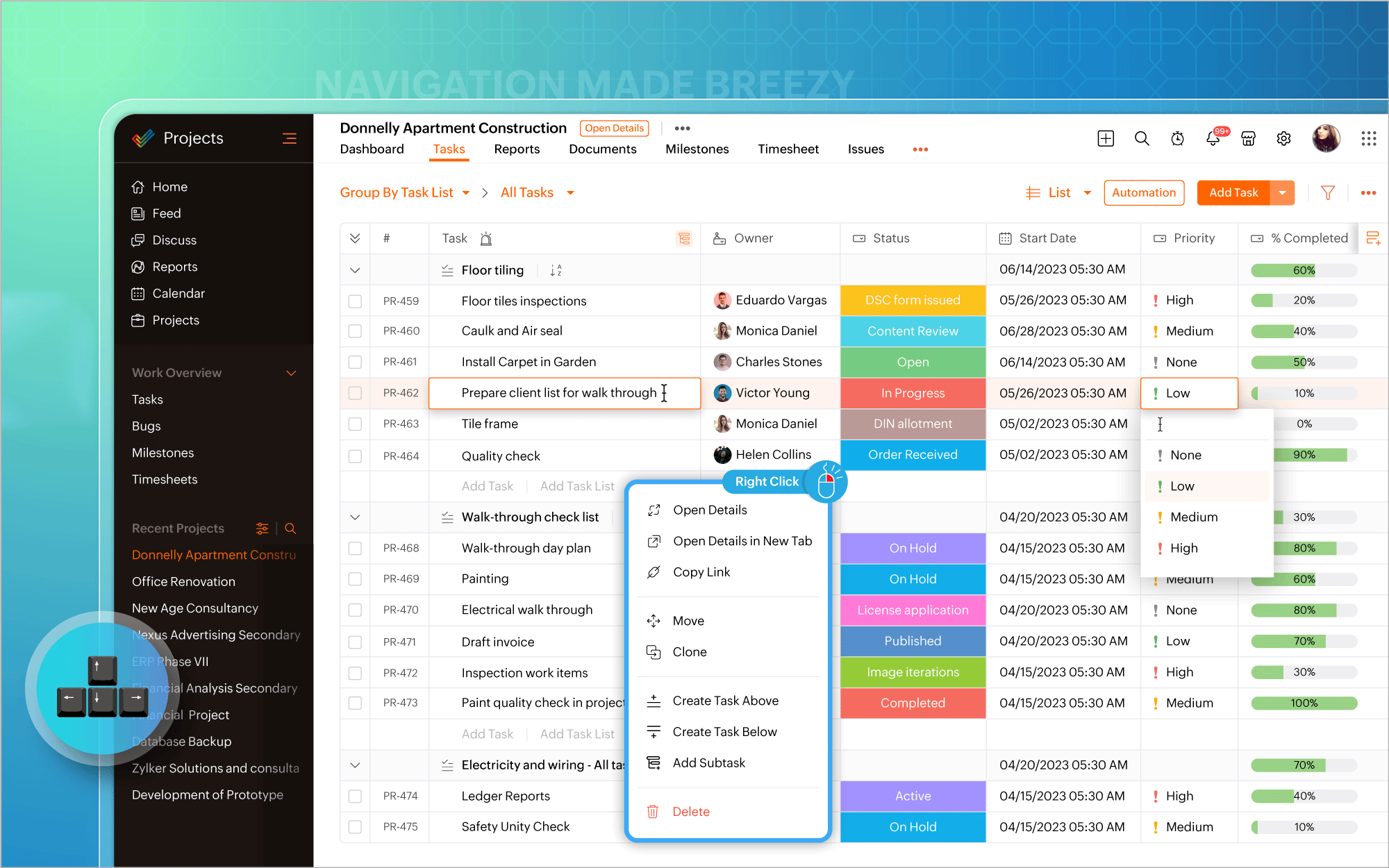
Nous avons modifié l'emplacement du diagramme de Gantt. Vous pouvez désormais y accéder directement dans la vue en liste et mettre à jour les éléments de travail en masse à partir du diagramme lui-même. Les vues quotidiennes, hebdomadaires, mensuelles, trimestrielles et annuelles de la chronologie du projet sont prises en charge, permettant de visualiser le travail depuis le point de vue qui vous intéresse, afin d'être toujours sur la bonne voie. En plus des rapports de Gantt habituels pour les tâches, vous pouvez également générer des rapports de Gantt spécifiques aux jalons et aux projets, et exporter ces données à tout moment.
Personnaliser selon vos goûts
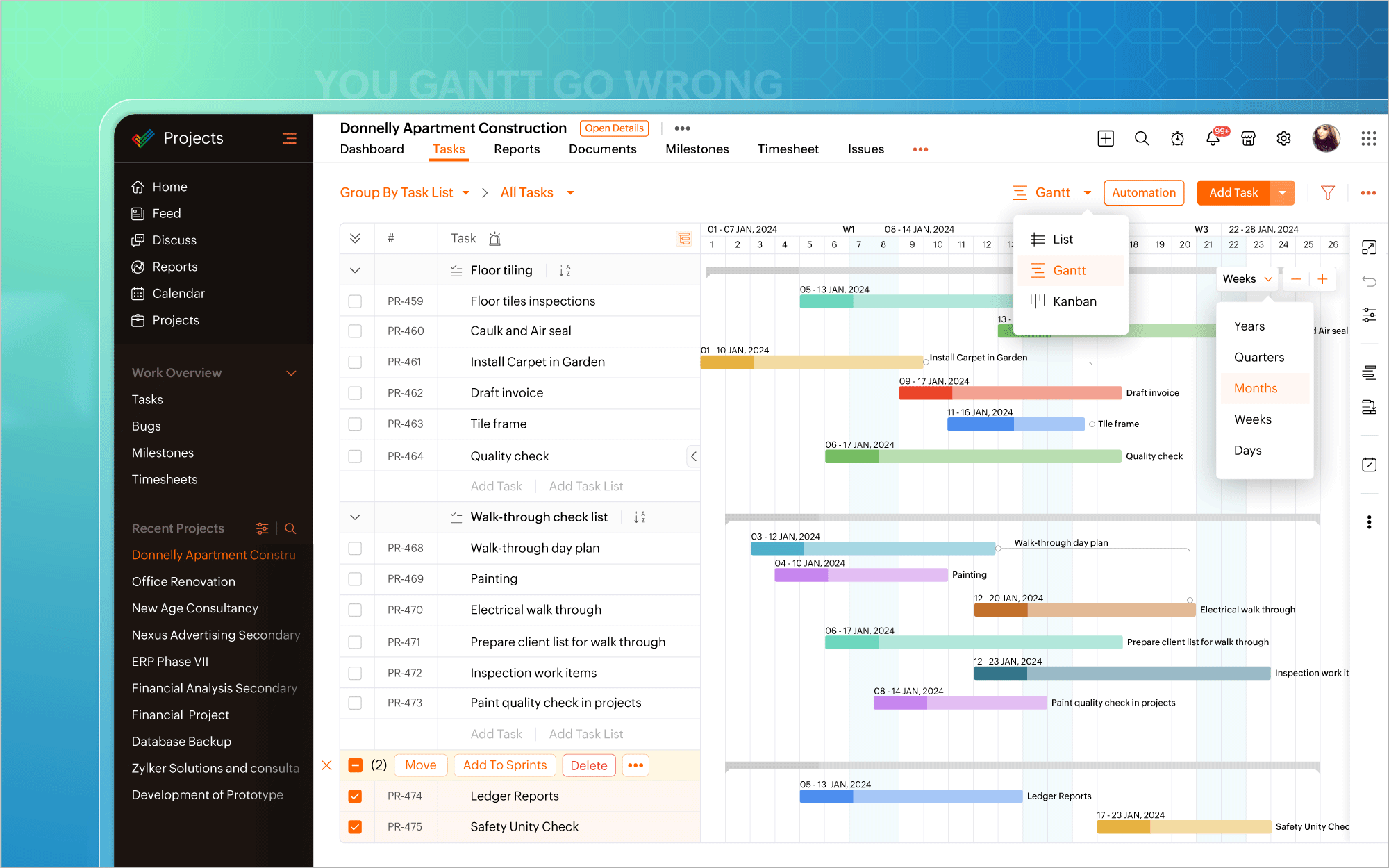
L'icône de personnalisation située dans le coin en haut à droite de l'écran vous permet d'ajouter facilement des champs personnalisés. Il existe également plus de 20 modèles de projets adaptés aux besoins de différents secteurs d'activité, ce qui vous permet d'éviter de créer des projets à partir de zéro. De plus, la possibilité vous est offerte de créer et de personnaliser des mises en page privées pour certains projets, tout en gardant les autres projets en l'état. Transformez chaque projet en un succès, avec une facilité accrue.
Automatiser à tout moment
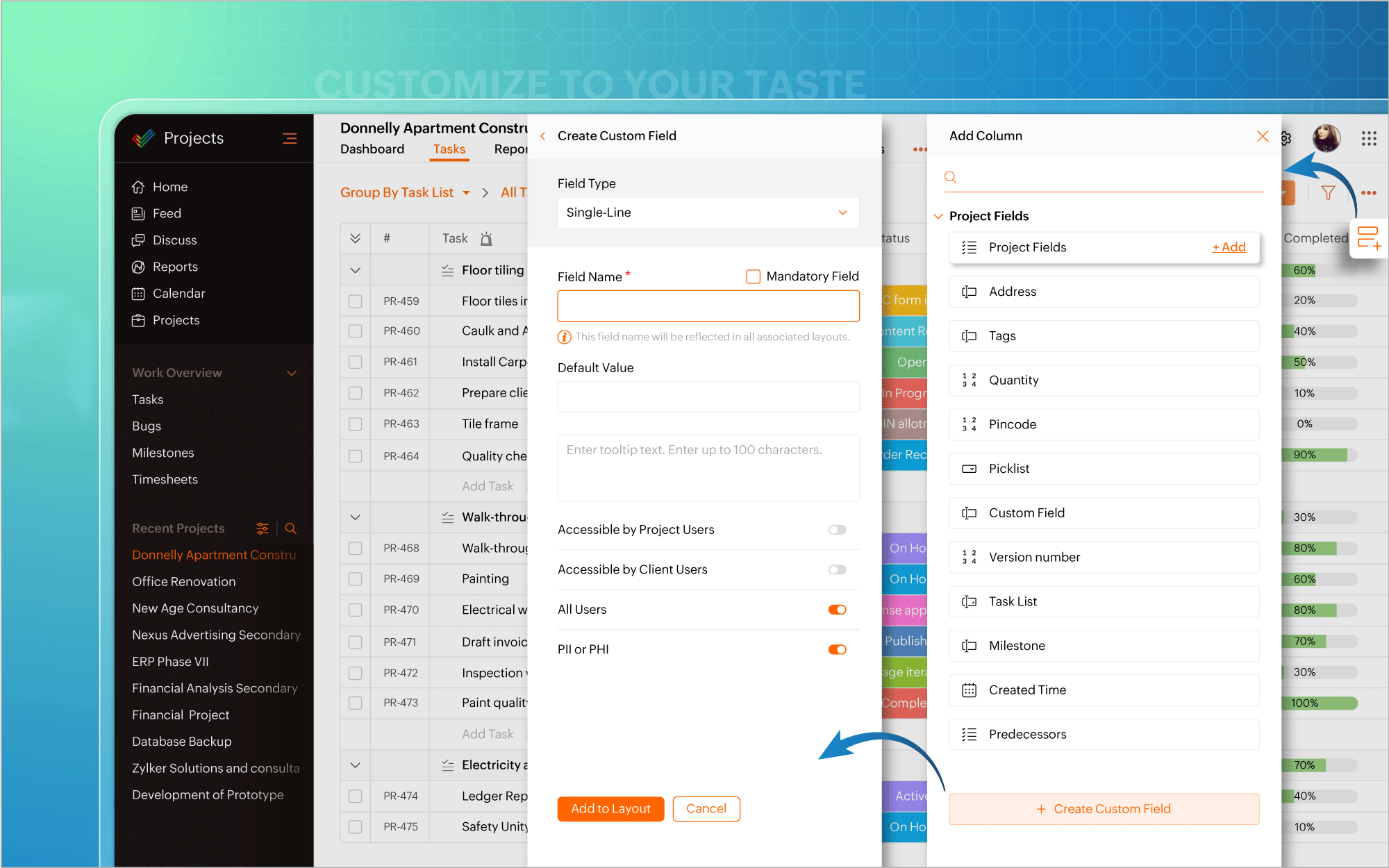
Nous avons également introduit l'automatisation dans la vue en liste. Plus besoin d'aller à la page de configuration chaque fois que vous souhaitez créer des règles de flux de travail pour des projets ou des tâches. Mettez l'accent sur l'automatisation et faites en sorte que les tâches routinières fonctionnent à votre convenance.
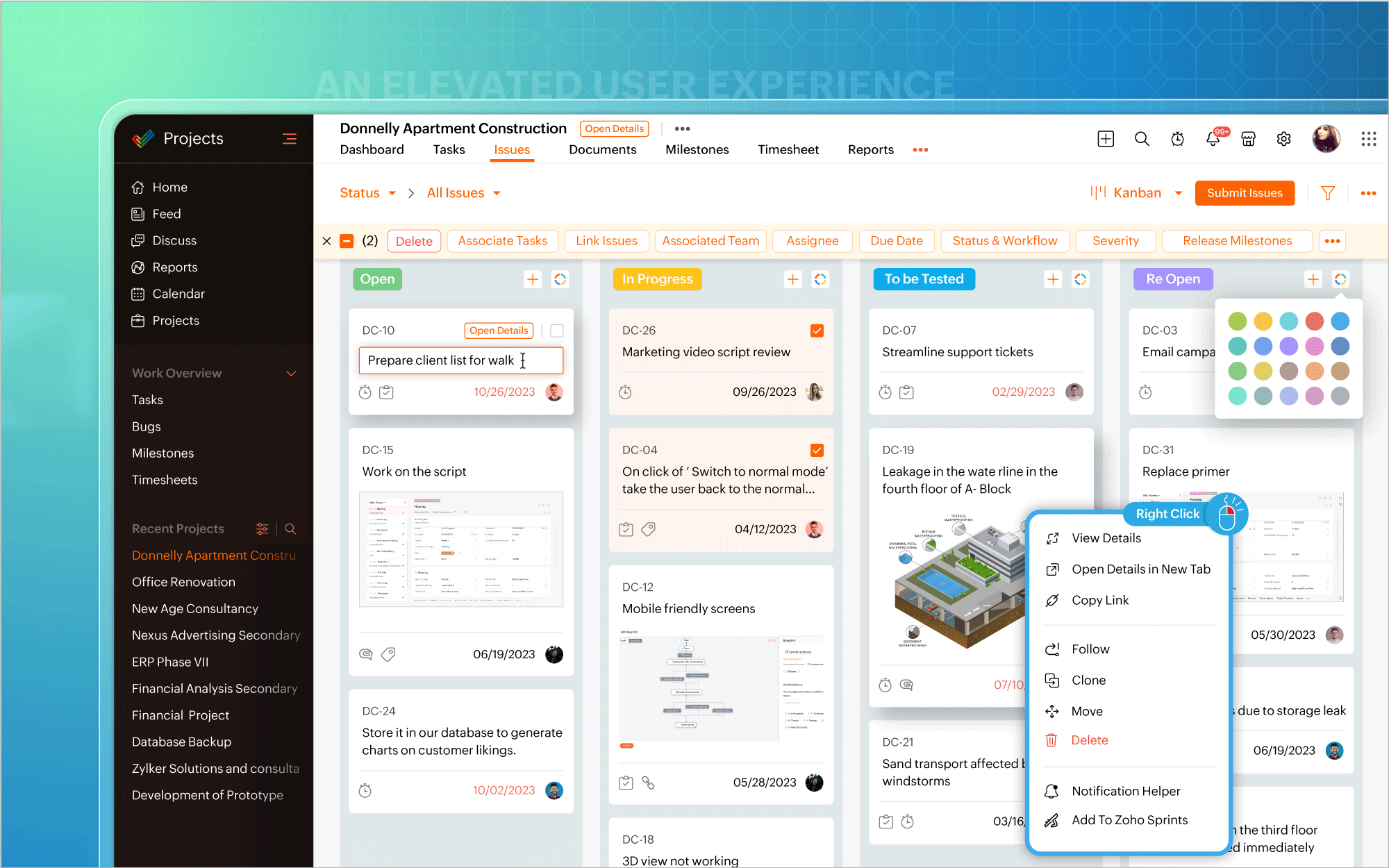
Une interface utilisateur améliorée
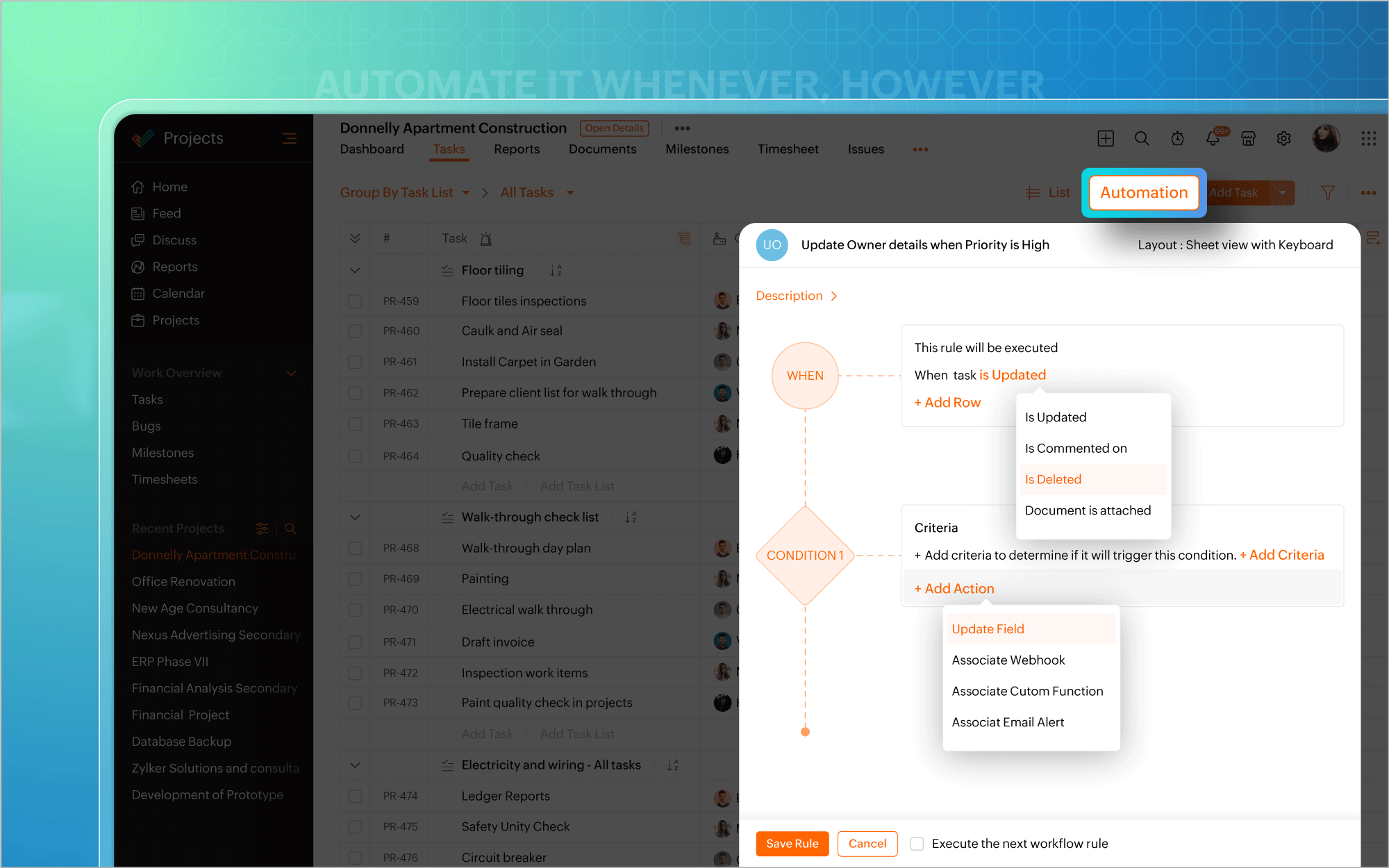
Vous pouvez ainsi effectuer des modifications, éditer les détails d'un projet, mettre à jour en masse des éléments de travail ou inclure des commentaires et des pièces jointes directement à partir de la vue du tableau Kanban. Un clic droit sur des modules tels que Liste, Kanban ou Gantt fait apparaître un menu contextuel qui vous permet d'effectuer des actions pertinentes, telles que consulter les détails du projet, cloner des tâches ou personnaliser les couleurs des barres de Gantt. Une page dédiée aux détails du projet s'ouvre si vous avez besoin d'informations spécifiques au projet ou si vous souhaitez apporter des modifications à votre projet.
Une expérience utilisateur améliorée sur mobile
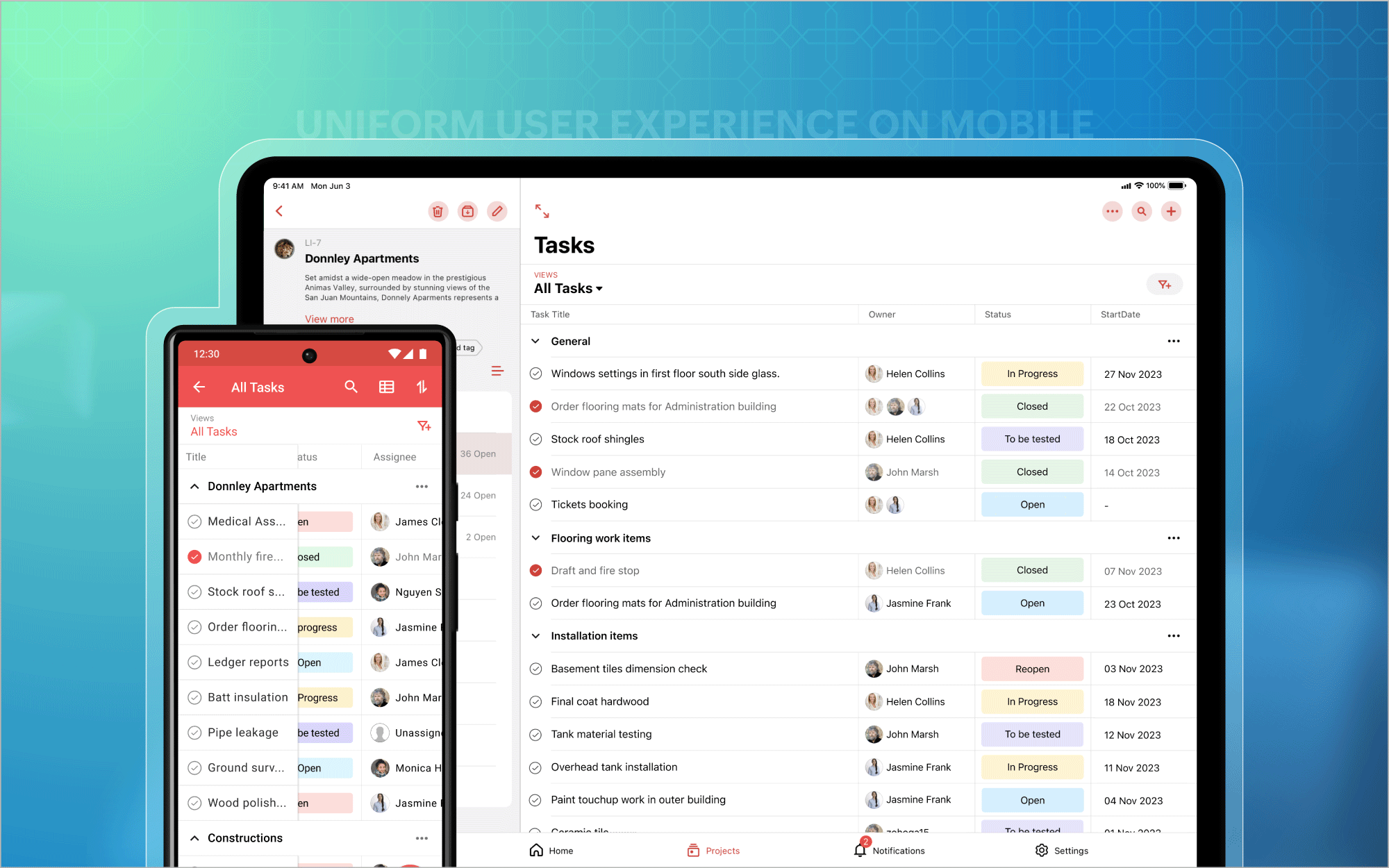
Nous avons également étendu l'affichage des listes aux appareils mobiles et aux tablettes, afin que vous puissiez profiter d'une expérience utilisateur homogène et standardisée sur toutes les plateformes. En outre, vous avez désormais accès aux tableaux de bord des projets et au module Calendrier sur les plateformes Android et iOS. Et bien plus encore est à venir !
Bon à savoir
Zoho Projects 7.0 sera inaccessible après le 31 mars 2024. Nous vous recommandons donc fortement de passer à la dernière version dès que possible. Nous avons hâte que vous l'essayiez !
N'hésitez pas à nous faire part de vos commentaires et de vos réactions sur les fonctionnalités préférées de la nouvelle version.
Plus simple, plus pratique, c'est Zoho Projects 8.0 !
L'équipe Zoho France
Topic Participants
Kinjal Lodaya
Sticky Posts
Les Zoholics sont de retour !
Bonjour à tous, Nous avons (encore une fois) une bonne nouvelle à vous partager : nous allons enfin pouvoir nous rencontrer ! Et pas dans n'importe quel contexte, mais lors de notre conférence annuelle : les Zoholics ! Mais que sont les Zoholics me direz-vousNovembre : un résumé de ce qui s'est passé le mois dernier sur Community
Bonjour à tous, L'année 2021 arrive presque à sa fin, mais nous continuons à avoir de nombreuses actualités à vous partager. En voici un résumé ! Nous avons eu notre première session "Ask The Experts" sur notre nouvelle version Zoho One 2021 et vousAoût : Un résumé de ce qui s'est passé le mois dernier sur Community
Bonjour à tous, Et bonne rentrée ! Comme chaque mois voici un résumé de ce qui s'est passé sur Community et dans l'actualité de Zoho en général. La grande nouvelle de mois d'Août est l'arrivée de la fonction Canvas : le premier studio de conception pourJuillet : Un résumé de ce qui s'est passé le mois dernier sur Community
Bonjour à tous, Le premier mois de l'été se termine, et si certain profitent d'un repos bien mérité, sur Community on continue à en apprendre toujours plus sur nos produits Zoho. Notre série sur Zoho CRM se réinvente avec la découverte de notre fonctionCommunity Digest - Résumé de mai 2021
Bonjour à tous, Que s'est il passé en Mai sur notre page Community France ? En plus de nos articles Trucs et Astuces, vous avez été nombreux a réagir, nous poser des questions ou encore publier vos propres conseils ! Vos les différents sujets abordés
Recent Topics
Zoho CRM for Gmail Extension Not Working in Brave Browser?
Is anyone able to get the Zoho CRM Chrome Extension working in the Brave browser? They're both built on the Chromium platform and every other Chrome Extension works with the exception of Zoho CRM for Gmail so any ideas here?Set Frozen Cells in the Report Settings
Hi, It would be nice to be able to set the frozen cells in the report Settings, and have an option if this is fixed or can be changed after loading (On the next load it still goes back to the Settings). Thanks DanMicrosoft Teams now available as an online meeting provider
Hello everyone, We're pleased to announce that Zoho CRM now supports Microsoft Teams as an online meeting provider—alongside the other providers already available. Admins can enable Microsoft Teams directly from the Preferences tab under the MeetingsTip of the week #26: Import/ Export calendars in Zoho Calendar.
Any calendar on the web or calendars that you create in any other calendar application can be imported in to Zoho Calendar. This will help you to add the events from the calendars that you import to your Zoho Calendar. You also have the option to exportAdd Zoho Forms to Zoho CRM Plus bundle
Great Zoho apps like CRM and Desk have very limited form builders when it comes to form and field rules, design, integration and deployment options. Many of my clients who use Zoho CRM Plus often hit limitations with the built in forms in CRM or Desk and are then disappointed to hear that they have to additionally pay for Zoho Forms to get all these great forms functionalities. Please consider adding Zoho Forms in the Zoho CRM Plus bundle. Best regards, Mladen Svraka Zoho Certified Consultant andBlocklist candidates in Zoho Recruit
We’re introducing Block Candidate, which helps recruiters to permanently restrict a candidate from applying to current/future job openings. Once the candidate is blocked, they will no longer be able to participate in the recruitment process. This willZoho CRM for Everyone's NextGen UI Gets an Upgrade
Hello Everyone We've made improvements to Zoho CRM for Everyone's Nextgen UI. These changes are the result of valuable feedback from you where we’ve focused on improving usability, providing wider screen space, and making navigation smoother so everythingSocial icons, open in new tab?
Hello, I have two social icons on my footer, Facebook and Psychology Today. Clicking on the Facebook icon opens a new tab, the Psychology Today icon does not. I would like them both to open a new tab. Am I missing a setting somewhere?Real-Time Screen Annotation During Zoho Cliq Screen Sharing
Hi Zoho Support Team, Hope you're doing well. We’d like to request the addition of real-time screen annotation tools during screen sharing sessions in Zoho Cliq video calls. 🔍 What We're Looking For: The ability for the presenter—and optionally, otherencountering an error when attempting to associate an email with a Deal using the Zoho CRM extension in Zoho Mail.
When I click "Yes, associate," the system displays an "Oops!! Something went wrong" error message. I have attached a screenshot of the issue for reference.Autofill address using smart fields mapped over the pdf document
Hi, I'm using mail merge to map smart fields onto PDF documents I plan to distribute for signing. I already have a Zoho Sign subscription. When mapping smart fields from the Employee form, I only see the permanent and current addresses which include theLive Chat for user
Hi everyone, I’m new to Zoho Creator and wanted to ask if it’s possible to add a live chat option for all logged-in portal users so they can chat internally. I’m trying to create a customer portal similar to a service desk, but for vehicle breakdowns,How do I cap employee leave accrual
HI there, How do I cap an employee's leave accrual? The policy is that you accrue 15 days leave annually (1.25 days a month) and once you reach 15 days, you wont accrue more until you take leave. Thank you!Open sub form from a button as a popup form
Is there a way within a form to use similar code as below to show a button in the form when clicked opens the subform for data to be added to the record being viewed in the form OpenUrl("#Form:<Customer_Delivery_Address>?<Delivery_Address>=" + input.ID,"popupDont have backup option in setting
Hi guys. I started using zoho book a week ago. I bought premium package yet I don't have backup option in setting. I hope anyone can help me find a solution. Thanks in advanceMaking Tags Mandatory
When creating an expense, is it possible to make the Tags field mandatory? I see the option in settings to make other fields mandatory, like Merchant, Description, Customer, etc, but nothing about Tags. Thanks! KevinIs there a plan to integrate zoho voice with zoho books?
Hello, Is there a plan to integrate zoho voice with zoho books? Right now we are using the Twilio SMS integration into zoho books, but have recently decided to switch to zoho voice for calls and sms. Is there a plan to integrate zoho voice natively intoPass variables to Zoho Desk via URL to create a fast new ticket landing page
We are integrating our phone system into Zoho Desk. Currently when a helpdesk agent answers the phone, a soft client opens a new tab with zoho desk at the new case page. https://desk.zoho.com/support/companyname/ShowHomePage.do#Cases/new We would likeZoho Books Extension: What Happens If Custom Fields Already Exist?
When developing Zoho Books extensions, what happens if the target Zoho Books organization already has a custom field with the same API name as one defined in the extension? I’m asking because we originally created an on-Books version of this functionality,Modular Permission Levels
We need more modular Permissions per module in Books we have 2 use cases that are creating problems We need per module export permission we have a use case where users should be able to view the sales orders but not export it, but they can export other¡Vuelven los Workshops Certificados de Zoho a España!
¡Hola usuarios de Español Zoho Community! Hace ya unos días que hemos dado la bienvenida al 2026, y promete ser un año de lo más emocionante. Y es que nos gustaría haceros nuestro particular regalo de Reyes, aunque lleguemos un poco tarde. 🎁 ¡Nos gustaríaFree Webinar on 21 January: Looking back at Zoho Mail in 2025
Hello Zoho Community! Curious about how Zoho Mail evolved in 2025? Wondering how these updates can make your everyday email work simpler? We’ve got a session you won’t want to miss. In our Zoho Mail 2025 recap webinar, we’ll walk you through the key featuresCliq Networks users can see all other network users contact information
Is there a way to hide user contact information from each user in networks? I would only like the users to see the admin's contact information, not other users. Network users information shared by defaultZoho Sheet - Printing - Page Breaks and Printing Customization
I think the title is descriptive enough in that I cannot find help documentation on a simple task of adding in page brakes for separating pages on print. ThanksMissing the "Find & Merge Duplicates" choice
Hi, I am missing the "Find & Merge Duplicates" choice. I looked under the "More Actions" menu in Contacts, Accounts, Vendors, and Leads and it is not there. I have full permissions. Please assist me on finding this feature. Thanks!OAuth integration issues
I'm experiencing persistent OAuth errors when trying to connect Make with Zoho API. I've tried multiple approaches but keep encountering the following issues: First error: 'Invalid Redirect Uri - Redirect URI passed does not match with the one configured'Marketing Tip #16: Ideal sizes and formats for adding images to your online store
Images can make (or break) your storefront experience. When your banners and product photos follow the right sizes and aspect ratios, your store looks cleaner, loads faster, and feels more trustworthy—especially on mobile. Here are recommended image sizesImprove WhatsApp Module in Zoho CRM
The current WhatsApp module UI in Zoho CRM feels cluttered and complex, especially when handling high volumes of conversations. It would be great to enhance the WhatsApp module UI/UX by adopting a clean and simplified interface similar to Bigin CRM’sBlueprint transitions on locked records
We use the ability to automatically lock records (quotes, sales orders, etc.) based on criteria, such as stage. For instance, if a quote has been sent to a client, the quote is then locked for further edits. Our ideal quote stage process is: Draft>Sent>Won.Enhance productivity with the revamped Zoho Sheet View
Hello folks, For some time now, you've been able to use the Zoho Sheet View to quickly edit multiple records or to insert a batch of new records. Its tabular interface allows users to engage in these tasks productively. Despite this, the existing SheetNo OR Filter for Views with a Related Modules Criteria
We would like to create a Deal View where the User can see all their deals. For that, we would need an OR to connect the criteria. One of the Fields is a "multiselect User", these (Related Modules Criteria) can only be Filter with an AND. Even betweenGood news! Calendar in Zoho CRM gets a face lift
Dear Customers, We are delighted to unveil the revamped calendar UI in Zoho CRM. With a complete visual overhaul aligned with CRM for Everyone, the calendar now offers a more intuitive and flexible scheduling experience. What’s new? Distinguish activitiesChat to Lead
Can I convert a Chat to a Lead?Limit maximum entries for subform - depending on fields entry
Hi Zoho! I have a form with a subform in it. I'd like to have limitation for the row number depending on an entry in a drop-down field in the main form (If the field in the main form is marked "Answer1" - Limit the entries to 1 row, if the field is "Answer2" to have 2 rows limitation, "Answer3" = no limitation at all) Can this be done? Thanks RavidSave HTML Snippet Page as PDF with Dynamic Data in Zoho Creator (Working Solution)
Hi Zoho Creator Community 👋, I faced a common challenge while working with HTML Snippet Pages — I needed to generate a PDF with dynamic data and save it back into the record automatically. Here’s the working solution that might help others. Use CaseMake Camera Overlay & Recording Controls Visible in All Screen-Sharing Options
Hi Zoho WorkDrive Team, Hope you are doing well. We would like to request an improvement to the screen-recording experience in Zoho WorkDrive. Current Limitation: At the moment the recording controls are visible only inside the Zoho WorkDrive tab. WhenCannot connect to imap.zoho.eu on iOS26
Hey, I recently migrated to another iPhone and since then use iOS26. Every since then, I was not able to connect to "imap.zoho.eu" from Apple Mail. I tried deleting the account and adding it again, did not work. I tried creating an app password, didn'tRebranding Options for Zoho One
We need the addition of rebranding and white-labeling settings directly within the Zoho One Admin Panel. This feature should allow organizations to customize the unified portal with their own logo, brand colors, and custom domain mapping (e.g., portal.company.com).Tip #57- Accessibility Controls in Zoho Assist: Mobility- 'Insider Insights'
Remote support should be easy to navigate for everyone. For users with mobility-related accessibility needs, long sessions and complex navigation can be challenging. Zoho Assist’s Mobility Accessibility Controls simplify interaction through keyboard-basedTo print Multiple delivery notes in batches
In Zoho Books, we can print a Delivery Note from an Invoice using the Print Delivery Note option, but it is non-editable and always prints all line items from the invoice. Our requirement is to deliver invoiced items in batches and print delivery notesNext Page