Integrate with WooCommerce using Wordpress Plugin

What’s New?
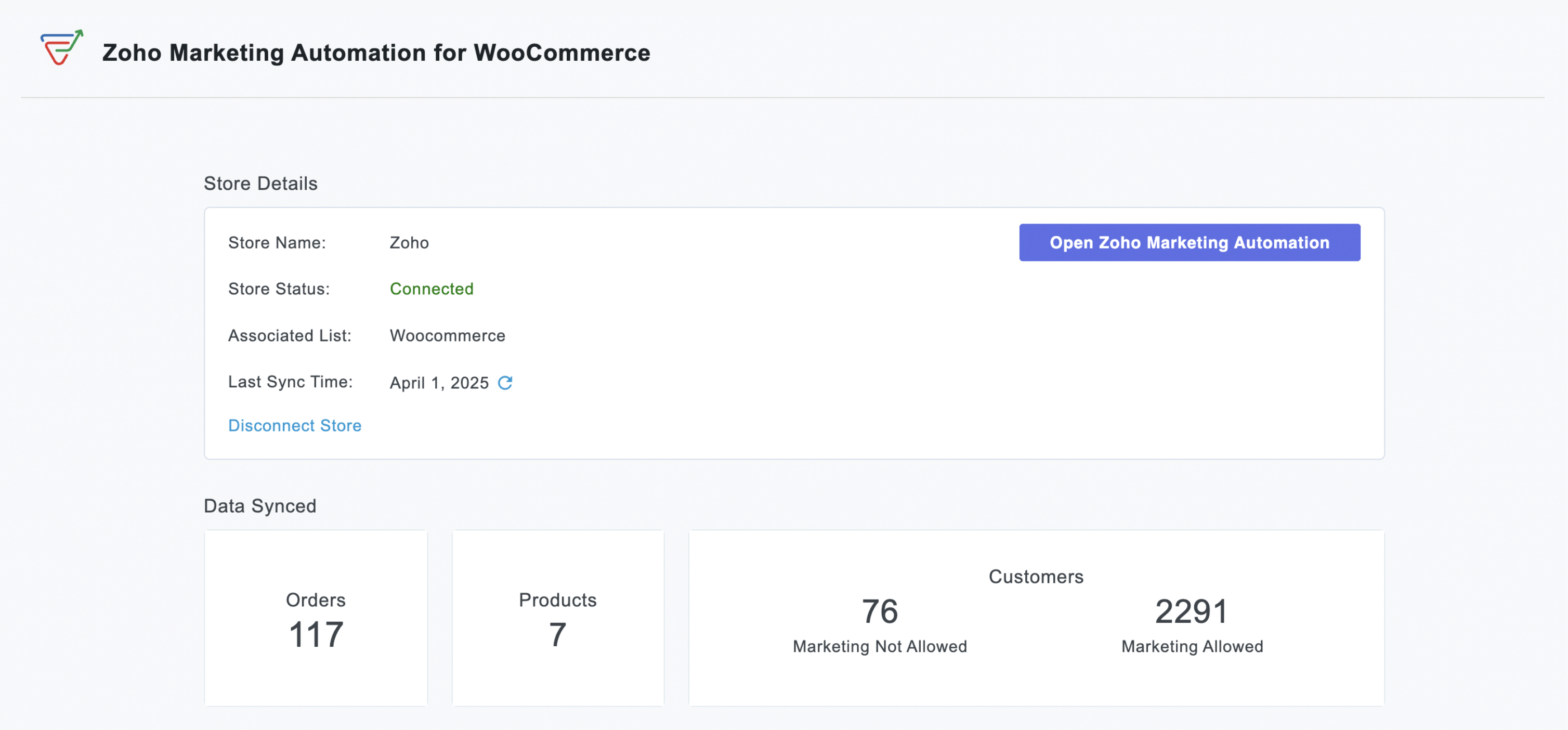
Previously, our WordPress plugin offered tools like the Web Assistant and signup forms to help you engage with your website visitors. Now, we've significantly expanded its capabilities with:
WooCommerce Integration:
- Seamless Data Sync: Automatically import customer data, order details, and customer segments into Zoho Marketing Automation for a comprehensive view of your audience.
- Targeted Campaign Automation: Launch automated emails for cart abandonment, post-purchase follow-ups, or personalized product recommendations based on buying behaviour.
- Purchase-Based Segmentation: Create dynamic lists using purchase data to deliver hyper-relevant promotions or loyalty programs.
- ROI Measurement: Measure how marketing efforts directly impact sales by linking campaigns to WooCommerce transactions.

Signup Forms:
Effortless Lead Capture: Capture leads directly on your WordPress site with high-converting signup forms.
Customizable Design: Design beautiful, brand-aligned forms to match your website's look and feel.
Easy Embedding: Embed forms anywhere on your site effortlessly using simple shortcodes.
Automatic Lead Sync: Captured leads sync automatically to Zoho Marketing Automation for immediate follow-up.
Visibility Control: Easily control form visibility with a simple on/off toggle.

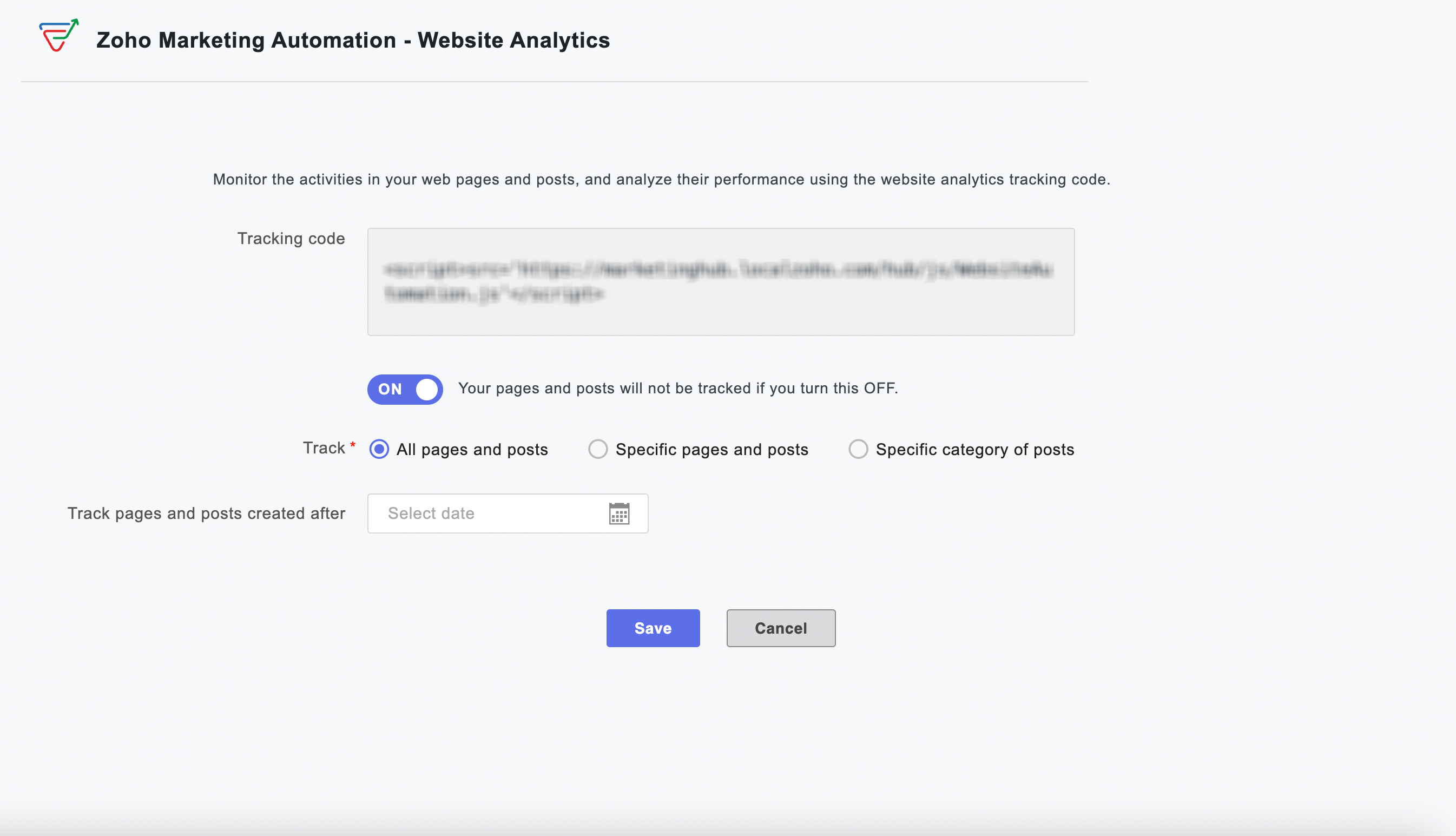
Web Analytics:
Visitor Behavior Insights: Gain powerful insights into how visitors interact with your website.
Engagement Tracking: Track time spent on pages and engagement patterns across your site.
Granular Tracking: Track all pages, specific content, or designated categories for detailed analysis.
Time-Based Analysis: Implement time-based tracking to focus on specific periods or new content.
Instant Activation: Activate or deactivate website tracking instantly from your WordPress dashboard.
Why this matters to your WooCommerce store
For every WooCommerce store owner, this integration represents a significant step towards unifying your marketing and sales efforts. Imagine the possibilities of automatically nurturing new customers with tailored content after their very first purchase, or re-engaging shoppers who have left items lingering in their cart, all happening automatically.
By leveraging real-time, actionable data from your WooCommerce store, you can craft highly personalized and effective marketing campaigns that are proven to drive conversions, significantly boost customer retention, and ultimately maximize your roi. This integration empowers you to move beyond generic marketing and create meaningful connections with your customers that translate directly into business growth.
Enhanced Capabilities, Simplified Workflow
Setting up is effortless—activate the integration within your WordPress dashboard and watch your store and website data flow into Zoho Marketing Automation.
Quick and easy plugin installation
From your WordPress dashboard, navigate to Plugins > Add New.
Search for "Zoho Marketing Automation" and click Install Now.
Click Activate.
We are confident that this powerful WooCommerce integration will be an invaluable asset for your business, enabling you to build stronger customer relationships, drive more sales, and achieve your e-commerce goals.
Happy marketing!
Best regards
Zoho Marketing Automation Team
Topic Participants
Moncy Samuel
Paulina J.
Jeshua Edward
Sticky Posts
Marketer’s Space - Automating CRM Actions with Journeys – Part 2
Hello marketers! Welcome back to another post in Marketer’s Space. In our previous post, we explored how CRM actions in Journeys help marketing and sales teams work together by nurturing CRM leads and pushing only engaged prospects back to sales. If youIntroducing automation and utility conversations in WhatsApp marketing
We’re excited to announce the addition of two new features to our WhatsApp integration: Automation and Utility conversations. These enhancements will allow you to streamline your marketing efforts and engage with your customers more effectively by automatingTip of the week 02 - The art of 'seeing' your leads
What's the last page that your lead visited before signing up for your brand? What was the page that first convinced your lead to explore more about you? Where are your leads coming in from? Well, these are some perennial questions today's marketers live upon. And, knowing the answers to these questions is crucial, considering the vitality of leads in every business. In the journey of finding lead opportunities, it's important to understand that every detail about a lead is useful. While the channelsZoho Marketing Automation Update: Topics, Contacts, and List Management
At Zoho Marketing Automation, our highest priority is making it easier for you to use our product to accomplish your business goals. With that in mind, we are updating three of our pivotal features: Topic, Contacts, and List Management. These existingImportant: Zoho MarketingHub is now Zoho Marketing Automation
Hello Everyone, We hope you all are doing well. We'd like to notify you that we have rebranded Zoho MarketingHub to Zoho Marketing Automation. We'll discontinue using the term "MarketingHub" from May 26, 2021. However, there will be no changes in the
Recent Topics
MX shopify problem
hello, i added all MX values in my shopify DNS - it shows those values on the shopify panel + your toolkit. I tried to send some email and it works, however on my gmail it says they cant verify this email. When i try to answer into my domain's email -Best Way to Manage Email Notifications While Running a Strategy Website
I am currently managing a content-based website, and I use Zoho Mail for handling contact forms, user queries, and collaboration emails. One challenge I am facing is organizing incoming emails efficiently, especially when messages come from differentWhat is the maximum email domains ?
I help manage about 20 associations and I'm looking for a way to centralize them in one place. Does Zoho Mail pro or enterprise support 20-30 domains for 3-5 users each?Add to Workdrive filter
I'm trying to create a filter that will upload attachments in emails and the e-mail body to a folder in workdrive. I am able to do one or the other (attachment, or e-mail content), but not both. I first tried it using the "Email (EML) + attachment" option.Forgot my admin Panel Id and password
Sir, I have an account , where a domain mycityestate.in is added for Zoho email , now it is hard for me to manage email because i have forgotten the Email account and password registered with Admin Panel of Zoho. Just need email name which is registeredMCP no longer works with Claude
Anyone else notice Zoho MCP no longer works with Claude? I'm unable to turn this on in the claude chat. When I try to toggle it on, it just does nothing at all. I've tried in incognito, new browsers, etc. - nothing seems to work.Knowledgebase SEO
We have a custom-domain mapped help center that is not restricted via login. I have some questions: a) will a robots.txt file still allow us to control indexing? b) do we have the ability to edit the sitemap? c) do category URLs get indexed by searchProblem with CRM Connection not Refreshing Token
I've setup a connection with Zoom in the CRM. I'm using this connection to automate some registrations, so my team doesn't have to manually create them in both the CRM and Zoom. Connection works great in my function until the token expires. It does not refresh and I have to manually revoke the connection and connect it again. I've chatted with Zoho about this and after emailing me that it couldn't be done I asked for specifics on why and they responded. "The connection is CRM is not a feature toNew Features: Repeat Last Action, Insert Cut/Copied Rows/Columns and Hyperlink
You might have noticed the constant updates to Zoho Sheet of late. Here are 3 more features that have been added to Zoho Sheet recently: F4 - Repeat Last Action Insert Cut/Copied Rows and Columns Insert Hyperlink Here is a screen cast demonstrating each of these features. Read further below to learn more about these new features. F4 - Repeat Last Action: You can now repeat the last action you made on your spreadsheet by using the keyboard shortcut, F4. It is quite handy and helps you get your workNeed help getting my mail on iPhone and Tablet
I need to access my Zoho mail via the iPhone Mail app. I have entered the login name, password and the incoming and outgoing servers, which my Mail Settings page says are imappro.zoho.com and smtppro.zoho.com. The iPhone keeps saying it cannot authenticate.Add an background image to an email template in CRM
Hi all, We wants to put an background image behind all our email templates. Is there a way to import this thru html. If i put the option background image in <body style="background-image:...</body> and i look to the preview it shows our background, butIs there a way to show contact emails in the Account?
I know I can see the emails I have sent and received on a Contact detail view, but I want to be able to see all the emails that have been sent and received between all an Accounts Contacts on the Account Detail view. That way when I see the Account detailHow do I bulk archive my projects in ZOHO projects
Hi, I want to archive 50 Projects in one go. Can you please help me out , How can I do this? Thanks kapilCopy contents of File Upload Field into Workdrive
Hello, I have set up our CRM so that a Workdrive folder is automatically created for each Deal via workflow, this adds the id of the folder into a dedicated field. We also have a field on each Deal called 'Approved Layout', which is a file upload field.Deleting a memorized email address
How can I delete a memorized email address? Even though the address has been deleted from Contacts, Zoho mail still auto suggests the address when typing it into the TO field. Thanks!ZeptoMail API
Hello Since today, we experience issues with the ZeptoMail API. When trying to send e-mails using: https://api.zeptomail.eu/v1.1/email we receive the error: (503) Site unavailable due to a traffic surge. Please try again shortly. I kindly ask you to identify553 Relaying disallowed. Invalid Domain - gzkcompany.ro
Hi there, Can you please assist me in getting the right domain settings? I just renewed my domain subscription, after expired and i got error: 553 Relaying disallowed. Invalid Domain - gzkcompany.ro Zoho mail can receive emails, but its impossible toNot able to receive emails for a while
I am not able to receive emails for a while now.Confirmation requested: eligibility and process to downgrade to Forever Free — tenant bigbanghawking.com
Thank you for your reply. I am testing Zoho Mail from Brazil with the tenant bigbanghawking.com (endpoint: mail.zoho.com) and we are currently on the Premium trial that expires 21/01/2026. Before deciding whether to pay or cancel, I need written confirmationZoho API v2.0 - get ALL users from ALL projects
Hello, I've been trying to work on an automatization project lately and I find it difficult to work with this strict structure. To be more explicit, if i would like to get all users participating in a project i would need to get all projects first. Same thing with projects. If i want to get all projects, I would need to get all portals first. The problem with this aproach is that it consumes a lot of time and resources. I want to ask if there is another way of gettingالموقع لا يقوم بالسداد
السلام عليكم ورحمة الله وبركاته وبعد من أمس وانا احاول السداد للدومين YELLOWLIGHT ولا اتمكن من السداد اقوم بتعبئة جميع البيانات ولكن دون جدوى يطلع لى حدث خطأ ماNew in Office Integrator: Enhanced document navigation with captions and cross references
Hi users, We're pleased to introduce captions, table of tables and figures, and cross-references in the document editor in Zoho Office Integrator. This allows you to structure documents efficiently and simplify document navigation for your readers fromWhere Do I set 24h time format in Cliq?
Where Do I set 24h time format? Thanks🎉 ¡Seguimos trayendo novedades a Español Zoho Community! 🎉 Confirmada la agenda y ubicación para los Workshops Certificados
Si todavía no te has hecho con tu entrada para nuestros Workshops Certificados del próximo 26 y 27 de marzo o, por el contrario, estabas esperando que confirmáramos dónde los celebraremos, ¡este post es para ti! 📍¿Dónde nos vemos?📍 Nuestros WorkshopsUser is already present in another account error in assigning users to marketing automation
Hello everyone Greeting, I had a problem in assigning user in marketing automation, when I try to add it I see this error: (User is already present in another account error) what should I do?How do I get complete email addresses to show?
I opened a free personal Zoho email account and am concerned that when I enter an email address in the "To", "CC", fields, it changes to a simple first name. This might work well for most people however I do need to see the actual email addresses showingWhat's New in Zoho POS - January 2026
Hello everyone, Welcome to Zoho POS’s monthly updates, where we share our latest feature updates, enhancements, events, and more. Let’s take a look at how January went. Sort and resolve conflicts Conflicts are issues that may arise when registers andOutlook is blocking incoming mail
Outlook is blocking all emails sent from the Zoho server. ERROR CODE :550 - 5.7.1 Unfortunately, messages from [136.143.169.51] weren't sent. Please contact your Internet service provider since part of their network is on our block list (S3150). It looksNot receiving email from customers and suppliers
I am getting error . most of the customers tell me not able to send me email please check i have attached screenshotCreate user
Hello I want to create user, but i get this error Unusual activity detected from this IP. Please try again after some time.File emails in Shared email folder
Hi, I am unable to allow users to collaborate in Shared email folders: User 1 shares a folder let's say "SharedTopic" with full permissions Users 2 and 3 can see this folder but are unable to add emails to this folder or search in this folder. For example,Consolidated report for multi-organisation
I'm hoping to see this feature to be available but couldn't locate in anywhere in the trial version. Is this supported? The main aim to go to ERP is to have visibility of the multi-organisation in once place. I'm hopeful for this.How to Switch from Outlook for Mac to Outlook for Windows
The most often used file formats for users to manage crucial data are OLM and PST files. PST files keep a copy of data on the configured system from Outlook, while the OLM file contains the Mac Outlook data items, which are only accessible with OutlookName autocomplete
Hi, During searching emails the web tool does not always propose the auto-completion of the saved emails. As a result I either have to go to contacts and look up the exact email, or the exact full name including the middle name and any dots, which isAre custom portals accessible on the Zoho learn smartphone app?
In other words, can users external to my organisation, once signed up, use the app in the same way as internal users? ThanksHow to increase my Zoho sign limit.
I cannot send a document/contract for signature. Zoho sign says I reached my monthly limit. May I know how to fix this please? Thanks!Can not add m365 outlook account to zohomail.
I am attempting to use zoho mail as an imap client to add my outlook.com m365 account. In the m365 exchange admin center i have made sure the imap is enabled. In zoho mail i go to settings, mail accounts, add account, add imap account, i select "outlook",Unable to attach Work Order / Service Appointment PDF to Email Notifications (Zoho FSM)
I’m trying to include the Work Order PDF or Service Appointment PDF as an attachment in Email Notifications (automation/notification templates), but I don’t see any option to attach these generated PDFs. Is this currently supported in Zoho FSM? If not,local file csv import problem
The issue occurs when I upload a CSV file via Databridge. In the preview, everything looks correct — the values are in the proper columns. However, after clicking Import, the first column becomes empty, and the values from that column appear in a newFunción Deshacer y Rehacer
Hola. Soy un reciente usuario de Zoho Notebook que he migrado desde Evernote. He encontrado en falta una función que considero muy importante: un botón para "deshacer". Es frustrante cuando se borra un parte del texto o un archivo de una nota, generalmenteNext Page