Introducing Zia GenAI: Zoho's Native Generative AI for Zoho Desk
Hello everyone,

Note: We have updated this announcement on 13th March 2025.
As of 7th March 2025, the following name changes are made with respect to Zia.
- Zia GenAI is updated as Zia
- Zia Powered by GPT is updated as Generative AI
- Native Generative AI is updated as Open Source Models
 Zia is available on Early Access for Zoho Desk Enterprise subscribers. Kindly fill out this Registration Form to request early access.
We are excited to announce the Beta release of Zia Native Generative AI in Zoho Desk, now available through our Early Access program. This model is designed to enhance the efficiency and quality of customer support, and we are inviting you to experience it firsthand.

Important notes
- Zia is currently available in AU, EU, US, and India data centers.
- Zia currently supports 13 languages - English, Spanish, German, Russian, French, Portuguese, Italian, Dutch, Danish, Swedish, Hindi, Arabic, Hebrew. We are actively working on expanding language support even further.
In the fast-paced world of customer support, efficiency, accuracy, and personalization are crucial. With this in mind, we're introducing Zia GenAI in Zoho Desk. While AI is already a key player in the service industry, Zia stands out by leveraging native genAI models to address specific challenges, such as:
- High response times
- Repetitive nature of routine queries
- Inconsistent responses across agents
- Limited contextual understanding of customer issues
- Difficulty of extracting actionable insights from vast amounts of customer data
By tackling these challenges, Zia helps support teams deliver faster, accurate, and personalized customer experiences.
Zia's advanced AI capabilities
Building on the foundation of Zia’s earlier tools—such as sentiment analysis for understanding customer emotions, keyword tagging for better ticket organization, and anomaly prediction for identifying irregular patterns—Zia takes these capabilities to the next level. It offers a more sophisticated contextual grasp of customer interactions, enabling it to provide highly relevant and actionable responses. By streamlining routine tasks and enhancing response quality, Zia empowers agents to focus on more complex customer needs and elevate the overall support experience.
Zia's generative skills
- Contextual ticket summaries
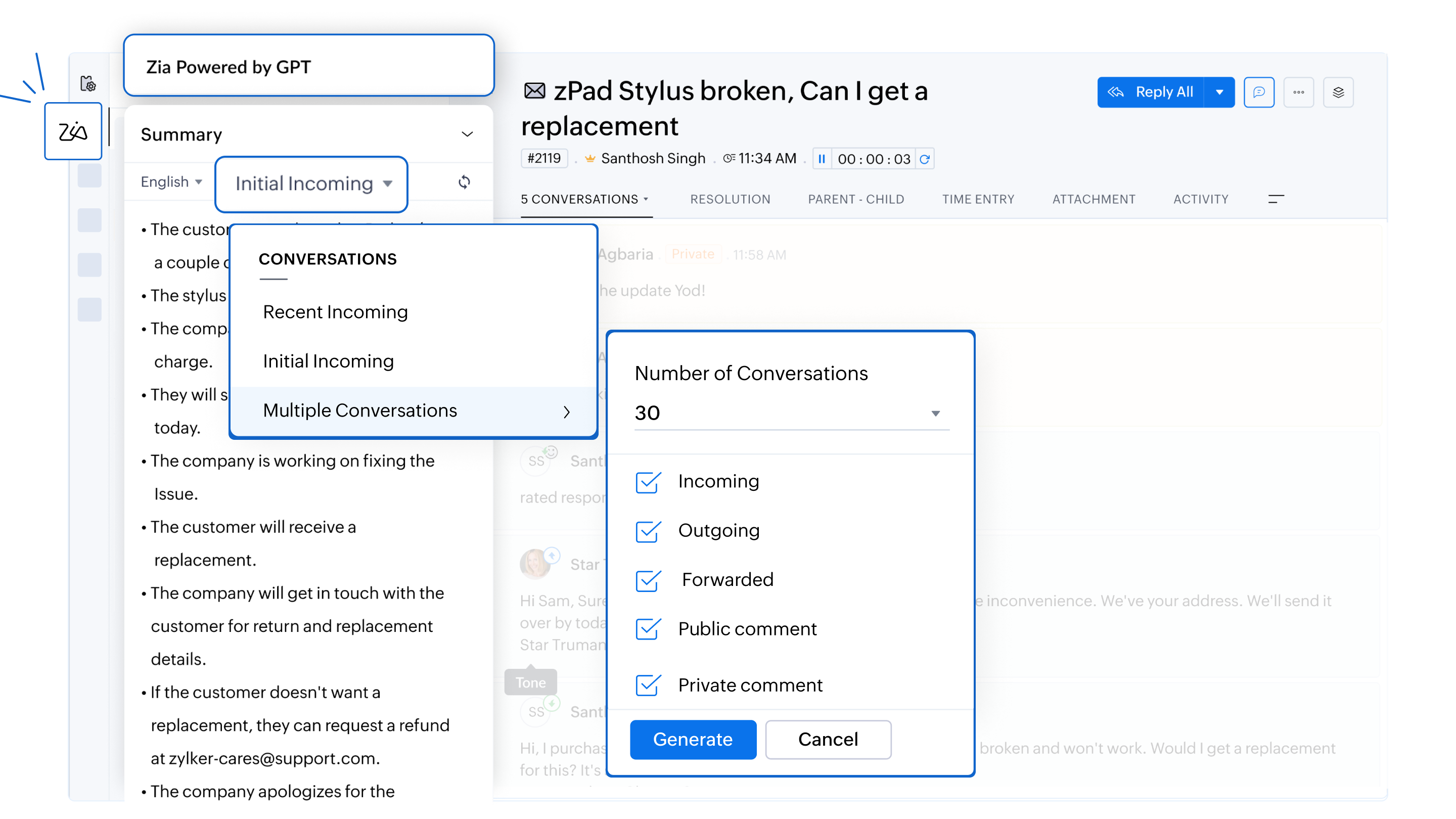
Zia provides concise summaries of incoming inquiries and previous conversations within a ticket. Agents can choose from different options, including recent, initial, or multiple ticket conversations (up to five), which cover all types of interactions—such as incoming, outgoing, forwarded, and public comments. This enables agents to quickly grasp the context and history of complex tickets, which ensures they can deliver informed, relevant, and efficient responses without having to read through lengthy ticket histories.
For example, if an agent is handling a long-running issue, Zia can generate a summary of the latest ticket conversations or earlier interactions within the same ticket, helping the agent provide a more precise response while saving time.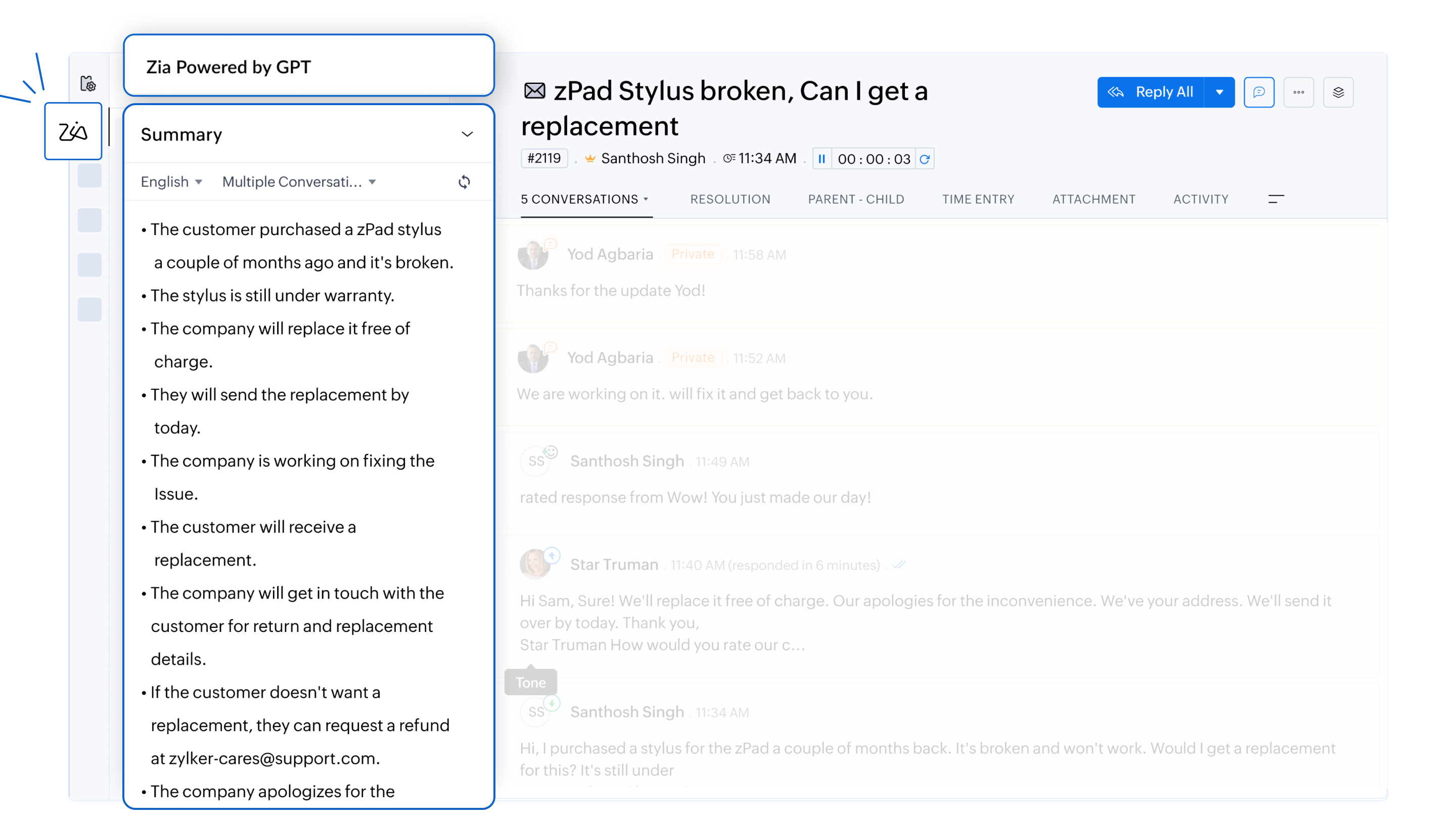
- Efficient responses with AI assistance
Zia analyzes customer inquiries and drafts responses based on the information available in the knowledge base articles. Whether it’s addressing policy-related questions or providing troubleshooting guides, agents can resolve issues faster.
For example, a ticket enquiring about a refund for a recently purchased item can be answered without an agent's intervention. Zia can analyze the tone of the email and draft a formal response with details on how to go about with the refund based on its analysis of the KB articles. It can also include the links to the company's refund policy and commonly asked questions related to the customer's request.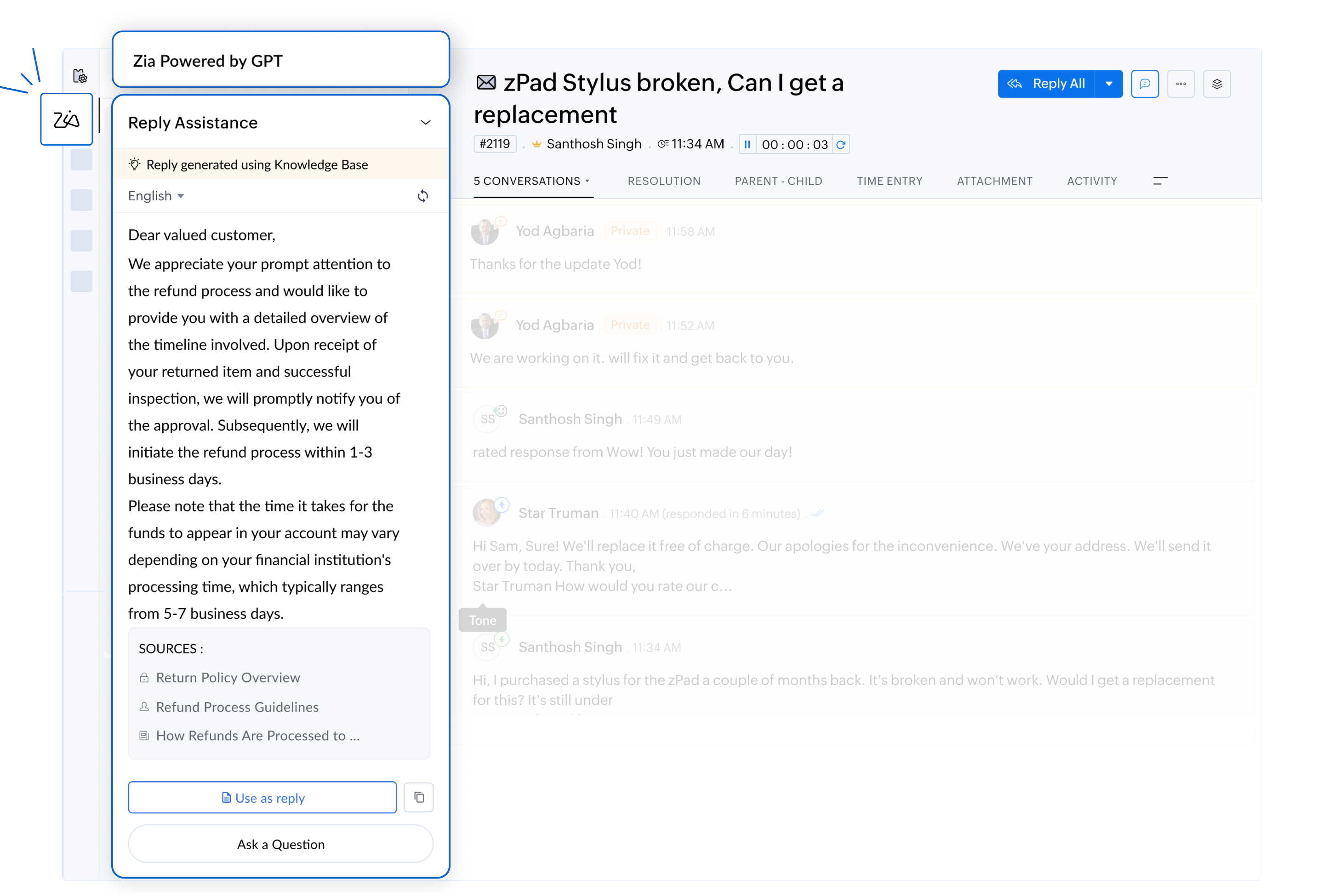
- Personalized and empathetic interactions
By analyzing the tone and sentiment, Zia helps agents draft responses that align with the emotional context of the conversation. Whether the situation requires an apology for a delay or a friendly response to a simple query, Zia ensures every interaction feels personalized.
For example, a customer reporting a delayed refund should receive an empathetic and prompt response. For routine inquiries, Zia will be more likely to suggest a friendly, concise reply.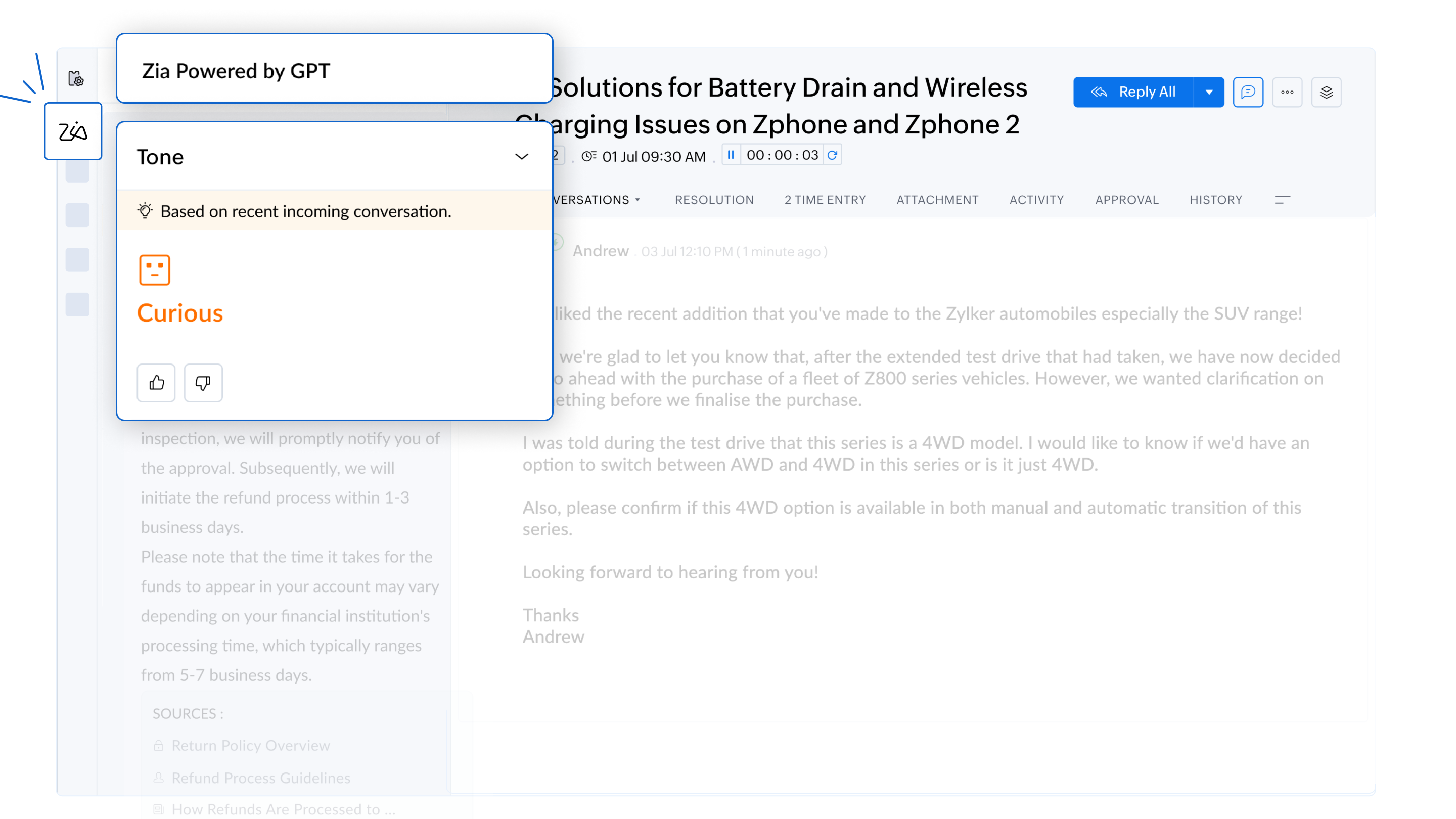
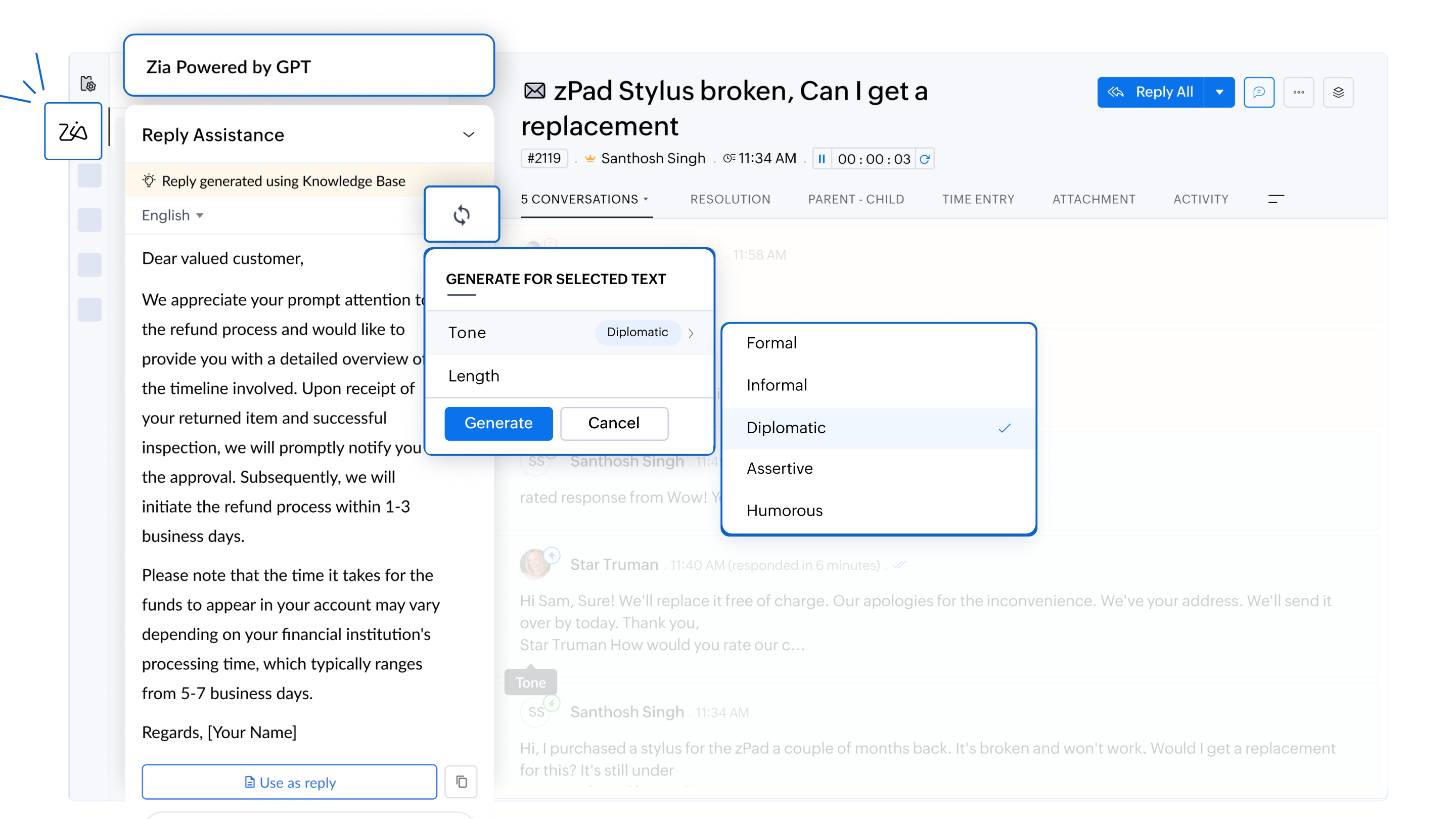
- Customizable response lengths
Zia enable agents to tailor the length of responses to suit customer needs. Whether a customer requires an in-depth explanation or a brief summary, agents can choose the most appropriate format to ensure clarity and efficiency.
For example, when a customer reports a technical error in the software, Zia can generate a detailed explanation to help resolve the issue or provide a concise troubleshooting guide based on the severity of the problem.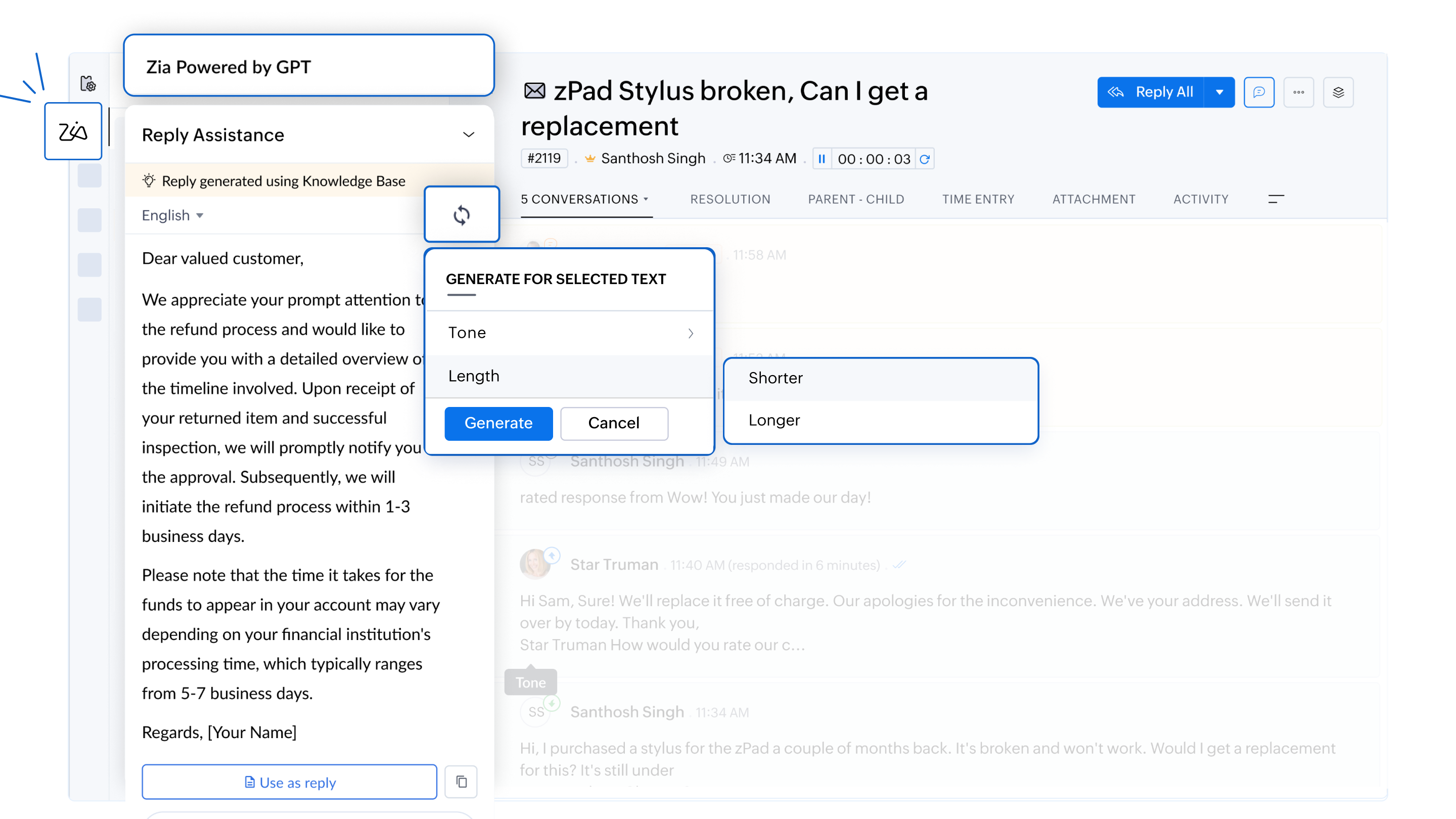
- Proactive knowledge base growth
Zia flags gaps in the knowledge base by identifying customer issues without documented solutions. This helps organizations continuously improve their knowledge repository, equipping teams to address similar issues more effectively in the future.
For example, if an agent encounters a unique issue without an existing solution, Zia notifies the team to create a new knowledge base article, helping future agents resolve similar problems more effectively.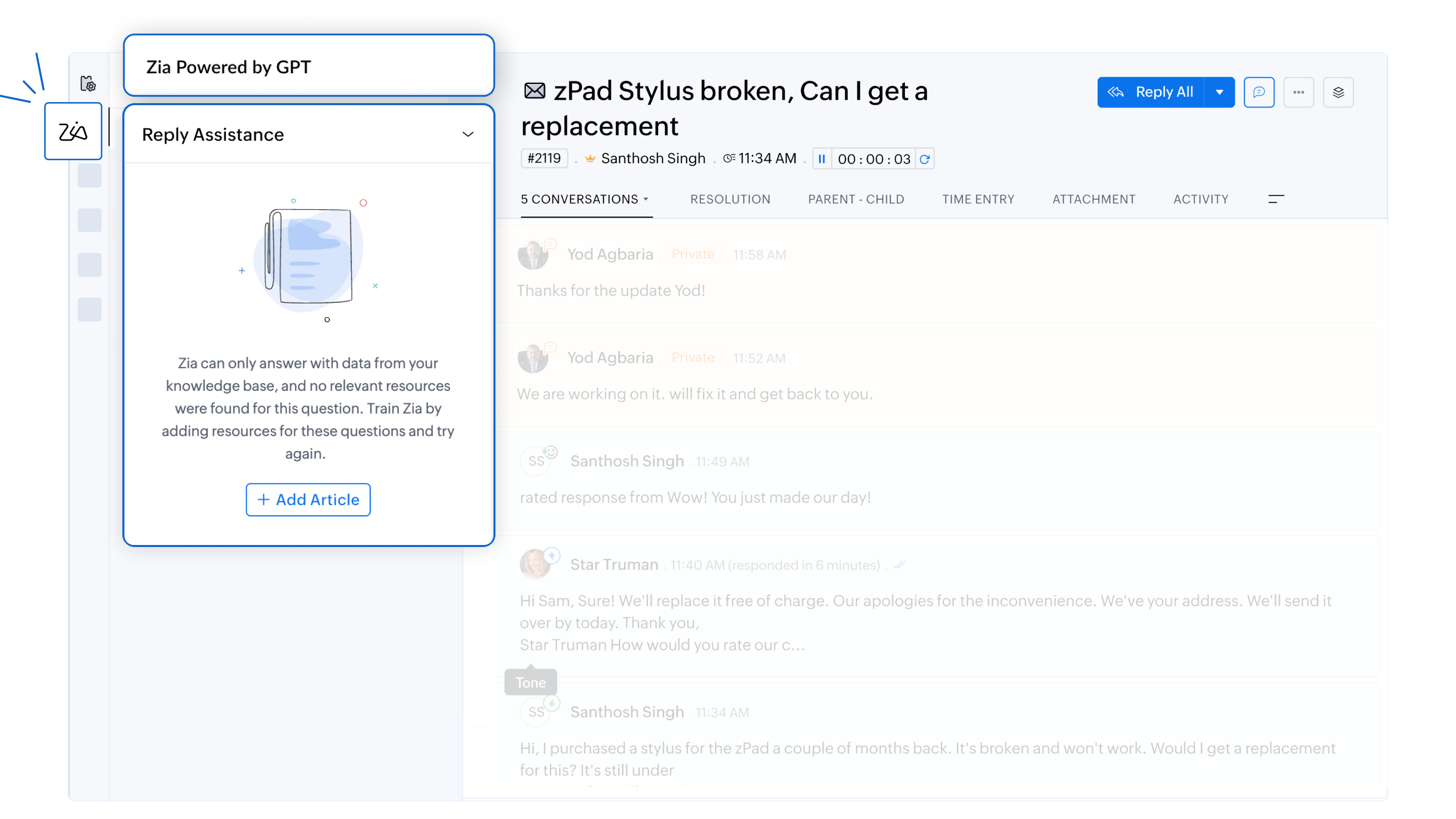
- Data privacy and security
Zia adheres to strict GDPR guidelines to ensure customer information remains secure. All responses are generated solely from the company’s knowledge base, and ticket data is not used for training purposes.
For more information on Zia and how to configure them, please refer to the detailed help documentation on
To enable this feature in your Zoho Desk account, please don't forget to fill out the registration form to request access. We look forward to empowering your support team with the power of AI.
For any questions or assistance, the support team is available via email at support@zohodesk.com, or queries and feedback can be left in the comment section below.
Thank you, and have a great day!
Regards,
Varsha P
Zoho Desk - User Education
Topic Participants
Varsha P
Zohoboy
Shivani | Zoho Desk
as
Alhatab Admin
Sticky Posts
2024 Email Authentication Standards: Elevating Security with Google and Yahoo
In contemporary email communication, email authentication plays a pivotal role in mitigating email fraud, spam, and phishing attacks. Brace yourself for a new level of security. Starting February 2024, Gmail and Yahoo will be implementing robust emailUsing Agent Email Address as From Address
Currently, while replying to a ticket, it is possible for agents to choose their own email addresses as 'from' addresses. Although we built this just for that little extra flexibility, in hindsight, it hasn't figured much in conventional usage. Almost all businesses prefer that responses to their customers' tickets be sent from the common support/service email address and NOT from those of individual agents. During personal interactions at events, some of you have even made passing mentions aboutEdit and Delete options in Comments
A lot of teams have been using ticket comments extensively to collaborate everyday. Notification Center further improved this experience by bringing real-time updates. As we continue to build more improvements to this experience, we've shipped a small-yet-importantWebinar 2: Supercharged customer support for growing business
Join us for this webinar and learn how to step up your support game using a real-time communication platform to generate happier, more successful customers. In this live webinar, we will will discuss the importance of SalesIQ for your support team and how it can help you: Understand your customers better and their journeys to proactively support and engage them even before they ask for help. Integrating real time conversations into Zoho Desk’s Support, providing a conversational customer serviceCustomize Colors of your Customer Self Service Portal
You asked for it. We heard you. We're happy to roll out the most sought after feature request, Customizing the Colors of your Customer Self-service Portal. Now you can set the color of your customer portal to mimic your company's web site, so that your customers visiting the portal will not feel alienated by the default theme. Go ahead and configure the color of the header, tabs, fonts and background according to your needs. You can either choose between default color themes like Blue, Grey, Green
Recent Topics
facing error 550 5.4.6 while sending emails
Please help me fix this issueMarketing Tip #9: Track your traffic sources
Not all marketing channels work equally well. Knowing whether your visitors come from Google, Instagram, or email helps you focus on what actually drives sales. Try this today: Check your Zoho Commerce reports or connect Zoho PageSense to see your topGoogle Analytics import data inaccurate (as of October 11, 2025)
We have Zoho Analytics connected to GA4 to import daily event data. This has been running without issue for a couple of years. However, a month ago we started noticing discrepancies. All data until October 10 lines up perfectly - October 11 onward isCan't make a document editable to anyone
Hey everyone, I am using Zoho Workdrive and trying to share a document so that it is editable by anyone with the link. I am trying to convince people to shift from Google to Zoho, but they don't have accounts yet. When I try to change the share settingsE-Invoicing in Belgium with Zoho Billing
Starting January 1, 2026, Belgium is introducing mandatory electronic invoices (e-invoicing) for all B2B transactions between VAT-registered businesses. Invoices and credits notes must be exchanged in a prescribed digital format. How E-Invoicing worksZoho Voice lance BYOC (Bring Your Own Carrier) : intégrez votre opérateur
Pour accompagner sa croissance, une entreprise a besoin d’une infrastructure téléphonique flexible et évolutive. Les solutions de téléphonie s’adaptent aux exigences du centre de contact, tout en intégrant aisément les opérateurs locaux de votre choix.Synchronise item image between Zoho Commerce and Zoho Books/Inventory/CRM
Here is a blindingly simple idea to tie several Zoho products together. Zoho - please include a method to synchronise the item image (or images) from one Zoho application to another. For example, if you upload an item image in Zoho Inventory, a user shouldZoho Recruit Slow and Freezing on all screens
We have had an issue with Zoho Recruit for weeks being extremely slow and at times freezing. We have 100 mega internet, and I went into each computer and updated the virtual memory so there is more available. Also restarted all computers daily. Still having the issues. Almost unable to work.Prevent accidental duplicate entry of Customer Ordersome
Zoho Support has confirmed that Zoho currently does not have any method (using Deluge, flow or any other method) to alert a user when a sales order has been entered twice using the same customer reference number (i.e. a duplicate). Most ERP platformsZoho Books | Product updates | November 2025
Hello users, We’ve rolled out new features and enhancements in Zoho Books. From translating email notification templates to the new transaction locking restrictions, explore the updates designed to enhance your bookkeeping experience. Making Tax DigitalInsert Image into Notebook page
Prior to today, I could add images to my notebook pages. Today when I tried to do this I got an error message that said something like, "There's been a problem on our end. Try again later." So, I've tried all the ways I know how, but I can't insert an【開催報告】名古屋 ユーザー交流会 Vol.2 2025/11/21 Zoho Analytics / Inventory で実現する在庫の"未来予測"
ユーザーの皆さま、こんにちは。コミュニティチームの中野です。 11/21(金)に名古屋 ユーザー交流会 を開催しました。 本投稿では、当日実施したセッションの様子及び投影資料をお届けします。 会場にて参加できなかった皆さまも、ぜひご参照ください。 (Zoho 社員セッションの登壇資料については、11/28(金)開催の東京回の開催報告で共有いたします) 今年2回目の開催となる名古屋 ユーザー交流会では、株式会社エンツナクリエイト 野末さんによる Zoho Analytics / InventoryIs there a way to automatically add Secondary Contacts (CCs) when creating a new ticket for specific customers?
Some of our customers want multiple contacts to receive all notifications from our support team. Is there a way to automatically add secondary contacts to a ticket when our support team opens a new ticket and associates it with an account? This wouldImproved RingCentral Integration
We’d like to request an enhancement to the current RingCentral integration with Zoho. RingCentral now automatically generates call transcripts and AI-based call summaries (AI Notes) for each call, which are extremely helpful for support and sales teams.Edit Pinned Comments in Zoho Desk
It's great that private comments can now be pinned to the top of the ticket but what would be extremely helpful would be to allow for the pinned comment to be edited vs. having to find the comment in the ticket to edit it.Updating Secondary Contact (CCs)
We use Zoho Forms to capture the user request and integrated with Zoho Desk to raise tickets. Active Microsoft login is captured in our Zoho forms and registered as Primary contact in Zoho desk ticket. We also an have an option to raise ticket on behalfShow Custom Button in Portal Listview Canvas
I have created a custom button that shows in a list view of deals (internally I can see it). I have permissions to allow this button on the portal. But it is not displaying in the canvas list? Before I do too much leg work, is this function allowed?Email Opt Out Question
Has the problem where if a customer is emailed opt out prevents you sending standard emails? For me this feature is simply to stop any email marketing and should not block people from receiving emails via Zoho mobile, which makes no sense.blank page after login
blank page after logging into my email account Thanks youWriterTh
After every space Writer goes to capital letters mode in my Android tablet. The cap mode stays till the second letter is typed in the word then it comes to normal mode.Does Thrive work with Zoho Billing (Subscriptions)?
I would like to use Thrive with Zoho Billing Subscriptions but don't see a way to do so. Can someone point me in the right direction? Thank youZoho writer unable to merge documents to PDF with basic fonts in Hebrew or fonts from my computer
I created several forms that will be merged into PDF files through Zoho Writer and I am unable to receive the PDF in the basic fonts of the Hebrew language or in the fonts I have on my computer. The writer exports to PDF an exchange font that looks veryI have already created some Bots, Commands, and Widgets in Cliq, but I am still not seeing the “Create Extension” option in my account. Could you please help me enable or access this option?
How to setup DKIM / SPF in Zoho Mail
Hello there! I'm having a hard time understanding how to setup the TXT records for SPF and DKIM with Zoho Mail. I'm following the instructions here: https://www.zoho.com/campaigns/help/setup-spf-dkim.html Specifically, when it comes to the value for theUnveiling Zoho Sites 2.0 - A new dimension in website building
Dear Zoho Sites Users, We are thrilled to announce the launch of Zoho Sites 2.0 today! This refresh represents a significant step forward in the capabilities of Zoho Sites and is crucial for creating a lasting and positive impact on our customers' businesses.Cliq iOS can't see shared screen
Hello, I had this morning a video call with a colleague. She is using Cliq Desktop MacOS and wanted to share her screen with me. I'm on iPad. I noticed, while she shared her screen, I could only see her video, but not the shared screen... Does Cliq iOS is able to display shared screen, or is it somewhere else to be found ? RegardsUnusual activity detected from this IP. Please try again after some time
When i try to create new addresses on my account i am getting this error, it has been 24 hours now and i am still getting this error can anyone helpSupport www.camcard.com
Hi, Is it possible CRM Zoho have integrations with https://camcard.com/? Thanks Br, AndyNeed to add a new admin for my domain
Hello Zoho Support, I am the owner of the domain localeistanbul.com. The current super admin account (admin@localeistanbul.com) is not accessible. I do not want to reset or delete the existing account because I need to keep all existing emails. PleaseInfinite loop of account verification
Hi I can't do anything on my zoho account. I always get this message Hi Sheriffo Ceesay As a security measure, you need to link your phone number with this account and verify it to proceed further. When ever I supply the details, it displays that the number is associated with another account. I don't have any other account on zoho so this is really annoying.Subform edits don't appear in parent record timeline?
Is it possible to have subform edits (like add row/delete row) appear in the Timeline for parent records? A user can edit a record, only edit the subform, and it doesn't appear in the timeline. Is there a workaround or way that we can show when a userHow we cut CRM updates from ~20 minutes down to 2, our real workflow
Updating the Zoho CRM after every call used to be one of the biggest time sucks for our team. By the time you write your notes, clean them up, fill in the fields, and log everything properly… you’ve easily lost 15–20 minutes per call. We started experimentingThis domain is not allowed to add. Please contact support-as@zohocorp.com for further details
I am trying to setup the free version of Zoho Mail. When I tried to add my domain, theselfreunion.com I got the error message that is the subject of this Topic. I've read your other community forum topics, and this is NOT a free domain. So what is theArattai App Features Update
1. Offline Messaging & Sync Enable users to compose messages without internet and deliver them automatically via peer-to-peer methods (Bluetooth/WiFi Direct) when nearby users are available. This would be a game-changer for rural India with unreliableZoho Books Sandbox environment
Hello. Is there a free sandbox environment for the developers using Zoho Books API? I am working on the Zoho Books add-on and currently not ready to buy a premium service - maybe later when my add-on will start to bring money. Right now I just need aHow to add Product Add-Ons, Mandatory Forms, and Auto-Save Address in Zoho Commerce
Hi all, I need help setting up several behaviors in Zoho Commerce. I can’t find the correct configuration options, so I want to confirm whether these are supported or if there is a workaround. 1. Product-Specific Add-Ons (Example: GWB Subscription) WhenNot able to link email text.
Kindly check Zoho Sites. I am unable to turn a text into a email link. The save button does not work. Kindly try yourself to see it not responding to save.Zoho Workdrive - Communication / Chat Bar
Hi Team, Please consider adding an option to allow admins to turn on or off the Zoho Communication Bar. Example of what I mean by Communication Bar: It's such a pain sometimes when I'm in WorkDrive and I want to share a link to a file with a colleagueZoho CRM - Writing Assistant Tone
Hi Zoho CRM Team, Text in my emails often gets underlined in yellow because I tend to use a more informal tone with my client's, like using "I'm" instead of "I am". Is there some way for me to tell the system that this is my preferred writing tone, soProposal for Creating a Unique "Address" Entity in Zoho FSM
The "Address" entity is one of the most critical components for a service-oriented company. While homeowners may change and servicing companies may vary, the address itself remains constant. This constancy is essential for subsequent services, as it providesNext Page