Hello all!!
Welcome back to a fresh Kaizen week.
This week, we will continue with another Actions API -
Webhooks API in Zoho CRM.
Webhooks in Zoho CRM
A webhook allows Zoho CRM to send real-time information to another application the moment something important happens. Webhooks let CRM push data instantly to an external URL whenever the workflow condition is met.
Webhooks do not notify on every record event by default. They trigger only when specific automations, such as a Workflow Rule you configure, are executed. This helps for specific real-time automation needs, such as sending high-value leads to an external validation service.
Use case
Zylker, an IT solutions provider, uses Zoho CRM to manage all incoming leads. But not every new lead is ready for the Sales team right away. Not all leads need immediate follow-ups. For leads with a high Profit Score (80+), it usually means strong buying intent, but they may contain fake information.
Why does Zylker use Zoho CRM and send these leads to an external validation application?
Before Sales reaches out, Zylker wants to make sure these high-value leads have valid information. While CRM keeps the lead data organized, a specialized third-party validation systems check any fraudulent activities and confirm whether the email, phone number, or other details are real.
To do this quickly, Zylker uses Webhooks in Zoho CRM. The moment a lead crosses the 80+ score, Zoho CRM automatically sends the lead’s data to Zylker’s external validation system. This lets Zylker verify the lead in real time and send back a clean, accurate, sales-ready profile for the Sales team to follow up on.
From here, we will explain every part of Webhooks by showing how it looks in the Zoho CRM UI and how to do the same using the API. Each step will be shown side-by-side, so you can clearly see how the UI setup translates into the API request.
Configuring Webhooks for Zylker’s Use Case - UI Method
- Go to Setup
- Navigate to Automation
- Choose Actions -> Webhooks
- Click Configure Webhook
You will see the window shown below.
Webhook - UI view
The following sections explain what each field means in three parts:
- Basic fields to configure Webhook.
- Configuring Headers
- Configuring Body
Filling the basic Webhook details via UI
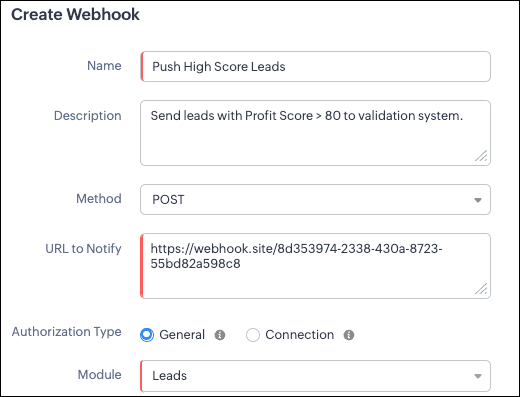
Filling the basic Webhook details via Create Webhook API
Request URL: {{api-domain}}/crm/v8/settings/automation/webhooks
Request Method: POST
Input JSON
{ "webhooks": [ { "name": "Push High Score Leads", "description": "Send leads with Profit Score > 80 to validation system.", "module": { "api_name": "Leads", "id": "5725767000000002175" }, "authentication": { "type": "general" }, "http_method": "POST" } ] }
|
Keys explanation
- name (mandatory): Name of your webhook.
- description: Add a short note about what this webhook does.
- module (mandatory): Select the module from where the external application listens the changes. In our case, select Leads module to push high-score leads.
- url (mandatory): Specify the external endpoint where CRM will send the data. This lets the external application see what CRM sends.
- Note: In this post, we have used an endpoint from Webhook.site
- authentication (mandatory): Specify authentication type for the webhook endpoint.
- Possible types:
- general: The receiving system does not require OAuth. You can pass OAuth tokens manually in headers.
- connections:
- OAuth-based integrations: Systems that use Zoho’s Connections.
- For our Zylker use case, we select General.
Note: In
Zoho CRM API V8, Webhooks currently support only General authentication. Connection-based authentication will be available in a future update.
- http_method (mandatory): Select a HTTP method that allows you to send structured data.
Possible values: POST, GET, PUT, DELETE
In our case, we use POST to create a new record in the external app with the necessary lead details, allowing the external system to run its validation checks.
HTTP methods and their supported parameters - Headers, Body, URL Parameters
HTTP Method | Headers | Body | URL Parameters |
POST | Module parameters Custom parameters
| Type: form-data
Module parameters Custom parameters User-defined parameters
Formats: null
Type: raw
Formats: Text, JSON, HTML, XML | Not Supported |
PUT | Module parameters Custom parameters
| Type: form-data
Module parameters Custom parameters User-defined parameters
Formats: null
Type: raw
Formats: Text, JSON, HTML, XML | Not Supported |
GET | Not Supported | Not Supported | - Module parameters
- Custom parameters
- User-defined parameters
|
DELETE | Not Supported | Not Supported | Module parameters Custom parameters User-defined parameters
|
Each HTTP method supports different parameter types. The above table shows which methods support Headers, Request Body, and URL Parameters. Detailed explanations of these parameter types are provided in the following section.
Creating a Webhook with Headers, Body, and URL Parameters
When a webhook is triggered in Zoho CRM, the data is sent to the external application as part of the HTTP request.
The data can be sent in three places:
- Headers
- Body (Form-Data or Raw)
- URL Parameters
Each part serves a different purpose.
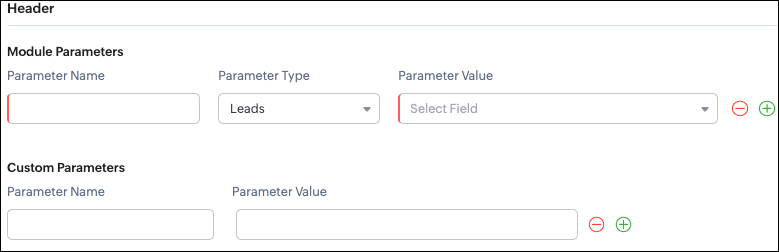
Configuring Headers
UI - Configuration

Headers allow you to send
extra information along with your webhook request. These help when the external app needs extra data like auth tokens or CRM field values.
Zoho CRM supports two types of headers:
- Module Parameters - Dynamic values from CRM fields
- Custom Parameters - Static values you define
Module Parameters - dynamic CRM data
Module parameters allow you to send values from CRM fields inside the header. These values change depending on the record that triggered the webhook.
A module parameter consists of:
- Parameter Name - A unique header key that you define. It does not have to match the CRM field API name.
- Parameter Type - Defines the source of the data you are mapping. It can come from the selected CRM module such as Leads and Contacts, lookup fields, User fields such as Lead Owner, or Organization fields.
- Parameter Value - The merge field value. Example, ${!Leads.Created_By.id}
Note: If you decide to use Headers, then you must add at least one module_parameter. Otherwise CRM will show an error.
Example:
Parameter Name | Parameter Type | Parameter Value |
Lead_Email | Leads | Email |
Annual_Revenue | Leads | Annual Revenue |
Profit_Score | Leads | Profit Score |
Created_By | Created By | User Id |
Custom Parameters - static values
Custom parameters are key-value pairs that never change.
These are useful for:
- API version
- Tags like “zylker-crm”
Name | Value |
source | zylker-crm |
version | v1 |
Request URL: {{api-domain}}/crm/v8/settings/automation/webhooks
Request Method: POST
Input JSON
{ "webhooks": [ { . . . "http_method": "POST", "headers": { "module_parameters": [ { "name": "Lead_Email", "value": "${!Leads.Email}" }, { "name": "Annual_Revenue", "value": "${!Leads.Annual_Revenue}" }, { "name": "Profit_Score", "value": "${!Leads.Profit_Score}" }, { "name": "Created_By", "value": "${!Leads.Created_By.id}" } ], "custom_parameters": [ { "name": "source", "value": "zylker-crm" }, { "name": "version", "value": "v1" } ] } } ] }
|
When should Zylker use Headers?
For the 80+ Profit Score validation use case, Zylker can include module parameters such as Lead Email, Profit Score, and Lead ID, which are helpful for fraud-detection tools.
Similarly, Zylker can include custom parameters like source=zylker-crm and api_version=v1 to help the external system identify where the webhook originated.
Configuring the Body of a Webhook - form-data & raw formats
After setting up the basic details and Headers, the next step is to configure the Body.
The Body is where the main CRM record data is sent, which is different from the Header section that only carries metadata like auth tokens or quick identifiers.
Depending on your needs, the Body can be either Form-Data or Raw. The list below shows the supported options for each format.
- Form-Data:
- Module parameter
- Custom parameter
- User-defined format.
- Raw:
- Text - plain messages
- JSON - structured API payload
- HTML - formatted messages
- XML - traditional enterprise systems
Form-Data Body: key-value
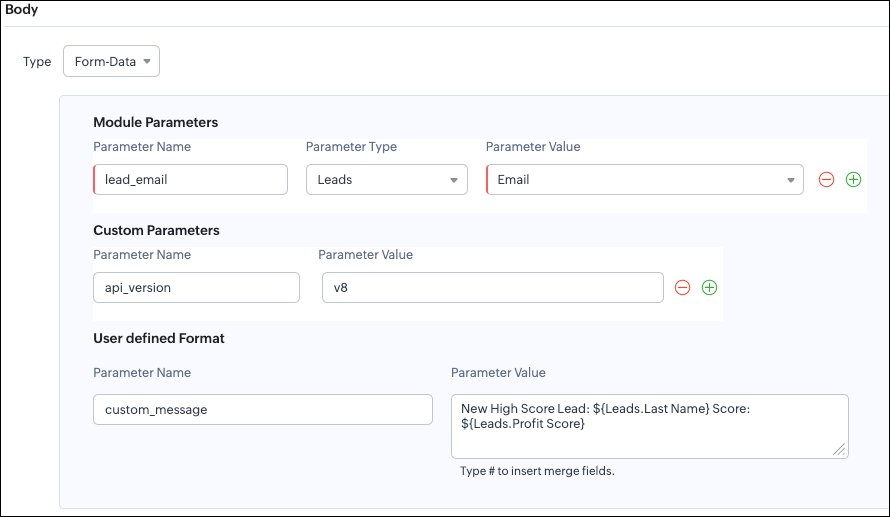
UI - Configuration
Zoho CRM lets you build Form-Data using three types of parameters:
- Module Parameters
- Custom Parameters
- User Defined Parameters
Use Form-Data when the external app expects key-value pairs - similar to how HTML forms submit data.
Note:
- Headers are for sending supporting information that helps the external system understand the request - this can include auth details, source identifiers, or key CRM fields like email or score that help with quick categorization or filtering.
Why do Module and Custom parameters appear again in Form-Data?
The same Module Parameters and Custom Parameters are available in the Body because:
- Headers - Provide supporting details such as identifiers or quick-check values. For example, Lead ID, or source tags that help the external system check and route the request.
- Body - Contains the complete lead information that the external validation system needs to process.
Although the parameter names look the same (Module, Custom), their purpose changes:
Where parameters are used | Purpose | Example |
Headers | Metadata - OAuth,tags, and context | source: zylker-crm |
Form-Data (Body) | Main record data - actual lead details sent to the app. | lead_email=patricia@zylker.com |
So Zoho CRM gives you the same structure, but used differently depending on where the data is placed.
User-Defined Parameters
User-Defined parameters let you build custom, human-readable messages or templates. This parameter is available only in the Body, not in Headers.
Parameter Name | Parameter Value |
custom_message | New high-score lead: ${Leads.First Name}${Leads.Last Name} (Score: ${Leads.Profit Score}) |
This is very helpful if your external app expects a text message, notes, or a description field.
Configuring the Body of a Webhook - form-data via Create Webhook API
Request URL: {{api-domain}}/crm/v8/settings/automation/webhooks
Request Method: POST
Input JSON
{ "webhooks": [ { . . . "body": { "form_data_content": { "module_parameters": [ { "name": "Lead_Email", "value": "${!Leads.Email}" }, { "name": "Annual_Revenue", "value": "${!Leads.Annual_Revenue}" }, { "name": "Profit_Score", "value": "${!Leads.Profit_Score}" }, { "name": "Created_By", "value": "${!Leads.Created_By.id}" } ], "custom_parameters": [ { "name": "source", "value": "zylker-crm" }, { "name": "version", "value": "v1" } ], "user_defined_parameters": { "name": "custom_message", "value": "New high-score lead: ${!Leads.First_Name}${!Leads.Last_Name} (Score: ${!Leads.Profit_Score})" } }, "type": "form_data" }, . . . } ] }
|
Raw Body - JSON / XML / HTML / Text
Zoho CRM’s Webhook Body section allows you to send data to an external application in a Raw format. This is useful when the receiving system expects structured data in the following structure.
You can choose:
- Raw + Text
- Raw + JSON
- Raw + HTML
- Raw + XML
Raw + Text:

Text format is the simplest. You can type any text and insert merge fields.
UI - Configuration
When to use Text?
- When sending a simple message.
- When the external app only expects plain text.
Configuring the Body of a Webhook - Raw - "Text" via Create Webhook API
Request URL: {{api-domain}}/crm/v8/settings/automation/webhooks
Request Method: POST
Input JSON
{ "webhooks": [ { . . . "body": { "raw_data_content": "New high score lead: ${!Leads.First_Name} ${!Leads.Last_Name}, ${!Leads.Email}, ${!Leads.Annual_Revenue}, ${!Leads.Phone}, ${!Leads.Industry}, ${!Leads.Owner}", "format": "Text", "type": "raw" }, . . . } ] }
|
Raw + JSON:
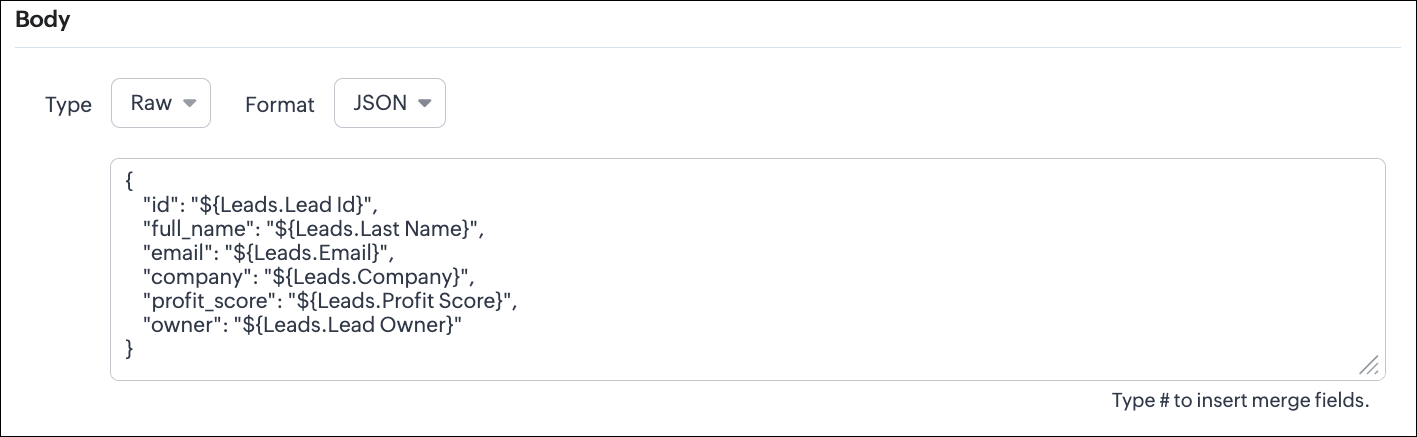
This is the most common format for APIs. Use this when the receiving system expects structured JSON data.
UI - Configuration
Configuring the Body of a Webhook - Raw - "JSON" via Create Webhook API
Request URL: {{api-domain}}/crm/v8/settings/automation/webhooks
Request Method: POST
Input JSON
{ "webhooks": [ { . . . "body": { "raw_data_content": "{\n \"id\": \"${!Leads.id}\",\n \"full_name\": \"${!Leads.Last_Name}\",\n \"email\": \"${!Leads.Email}\",\n \"company\": \"${!Leads.Company}\",\n \"profit_score\": \"${!Leads.Profit_Score}\",\n \"owner\": \"${!Leads.Owner}\"\n}", "format": "JSON", "type": "raw" }, . . . } ] }
|
When to use JSON?
- When the external system expects structured data
- Easier validation
Raw + HTML:
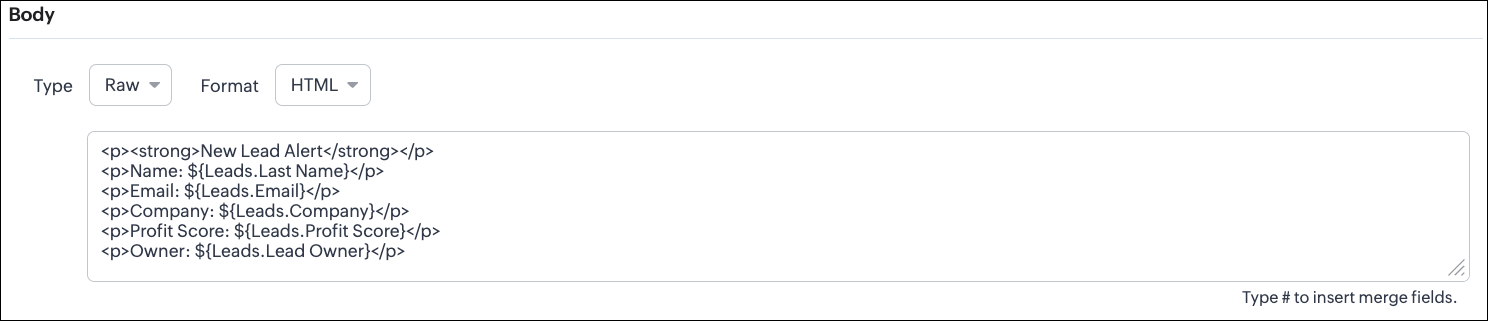
HTML format is useful for sending stylized messages or formatted content.
UI - Configuration
Configuring the Body of a Webhook - Raw - "HTML" via Create Webhook API
Request URL: {{api-domain}}/crm/v8/settings/automation/webhooks
Request Method: POST
Input JSON
{ "webhooks": [ { . . . "body": { "raw_data_content": "<p><strong>New Lead Alert</strong></p>\n<p>Name: ${!Leads.Last_Name}</p>\n<p>Email: ${!Leads.Email}</p>\n<p>Company: ${!Leads.Company}</p>\n<p>Profit Score: ${!Leads.Profit_Score}</p>\n<p>Owner: ${!Leads.Owner}</p>", "format": "HTML", "type": "raw" }, . . . } ] }
|
When to use HTML?
- If the external system displays formatted output
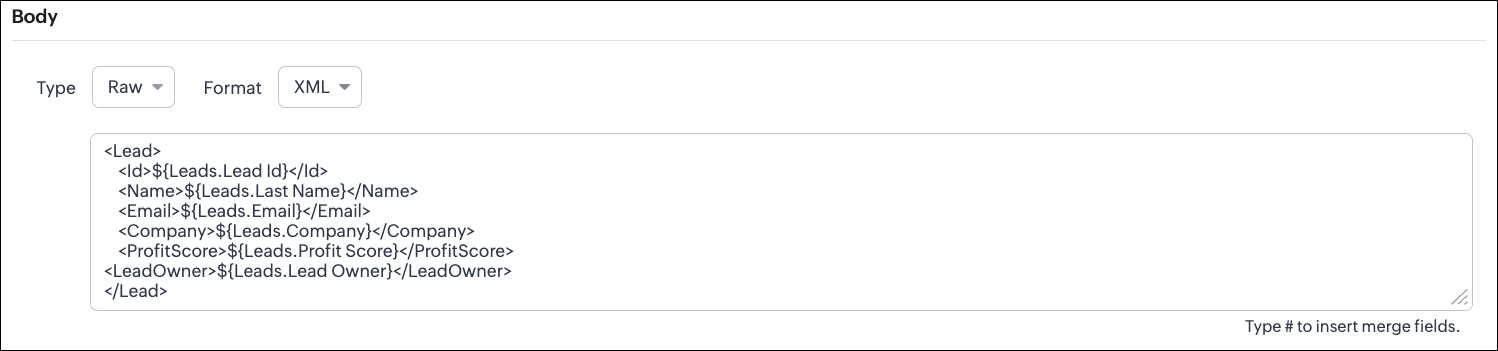
Raw + XML:
Some legacy systems or enterprise applications prefer XML.
UI - Configuration
Configuring the Body of a Webhook - Raw - "XML" via Create Webhook API
Request URL: {{api-domain}}/crm/v8/settings/automation/webhooks
Request Method: POST
Input JSON
{ "webhooks": [ { . . . "raw_data_content": "<Lead>\n <Id>${!Leads.id}</Id>\n <Name>${!Leads.Last_Name}</Name>\n <Email>${!Leads.Email}</Email>\n <Company>${!Leads.Company}</Company>\n <ProfitScore>${!Leads.Profit_Score}</ProfitScore>\n<LeadOwner>${!Leads.Owner}</LeadOwner>\n</Lead>", "format": "XML", "type": "raw" }, . . . } ] }
|
When to use XML?
- With older systems
- When the receiving system only supports XML
Note:
- When you switch the webhook method in the UI, Zoho CRM changes the options you can configure:
GET Method
- Only URL Parameters are available
- Headers are hidden
- Body is hidden
- Because GET requests always send data through the URL and cannot carry a body.
DELETE Method
- Headers are available
- URL Parameters are available
- Body is still not supported
- DELETE requests can include headers, but Zoho CRM does not allow sending a body for DELETE webhooks.
- Date-time format:
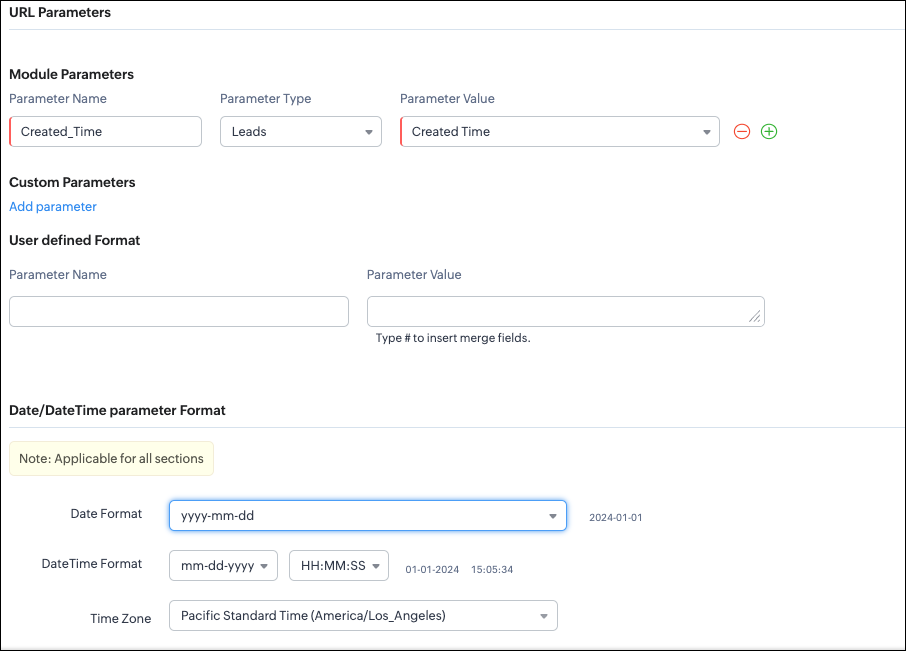
Zoho CRM will format any Date or DateTime fields in your webhook according to the format you select.
UI - Configuration
API - Configuration
{ "webhooks": [ { "module": { "api_name": "Leads", "id": "5725767000000002175" }, "url_parameters": { "module_parameters": [ { "name": "Created_Time", "value": "${!Leads.Created_Time}" } ] }, "description": "Send leads with Profit Score > 80 to validation system.", "http_method": "GET", "name": "Push High Score Leads", "date_time_format": { "datetime_format": "mm-dd-yyyy HH:MM:SS", "date_format": "yyyy-mm-dd", "time_zone": "America/Los_Angeles" }, "authentication": { "connection_name": null, "type": "general" } } ] }
|
With this, we have covered what a
Webhook is in Zoho CRM, how to configure a basic Webhook, how to configure a Webhook with Headers, Body, and URL Parameters, how each component works, how to configure them using the UI, and how the same setup can be created through the
POST Webhooks API.
In Part 2, we will explain
- How to manage Webhooks using the GET, PUT, and DELETE Webhook APIs
- How to associate a Webhook with a Workflow
- How to perform real-time testing by creating records
- How an external application receives data from Zoho CRM via Webhook.
We hope this post helps you understand how to use Webhooks through the Zoho CRM Actions API -
Webhooks API.
Try it out, and let us know your experience in the comments section or reach out to us at
support@zohocrm.com.
Stay tuned for more insights in our upcoming Kaizen posts!
Cheers!
Recent Topics
Separate Items & Services
Hi, please separate items and services into different categories. Thank you
Scheduled sending of a poll and its results
Is there a way to schedule sending a poll to all my users and have the results sent separately to the team?
How to list services on quote instead of products
I need to create a customer facing estimate that displays our services. The default quote layout only allows products to be listed. Is there a way to correct this?
Customize Calendar view in Teamspaces Settings
Right now every customization that happens inside of the calendar view inside of CRM is only visible for the specific user. We want to be able to set up calendar views as an admin for specific roles. I would suggest to do that inside of the settings of
CRM->INVENTORY, sync products as composite items
We have a product team working in the CRM, as it’s more convenient than using Books or Inventory—especially with features like Blueprints being available. Once a product reaches a certain stage, it needs to become visible in Inventory. To achieve this,
Add an option to disable ZIA suggestions
Currently, ZIA in Zoho Inventory automatically provides suggestions, such as sending order confirmation emails. However, there is no way to disable this feature. In our case, orders are automatically created by customers, and we’ve built a custom workflow
What's new in Zoho Sheet: Simplify data entry and collaboration
Hello, Zoho Sheet community! Last year, our team was focused on research and development so we could deliver updates that enhance your spreadsheet experience. This year, we’re excited to deliver those enhancements—but we'll be rolling them out incrementally
Zoho Desk API - Send Reply to CUSTOMERPORTAL
Hello! I'll try to send a reply to Customer Portal, But the response is 500 (INTERNAL_SERVER_ERROR in service response). {"Error":"{\"errorCode\":\"INTERNAL_SERVER_ERROR\",\"message\":\"An internal server error occurred while performing this operation.\"}"}
validation rules doesn't work in Blueprint when it is validated using function?
I have tried to create a validation rule in the deal module. it works if I try to create a deal manually or if I try to update the empty field inside a deal. but when I try to update the field via the blueprint mandatory field, it seems the validation
Zoho Creator Developer Console | Improved Distribution and Lifecycle Management for apps
Hello everyone, We're excited to introduce new enhancements now in the Zoho Creator Developer Console. These updates strengthen private app distribution through licensing controls and extend environment support across all installed apps, helping teams
CRM gets location smart with the all new Map View: visualize records, locate records within any radius, and more
Hello all, We've introduced a new way to work with location data in Zoho CRM: the Map View. Instead of scrolling through endless lists, your records now appear as pins on a map. Built on top of the all-new address field and powered by Mappls (MapMyIndia),
WhatsApp IM in Zoho Desk always routes to Admin instead of assigned agent
Hello Zoho Experts, I connected WhatsApp IM to my Zoho Desk account. I only assigned my Customer Service (CS) agent to the WhatsApp channel, and I did NOT include Admin in this channel. However, every new WhatsApp conversation automatically gets assigned
Zoho CRM for Everyone's NextGen UI Gets an Upgrade
Hello Everyone We've made improvements to Zoho CRM for Everyone's Nextgen UI. These changes are the result of valuable feedback from you where we’ve focused on improving usability, providing wider screen space, and making navigation smoother so everything
[Webinar] Solving business challenges- Handling the challenge of transitioning to Zoho Writer from legacy tools
Moving to Zoho Writer is a great way to consolidate your business tools and become more agile. With multiple accessibility modes, no-code automation, and extensive integration with business apps and content platforms, Zoho Writer helps solve your organization's
hide resolution from help centre
to my surprise, i just found out that the resolution text is public in the helpcenter, even if 'notify customer' is off. is there a workaround to that? how do others deal with this? How zoho support does this and I don't think its used by Zoho in the first place. the resolution is meant to be private, not public
Feature Request - Gift Cards or Gift Voucher Capability in Zoho Commerce
Hi Zoho Commerce team, I'm comming accross more and more retail businesses who sell gift cards. As there is currently no way to manage this in Zoho Commerce, it is a blocker to addoption. This is particularly popular in Europe and North America. I recently
Highlight a candidate who is "off limits"
Hello: Is there a way to highlight a candidate who is "off limits"? I would like to have the ability to make certain candidate and / or Client records highlighted in RED or something like that. This would be used for example when we may have placed a candidate somewhere and we want everyone in our company to quickly and easily see that they are off limits. The same would apply when we want to put a client or former client off limits so no one recruits out of there. How can this be done? Cheers,
Closing off tasks automatically based on project status
Is there a way to close off all open tasks when a project is set as Cancelled?
CRM x WorkDrive: File storage for new CRM signups is now powered by WorkDrive
Availability Editions: All DCs: All Release plan: Released for new signups in all DCs. It will be enabled for existing users in a phased manner in the upcoming months. Help documentation: Documents in Zoho CRM Manage folders in Documents tab Manage files
[Free webinar] Understanding connections and datasources in Zoho Creator - Creator Tech Connect
Hello everyone, We’re excited to invite you to another edition of the Creator Tech Connect webinar. About Creator Tech Connect The Creator Tech Connect series is a free monthly webinar featuring in-depth technical sessions designed for developers, administrators,
Bridge the Gap Between your Service and Finance Teams
In field service, the most expensive distance isn’t the drive to a customer’s home—it’s the gap between a finished job and a paid invoice. Zoho FSM leverages the power of Zoho Invoice to handle and manage billing operations. It enables you to: Instantly
Direct URL to "View Record"
I would like to create a button (Deluge Script) to jump to the "view record" without passing by the record menu, but I can not aford to find the right url. I don't want the "view record" as a single page. I want the "view record" in the application like the picture below: Thanks in advance for your help
Live Chat for user
Hi everyone, I’m new to Zoho Creator and wanted to ask if it’s possible to add a live chat option for all logged-in portal users so they can chat internally. I’m trying to create a customer portal similar to a service desk, but for vehicle breakdowns,
SalesIQ Chat Owner to CRM Lead Owner Mapping
There is no proper mapping between the SalesIQ chat owner and the CRM lead owner. When a chat is assigned to an agent, the lead created in CRM is often assigned to a different user, forcing admins to manually change ownership every time. This creates
Does zoho inventory need Enterprise or Premium subsrciption to make Widgets.
We have Zoho One Enterprise and yet we can't create widgets on inventory.
Product line search in quotes
Is there a way to change the search setting when you add a product line to a quote. We have created a field in products called 'Part Number' and I would like when I'm adding a product line to the quote that I can search on that field. At the moment it only searches on product description. In products I can search on the 'Part Number' field Any help welcome.
Invoice status on write-off is "Paid" - how do I change this to "Written off"
HI guys, I want to write off a couple of outstanding invoices, but when I do this, the status of the invoices shows as "Paid". Clearly this is not the case and I need to be able to see that they are written off in the customer's history. Is there a way
🚀 WorkDrive 6.0 (Phase 1): Empowering Teams with Content Intelligence, Automation, Accessibility, and Control
Hello, everyone! WorkDrive continues to evolve from a robust file management solution into an intelligent, secure, and connected content collaboration platform for modern businesses. Our goal remains unchanged: to simplify teamwork, strengthen data security,
Storage Limits
Hello, What is the storage limitations for each user on professional edition? Thanks, Mekki
Optimum CRM setup for new B2B business
Can some advise the most common way to setup Zoho CRM to handle sales for a B2B company? Specifically in how to handle inbound/outbound emails. I have spent hours researching online and can't seem to find an accepted approach, or even a tutorial. I have
Dheeraj Sudan and Meenu Hinduja-How do I customize Zoho apps to suit my needs?
Hi Everyone, I'm Meenu Hinduja and my husband Dheeraj Sudan, run a business. I’m looking to tweak a few things to fit my needs, and I’d love to hear what customizations others have done. Any tips or examples would be super helpful! Regards Dheeraj Sudan
Important Update: Google Ads & YouTube Ads API Migration
To maintain platform performance and align with Google's newest requirements, we are updating the Google Ads and YouTube Ads integrations by migrating from API v19 to the newer v22, before the official deprecation of v19 on February 11, 2026. Reference:
Zoho Recruit Community Meetup - London 🇬🇧
Hello Recruiters! We’re excited to announce that the Zoho Recruit team is coming to the UK for an in-person Zoho User Group (ZUG) Meetup in London! This is your chance to connect with fellow Zoho users, learn from experts, and walk away with actionable
Power Pivot and Data Modeling functionality in Zoho Sheet
When will MS Excel functionalities like Power Pivot and Data Modeling functionalities be available in Zoho Sheet?
Sender Email Configuration Error.
Hello Team, Hope you are all doing well. We are in the process of creating the Zoho FSM environment in the UAE. When we try to add the sender email address “techsupportuae@stryker.com”, we receive the error message: “Error occurred while sending mail
Canvas View bug
I would like to report a bug. When clone a canvas view from an existing canvas view, if the original canvas view have canvas button with client script. Then the new create canvas view will have canvas button, it is make sense. But when I try to delete
Global Search placement in the new UI
Having a hard time with the global search placement in the UI redesign. Surely I can't be the only one. Previously global search placement was perfect. A bar at the top/center of the page. Exactly where you would expect it to be. Since the new UI has
What's New - January 2026 | Zoho Backstage
Welcome to 2026! If you thought last year was big, buckle up. We’re stepping into this year with a singular focus: unimaginable growth, elite scalability, and performance benchmarks that leave the old ways of event management in the rearview mirror. As
Cliq on your mobile phone
Some of the employees in my company get their cliq on their mobile phones but it will not let them answer the call. The employee has to go to their laptop to access it.
Bulk Delete Messages in Cliq
Isn't it possible to bulk delete messages in Cliq? I have them delivered to me as notifications from another service but most of them need to be deleted as not of value. I get dozens of them per day, and deleting them is already difficult is the "Delete"
Next Page