Let’s Talk Recruit: Forms that think before you do!
Welcome back to our Let's Talk Recruit series. In our previous post, we shared highlights from our community meetups held across India.
This time, we’re talking about something that often gets overlooked but makes a huge difference once you set it up right: Webforms and Form Rules.
Let’s say you're rolling out a hiring drive or posting jobs on multiple channels. Candidates start pouring in—but half of them forget to attach their resumes, a few skip critical questions, and some apply to the wrong roles altogether. And that’s before you’ve even started shortlisting.
That’s exactly the kind of cleanup Webforms and Form Rules are built to prevent. They help you collect the right details, personalize the experience for candidates, and automate the little things that usually slow you down. And once you get the hang of them, you'll wonder why you didn’t start sooner.
The Problem
If your team still relies on email attachments or inconsistent spreadsheets to gather applicant info, chances are you’re wasting time fixing errors that shouldn’t exist in the first place.
Candidates entering outdated contact details
Missing info on key fields like skill set, location, or availability
Manually categorizing candidates for different roles or hiring pipelines
Without a structure in place, things slip through the cracks. And when you're hiring at scale, that’s a problem.
Why Webforms matter
A webform is often the first step a candidate takes to engage with your company. Whether it’s embedded on your careers page, linked on a social post, or shared during campus drives — it sets the tone.
But a lot of recruiters still use basic forms. Candidates fill them out, and then it’s a game of manual edits, sorting, and follow-ups.
What if the form did more? What if it already knew:
Which fields to show and when?
Whom to assign the record to?
Whether the candidate should be redirected after submission?
That’s where form rules come in.
What are Form Rules?
Form rules let you customize the candidate’s experience while they’re filling out the form by triggering actions based on their input.
Actions include: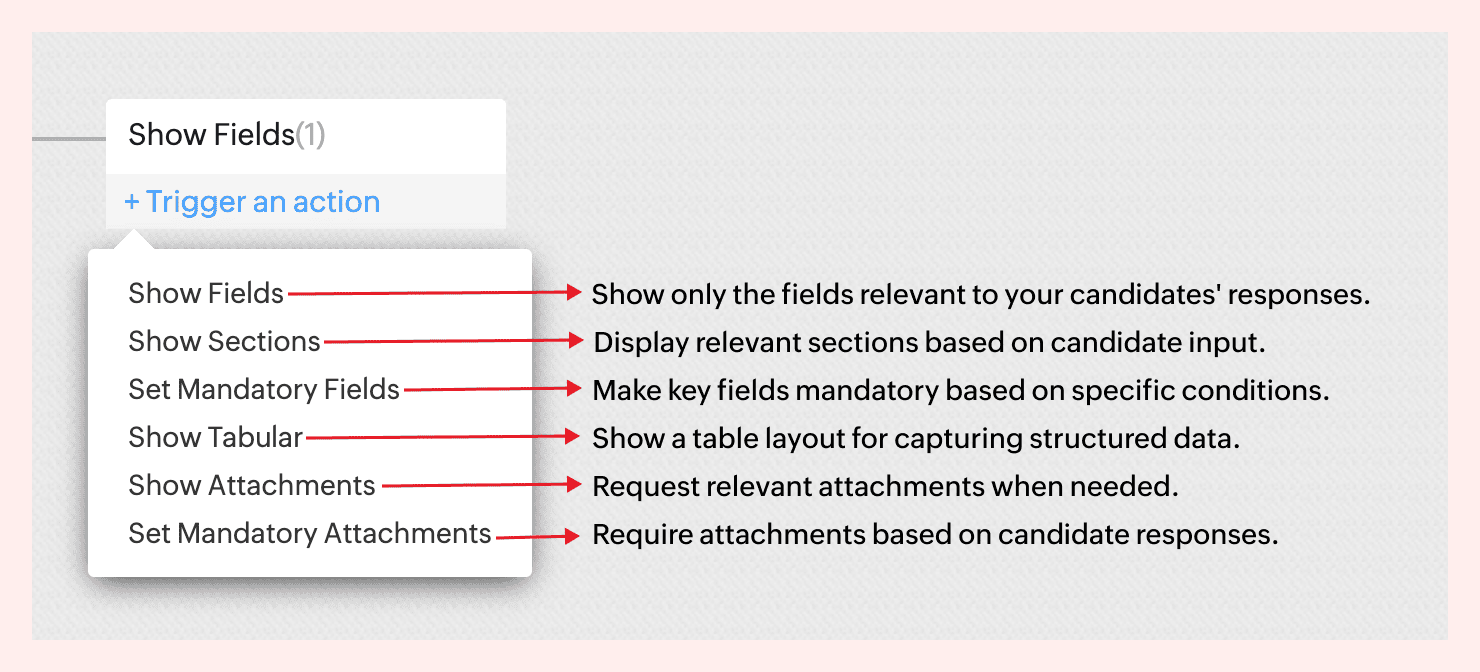
For instance, not all candidates come with the same background—and your forms shouldn’t treat them like they do.
If a candidate indicates they’re a fresher, there’s no need to show fields like Work History or Current Salary. But if they’re experienced, you might want to ask about key projects, past employers, or management experience.
With form rules, you can create this branching logic in just a few clicks—keeping the form clean for early talent and detailed where it matters.
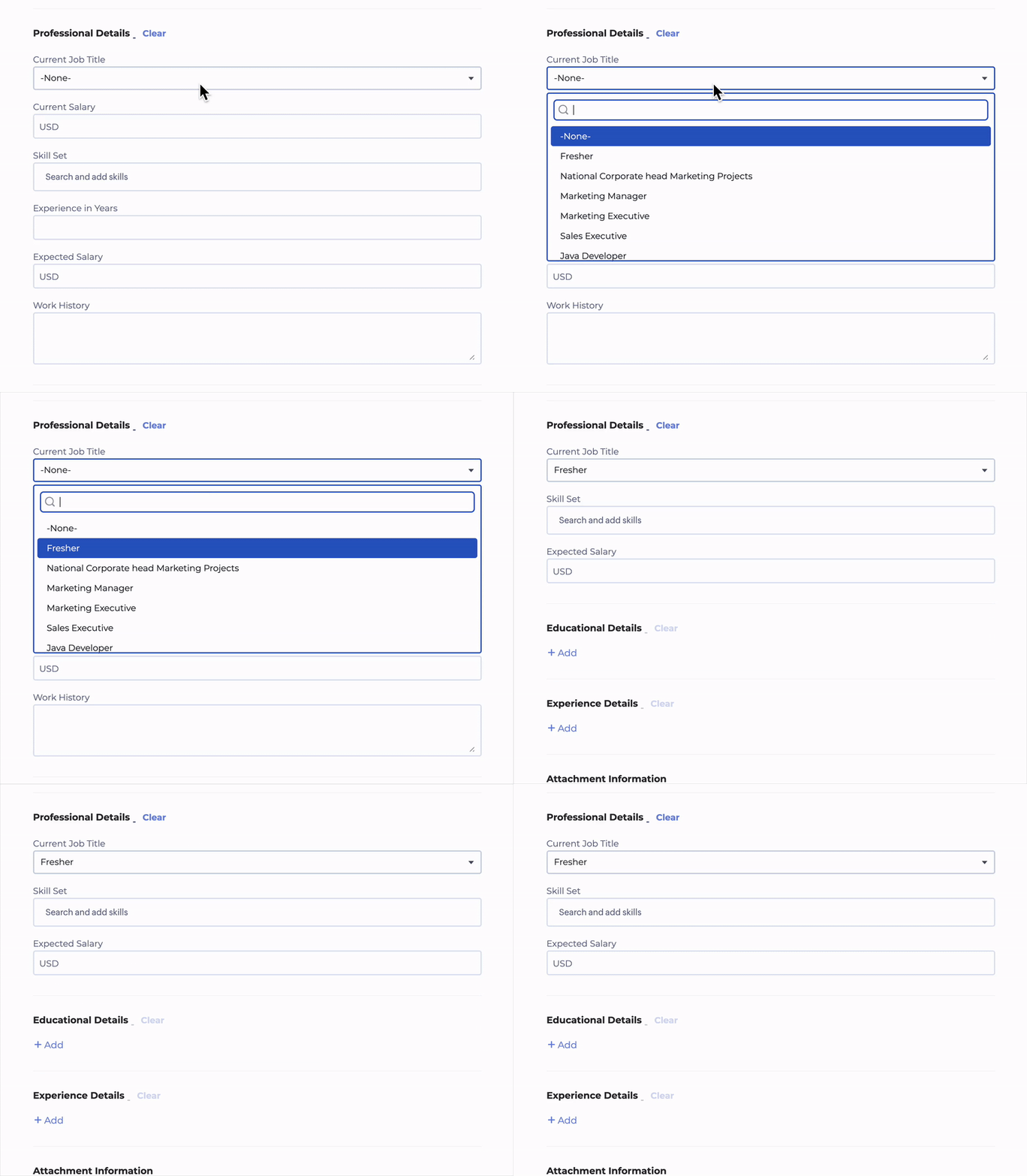
No code required. Just simple logic-based conditions.
→ Learn more
A few use cases to consider
Client Intake to Job Requisition
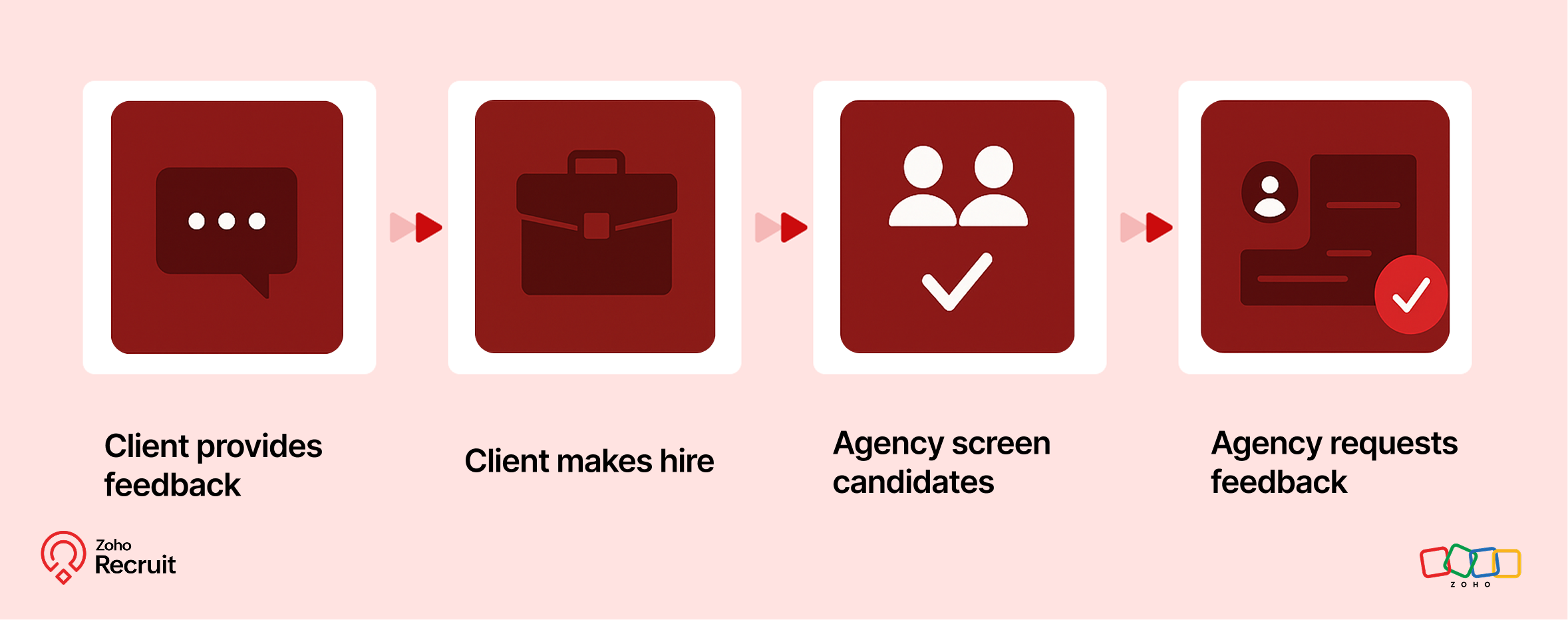
Step 1: Client submits contact form
Embed a Contact webform on your website to capture leads—clients who want to work with your staffing agency.
Step 2: Client shares job details
Once onboarded, clients can submit job requirements through a Job Requisition form. These details feed directly into your system.
Step 3: Agency hires candidates
Use the shared job details to source, match, and hire candidates for the role.
Step 4: Agency requests feedback
After successfully filling positions, request feedback from clients using a Feedback webform.
Candidate Onboarding & Documentation
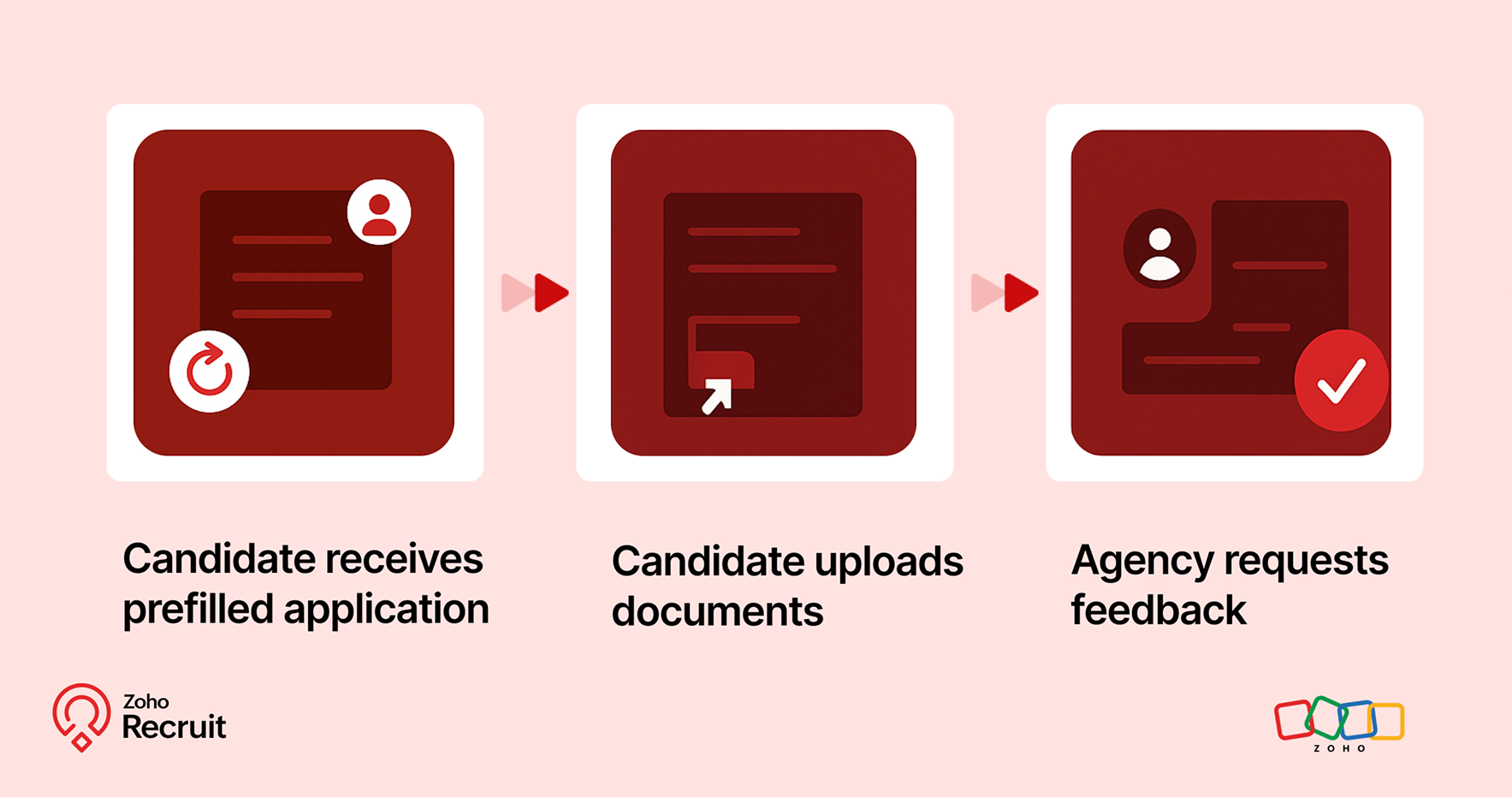
Step 1: Candidate receives prefilled application
Once candidates are selected, use known data to prefill details into a Background Check form.
Step 2: Candidate uploads documents
Share the form with candidates to collect necessary documents—ensuring accuracy and reducing redundant data entry.
Step 3: Agency requests feedback
After onboarding is complete, send a Feedback webform to capture the candidate’s experience.

A quick look at the numbers
Webforms and Form Rules aren’t just about convenience — they actually influence how well candidates interact with your hiring process.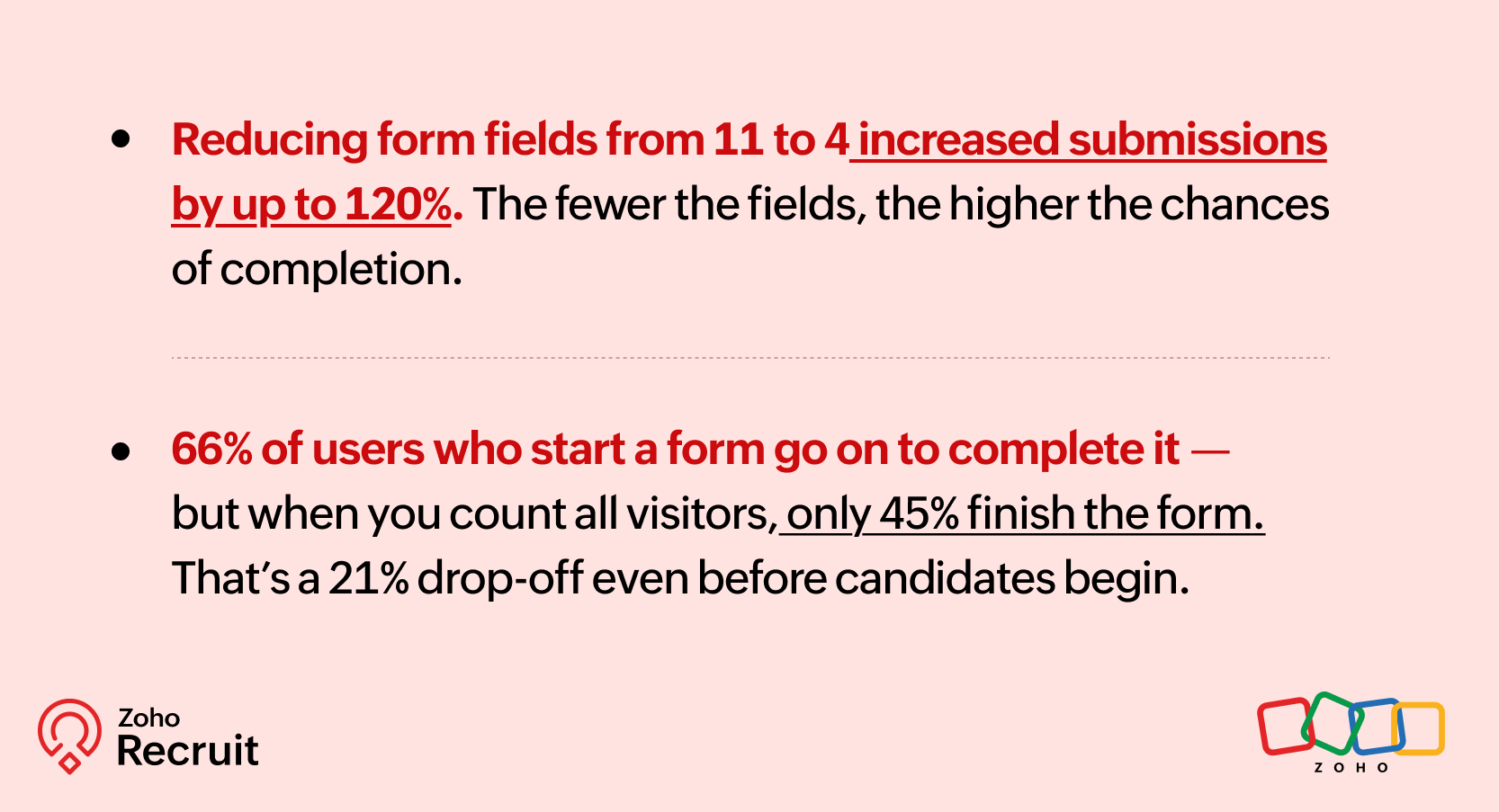
These numbers reinforce what we already know — clearer, shorter, and smarter forms can keep more candidates moving forward.
Getting started: A few setup tips
If you’re new to webforms or haven’t reviewed your setup in a while, here are three things to check:
Do you have job-specific forms?
A generic form might be easier to maintain — but it might also be collecting unnecessary or missing important info.Have you mapped fields correctly?
Ensure that all form fields map directly to your Recruit modules (Candidate, Job Opening, etc.) to avoid duplicates or errors.Are you using rules to simplify things?
Even one simple rule — like showing a “Notice Period” field only for full-time roles — can improve form quality.
Need help setting this up? Here’s how to build a webform and how to configure Form Rules.
Let’s Talk Recruit!
Do you already use Webforms in your hiring flow? Have you explored conditional form rules yet—or is that still on your to-do list?
Drop your experience below or tell us what kind of form use case you'd love to automate—we're all ears (and maybe one of our product folks will drop in with a tip or two!).
Topic Participants
Akshaya P
Sticky Posts
An update to improve email delivery | Email Authentication & Relay
Update Rollout Latest Update: Enterprise users (8th July, 2025) This update is now live for Enterprise plan users in all regions. This includes People Plus, but not Zoho One, which will be covered in an upcoming update. Professional users (31st May 2025)Zoho Recruit User Group Meet-up | INDIA 2025 (Venue Finalised)
Hello Zoho Recruit users from India, We’re pleased and excited to announce our 2025 edition of Zoho user group meet-up in India in five cities! In this meet-up, our team of experts will help you understand the intricate nuances to use Zoho Recruit better,Zoho Recruit is coming to the UK | Zoho Community Learning Series
Customers from the United Kingdom, Exciting news: We will be in London for the Zoho Recruit user meet up. Our team will help you better understand the intricate nuances of Zoho Recruit to help you hire faster, inform about new and upcoming features, andAsk the experts - A live Q & A discussion on Zoho Recruit
We are delighted to come back with another edition of Ask the Experts community series. This edition, we'll be focusing on everything about Zoho Recruit. The topics will focus on the features that are used/asked by the majority of users and also basedRestriction on 'From' addresses with a public domain
Dear Zoho Recruit Community, We hope this message finds you well. This post is to inform you about some important updates regarding email restrictions within Zoho Recruit. Effective post 31st March 2025, we will be implementing changes to the use of email
Recent Topics
Zoho Recruit Slow and Freezing on all screens
We have had an issue with Zoho Recruit for weeks being extremely slow and at times freezing. We have 100 mega internet, and I went into each computer and updated the virtual memory so there is more available. Also restarted all computers daily. Still having the issues. Almost unable to work.Prevent accidental duplicate entry of Customer Ordersome
Zoho Support has confirmed that Zoho currently does not have any method (using Deluge, flow or any other method) to alert a user when a sales order has been entered twice using the same customer reference number (i.e. a duplicate). Most ERP platformsZoho Books | Product updates | November 2025
Hello users, We’ve rolled out new features and enhancements in Zoho Books. From translating email notification templates to the new transaction locking restrictions, explore the updates designed to enhance your bookkeeping experience. Making Tax DigitalInsert Image into Notebook page
Prior to today, I could add images to my notebook pages. Today when I tried to do this I got an error message that said something like, "There's been a problem on our end. Try again later." So, I've tried all the ways I know how, but I can't insert an【開催報告】名古屋 ユーザー交流会 Vol.2 2025/11/21 Zoho Analytics / Inventory で実現する在庫の"未来予測"
ユーザーの皆さま、こんにちは。コミュニティチームの中野です。 11/21(金)に名古屋 ユーザー交流会 を開催しました。 本投稿では、当日実施したセッションの様子及び投影資料をお届けします。 会場にて参加できなかった皆さまも、ぜひご参照ください。 (Zoho 社員セッションの登壇資料については、11/28(金)開催の東京回の開催報告で共有いたします) 今年2回目の開催となる名古屋 ユーザー交流会では、株式会社エンツナクリエイト 野末さんによる Zoho Analytics / InventoryIs there a way to automatically add Secondary Contacts (CCs) when creating a new ticket for specific customers?
Some of our customers want multiple contacts to receive all notifications from our support team. Is there a way to automatically add secondary contacts to a ticket when our support team opens a new ticket and associates it with an account? This wouldImproved RingCentral Integration
We’d like to request an enhancement to the current RingCentral integration with Zoho. RingCentral now automatically generates call transcripts and AI-based call summaries (AI Notes) for each call, which are extremely helpful for support and sales teams.Edit Pinned Comments in Zoho Desk
It's great that private comments can now be pinned to the top of the ticket but what would be extremely helpful would be to allow for the pinned comment to be edited vs. having to find the comment in the ticket to edit it.Updating Secondary Contact (CCs)
We use Zoho Forms to capture the user request and integrated with Zoho Desk to raise tickets. Active Microsoft login is captured in our Zoho forms and registered as Primary contact in Zoho desk ticket. We also an have an option to raise ticket on behalfblank page after login
blank page after logging into my email account Thanks youWriterTh
After every space Writer goes to capital letters mode in my Android tablet. The cap mode stays till the second letter is typed in the word then it comes to normal mode.Zoho writer unable to merge documents to PDF with basic fonts in Hebrew or fonts from my computer
I created several forms that will be merged into PDF files through Zoho Writer and I am unable to receive the PDF in the basic fonts of the Hebrew language or in the fonts I have on my computer. The writer exports to PDF an exchange font that looks veryI have already created some Bots, Commands, and Widgets in Cliq, but I am still not seeing the “Create Extension” option in my account. Could you please help me enable or access this option?
Infinite loop of account verification
Hi I can't do anything on my zoho account. I always get this message Hi Sheriffo Ceesay As a security measure, you need to link your phone number with this account and verify it to proceed further. When ever I supply the details, it displays that the number is associated with another account. I don't have any other account on zoho so this is really annoying.How we cut CRM updates from ~20 minutes down to 2, our real workflow
Updating the Zoho CRM after every call used to be one of the biggest time sucks for our team. By the time you write your notes, clean them up, fill in the fields, and log everything properly… you’ve easily lost 15–20 minutes per call. We started experimentingArattai App Features Update
1. Offline Messaging & Sync Enable users to compose messages without internet and deliver them automatically via peer-to-peer methods (Bluetooth/WiFi Direct) when nearby users are available. This would be a game-changer for rural India with unreliableZoho Books Sandbox environment
Hello. Is there a free sandbox environment for the developers using Zoho Books API? I am working on the Zoho Books add-on and currently not ready to buy a premium service - maybe later when my add-on will start to bring money. Right now I just need aHow to add Product Add-Ons, Mandatory Forms, and Auto-Save Address in Zoho Commerce
Hi all, I need help setting up several behaviors in Zoho Commerce. I can’t find the correct configuration options, so I want to confirm whether these are supported or if there is a workaround. 1. Product-Specific Add-Ons (Example: GWB Subscription) WhenZohomail
Im trying to setup email address zohoPROBLEMA
Salve, non riesco a inviare email, e mi esce una tabela errore temporaneo. come posso risolvere il problema ?Forever FREE Business Email with Zoho Mail
Forever FREE Business Email with Zoho Mail: is it available?Weekly Tips : Make collaboration effortless with Whiteboard in Zoho Mail
Working with your team often means switching between emails, notes, and other applications just to explain an idea. Maybe you are trying to sketch a layout, plan a workflow, or quickly brainstorm ideas—with text alone, things can get confusing. So howFormula field number of days between 2 dates
Hi, I want to have a formula field which calculates the following: IF EndDate < TODAY and Oproep is true (this is a checkbox field) than EndDate - StartDate, otherwise TODAY - StartDate It should calculate the number of days How can I write this for'email address already exists'
I deleted a user from my organization and want to use the same email address that user had, but the email address seems to still exist somewhere as I get 'email address already exists' when I try and create it. I have deleted the entire organization andZOHO reporting DKIM entries are not configured, when they have been configured and verified by 3rd parties
Why is ZOHO reporting to my organisation users the following: "The DKIM entries in your domain's DNS records are not configured. Please contact your administrator for configuring DKIM to ensure optimal RSVP invite delivery." When I have configured theManage Bookings directly from Zoho Mail
Greetings from the Zoho Bookings team! We’re introducing the new Zoho Bookings extension for Zoho Mail, designed to help you view appointments, copy time slots and share booking links without leaving your inbox. This integration brings scheduling rightMy notes from the past 2 months have disappeared
Hola, necesito ayuda urgente. Hoy, al iniciar sesión en mi Zoho Notebook como todos los días, me llevé una gran sorpresa al descubrir que todas mis notas de los últimos dos meses habían desaparecido. Estas notas son muy importantes para mí, ya que usoHow can I load a network into the cliq desktop app?
I have both the standard cliq log in for my org and I am part of a cliq network. In the browser I can choose which I log in to. However, in teh desktop app if I log in it will alwasy load my org's cliq. Can I switch this to the network I have createAbility to modify what displays in calendar invite?
I am a long time calendly user and want to make the switch to bookings. I understand that there is not currently a meets/hangouts integration, is one on the roadmap? Is there anyway I can modify the calendar invite to include the meet link? I can add it to the emails no problem, but I would also like it to display on their calendar. Is there some work around I can do to get it on the calendar? Also am I able to modify the calendar event title?Issue with Booking Confirmation Page Not Displaying, Leading to Customer Anxiety and Unnecessary Support Calls
I am writing to express my growing concern regarding the confirmation process in Zoho Bookings, particularly the inconsistent display of the confirmation page after a successful payment. As a mobile service provider, I rely on Zoho Bookings platform forIs it possible to turn off all capabilities for a customer to schedule, reschedule or cancel an appointment?
Is it possible to turn off all capabilities for a customer to schedule, reschedule or cancel an appointment? I would like to set it up so only staff can schedule appointments. Is this possible?Is there a way to generate a virtual meeting for a group service in Zoho Bookings?
Are virtual meetings not supported for group services/meetings? I have integrated Zoom with one-on-one services, but I need a way to create an online group meeting. ThanksWhere we can change the icon in social preview
Hi, we changed our logo, and the image that appear in preview (ex : when we post a appointment link somewhere) is still our old logo. I did change our logo in the org setting. https://bookings.zoho.com/app/#/home/dashboard/settings/basic-info?clview=falseZoho Bookings changes Lead Source
Hi. i would like to know if there's a way for Zoho Bookings to not change the lead source when booking a lead for an appointment as the lead source will be used in a report. Scenario: Lead source: Website after booking an appointment Lead source: Zoho Bookings Thanks. DanNeed to set workflow or journey wait time (time delay) in minutes, not hours
Minimum wait time for both Campaigns workflows and Marketing Automation journeys is one hour. I need one or the other to be set to several minutes (fraction of the hour). I tried to solve this by entering a fraction but the wait time data type is an integerSuggestion: Associating Assets with Company in Zoho FSM
Hello Team, I would like to share an idea based on practical experience. Currently, all assets in the Zoho FSM Asset module are linked to a specific contact person. I would like to know if it is possible to associate assets with a company instead. ThisZoho Inventory / Finance Suite - Extend Visibility of File Names on Attachment Fields
Hi Inventory / Finance Suite team, I noticed recently that when you add an attachment field to a module in Inventory, only the first 8 characters of the file name are visible on the details view. 8 characters is not a useful amount and there is plentyMany Notes Becoming Unusable
Hello. The Notebook app is becoming unusable. I'm getting odd-looking results from my searches. Some of the notes, after clicking on them, show an update button that does absolutely nothing. Not sure what has happened, but it would be nice to get thisKaizen #218: Actions APIs - Field Updates
Hello all!! Welcome back to a fresh Kaizen week. In the previous weeks, we covered Workflow Rules APIs, Actions APIs - Email Notification APIs, and Tasks Update APIs. This week, we will continue with another Actions API - the Field Update API in ZohoHow Contract Types and Templates Form the Backbone of Zoho Contracts
Every contract in Zoho Contracts starts with two essential elements: Contract Type and Template. These are not just administrative steps. They define how every contract in your organization is created, governed, and managed over time. Let us look at theNext Page