Welcome back to the Let’s Talk Recruit series.
In the part 2 post, we explored how Zia has evolved with smarter summaries and seamless AI-assisted content creation. This time, we’re diving into the latest upgrades that take productivity even further — from multilingual insights to instant note-taking and interview summaries. When we first introduced Zia, the goal was to make the recruiting experience smoother.
Today, Zia is doing more than assisting, it’s listening, learning, and adapting to every stage of the hiring journey!
The big picture — Why these Zia updates matter
Hiring today is fast, global, and collaborative and recruiters need tools that keep up.
Zia now helps you do three critical tasks smarter, Let's delve into it:
1. Zia Profile Summary — Now they speak user language
Ever wished resume insights sounded just as natural in your preferred language?
Now they do.
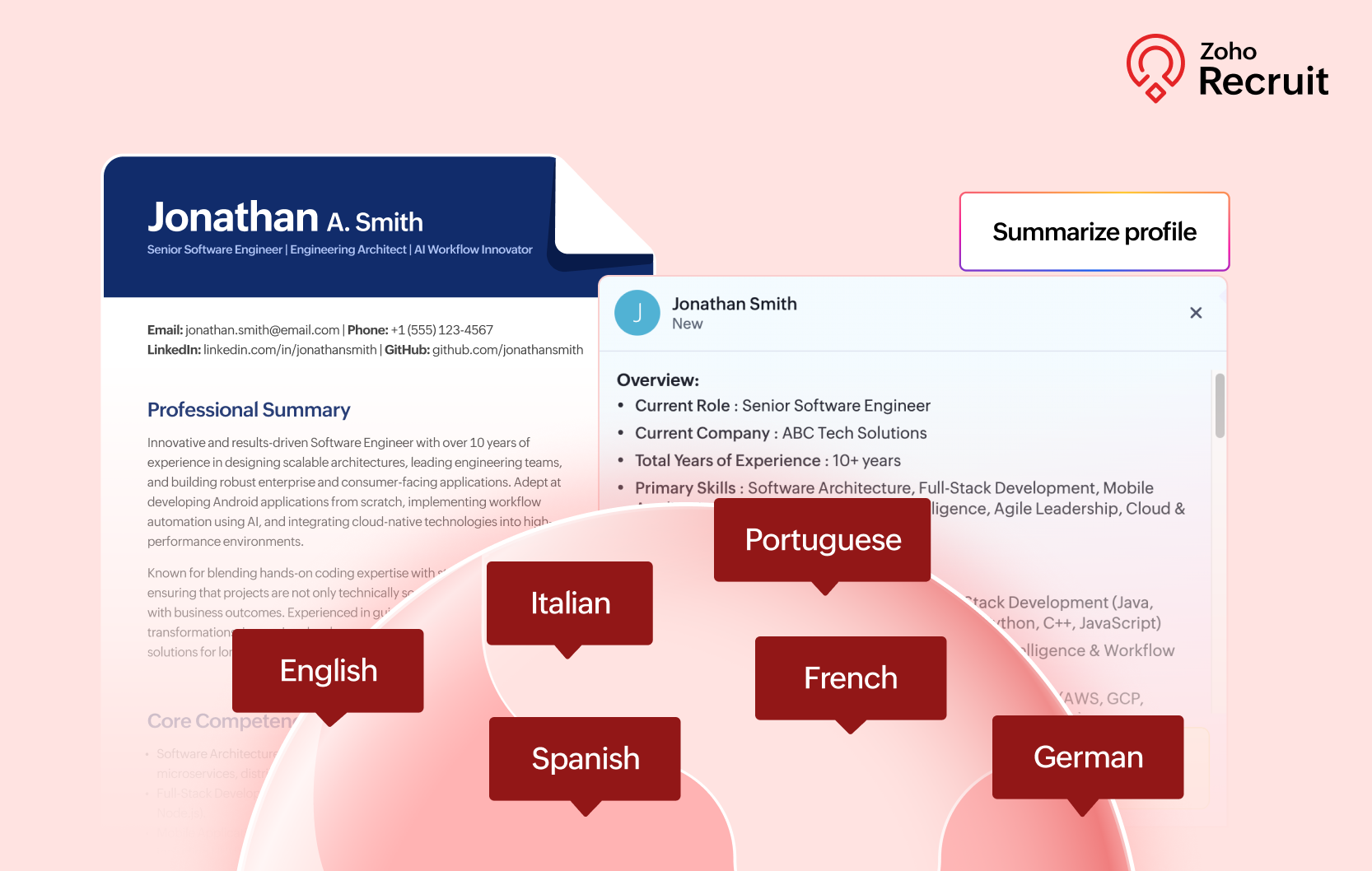
Zia Profile Summary can now generate summaries in six languages — English, French, German, Spanish, Italian, and Portuguese. So whether your talent pool or hiring team spans regions, everyone gets the same clarity without switching between tools.
That’s not all. You can now translate summaries between supported languages instantly. So if a teammate in Madrid shares a profile in Spanish, you can view it in English with a single click.
✨ Bonus: You can translate summaries between supported languages instantly.
A résumé arrives in Spanish? View it in English with a click. Summaries now load in 5–10 seconds — down from the earlier average of 30 seconds.
Same accuracy. Faster decisions. Learn more
2. Zia AI Assist for Notes — Clearer documentation in seconds
Note-taking is essential — but polishing those notes shouldn’t slow you down.
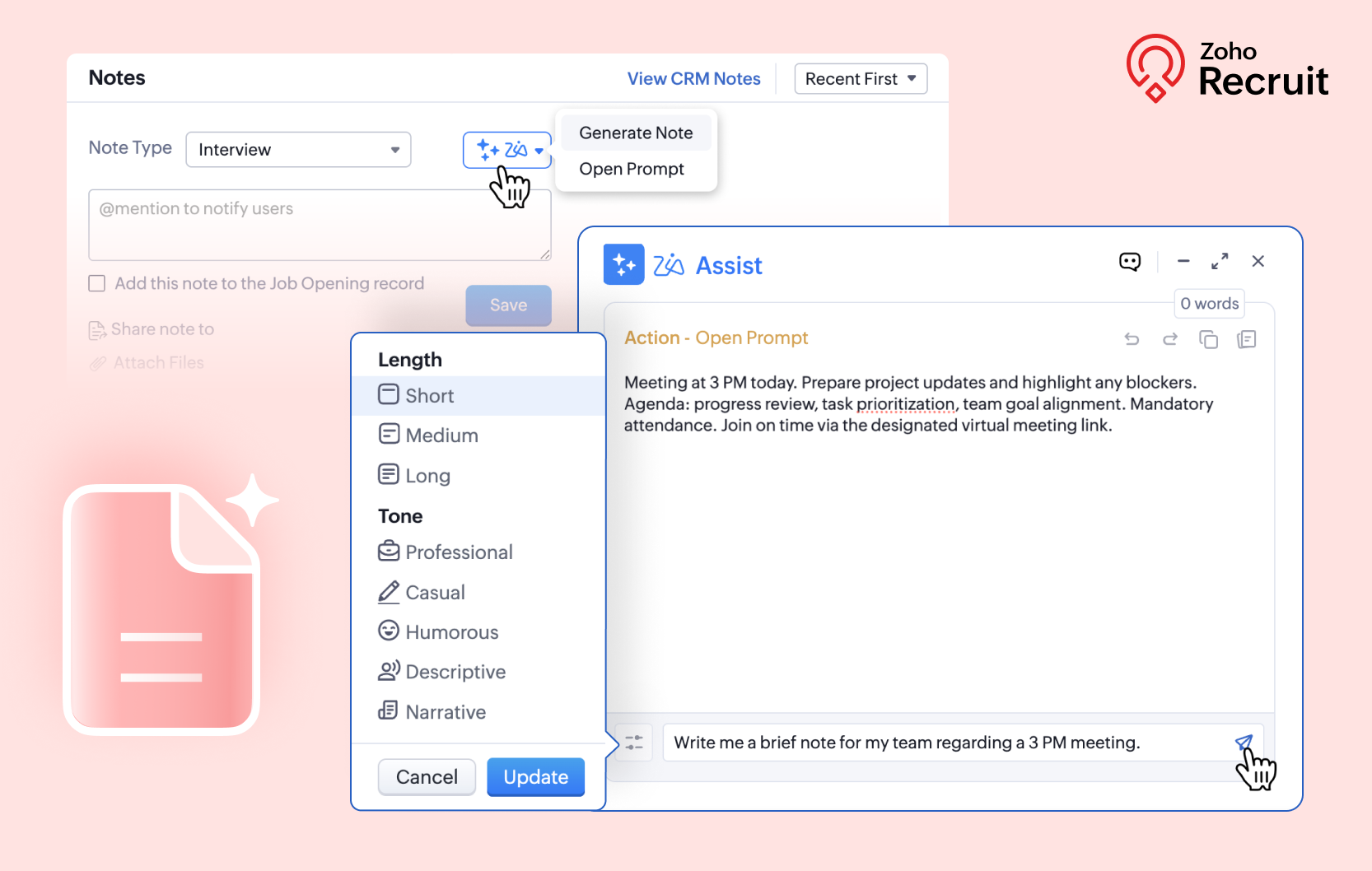
With AI Assist for Notes, Zia can now turn rough bullet points into clean, concise, professional documentation. Whether you’re logging feedback after an interview or sharing an internal update, Zia helps you get to clarity in seconds.
There’s also a new “Remove Redundancies” system prompt, built specifically for notes. It trims repetition and keeps only what matters — making your records easier to read, search, and share across teams.
And thanks to improved processing across the platform, Zia now responds dramatically faster:
And the speed updates?
Assessments: under 20 seconds
Emails, job descriptions, notes, etc.: 30 sec → 5–10 secs. Learn more
3. AI Interview insights — Transcription & Summaries
Replay interviews? Not anymore.
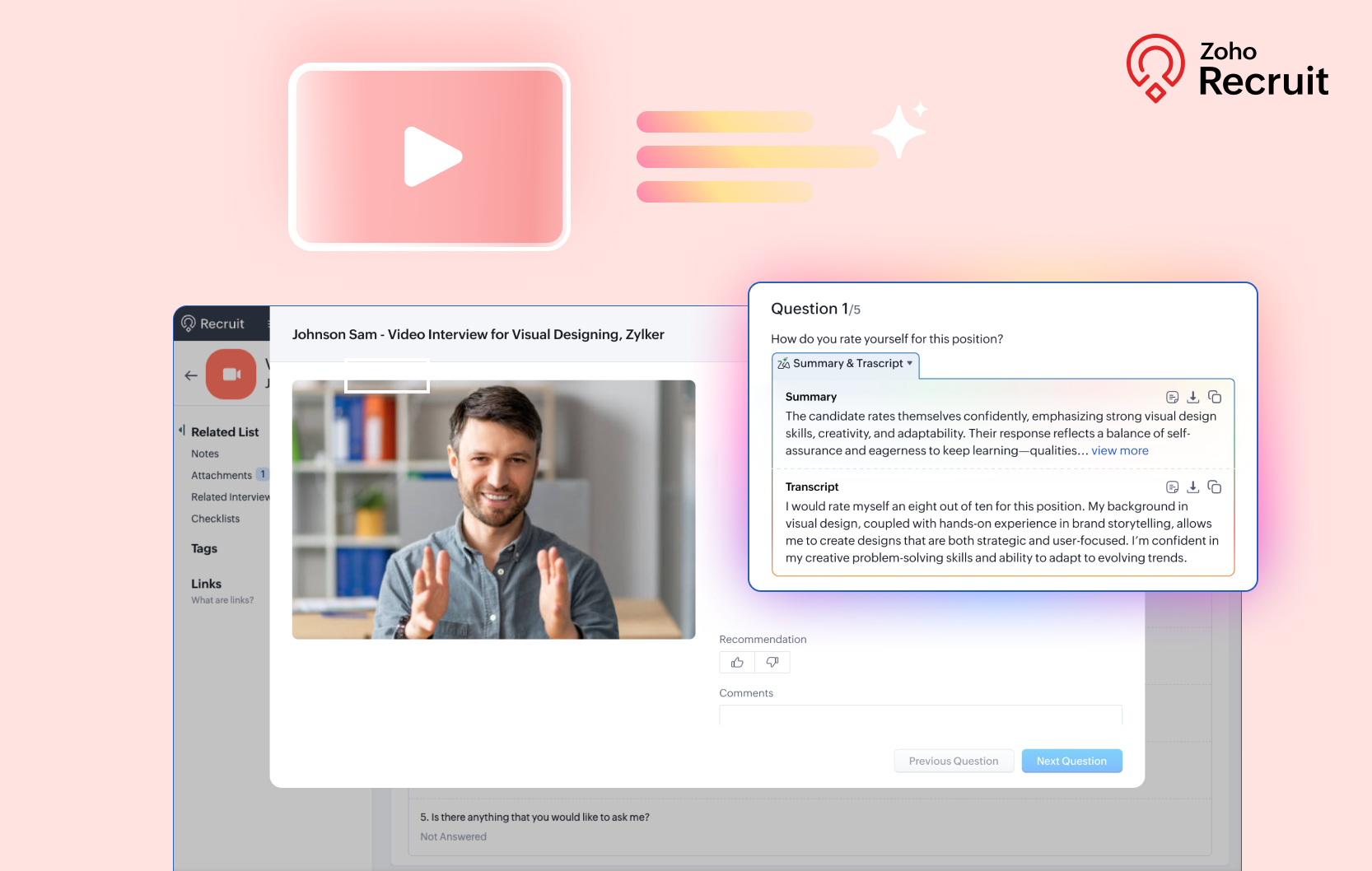
With AI Interview Insights, your one-way recorded interviews are converted into accurate text transcripts, along with AI-generated summaries of each response.
Instead of rewatching every minute, you can now scan highlights and focus on evaluating quality.
You’ll be able to:
✔ Read complete interview transcripts without replaying recordings
✔ Skim AI summaries to understand tone, strengths, and main talking points
✔ Add comments or review insights directly in Zoho Recruit for better collaboration
Supported transcription languages include English, Spanish, French, Dutch, German, Portuguese, Russian, and Italian. Learn more
That's a wrap: Where Zia saves you the most time
Scenario | Zia enhancement that saves time |
Hiring across multiple regions | Multilingual resume summaries |
Back-to-back interviews | AI-assisted note writing |
Reviewing high volumes of recorded interviews | Automated transcripts & summaries
|
From multilingual summaries to polished notes and auto-generated interview transcripts — Zia continues to shape a recruiting experience that keeps pace with the real world. Whether you’re reviewing resumes, documenting feedback, or evaluating recorded interviews, Zia helps you focus on what matters most: the right talent.
Try this challenge
Pick one of these new Zia upgrades and try it in a real-world scenario this week:
✨ Multilingual profile summaries for global hiring
✨ AI-powered notes after interviews or client calls
✨ Interview insights to speed up evaluation
You might be surprised how much time you get back every day.
Let’s Talk Recruit!
Have you tried any of these features yet?
Tell us which update made the biggest impact on your workflow in the comments.
Your feedback fuels what comes next. If you want to explore our Let’s Talk series, hit the link.
Recent Topics
Comment to DM Automation
Comment to DM automation feature in Zoho Marketing Automation, similar to what tools like ManyChat offer. Use case: When a user comments on a social media post (Instagram / Facebook), the system should automatically: Send a private DM to the user Capture
ZMA shows as already connected to Zoho CRM, but integration not working
When I try to connect ZMA with Zoho CRM, it shows as already connected, but the integration doesn’t seem to be working. I’ve attached the screen recording for reference.
Handling Agent Transfer from Marketing Automation Journey to SalesIQ WhatsApp
We are currently using Marketing Automation for WhatsApp marketing, and the features are great so far We have a scenario where, during a campaign or journey, we give customers an option to chat with our sales team. For this, we are using SalesIQ WhatsApp
Automatic Email Alerts for Errors in Zoho Creator Logs
Hello, We would like to request a feature enhancement in Zoho Creator regarding error notifications. Currently, Zoho Creator allows users to view logs and errors for each application by navigating to Zoho Creator > Operations > Logs. However, there is
Can you default reports/charts to report the current week?
Our data table maintains two years of data. Management wants certain report to automatically filter the report to the latest calendar week. I know I can do this manually with filters but I want the report to automatically default to the latest calendar
How can I check all announce?
Hiii, May I ask how can I check all the announce based on broadcast date instead of reply date based So that I will not will miss out any new function
Recurring Automated Reminders
Hi, The reminders feature in Zoho Books is a really helpful feature to automate reminders for invoices. However, currently we can set reminders based on number of days before/after the invoice date. It would be really helpful if a recurring reminder feature
Zobot Execution Logs & Run History (Similar to Zoho Flow)
Dear Zoho SalesIQ Team, We would like to request an enhancement for Zoho SalesIQ Zobot: adding an execution log / run history, similar to what already exists in Zoho Flow. Reference: Zoho Flow In Zoho Flow, every execution is recorded in the History tab,
using the client script based on the look up filed i wnat to fetch the record details like service number , service rate
based on selected service look up field iwant to fetch the service serial number in the serice form how i achive using client script also how i get the current date in the date field in the on load of the form
Importing into Multiselect Picklist
Hi, We just completed a trade show and one of the bits of information we collect is tool style. The application supplied by the show set this up as individual questions. For example, if the customer used Thick Turret and Trumpf style but not Thin Turret,
I need to know the IP address of ZOHO CRM.
The link below is the IP address for Analytics, do you have CRM's? https://help.zoho.com/portal/ja/kb/analytics/users-guide/import-connect-to-database/cloud-database/articles/zoho-analytics%E3%81%AEip%E3%82%A2%E3%83%89%E3%83%AC%E3%82%B9 I would like to
Password Assessment Reports for all users
I'm the super admin and looking at the reporting available for Zoho Vault. I can see that there is a Password Assessment report available showing the passwords/weak and security score by user. However I'm confused at the 'report generated on' value. Monitor
Allow people to sign a zoho form by using esign or scanned signature
Can't change form's original name in URL
Hi all, I have been duplicating + editing forms for jobs regarding the same department to maintain formatting + styling. The issue I've not run into is because I've duplicated it from an existing form, the URL doesn't seem to want to update with the new
How to Print the Data Model Zoho CRM
I have created the data model in Zoho CRM and I want the ability to Print this. How do we do this please? I want the diagram exported to a PDF. There doesnt appear to be an option to do this. Thanks Andrew
Customer ticket creation via Microsoft Teams
Hi all, I'm looking to see if someone could point me in the right direction. I'd love to make it so my customers/ end users can make tickets, see responses and respond within microsoft teams. As Admin and an Agent i've installed the zoho assist app within
Transfer ownership of files and folders in My Folders
People work together as a team to achieve organizational goals and objectives. In an organization, there may be situations when someone leaves unexpectedly or is no longer available. This can put their team in a difficult position, especially if there
Setting certian items to be pickup only
How do we have some items that are pickup only? I have several items in my item's list that I do not ship. But they need to be on the website to be sold, and picked up in store. Need to be able to do this as one of these products is a major seller for
Using gift vouchers
We would like to be able to offer a limited number of gift vouchers, of varying values, to our customers, and are looking for the best way to do this. We have looked at Coupons and Gift Certificates, but neither seem to fit the bill perfectly. Coupons:
Automatically updating field(s) of lookup module
I have a lookup field, which also pulls through the Status field from the linked record. When the lookup is first done, the Status is pulled through - this works perfectly. If that Status is later updated, the lookup field does not update as well. As
Zoho Commerce and Third-party shipping (MachShip) API integration
We are implementing a third-party shipping (MachShip) API integration for our Zoho Commerce store and have made significant progress. However, we need guidance on a specific technical challenge. Current Challenge: We need to get the customer input to
Adding custom "lookup" fields in Zoho Customization
How can I add a second “lookup” field in Zoho? I’m trying to create another lookup that pulls from my Contacts, but the option doesn’t appear in the module customization sidebar. In many cases, a single work order involves multiple contacts. Ideally,
Can you import projects into Zoho Projects yet?
I see some very old posts asking about importing project records into Zoho Projects. But I can't find anything up to date about the topic. Has this functionality been added? Importing tasks is helpful. But we do have a project where importing projects
Allocating inventory to specific SO's
Is there a way that allocate inventory to a specific sales order? For example, let's say we have 90 items in stock. Customer 1 orders 100 items. This allocates all 90 items to their order, and they have a back order for the remaining 10 items which could
Introducing Workqueue: your all-in-one view to manage daily work
Hello all, We’re excited to introduce a major productivity boost to your CRM experience: Workqueue, a dynamic, all-in-one workspace that brings every important sales activity, approval, and follow-up right to your fingertips. What is Workqueue? Sales
Zoho Inventory. Preventing Negative Stock in Sales Orders – Best Practices?
Dear Zoho Inventory Community, We’re a small business using Zoho Inventory with a team of sales managers. Unfortunately, some employees occasionally overlook stock levels during order processing, leading to negative inventory issues. Is there a way to
Automation #10 - Auto Assign Ticket based on Keywords
This is a monthly series designed to help you get the best out of Desk. We take our cue from what's being discussed or asked about the most in our community. Then we find the right use cases that specifically highlight solutions, ideas and tips on optimizing
Automate attendance tracking with Zoho Cliq Developer Platform
I wish remote work were permanently mandated so we could join work calls from a movie theatre or even while skydiving! But wait, it's time to wake up! The alarm has snoozed twice, and your team has already logged on for the day. Keeping tabs on attendance
Reusable Custom Functions Across Department Workflows
Dear Zoho Desk Team, We appreciate the powerful workflow automation capabilities in Zoho Desk, particularly the ability to create and use custom functions within workflows. However, we have encountered a limitation that impacts efficiency and maintainability.
Contact data removes Account data when creating a quote
Hi, Our customer has address fields in their quote layout which should be the address of the Account. They prefill the information, adding the account name - the address data is populated as per what is in the account - great. However when they then add
Feature Request - Gift Cards or Gift Voucher Capability in Zoho Commerce
Hi Zoho Commerce team, I'm comming accross more and more retail businesses who sell gift cards. As there is currently no way to manage this in Zoho Commerce, it is a blocker to addoption. This is particularly popular in Europe and North America. I recently
Don't Allow Customer to Edit Values After Submitting Ticket
After a customer submits a ticket through the customer portal, they can go into the ticket and see some of the values from the questions they answered in the sidebar. Currently, a customer can edit these values even after they submitted them. This makes no sense. We ask very specific questions that we don't want customers to later change! Please disable the ability for customers to edit the values to their submission questions in the portal. Screenshot attached.
Analytics <-> Invoice Connection DELETED by Zoho
Hi All, I am reaching out today because of a big issue we have at the moment with Zoho Analytics and Zoho Invoice. Our organization relies on Zoho Analytics for most of our reporting (operationnal teams). A few days ago we observed a sync issue with the
text length in list report mobile/tablet
Is there a way to make the full text of a text field appear in the list report on mobile and tablet? With custom layouts, the text is always truncated after a certain number of characters.
Automation #4 - Auto Delete Tickets based on Rules
This is a monthly series in which we pick some common use cases that have been either discussed or most asked about in our community and explain how they can be achieved using one of the automation capabilities in Zoho Desk. Unwanted tickets spamming
Automation #3 - Auto-sync email attachments to tickets
This is a monthly series where we pick some common use cases that have been either discussed or most asked about in our community and explain how they can be achieved using one of the automation capabilities in Zoho Desk. Most of our customers use email
Automation #11 - Auto Update Custom Fields with Values from Emails
This is a monthly series designed to help you get the best out of Desk. We take our cue from what's being discussed or asked about the most in our community. Then we find the right use cases that specifically highlight solutions, ideas and tips to optimize
Automation #13 - Auto assign tickets based on agent shift time
This is a monthly series designed to help you get the best out of Desk. We take our cue from what's being discussed or asked about the most in our community. Then we find the right use cases that specifically highlight solutions, ideas and tips to optimize
Automation #14: Capture Jira Issue Key/ID in a Ticket Custom Field
Hello Everyone! This month's edition brings you a custom function to consolidate your records associated with Jira integration. Jira integration enables support engineers and R&D units to collaborate seamlessly on feature development, product improvement,
Automation #16: Automate Ticket Reopening on Scheduled Timestamp
Hello Everyone! This edition uncovers the option to schedule reopening a ticket automatically. Zylker Finance tracks insurance policyholder activities through Zoho Desk. For policyholders who pay monthly premiums, tickets are closed upon payment completion.
Next Page