Make scheduling appointments seamless with Zoho SalesIQ and Zoho Bookings integration
You have streamlined your business’s engagement and customer communication by implementing versatile engagement software like Zoho SalesIQ. And now, you have your customer relationships, engagement, analytics, and more overseen from a single dashboard. But the one thing that is missing is the ability to make the appointment booking platform seamlessly flow along with the customer conversation.
You are currently using outdated apps to send calendar invites and exchange texts with visitors and operators to schedule appointments. Rescheduling, checking slot availability, and canceling appointments can be a tedious process.
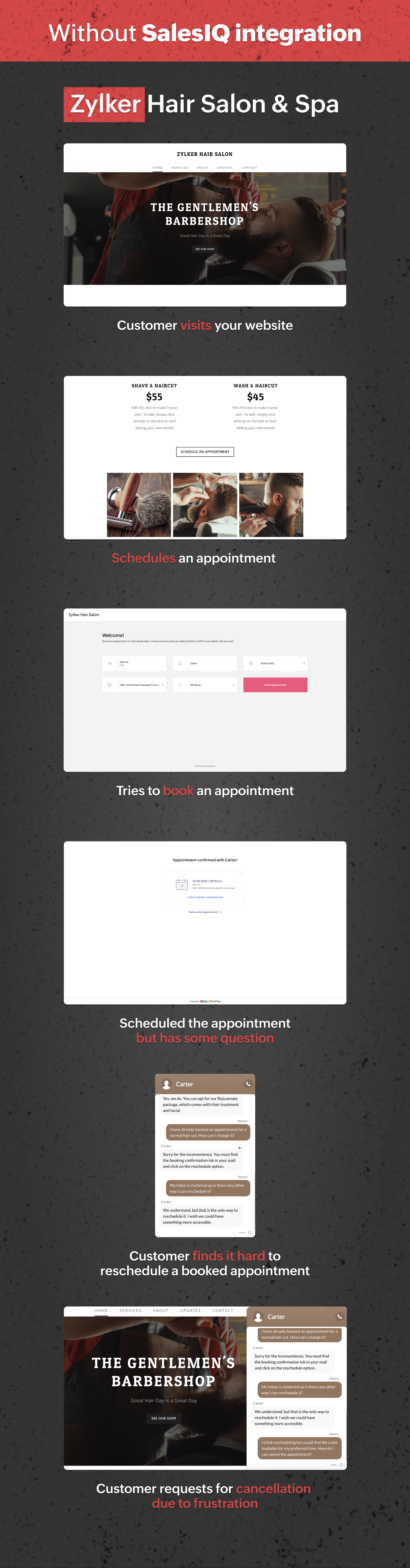
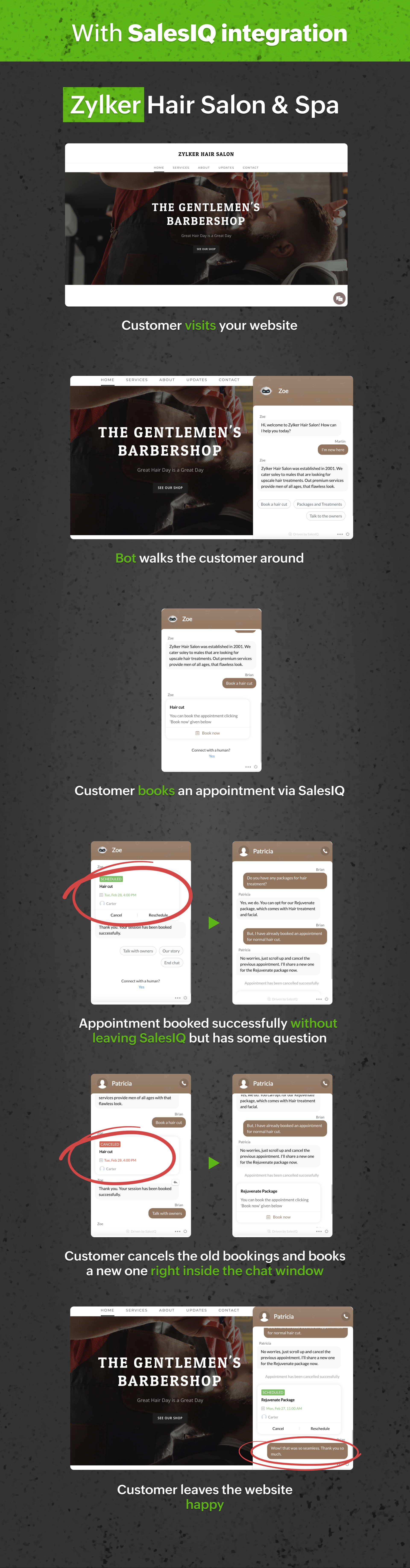
Let’s look at a customer journey with and without Zoho Bookings integration.
From the above journey, we can quickly identify how drastically Zoho Bookings integration has uplifted the customer journey.
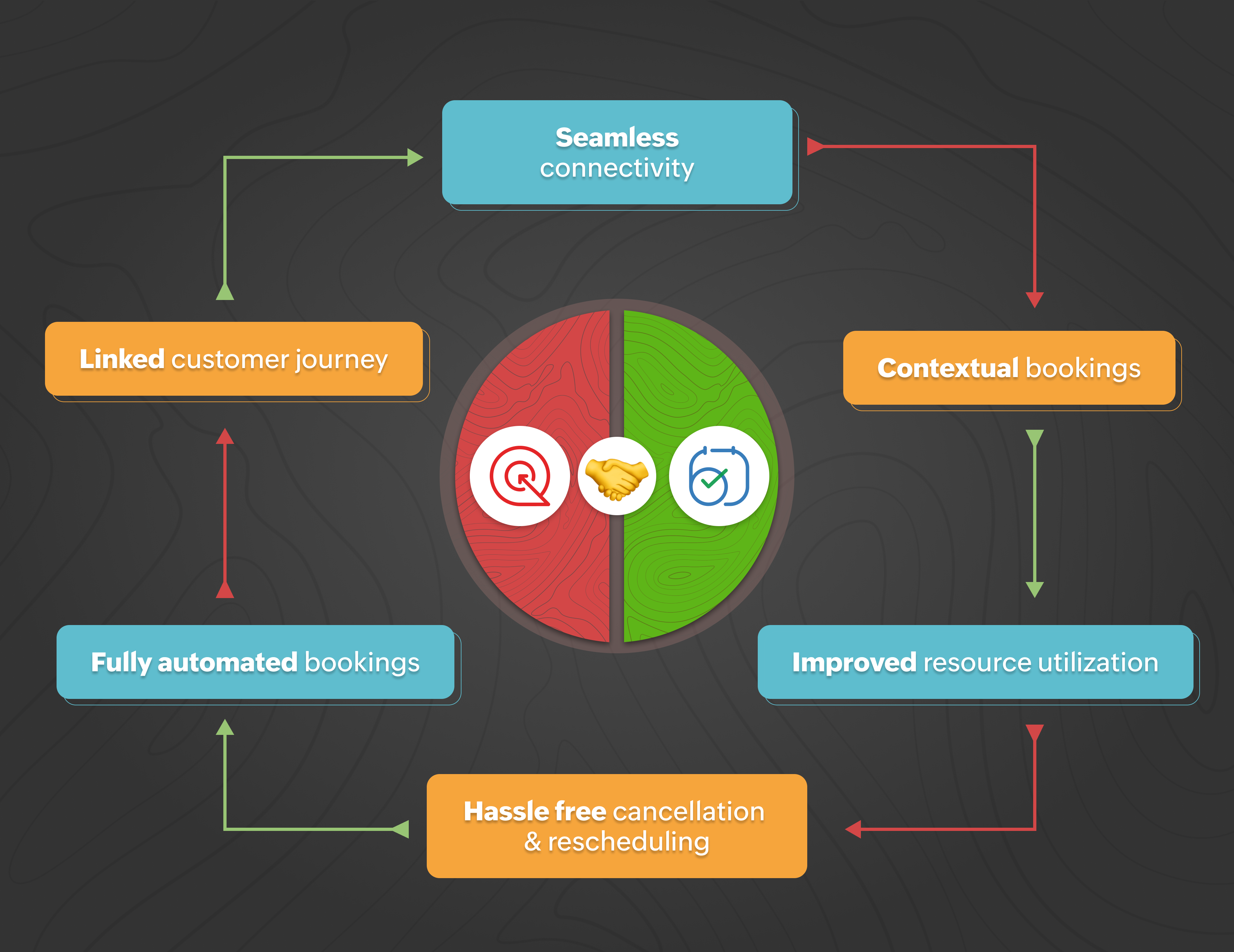
Seamless Connectivity: Leverage the integration with Zoho Bookings to allow operators and bots to quickly access Zoho Bookings and share suitable appointments with visitors.
Contextual bookings: Interact with your customers and allow them to book appointments from the chat window during an ongoing conversation.
Improved resource utilization: The one-click integration with Zoho Bookings will help you save the resource that would have been spent in developing and integrating a third-party or custom appointment scheduling software.
Hassle-free rescheduling and cancellation: Save your operators’ and customers' time and make it an effortless process by allowing them to re-schedule and cancel appointments right from the chat window.
Fully automated bookings: Maximize your operators’ efficiency by implementing bots that can fully handle bookings for your business.
Linked customer journey: Create a smoother customer experience by providing an all-in-one solution from the SalesIQ chat window.
What can your visitors do with this integration:
This integration provides a streamlined way of booking appointments or sessions while conversing with your operators without leaving the SalesIQ chat window, keeping the appointments in the loop with the conversation.
Visitors can view all the available slots dynamically and select them per their preference.
Visitors can reschedule or cancel the appointments anytime directly from the conversation without contacting the operator.
Here are some business scenarios where you can use Zoho SalesIQ + Bookings:
Dental clinics
Salons and Spas
Automotive repair shops
Physical therapy clinics
Fitness studios
Law firms
Real estate agencies
Photography studios
Tutoring centers
Home repair and maintenance services
Benefits of integrating Zoho Bookings with Zoho SalesIQ:
Your visitors can now book sessions directly from the SalesIQ chat window.
Appointment/session slots will be updated dynamically as visitors book them.
Booking confirmation over email.
Completely automating your appointment scheduling with chatbots:
One of the most significant benefits you can unlock with this integration is to use the Zoho Bookings in bots, especially in the codeless bot builder, to build chatbots that can automate scheduling appointments and sessions for your business. With these chatbots, your visitors can plan and reschedule appointments anytime without the need for operators.
To conclude, integrating Zoho Bookings with SalesIQ is a powerful solution for businesses looking to streamline their appointment scheduling process. With this integration, companies can provide an enhanced customer experience and improve efficiency. With customer information and appointment history stored in one place, businesses can personalize communication and support, further enhancing customer satisfaction. If you already use Zoho SalesIQ and Zoho Bookings, we recommend integrating them to take your customer experience to the next level.
Integrate Now
Regards,
Naveen
Topic Participants
Naveen Chandar
premiumsidingwindows
Ashish Bhatnagar
pragadeesh.j
Recent Topics
The Social Wall: September 2025
Hello everyone, As we step into the fall season, some major updates are on the horizon. Meanwhile, here are the exciting updates we rolled out this September. Approvals in iOS Managing approvals just got more seamless on mobile. With this update, theIntroducing Detailed View for Candidates in Vendor Portal
We’ve added a new Details sub-tab inside the Vendor Portal to help vendors easily view complete candidate information after submission. With this update, vendors can now access all candidate details, from personal information to associated job openings,Zoho One Down
Zoho Team, Checking if when the services up - currently Zoho One is downHow can I track which zoho users are actively using Zoho CRM
I have several licenses of Zoho CRM. We now need to add a new user. I could purchase a new license, but before I do, I would like to see if any of our existing users are not actively using the license assigned to them. How can I determine the activityAccess to Detail View From HTML Snippet
Zoho Creator displays a detail view that slides out from the right onClick of a record in a report. Am I able to access that detail view from an html snippet, e.g. click a record in a list and display the detail view? The zc_LoadIn dialog is a bit clunky,Billing Management: #10 Solving Common Mistakes in Billing
Over the past few weeks, we have explored different facets of billing, from the simplicity of traditional one-time billing to the evolving landscape of subscriptions, retainers, and usage-based models. We've unpacked how billing isn't just about sending【開催間近 - 10/17】東京 ユーザー交流会 Vol.3 参加登録 受付中!(参加無料)
ユーザーの皆さま、こんにちは。コミュニティチームの藤澤です。 10/17(金)に、東京・新橋で「東京 ユーザー交流会 Vol.3」を開催します! ZOHOLICSよりも小規模なイベントですので、「リアル開催はちょっと緊張する…」という方も、安心してご参加いただけます✨ 当日は、初公開の事例を2つご紹介予定です! なお、セッション映像のアーカイブ配信は予定していないため、会場にお越しいただいた方だけが、登壇者へ直接質問したり、リアルな声を聞いたりできる貴重な機会となっています。 ーーーーーーーーーーーーーーーーーーーーーーーーーーーーーーーーーーーーーーーーーーLoading CSS Stylesheets into HTML Snippet
Combining html/css into a single snippet can grow quite large for a UI that has a lot of functionality/styling. To keep things tidy, are we able to pull files into an html snippet using a <link> tag? If so, what are some best practices?Notes Attachments
Two things it would be nice to have the attachment size the same as the attachments sections and it would be nice to be able to attach links like you can in the attachments section. Thank youCanvas: empty images
Hello. If I add an image field like contact photo in a Canvas design, and the field is empty, there is an ugly placeholder in its place. This doesn't happen in the standard view. In the standard view, if the contact photo is empty, nothing appears inGoogle enhanced conversions not working
Hi guys, I've connected Zoho CRM through Google Ads interface with the goal to setup the enhanced conversion tracking in Google Ads. I have to Zoho related conversion goals which you can see in the images below: For the conversion goal above I've setupSync Contacts with iPhone
Is syncing the Zoho Personal Mail contacts with the iPhone (or other mobile devices) in the works? I just dumped Yahoo & then found out that contacts sync is missing. Importing is only a stop gap and a step backwards for me.MS Teams Meeting to Zoho CRM
Has anyone figured out a good way to push MS Teams meeting info on a trigger of "meeting end" to Zoho CRM? We're looking for a way to take attendees of a meeting and meeting duration and push it into Zoho CRM after the meeting has ended. If I can justHow do I move a section or element from one page to another in the NEW Zoho Sites UI
I have a section on my home page with numerous elements within it and I'd like to move the entire section to a different page on my site so I don't have to recreate it from scratch. Is there a way for me to do that easily? I could use a quick answer on this please.Zoho Projects app update: Global Web Tabs support
Hello everyone! In the latest version(v3.10.10) of the Zoho Projects app update, we have brought in support for Global Web Tabs. You can now access the web tabs across all the projects from the Home module of the app. Please update the app to the latestExport as MP4 or GIF
Hi, Just wondering if there's a way to export/convert a presentation to an MP4 video file or even a GIF. One use case would be to use the animation functionality to create social media graphics/charts/gifs/videos. Thanks for a great tool... Rgds JonPage Layout- Horizontal Rule
When editing the layout of, for instance, the Potentials page, is there a way to insert a horizontal rule or white space in between fields? I'd like to keep a group of fields in the same Section, but would like to create some seperation in order to further group together certain fields within the Section. If this is not possible, does anybody have any other suggestions on how to create this same effect? Thank you!Zoho Books will discontinue support for older browser versions soon
Hello users, Starting from May 15, 2024, Zoho Books will no longer support the following browser versions: Browsers Version Restrictions Firefox Browser Versions older than 100 Google Chrome Versions older than 100 Microsoft Edge Versions older than 100Zoho Projects - Q3 Updates | 2025
Hello Users, The final quarter of the year 2025 has begun, and we at Zoho Projects are all set with a plan. New targets to achieve and new milestones to reach, influenced by the lasting imprint of the past quarter. 2025's Q3 saw some new features andIssue with Trident exe file
Hello Team, Exe Setup file It's showing harmful for user pc please check and do needful. this message for developer team. Thanks Bhargav PurohitTransaction Locking with the dynamic date
Is it possible to dynamically update dates on transaction locking. We want to lock transaction x days from todayUnable to change sales_order status form "not_invoiced" to "invoiced"
I am automating process of creating of invoice from sales_orders by consolidated sales_orders of each customer and creating a single invoice per customer every month. I am doing this in workflow schedule custom function where i create invoice by gettingApply Vendor Credits Automatically
We are bulk importing Vendor credits in Zoho Books!!! Is there a way to apply vendor credits automatically to the first UNPAID bill of the Vendor?Apply Vendor Credit Automatically
Hello!!! Is there a way where in we can apply vendor credits automatically on the FIRST OUTSTANDING BILL of the vendor?? We have lots of VENDOR CREDITS ISSUES mostly!!! Applying it manually is a pain for us. Would be great if we have a way to apply theNeed Easy Way to Update Item Prices in Bulk
Hello Everyone, In Zoho Books, updating selling prices is taking too much time. Right now we have to either edit items one by one or do Excel export/import. It will be very useful if Zoho gives a simple option to: Select multiple items and update pricesCreator problem: Edit form View not displaying whole form
I'm having problems with the form in my database. The edit view is not showing the whole form: This is how it looks in the normal view: As you can see, there is a whole section in the bottom right of the form which is not displaying in the Edit View. This means that I can't change or delete any of these fields... Anybody had a similar problem or know a solution? Any help would be appreciated. Cheers,Vendor Master Enhancements for Faster Purchase Entry
I’d like to suggest a few features that will improve accuracy and speed during purchase voucher entry: Automated Item Tax Preference in Vendor Master Add an option to define item tax preference in the vendor master. Once set, this preference should automaticallyQuick Item Search & Auto-suggestion for Invoices
Hi Team, I am facing an issue while creating invoices in Zoho Books. Currently, I have to type the full item name in the correct sequence and spelling for it to appear. For example, my item name is: "Distemper Acri Silk Special White 10kg" If I type somethingIntegrating Chatbot with Zoho Creator Application
Is it possible to integrate a chatbot with a Zoho Creator application?Average Costing / Weighted Average Costing
Hello fellow maadirs. I understand Zoho Books uses FIFO method of dealing with inventory costing, but do you guys have any plans to introduce average costing? We indians need average costing. It's part of our culture. Please. I beg thee. Thanks.'Add Tax To Amount' not reflected in Invoice
Hi Zoho Support, I'm experiencing an issue with tax calculation display in my invoice template. Despite having "Add tax to amount" box checked in the template settings, the Amount column is not showing the tax-inclusive total for line items. Current behaviour:"Subject" or "Narration"in Customer Statement
Dear Sir, While creating invoice, we are giving in "Subject" the purpose of invoice. For Example - "GST for the month of Aug 23", IT return FY 22-23", "Consultancy", Internal Audit for May 23". But this subject is not coming in Customer Statement. OnlyA real WYSIWYG field instead of the limited rich text
Hi to everyone A "real" WYSIWYG or HTML field that outputs good HTML code when accessed through the API would be excellent. I tried to use the rich text field, but the styling options are limited. For example, there are no heading tags (h1 to h6), andDelete my store of Zoho commerce
Hi Team, I want to delete my stores of commerce. Please help me asap. Looking for the positive response soon. Thanks Shubham Chauhan Mob: +91-9761872650Delete Inactive Zoho Accounts - Access Cleanup_User Id: 60001640923
As part of our Zoho access hygiene, we’ve reviewed and deactivated several inactive user accounts. These accounts have not been used in the past year and are no longer tied to active operations. All access rights have been revoked, and records retainedInappropriate Removal of Features
It's the first with any software where I am experiencing that an existing customer has some of his exiting features removed. Moreover, new Zoho One users are paying less than us. Is this going to be Zoho's "normal behaviour". If so, it is going to beFiltering report embeded in page
Right now we are using a page variable to filter a report on a page. However, it being a page variable makes it reset if you go to another report/form, we want the filter to be kept the same. I tried using an application variable according to zoho youZia summarizes your IM bot chats in real time
Hello everyone! Let's say you’re an agent taking over a chat where a customer was booking a flight through a bot on WhatsApp. They've already shared key details, like their destination, travel date, and number of passengers. You need to understand theMegamenu
Finally! Megamenu's are now available in Zoho-Sites, after waiting for it and requesting it for years! BUT ... why am I asked to upgrade in order to use a megamenu? First: Zoho promised to always provide premium versions and options for all included Zoho-applicationsCancel and refund
Hi, Yesterday I paid for the Zoho email subscription. Within a few minutes, I realized that the subscription counts one email ID as one user. To make another email ID for the same domain name, I'd have to pay for another user. I emailed right away toNext Page