Unlock seamless data-capturing with QR codes
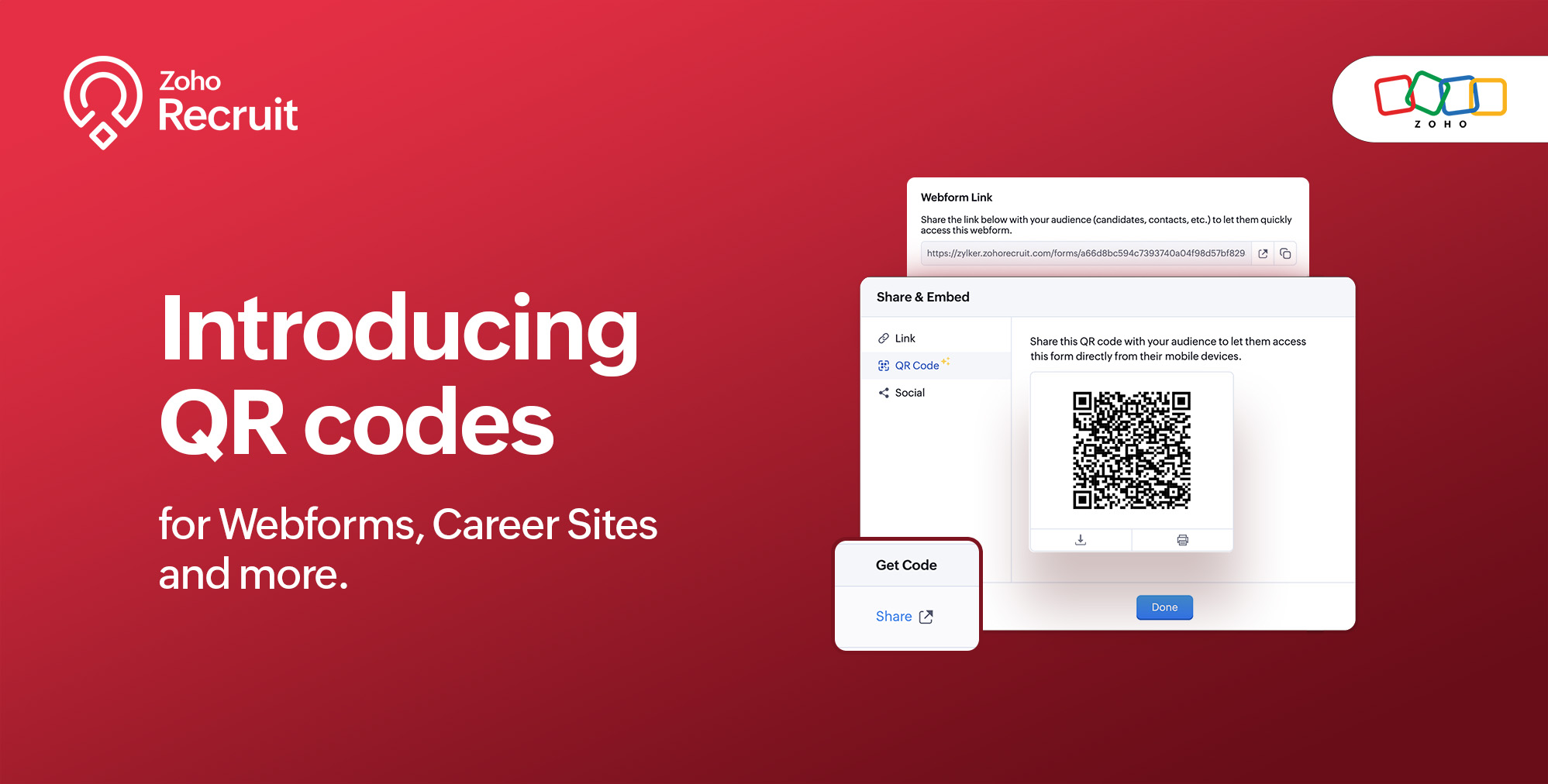
We're thrilled to share a groundbreaking enhancement that will reshape the way you connect with candidates. In our continuous efforts to enhance your recruiting experience, we proudly present the QR Code feature for Webforms, Career Sites and more. This exciting addition aims to simplify and amplify the way you engage with potential hires, promising a more efficient and seamless process.
Benefits
Unleash the full spectrum of advantages that QR Codes bring to your recruitment toolkit.
Effortless Sharing
Simplify the distribution of application forms and job listings by sharing QR codes effortlessly. Whether you're networking at an event, collaborating with partners, or reaching out through various channels, the QR codes make the process seamless. Recruiters can now disseminate vital information with just a scan, facilitating quicker connections with potential candidates.
Enhanced Candidate Experience
Elevate the candidate journey by providing swift and hassle-free access to application forms. The convenience of scanning a QR code enables candidates to engage with your opportunities instantly, reducing friction in the application process. This enhancement aims to leave a positive and lasting impression on candidates, reflecting your commitment to a user-centric recruitment experience.
Time-saving Recruitment
Say goodbye to manual data entry woes. The QR Code feature significantly reduces the time and effort invested in data collection. Candidates can efficiently fill out forms, and recruiters can focus on analyzing and selecting the best-fit talent. This time-saving aspect not only boosts overall productivity but also allows recruiters to invest more energy in strategic aspects of the recruitment process.
Streamlined Data Collection
Embrace a new era of streamlined data collection. With QR codes seamlessly linking candidates to your forms, you eliminate the need for manual information input. This not only reduces the risk of errors but also ensures that your database is populated with accurate and relevant candidate information. Streamlining data collection is a pivotal step towards creating a more efficient and error-free recruitment process.
Use Cases
Explore the various ways in which QR Codes can be seamlessly integrated into your recruitment strategy, catering to diverse scenarios and enhancing your overall outreach.
Event Recruiting
Picture a bustling career fair or industry conference where capturing candidates' attention is crucial. Utilizing QR codes to provide instant access to your Webforms and Career Sites, turns casual interactions with candidates into potential job applications. This empowers recruiters to make a lasting impression at events, fostering a bridge between in-person engagement and online application processes.
Printed Materials
Enrich your printed marketing materials, such as brochures, posters, or promotional handouts, with QR codes. Instead of directing candidates to lengthy URLs, a quick scan seamlessly guides them to relevant application forms or job listings. This not only simplifies the candidate's journey but also transforms your print materials into interactive gateways, blending the physical and digital realms for a more engaging experience.
Onboarding Efficiency
Beyond the recruitment phase, leverage QR codes to streamline the onboarding process for new hires. Include QR codes in onboarding materials, facilitating quick access to essential forms, training materials, and relevant documentation. This enhances the efficiency of the onboarding journey, ensuring a smooth transition for new employees and reinforcing a positive impression from the start.
Cross-Platform Consistency
Achieve cross-platform consistency by incorporating QR codes across various channels. Whether engaging candidates at events, through printed materials, or in the digital landscape, the QR Code feature ensures a unified application experience. This consistency not only reinforces your brand identity but also simplifies the candidate journey, making it seamless and accessible, regardless of the engagement platform.
How to get started?
Zoho Recruit automatically generates QR codes for your Webforms and Career Sites, which you can directly print or download with a click of a button. Given below are step-by-step instructions on how to find the generated QR codes.
To access the QR code of a webform;
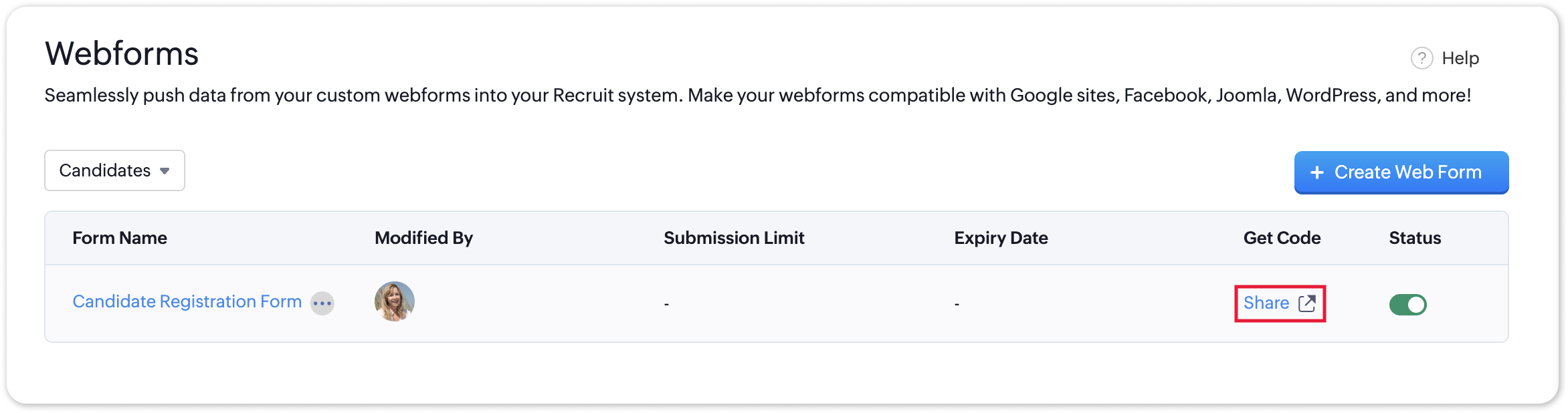
- Navigate to Setup > Career Website > Webforms and click the Share button for the webform of your choosing.
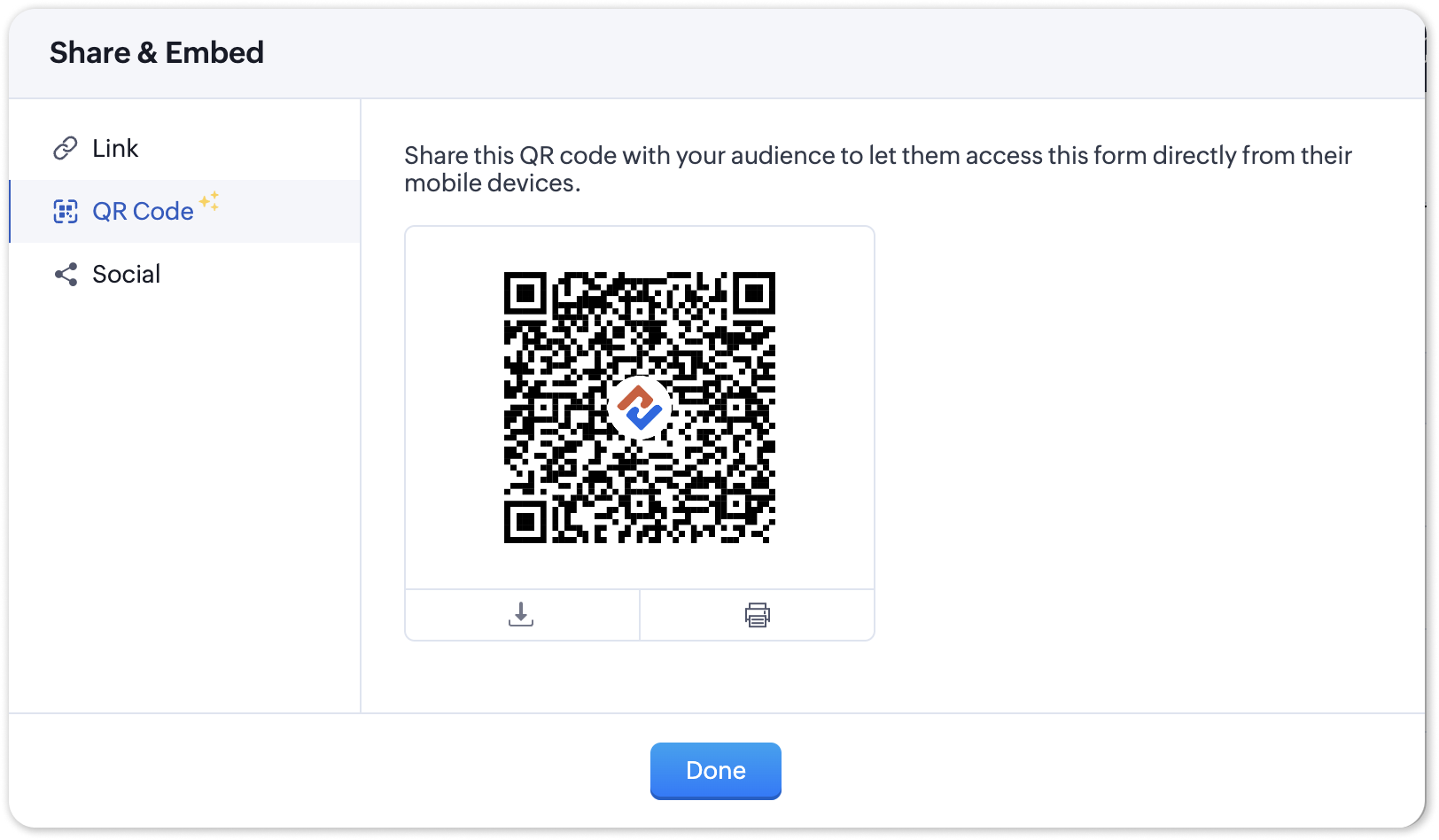
- In the Share & Embed pop-up, select the QR section.
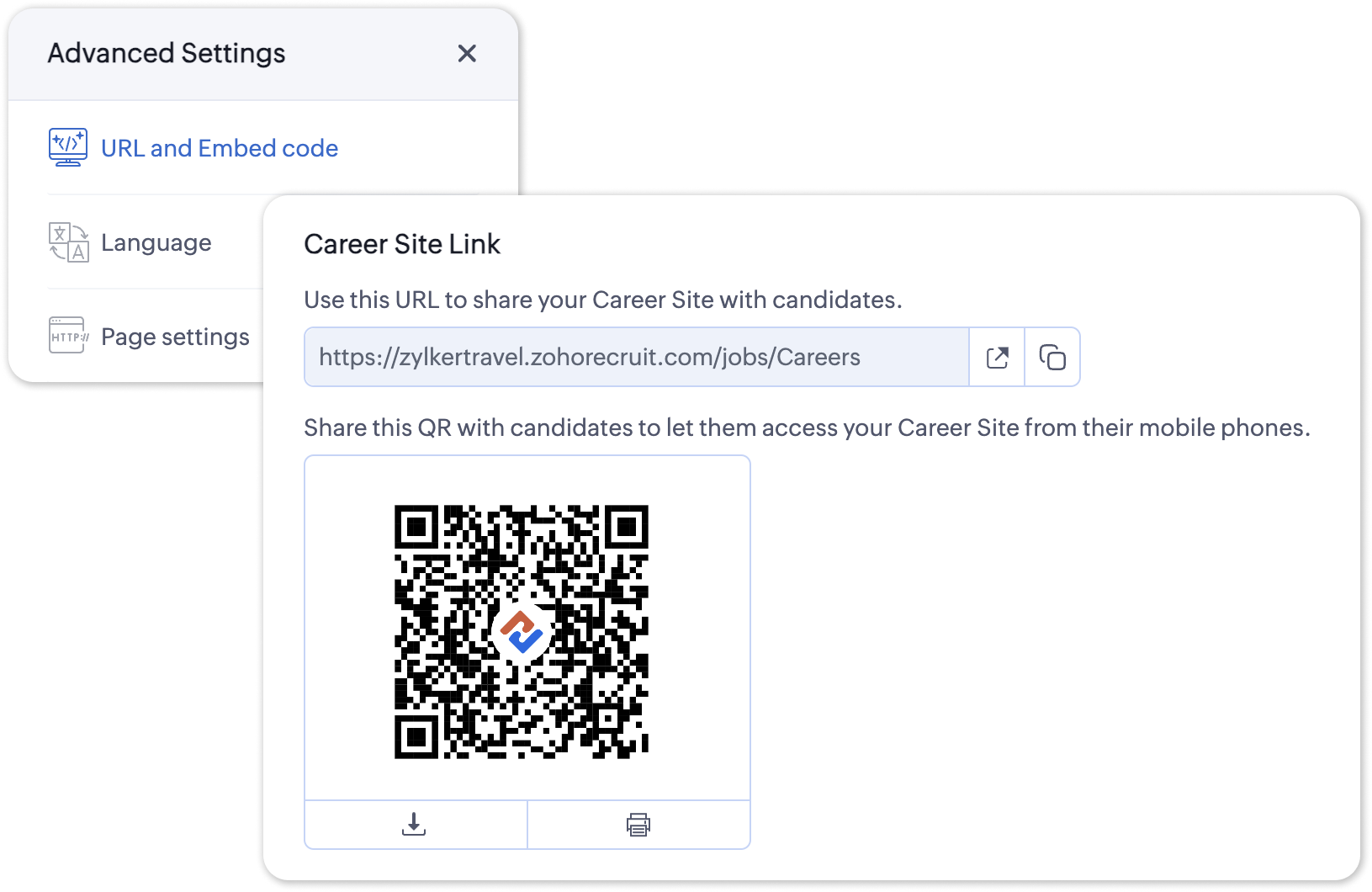
To access the QR code for your Career Site;
- Navigate to Setup > Career Website > Career Site and Customize a career site of your choosing.
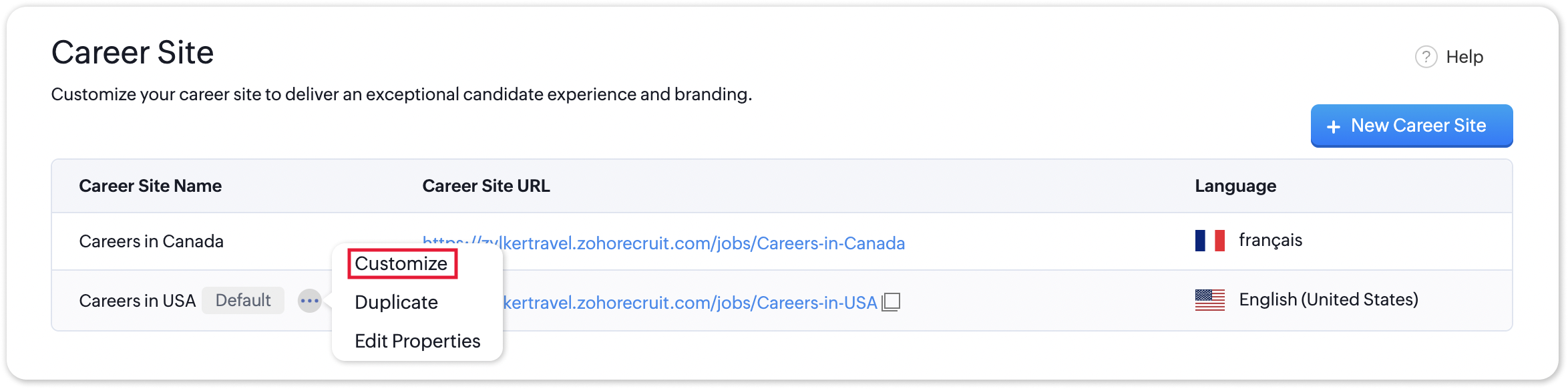
- Under the Advanced Settings section, select URL and Embed Code. The QR code for the selected career site will be displayed here.
Additional Details
Zoho Recruit generates QR codes for every individual job listing added to your Career Site. Follow the steps given below to access the generated QR code for a published job opening.
To access the QR code for a specific Career Site job listing;
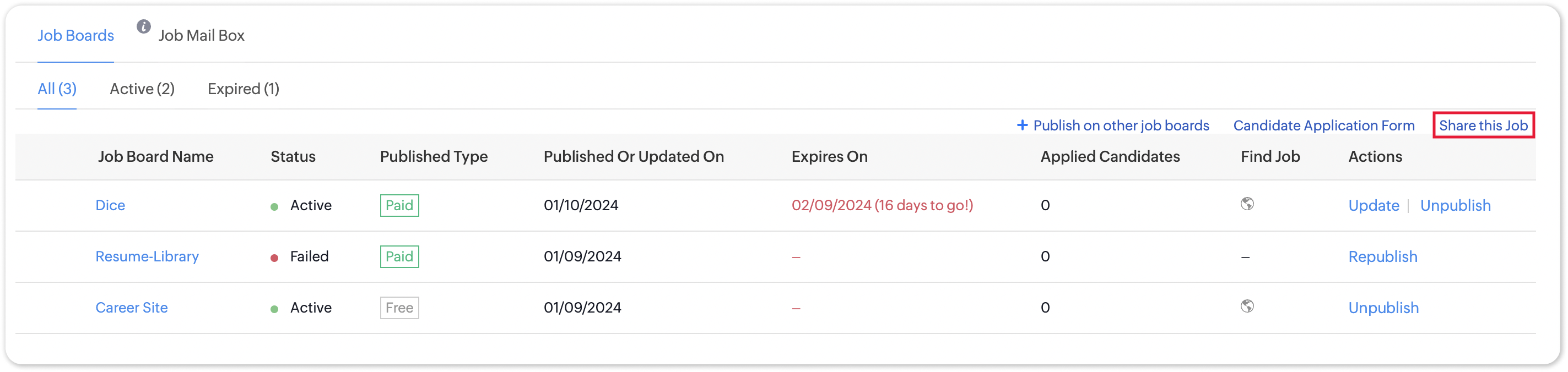
- Navigate to the published job opening and click Sourcing Summary from the Quick Access panel on the left. In the sourcing summary section, click Share this Job.
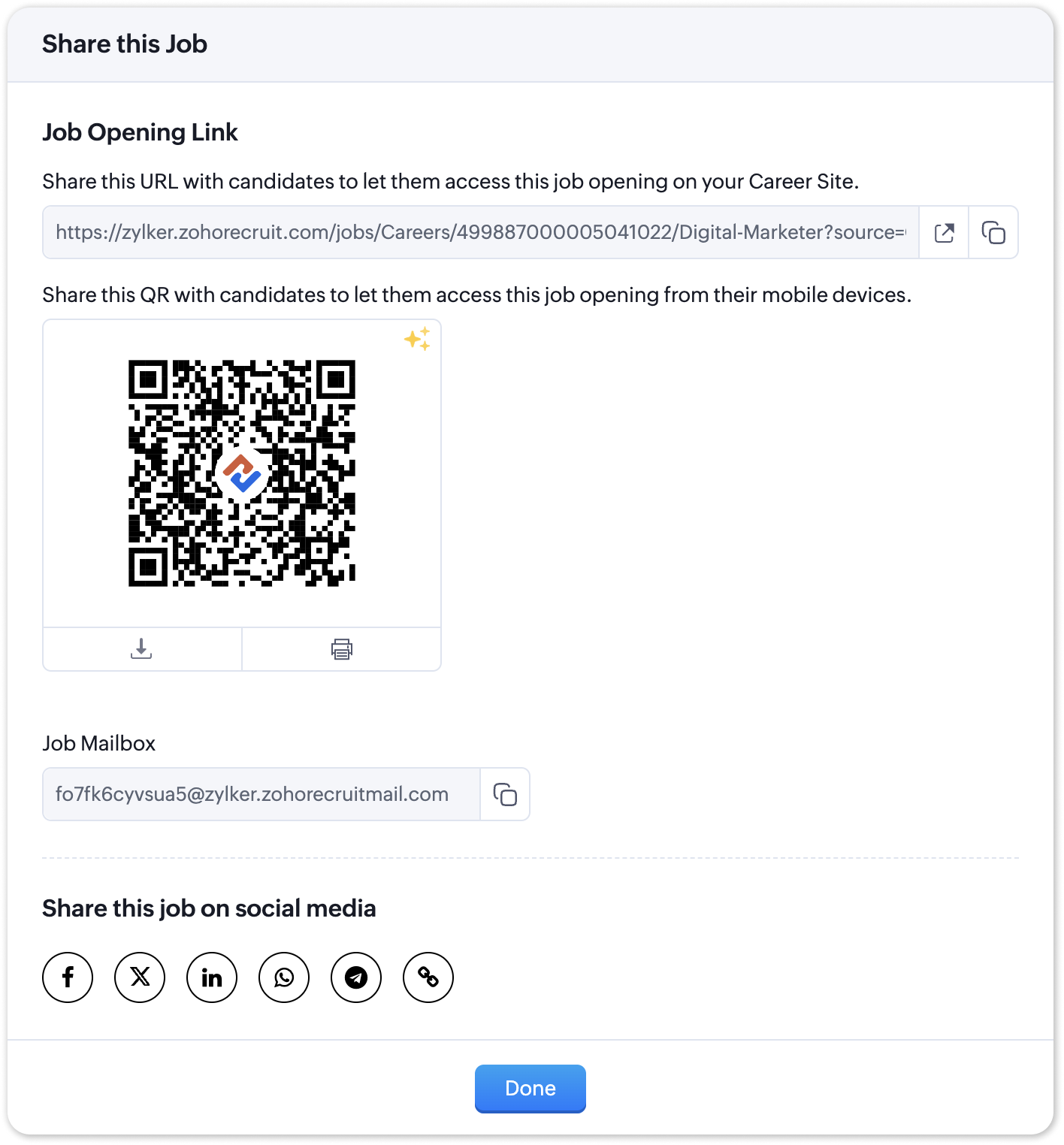
- In the pop-up that is displayed, you will be able to access the QR code for the job's Career Site listing and other key information.

Note:
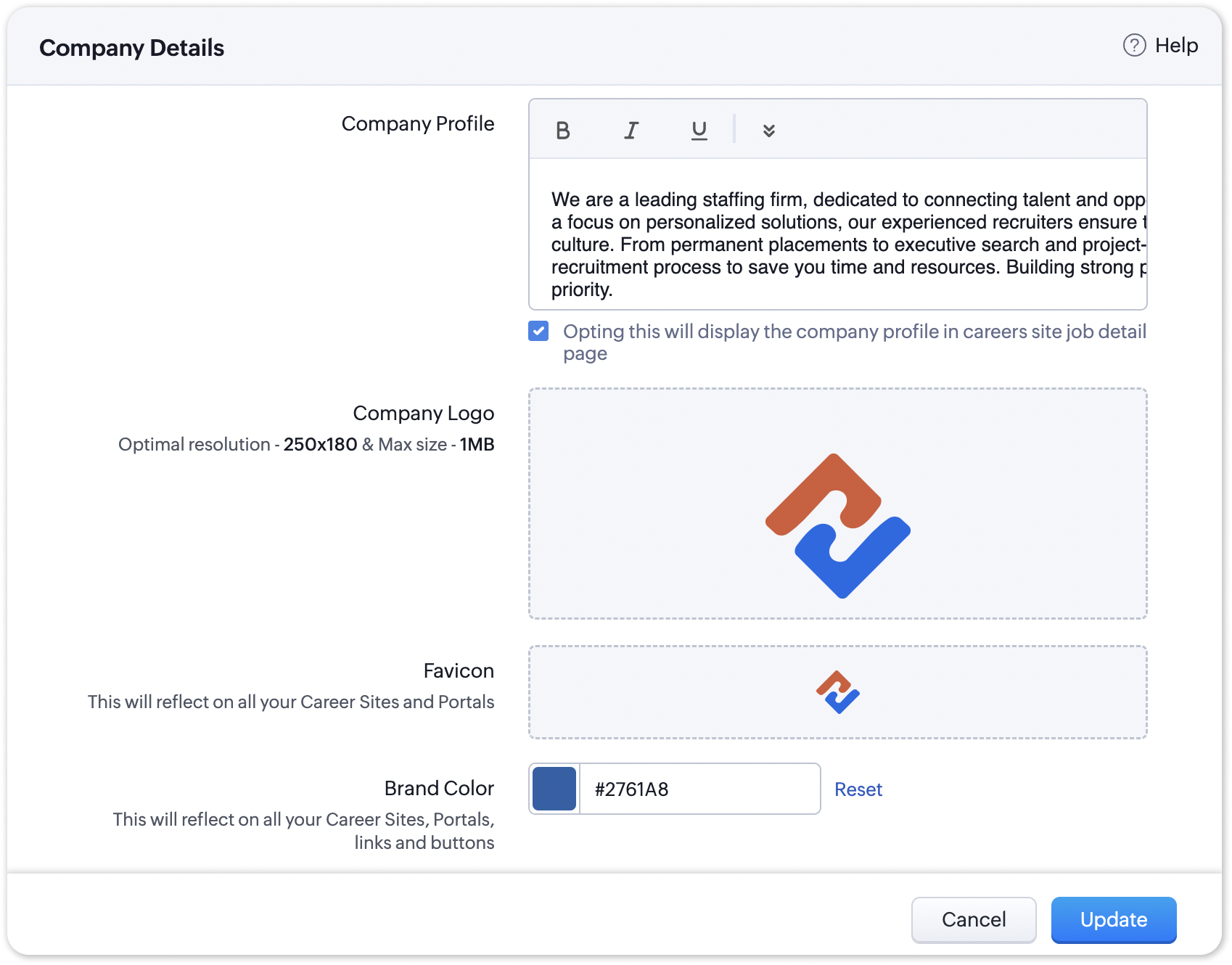
The favicon you upload during the Company Profile Verification stage will be added to your generated QR codes.
Join us in transforming recruitment into a streamlined, dynamic experience—where QR codes open doors, candidates find their path, and your team discovers a new era of efficiency.
Questions? Suggestions? Leave a comment below or reach out to our customer support team at support@zohorecruit.com.
Regards,
Team Zoho Recruit
Team Zoho Recruit
Topic Participants
Pradyumn K
Sticky Posts
Zoho Recruit Community Meet-up - India (Venues Finalised)
Zoho Recruit Community Meet-up - India (Venues Finalised) Namaste, India. 🙏🏼 The Zoho Recruit team is hitting the road—and we're absolutely excited behind the scenes. Join us for the Zoho Recruit India Meet-up 2026, a morning designed to make your recruitingZoho Recruit Community Meetup - London 🇬🇧 (Venue Finalised)
Hello Recruiters! We’re excited to announce that the Zoho Recruit team is coming to the UK for an in-person Zoho User Group (ZUG) Meetup in London! This is your chance to connect with fellow Zoho users, learn from experts, and walk away with actionableAn update to improve email delivery | Email Authentication & Relay
Update Rollout Latest Update: Enterprise users (8th July, 2025) This update is now live for Enterprise plan users in all regions. This includes People Plus, but not Zoho One, which will be covered in an upcoming update. Professional users (31st May 2025)Zoho Recruit User Group Meet-up | INDIA 2025 (Venue Finalised)
Hello Zoho Recruit users from India, We’re pleased and excited to announce our 2025 edition of Zoho user group meet-up in India in five cities! In this meet-up, our team of experts will help you understand the intricate nuances to use Zoho Recruit better,Zoho Recruit is coming to the UK | Zoho Community Learning Series
Customers from the United Kingdom, Exciting news: We will be in London for the Zoho Recruit user meet up. Our team will help you better understand the intricate nuances of Zoho Recruit to help you hire faster, inform about new and upcoming features, and
Recent Topics
Release Notes | January 2026
We have rolled out a set of powerful new enhancements across Zoho Vertical Studio that bring several long-awaited capabilities to your applications. These updates focus on deeper customization, smarter automation, better reporting, and improved usabilityProduct Request: Send email to Secondary email
Guys, we should be able to send the campaign to the secondary email too. Is this on the plans for Zoho Campaign? It looks like I can map the secondary email from the CRM to the Campaigs, but can not send the message.Franchise
Is there a solution of how to organize global franchise organisations?Recording overpayment?
So a customer just overpaid me and how do I record this? I can't enter an amount that is higher than the invoice amount. Eg. Invoice is $195 and he sent $200. He's a reccuring customer so is there a way to record so that he has a $5 advance for future invoice?Holidays
Hi; For defining Holidays, you need to add logic to handle the year as well as the month & day. We need to be able to enter Holidays for the next year. I need to add a holiday for January 2, 2017, but I can't until January 1st, which is a Sunday and weComposite Product (kit) - Dynamic Pricing
I am setting up Composite Products for item kits that I sell. I also sell the items from the kit individually. Problem is when pricing changes on an individual part, the Composite Product price does not change meaning when the cost of item # 2 in theUrgent: Slow Loading Issue on Zoho Commerce Website
Dear Zoho Support Team, I am experiencing slow loading times on my Zoho Commerce website, which is affecting its performance and user experience. The issue persists across different devices and networks. Could you please investigate this matter and provideNeed help with importing expenses
I'm using the template downloaded from the application. When I try to import my expenses, I get the message: Duplicate entry in the Expense Date column. Ensure it contains unique values. None of the rows will import. There are duplicate dates, but theySearch not working!
I have items in my notebook tagged but when I search for a tag nothing comes up! Any fix for this?ERROR CODE :550 - 550 5.1.1 Invalid email recipients
This message was created automatically by mail delivery software. A message that you sent could not be delivered to one or more of its recipients. This is a permanent error. mustafa.ashraf@techlink-eg.net, ERROR CODE :550 - 550 5.1.1 Invalid email recipientsWhat's New in Zoho POS - February 2026
Hello everyone, Welcome to Zoho POS’s monthly updates, where we share our latest feature updates, enhancements, events, and more. Let’s take a look at how February went. Purchase and sell items on different units We have introduced a unit conversion functionalityCan i integrate bigin with google voice?
I make all my calling through google voice to seprate my personal line from business. I want to log my calls with customers automatically but i domt see anywhere where i can do that. Any help? Im pretty sure i wont be able to. SadPOP/SMTP access authentication failed
I am unable to log setup outlook for my zoho mail account. I am using these settings poppro.zoho.com port 995 SSL smtp.zoho.com port 587(tls)/465(ssl) username/password works on mail.zoho.com but not with POP access. Can you help?Our Review Of Zoho CRM after 60 Days
The purpose of this is to just share with Zoho why I love their product, but ultimately why I could not choose Zoho CRM for our next CRM. About two months ago we begun a CRM exploration process for our financial planning firm, based in Texas. We alreadyError AS101 when adding new email alias
Hi, I am trying to add apple@(mydomain).com The error AS101 is shown while I try to add the alias.This domain is not allowed to add. Please contact support-as@zohocorp.com for further details
I am trying to setup the free version of Zoho Mail. When I tried to add my domain, theselfreunion.com I got the error message that is the subject of this Topic. I've read your other community forum topics, and this is NOT a free domain. So what is theAllow Admin to Configure Report > More Options Button
As an Admin, I want to configure the options of the Report > More Options button to improve UX and reduce Developer overhead. See attached screenshot. Original question posted here: https://help.zoho.com/portal/en/community/topic/modify-standard-repGenerate a link for Zoho Sign we can copy and use in a separate email
Please consider adding functionality that would all a user to copy a reminder link so that we can include it in a personalized email instead of sending a Zoho reminder. Or, allow us to customize the reminder email. Use Case: We have clients we need toYou cannot send this campaign as there is no contact in the selected mailing list.
We have synced contact lists and sent campaigns just fine prior to today. Now no matter what list I upload when I go to send the campaign it gives an error "You cannot send this campaign as there is no contact in the selected mailing list." And now itPivot Report Formula - using a today() variable
Is it possible for me to use a value of today() in a formula on a pivot table? I'm trying to identify where the end date of a project is greater than the current date if("10. Projects (Zoho Projects).End Date" > today(), 'Yes', 'No') I get the error thatCannot connect IMAP to outlook
Hello I have followed the instructions to connect my zoho account to Outlook IMAP but get this message: Session Id: bba118fb-151c-824f-9512-3ad1e91b109d Timestamp: 1708976566964 Error code: INVALIDCREDENTIALS INTERACTIONREQUIRED I'm using the exact configerationDepartment Overview by Modified Time
We are trying to create visuals to show the work our agents do in Zoho Desk. Using Zoho Analytics how can we create a Department Overview per modified time and not ticket created time? In order for us to get an accurate view of the work our agents areEnhance Sign CRM integration
Hello all, I'm working on a custom Deluge script to enhance the integration between Zoho CRM and Sign by using a writer merge template for additional flexibility. I want to replicate the post-sign document integration that exists between CRM and SignZoho Workdrive download was block by security software
Hi Team, Recently workdrive download was blocked by huorong security. Could you please advise how to put zoho workdrive as white list? every time we put "*.zohoexternal.com" or "workdrive.zohoexternal.com", the warning msg will still pop in next dowChoosing a portal option and the "Unified customer portal"?
I am trialling Zoho to replace various existing systems, one of which is a customer portal. Our portal allows clients to add and edit bookings, complete forms, manage their subscriptions and edit some CRM info. I am trying to understand how I might bestGeneral feedback
I think Zoho is at the moment (potentially) the best, or perhaps the only, real online solution, for business, and not just business. Surely the only one that has all the features that I need (and I've probably tried everything, at least all that has a cost-free option). It has still got lots of bugs and imperfect features, so I do hope it keeps developing and becomes a really professional platform. Lots of people (including me) want to use such one platform for all scheduling/mail/note-taking...How to add SSL to Short URL custom domain?
Hi, I've added a custom domain the the URL Shortener Domains. It's creating the short URL fine, but when clicking through, firstly I get an SSL warning, then a 400 Bad Request warning.Single Portal for Multiple Apps
Hello, I'm just getting started with Zoho and I'm very overwhelmed. I am currently using the free trial of Zoho One, but if I can figure it out, I intend to upgrade to the paid version. Zoho One, of course, gives me access to an entire suite of services/applications. One of the things I'd like to do is have a single place for clients (customers?) to log in and view current projects, invoices, contact information, etc. A single login for my clients. A single portal. I've come across documentationAntispam validation failed for your domain in Accounts
I tried adding a domain to zeptomail.zoho.com, but the “add domain” operation failed. The front‑end error reads: “Domain could not be added. Please contact support@zeptomail.com.” The back‑end API returned: ``` { "error": { "code": "TM_3601", "details":CodeX Scripts for Enforcing Custom Project Logic
Every organization has a defined way of executing projects. There are clear expectations around how tasks should move, when projects should progress, and which actions require validation. When these rules are consistently followed, projects remain structuredCancelled appointments still block out timeslot
I haven't had to test this before, but I've just found a problem. I had an appointment in a certain timeslot, and that appointment was cancelled. However, Bookings won't let another appointment be booked in that slot - it makes that time unavailable untilPreventing Group Emails From Being Sent to Group Member Personal Mail
We have a group setup for a public facing email address. We have streams turned on for this group. Right now when an email is sent to this group email it hits the group stream and also sends a copy of the email to all group members. We'd like to disableUnusual activity detected from this IP. Please try again after some time.
Hello Zoho admin and IT team We are a registered website in Eloctronic services and we been trying to add our users to the zoho system but this issue faced us ,, hope you unlocked us please.¿Puedo migrar mi sitio desde WordPress a Zoho? ¿Zoho admite herramientas con código personalizado?
¡Hola comunidad! Estoy evaluando la posibilidad de migrar mi sitio web https://calculadoradenotas.cl/ desde WordPress a una solución Zoho, y tengo algunas dudas técnicas que espero puedan aclararme. Mi sitio no es solo informativo: es una herramientaHow do I link my invoice to an estimate?
There has been instances where I have created estimates, however, invoices for the same estimate were created independently. The status of these estimates hasn't converted to 'invoiced'.Impossible to import Journal from Freshbooks
I have been trying to import journals from Freshbooks since August 30th. Every time I try to import, I get an error message. I have already made sure every row has a date. First it was saying the account and notes had unexpected input and that every debit/creditPeppol: Accept Bill (Belgium)
Hi, This topic might help you if you're facing the same in Belgium. We are facing an issue while accepting a supplier bill received by Peppol in Zoho Books. There is a popup with an error message: This bill acceptance could not be completed, so it wasConvert invoice from zoho to xml with all details
How to convert an Invoice to XML format with all detailsPrevent subform editing on a module's detail's page
Hi everyone, We would like to prevent any editing of the subform data in the : Create page Edit page Details page (as subform editing is now allowed by the recent UX update) We are able to prevent editing by making the subform fields read only in theExport Invoices to XML file
Namaste! ZOHO suite of Apps is awesome and we as Partner, would like to use and implement the app´s from the Financial suite like ZOHO Invoice, but, in Portugal, we can only use certified Invoice Software and for this reason, we need to develop/customize on top of ZOHO Invoice to create an XML file with specific information and after this, go to the government and certified the software. As soon as we have for example, ZOHO CRM integrated with ZOHO Invoice up and running, our business opportunitiesNext Page