Zoho Projects - Email Notifications for Feed Updates

Zoho Projects - Email Notifications for Feed Updates

Hi Projects Team,

I'm working with a client who wants a simple way to communicate with their customers on projects.

Getting the customer to add comments to Tasks or Bug records is not ideal, as we need a way which is easy with minimal training, and has all the message for the project in one place.

I have looked at all the options in Zoho Projects and for simplicity, communicating via the Feed would be the ideal scenario.

This basically seems to work but there doesn't seem to be a way to turn on email notifications for the project owner when a message is added to the feed by a client user, or a reply added for the client user (and the same in reverse... when a project owner adds a message to the client user).

I can see that web and mobile notifications are an option, but there is an option it could get missed.

I have also considered using @ mentions, which is fine from the project owner's perspective, but we can't expect the customer to remember to mention the project owner every time they reply.

It would also be great if we could trigger an automation when a comment is added to the feed. I know that this customer uses Cliq and every project has a Cliq channel. It would therefore also be beneficial if a comment on the Feed could result in a message on the project channel.

Thanks for considering my feedback and I look forward to learning of any existing way to achieve this.

Below is the Feed I'm referring to:
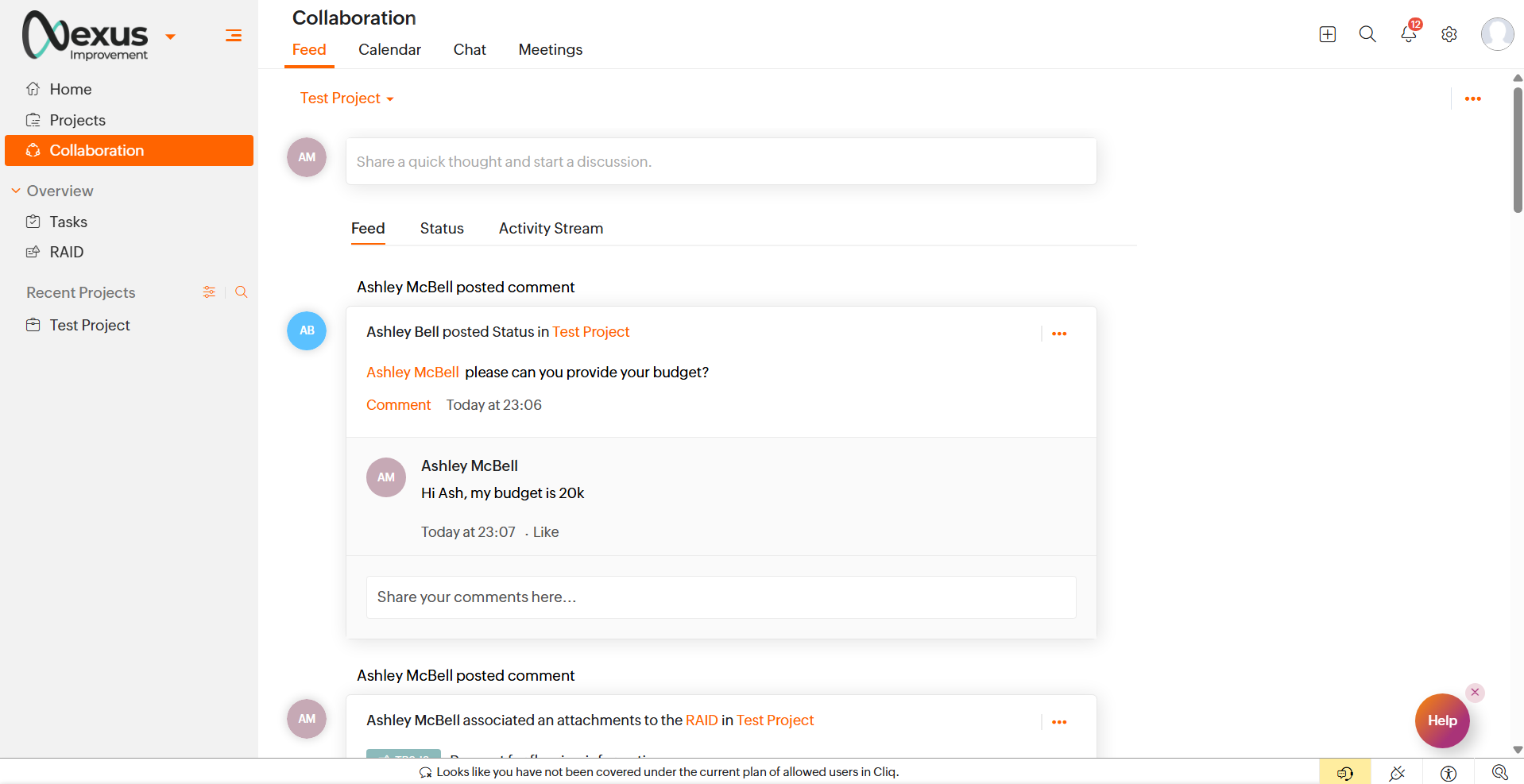

Thanks
    • Sticky Posts

    • Four types of task dependencies

      "Nothing is particularly hard if you divide it into small jobs."                                                                                                                  - Henry Ford Projects, small or large, are driven by simple work units called tasks. Monitoring standalone tasks might look simple but as the workflow becomes elaborate, tasks may start relying on one another. In project management, this relationship between tasks is termed as "Task Dependencies". Dependency between tasks arise
    • Tip: How to print the Gantt View

      Though we move from the traditional project management system (using papers) to an online project management system, we still prefer to have a printed copy of the activities/tasks that are to be done in the project. This way, we can carry the to-do lists with us for the meetings and refer when we are offline. The print option, available at the right side of the page, allows the users to print the project information across all the modules. However, this option failed to print all the tasks & milestones
    • Task and Project numbering

      Zoho Projects now generates a unique number for each project, task, and issue added. The auto-generated ID is a combination of a prefix and a number which is assigned by Zoho Projects. The unique IDs for projects, tasks, and issues will be useful to track, identify, and search easily. You can modify the settings to enable or disable the Project and Task IDs.  Learn more on how to modify Prefix & ID settings for projects and tasks. Issue IDs cannot be disabled, only its prefix can be changed (tasks
    • Task Inline Editing Enhancement

      Hi All, Today, we have made an enhancement in task inline editing. In 4.0, task edit is moved in a single screen in a pop-up. We designed this in-order to make the task edit across the product to be the same. Let it be in Feeds, Tasks & My Tasks tab, Calendar & My Calendar tab, a click on the task title will open the popup and user can edit the values. Customers pointed us the inline editing was very useful to them & how much they miss that in 4.0. Based on the feedback, we have rolled out this enhancement.
    • Blueprint in Zoho Projects

      Often, we stumble upon tasks having the same status workflow. Repetitive task processes are tedious to handle, right? That’s why we have introduced Blueprint for task automation. Blueprint is a tool to organize tasks and automate them based on the workflow you design and the criteria you define.    How do I associate tasks with a blueprint? You can set the criteria while creating the blueprint such that when you publish a blueprint, the tasks that satisfy the criteria will be associated with the