2024年度 Zoho Champion 決定のお知らせ
ユーザーの皆さん、こんにちは。Zoho コミュニティチームです。
Zoho コミュニティでは、2024年の1年間でコミュニティに貢献し、他ユーザーの役に立つ活動・情報発信を特に積極的に行ってくださった4名の方を、 「Zoho Champion」 として表彰させていただきます!
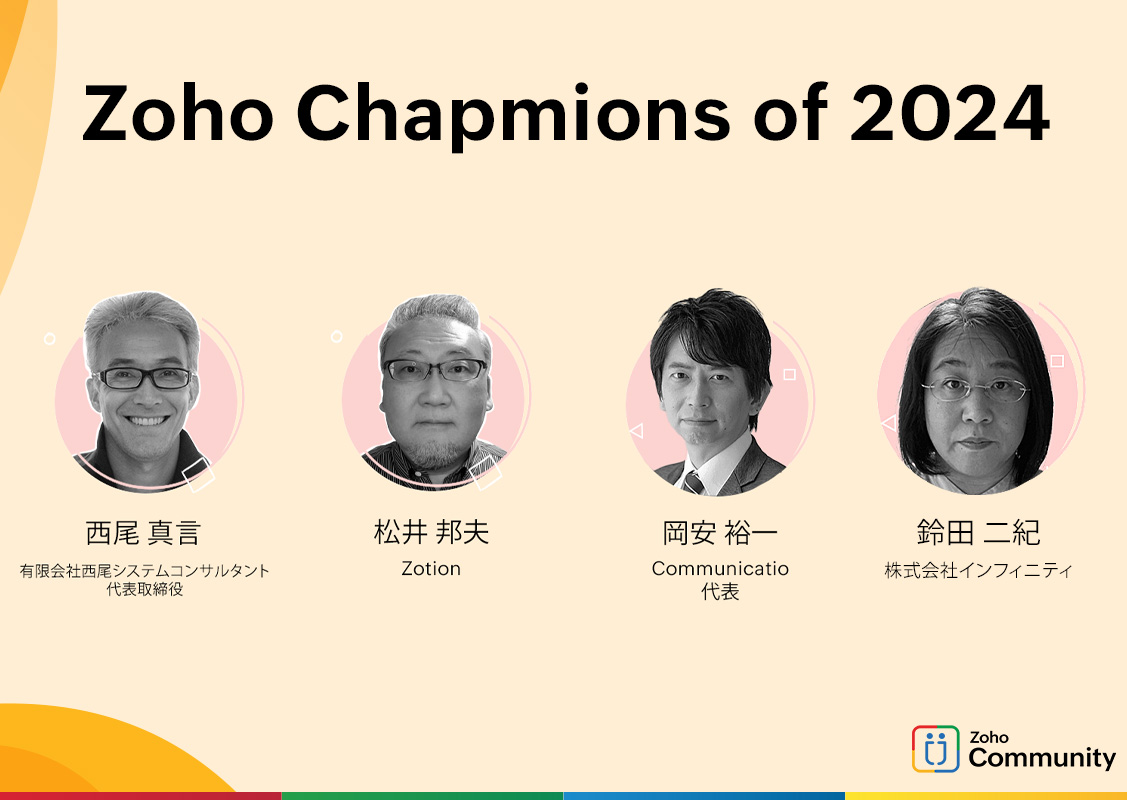
@西尾真言さん、 @Kunio さん、@岡安裕一(Yuichi)さん、@Anonymous User さん
ユーザー交流会の事例セッションへの登壇、フォーラムへの投稿 / 質問への回答や各活動についてのフィードバックなど多くの貢献をいただき、大変感謝しています。
*選定方法は、コミュニティチームによる他薦です。
Zoho Champion は、コミュニティのリーダーとして尊敬され、ユーザーの声を代弁しています。
コミュニティに積極的に参加し、仲間を助け、アイデアの流入や建設的な批評を通じて、コミュニティの活性化に貢献している必要不可欠な存在です。
参加ユーザーの皆さんはすでに、Champion の方々が共有したソリューションから恩恵を受けている可能性があります。
彼らのコミュニティへの多大な貢献に感謝の意を表しましょう。
 Champion の皆さんへ: コミュニティにさまざまな形で貢献していただき、他の方にとってとても意味のある活動をしてくださったChampion の皆さん、本当にありがとうございます & おめでとうございます!!
引き続きコミュニティが皆さんにとって価値のある場所として継続的に成長できるよう、私たちも努力していきたいと思います。
なお、3/19(水)18:00〜 開催予定のユーザー交流会 東京でChampion の松井さん、鈴田さんに登壇いただく予定です。
詳細は、追って本フォーラムに共有しますので、ぜひご参加ください。
また、本Championプログラムは2025年度も実施予定です。
ユーザーの皆さん、先日ご案内したZCAPと共に、ぜひチャレンジしてみてください。
Zoho コミュニティチーム
Topic Participants
Junya Nakano
Sticky Posts
【ZOHO】コミュニティユーザー自己紹介のトピック
日頃よりZoho Japan Communityをご愛顧いただき、ありがとうございます。 おかげさまで昨年より、フォロワー数も増えてまいりました! 人数も50名を超えてまいりましたので、改めて運営しているZohoメンバーの自己紹介の場、また皆さまがご自身を紹介できる場を目的とした、トピックを作らせていただきます。 これからご参加いただく方も、立ち上げ当初からお付き合いいただいている方も、よろしければ当スレッドのReply欄からご自由にコメントいただければ嬉しいです。(オンラインフォーラムは現状オープンなフォーラムとなっているので、記入できる範囲で構いません) スライドテンプレートもご用意いたしましたので、もし良ければご自由にご利用ください。下記のリンクからダウンロードいただけます。 https://zurl.co/lC7N テキストのみのコメントでももちろんOKです。 — 自己紹介例 【お名前(ニックネーム)】 【利用中のZohoサービス】 【ユーザー歴】 【ご利用人数】 【興味のあるZohoサービス】 【Zohoを利用し始めた、興味を持ったきっかけ】 【活用している主なサービスや機能】【ZOHO】オンラインフォーラムのご利用について
こちらでのディスカッション、またそれ以外でも普段より、様々な投稿/コメントで支えていただき、ありがとうございます。 オンラインフォーラムの運営に関しては、まだまだ完璧ではなく、 それゆえに皆さまにご不便をおかけしている部分もあり恐縮ですが、いただいたご意見も参考にしつつ、少しずつ試行を重ねています。その上でにはなりますが、改めてオンラインフォーラムの方針と別投稿にて機能要望に関する対応に関し、共有いたします。 Zoho Japan Community オンラインフォーラムについて ・Zoho製品を利用するユーザー様同士の交流、ノウハウ共有を目的としたオンライン掲示板です。 製品に関するご質問、ご意見につきましては、オンラインフォーラム上で、Zoho側からの回答を保証するものではありません。 ・コミュニティ運営に関わる投稿など、一部ゾーホージャパンからもコメント/投稿を行わせていただくことがあります。 ・製品に関する投稿の、Zoho側からの確実な回答をご希望の場合は、以下の方法をご検討いただけると幸いです。 <製品に関する質問に対し、確実にZoho側からの回答が欲しい場合> ・ご購入前:sales@zoho.jpZoho Japan Community オンラインフォーラムの利用案内
この度は、Zoho Japan Communityのオンラインフォーラムにご参加いただき、ありがとうございます。 ご利用にあたり、以下案内をご一読願います。フォーラムの使い方に関してはこちらをご確認ください。 1. オンラインフォーラムの利用について オンラインフォーラムに投稿、リアクションを行うには、ユーザー登録が必要となります。 登録情報に関しては、パスワードを適宜変更するなどして自己責任での管理をお願いします。 ユーザーは、自由にオンラインフォーラムのユーザー登録から退会できます。なお、オンラインフォーラムから退会しても、当該ユーザによる投稿は引き続き掲載することがあります。
Recent Topics
How do I create an update to the Cost Price from landed costs?
Hi fellow Zoho Inventory battlers, I am new to Zoho inventory and was completely baffled to find that the cost price of products does not update when a new purchase order is received. The cost price is just made up numbers I start with when the productManage control over Microsoft Office 365 integrations with profile-based sync permissions
Greetings all, Previously, all users in Zoho CRM had access to enable Microsoft integrations (Calendar, Contacts, and Tasks) in their accounts, regardless of their profile type. Users with administrator profiles can now manage profile-based permissionsZoho OAuth Connector Deprecation and Its Impact on Zoho Desk
Hello everyone, Zoho believes in continuously refining its integrations to uphold the highest standards of security, reliability, and compliance. As part of this ongoing improvement, the Zoho OAuth default connector will be deprecated for all Zoho servicesVoC in Zoho CRM is now data savvy: Explore response drilldown, summary components and participation in CRM criteria
VoC has all the goods when it comes to customer intelligence—which is why we're constantly enhancing it. We recently added the following: A customer drilldown component that shows you the list of prospects and customers behind a chart's attribute ExpandedHow do I bulk archive my projects in ZOHO projects
Hi, I want to archive 50 Projects in one go. Can you please help me out , How can I do this? Thanks kapilError 0x800CCC0F Outlook
Hello, i cannot send or receive email in outlook. can you please help. 'Sending' reported error (0x800CCC0F) : 'The connection to the server was interrupted. If this problem continues, contact your server administrator or Internet service provider (ISP).'Passing the CRM
Hi, I am hoping someone can help. I have a zoho form that has a CRM lookup field. I was hoping to send this to my publicly to clients via a text message and the form then attaches the signed form back to the custom module. This work absolutely fine whenCan I add Conditional merge tags on my Templates?
Hi I was wondering if I can use Conditional Mail Merge tags inside my Email templates/Quotes etc within the CRM? In spanish and in our business we use gender and academic degree salutations , ie: Dr., Dra., Sr., Srta., so the beginning of an email / letterZoho vault instal on windows
I am trying to use Zoho Vault Desktop for Windows, but I am unable to complete the sign-in process. Problem description After logging in to my Zoho account and clicking Accept on the authorization page, nothing happens. The application does not proceedZoho Browser??
hai guys, this sounds awkward but can v get a ZOHO BROWSER same as zoho writer, etc. where i can browse websites @ home and continue browsing the same websites @ my office, as v have the option in Firefox, once i save and close the browser and again when i open it i will be getting the same sites. If u people r not clear with my explanation, plz let me know. Thanks, SandeepLet’s Talk Recruit: LinkedIn Cheatsheet
Welcome to the first edition of Let’s Talk Recruit for 2026. We are kicking off the year by revisiting one of the most asked about topics in Zoho Recruit. How our LinkedIn integrations actually work and how recruiters can get the most value from them.Zoho Forms API
Is there any way to get all form entry list using API? Looking forward to hear from youCreating a Chart from a Report
In Zoho Analytics, is it possible to create a chart from a Pivot View report? We are looking to use Zoho Analytics to replace Excel for Sales reports and would like to be able to show both the table and the chart together.Ability to Set Client Name During Portal Invitation
Hi Zoho Team, We would like to suggest an important enhancement to the Zoho Creator Client Portal functionality. Zoho Creator recently introduced the option to set a client’s display name in the Client Portal settings, which is very helpful for creatingMove email between inboxes?
Is it possible to move emails from one team inbox to another? We would like to be able to have a single "catch-all" inbox for incoming requests, and then move the email to the appropriate department inbox. I was hoping we would be able to accomplish thisPDF Attachment Option for Service Reports
Hello Team, I would like to check with you all if there is an option to attach PDF documents to the service reports. When I try to attach a file, the system only allows the following formats: JPEG, JPG, and PNG. Could you please confirm whether PDF attachments【Zoho CRM】データ一覧画面でのメモのバッジ機能リリースのお知らせ
ユーザーの皆さま、こんにちは。コミュニティチームの藤澤です。2026年度もゾーホーユーザーコミュニティをどうぞよろしくお願いいたします! 今回は「Zoho CRM アップデート情報」の中から、新機能のデータ一覧画面でのメモのバッジ機能をご紹介します。 目次 概要 メモのバッジ機能について メモの作成について メモに関する様々な処理について 最近追加したメモについて メモのバッジの非表示について クライアントスクリプトの対応 概要 メモのバッジ機能について 既存の活動バッジに加えて、すべてのタブのデータ一覧表示画面に、各データごとに利用できる「メモのバッジ」(キャプチャ内の赤枠部分)が新たに導入されました。is it possible to add more than one Whatsapp Phone Number to be integrated to Zoho CRM?
so I have successfully added one Whatsapp number like this from this User Interface it seems I can't add a new Whatsapp Number. I need to add a new Whatsapp Number so I can control the lead assignment if a chat sent to Whatsapp Phone Number 1 then assignCan’t find fsm in zoho one
Every other app is available to me in Zoho one except fsmPosibility to add Emoticons on the Email Subject of Templates
Hi I´ve tried to add Emoticons on the Subject line of Email templates, the emoticon image does show up before saving the template or if I add the Emoticon while sending an Individual email and placing it manually on the subject line. Emoticons also showTask Deletion Restriction & Strict Stage Control
Hello Zoho Community, We have the following two issues currently pending and under testing, for which we require a workable and reliable solution: 1. Task Deletion Restriction We are testing ways to ensure that staff users are not able to delete tasksUnable to mass update a picklist field
Hello, I have the records within our Accounts module divided between two account types: Parent Accounts & Member Accounts. I am attempting to mass update accounts from one picklist value to the other (within other specific criteria in our custom fields)Process checklist in CRM
Hi We've created a new sales process that I'm mapping into the CRM - issue I have is that some of the tasks / milestones I would like to capture require very simple tick box responses but there are quite a few under a variety of sub categories so I don'tCRM project association via deluge
I have created a workflow in my Zoho CRM for closing a deal. Part of this workflow leverages a deluge script to create a project for our delivery team. Creating the project works great however, after or during the project creation, I would like to associateHolidays - Cannot Enter Two Holidays on Same Day
I have a fairly common setup, where part-time employees receive 1/2 day's pay on a holiday and full-time employees receive a full day's pay. Historically, I've been able to accommodate this by entering two separate holidays, one that covers full-timeWhere is the settings option in zoho writer?
hi, my zoho writer on windows has menu fonts too large. where do i find the settings to change this option? my screen resolution is correct and other apps/softwares in windows have no issues. regardsFile emails in Shared email folder
Hi, I am unable to allow users to collaborate in Shared email folders: User 1 shares a folder let's say "SharedTopic" with full permissions Users 2 and 3 can see this folder but are unable to add emails to this folder or search in this folder. For example,How create a draft via workflow?
I wish to create a workflow rule for specific emails that creates a draft response - not an automatic email reply, but just a draft with a set response ready to be verified by an agent who can then manually select recipients. Alternatively, the workflowThis user is not allowed to add in Zoho. Please contact support-as@zohocorp.com for further details
Hi Team, when I,m trying to create a email account (imagixmidia.com.br) it's showing this error >> This user is not allowed to add in Zoho. Please contact support-as@zohocorp.com for further details plz help me thanksHow to manage task lists in Zoho Desk?
Hello, I use Zoho Desk for IT customer support. I have a list of standard operating procedures (SOPs), including SOPs for onboarding new users, offboarding users, losing a device, etc. These are lists of tasks to be performed depending on the situation.Zoho → ShipStation Integration – Sales Order–Driven Fulfilment Workflow
Hello All, I’m reaching out to explore the best way to integrate a shipping tool into our inventory which will speed our process up. We are looking to integrate ShipStation into our existing order-to-fulfilment workflow, as we’re keen to standardise onBusiness Day Logic Update: More Accurate Scheduling for Your Workflows
Hello everyone, We’re improving how business-day calculations work in workflows, especially when triggers happen on weekends. This update ensures that offsets like +0, +1, and +2 business days behave exactly as intended, giving you clearer and more predictableConvert Lead Automation Trigger
Currently, there is only a convert lead action available in workflow rules and blueprints. Also, there is a Convert Lead button available but it doesn't trigger any automations. Once the lead is converted to a Contact/Account the dataset that can be fetchedDefault Tagging on API-generated Transactions
If one assigns tags to an Item or Customer, those tags get auto-populated in each line item of an Invoice or Sales Order when one creates those documents. However, if one creates the Sales Order or Invoice via the API (either directly coding or usingUser
If user is already part of manage engine endpoint central , what hapens when i try to add them to another Zoho org / directory? Are these users added as external users?Adding a new section to the related details sidebar when creating a new ticket.
Hello, I was wondering if you can add a new section to the related details sidebar when creating a new ticket. I was wanting to have it to where it also shows the account information related to the contact chosen as well. This is the section I am referringDisplaying only unread tickets in ticket view
Hello, I was wondering if someone might be able to help me with this one. We use filters to display our ticket list, typically using a saved filter which displays the tickets which are overdue or due today. What I'd really like is another filter thatHow to compare a subform lookup field that allows multiple entries when edited
I have a form with a subform with multiple fields. One of the fields is a lookup field that allows a multi select. On edit validation, I want a workflow to execute only when the entries in that subform field has changed. The old. function is not workingIs Zoho Shifts included in the Zoho One plan?
In case the answer is no: there's any plan to make it available via One? Thank youZoho Tracking Image location
So we've been having an issue with tracking email opens. Specifically in Gmail. Our emails are not that long either, maybe 4 sections of image/250 characters of text/button per section. But all my test accounts I used via Gmail we're showing opens. But then come to find out the tracking image is at the very bottom of the email. So If the message is clipped (It always just clips our social icons on the bottom) and the user doesn't click the show more button it never tracks the open. Looking at otherNext Page