Automation#23: Automate Guided Conversations in Zoho Desk with Business Hours

Hello Everyone,
This week's edition introduces a custom function designed to automate Guided Conversations in Zoho Desk, based on your business hours. With this feature, you can align the bot's behavior with your business schedule, ensuring a smooth and professional customer experience.
This week's edition introduces a custom function designed to automate Guided Conversations in Zoho Desk, based on your business hours. With this feature, you can align the bot's behavior with your business schedule, ensuring a smooth and professional customer experience.
Self-service platforms are now a cornerstone of effective customer service, improving productivity for both customers and support agents. With the evolving nature of customer support, self-
service has become indispensable. It saves time and provides quick access to solutions, empowering customers to address their concerns efficiently.
Zoho Desk's Guided Conversations serves as a robust self-service tool, offering Tier-1 solutions to customers through an intuitive interface. For more complex or escalated queries, the bot seamlessly connects customers to a live agent, ensuring both self-service and human assistance for effective issue resolution.
However, businesses often have non-working hours, such as weekends or holidays, when agents are unavailable. In such cases, configuring your Guided Conversations based on your business hours is essential. During non-working hours, the bot can:
- Notify customers that your business is currently closed, along with your operating hours.
- Provide an option for customers to submit a ticket, ensuring their query is addressed promptly during working hours.Configure your Guided Conversations today and streamline your customer support process!
How to incorporate this custom function within your GC flow?
1. Go to Setup (S) >> Self-Service >> Guided Conversation.
2. Choose the Department and click on Create Flow.
(If you would like to add this to your existing flow, click on the ellipsis icon under Published Flows and click on the Edit button.)
3. Select the channels, give a Name and Description, and click Next.
4. Click on the + icon, add the Webhook block, under Perform Actions.
5. Enter the Block name as Business Hours, Choose Get under Method.
 Note: In the Business Hours URL, replace .com with .in/.eu/.ca/.sa based on your DC
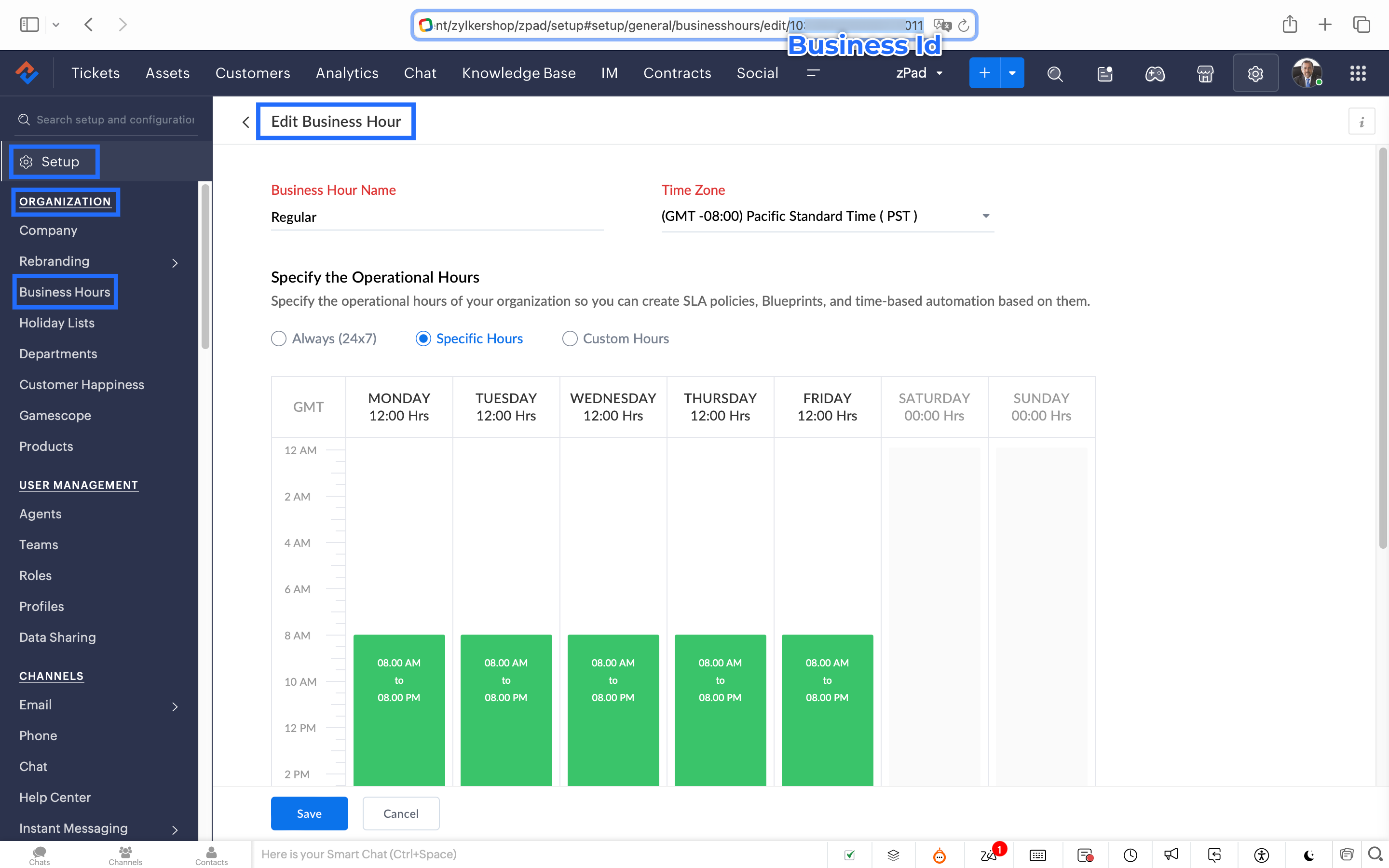
How to fetch the Business Hour Id?
6.1 To fetch the Business Id, Go to Setup (S) >> Organization >> Business Hours.6.2 Click on the Business Hours configured within your Zoho Desk Account. Go to the URL of the specific Business Hours, and you can fetch the business Id from the URL.
7. After entering the URL, do not make changes to the Query Params and Headers.
8. Under Connections, click on Add.
To Create a connection
8.1 Click Create Connection.
8.2 Select Zoho Desk under Default Services.
8.3 Give a connection name (let's say configureBusiness Hours).
8.4 Disable the toggle for User Credentials of Login User.
8.5 Under Scope, choose the below scope values:
Desk.settings.READ
8.6 Click Create and Connect.
8.7 Click Connect and click Accept.
Connection is created successfully.

9. After creating the connection, click on Refresh and then click on the drop down arrow and select the connection (configureBusiness Hours) created.
10. Click on the gear icon in the Formatter option and paste the below code in the Deluge window:
- dayMAp = {"SUNDAY","MONDAY","TUESDAY","WEDNESDAY","THURSDAY","FRIDAY","SATURDAY"};
- businessTimes = response.get("businessTimes");
- timez = response.get("timeZone").get("id");
- response = Collection();
- createdTime = zoho.currenttime.toString("yyyy-MM-dd HH:mm:ss",timez).toDateTime();
- createdDay = createdTime.getDay();
- //get this from above created time
- createdHour = createdTime.getHour();
- //get this from above created time
- createdMinute = createdTime.getMinutes();
- //get this from above created time
- createdWeekDay = createdTime.getDayOfWeek();
- //get this from above created time
- createdWeekDay = dayMAp.get(createdWeekDay - 1);
- for each businessTime in businessTimes
- {
if(businessTime.get("day") == createdWeekDay)
{
businessTimeStartHour = businessTime.get("startTime").getPrefix(":").toLong();
businessTimeEndHour = businessTime.get("endTime").getPrefix(":").toLong();
businessTimeStartMinute = businessTime.get("startTime").getSuffix(":").toLong();
businessTimeEndMinute = businessTime.get("endTime").getSuffix(":").toLong();
if((createdHour > businessTimeStartHour || createdHour == businessTimeStartHour && createdMinute >= businessTimeStartMinute) && (createdHour < businessTimeEndHour || createdHour == businessTimeEndHour && createdMinute <= businessTimeEndMinute))
{
response.insert({"status":"true"});
}
else
{
response.insert({"status":"false"});
}
}- }
- return response.get(0).get("status");
11. Click Save after pasting the code.
12. Click on the gear icon in the Response icon.
12.1 Click on the gear icon on the Status Code.12.2 Give Status Code as 200, Flow Variables as status, Response Value as /.12.3 Let the Type be single element and the Data Type be String. Click Save. Click Save for the Response List with the updated status.
13. Disable the toggle for the Multi Path.
14. Choose a Request timeout if required. This sets a response waiting time from the server.
15. Set the Error message if required to display in case waiting time exceeds the response time.
16. Click Save.
This is the configuration for setting the business hours through a custom function.
17. After the Webhook, click on the + icon and add the Fork block under the Perform Actions.

18. Give the Block Name as Check, Enter Path list : name it as Check.
Under Criteria 1, click on the drop-down arrow, and enter choose Status under Block variables, from the drop-down menu. Choose operation: contains and give the value : True.
19. Do not add an else path.
20. Click Save.
In the Fork block, under Check, you can add the Transfer to agent block from the Zoho Desk Blocks. Under Else, you can add a text icon/ info card stating you are out of business hours.
Note: This custom function does not include the Holiday Lists configured within Zoho Desk.
You can seamlessly integrate this Guided Conversation flow into your self-service platform to ensure you never miss a customer, even during non-working hours. Keep your customer support running smoothly!
See you next week!
Regards,
Lydia | Zoho Desk
Topic Participants
Lydia | Zoho Desk
Dikka
Shivani | Zoho Desk
Sticky Posts
Register for Zoho Desk Beta Community
With the start of the year, we have decided to take a small step in making the life of our customers a little easier. We now have easy access to all our upcoming features and a faster way to request for beta access. We open betas for some of our featuresShare your Zoho Desk story with us!
Tell us how you use Zoho Desk for your business and inspire others with your story. Be it a simple workflow rule that helps you navigate complex processes or a macro that saves your team a lot of time; share it here and help the community learn and grow with shared knowledge.Tip #1: Learn to pick the right channels
Mail, live chat, telephony, social media, web forms—there are so many support channels out there. Trying to pick the right channels to offer your customers can get pretty confusing. Emails are most useful when the customer wants to put things on record. However, escalated or complicated issues should not be resolved over email because it's slow and impersonal. When you need immediate responses, live chat is more suitable. It's also quick and convenient, so it's the go-to channel for small issues.Welcome to Zoho Desk Community - Say hello here!
Hello everyone! Though we have been here for a while, it’s time to formally establish the Zoho Desk Community; we’re really happy to have you all here! This can be the place where you take a moment to introduce yourself to the rest of the community. We’d love to hear all about you, what you do, what company or industry you work for, how you use Zoho Desk and anything else that you will like to share! Here’s a little about me. I am Chinmayee. I have been associated with Zoho since 2014. I joined hereWebinar 1: Blueprint for Customer Service
With the launch of a host of new features in Zoho Desk, we thought it’ll be great to have a few webinars to help our customers make the most of them. We’re starting off with our most talked about feature, Blueprint in Zoho Desk. You can register for the Blueprint webinar here: The webinar will be delivered by our in-house product experts. This is a good opportunity to ask questions to our experts and understand how Blueprint can help you automate your service processes. We look forward to seeing
Recent Topics
Rate Limiting in Zoho Flow (OpenAI API)
Hi Everyone, We are facing some issues when using Zoho Flow as we have a deluge script running which is making external calls to OpenAI endpoint. Sometimes the response takes more than 30 seconds meaning the script will timeout. We want to implement aPlacing a condition before converting the LEAD
Hi, I need some assistance with Lead conversion. I need to place certain conditions before allowing the user to convert the lead. For example: up until the certain status's doesn't equal "green" don't allow to convert lead. I tried creating this usingit is possible to open a widget via deluge script function
I have one function that is workflow action I call my fucntion I need to call the internal widget it is possible to open or it have to please tell me the solutionCreator - Portal Custom Domain
I will pay $100 in crypto to anyone who can actually get my Creator Custom Domain to function (actually tell me how you got yours to). Domain verifies, Nothing. I've been fighting it a week, multiple chats to customer service. Clearly I'm doing something wrong. Some datapoints Domain name itself unimportant, can be a string of numbers. I need to know what registrars are working for you because GoDaddy does NOT. Do I need hosting? I've tried both ways and nothing works. I pushed through Cloudflaresteps and options to change Domain DNS/Nameservers settings
Please share the options or steps to change Domain DNS/Nameservers settingsEmployees in Leave Policy exceptions
In the Leave Policies we should be able to add specific employees to the exception list So it will be like All Employees except A,B,C in the exception list, currently we can only add departments etcHow get stock name from other column ?
How get stock name from other column ? e.g. =STOCK(C12;"price") where C12 is the code of the stockAdding a developer for editing the client application with a single user license
Hi, I want to know that I as a developer I developed one application and handed over to the customer who is using the application on a single user license. Now after6 months customer came back to me and needs some changes in the application. Can a customerDownload an email template in html code
Hello everyone, I have created an email template and I want to download it as html. How can i do that? I know you can do it via the campaigns-first create a campaign add the template and download it as html from there. But what if i don't want to createAttachment is not included in e-mails sent through Wordpress
I have a Wordpress site with Zeptomail Wordpress plugin installed and configured. E-mails are sent ok through Zeptomail but without the included attachment (.pdf file) Zeptomail is used to send tickets to customers through Zeptomail. E-Mails are generatedUpcoming Changes to the Timesheet Module
The Timesheet module will undergo a significant change in the upcoming weeks. To start with, we will be renaming Timesheet module to Time Logs. This update will go live early next week. Significance of this change This change will facilitate our nextCant update image field after uploading image to ZFS
Hello i recently made an application in zoho creator for customer service where customers could upload their complaints every field has been mapped from creator into crm and works fine except for the image upload field i have tried every method to makeBilling Management: #4 Negate Risk Free with Advances
In the last post, we explored how unbilled charges accumulate before being invoiced. But what happens when businesses need money before service begins? Picture this: A construction company takes on a $500,000 commercial building project expected to lastZoho CRM Inventory Management
What’s the difference between Zoho CRM’s inventory management features and Zoho Inventory? When is it better to use each one?Cannot Enable Picklist Field Dependency in Products or Custom Modules – Real Estate Setup
Hello Zoho Support, I am configuring Zoho CRM for real estate property management and need picklist field dependency: What I’ve tried: I started by customizing the Products module (Setup > Modules & Fields) to create “Property Type” (Housing, Land, Commercial)Get Workflow Metadata via API
Is there a way to get metadata on workflows and/or custom functions via API? I would like to automatically pull this information. I couldn't find it in the documentations, but I'm curious if there is an undocumented endpoint that could do this. ModerationZoho Projects - Q2 Updates | 2025
Hello Users, With this year's second quarter behind us, Zoho Projects is marching towards expanding its usability with a user-centered, more collaborative, customizable, and automated attribute. But before we chart out plans for what’s next, it’s worthFSM setup
So we have been tinkering with FSM to see if it is going to be for us. Now is the time to bite the bullet and link it to our zoho books and zoho crm. The help guides are good but it would really help if they were a bit more in depth on the intergrations.Upcoming Updates to the Employees Module in Zoho Payroll (US)
We've made a couple of updates to the Employees module in Zoho Payroll (latest version of the US edition). These changes will go live today. While creating an employee Currently, the Compensation Details section is part of the Basic Details step, wherePossible to Turn Off Automatic Notifications for Approvals?
Hello, This is another question regarding the approval process. First a bit of background: Each of our accounts is assigned a rank based on potential sales. In Zoho, the account rank field is a drop-down with the 5 rank levels and is located on the accountZOHO Creator subform link
Dear Community Support, I am looking for some guidance on how to add a clickable link within a Zoho Creator subform. The goal is for this link to redirect users to another Creator form where they can edit the data related to the specific row they clickedAllow Resource to Accept or Reject an Appointment
I have heard that this can be done, is there any documentation on how?Create new Account with contact
Hi I can create a new Account and, as part of that process, add a primary contact (First name, last name) and Email. But THIS contact does NOT appear in Contacts. How can I make sure the Contact added when creating an Account is also listed as a Contact?How To Insert Data into Zoho CRM Organization
Hi Team I have this organization - https://crm.zoho.com/crm/org83259xxxx/tab/Leads I want to insert data into this Leads module, what is the correct endpoint for doing so ? Also I have using ZohoCRM.modules.ALL scope and generated necessary tokens.Where can I get Equation Editor por Zoho Writer?
I need to use Math Formulas in my document. Thank you.Filtering repport for portal users
Salut, I have a weird problem that I just cannot figure out : When I enter information as administrator on behalf of a "supplier" portal user (in his "inventory" in a shared inventory system), I can see it, "customer" portal users can see it, but theBUTTONS SHOWN AS AN ICON ON A REPORT
Hi Is there any way to create an action button but show it as an icon on a report please? As per the attached example? So if the user clicks the icon, it triggers an action?I can't connect my Instagram account in Zoho SalesIQ
I deleted an old account to test SalesIQ and connected it to Instagram and facebook. After deciding that I want to use it officially, I deleted the account and create another one with the email account of the company. But, now I having this error whileProduct Updates in Zoho Workplace applications | August 2025
Hello Workplace Community, Let’s take a look at the new features and enhancements that went live across all Workplace applications this August. Zoho Mail Delegate Email Alias Now you can let other users send emails on your behalf—not just from your primaryWant to use Zoho Books in Switzerland. CHF support planned?
Hi, We're a Swiss company using other Zoho suite software and I discovered Zoho Books and other accounting SaaS when looking for an accounting tool. Do you intend to cover Switzerland and CHF based accounting anytime soon? RoyCelebrating Connections with Zoho Desk
September 27 is a special day marking two great occasions: World Tourism Day and Google’s birthday. What do these two events have in common (besides the date)? It's something that Zoho Desk celebrates, too: making connections. The connect through tourismAdding Overlays to Live Stream
Hello folks, The company I work for will host an online event through Zoho Webinar. I want to add an overlay (an image) at the bottom of the screen with all the sponsors' logos. Is it possible to add an image as an overlay during the live stream? If so,Email Sending Failed - SMTP Error: data not accepted. - WHMCS Not sending emails due to this error
I have been trying to figure out a fix for about a week now and I haven't found one on my own so I am going to ask for help on here. After checking all the settings and even resetting my password for the email used for WHMCS it still says: Email Sending Failed - SMTP Error: data not accepted. I have no clue how to fix it at this point. Any insight would be lovely.Zoho Flow - Update record in Trackvia
Hello, I have a Flow that executes correctly but I only want it to execute once when a particular field on a record is updated in TrackVia. I have the trigger filters setup correctly and I want to add an "update record" action at the end of the flow toAdd Comprehensive Accessibility Features to Zoho Desk Help Center for End Users
Hello Zoho Desk Team, We hope you're doing well. We’d like to submit a feature request to enhance the client-facing Help Center in Zoho Desk with comprehensive accessibility features, similar to those already available on the agent interface. 🎯 CurrentZoho CRM mobile: Support for rich text in multi-line fields, Image upload field, and more
Hello everyone, We've made a few enhancements to the Zoho CRM mobile app to improve your experience. Here's what's new: Rich text support for multi-line fields (iOS) Image upload field support (iOS and Android) Tool tip markdown (iOS) Rich text supportin zoho creator Sales Returns form has sub form Line Items return quantity when i upate the or enter any values in the sub form that want to reflect in the Sales Order form item deail sub form field Q
in zoho creator Sales Returns form has sub form Line Items return quantity when i upate the or enter any values in the sub form that want to reflect in the Sales Order form item deail sub form field Quantity Returned\ pls check the recording fetch_salesorderEstimates with options and sub-totals
Hi It seems it would be great to be able to show multiple options in an estimate. For instance I have a core product to which I can add options, and maybe sub-options... It would be great to have subtotals and isolate the core from the not compulsory items. ThanksOptional Items Estimate
How do you handle optional items within an estimate? In our case we have only options to choose with. (Like your software pricing, ...standard, professional, enterprise) How can we disable the total price? Working with Qty = 0 is unprofessional....Important Update : Zendesk Sell announced End of Life
Hello Zendesk users, Zendesk has officially announced that Zendesk Sell will reach its End of Life (EOL) on August 31, 2027 (Learn more). In line with this deprecation, Zoho Analytics will retire its native Zendesk Sell connector effective October 1,Next Page