Automation#23: Automate Guided Conversations in Zoho Desk with Business Hours

Hello Everyone,
This week's edition introduces a custom function designed to automate Guided Conversations in Zoho Desk, based on your business hours. With this feature, you can align the bot's behavior with your business schedule, ensuring a smooth and professional customer experience.
This week's edition introduces a custom function designed to automate Guided Conversations in Zoho Desk, based on your business hours. With this feature, you can align the bot's behavior with your business schedule, ensuring a smooth and professional customer experience.
Self-service platforms are now a cornerstone of effective customer service, improving productivity for both customers and support agents. With the evolving nature of customer support, self-
service has become indispensable. It saves time and provides quick access to solutions, empowering customers to address their concerns efficiently.
Zoho Desk's Guided Conversations serves as a robust self-service tool, offering Tier-1 solutions to customers through an intuitive interface. For more complex or escalated queries, the bot seamlessly connects customers to a live agent, ensuring both self-service and human assistance for effective issue resolution.
However, businesses often have non-working hours, such as weekends or holidays, when agents are unavailable. In such cases, configuring your Guided Conversations based on your business hours is essential. During non-working hours, the bot can:
- Notify customers that your business is currently closed, along with your operating hours.
- Provide an option for customers to submit a ticket, ensuring their query is addressed promptly during working hours.Configure your Guided Conversations today and streamline your customer support process!
How to incorporate this custom function within your GC flow?
1. Go to Setup (S) >> Self-Service >> Guided Conversation.
2. Choose the Department and click on Create Flow.
(If you would like to add this to your existing flow, click on the ellipsis icon under Published Flows and click on the Edit button.)
3. Select the channels, give a Name and Description, and click Next.
4. Click on the + icon, add the Webhook block, under Perform Actions.
5. Enter the Block name as Business Hours, Choose Get under Method.
 Note: In the Business Hours URL, replace .com with .in/.eu/.ca/.sa based on your DC
How to fetch the Business Hour Id?
6.1 To fetch the Business Id, Go to Setup (S) >> Organization >> Business Hours.6.2 Click on the Business Hours configured within your Zoho Desk Account. Go to the URL of the specific Business Hours, and you can fetch the business Id from the URL.
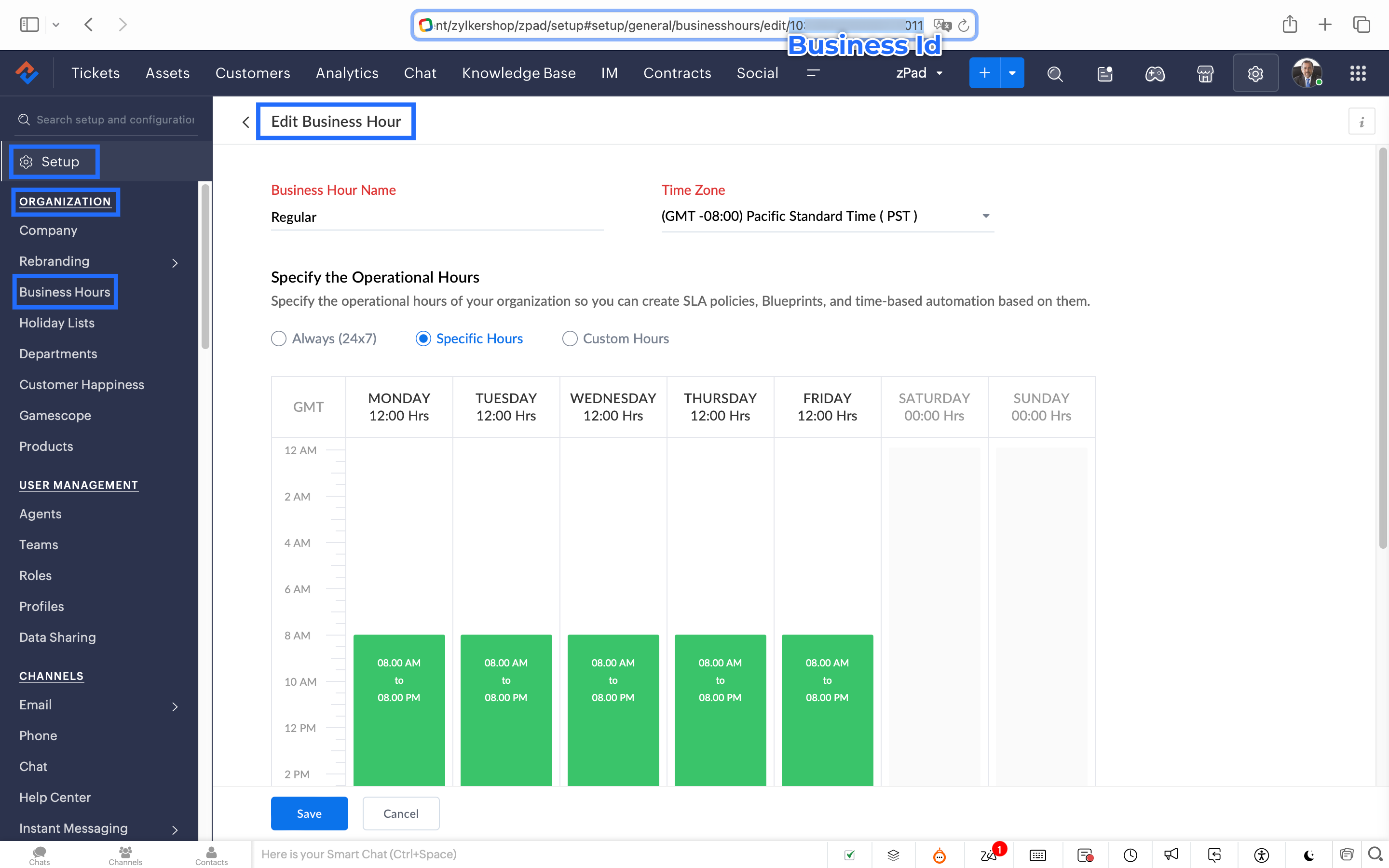
7. After entering the URL, do not make changes to the Query Params and Headers.
8. Under Connections, click on Add.
To Create a connection
8.1 Click Create Connection.
8.2 Select Zoho Desk under Default Services.
8.3 Give a connection name (let's say configureBusiness Hours).
8.4 Disable the toggle for User Credentials of Login User.
8.5 Under Scope, choose the below scope values:
Desk.settings.READ
8.6 Click Create and Connect.
8.7 Click Connect and click Accept.
Connection is created successfully.

9. After creating the connection, click on Refresh and then click on the drop down arrow and select the connection (configureBusiness Hours) created.
10. Click on the gear icon in the Formatter option and paste the below code in the Deluge window:
- dayMAp = {"SUNDAY","MONDAY","TUESDAY","WEDNESDAY","THURSDAY","FRIDAY","SATURDAY"};
- businessTimes = response.get("businessTimes");
- timez = response.get("timeZone").get("id");
- response = Collection();
- createdTime = zoho.currenttime.toString("yyyy-MM-dd HH:mm:ss",timez).toDateTime();
- createdDay = createdTime.getDay();
- //get this from above created time
- createdHour = createdTime.getHour();
- //get this from above created time
- createdMinute = createdTime.getMinutes();
- //get this from above created time
- createdWeekDay = createdTime.getDayOfWeek();
- //get this from above created time
- createdWeekDay = dayMAp.get(createdWeekDay - 1);
- for each businessTime in businessTimes
- {
if(businessTime.get("day") == createdWeekDay)
{
businessTimeStartHour = businessTime.get("startTime").getPrefix(":").toLong();
businessTimeEndHour = businessTime.get("endTime").getPrefix(":").toLong();
businessTimeStartMinute = businessTime.get("startTime").getSuffix(":").toLong();
businessTimeEndMinute = businessTime.get("endTime").getSuffix(":").toLong();
if((createdHour > businessTimeStartHour || createdHour == businessTimeStartHour && createdMinute >= businessTimeStartMinute) && (createdHour < businessTimeEndHour || createdHour == businessTimeEndHour && createdMinute <= businessTimeEndMinute))
{
response.insert({"status":"true"});
}
else
{
response.insert({"status":"false"});
}
}- }
- return response.get(0).get("status");
11. Click Save after pasting the code.
12. Click on the gear icon in the Response icon.
12.1 Click on the gear icon on the Status Code.12.2 Give Status Code as 200, Flow Variables as status, Response Value as /.12.3 Let the Type be single element and the Data Type be String. Click Save. Click Save for the Response List with the updated status.
13. Disable the toggle for the Multi Path.
14. Choose a Request timeout if required. This sets a response waiting time from the server.
15. Set the Error message if required to display in case waiting time exceeds the response time.
16. Click Save.
This is the configuration for setting the business hours through a custom function.
17. After the Webhook, click on the + icon and add the Fork block under the Perform Actions.

18. Give the Block Name as Check, Enter Path list : name it as Check.
Under Criteria 1, click on the drop-down arrow, and enter choose Status under Block variables, from the drop-down menu. Choose operation: contains and give the value : True.
19. Do not add an else path.
20. Click Save.
In the Fork block, under Check, you can add the Transfer to agent block from the Zoho Desk Blocks. Under Else, you can add a text icon/ info card stating you are out of business hours.
Note: This custom function does not include the Holiday Lists configured within Zoho Desk.
You can seamlessly integrate this Guided Conversation flow into your self-service platform to ensure you never miss a customer, even during non-working hours. Keep your customer support running smoothly!
See you next week!
Regards,
Lydia | Zoho Desk
Topic Participants
Lydia | Zoho Desk
Dikka
Shivani | Zoho Desk
Sticky Posts
Register for Zoho Desk Beta Community
With the start of the year, we have decided to take a small step in making the life of our customers a little easier. We now have easy access to all our upcoming features and a faster way to request for beta access. We open betas for some of our featuresShare your Zoho Desk story with us!
Tell us how you use Zoho Desk for your business and inspire others with your story. Be it a simple workflow rule that helps you navigate complex processes or a macro that saves your team a lot of time; share it here and help the community learn and grow with shared knowledge.Tip #1: Learn to pick the right channels
Mail, live chat, telephony, social media, web forms—there are so many support channels out there. Trying to pick the right channels to offer your customers can get pretty confusing. Emails are most useful when the customer wants to put things on record. However, escalated or complicated issues should not be resolved over email because it's slow and impersonal. When you need immediate responses, live chat is more suitable. It's also quick and convenient, so it's the go-to channel for small issues.Welcome to Zoho Desk Community - Say hello here!
Hello everyone! Though we have been here for a while, it’s time to formally establish the Zoho Desk Community; we’re really happy to have you all here! This can be the place where you take a moment to introduce yourself to the rest of the community. We’d love to hear all about you, what you do, what company or industry you work for, how you use Zoho Desk and anything else that you will like to share! Here’s a little about me. I am Chinmayee. I have been associated with Zoho since 2014. I joined hereWebinar 1: Blueprint for Customer Service
With the launch of a host of new features in Zoho Desk, we thought it’ll be great to have a few webinars to help our customers make the most of them. We’re starting off with our most talked about feature, Blueprint in Zoho Desk. You can register for the Blueprint webinar here: The webinar will be delivered by our in-house product experts. This is a good opportunity to ask questions to our experts and understand how Blueprint can help you automate your service processes. We look forward to seeing
Recent Topics
Zoho Creator - 2024 Release Projection 1
Hello everyone! As we enter 2024, we'd like to extend our warmest wishes for success and prosperity. Your fantastic response to our Product Roadmap page last year has been incredibly motivating. Continuing on this path, we're excited to share a glimpseAutomation Assistance for Zoho Form Integration and Workflow
Hi, We are currently using a Zoho Form to send out our Global Credit Application and would like to automate the process further. Specifically, we’d like the ABN number submitted through the form to automatically populate the GST/VAT Number field in ZohoCOQL does not return queryable value if the result set is empty
See linked video for running code illustration of the problem: https://workdrive.zohoexternal.com/external/d49bb40033b43b288d56fdf843095b7c65b28391d3ec5d09c854f416d853003d Moderation update: We are appending the comment that was removed, to add contextZoho CRMでの商談の管理のしかたについて初歩的な質問です。
先月からZoho CRMを試験的に導入して運用しています。 商談の管理(運用?)の仕方について教えてください。 商談の数が増えてくると、ダッシュボードの「ステージ別進捗状況」にどんどん過去の商談が蓄積されてくると思うのですが、 現在動きのあるものを中心に確認したくなる気がします。 そのあたりについては、どのように運用が一般的なのでしょうか? アドバイスいただけるととてもありがたいです。 よろしくお願いします。Composite Items & Purchase Orders
The Composite Item is great way to bundle different products and services into a single line and sell it as a single line item in Estimates, Sales Orders and Invoices. However, on the other side - i,e,. Purchasing - this item creates quite a bit of ausing custom function is it possible to update the created by field in Zoho Crm custom module
using custom function is it possible to update the created by field in Zoho Crm custom moduleSlow Sloww Slowwww Responses
Good day, Has anyone been experiencing slow responses from support? Since Thursday I migrated my Whats app to Sales Iq and I had to synch with Social to get the otp they were sending. Apparently What's app can't be automatically added so I reached outYou have exceeded the maximum number of attempts for this action. Please retry doing the same in 30 minutes.
When one of Zoho Books user tries to select a vendor, recording a new bill, these message appears: You have exceeded the maximum number of attempts for this action. Please retry doing the same in 30 minutes. Other user, at the same time, but differentEnable Conversation Context Retention for SalesIQ Answer Bots
Hello Zoho SalesIQ Team, We hope you are doing well. We have noticed that SalesIQ bots currently fail to maintain conversation context in Hebrew. For example, when we follow up on a previous answer or ask for clarification in Hebrew, the bot either providesAutomatic Hebrew Small Talk Setup Without Duplicate Term Errors & Manual Configuration
Dear Zoho SalesIQ Team, Greetings, We would like to request an enhancement to the Small Talk feature in Zoho SalesIQ, specifically for Hebrew language support. Current Challenge: When setting up Small Talk for Hebrew, we encounter multiple issues: SimpleTrouble fetching custom fields from Zoho Booking
I'm following the instructions from here : https://help.zoho.com/portal/en/kb/flow/user-guide/app-specific-documentation/articles/zoho-bookings#1_Problem_with_accessing_custom_fields But I can't get this to work. Here is the result of a test booking :Should I Add Leads in Bigin?
ok, first off I'm new here. I just started using Bigin. I'm debating if it's appropriate to enter leads. by leads I mean a list of contacts that I have not yet reached out to...it's a cold calling list. if I enter them I can track them (I understandZoho Books - Perform a validation check before an invoice is marked as sent or sent
Allow the validation rules to apply to button actions. For example: an invoice could not be sent or marked as sent if it has an empty value in a custom field. (The field could remain blank while it is being worked on.)Flow error "given url is wrong"
when I setup a flow to update a task status, I get an error when it runs that says "given url is wrong."Bigin Android app update: Email filters enhancement, change owner for related records.
Hello, everyone! In the most recent Bigin Android app update, we have introduced additional email filters and an option to change the owner of related records. Email filters: We have now brought in support for 'All Emails' and 'Added from Widgets' filterHow can I get all conversations and comments of a Zoho Desk ticket using ZOHODESK
Hi everyone, Currently, I am developing a Zoho Desk extension, and I am following the guide available at https://www.zoho.com/desk/extensions/guide/#ticket-object. While working with Zoho Desk, I have noticed that I can only retrieve the general informationAI & Zoho Recruit
Hello, I guess we all are using AI in our personal and professional lives. Now, let's imagine. Recruitment is just a succession of stages and steps. For which step would you like to see AI implemented into Zoho Recruit ? I'll start : - Automatic translationwidget url 404'ing
I'm creating a widget for the first time. When I grab the url from the base url section of the widget builder and append /widget.html it 404's Just wrote a very basic test. I have a folder structure app.zip - widget.html --js/app.js /widget.html <!DOCTYPEUnable to Edit Pick-List Items in Custom Project Field(s)
I can edit most fields normally, but if I try to edit - in any way - a Pick List field, I just get this error: To be perfectly clear, I'm trying to edit an existing Pick List field (adding or removing items), not adding a new instance. If I rename it,How to display results from zoho.crm.searchRecords in message window
Hello, I've created a custom function which is linked to a custom button which pulls a date from our contacts module and searches a date field in our quotes module and returns all records matching the date. My issue is, how to I get this to display theDomain Transfer
Hello there! I wanted to know if I can transfer my domain from Zoho to other hosting providers or use a different hosting provider instead of zoho's services.Select CRM Custom Module in Zoho Creator
I have a custom module added in Zoho CRM that I would like to link in Zoho creator. When I add the Zoho CRM field it does not show the new module. Is this possible? Do i need to change something in CRM to make it accesible in Creator?New User - Opening Stock Aging Report
I am setting up new client and am entering Opening Stock - created items and entered quantity/price details. Now the aging report is showing all the opening stock as new. How do I enter the Purchase Dates of these items so that I get accurate InventoryBulk Receive Multiple Purchase Orders
Is there a feature or function that will allow you to bulk receive issued purchase orders? I have about 100 that need to be received from 5 years ago.Manual Invoice
How to create a Manual invoice, I need to enter Amount directly instead of (qty*Rate). our company is a service sectorMerging contacts and or accounts
Hello, In a prior CRM we were able to merge contacts and or accounts. We have turned on the function to stop multiple contacts with the same email, so we can prevent multiple contacts from happening, however, we now have multiple contacts that have theCapture Reason for absence next to Campaign Member Status. Is there a reasonable workaround?
I've reviewed the topics I could find to do with this but still couldn't find anything that satisfies our requirements: We would like to track a *reason* (picklist or text, doesn't matter which) why a Campaign Member (Lead or Contact associated with aButton or Links order
Is there a way to re-order the buttons or links that are created?'Pin' notes, so that specific ones are always visible at the top of the 'notes' tab.
It doesn't appear Bigin has the functionality to 'pin' a note to then have it always show at the top of the notes tab section of a record. Often times we have a large number of records, but key information we may want to have easily visible to all atRequest for Subform Support in Zoho CRM Webforms
Hi Team, I hope you're doing well. I would like to bring to your attention that currently, Zoho CRM Webforms do not support Subforms, which limits our ability to send forms that mirror the actual structure used within Zoho CRM. This feature is extremelyMaxima Address on FSM Customer
Im trying to add probably 50 customers from one company but couldn't make it since it has limit..how do i add the limit?How to Track Inventory Usage from Zoho FSM to Zoho Inventory?
Hi everyone, We’re currently working on integrating Zoho FSM with Zoho Inventory, and we’ve encountered a challenge we’re hoping the community can help us understand better. Here’s the context: When we create a Work Order in Zoho FSM that involves partsView subform entries without viewing a record in Zoho CRM | Kiosk Studio Session #8
In a nutshell Have you ever wanted to take a quick peek at a record's subform? Examples might be invoiced items in an invoice, ordered items in a sales order, or purchased items in a purchase order. Let's say you're viewing your list of invoices in ZohoTransforma tu Inventario: Control Inteligente y Funciones Clave en Zoho Inventory (Spanish Webinar)
¿Tu empresa necesita mayor trazabilidad y control en almacenes? Conoce cómo gestionar tu inventario con eficiencia y automatización... ¡y descubre las sorpresas que trae Zoho Analytics! Participa en nuestro webinar gratuito en español, este 19 de agostoMails are not being sent from custom Deluge function
We are having troubles to implement sending Invoices / Sales_Orders etc. automatically using following deluge script: attachment_template_id = "aaaa"; record_id = "bbbb"; mail_template_id = "cccc"; //NEW aproach fileUrl = "https://www.zohoapis.com/crm/v8/settings/inventory_templates/"Currency transition
We are using Zoho CRM in Curacao, Dutch Caribbean. Our currency is currently the ANG. Curacao will be transition ing from using the ANG (Antillean Guilder) to using the XCG currency (Caribbean Guilder) on March 31st 2025, see: https://www.mcb-bank.com/caribbean-guilder.Notes and Attachments visibility can now be restricted based on profiles
Dear All, We hope you're well! We are here with a quick update about Notes and Attachments profile permissions. In the past, a record's Notes and Attachments were visible by default to all users with record access. However, as notes and attachments canZoho webinar--hard for agencies
So, this is just a dive into our use case, and why we've been disappointed in Zoho webinar. We are a small marketing agency, and we wanted to add webinars to the services we provide, as many of our clients want to learn to use them as part of their contentCelebrating Raksha Bandhan with Zoho Desk: A Bond of Trust, Protection, and Service
Raksha Bandhan, celebrated across India, symbolizes the sacred bond of protection and affection between siblings. “Raksha” means protection, “Bandhan” means bond or knot: together, it represents a knot of care and security. On this occasion, we'd likeBanking > Import statements with a csv file
Good morning, I am regularly using the "import statement" option to match my transactions. I've been using csv files produced by my bank online and was able to import my transactions. Until now. Thank you for your help for fixing this ! Alex.Next Page