Bring your CRM and Desk app inside SalesIQ with widgets
Have you ever been confused and frustrated with multiple open tabs and switching back and forth from SalesIQ to other apps to perform your business-specific operations?
How effective would it be to have all the required tools and data of the apps you use in one window and never switch tabs again? Yes, you can do that by using Widgets in SalesIQ.
What are widgets?
Widgets can be used to bring data from your external and integration apps inside the Conversation and Visitor module of SalesIQ.
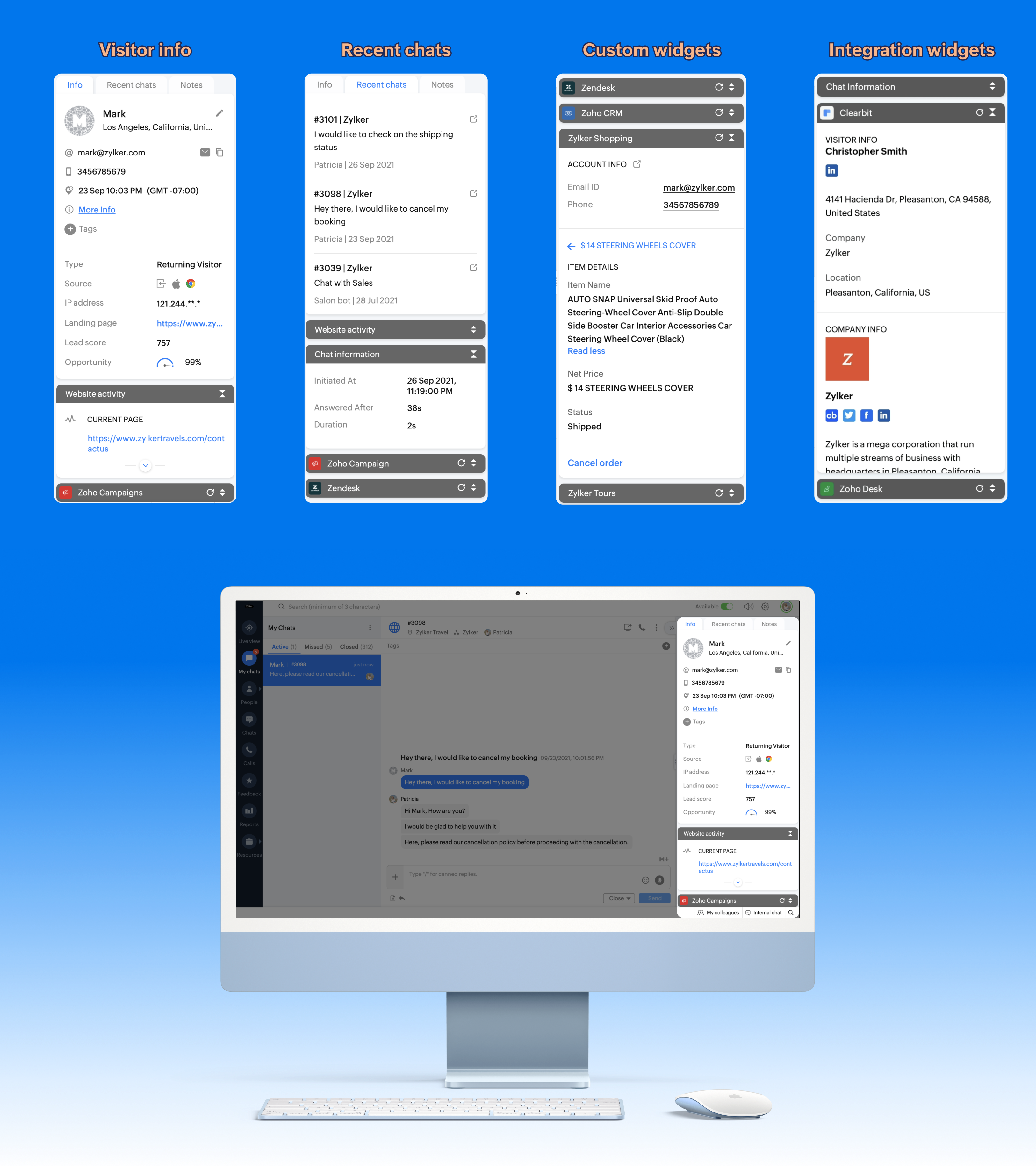
In this post, we'll look at the CRM and Desk widget in focus.
Zoho CRM widget
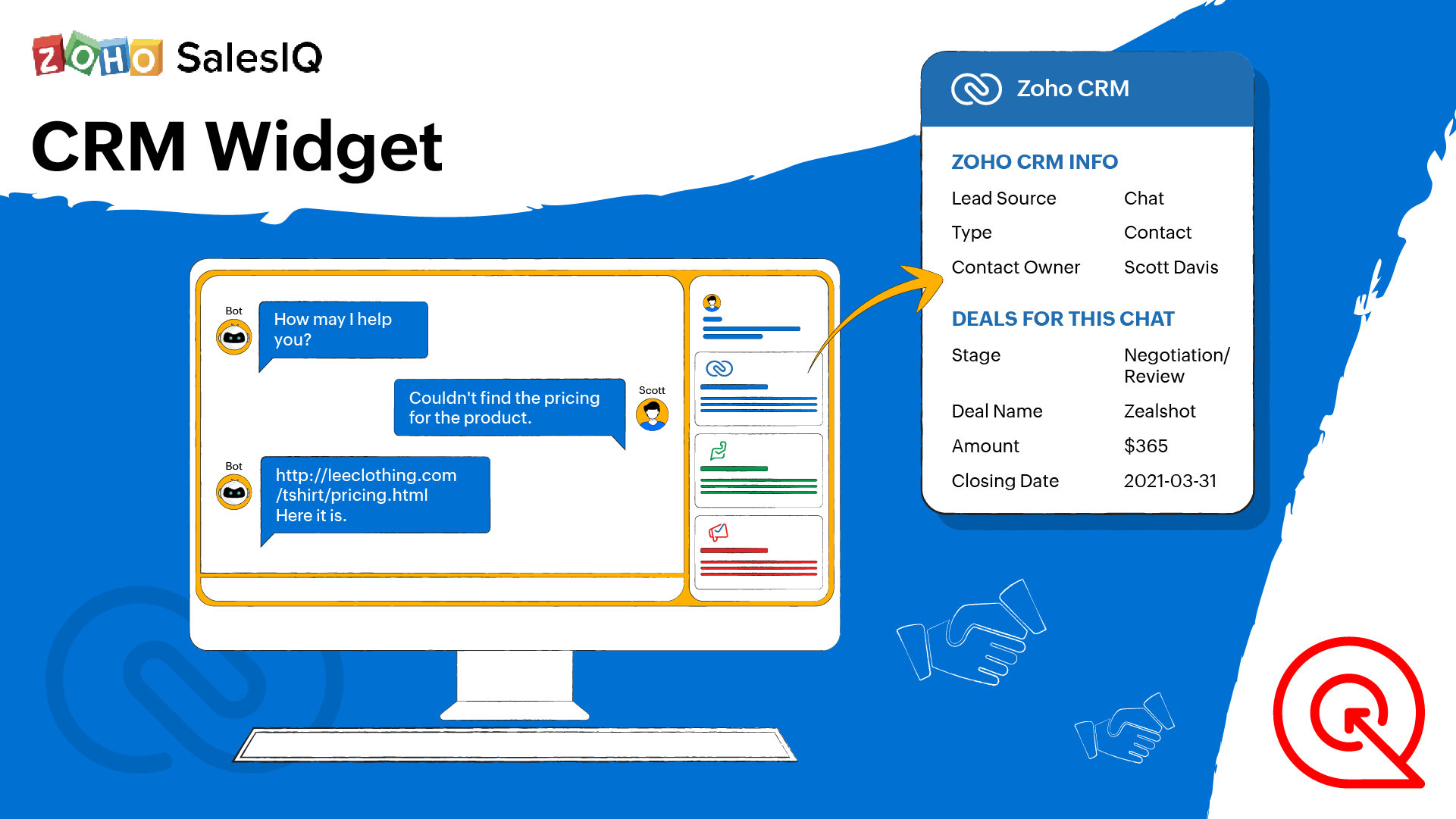
CRM is the most widely used tool to manage your customer info and relations. Performing support and engagement using SalesIQ and then switching tabs to update the information in CRM would be inefficient and can result in errors when handling multiple chats.
Using the CRM widget, you can bring your Zoho CRM account right inside SalesIQ's operator chat window and perform all actions then and there.
Key benefits:
The widget will automatically show the contact's CRM details as you are conversing with them in the chat window without you having to pick the contact and open it to view the info.
Having the CRM widget can remove the need to add all your operators as users in your CRM account.
What details can I view in the CRM widget?
If available in Zoho CRM, you can view all the fields listed in this page.
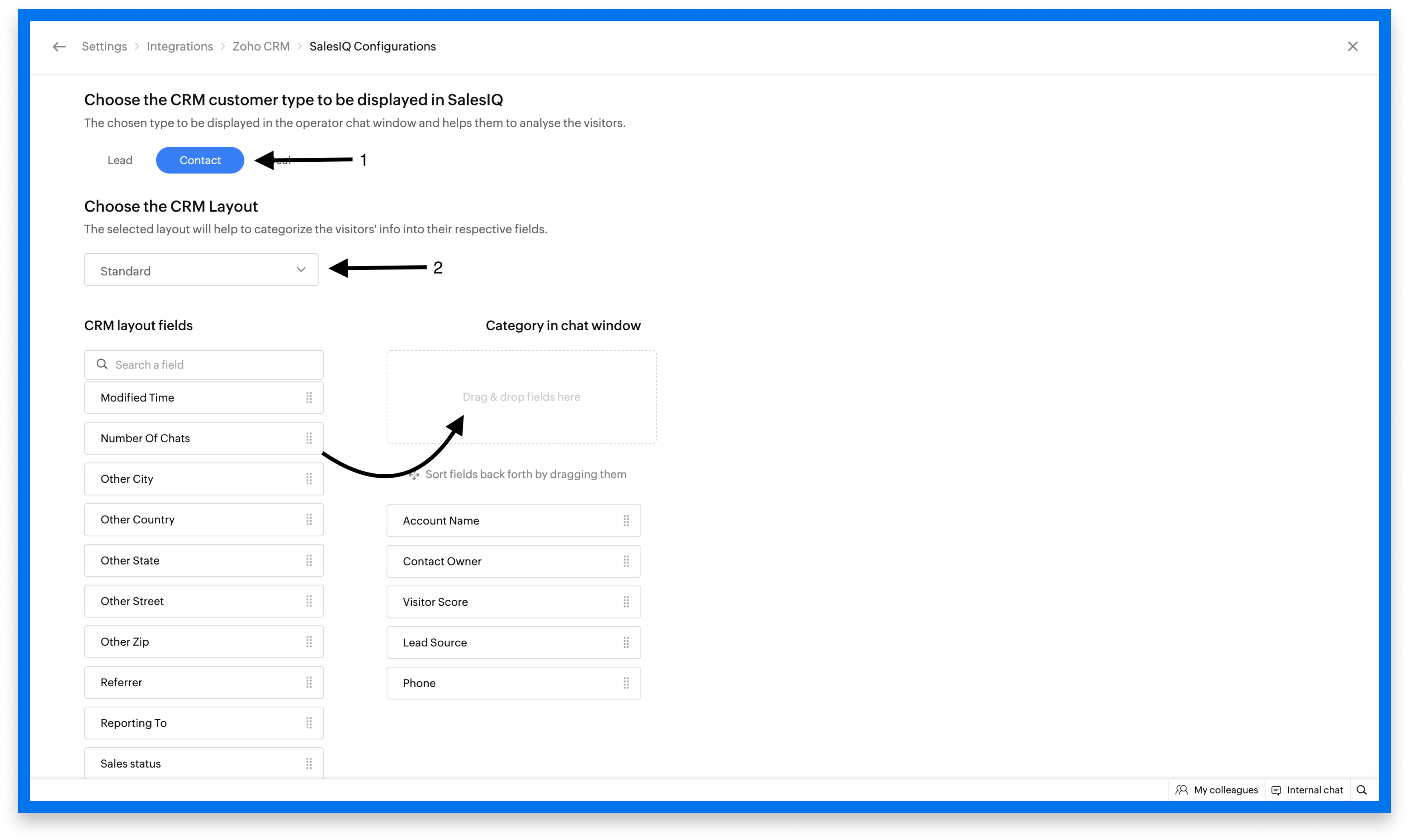
To customize the info that you want to view inside the CRM widget
Navigate to Settings > Integrations > Zoho CRM > SalesIQ configuration.
Choose the CRM visitor type.
Select a CRM layout from the drop-down.
Now drag and drop the available fields under the CRM layout fields into the box under Category in the chat window.
What are the actions that I can perform with the CRM widget?
Convert leads to contacts
Push new contacts to CRM
Associate and manage new deals
Zoho Desk widget
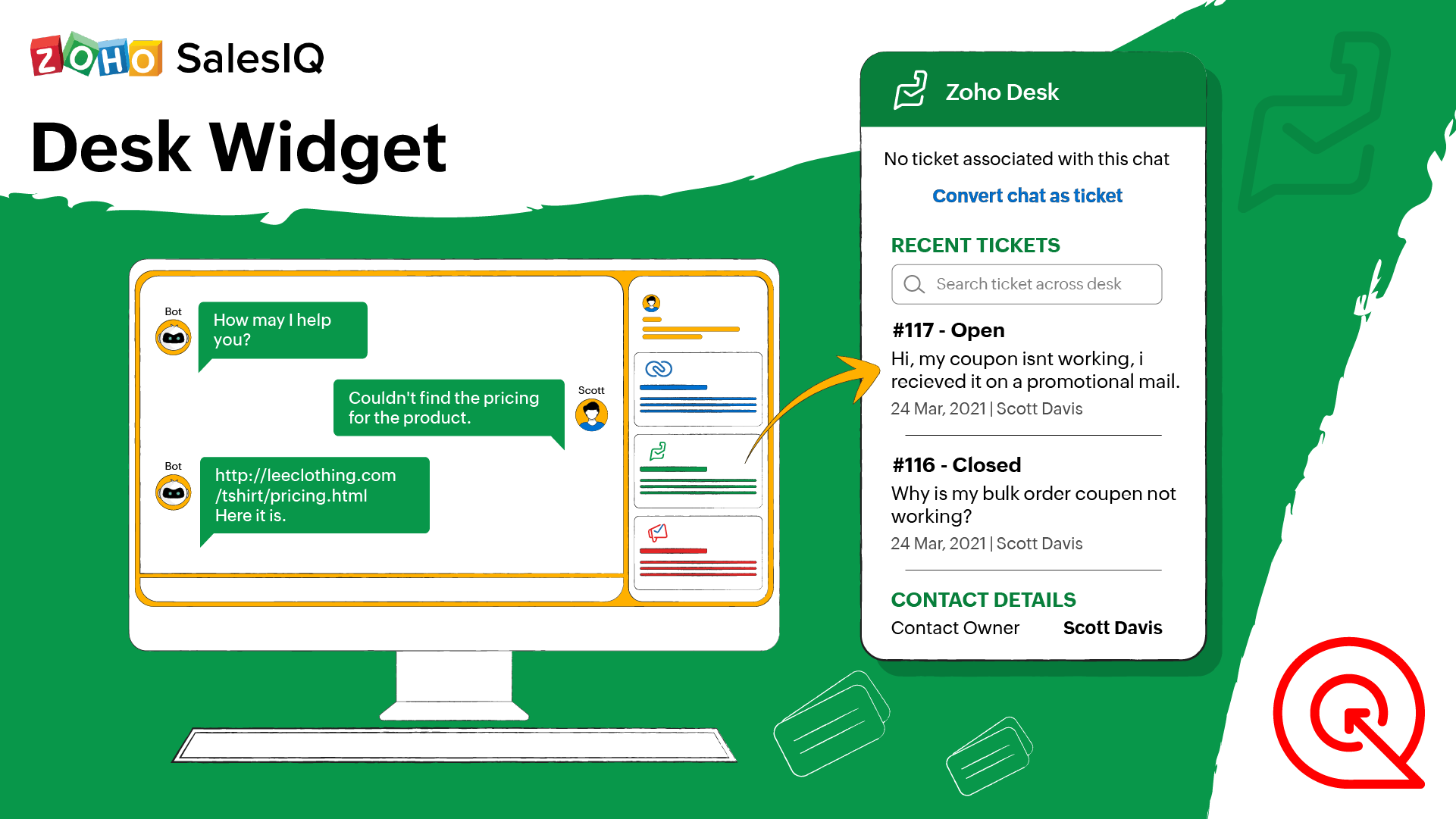
Support teams use Zoho Desk to add and manage support tickets. Without the Desk widget in SalesIQ, operators have to navigate back and forth between the Desk app and SalesIQ to log a support request or change the status of the support ticket. With the Zoho Desk widget, operators can view the tickets and manage them right inside SalesIQ.
What can you do with the Desk Widget?
View tickets associated with the current chat
View previously handled tickets of the visitor
Add new tickets
Update and manage tickets
Topic Participants
Naveen Chandar
Dagmar Noome
Sasidar Thandapani
Ryder Wagner
Sticky Posts
Speak Your Customers' Language: SalesIQ's chatbots now support 30 languages 🤖
We're unveiling some major upgrades to our chatbot that are set to revolutionize your experience! Now SalesIQ support 30 languages for both Zobot and Answer bot. By speaking your customers' language, you can enhance engagement, improve customer satisfaction,Attention Deluge Developers: Important Update Regarding "Send Email Deluge Task"
Hi Deluge Users, We hope this message finds you well. We would like to inform you about a recent update on the Send emails deluge task. If you are using this deluge task (SalesIQ Scripts) for your Zobot, widgets, or form controllers to send emails, pleasePlug Samples #12: Verify Customer Mobile Numbers with OTP to Avoid Spam Entries
Hi Everyone! Verifying customer information is critical in business to filter out junk data and spammers. Whether it’s lead generation, appointment booking, or any other operation, ensuring quality data is essential for driving meaningful outcomes. ABig Things Just Dropped in the SalesIQ Universe: Top Upgrades You’ll Love in Nova’25
Nova'25 has landed, and it’s packed with meaningful upgrades to help you engage smarter, work faster, and scale with ease. Whether you're into proactive messaging, smarter automation, or better admin control, there's something here for everyone. Here'sYour bot just got smarter: AI-Powered routing that reads between the lines
What if your bot could tell the difference? Between a visitor who just needs a quick answer, someone actively comparing options, and a frustrated customer one click away from leaving? Most bots can't. They deliver the same response to everyone, missing
Recent Topics
How to change the format for phone numbers?
Mobile phone numbers are currently formatted (###) ###-####. How can I change this to a more appropriate forms for Australia being either #### ### ### or (#)### ### ###?Unattended Access on Android without Play Store
I'm testing Zoho Assist for remote config and maintenance of our IoT devices. The devices are running Android 8.1 and do NOT have Google Play Store installed, nor can it be installed. I've been able to install Zoho Assist on the devices and load the enrollmentIs it possible to embed Zoho Bookmarks in the Cliq sidebar?
Is there any way that each Zoho user can access their bookmarks (that live in https://bookmarks.zoho.eu/ which is technically a part of Zoho Mail) directly within Cliq? As a widget, or an item in the sidebar? My team does not use Mail, it uses Cliq allShow Attachments in the customer portal
Hi, is it possible to show the Attachments list in the portal for the particular module? Bests.Kaizen #142: How to Navigate to Another Page in Zoho CRM using Client Script
Hello everyone! Welcome back to another exciting Kaizen post. In this post, let us see how you can you navigate to different Pages using Client Script. In this Kaizen post, Need to Navigate to different Pages Client Script ZDKs related to navigation A.Navigate with Ease: Announcing Improvements to Your Zoho CRM for Everyone's Setup Experience
Hello Everyone, We’re thrilled to announce new enhancements to the Setup Menu in our Zoho CRM for Everyone system, designed to simplify your workday and streamline your overall experience. What's New? Addition of a Setup Homepage Faster Search in SetupZoho Projects Webhook fails with HTTP Error 0
Hello Zoho Community, I am pulling my hair out over this one. I have setup a very basic http(s) server that always responds "ok" and code 200 to incoming GET requests. It will accept any parameters, and any path. Really, all it does is say "ok," and logZOHO Campaignで表のカラムの幅を調整したい。
表を作成した際、個々のカラムの幅を調整したいのですが、方法が分かりません。 どなたかご存じの方ご教示ください。Kaizen #129 : Client Script Support for Blueprints
Hello everyone! Welcome to another week of Kaizen. Today, let us discuss about how you can use Client Script during a Blueprint transtion to meet your requirements. This Kaizen post will provide solution for the post - Need non-mandatory fields in blueprintSearch Bar Improvement for Zoho Commerce
Hey everyone, I've been using Zoho Commerce for a bit now, and I think the search bar could really use an upgrade. Right now, it doesn't show products in a dropdown as you type, which would make finding items a lot faster. On Shopify, for example, youMaking digital signatures accessible to all: Introducing accessibility controls in Zoho Sign
Hi there! At Zoho Sign, we are committed to building an inclusive digital experience for all our users. As part of our ongoing efforts to align with Web Content Accessibility Guidelines (WCAG), we’re updating the application with support that will goAccount Owner Field From Accounts Module to be Displayed in Contacts module
I have a field in the Accounts Module in the CRM called "Account Owner" i want that field to be also mapped into the Contacts Module custom single line field called "Account Manager".Update a field in the ZOHO Form, basis numeric value in another field in the same form
I am trying to create a questionnaire in ZOHO, where clients need to answer 10 questions, and basis response, values are assigned. I have created a total score field where the sum of the values is stored. But i am unable to create a rule whereby anotherMeet up de Zoho en Bilbao
Buenos días comunidad! Estamos estudiando hacer un Meet up en Bilbao desde zoho y varios Partners. Para que la experiencia sea excelente, queremos saber cuantas pesonas se vendrían a Bilbao al evento. Y para que sea lo mas útil posible, que temas dentroPicklist reference value in REST
picklist options can be configured to have a different reference value than the displayed one, should be helpful in things like multilanguage: https://help.zoho.com/portal/en/kb/crm/customize-crm-account/translations/articles/translations is there a wayIn Zoho inventory Converting sales return to cerdit note from using Api from Creator Error details: {"code":-1,"message":"Invalid Sales Return ID."}
In Zoho inventory Converting sales return to cerdit note from using Api from Creator Error details: {"code":-1,"message":"Invalid Sales Return ID."} this is button Function used in the Creator map Inventory.Create_Credit_note(int CRE_ID) { return_valueMarketing Tip #2: Recover lost sales with abandoned cart emails
Did you know most online shoppers don’t complete checkout? Automated cart recovery emails are an easy way to bring them back. A simple reminder can recover sales you’d otherwise lose. Try this today: Enable abandoned cart emails in Zoho Commerce and setBilling Management: #9 Usage Billing in IoTs
We live in a world where connectivity has become a lifestyle rather than a luxury. From smart thermostats that adjust your home's temperature to GPS trackers monitoring end-to-end fleets and sensors that optimize energy grids, the Internet of Things has{"code":1038,"message":"JSON is not well formed"}
Today this began failing: sales_order_data = zoho.books.createRecord("salesorders",books_organization_ID,order_data); with this error message. {"code":1038,"message":"JSON is not well formed"} This code has been running for two years. Here is the inputHow can I migrate Shared Mailbox from Zoho Mail to Team Inbox?
I am unable to migrate mails from my shared mailbox in Zoho Mail to Team Inbox. I am the super admin of my Zoho One plan and yet I am getting an error saying only admins can do this? I don't understand the issue.Remember all the ways we've posted?
The world celebrates World Postal Day in 2025 with the theme “#PostForPeople: Local Service. Global Reach". The story of the “post” is a story of human connection itself, evolving from simple handwritten notes carried over long distances to instant digitalCan no longer upload my own Notebook cover
I've had Notebook for over a year and have been able to create my own notebook covers, but when I tried to upload my own cover for a new notebook today, the upload feature has suddenly been starred, requiring me to upgrade my account. When did thisZoho Desk - Cannot Invite or Register New User
Hi who may concern, we encountered a problem that we cannot invite user or the visitor cannot register for a user at all through our help center portal, with the snapshot shown as below and the attachement. It always pops up that "Sorry, Unable to processCustom domain issue
I recently changed records for my support area custom domain for a few months, I then wanted to come back to Zoho, but now I can't connect it and I can't login as it's having an SSL issue. I cannot get a good response from support, as I've been notifiedHow do you generate personalized certificates and save them in dynamic folders using Writer's mail merge?
Zoho Writer's mail merge feature can help you enhance the certificate management process. It's a great way to save time and effort! Merge certificates and maintain a well-organised repository with personalised certificates stored in separate folders forZoho Editor
Zoho PDf Editor is not working I am clicking on EDIT PDf then it again bringing me back to the same page. again and again.The present is a "present"
The conversation around mental health has been gaining attention in recent years. Even with this awareness, we often feel stuck; the relentless pace of modern life makes us too busy to pause, reflect, and recharge. In the world of customer support, thisMarket cap
Market cap formula?? Kaise nikaleCreate project (flow) and assign to person without account (company)
Hi Zoho Support & Community, I'm trying to automate a process using Zoho Flow to create a Zoho Project and link it directly to a Zoho CRM Contact. This reflects our B2C workflow where we primarily deal with individual Contacts, not Companies/Accounts.Mail and OS
Jai Hind! Zoho is doing good by creating good software (made in india) on par with other tech giants. 🥰 Suggestion: 1. Whenever we sign up on zoho mail its asking for other mail id. It shouldn't be like that. You should ask general details of a userNeed Help to setup plugs along with codeless bot buidler. To send sms OTPs to users via Zoho Voice and to verify it
Need Help to setup plugs along with codeless bot buidler. To send sms OTPs to users via Zoho Voice and to verify it. I get leads from our website and we need to make sure those are not junk. So we are using proactive chat bot and we need mobile OTPs toDirect Integration Between Zoho Cliq Meetings and Google Calendar
Dear Zoho Team, We’d like to submit the following feature request based on our current use case and the challenges we’re facing: 🎯 Feature Request: Enable meetings scheduled in Zoho Cliq to be automatically added to the host's Google Calendar, not justZoho sheet
Unable to share zoho sheet with anyone on internet with editer option only view option is showPersonal account created under org account
Hi there, I am Jayesh. We are using ME Central, and we have an account by the email ID soc@kissht.com.. Now I have created a personal account., jayesh.auti@zohomail.in, accidentally. Can you help me to remove this jayesh.auti@zohomail.in from my organizationAdd another account
How to add another mail account to my zoho mail.Recover deleted user
Hi by mistake i have deleted an added user and his email associated. Please help me recover it thank you.No connection to the server
Hello! I can't add a new email address to my mailbox because your server is rejecting me. Please help. I took and added a screenshot of this problem Marek OlbrysEmails missing from desktop but visible on phone
Subject says it all. Windows 11 laptop. Apple phone. all systems up to date.Website Hosting
Hello, I want to host my domain on Hostinger, and I want my emails to run through Zoho Mail. Please provide me with the SPF record, MX record (Type: TXT), and A record, so that I don’t face any issues with my emails. My website is on Hostinger hosting,Can not search zoho mail after update V.1.7.0
i can not search mail on to and cc box from attached picture and then search contacts box can't click or use anything. include replay mail too.Next Page