Client Script | Update - Introducing ZRC: Simplified HTTP request library

Client Script | Update - Introducing ZRC: Simplified HTTP request library

Hello Developers!

Are you tired of juggling different methods to make API calls? Are you confused with multiple syntaxes and version restrictions? Have you ever wished for one simple way to make all API calls in CRM?

We heard you :)

Here comes ZRC (Zoho Request Client), the new way of making any API call in Client Script with one simple syntax!

Quote

What is ZRC?

ZRC (Zoho Request Client) is a built-in SDK that simplifies making API calls in Client Script. It uses one simple and consistent syntax to handle,

- CRM APIs

- Connection requests

- Public APIs .


There is no setup or configuration needed, making API calls hassle free.

          ZRC is now available for use in Client Script, helping you build faster with less effort.

Why use ZRC ?

APIs serve as the backbone for customizing Zoho CRM, powering vital tasks like updating records, adding leads, and integrating with external services. For developers, working with these APIs has not always been simple. Each type of API, whether internal CRM APIs, Connection APIs, or external APIs, requires different methods and boilerplate codes, which creates friction and slows down building solutions. Here comes ZRC to address this by handling authentication, supporting all CRM API versions, and managing requests and responses automatically, so developers can focus on building meaningful solutions.


Here is why ZRC is a
game changer for scripting in Zoho CRM:

Supports Any CRM API Version

With ZRC, you can use any version of the CRM APIs, even the latest ones like v7 and v8.

Self domain calls

For CRM API calls, ZRC requires only the API endpoint without specifying the domain. This enables usage across different domains and simplifies API calls.

Unified Syntax for All Calls

Whether it is a CRM API, a custom Connection, or an external public API, all calls follow the same simple syntax.


No Authentication Needed for Same CRM Org

You do not have to worry about tokens or domain configurations. Just pass the endpoint, ZRC takes care of authentication behind the scenes.


Smart JSON Handling

ZRC automatically handles JSON responses. There is no need to manually stringify or parse response objects.


Async/Await & Clean Code

Write clean, modern code with full support for async/await and promise chains using `.then().catch().`


Let us see how to use ZRC to make API calls for different scenarios.


Use Cases


1. CRM API Use Case - Create Task with one click

At Zylker, a custom button “Log Call Attempt” should prompt the user to enter call details, save them as a Note on the Lead, update the Lead_Status to “Contacted”, and create a follow-up task for the next day, streamlining the process and reducing errors.

7.4 M


Click here to view source code


2. Connection based Use Case - Export Subform Data to Zoho Sheet via API


At Zylker Finance, users maintain multiple loan options under each lead using a subform in Zoho CRM. The Admin requires the ability to export these subform rows to Zoho Sheet via API. This export should allow structured data transfer for further analysis, comparison, and reporting, all without manual copying or downloading.
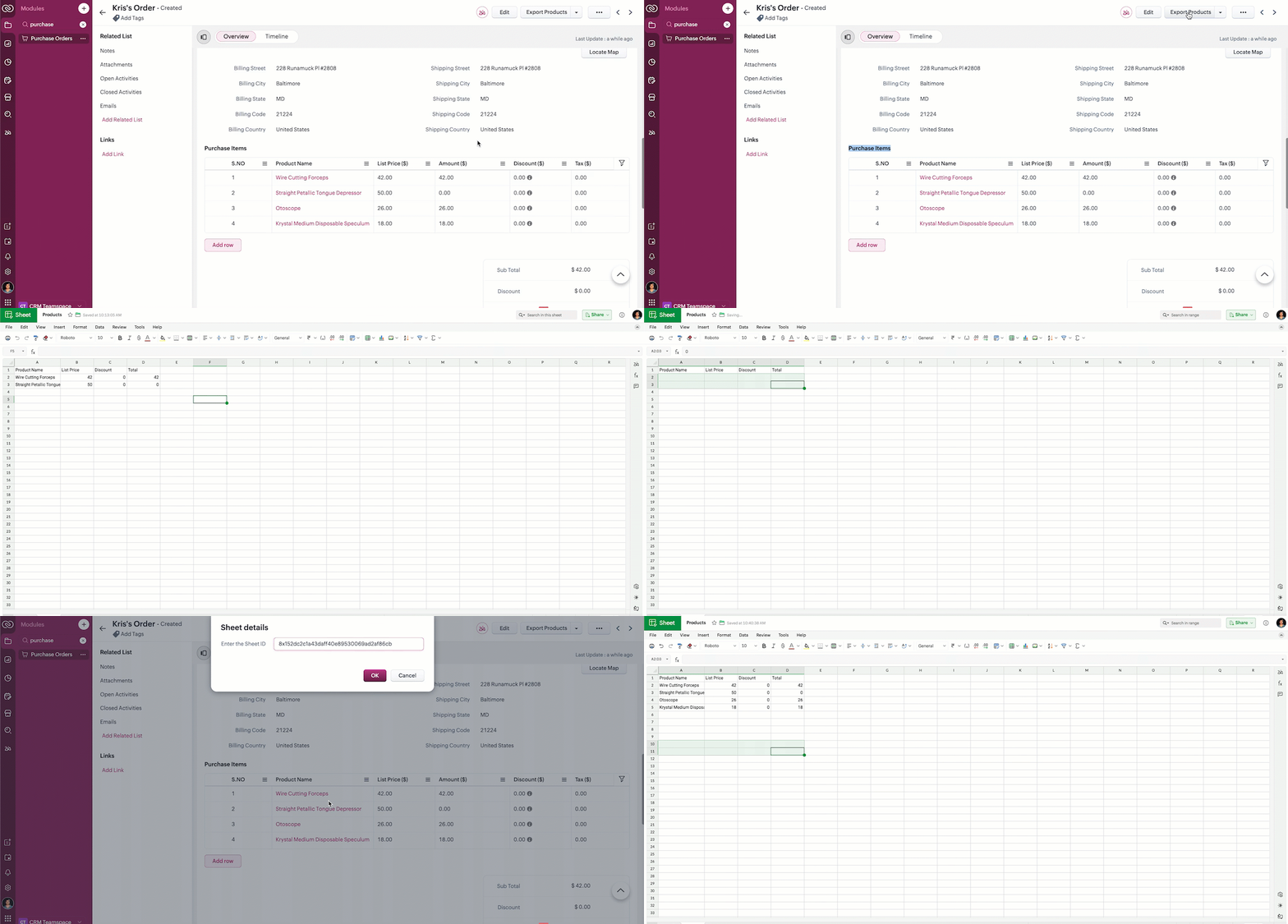
2.57 MB

Click here to view source code.


3. Public API - Instantly retrieve real-time gold prices and perform currency conversions directly within the CRM interface


At Zylker, a gold jewelry company using Zoho CRM, the Admin needs the ability to instantly retrieve real time gold prices and perform currency conversions directly within the CRM interface without switching to external tools or websites.
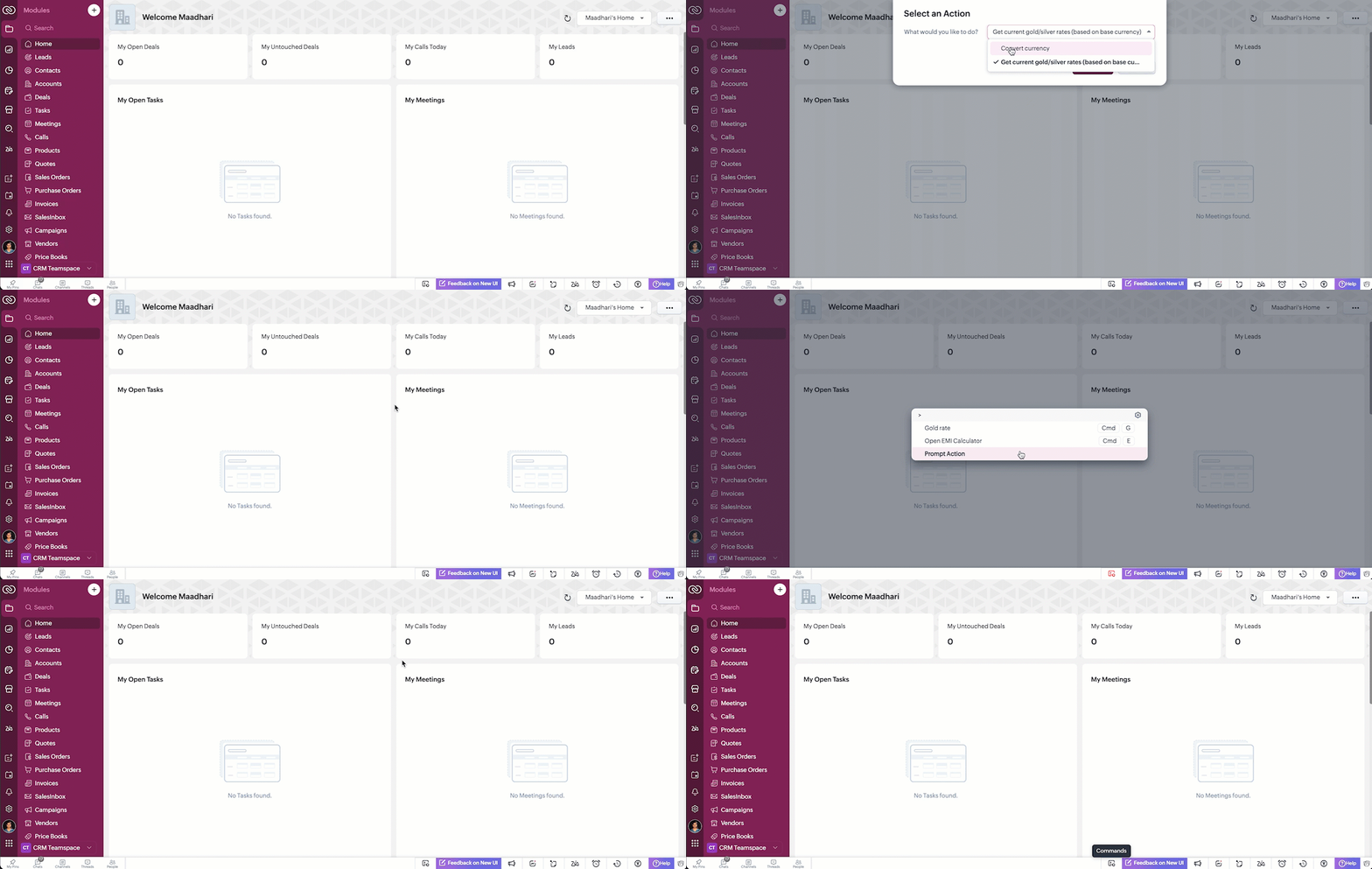
5.4 MB


Click here to view source code.

Notes

Note :

- Now, all your API calls are made using one SDK, one format, and with full browser capabilities.

- No need to worry about authentication, domains, or response formats.

- Available now in Client Script. ZRC support in Mobile App will be available soon.

- Coming soon to Widgets

- Function Invoke APIs also follow the same fundamentals as ZRC.


From fetching CRM data to integrating with third-party tools, you can now achieve powerful customizations in Zoho CRM.

This feature is live across all DCs.

Go ahead. Try ZRC in your next Client Script, and feel the difference. Let us know your comments and feedback!

The help documentation of ZRC is available here.


Happy Coding!


    • Sticky Posts

    • Announcing the new SKILL.md for Zoho CRM and the updated OAS repository!

      We are introducing a new zoho-crm skill to make working with Zoho CRM Developer tools (like APIs, functions, widgets, client scripts, queries etc) easier and faster, with the help of AI in your preferred AI harness like Claude Code, Codex, Cursor, VSCode
    • Kaizen #256 - Build an Arrival Readiness Web Tab in Zoho CRM

      Hi everyone! Welcome back to the Kaizen series! In the post, we discuss a use case in hospitality industry: how an Arrival Readiness web tab widget can be used to let reception staff identify and resolve issues before arrival of guests. Use case In the
    • Kaizen #198: Using Client Script for Custom Validation in Blueprint

      Nearing 200th Kaizen Post – 1 More to the Big Two-Oh-Oh! Do you have any questions, suggestions, or topics you would like us to cover in future posts? Your insights and suggestions help us shape future content and make this series better for everyone.
    • Kaizen #226: Using ZRC in Client Script

      Hello everyone! Welcome to another week of Kaizen. In today's post, lets see what is ZRC (Zoho Request Client) and how we can use ZRC methods in Client Script to get inputs from a Salesperson and update the Lead status with a single button click. In this
    • Kaizen #222 - Client Script Support for Notes Related List

      Hello everyone! Welcome to another week of Kaizen. The final Kaizen post of the year 2025 is here! With the new Client Script support for the Notes Related List, you can validate, enrich, and manage notes across modules. In this post, we’ll explore how
    • Recent Topics

    • Check out in Meetings

      Why there is no check out in Meetings of Zoho CRM, very difficult to track Moderation Update: Meeting Check-out is in our roadmap and is currently in the development analysis phase. Development is yet to start, and we'll post an update here once it
    • Custom View - Sort by Custom Field

      I created a custom field for our Engineering team to know which tickets to work first by numbering them.  I created a custom view to general data which includes the Engineering Priority.  However, I cannot sort the Engineering Priority column ascending
    • Zoho Marketing Automation Cannot Sync Lookiup Fields

      Hello all, It seems that Zoho MA cannot sync Lookup fields from the CRM. Can you confirm if this is the case? Is there a workaround? Do you know if Campaigns can sync with custom modules and also with Lookup field in the CRM? Thank you!
    • Why does Analytics keep pulling in IDs?

      Every time I pull in Job Reference/Name data it inputs it as an ID number instead of the actual name. Its impossible to find anything. Is there a way to fix this?
    • Feature request - pin or flag note

      Hi, It would be great if you could either pin or flag one or more notes so that they remain visible when there are a bunch of notes and some get hidden in the list. Sometimes you are looking for a particular name that gets lost in a bunch of less important
    • CRM x WorkDrive: We're rolling out the WorkDrive-powered file storage experience for existing users

      Release plan: Gradual rollout to customers without file storage add-ons, in this order: 1. Standalone CRM 2. CRM Plus and Zoho One DCs: All | Editions: All Available now for: - Standalone CRM accounts in Free and Standard editions without file storage
    • Zoho Assist Remote Desktop on Android grey screen

      With Zoho Assist Remote Desktop for Android when I connect to an unattended device I see only a Grey Screen. It worked fine before. This is a recently issue. I tried to clean data and cache, reinstall app, try and old version... but nothing. Always grey
    • Global Sets for Multi-Select pick lists

      When is this feature coming to Zoho CRM? It would be very useful now we have got used to having it for the normal pick lists.
    • Change 'default' project dashboard

      Is it possible to change the default project dashboard for all projects? Both in layout and in what widgets are shown? We have a lot of (short-running) projects and I want to quickly see the tasks and milestones when I open a Project, but I don't want to change the layout for all my projects manually. Thanks, Menno
    • Unbilled Items from Purchase orders

      Hi, I was wondering if there is a way for me to generate a report for the sum amount of unbilled items in open PO or partially billed PO. this info would be helpful for better cash flow management and for foreseeing any issues for unjustified delays for
    • Discount Per Item / Option Removed

      Hi, I was using Zoho Books for three years now and very saticfied. Now, as we try to add an invoice, we founds that the discount option per item was takn away, and a discount from total was implemented. However, we have cases when we add a diffrent discount to each item. Was this option removed permanently? Thanks, 
    • Allow Reauthorizing CRM Connections Without Revoking First

      Currently, when a Zoho CRM connection needs to be reauthorized or authorized with another account, we first have to revoke the existing authorization and then authorize it again. This creates a gap where the connection is unavailable, and any functions,
    • Zoho Projects - Mobile App - Creating Related Issue On Task View

      Hi Projects Team, I'm working with a client who wants to use Zoho Projects for their field service work. So far it is working find (and I am aware of FSM, but the client is happy with Projects). One thing they have raise with me as a frustration is that
    • 👍 Zoho CRM's Notes now gets Reactions and a new look

      Available in SA and JP DCs. Rolling out to other DCs in phases. Hello everyone, Notes help users capture important updates, collaborate with teammates, and maintain context for records. Now with Note Reactions, users can quickly acknowledge updates, express
    • Track All Emails from Company Domain

      For our business model, it's almost impossible to keep track of all emails sent to clients, under the way ZohoCRM currently tracks emails to customer records via the user account only. We'd like to see a way of tracking emails via domain only, separate
    • Cannot format "start date" field in Zoho Flow

      I am trying to recreate a flow that connects Inventory package creation to Zoho projects (where a task is created in a defined project). I've been able to troubleshoot everything EXCEPT the date fields; specifically the "start date" - which is quite important
    • Introducing Incentives for Zoho CRM: Build, automate, and track sales commissions

      Dear Customers, We are here with an amazing news! We built a direct solution to help manage your commission provisioning activity in your business. From creating commission plans to issuing payouts, this application leverages your sales reps’ performance
    • Dark Mode for ZOHO Recruit

      Please make a dark mode for ZOHO Recruit. The white is SO BRIGHT!
    • Dashboards for Customers

      Is it possible to build dashboards for each customers in the community for their tickets?
    • Feature Request - Dedicated "Avail" action for Restricted Holidays (instead of routing through Apply Leave)

      Currently, Restricted Holidays in Zoho People are handled through the Leave module. Employees have to go through Apply Leave and select the Restricted Holiday as a Leave Type in order to avail it. From an HR perspective, a Restricted Holiday isn't really
    • Deleting invoice (not syncing with Xero)

      If I delete an invoice or Bill in Zoho Inventory, it doesn't sync with Xero. So my Xero accounts are not correct. Whats the point of being able to delete a transaction in Zoho if it doesn't sync to my accounting package? How can I do this?
    • Allow Clients to choose which meeting platform works best for them

      Hi! I have a feature request for Zoho Bookings! I currently have multiple online meeting platforms connected to Zoho Bookings: Zoho Meeting, Zoom Meetings and Teams Meetings. Since we are allowed to connect multiple meeting platforms, it would only make
    • Implement Meeting Polls in Zoho Bookings

      Dear Zoho Bookings Support Team, We'd like to propose a feature enhancement related to appointment scheduling within Zoho Bookings. Current Functionality: Zoho Bookings excels at streamlining individual appointment scheduling. Users can set availability
    • Previewing attachments in email composer (Zoho CRM)

      When I am sending an email from a contact's record, when I am in the compose email screen, if I add an attachment to the email, I cannot then click on the attachment to view it to see if it is in fact the correct attachment before sending. In Outlook
    • Zoho Lens Feature Update: September 2026

      RealWear store support Zoho Lens is now listed on the RealWear marketplace, paving the way for quick and easy deployments. Install it straight to your smart glasses from the marketplace without any cables, pendrives, or manual transfers.
    • How are you using AI task management tools in your team

      AI is becoming more useful when it can do more than suggest tasks. Having AI agents help with task updates, follow-ups, and repetitive project work could make day-to-day collaboration much smoother. I recently came across Sharkly.ai, which focuses on
    • Can Zoho Mail Be Used with Google Workspace Without Migrating Emails?

      Hello Zoho Community, We currently use Google Workspace for our company emails and do not want to migrate our email accounts or data to Zoho Mail. However, we would like to use Zoho Mail as an email client, similar to Microsoft Outlook, by connecting
    • Topic assignment to a contact list never completes in Zoho Campaigns

      Hello, I am experiencing an issue in Zoho Campaigns when trying to assign a Topic to a contact list. When I select a list and try to assign a Topic, Zoho displays the following message: “This process will take a few minutes. You will receive an email
    • Subforms and automation

      If a user updates a field how do we create an automation etc. We have a field for returned parts and i want to get an email when that field is ticked. How please as Zoho tells me no automation on subforms. The Reason- Why having waited for ever for FSM
    • [ZohoDesk] Improve Status View with a new editeble kanban view

      A kanban view with more information about the ticket and the contact who created the ticket would be valueble. I would like to edit the fields with the ones i like to see at one glance. Like in CRM where you can edit the canvas view, i would like to edit
    • Automating CRM backup storage?

      Hi there, We've recently set up automatic backups for our Zoho CRM account. We were hoping that the backup functionality would not require any manual work on our end, but it seems that we are always required to download the backups ourselves, store them,
    • Zoho Assist Feature Update: September 2026

      Custom View Filters in Scheduled Reports Scheduled Custom Reports now support saved Views. Select a View when setting up your schedule, and only the data matching its filter criteria will be delivered to recipients in each email. Without a selected View,
    • Tip #89 – Access, print, and manage remote files from your local printer with Remote Printing – 'Insider Insights'

      A team member working from home urgently needs a document that's sitting on the office system. The office is locked and nobody is around to access it. Emailing the file means routing a sensitive document through external channels, and that's not something
    • Important: Teamwork Projects Integration Moving to API v3

      Hello Teamwork Project users, We are migrating the Teamwork Projects integration from the legacy V1 API to V3 API. This upgrade enables support for custom fields from Teamwork Projects, allowing users to import custom modules and fields into Zoho Analytics
    • Introducing Night Mode for Zoho Recruit [BETA]

      Late-night hiring sessions? Long hours reviewing resumes? We heard you. Night mode [BETA] is now available in Zoho Recruit, giving you a cleaner, more comfortable workspace that’s easier on the eyes while keeping the focus on what matters most: hiring.
    • Sent Items folders not syncing on Thunderbird

      HI,  I run TB on multiple devices, since the middle of September all the devices have stopped synchronising the sent items folders, all mail is received and sent correctly and stored in my zoho webfolders. I haven't changed any of the settings. Any ideas? This is also the case in my 'paid for' accounts with ZOHO and Thunderbird Many thanks Tony whittingham
    • Thunderbird not retrieving Mail automatically

      Hi, I have set up Zoho in Thunderbird all fine, the only problem is that the mails are not coming to Thunderbird automatically, they only come when I initially start up Thunderbird,  any ideas for a fix on this cheers
    • Free Webinar Alert! Don’t take the bait: Everyday email safety in Zoho Mail

      Hello Zoho Community! Think you can spot a suspicious email before it catches you off guard? Join our upcoming webinar, “Don’t take the bait: Everyday email safety in Zoho Mail,” and learn how to recognize common email threats and build safer habits for
    • Do you know which 20% of your products generate 80% of your revenue?

      Not all products earn their place in your inventory. In almost every catalog, a small group of items drives most of the revenue, while a long tail quietly ties up storage, counting effort, and working capital. The trouble is, most teams treat every SKU
    • How can we allocate incoming PO stock to Sales Orders, and does Backorder automatically reserve it upon receipt?

      Hello Everyone, We want to allocate incoming Purchase Order quantities to specific Sales Orders before the stock arrives. For example, from an existing PO of 100 pieces: 40 pieces assigned to SO-A. 35 pieces assigned to SO-B. 25 pieces left unallocated.
    • Next Page