Client Script | Update - Introducing ZRC: Simplified HTTP request library
Hello Developers!
Are you tired of juggling different methods to make API calls? Are you confused with multiple syntaxes and version restrictions? Have you ever wished for one simple way to make all API calls in CRM?
We heard you :)
Here comes ZRC (Zoho Request Client), the new way of making any API call in Client Script with one simple syntax!

What is ZRC?
ZRC (Zoho Request Client) is a built-in SDK that simplifies making API calls in Client Script. It uses one simple and consistent syntax to handle,
- CRM APIs
- Connection requests
- Public APIs .
There is no setup or configuration needed, making API calls hassle free.
ZRC is now available for use in Client Script, helping you build faster with less effort.
Why use ZRC ?
APIs serve as the backbone for customizing Zoho CRM, powering vital tasks like updating records, adding leads, and integrating with external services. For developers, working with these APIs has not always been simple. Each type of API, whether internal CRM APIs, Connection APIs, or external APIs, requires different methods and boilerplate codes, which creates friction and slows down building solutions. Here comes ZRC to address this by handling authentication, supporting all CRM API versions, and managing requests and responses automatically, so developers can focus on building meaningful solutions.
Here is why ZRC is a game changer for scripting in Zoho CRM:
Supports Any CRM API Version
With ZRC, you can use any version of the CRM APIs, even the latest ones like v7 and v8.
Self domain calls
For CRM API calls, ZRC requires only the API endpoint without specifying the domain. This enables usage across different domains and simplifies API calls.
Unified Syntax for All Calls
Whether it is a CRM API, a custom Connection, or an external public API, all calls follow the same simple syntax.

No Authentication Needed for Same CRM Org
You do not have to worry about tokens or domain configurations. Just pass the endpoint, ZRC takes care of authentication behind the scenes.
Smart JSON Handling
ZRC automatically handles JSON responses. There is no need to manually stringify or parse response objects.
Async/Await & Clean Code
Write clean, modern code with full support for async/await and promise chains using `.then().catch().`
Let us see how to use ZRC to make API calls for different scenarios.
Use Cases
1. CRM API Use Case - Create Task with one click
At Zylker, a custom button “Log Call Attempt” should prompt the user to enter call details, save them as a Note on the Lead, update the Lead_Status to “Contacted”, and create a follow-up task for the next day, streamlining the process and reducing errors.


Click here to view source code
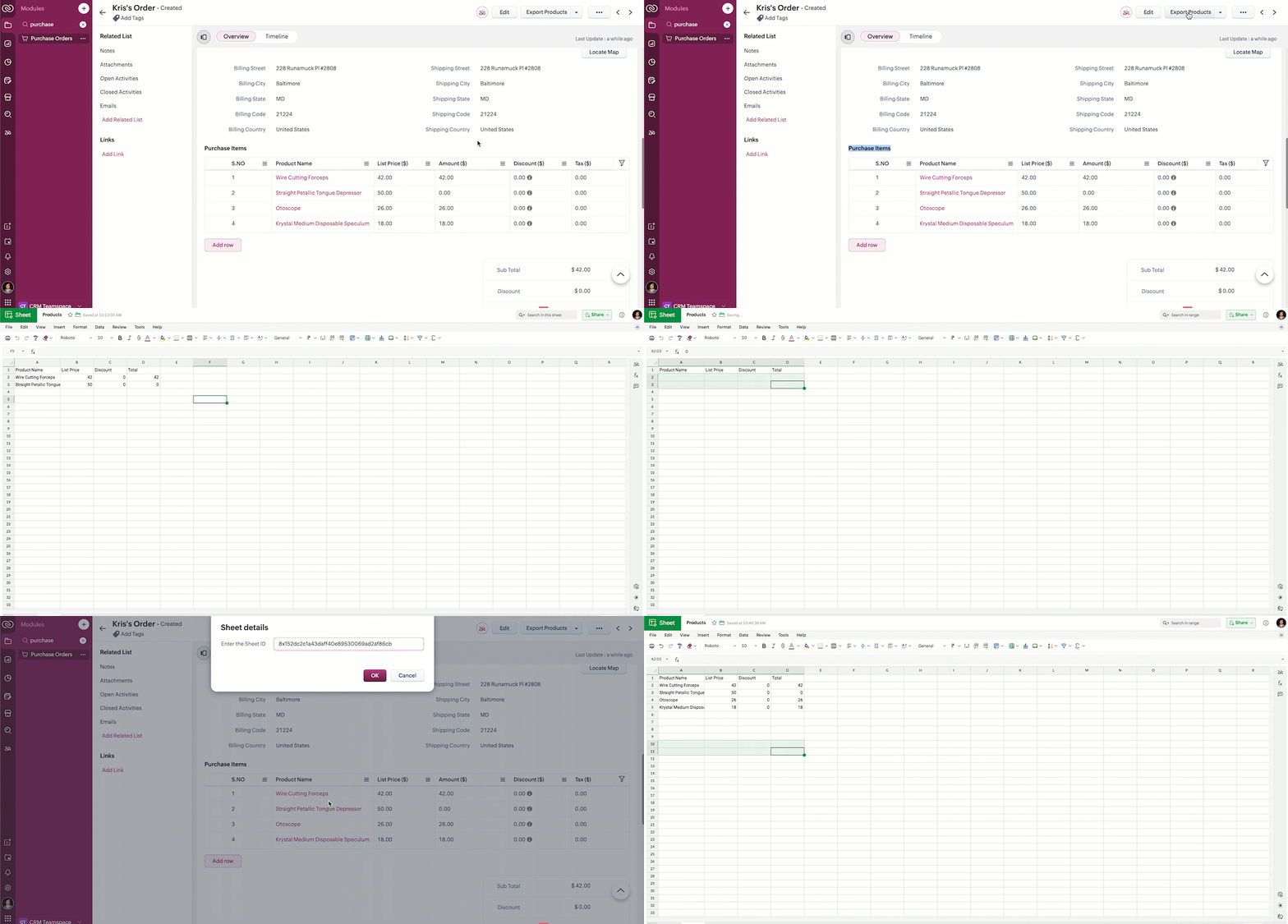
2. Connection based Use Case - Export Subform Data to Zoho Sheet via API
At Zylker Finance, users maintain multiple loan options under each lead using a subform in Zoho CRM. The Admin requires the ability to export these subform rows to Zoho Sheet via API. This export should allow structured data transfer for further analysis, comparison, and reporting, all without manual copying or downloading.

Click here to view source code.
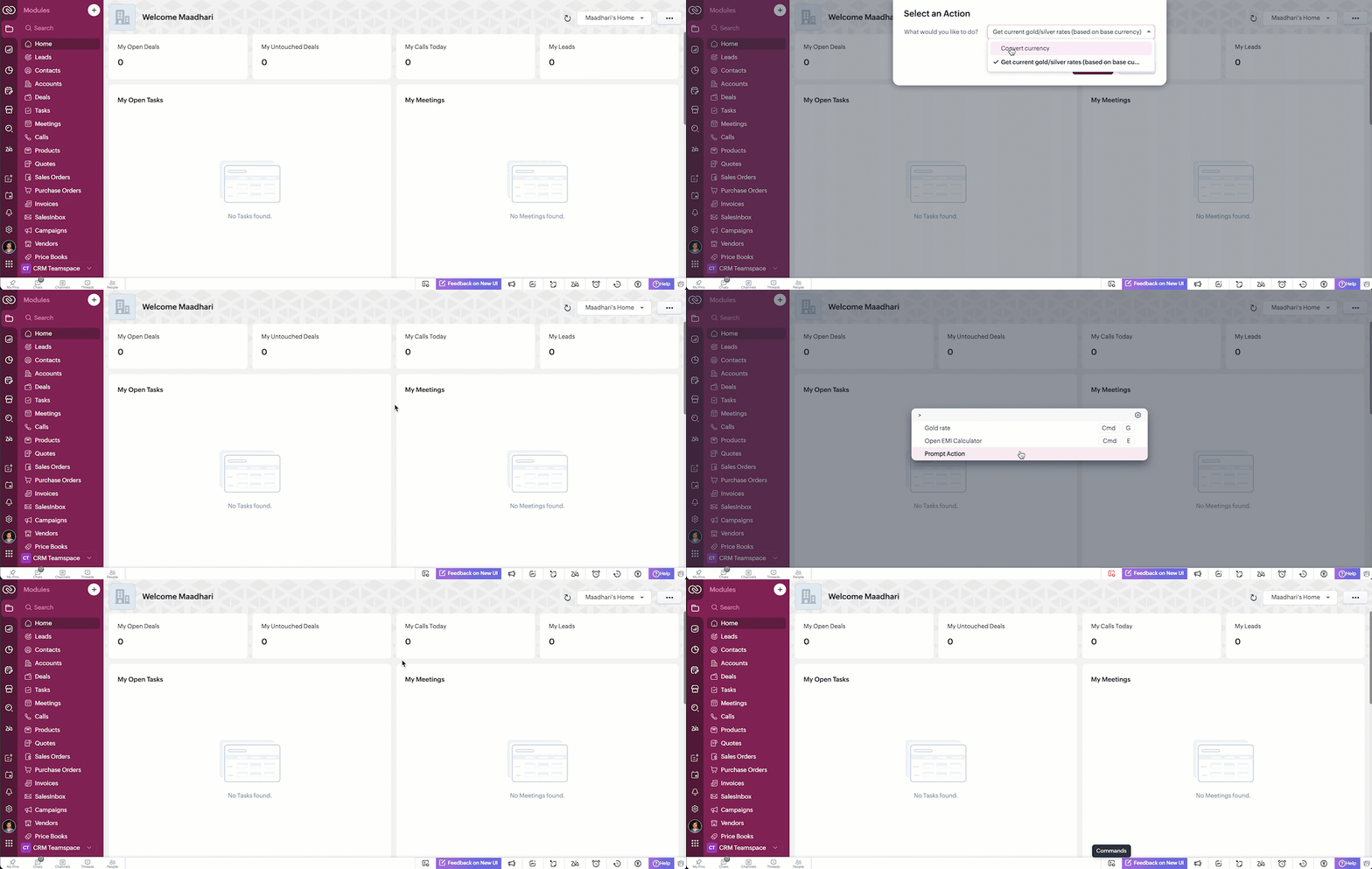
3. Public API - Instantly retrieve real-time gold prices and perform currency conversions directly within the CRM interface
At Zylker, a gold jewelry company using Zoho CRM, the Admin needs the ability to instantly retrieve real time gold prices and perform currency conversions directly within the CRM interface without switching to external tools or websites.

Click here to view source code.

Note :
- Now, all your API calls are made using one SDK, one format, and with full browser capabilities.
- No need to worry about authentication, domains, or response formats.
- Available now in Client Script. ZRC support in Mobile App will be available soon.
- Coming soon to Widgets
- Function Invoke APIs also follow the same fundamentals as ZRC.
From fetching CRM data to integrating with third-party tools, you can now achieve powerful customizations in Zoho CRM.
This feature is live across all DCs.
Go ahead. Try ZRC in your next Client Script, and feel the difference. Let us know your comments and feedback!
The help documentation of ZRC is available here.
Happy Coding!
Topic Participants
Maadhari M
Haiku Technical Support
Sticky Posts
Kaizen #198: Using Client Script for Custom Validation in Blueprint
Nearing 200th Kaizen Post – 1 More to the Big Two-Oh-Oh! Do you have any questions, suggestions, or topics you would like us to cover in future posts? Your insights and suggestions help us shape future content and make this series better for everyone.Kaizen #226: Using ZRC in Client Script
Hello everyone! Welcome to another week of Kaizen. In today's post, lets see what is ZRC (Zoho Request Client) and how we can use ZRC methods in Client Script to get inputs from a Salesperson and update the Lead status with a single button click. In thisKaizen #222 - Client Script Support for Notes Related List
Hello everyone! Welcome to another week of Kaizen. The final Kaizen post of the year 2025 is here! With the new Client Script support for the Notes Related List, you can validate, enrich, and manage notes across modules. In this post, we’ll explore howKaizen #217 - Actions APIs : Tasks
Welcome to another week of Kaizen! In last week's post we discussed Email Notifications APIs which act as the link between your Workflow automations and you. We have discussed how Zylker Cloud Services uses Email Notifications API in their custom dashboard.Kaizen #216 - Actions APIs : Email Notifications
Welcome to another week of Kaizen! For the last three weeks, we have been discussing Zylker's workflows. We successfully updated a dormant workflow, built a new one from the ground up and more. But our work is not finished—these automated processes are
Recent Topics
Print View
Nothing happens when I'm in a module , ie; Contacts, and I hit the Print View Button. Even when it does come up and say "loading", nothing loadsGet Holiday ready with Zoho Mail's Offline mode
With the holiday season right around the corner, this is the perfect time to get ready to unplug, relax, and enjoy a well-deserved break. In addition to preparing yourself, you can also make sure your organization members are set for their time away fromSolution to Import OST File into Office 365.
MailsDaddy OST to Office 365 Migration Tool is an outstanding solution to recover OST files and migrate them into Office 365 without any hassle. Using this software users can multiple OST files into Office 365 with complete data security. It offers usersZoho CRM Kiosk issues
Firstly this is for a system on the AU servers if that makes a difference. Issues are as follows (For Kiosk): 1. Re-ordering fields in the screen builder is broken. The fields seem to be re-ordering themselves, unless you order everything by moving theEmail Template Edits Not Saving
I can make an edit, click save, and see the blue bar annimation at the top, but the edits don't actually save. Important, because my email templates are now broken and clients are receiving bad emails. Tried on Chrome, Firefox and IE.Default Ticket View - Table?
Guys, We mostly use the table view to queue tickets. Maybe I am missing it - but how can I set that view as 'default" for all our agents? Thanks JVCan I have different users see different pick list values for Potential Stage?
We have some users focusing on new business and others focusing on existing business, and they follow different sales processes/cycles, so we would like them to see different pick list values for Stage (eventually leading up to Closed Won/Lost in both cases). And just to keep it interesting - some of these users will of course do a combination, so would need to see one pick list for their New business potentials and a different pick list for their Existing business ones. Salesforce does thisTracking Snippet not working in Zoho Marketing Automation!
First off, the fact that you have to wait about 12-24 hours for every response is terrible. How are we supposed to conduct business? Second, we have been trying for several days to get the Tracking Code Snippet in marketing automation to work, to no avail.Is there any way to send an Excel received by email to Dataprep?
Every day I receive an email alert with an Excel file that I want to process through a Dataprep pipeline. To do this, I need to: -Save the file to disk -Open the pipeline -Run the pipeline -Update the source -Several clicks to select and open the savedRead webpage - MSXML2.ServerXMLHTTP
I have the following VBA script, put together from various sources (mainly zoho forum/help/support, so it once worked, I guess): private Sub GetListOfSheets() Dim url As String Dim xmlhttp As Object Dim parameters As String Dim html As String range("B1").valueZoho Creator Form Search
I'm new to Zoho Creator and so far i do like it but im shocked there seems to be no easy way to add a search function and/or navigation to there forms as this readily available in every platform i have used in the past. Anyway i have a form which i haveHow to setup DKIM / SPF in Zoho Mail
Hello there! I'm having a hard time understanding how to setup the TXT records for SPF and DKIM with Zoho Mail. I'm following the instructions here: https://www.zoho.com/campaigns/help/setup-spf-dkim.html Specifically, when it comes to the value for theMass update cant trigger a workflow?
Hello there, Is this a normal Creator behaviour? In a report, if I manually edit each data row, it will pass those changes to all other reports. However, if I perform a Mass Update on a few data rows at once, the new data is not pushed to other reports.search and Smart Bar both missing in Mail
One of the users on my account does not have the search bar at the top right or the Smart Bar at the bottom left of the desktop Mail app. Any ideas how to get those back?Let us add Lookup fields in the Blueprint Transitions
We are unable to add Lookup Fields in the blueprint transitions in Zoho Desk, we wanted to make it a requirement for our workflow but since it's not available in the transition we cannot. The lookup field exists in the Layout: But it cannot be added/selectedZoho Projects API Scope for Issue Attachments
I try to download issue attachments via the API, unfortunately I always get the following error code when trying to download the file from the supplied URL: {"ERROR_MESSAGE":"INVALID_OAUTHSCOPE","ERROR_CODE":401} indicating an auth scope error. I've triedHow to fetch custom fields for time entries in Zoho Project API v3
In the previous Zoho Projects REST API, we were able to retrieve custom field details for time entries, including picklist options, using the endpoint: GET /restapi/portal/[PORTAL_ID]/timesheetcustomfields In the new Zoho Projects API v3, we tried usingZoho Survey Enhancements
We love Survey. We use it a ton. It needs some enhancements. Maybe some of these are already on the roadmap? API - this is crucial. We have some complex surveys that take place and need to update records, trigger other functions/automations, etc. I wouldImages Don't Display on Blog
Hi, I've just posted a new blog entry, but regardless of format (png or jpeg) Images that display in Preview mode do not display on any browser in the published post. I've not done anything different with this post than others regarding images, please advice. Thanks! Edit: I've discovered that moving the image files from a my sub directory folder "Pics for Blog" to the top level of the "Files" folder on my site allows the images to display live. This, even though my other blog posts are correctlyCheckbox Field Mapping Zoho Forms to Zoho Sign
I have an application that will be filled out via Forms that I am mapping into a PDF Filler on Zoho Sign. I need to have a series of checkboxes mapped to the corresponding fields in Sign and I only see single checkboxes available via the mapping, thoughBooks P&L by Customer
Lately, we have found that the Customer field filter for the Profit & Loss report in Zoho Books is no longer available. We have several projects with the same customer and look at the P&Ls by project AND by Customer (overall). Can you please add back in this field selection alongside the Project field to the P&L report filter? Thanks! -GinaSent mail sort by date disappeared
Hello, We used to be able to sort the emails by date in the sent folder, but this feature has recently disappeared. Can we bring it back?I cannot check out to Zoho People.
When I tried to check out today, there's prompt that inhibits me to check out: To add entry in Attendance, log time for any of your jobsPricing Strategies: #2 Plan your Service Offerings using Plans
Meet Harvey & Mia, hailing from the same Tech school, carrying the dream of setting up their own IT maintenance firm in their location. They drew up a clear business plan and put their business in motion on New Year's Eve. They had great reception rightOpen a record to edit based on another form being edited
Hi all, I am trying to edit a record based on another record being edited. It works out like this: When I create a Monthly_Update and then submit I open the Monthly_Levels form and pass the ID from the Monthly_Update to a field called mu. I want it toProblem with signature on zoho survey
Hello, I'm trying to export individual responses with signatures on zoho survey. But the signatures on some of my surveys are not exported as the original image, but as a generic image, same for all (screen joins). Is there a solution to have the signaturesChange in Zoho CRM API?
Hello, I am using the Zoho API trough the PHP SDK v2.1 Since few days, I noticed that I have to change the way I pass the data to the API when I create, update, or upsert a record. Dates Before I was passing a PHP date object to "$record->addKeyValue(...)",MTA - BAD IP reputation by outlook/hotmail
Messages to Microsoft email servers are bouncing back due to poor reputation. Message: 4.7.650 The mail server [136.143.188.206] has been temporarily rate limited due to IP reputation. For e-mail delivery information see https://postmaster.live.com (S775)QuickBooks Extension for Zoho CRM - Advanced Features -2025
Hello Everyone, We’re happy to announce the latest version of our QuickBooks Extension for Zoho CRM, now officially live on the Zoho Marketplace! This release introduces one-click data sync, a user-friendly UI, enhanced performance, and a powerful setChanging Department often causes the Firefox tab to freeze
Title, it doesn't seem to happen with neither Opera nor Chrome. And even in Firefox, sometimes it just lets me change the department I'm in no problem, even to All Departments which is probably the most, like, resource heavy? But most of the time, theNeed to integrate Zoho Mail Mobile app with Zoho Meeting Mobile App for Android and Apple
Hello Zoho Team, Please bring integration of Zoho Mail Mobile app with Zoho Meeting for Android and Apple Thanks¡Muchas gracias por participar a los Meetups de Usuarios de Zoho! Y Novedades del ecosistema Zoho
¡Hola Comunidad de Zoho en Español! 👋 Después de un breve lapso de tiempo, volvemos con una nueva edición de nuestro Community Digest, donde te contamos las novedades de los productos de Zoho en los últimos meses. Estas mejoras se centran en nuestrosAnyway to move mail from one account to another yet?
Hello, Is there any way to move email from one mailbox account to another mailbox account in zoho yet? Thanks, Ryan.Using a CRM Client Script Button to create a Books Invoice
Hello, I need help handling error messages returned to my client script from a function. The scenario I have setup a client script button which is available from each Deal. This CS executes a crm function, which in turn creates an invoice based on theBuilding Toppings #2 - Learn how to use Bigin's Developer Console to build toppings
Hey Biginners, In our last post, we discussed what toppings are, why they're essential to extending Bigin's capabilities, and how the Bigin Developer Center serves as the starting point for building them. As a cloud platform, the Developer Center empowersLinks are incorrect when sent out
I'm adding in hyperlinks into my eDM. When I send a test email, it's all correct. However, when I send out the eDM, all the hyperlinks jump up one space so none of the links are opening to the correct page. Why is this happening and how can I fix it?Tip of the week #16 - Search and filter threads based on criteria
Zoho TeamInbox lets you search and filter threads with any information that you have about the thread. You just have to input the criteria and Zoho TeamInbox will list all the threads that match the condition. Firstly, there is a global search you canIntroducing recipient authentication via Stripe Identity in Zoho Sign
Hi everyone! It's important to authenticate your recipient's identity before they access and sign important documents to ensure the highest level of compliance. Zoho Sign already helps businesses do this with various authentication methods: SMS OTP EmailKeep Converted Leads
How do I keep the converted leads in the Leads Module after conversion (converting it to account, contact, deal). I want to add it in a converted stage in the leads module in order to get a report or dashboard and see all converted leads from my pipCustomizing Global Search Settings for All Users
Hi Our team use the brilliant global search functionality within CRM many many times daily. But, we struggle with the out-of-the box columns that CRM gives you. We are always telling users to customize this look to more suit our business, to show theNext Page