Customize your SalesIQ live chat with Custom CSS and blend it with your website design
Building your CSS
Where do I place the CSS code?
There are 2 methods to carry out Custom CSS on SalesIQ. Both methods are used for varying circumstances.
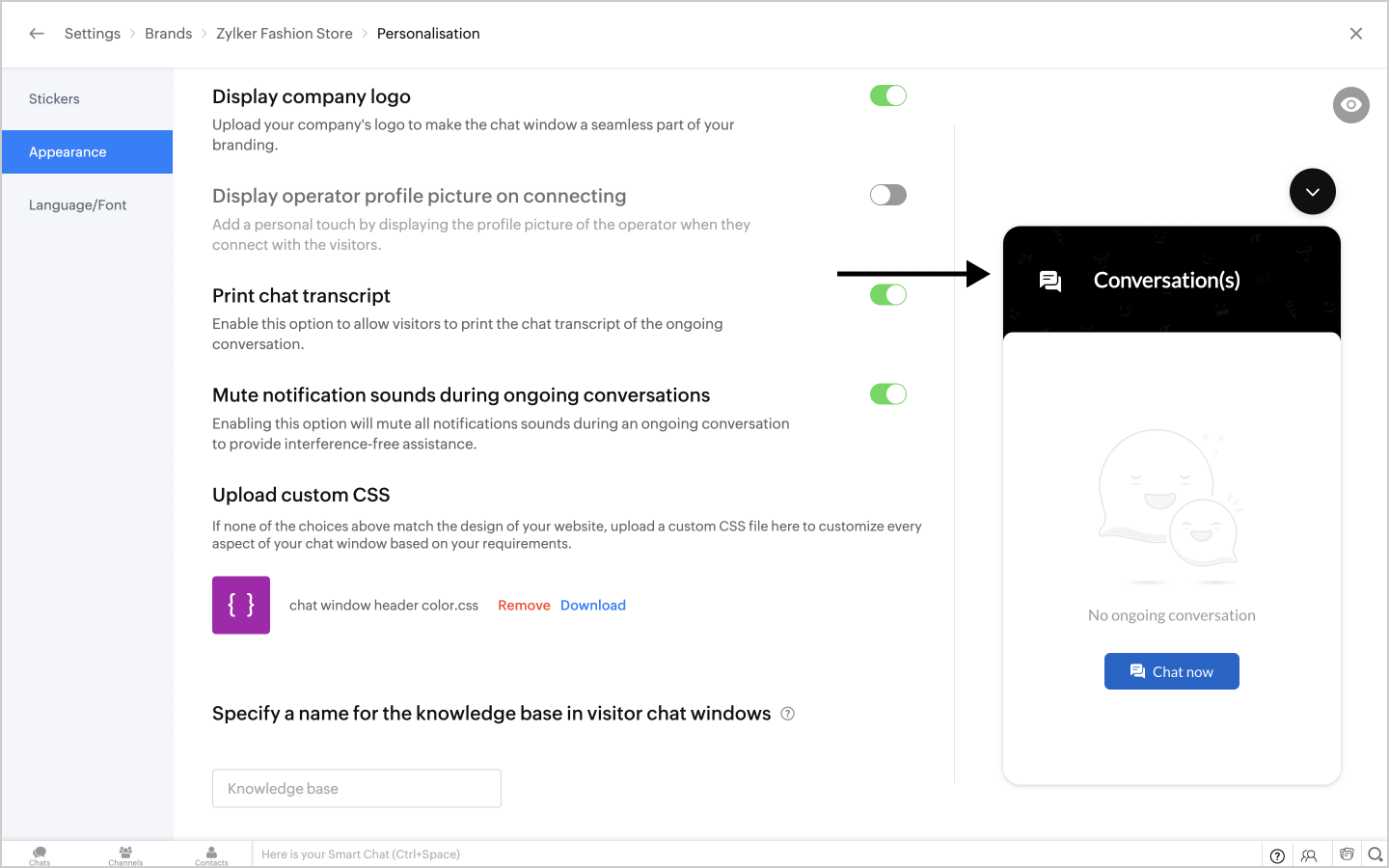
- Brand Personalization - The first method is by uploading the Custom CSS file in the Personalization area of the chat widget. This method is to be used when changes/modifications are to be made on the elements within the chat window. For example, changes in the messaging area, font used within the chat window, colour changes for the header or minimize button etc.
For this,
- Navigate to Settings > Brands > Personalization > Appearance tab.
- Scroll down to Upload custom CSS and click on Upload.
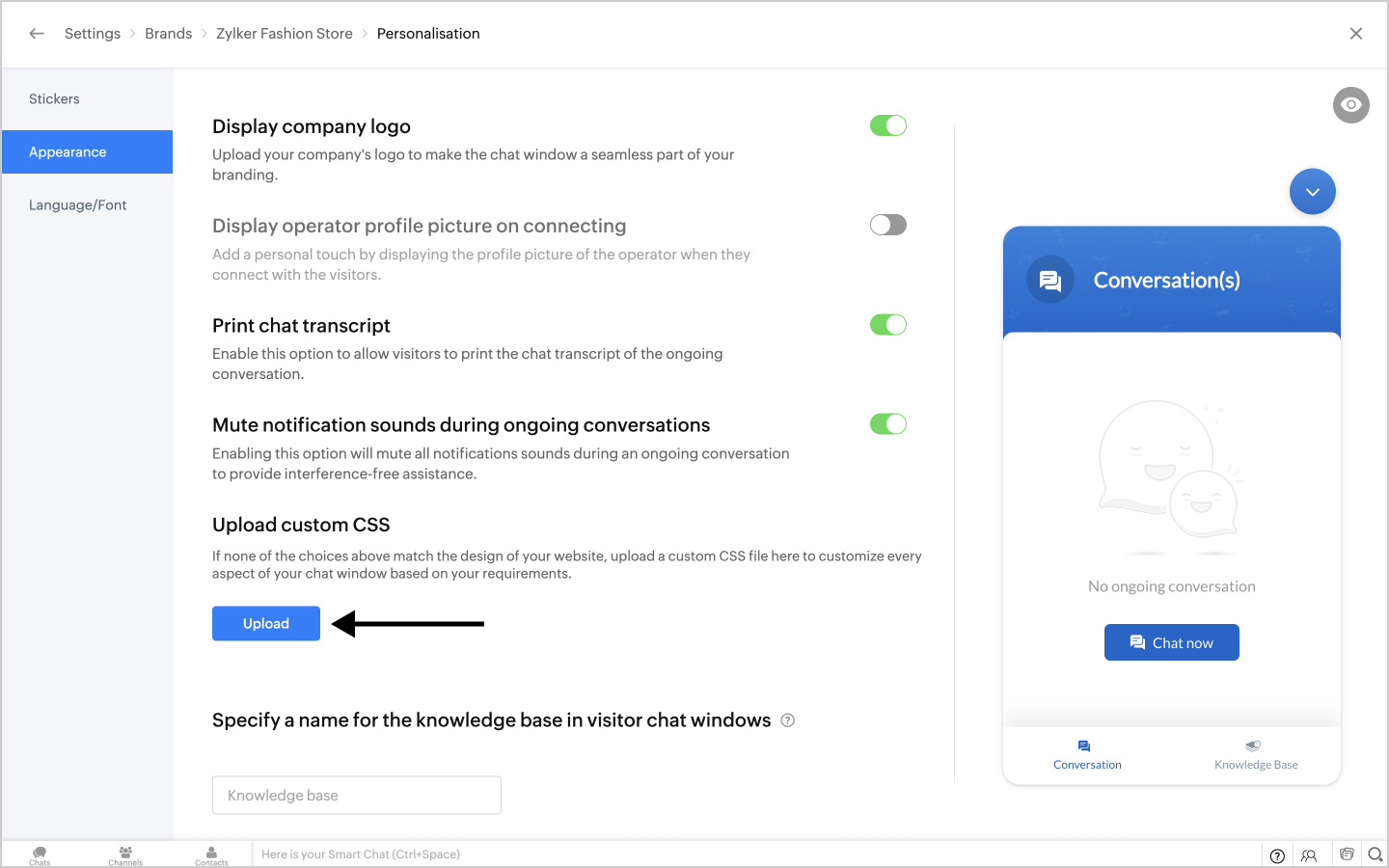
- Choose the required CSS file from the list.
- The preview window on the right will immediately display the result of adding your Custom CSS code to SalesIQ.
Website Style sheet
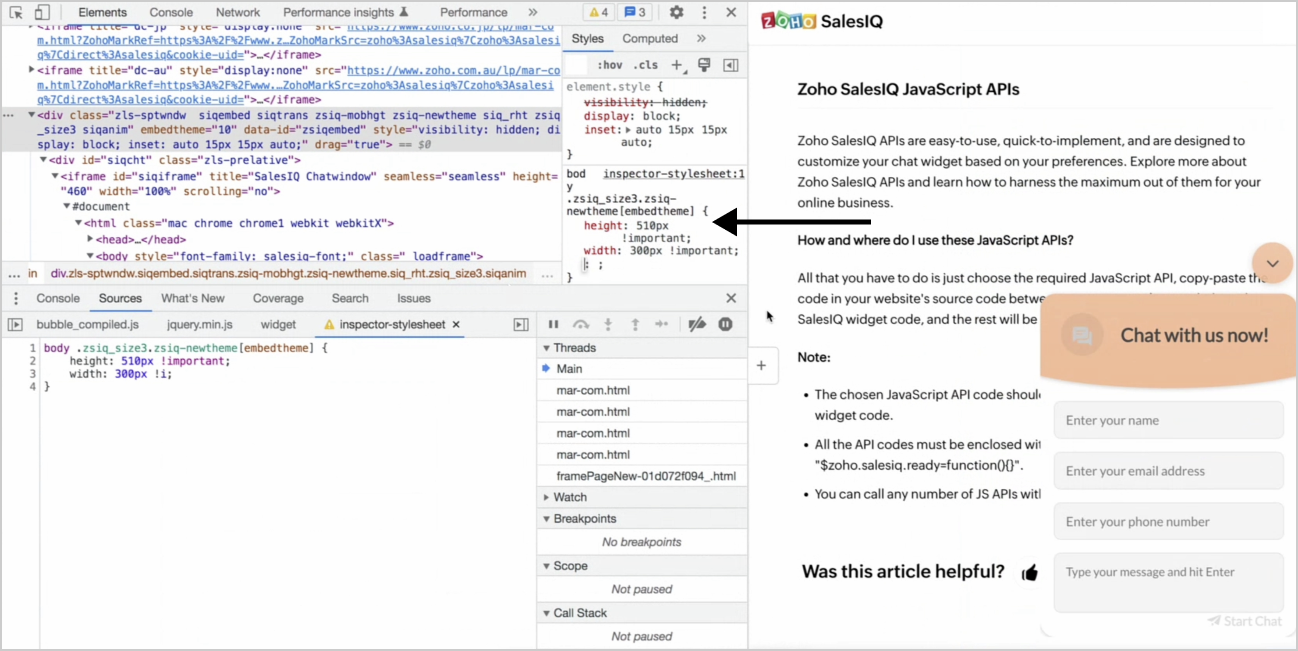
In this case, a Custom CSS for changing the height and width of the chat window has been added to the style sheet.
Tips for writing Custom CSS
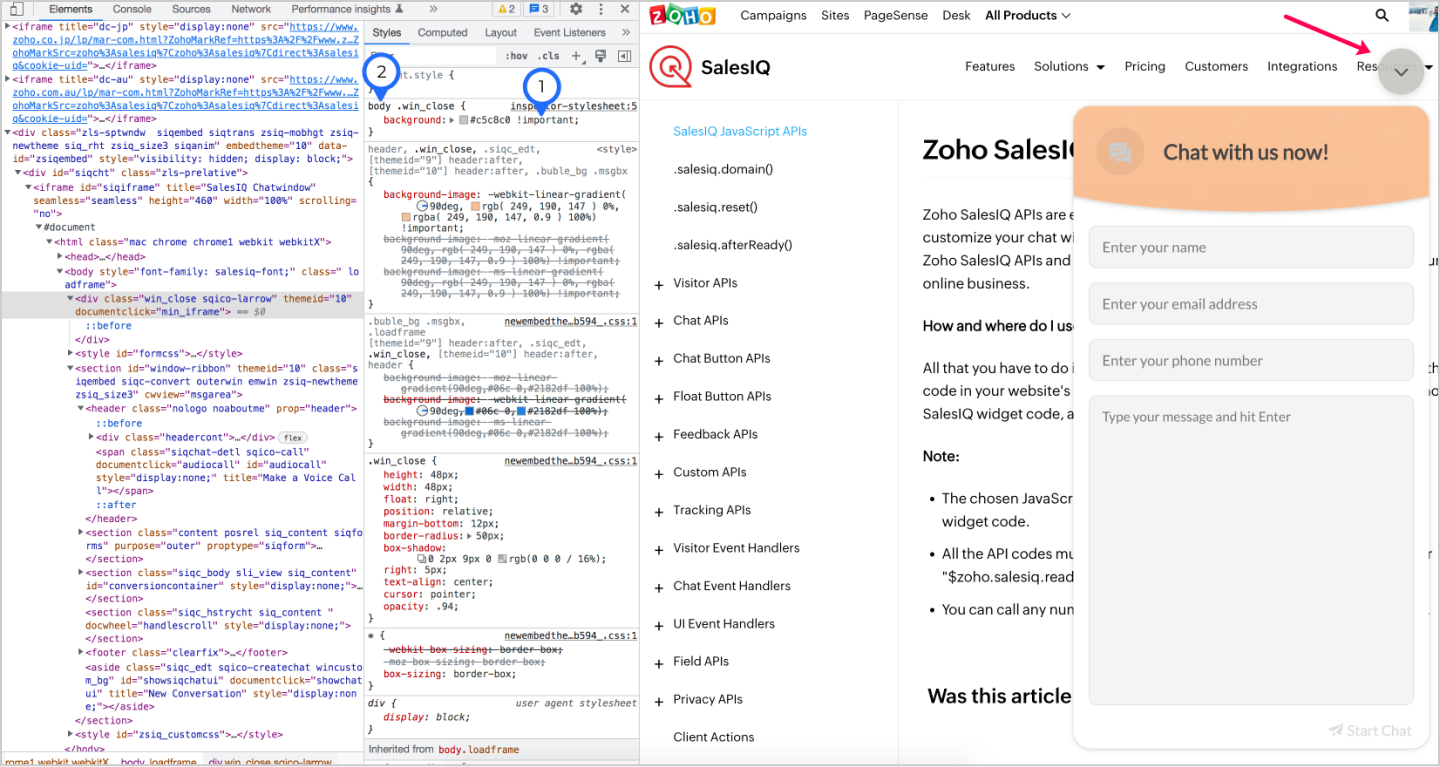
The !important rule in CSS can be used to add more weightage to a property and override other previously added styling rules.
Extra CSS weightage can be added with a body tag, which will be another way to override all previous styling rules for the element.
Frequently asked CSS formats
We have taken note of some of the frequently asked queries and provided the custom CSS code here for your reference.
To change the header colour of the chat window.
- body header {
- background: #e2bb3c !important;
- }
To change the chat window dimensions on website.
- body .zsiq-newtheme.siqembed.zls-sptwndw {
- height: 500px !important;
- width: 400px !important;
- }
To change the chat widget colour.
- body .zsiq_flt_rel {
- background-color: #e2bb3c !important;
- }
To change the chat window dimensions on mobile alone.
- @media only screen and (min-width: 100px) and (max-width: 555px)
- {
- body .zsiq-newtheme.zsiq-mobhgt.siqembed {
- height: 80% !important;
- width: 80% !important;
- }
- }
To move the position of the chat widget.
- body .zsiq_floatmain {
- right: 40px !important;
- bottom: 40px !important;
- }
Topic Participants
Hameetha Nasreen
Oby
Sasidar Thandapani
Enrique Masias
Dov Levy
Sticky Posts
Let customers reach you easily with the Zoho SalesIQ - Telegram IM Channel Integration
We are now living in the era of instant messaging where every single person around us will have at least two instant messaging apps on their mobile phones. And that very well includes your customers. It is important for businesses to be able to communicateWhy should you integrate Zoho SalesIQ with Google Analytics?
Hello everyone. Greetings from Zoho SalesIQ! Today, we are going to take a detailed look at the possibilities and outcomes when integrating SalesIQ with Google Analytics. Some of us may have lingering questions on this topic and here we are, with a
Recent Topics
IMPORTANT: It doens´t show full article name on search - Should add line break
When we search for articles, it doesn´t show the full name. There should be a line break so the user can see the full article name, otherwise the user can´t know if that´s the article he/she is looking for. This is very important, otherwise the user hasZoho Books - Payment Gateway - Revolut
Hi Books Team, My feature request if to include the popular platform Revolut as a payment collection option on invoices in Zoho Books. Please upvote if you are also looking for this option.Zoho Books | Product updates | January 2026
Hello users, We’ve rolled out new features and enhancements in Zoho Books. From e-filing Form 1099 directly with the IRS to corporation tax support, explore the updates designed to enhance your bookkeeping experience. E-File Form 1099 Directly With theKaizen #233 - Generating AI-powered Follow-up Emails Using CRM Functions and Widgets
Hey everyone! Welcome back to another interesting post in the Kaizen series! Sales teams regularly capture interaction notes in CRM after speaking with prospects. However, drafting a follow-up email that reflects the conversation context can be repetitiveConnect Bank in Zoho Books
Can I connect UOB or Ariwallex in Zoho Books?Using MPN across multiple SKUs and inventory tracking
I have several different SKU's that share a common MPN and would like to track inventory by MPN. SKU1 has MPN1 assigned SKU2 has MPN1 assigned Here is an example If I start with 5 of MPN 1 in stock I want each SKU1 and SKU2 to show as 5 in stock, If IExtend Zoho Canvas Customization to Zoho Creator Forms and Reports
Currently, Zoho Canvas allows users to design and customize the UI of Zoho CRM modules with a much better visual experience. This helps organizations create cleaner layouts, improve usability, and design interfaces that match their workflows. However,Marketing Tip #1: Optimize item titles for SEO
Your item title is the first thing both Google and shoppers notice. Instead of a generic “Leather Bag,” go for something detailed like “Handcrafted Leather Laptop Bag – Durable & Stylish.” This helps your items rank better in search results and instantlyFeature Enhancement Request – Text Formatting Options in Item Description (Zoho Books/Quotes Module)
Dear Zoho Development Team, Greetings from Radiant360 Integrated Technical Services LLC. We would like to bring to your attention a functional limitation we've encountered within the Item Table / Quote Description section of Zoho Books (and Zoho CRM Quotes).ZOHO Books Query
Good day, Can someone please advise. I recently migrated from ZOHO Invoice to ZOHO Books. No that I want to use the inventory on Books I cant as all my items have transaction history. The person I spoke to at ZOHO said I need to create a new Company profileBest way to schedule bill payments to vendors
I've integrated Forte so that I can convert POs to bills and make payments to my vendors all through Books. Is there a way to schedule the bill payments as some of my vendors are net 30, net 60 and even net 90 days. If I can't get this to work, I'll haveZOHO.CRM.UI.Record.open not working properly
I have a Zoho CRM Widget and in it I have a block where it will open the blocks Meeting like below block.addEventListener("click", () => { ZOHO.CRM.UI.Record.open({ Entity: "Events", RecordID: meeting.id }).catch(err => { console.error("Open record failed:",inventory removal at packing list or shipment.
currently our system is set to remove inventory at invoice. This is creating an inventory nightmare? Is it possible to change the settings to remove the item from inventory at either the packing slip stage or shipping the item.How to add employee and not invite them to log in?
I want to add 50 employees, but invite them only when everything will be configured and ready. Is it possible? Should we create employee profiles and then convert them later? Thank you,How is Your eCommerce Experience w/Zoho Inventory?
First off, I'm SUPER grateful for the advent of Zoho Inventory and now the Zoho Commerce Suite. Overall, Inventory is a great product, especially for customers without an eCommerce presence. For eCommerce companies (especially those shipping more than ~10 packages/day), however, there are certain drawbacks that keep my clients from moving over to Zoho Inventory: Cons: 1. Invoice + Package Creation from Shopify/Other eCommerce Integrations: Zoho Inventory makes the somewhat perplexing decision toAbility to Use Both AND and OR When Creating Rules (Advanced Conditions)
I'd like to be able to use more complicated logic when setting up rules. E.g. in Zoho Mail, I can choose "Advanced conditions (AND/OR) to create a rule that can be applied to multiple subject lines from the same sender. But in Zoho TeamInbox, I will haveZoho Desktop App- Unable to Minimize/Freezes
I'm having issues with my Zoho Mail desktop app (PC). When go on my desktop and open the app this is what happens: - Unable to minimize and close app (in the screenshot attached you can see at the top right there is no option to minimize/close) - UnableZoho Invoice Zapier Integration
Is there still a way to use Zapier with Zoho Invoice? I've read online that that migrated to Zoho Books or Billing but since I am just using Invoice I can not find a Zapier Connection anymore.Conect chat of salesiq with zoho cliq
Is there any way to answer from zoho cliq the chat of salesiq initiated by customers?Bug: OAuth 2.0 State Parameter fails with Pipe Delimiters (RFC 6749 Non-Compliance)
I've discovered a bug in how Zoho's API Console handles the OAuth 2.0 authorization flow when the state parameter contains pipe characters (|), and I'm hoping the Zoho team can address this in a future update. The Issue Zoho's OAuth 2.0 implementationZobot with Plugs
Hello, I am having a problem with Zobot using Plugs. Here is my current flow: When I run the flow, I should immediately see the messages from the initial cards (Send Message cards), then after running the plug, and finally, see the messages after thePrint a document from Zoho Writer via Zoho Creator
If i use the code below i can get writer to create a new document or email it to me but i want to be able to print it directly from the browser and not have to send it via email and then print. Below is the code im using. Attached options form zoho writerIs it possible to use HTML formatting in SMS messages sent from Zoho?
Hi everyone, I have a question regarding sending SMS from Zoho When we send emails from Zoho, we can include HTML code to format the message (like adding links, styling, etc.). Is it possible to do something similar when sending SMS messages through ZohoTraining for How can i Operate the Software Features
need to Help for Training of the ZOHO Billing SoftwareAutomating Vendor Contract Management between Zoho Contracts and Zoho Books using Zoho Flow
Managing vendor agreements across procurement and finance systems often requires manually downloading executed contracts and attaching them to vendor records. This can become time-consuming and difficult to manage when dealing with a large number of contracts.Problem applying batch operation error keeps looping that error
Problem applying batch operation error keeps looping that error an wont loginShared Email Sending Duplicate Copies of Emails
Hi there, We recently have moved our info@ email to Team Inbox to trial. We set this channel up using the Microsoft setup which works fine and have 3 users. I am wanting to know: 1. When I send a new email, it will create a copy of that email and sendmerhaba
merhaba sosyal medya paketimiz mevcut ama yorumları göremiyoruz ve o yüzden cevap veremiyoruz destek rica ediyoruz.Teaminbox not working
We couldn't send or receive any mail within the team inbox. Displaying error 'Unable to process this request.'Related lists New option in missing
hi I have created quite a few modules and added as related lists to my main module. Some have new, some dont I can not see why?Cliq and ToDo integrations?
I'm a bit surprised not to find any way to open a Cliq chat for the current thread, or to create a Zoho Mail ToDo from a thread. Are these on the roadmap?Reply-to names are mangled
Hello, I'm seeing an odd behavior in replies. Steps to reproduce: 1. Click reply to an email from "John Doe <doe.john@example.com> in TeamInbox Expected outcome: TO field pre-filled with "John Doe <doe.john@example.com>" Actual outcome: TO field pre-filledI CANT UPGRADE MY FREE ACCOUNT
I TRY TO UPGRADE MY FREE ACCOUNT AND I COULD NOT UPGRADE IT CAN SOMEBODY TELL ME WHY? AND I HAVE THE MONEY SO.Level up your ASO game with tags & categories in store reviews
Introducing tags and categories in Apptics' store reviews Dear Apptics community, If your app is listed on the Play Store or App Store, you already know how important store reviews and ratings are. They’re one of the most direct signals of user sentimentIncluding attachments with estimates
How can attachments be included when an estimate is sent/emailed and when downloaded as a .pdf? Generally speaking, attachments should be included as part of an estimate package. Ultimately, this is also true for work orders and invoices.Adding VENDOR SKU to PURCHASE ORDERS
how can we add the Vendor SKU when issuing a Purchase Order , so the PO shows the Supplier SKU and our own Internal SKU , which is what we want to receive into the system .Possible to freely prompt/query CRM data using Zia?
Is it possible to prompt Zia to query on any information stored in the CRM, especially on the data stored in custom text fields? My use case is the people in my organisation have entered lots of text in custom text fields to capture information from anRestrict employees to take only one day holiday from a multi-day festival holiday
Hi everyone, I have a requirement related to Optional/Festival Holidays in Zoho People. For example, in the month of May there are three optional holiday dates: May 11, May 12, and May 13. Employees can choose one of these days as their optional holiday.Cannot modify colours in invoice email template
I have tried switching browsers... but I cannot change the (pretty horrible) default colours in the preset email when sending an invoice... the blue banner, red outstanding total and the bright green button... I can change other things but not the colours?Cannot find zpuid for Zoho Projects user
I'm using the Zoho Projects v3 API to create a task. The task is created successfully, but in order to assign the task owner, the "Create a Task" API also requires the zpuid of the task owner. Unfortunately I cannot find any user-related API calls thatNext Page