Advance Your Churn Predictions with Zia's Usage Data Feature: Event Mapping
Greetings all,
This is an important and exciting update about feeding usage data into Zoho CRM. To expand the scope of how usage data can be used by Zia, we are introducing a new section called Usage Data under Zia. Users can now easily import, edit, and update usage data within their CRM.
This feature helps you understand if your customers are losing interest or satisfaction with your service, experiencing technical difficulties, or switching to a different platform with the usage data you feed. Identifying these behavioral changes early on can provide valuable insights for businesses to step in and re-engage customers.

Through this enhancement,
- Improve the CRM's capability to leverage usage data for Zia-generated insights such as churn prediction, recommendations, and engagement signals.
- Enable users to link key attributes from usage data to terms that the system can understand for accurate Zia processing.
- Facilitate the seamless import of usage data from different sources into Zoho CRM.
What's new?
When AI models sometimes struggle to interpret the usage data, customers often find it challenging to use their usage data in CRM systems effectively. Event mapping is a proper mapping mechanism to utilize usage data fully, not missing any opportunity on customer engagement, retention, and personalized service delivery.
With the new Usage Data under Zia, you can map each static set of events to the fields of the custom module. This enhancement helps Zia provide a deep analysis that can help predict more insights. Likewise, your churn prediction goes on, and the data is automatically updated with incoming data whenever your customers engage.
Zia can expand the range of applications for the usage data beyond Churn prediction after being trained with the data. The scope of Zia expands with the full utilization of usage data, helping with the following use cases in other features.
- Recommendations help you decide what products you can cross-sell or upsell to which customers.
- Analyze your customers' signals and engagement rates to gain deeper insights.
- Bring in more accuracy to churn predictions, like when a specific customer is likely to churn.
Additionally, Zoho CRM can now access usage data sourced via API, URL, or any supported file format from any tool to be stored in a custom module. This lowers your dependency on restricted tools.
Let's get started with the details of the enhancement.
What is usage data?
All businesses need transactional data as a base to study user purchase behavior on metrics like customer details, date and time, payment methods, discounts, and inventory movements.
Unlike transactional data, which only includes information about customer purchases and subscription details, usage data tracks how these customers interact with or use them, through an app or a website, concentrating on metrics like frequency, duration, and patterns of usage, helping businesses understand user behavior and preferences.
Tools like Google Analytics track customer actions, such as logins, interests, purchases, and location, to provide us with this data. It is used for behavior analysis, engagement metrics, churn prediction, and more.

What is event mapping?
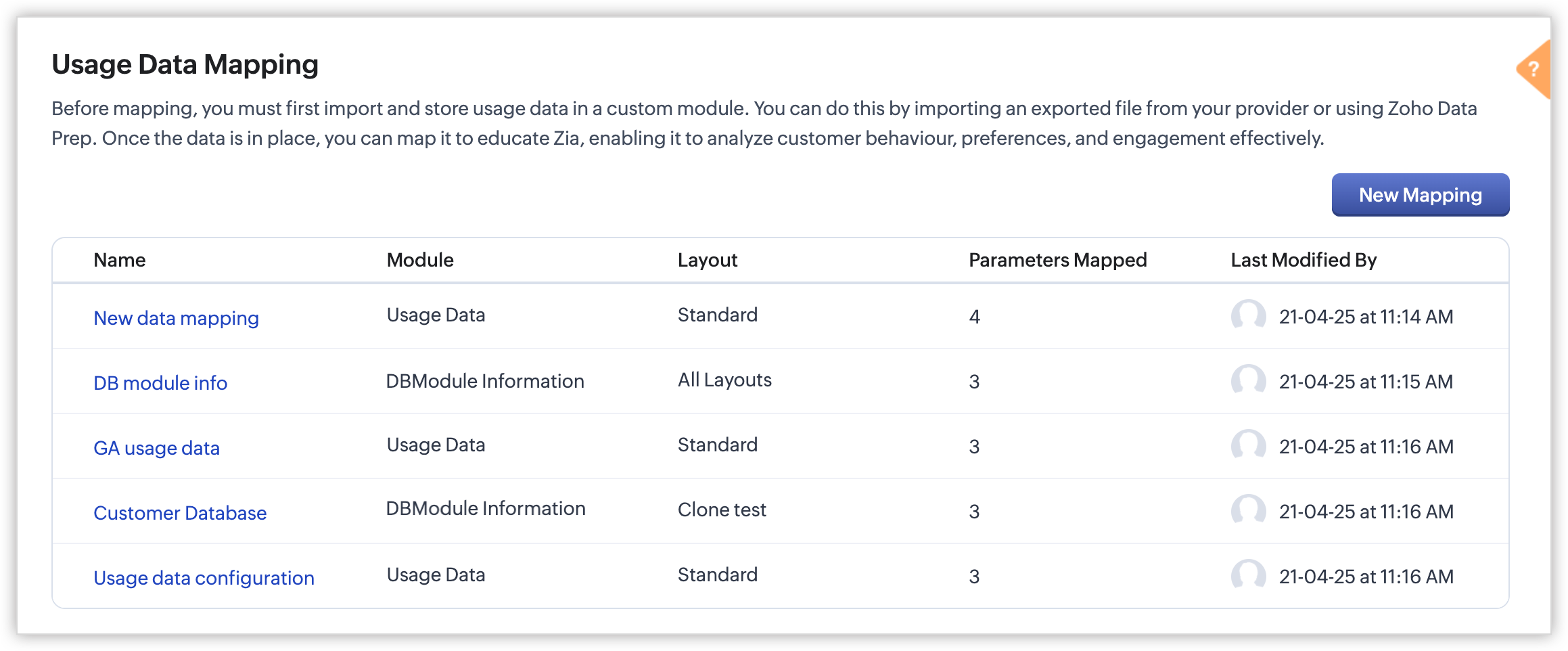
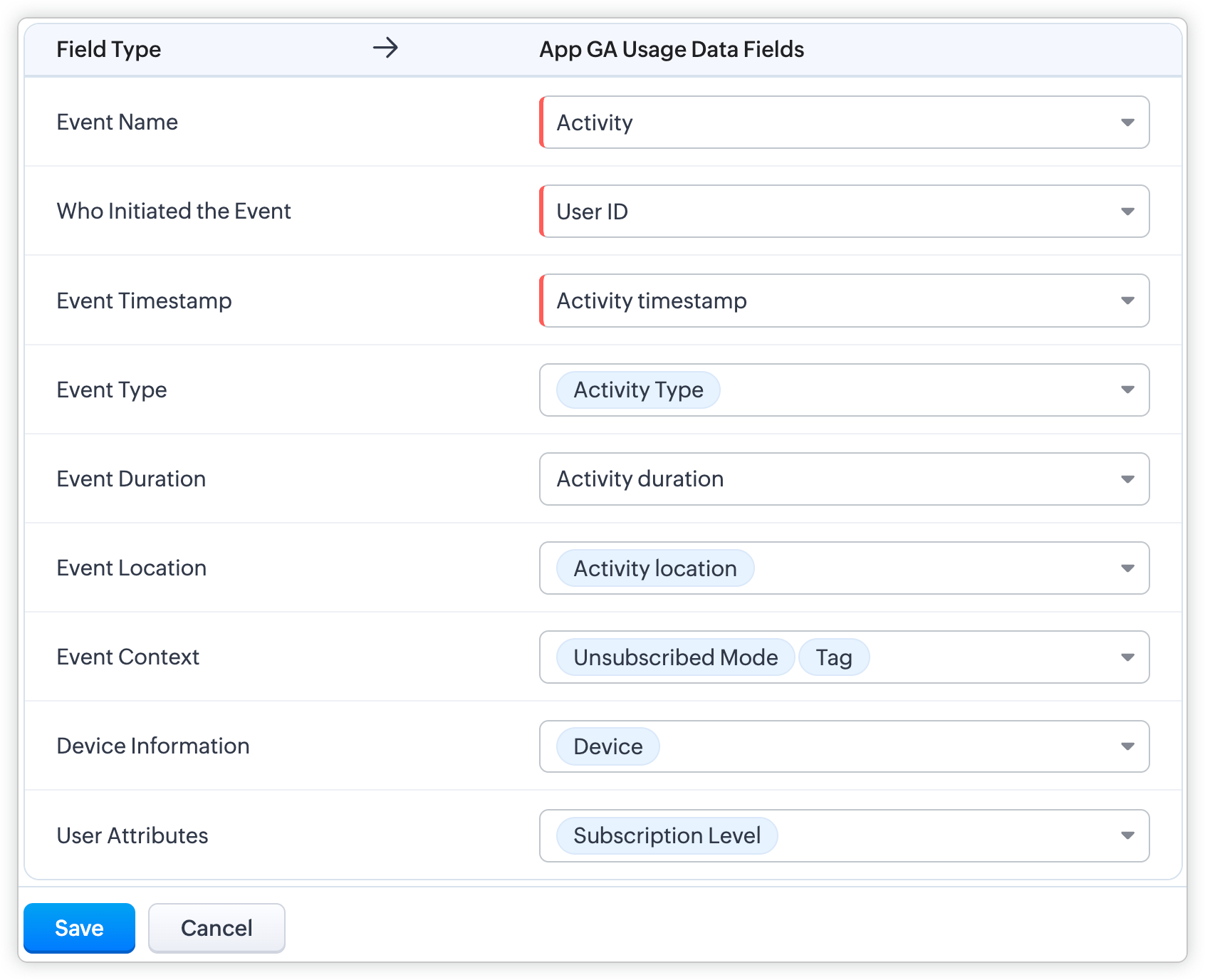
Event mapping is a learning technique for the system so the user can activate Predictions, such as churn prediction. Through event mapping, the system will learn and understand how to interpret usage data. Mapping involves certain data attributes like event name, event timestamp, event initiator, and others.
Why event mapping?
Since event mapping requires the mapping of information, you are directly feeding in more details about the user interactions, easing the accuracy of churn prediction. In simple words, more details give you more accurate prediction.
For instance, a sudden reduction in the amount of logins serves as a significant indication of decreasing engagement, potentially indicating churn. Through event mapping, Zia can anticipate the reasons why a certain demographic of users cease logging in at specific times and whether device-related factors impact their logins.
Moreover, event mapping unlocks various functionalities like calculating churn scores, generating personalized recommendations, and monitoring customer engagement. For example, through Workflow Rules, users can send promotional emails to encourage customers who have not logged in for over 30 days to stay engaged.
Steps to configure:
With the enhancement, import usage data into a CRM custom module, create a mapping of the data called event mapping, and utilize that data for churn prediction and more Zia insights. Through event mapping, AI increases the accuracy of Zia-driven predictions and also widens its scope for personal recommendations and other predictions.
Let's look at this activation in the below steps:
- Create a custom module and three (mandatory) fields to store the following data: event name, event timestamp, and event initiator.
- Import the usage data from other sources (via API, DataPrep, CSV, or any supported file format) to the created custom module and map the fields.
- In Usage Data under Zia, perform the event mapping to create a way that the system understands.
Availability
DC: All DCs
Editions: Enterprise and Ultimate editions
Release Plan: This feature will be released phase-wise to all DCs
For detailed description and guide, refer to our resources:
Topic Participants
Pauplin Fiona Peries G
Rich Brandwein
Sunderjan Siddharth
Sticky Posts
Presenting ABM for Zoho CRM: Expand and retain your customers with precision
Picture this scenario: You're a growing SaaS company ready to launch a powerful business suite, and are looking to gain traction and momentum. But as a business with a tight budget, you know acquiring new customers is slow, expensive, and often deliversGood news! Calendar in Zoho CRM gets a face lift
Dear Customers, We are delighted to unveil the revamped calendar UI in Zoho CRM. With a complete visual overhaul aligned with CRM for Everyone, the calendar now offers a more intuitive and flexible scheduling experience. What’s new? Distinguish activitiesCreate and populate a record in an instant: Introducing zero-shot field prompting to Zia's ICR
A couple of months ago, we upgraded our in-house AI image detection and validation tool, Zia Vision, with intelligent character recognition (ICR). By training Zia with sample images, you could create and enrich CRM records with data extracted from standardIn-person ZUG Meetups for Real Estate Professionals - US Q1 2026
The Real Estate Zoho User Group is going on a multi-city, in-person meetup tour across the US, and we’d love to see you there! These meetups are a great opportunity to: Connect with fellow real estate professionals using Zoho Share challenges and discoverNimble enhancements to WhatsApp for Business integration in Zoho CRM: Enjoy context and clarity in business messaging
Dear Customers, We hope you're well! WhatsApp for business is a renowned business messaging platform that takes your business closer to your customers; it gives your business the power of personalized outreach. Using the WhatsApp for Business integration
Recent Topics
Add a "Success" Route to the "Forward to Operator" Card in Zobot
Hello Zoho SalesIQ Team, We hope you're doing well. We would like to request an enhancement to the "Forward to Operator" card in Zobot. Current Limitation: At present, the "Forward to Operator" card provides the following routes: Operator Not AvailablePower of Automation :: Auto-update Project status based on Tasklist completion
Hello Everyone, A Custom function is a user-written set of code to achieve a specific requirement. Set the required conditions needed as when to trigger using the Workflow rules (be it Tasks / Project) and associate the custom function to it. Requirement:Multi Module Lookup Fields
🎯 Use Case: In many custom implementations, especially those involving financial tracking, service operations, or project-based work, a single record (e.g. an invoice or bill) often relates to one of several different modules — but only one at a time.Introducing AI Modeler—a no-code approach to adding AI to your business applications
Forward-thinking businesses today are embracing AI to make life easier for themselves, their employees, and their customers. But if you haven't started yet, you might be concerned that your business will be left behind. Or maybe you're worried becauseZoho People how do i view the history of leave taken
Hi All What is the report that i am unable to view the history of the leave taken for an individual and team?UK Registration for VAT with existing stock/inventory
We have an existing inventory of stock and are investigating how to handle the conversion from a UK VAT unregistered company to a UK VAT registered company. Enabling VAT registered status looks extremely easy, but we cannot find any way within Books toTrigger action after workflow
I would like to trigger a deluge function after the approval workflow is complete. Is this possible? The objective is to take the approved document and move it over to Zoho Contracts to send out to our customer for review and signature. The reason weIs it possible to create a meeting in Zoho Crm which automatically creates a Google Meet link?
We are using Google's own "Zoho CRM for Google" integration and also Zoho's "Google Apps Sync" tools, but none of them provide us with the ability to create a meeting in Zoho CRM that then adds a Google Meet link into the meeting. Is this something thatUnable To Enable Google Calendar Sync
Hi Folks, I am unable to enable google calendar sync. I get Internal Error, Problem Occurred Internally. Screenshot attached. How do I solve this?Export to Zoho CRM Not Triggering Workflow Rules
Hello, I have set up an automated export from DataPrep to Leads in CRM but none of my Workflow Rules are triggering once the leads are created. The Timeline history is completely empty in every lead. How can I fix this issue? Do I need to set up a Schedule【Zoho Projects】サンドボックス機能(テスト環境)リリースのお知らせ
本投稿は、本社のZoho コミュニティに投稿された以下の記事を参照し作成したものです。 Sandbox - Your Secure Testing Space in Zoho Projects ユーザーの皆さま、こんにちは。コミュニティチームの中野です。 本投稿では、Zoho Projects のサンドボックス機能リリースについてご紹介します。 サンドボックス(テスト環境)とは? Zoho Projects の「サンドボックス」は、新たな設定を作成、検証、そして既存の処理を妨げることなく本番環境に適用することができるテスト環境です。Sending from domain alias
In the Control Panel/Domains, I have set up some domains as aliases for my main domain. Only my main domain has mail hosting. The other domains are verified as aliases for the main domain, and emails sent to <user>@<alias domain> arrive successfully atDifficult to Purchase More users
It's surprisingly difficult and un-intuitive to purchase more user licenses in Zoho One under the new UI. It's not actually possible to do it anywhere from the admin interface. You have to leave the admin/directory section, then click your profile icon,How to link web sales payments through Stripe to invoices?
I have just set up an online shop website which accepts payments through Stripe. The payment appears in Zoho Books through the Stripe feed as 'Sales without invoices'. In order to keep Zoho Inventory in step, I manually (for now) create a Sales InvoiceAnnouncing New Features in Trident for macOS (v.1.22.0)
Hello everyone! Trident for macOS (v.1.22.0) is here with thoughtful updates to improve your daily workflow. Here's a quick look at what's new. Switch email response type easily. You can now switch between Reply, Reply All, and Forward directly in theLayout Rules / Quick create
Hello, is there a way to create a layout rule for quick create option? Regards, KatarzynaZoho Notebook Will Not Open After App Install
I am a new user of Notebook. I was able to successfully import my data from Evernote and the product is working well on a Windows 11 computer and Pixel device. I have also installed Notebook on a Samsung S6 lite tablet however the software freezes onLeads, contacts, deals table view is not sorting
i am unable to sort the table view of leads, contacts and dealsZoho CRM Multi-select values not translated
Hello! I have some issue with translate custom multi-select fields in zoho CRM in other language. I download export file, but it has all my custom fields and picklist values exept multi-select fields picklist values. Please, help me to undestand, isUnable to Download Invoices via API – Code 57 Authorization Error
I’m integrating the Zoho Billing API with the scopes ZohoInvoice.invoices.CREATE,ZohoInvoice.invoices.READ. I’ve completed the OAuth2 flow successfully, including generating the auth code, access token, and refresh token. All tokens are valid and fresh.Weekly Tips : Stay in loop with Conversation View
You receive a series of emails back and forth with a client regarding a project update. Instead of searching through your inbox for each separate email, you would want to see the entire email conversation in one place to understand the context quicklyIntroducing Zoho PDF Editor: Your free online PDF editing tool
Edit your PDFs effortlessly with Zoho PDF Editor, Zoho's new free online PDF editing tool. Add text, insert images, include shapes, embed hyperlinks, and even transform your PDFs into fillable forms to collect data and e-signatures. You can edit PDFsRSC Connectivity Linkedin Recruiter RPS
It seems there's a bit of a push from Linkedin Talent Solutions to keep integrations moving. My Account Manager confirmed that Zoho Recruit is a Certified Linkedin Linkedin Partner but does not have RSC as of yet., (we knew that :-) She encouraged meWater-Scrum-Fall approach for finance institutions with Zoho Projects Plus
Finance is a highly regulated sector with strict rules and compliance requirements. Handling sensitive client data and complex transactions like multi-currency deals requires elaborate workflows and precise management. Implementing project managementGet instant summaries of your notes with the help of Zia
Hello all, We've added a simple yet powerful feature to Zoho CRM that we're excited for you to try: Zia Notes Summary. It's designed to make the daily lives of a CRM user a bit easier by giving you quick summaries of your CRM notes. Whether it's a glanceZoho one web page are not available
Why I am not able to enter to zoho one web page?Zoho People > Onboarding > Candidate do not view all the data field on the Employee Onboarding
Hello In my onboarding portal I do not see all the fields that i want the candidate to fill in In my Employee Onboarding Form These details i can see In the work information, i have enable the Company View but in the Employee Portal i do not see I haveHas anyone implemented a ""switch"" to redirect emails in production for testing?
Hi everyone, In our production Zoho CRM we have a fairly complex setup with multiple Blueprints and Deluge functions that send emails automatically — to managers and internal staff — triggered by workflows. We’re looking for a way to *test changes safely*,Restrict Access/Shared Access
Sometimes access to documents that go out from Zoho Sign need to be restricted or shared. For example: 1) HR department send out employment contracts. Any Zoho Sign admin can view them. Access should be restricted to those that HR would allow to viewTip#44: Integrate with Xero to manage your financial operations
Managing your project finances becomes more efficient with Xero integration in Zoho Sprints. With this integration, you can sync your Zoho Sprints data with Xero. Once you sync them to Xero, you can easily create invoices in Xero. This feature significantlyZoho People Onboarding Unable to Convert to User
Hello All I need help in this onboarding of candidate Currently at this stage the candidate is just being offered and we are filling in his details however not all information are fill up. The candidate is still using his/her personal email When i tryIntegration with SharePoint Online
Is there an integration where we can add a Zoho Sign link to the context menu of a document in the SharePoint document library. Then, we could directly initiate a workflow of sending a document for signature from a document library in SharePoint onlWhite screen when connecting Zoho Cliq and Zoho People for birthday notifications
Hi everyone, I'm new to Zoho and I'm trying to set up the employee birthday notifications, following this guide: Automating Employee Birthday Notifications in Zoho Cliq But when I try to connect Zoho Cliq with Zoho People, I just get a white screen andWord file is messed up when i upload it to zoho sign
Hi. I am trying to upload a word file to zoho sign and when i do that it ruins the file, It adds spaces and images are on top of each other. What can i do? Thanks.Annotate widget?
Is there something in creator or any zoho app that allows me to have an image markup field item in the form? I need to be able to complete a form that also allows the user to mark up a preloaded image. Other compay's call this an image markup field orDashboards / Home Page - Logged In User
Lots of the dashboards that we use reference the Logged In User. We also set up Home Pages for specific roles, where the Logged In User is referenced within the custom view. As an admin, that means that these views are often blank when customizing andI'm pissed as fuck
What the hell Zoho! Always the same goddam problem. It takes time because the simplest things just don't fucking work. Today it just took me 3 hours to complete and send a 1page privacy letter to a client. And you know what 99% of the document was alreadyConfigure Notifications for API Limit
Hello developers, APIs are essential for businesses today as they enable seamless integration between different software systems, automate workflows, and ensure real-time data sync. To ensure that admins are notified well in advance before APIs reachIntroducing Blueprints for Custom Modules!
Hello developers, We've added a new feature called Blueprints in Custom Modules. Blueprints are the online representation of a business process. In Zoho Books, you can use Blueprints to design a process flow using states and transitions. Developers canCampaign Links Blocked as Phishing- Help!
We sent a Campaign out yesterday. We tested all of the links beforehand. One of the links is to our own website. After the fact, when we open up the Campaign in our browser, the links work fine. The links in the emails received, however, opened in a newNext Page