Dear Customers,
We hope you're well!
Portals is a self-service avenue through which your clients can access and manage their direct and related data in Zoho CRM. This empowers them to be more independent and enables them to experience a sense of transparency with your business.
Here, the key term to notice is
direct and related data. The current portal setup serves clients only with their own primary and related data via a lookup field. Here's a pictorial representation of the current setup:
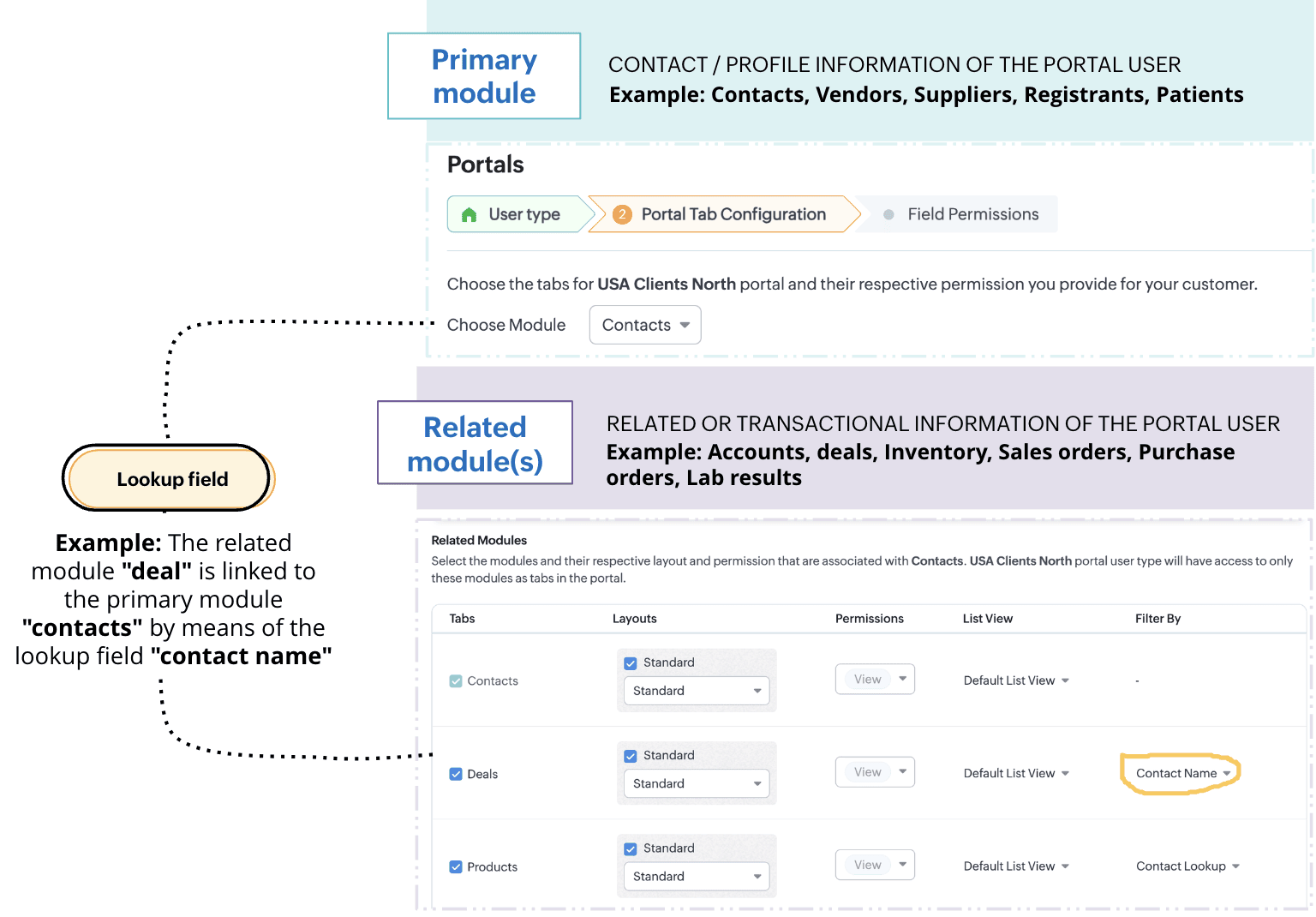
While having access only to their records gives customers authority over their information, it presents some notable challenges.
Challenge #1: Lack of control
A record undergoes two types of processes: customer-driven processes like conversion, negotiation, winning a deal, and more, and internal processes like approvals, discussions, and rejections. While the former keeps customers informed about the progress of their deals, the latter reveals the business' internal decision-making process. Administrative information isn't necessarily meant to be seen, but the current portal setup exposes each stage a record goes through, unconditionally. This poses a problem: The business lacks control over the kind of information that's shared.
Imagine this scenario: Patricia is your customer. She has access to her profile, deals, and quotes. She can manage data all by herself and track records as they progress. While having access to her own records empower her with independence, witnessing all the process changes—including approvals and rejections of discounts that aren't yet final—might cause her some anxiety. It also violates the business's privacy policies.
Challenge #2: Lack of flexibility
The portals you have now only enable you to share clients' personal and transactional records. Clients can only see their own data. But what if they want to access information other than their own? Or what if they want to view records with a particular trait?
Say, for example, your business sells multiple products across Canada, and you want your portal users to see only the products available in their regions. This is a specific request that's based on the location of the customer. The current setup limits this requirement and fails to preserve context for the customer.
Thus, to give the admins control over any exposed information and simultaneously provide portal users with both flexibility and independence, we've developed an exciting addition to portals' data-sharing functionality: criteria-based data exposure.
Introducing criteria-based data exposure
Criteria-based data exposure is the ability to expose modules and data based on conditions that you use to control what data should be exposed and when, or to render contextual results for portal users.
Technically speaking, in addition to linking a primary module and a related module using lookup fields, admins can now define two types of criteria to expose other records with a particular trait in the module: match with fields and match with values.
Match with value: This criterion should be familiar to you as a seasoned Zoho CRM user. You can determine record eligibility by defining a field, operator, and qualifying value.
Example: Deal type is new business. All those deals that are new businesses will be displayed to the portal user.
Match with field: Here, the relationship between the related module and the primary module is established by mapping their fields. That is, the relationships between records in primary and related modules are established by fields with the same values.
Example: Implementation agent servicing area is the client's billing city.
Let's understand these criteria by addressing our initial challenges:
Solution for challenge #1 (lack of control)
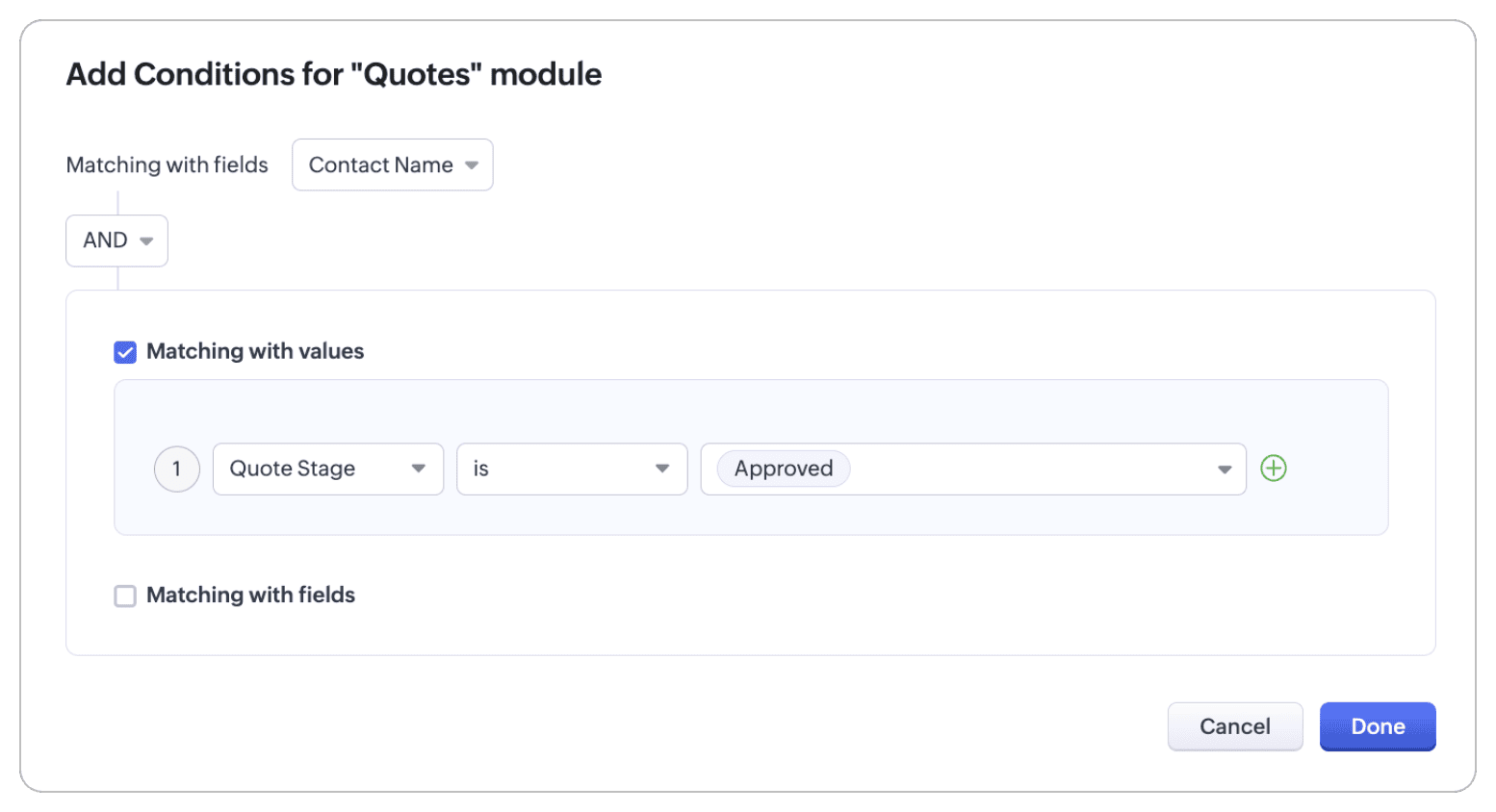
By matching with value, we can allow Patricia to view her quote only after it reaches the approved stage. This way, your business's internal correspondence stays internal, and Patricia can track her quotes without any impact on her experience.
Below is how you can configure this feature. Again, let's suppose Patricia is your customer and that you want her to have access to her transactional data:
- Create a mutual lookup field called "Contact name" between the Contacts and Quotes modules.
- To control who can access this information, use the match by value criterion and add two conditions:
- Quote stage is approved
- Quote stage is not negotiating
This way, Patricia's quote is visible only when it reaches the approved stage.
Solution for challenge #2 (lack of flexibility)
With the match with field criterion, your portal user can view all products that are available in Canada.
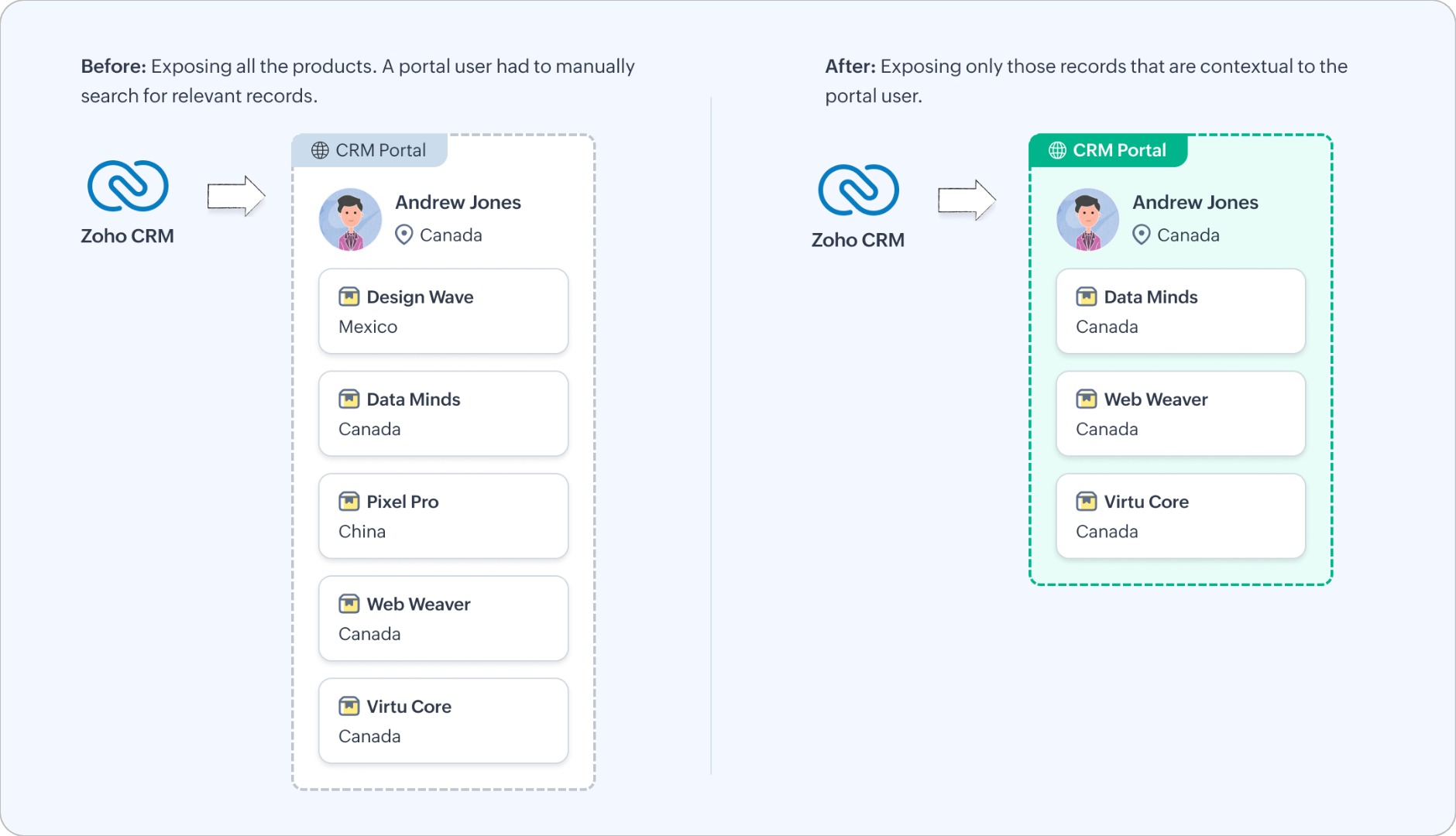
Let's look at how you can configure this functionality.
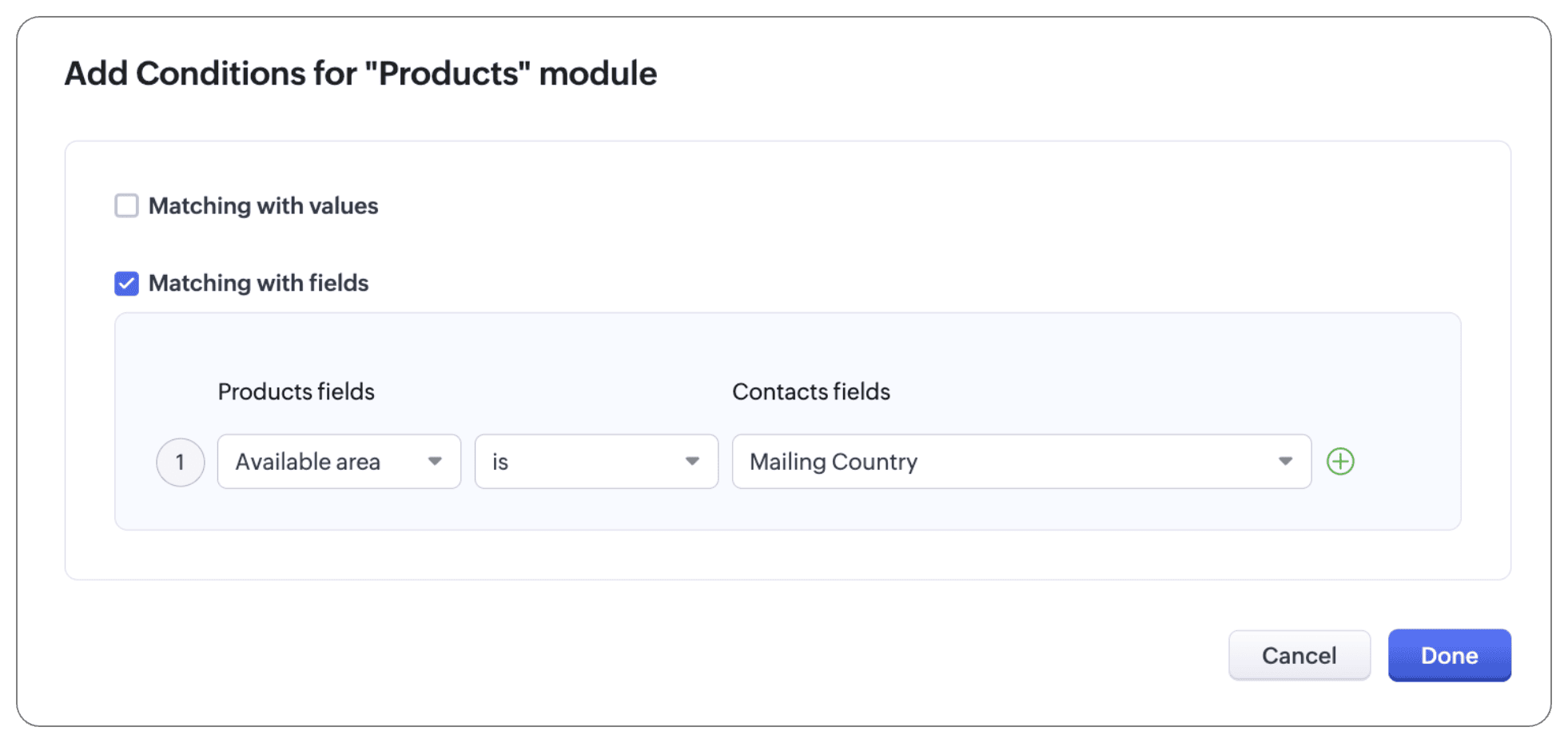
The Products module is a public module, accessible to all portal users, irrespective of their relationship to that module. To bring context to this setup, add a condition using the match by field criterion:
- Available area is mailing country
Note:
In addition to configuring criteria, you can also use an "and/or" conditional to follow these criteria. That is, you can use both criteria and lookup, or either of the three (criteria, or match with values, or match with fields), or one of the criteria and lookup.
For example, let's say your Implementation Specialist module has an exhaustive list of agents that implement servers in different areas, with varying levels and types of expertise. To display the agents the user hired as well as other agents for reference, we can configure conditions, as shown below:
- The primary module and the related module can be linked using the native lookup field to bring up agent records that users have hired directly.
- To display other agents in the location, let's use conditions:
- If the record matches with values, the customer can see all agents who belong to Michigan, Ohio, Chicago, Washington, and Indianapolis will be displayed.
- If the record matches with fields, the customer can see all agents whose service region matches the contact's mailing state.
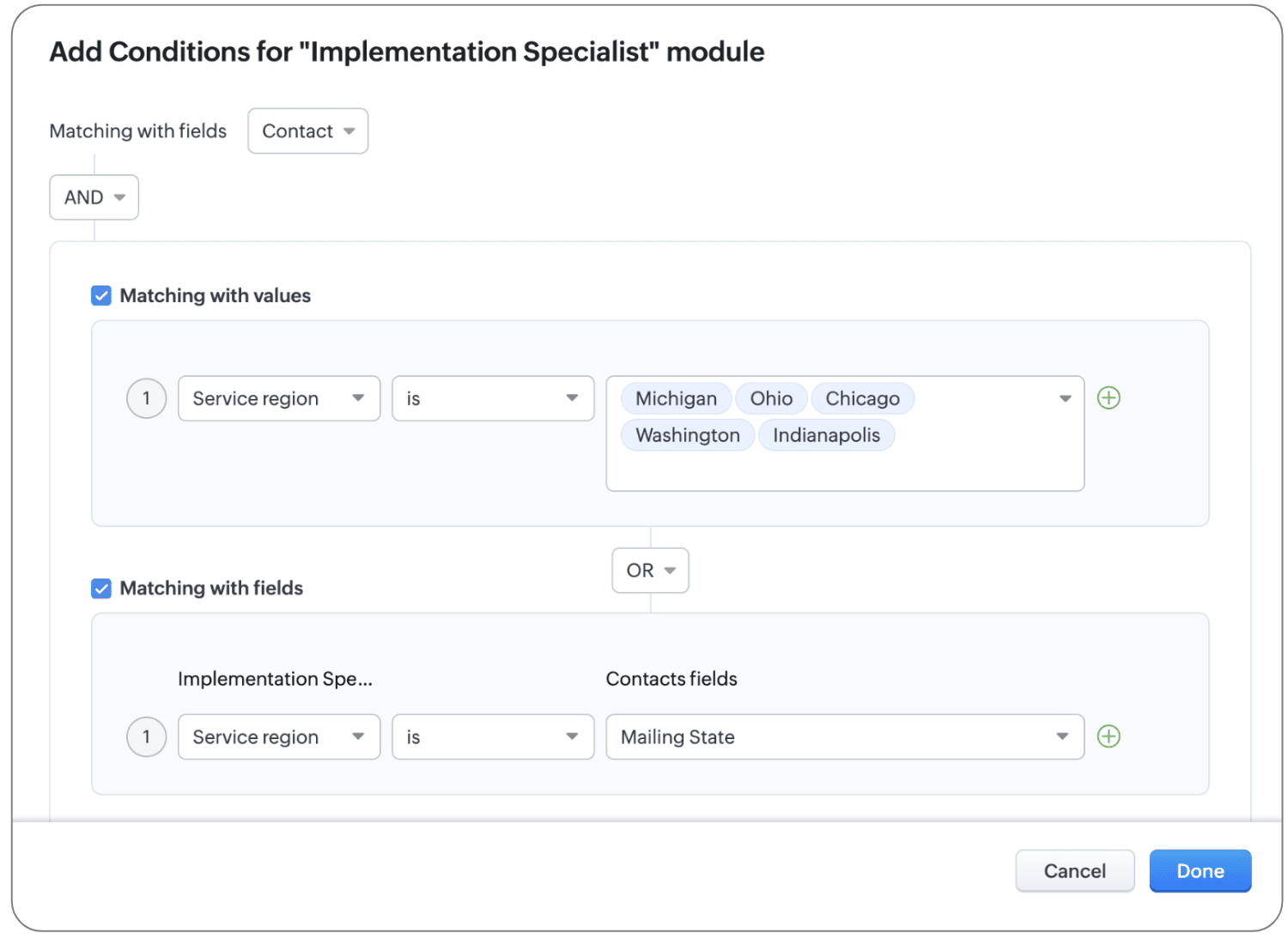
This way, both the agents directly hired by the contact and those agents that are from a desired location are displayed for portal users' reference.
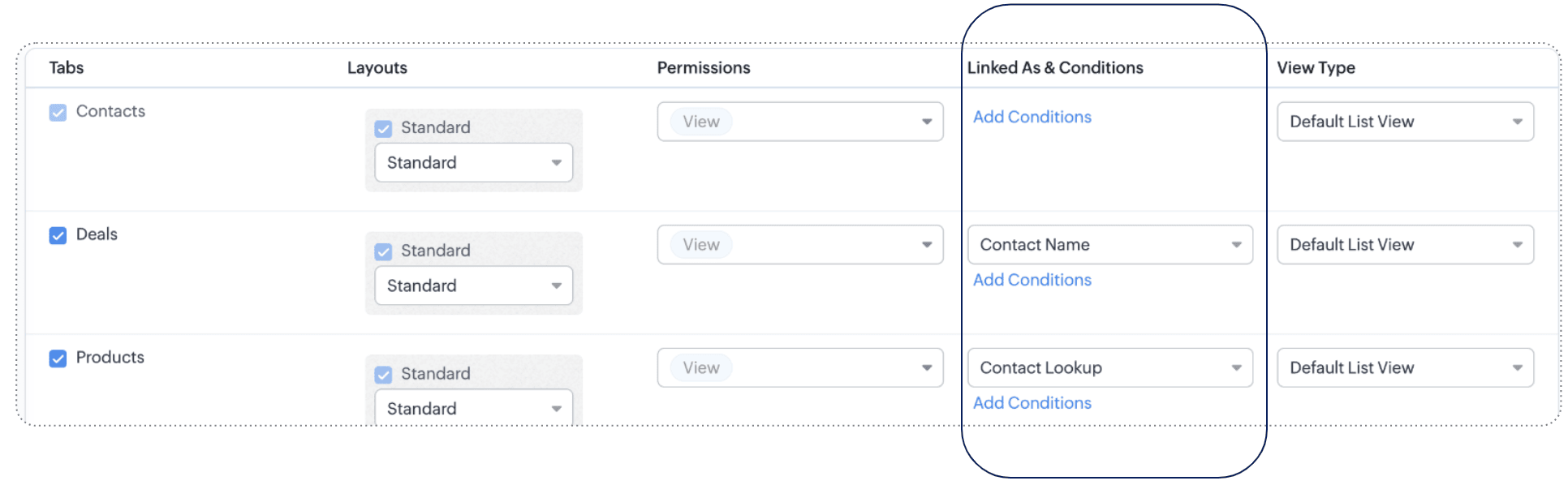
Thanks to these new criteria, we've updated the UI of the configuration page as well. What used to be called
Filter by column (where the lookup value is selected) has been renamed to
Linked as and conditions.
To understand the scope and impact of this enhancement, let's look at a couple more examples.
Example 1: Match with value
Let's say you sell electronics and accessories in bulk for large enterprise organizations. You've extended the following modules in portals for enterprise customers:
- Primary module: Contacts
- Related modules: Products, Invoices, Cases, Appointments
- Public module: Channel partners
So that customers can look at all the products applicable for enterprise customers, you've formulated some criteria: Lookup and Match by value. Customer type is Enterprise.
Now clients can see their contact records, their products (thanks to the lookup connection), and products for enterprise customers (thanks to the match by value criterion), as well as invoices, cases, and appointments related to them, and, finally, all channel partners.
Example 2: Match by field
Saint Laurent Hospital is a multi-specialty hospital in Iowa. They let their patients manage their profiles, view their prescriptions, order medicines from the pharmacy, view lab results, and book appointments with doctors using a dedicated portal.
This is their setup:
- Primary module: Patient's profile
- Related modules: The Prescriptions module, Lab Results module, and Appointments module are related with the primary module via lookup fields, and the Doctors module via the Match by field criterion.
- Public modules: Medicines
As you can see, records with personal data (prescriptions, lab results, appointments) are directly linked to the patient's profile using lookup fields, and to map the doctors to the patients' ailments, the complaint field from the patient's profile is linked to doctors whose specialization is also the same as the ailment. This means that the patient can see all the doctors whose specialization matches their complaint.
(i.e.) Specialization contains Complaint. IBS specialist contains IBS
That's all for this enhancement to the Portals configuration.
We hope these criteria will enhance your clients' experiences with your business. If you have any questions or concerns, please drop a comment. Let's connect!
Release plan: This enhancement is available for users in all DCs.
Resources: Portals in Zoho CRM
Thanks and kind regards,
Saranya Balasubramanian
Recent Topics
Zoho DataPrep and File Pattern configuration
I'm using Zoho data prep to ingest data from One Drive into Zoho Analytics... The pipeline is super simple but I can't any way to get all the files that I need. Basically I need to bring all the files with a certain pattern and for that I'm using a regex
Adding a new section to the related details sidebar when creating a new ticket.
Hello, I was wondering if you can add a new section to the related details sidebar when creating a new ticket. I was wanting to have it to where it also shows the account information related to the contact chosen as well. This is the section I am referring
JWT Token authentication problem that sometimes generates infinite redirect loops
Description : Nous proposons un bouton sur notre plateforme permettant de rediriger l'utilisateur vers le portail ZohoDesk via un jeton JWT pour une authentification transparente. Cependant, il arrive que certains utilisateurs soient pris dans une boucle
Zoho desk desktop application
does zoho desk has a destop applicaion?
No funcionan correctamente el calculo de las horas laborales para informe de tickets
Hola, estoy intentando sacar estadísticas de tiempo de primera respuesta y resolución en horario laboral de mis tickets, pero el calculo de horas en horario laboral no funciona correctamente cree los horarios con los feriados : Ajusté los acuerdos de
How do I bulk archive my projects in ZOHO projects
Hi, I want to archive 50 Projects in one go. Can you please help me out , How can I do this? Thanks kapil
ZOHO Work Drive Back Up
I am looking for a ZOHO Work Drive backup solution. Something that is cloud based. There's lots of these kinds of options for Google Drive and other providers, but I have not seen anything for WorkDrive. Any suggestions?
ZOHO Reports - Filter Logic?
Hi, I need a way to apply filter logics such as ((1 AND 2) OR 3). All I can see as of now is a way to enter different AND filters in the respective filter column. But how can I add an OR filter? Any advice would be highly appreciated. Mark
Scanned Doc - selecting Item overwrites Rate
I have a Vendor Invoice which was uploaded to Documents. I select Add To > New Bill. The OCR is actually quite good, but it is reading an Item Description instead of an Item Number. I remove the description and select the correct Item Number... and it
Recruit API search
Hi all, Attempting to call the search api endpoint from Postman using the word element as mentioned in api docs Search Records - APIs | Online Help - Zoho Recruit When making the call to /v2/Candidates/search?word=Saudi receive response of { "code": "MANDATORY_NOT_FOUND",
Manage control over Microsoft Office 365 integrations with profile-based sync permissions
Greetings all, Previously, all users in Zoho CRM had access to enable Microsoft integrations (Calendar, Contacts, and Tasks) in their accounts, regardless of their profile type. Users with administrator profiles can now manage profile-based permissions
Saving reading position + Keep screen on
While Zoho Notebook is excellent for saving and annotating articles, its utility is severely limited by the lack of reading progress synchronization. On the Android app, if a user exits a long note after reading 50%, the app fails to save the position.
Zoho LandingPage is integrated with Zoho One!
Greetings to the Zoho One users out there! We're delighted to let you know that Zoho LandingPage is available in Zoho One too! With Zoho LandingPage, you can host custom-made landing pages, and persuade the visitors to dive deeper by making further clicks,
Android app sync problem - multiple devices have same problem
Hello, I am having a problem with synchronization in the Android app. When I create a drawing, the data does not sync correctly—only a blank note is created without the drawing. I tested this on multiple devices, including phones and tablets, and the
How can i resend a campaign to only one of the recipients on the original campaign
How can i resend a campaign to only one of the recipients on the original campaign ? Sincererly, Mike
Notes badge as a quick action in the list view
Hello all, We are introducing the Notes badge in the list view of all modules as a quick action you can perform for each record, in addition to the existing Activity badge. With this enhancement, users will have quick visibility into the notes associated
How to show branch instead of org name on invoice template?
Not sure why invoices are showing the org name not the branch name? I can insert the branch name using the ${ORGANIZATION.BRANCHNAME} placeholder, but then it isn't bold text anymore. Any other ideas?
Create CRM Deal from Books Quote and Auto Update Deal Stage
I want to set up an automation where, whenever a Quote is created in Zoho Books, a Deal is automatically created in Zoho CRM with the Quote amount, customer details, and some custom fields from Zoho Books. Additionally, when the Sales Order is converted
Marketing Automation Requirements Questions
I would like to set up a multi-email drip campaign- please see the structure below and confirm if I can achieve this set up in Zoho marketing automation. Where applicable, highlight gaps and workarounds. Thanks Drip email campaign- Can I create one drip
Sharing URLs and direct access
Hello, I am storing my team's email signature images on Workdrive. I am creating a public image download share and adding “?directDownload=true” so that the image can be accessed without the Workdrive interface. A few questions: 1) Can we generate friendly
how to change the page signers see after signing a document in zoho sign
Hello, How can I please change the page a signer sees after signing a document in Zoho Sign? I cannot seem to find it. As it is now, it shows a default landing page "return to Zoho Sign Home". Thanks!
Question about using custom_fields in Storefront Add-to-Cart API (error 2003 – required details)
Hi everyone, I’m working with the Zoho Commerce Storefront API, specifically the Add to Cart endpoint: POST /storefront/api/v1/cart According to the documentation, this endpoint supports a custom_fields parameter for adding line-item custom data. I’m
Can a project be cloned?
Good afternoon, greetings. I would like to ask if it's possible to clone a project in Microsoft Project. I found a way to do it using templates, but I'm not sure if there's a direct way to clone a project. Thank you in advance for your attention, and
Timesheet Tasks in Zoho Books: associate to service item
How do we associate a service item to timesheet tasks in Zoho Books? For example: Joe spent 5 hours on project:task1 which is Service Item#1 (Income:Service1). When the invoice is issued thru the Project Invoice section, this is not available. When the
Why Sharing Rules do Not support relative date comparison???
I am creating a Sharing Rule and simply want to share where "Last Day of Coverage" (Date field) is Greater than TODAY (Starting Tomorrow). However, sharing rules don't have the option to compare a date field to a relative date (like today), only to Static
Task/Activity indicator in SalesPipeline overview has disappeared
I Just logged in my ZOHO CRM first 2026 checking my salespipeline overview , Every record card used to show an indication that there was an open task (Yellow if the expiry date was close, red if the expiry date was today and grey when it had expired).
Tip #56- Accessibility Controls in Zoho Assist: Hearing- 'Insider Insights'
As we begin the new year, it’s a great time to focus on making our tools more inclusive and accessible for everyone. Remote support often involves long hours in front of screens, varying lighting conditions, and users with diverse accessibility needs.
Zoho Desk Android app update: Table view for All Departments view, custom button
Hello everyone! In the latest version(v2.9.25) of the Zoho Desk Android app update, we have introduced Table view for the 'All Departments' view in the ticket module. We also have supported an option that allows tickets in the Table view to be sorted
What's New - December 2025 | Zoho Backstage
In December, Backstage introduced a focused set of updates that improve how you manage registrations, communicate with attendees, and track participation. These enhancements are designed to give organizers greater flexibility and clearer control across
Need code format to specify default values
Can someone please direct me to the code syntax or the proper translation per the instructions circled below. These instructions don't seem correct.
Add multiple users to a task
When I´m assigning a task it is almost always related to more than one person. Practical situation: When a client request some improvement the related department opens the task with the situation and people related to it as the client itself, the salesman
A Roundup of Zoho Sprints 2025
Issue with WhatsApp Template Approval and Marketing Message Limit in Zoho Bigin
We are facing issues while creating and using WhatsApp message templates through Zoho Bigin, and we request your clarification and support regarding the same. 1. Utility Template Approval Issue Until December, we were able to create WhatsApp templates
Sorting Custom Date in API isn't working w pagination limit
How can we sort a custom field with DATE using pagination? Starting at page=1 then moving to page=2 with a limit of 10 each, its all messed up and even shows some of the same records as page 1? https://www.zohoapis.com/crm/v2/INVOICE_MODULE/search?criteria=(FM_Contact_ID:equals:1234)&sort_by=Invoice_Date&sort_order=desc&per_page=10&page='
SAP Business One(B1) integration is now live in Zoho Flow
We’re excited to share that SAP Business One (B1) is now available in Zoho Flow! This means you can now build workflows that connect SAP B1 with other apps and automate routine processes without relying on custom code. Note: SAP Business One integration
Enhancement in Role and Profile mapping of agents in Sandbox
Hello everyone! We have brought in a modification in the way users are mapped to a particular role and profile in Sandbox. What has changed? When agents are copied from production to Sandbox: If a user's current role and profile is available in Sandbox,
The reason I switched away from Zoho Notebook
My main reason for switching to Zoho was driven by three core principles: moving away from US-based products, keeping my data within India as much as possible, and supporting Indian companies. With that intent, I’ve been actively de-Googling my digital
Decimal places settings for exchange rates
Hello, We are facing issues while matching vendor payments with banking feeds. As we often import products/services exchange rate comes into play. Currently, ZOHO allows only six digits for decimal places. We feel that conversions like JPY to INR require
Zoho removed ability to see all Scheduled Reports!
If you are not the owner of a scheduled report, Zoho recently removed the capability to see each scheduled report. As an admin who relies on seeing all scheduled reports being sent, this is a terrible update. Now I cannot see ANY scheduled reports...even the ones I am being sent!! This should be a setting for admins to control. This is a bad update.
Please can the open tasks be shown in each customer account at the top.
Hi there This has happened before, where the open tasks are no longer visible at the top of the page for each customer in the CRM. They have gone missing previously and were reinstated when I asked so I think it's just after an update that this feature
Next Page