Identify, Qualify and Retarget Potential Leads Using Zoho SalesIQ & Campaigns
Finding the right leads can often feel like guesswork. Because not all your website visitors are worth targeting — some may just be browsing, while others may have landed in there by accident. So how do you filter out the noise and focus on those who actually matter?
While SalesIQ offers many ways to narrow down your best prospects, today let's explore the combined power of Zoho SalesIQ and Campaigns. With these two products working together, identifying and qualifying leads becomes a lot more structured and automated. If you're a SalesIQ user who also uses Campaigns to target leads, this post is for you!
Phase 1: Spotting potential leads
For any business, identifying a lead starts with understanding visitor behavior.
Let’s say someone visits your website more than 10 times and has also conversed with your operators a few times regarding certain offers and products you offer. That’s not just random browsing — it’s a sign of interest. Based on that visitor's behaviour, they are definitely interested in what you have to offer but hesitant to take action. With a little push, these visitors or potentials can be easily converted to customers.
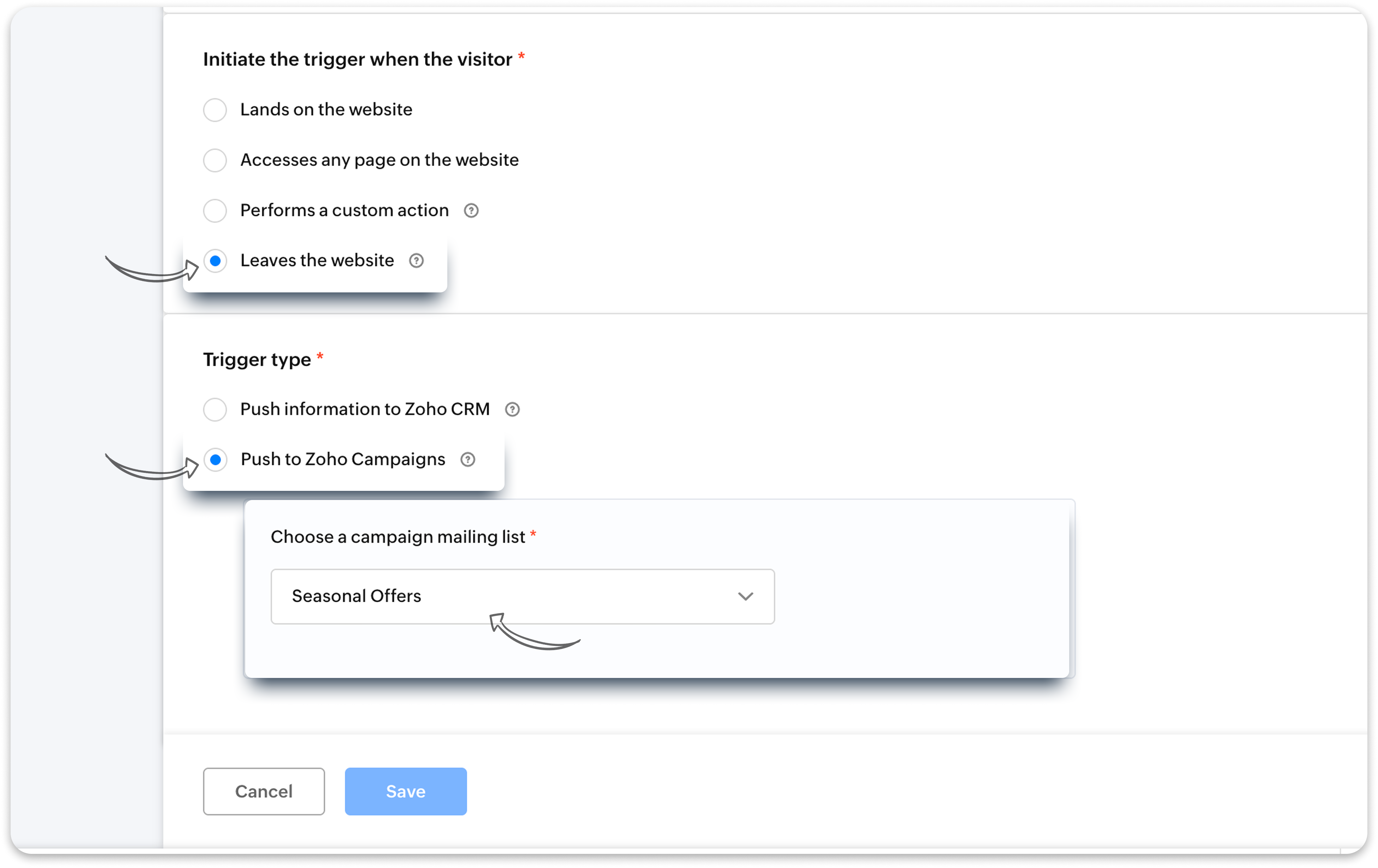
- With SalesIQ Triggers, you can automatically identify these potentials.
- Set up a trigger with the Number of visits and Number of past chats criteria to identify these potentials.
- You can set up in the trigger for the details (name and email) of these potentials to be directly added to your Zoho Campaigns mailing list.

Note: This trigger will work only when the visitor's name and email is identified by SalesIQ using past chats, webforms, etc.
Phase 2: Moving from interested to qualified
Once you've added these potential leads to your Campaigns list, it’s time to target them to push sales.
- Send a targeted campaign to these potentials with their interested products and services.
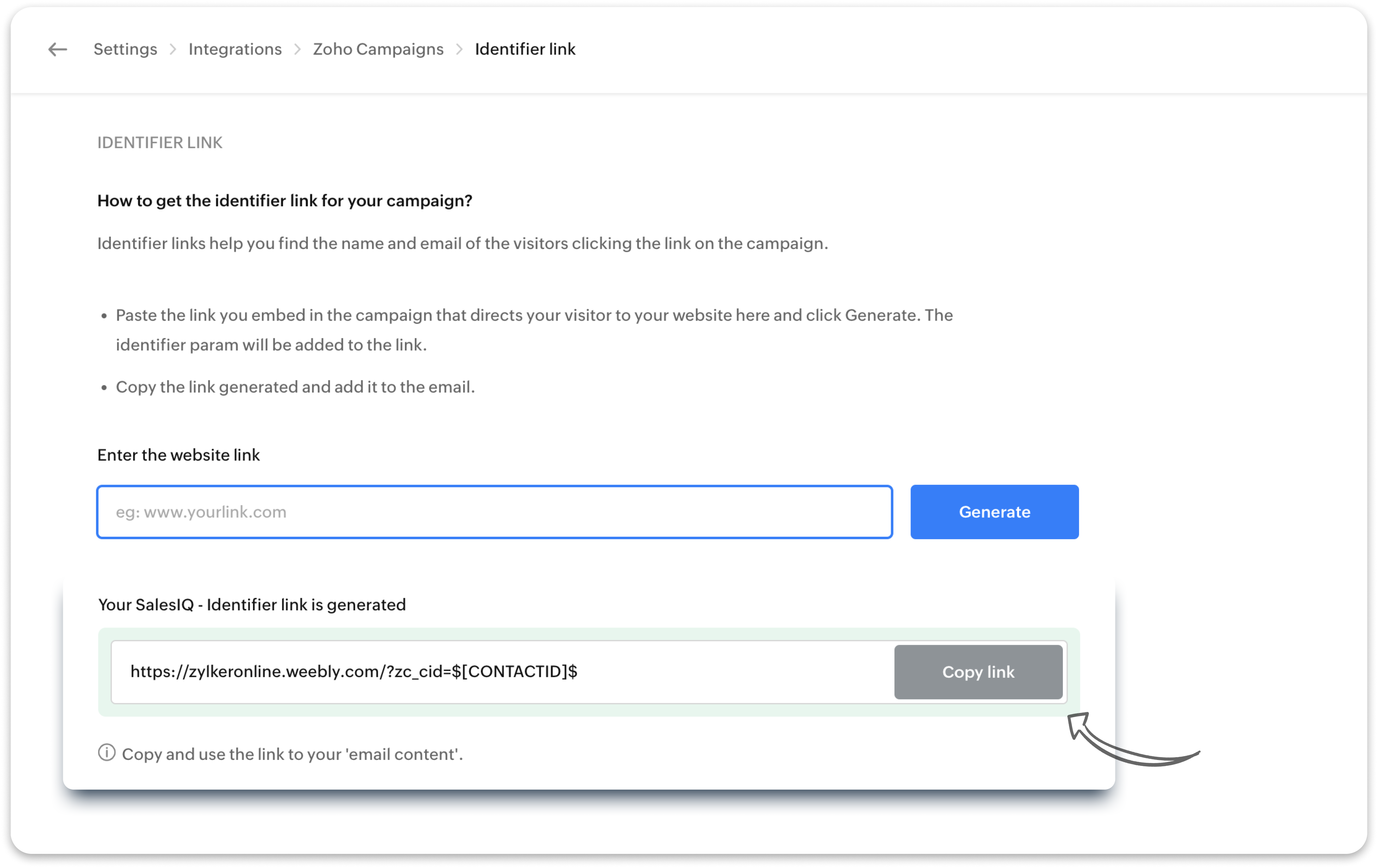
- Here’s the trick: generate a unique tracking URL (identifier link) in SalesIQ with the campaigns integration and use that in your campaign mailer’s CTA button (for example: “Browse Now" or “Learn More”).
- When they click through and land on your website via the campaign email, SalesIQ will recognize them — because now they’re a known visitor.
At this point, you’re not just guessing anymore. These are leads who’ve shown consistent interest and responded to your outreach. That’s a qualified lead.
Phase 3 - Retarget qualified leads with another niche campaign
Now, you can send another niche campaign to only your qualified your leads i.e. only the leads who came back to your site from the previous campaign click.
- Set up another trigger with the previous Zoho Campaign name as the Audience criteria.
- You can set up in the trigger for these leads to be added to another, separate Zoho Campaigns mailing list.
- Send another focused email to your qualified leads alone using Zoho Campaigns.

Bonus: You can also choose to push the information of your qualified leads directly into Zoho CRM for follow-up and progress them through the sales pipeline.

What else can you do next?
Apart from sending another niche campaign and pushing their details to CRM, you have other options too to reengage your qualified leads.
- Set up another trigger: Route them to a live operator using another SalesIQ trigger to engage them instantly and help them with what they need.
- Engage with a chatbot: Or, even use a SalesIQ chatbot to engage them, gather more context, and route the conversation accordingly — either to an operator or CRM.
These are just a few ways to bring automation and clarity to your lead generation process.
Stay tuned for our next post where we’ll show you how to set up a SalesIQ bot specifically for campaign-driven leads.
Warm regards,
Hameetha
Zoho SalesIQ
Topic Participants
Hameetha Nasreen
Sticky Posts
Big Things Just Dropped in the SalesIQ Universe: Top Upgrades You’ll Love in Nova’25
Nova'25 has landed, and it’s packed with meaningful upgrades to help you engage smarter, work faster, and scale with ease. Whether you're into proactive messaging, smarter automation, or better admin control, there's something here for everyone. Here'sYour bot just got smarter: AI-Powered routing that reads between the lines
What if your bot could tell the difference? Between a visitor who just needs a quick answer, someone actively comparing options, and a frustrated customer one click away from leaving? Most bots can't. They deliver the same response to everyone, missingAlert: Audio Call Support to be discontinued for Old Live Chat Widget from December 31, 2025
Action Required: Upgrade to the New SalesIQ Live Chat Widget We're reaching out with an important update regarding the SalesIQ Live Chat Widget that requires your immediate attention. Effective December 31, 2025, audio call functionality will no longerPlug Sample #10 - Simplify Ticket Management (Zoho Desk) with Chatbots
Hi everyone! We're here with another simple yet effective plug for your chatbot to integrate with Zoho Desk. When a customer reports an issue/request during chat, it's logged as a ticket on Desk. When they return for updates, you end up searching throughOpenAI Alert! Plug Sample #11 - Next-generation chatbots, Zobot + ChatGPT Assistant
Hi Everyone! We have great news for all AI enthusiasts and ChatGPT users! The much anticipated Zobot integration with ChatGPT Assistant is now available with Plugs. Note: SalesIQ offers native integration with OpenAI, supporting several ChatGPT models,
Recent Topics
How to calculate separate totals for Product Line Items filtered by category in Quotes?
Hello! I'm working with Quotes in Zoho CRM and need help calculating conditional totals for line items. Current setup: I have two tables in my Quote template (Zoho Writer), both displaying Quoted Line Items Table 1 (top): Shows all products where ProductI Need Help Verifying Ownership of My Zoho Help Desk on Google Search Console
I added my Zoho desk portal to Google Search Console, but since i do not have access to the html code of my theme, i could not verify ownership of my portal on Google search console. I want you to help me place the html code given to me from Google searchZoho Desk API Documentation missing a required field
We are trying to create a section using this information. Even after preparing everything based on that page, we still get an error. The error we get is this: {"errorCode":"INVALID_DATA","message":"The data is invalid due to validation restrictions","errors":[{"fieldName":"/translations","errorType":"missing","errorMessage":""}]}Fetch Subform values through a lookup of a lookup
Hi, I'm having an issue fetching the values of a subform through a lookup field through another lookup field. The code works perfectly to show me the subform row ID, but the second I try to get any readable data, it says "Error occurred. Please contactTurn Decision Box to a button
Dear all, I need your help on CSS to turn a Decision Box to a Button. I have a Decision Box like: Turn on/off to refresh the information. (on User Input, either True or False, will refresh the information) Now I want to simulate to treat it like a RefreshEmails not being received from a particular domain
Cannot receive any emails sent from atco.com Domain is in the spam whitelist so should be no reason for it not to be coming through. Have filed a ticket and besides a generic response of we are looking at it - it seems there is no actual support workersStock Count
The stock count is a nice new feature, but we cannot figure out how to: 1. Use it without assigning to a person, we have a team or one of multiple do stock counts as do most any company. 2. Add any extra fields to what the "counter" sees. The most importantCan you import projects into Zoho Projects yet?
I see some very old posts asking about importing project records into Zoho Projects. But I can't find anything up to date about the topic. Has this functionality been added? Importing tasks is helpful. But we do have a project where importing projectsHow to delete attachments form Zoho mail accounts
I can't find a way to delete attachments from Zoho mail messages, either individually or in bulk. Searches here are providing conflicting results and often talk about workspace, whereas I am only interested in how to delete attachments that are seen withSend Whatsapp message from Whatsapp template with custom variables
Hi, I'm trying to do some basic integration for sending WhatsApp messages from Zoho CRM using Zoho Desk whatsapp templates. When creating new whatsapp template in Zoho Desk we can choose ticket related fields as variables but it's not clear how to useOutgoing blocked: Unusual activity detected.
I just made payment for my Zohomail Today and have been debited so i will like to be Unblocked because this is what it says (Outgoing blocked: Unusual activity detected) Thank you i await your swift responsesIntegrating with My Own Application and ZOHO CRM Simultaneously
I have my own WhatsApp bot that uses my WhatsApp business account. I want to use the same phone number to integrate with ZOHO as well. What is the recommended way to do that? Should I integrate my application with ZOHO, forwarding messages whenever theHow do i move multiple tickets to a different department?
Hello, i have several tickets that have been assigned to the wrong department. I am talking about hundreds of automatically generated ones that come from a separate system. How can i select them all at once to move them to another department in one go? I can select them in "unsassigned open tickets view" but i can't find a "move to another department" option. I also can't seem to assign multiple tickets to the same agent in that same view. Could somebody advice?Transferring CRM Attachments to Workdrive
relatedrecords = zoho.crm.getRelatedRecords("Attachments","Conditions",conId); attachid = List(); for each ele in relatedrecords { attachementId = ele.get("id"); attachid.add(attachementId); } for each ele in attachid { counter = 1; downloadFile = invokeurl [ url: "https://www.zohoapis.com/crm/v2/Conditions/" + conId + "/Attachments/" + ele type: GET connection : "work_drive" ]; resp2 = zoho.crm.attachFile("Deals",dealId,downloadFile); resp3 = zoho.workdrive.uploadFile(downloadFile, dealWD, "PlaceHolder"+counter+"",New Customization options in the module builder: Quick Create and Detail view
Hello everyone, We have introduced two new components to the module builder: Quick create and Detail view. The Quick Create Component It is a mini form used to create a record and associate it to the parent record from a lookup field. For example, if you have a Deals lookup in the Contacts module, then you can associate existing deals or create a deal and associate it with the contact. You can customize this Quick Create form by adding standard as well as custom fields. There is no limit to the numberunblock my zoho mail account. outlines@zoho.com
please unblock my zoho mail account, outlines@zoho.comSMTP email sending problem
Hello, I've sent emails before, but you haven't responded. Please respond. My work is being disrupted. I can't send emails via SMTP. Initially, there were no problems, but now I'm constantly receiving 550 bounce errors. I can't use the service I paidMailk got blocked / Inquiry About Email Sending Limits and Upgrade Options
Dear Zoho Support Team, My name is Kamr Elsayed I created this account to use for applying for vocational training in Germany. As part of this process, I send multiple emails to different companies. However, after sending only 8 emails today, I receivedForwarder
Hi, I tried to add a forwarder from which emails are sent to my main zoho account email . However, it asks me for a code that should be received at the forwarder email, which is still not activated to send to my zoho emial account. So how can I get theNo chat option
Chat option is not supported.Direct “Add to Google Calendar” Option in Zoho Meeting
Hello Zoho Meeting Team, Hope you are doing well. We would like to request an enhancement related to the “Add to Calendar” functionality in Zoho Meeting. Currently, when we open Zoho Meeting and view our meetings under My Calendar, there is an Add toDefault Tagging on API-generated Transactions
If one assigns tags to an Item or Customer, those tags get auto-populated in each line item of an Invoice or Sales Order when one creates those documents. However, if one creates the Sales Order or Invoice via the API (either directly coding or usingDKIM cannot be enabled for the domain as no verified default selector present
Hi Support Team, For Domain DKIM record trying to enable status. but showing error "DKIM cannot be enabled for the domain as no verified default selector present" So, please resolve the issue. Thank you.unable to send message reason 554 5.1.8 Email outgoing blocked
unable to send message reason 554 5.1.8 Email outgoing blockedI can't log in to my account on Thunderbird
I've just had to rebuild my PC (calamitous mess from Microsoft with Win10/Win 11 'upgrade' - they confirmed I had to start with a new build). I have used Zoho mail for years via Mozilla Thunderbird, but now I've had to download the latest version of TBird,Should I Use DMARC?
When I configure Zoho Mail's DMARC settings, it's mandatory to fill in the RUA and RUF (Aggregate notification email address*, Forensic notification email address*) addresses. When we enter an email address in these fields, we receive reports from theIntroducing Profile Summary: Faster Candidate Insights with Zia
We’re excited to launch Profile Summary, a powerful new feature in Zoho Recruit that transforms how you review candidate profiles. What used to take minutes of resume scanning can now be assessed in seconds—thanks to Zia. A Quick Example Say you’re hiringBooks API Receiving an Error that Doesn't Make Sense when Creating Credit Note - trying to use 'ignore_auto_number_generation' argument
Hello, I'm working on a newly created routine and I'm getting an error that doesn't make sense when trying to create a new Credit Note. Here is my POST request. Endpoint: https://www.zohoapis.com/books/v3/creditnotes?organization_id=########## Body: {How to move emails to Shared Mailbox?
Hello, I created a Shred Mailbox instead of using a distribution group. But I cannot move previous emails to certain shared mailbox. Is it possible move some emails from inbox to shared mailbox?Collaboration with free plan user.
Hello. Do both users need to be on Pro plan to collaborate? Or can a Pro user share a note with a free plan user with the ability to edit?Connection to other user
Zoho Cliq handles sharing of Custom OAuth Connections that require individual user logins.In arattai received message can't be deleted
The issue has been noticed in following: arattai app (Android) arattai app (Window) arattai web While the message posted by me may be deleted, the ones received from others can't be. The item <Delete> change to <Report> when the message is a receivedAnalytics Portal
I have the "standard plan" and want to explore the portal option; I activated the 15-day trial but do not see the pricing for the add-on. How can I get the price under "Upgrade add-ons." Thanks RudyCan I filter a Lookup field to only show related records from another Lookup in Zoho CRM?
In our Leads module, we have two Lookup fields: Recruitment Agency – the agency that the lead came from Recruiter – the individual contact from that agency who sent us the lead Both fields link correctly to their respective records in CRM. However, ourZoho Books API invoice email bouncing with 'relaying-issues' error
I have waited over 30 days for zoho books uk to assist with the following and i have had no replies or tickets erronously closed. The service has been terrible - very unlike zoho! So i am raising this here hoping that a community member can assist: Hello,How do I filter contacts by account parameters?
Need to filter a contact view according to account parameter, eg account type. Without this filter users are overwhelmed with irrelevant contacts. Workaround is to create a custom 'Contact Type' field but this unbearable duplicity as the information alreadyZoho Writer to Zoho Sign Template Misalignment – Request for Community
We are currently facing a critical issue impacting our live business operations due to a misalignment problem between Zoho Writer templates and Zoho Sign output. Issue Summary: We have an automated workflow in Zoho CRM using Deluge scripts that generatesAccount blocked
Yesterday I got my Zeptomail account blocked due to too many hard bounces. My account is used exclusively for sending transactional emails (eg. your order has been shipped, a form has been filled, etc) and the sudden blocking impacted hundreds of websitesMigration Tool Download
Since apparently you have to ask for the migration tool to download (why?), I need the download for the migration tool for exchange servers. Please forward link, thanks.IF Formula
Hi, I'm having trouble setting up a custom formula in a field. Can you help me with it? The formula should do the following: If the created date is less or equal to 30 days the field should display a string New in pieline or Exisitng pipeline if aboveNext Page