Introducing Configure, Price, Quote (CPQ) in Zoho CRM | Public early access 2023
Greetings Customers!
We're excited to announce that the CPQ feature will soon be available in Zoho CRM and accessible to all accounts using the Professional, Enterprise, and Ultimate editions. We've opened this feature to select customers, and it'll be available to all within a week. As we move ahead, you can expect further enhancements and added functionalities.
Please note that while the CPQ feature will be enabled to all customers, one of its components, called Guided Selling, will be available upon request. Guided Selling is a holistic way of filtering the product selection to meet the customer's requirements. It presents a series of product-specific questions and narrows down a list of products based on the user's responses.
-------------EDIT As on 17/10/2023--------
Guided Selling in CPQ, which was available on Request-based Early Access, has now been released to all eligible users across DCs. Guided Selling is as accessible as other features in CPQ. Please learn more about Guided Selling from here: https://help.zoho.com/portal/en/kb/crm/cpq/articles/guided-selling
-------------------------------------------------------
What is Configure, Price, Quote (CPQ)?
CPQ is a sales tool that helps you share customized and accurate quotes with customers in just a few clicks. Pre-configure product combinations and price rules and create bespoke quotes, along with applicable taxes and discounts. This is a transformative tool for businesses with multiple product lines. Please note that currently, the CPQ feature only supports Zoho CRM's native inventory modules.
How to access CPQ in Zoho CRM
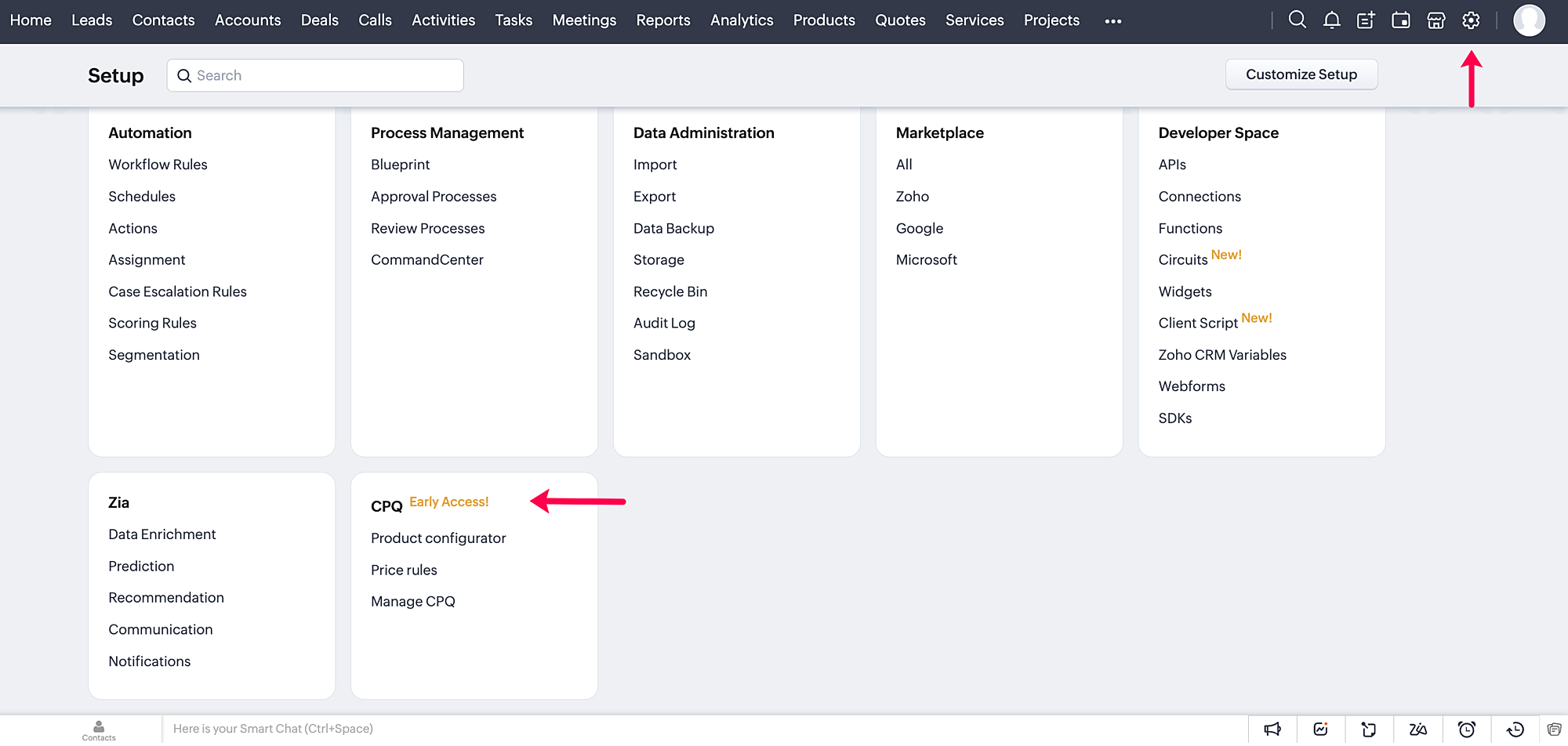
Click on the gear icon in the top-right corner of your Zoho CRM account. On the Setup page, you can access your CPQ settings and configure your product and price rules.
How does CPQ in Zoho CRM work?
CPQ centralizes the pricing and product inclusions in quotes salespeople generate, allowing them to sell more quickly and efficiently. In addition to Zoho CRM's built-in inventory management, CPQ expedites quote creation and enhances the customer's purchase journey. The two building blocks of the CPQ solution are the Product Configurator and Price Rules.
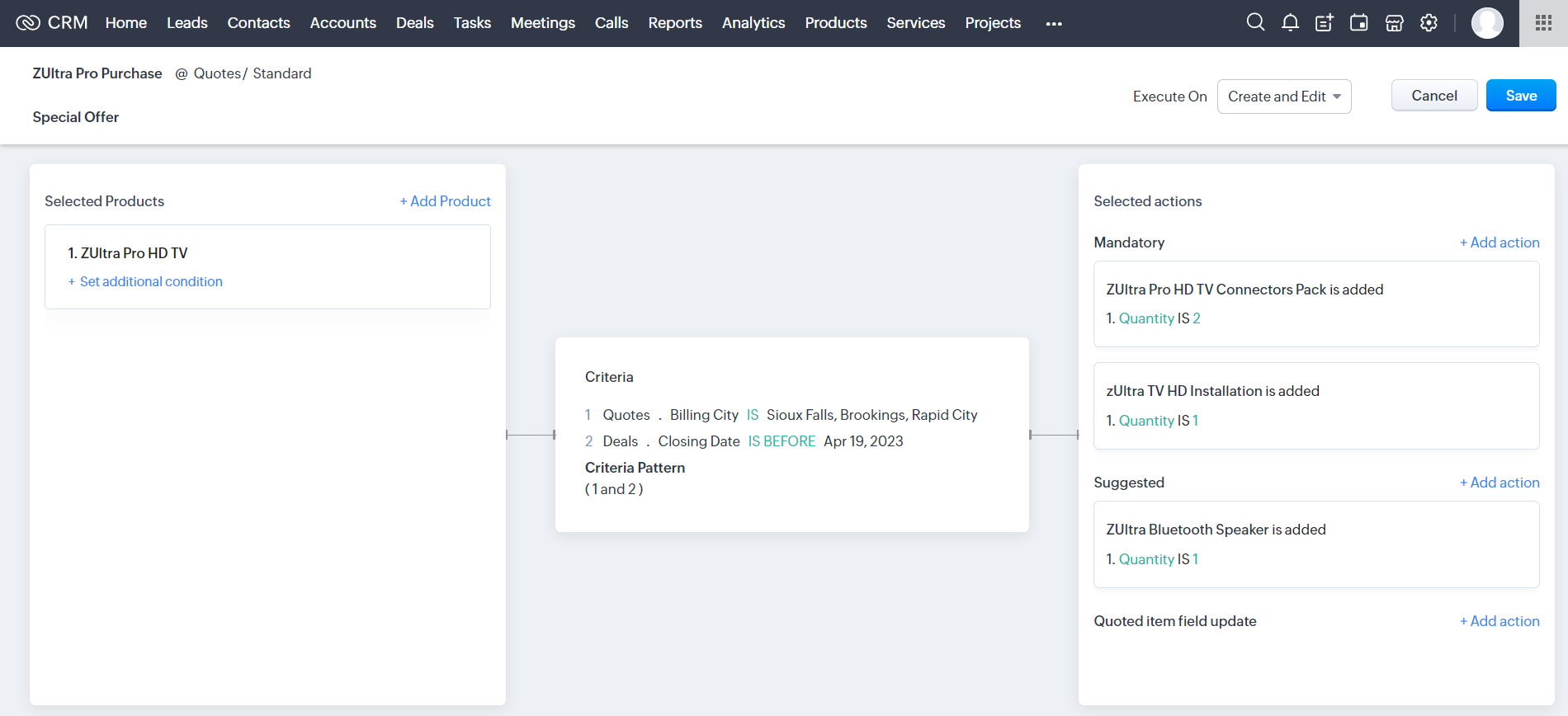
The Product Configurator enables you to pre-define automated actions like product additions, suggestions, and field updates for a single product or a combination of products. You can set multiple criteria to qualify these product rules across various modules in CRM. This cross-module capability enables salespeople to customize quote generation by including different record types, such as deal amount, region, vendors, and so on.
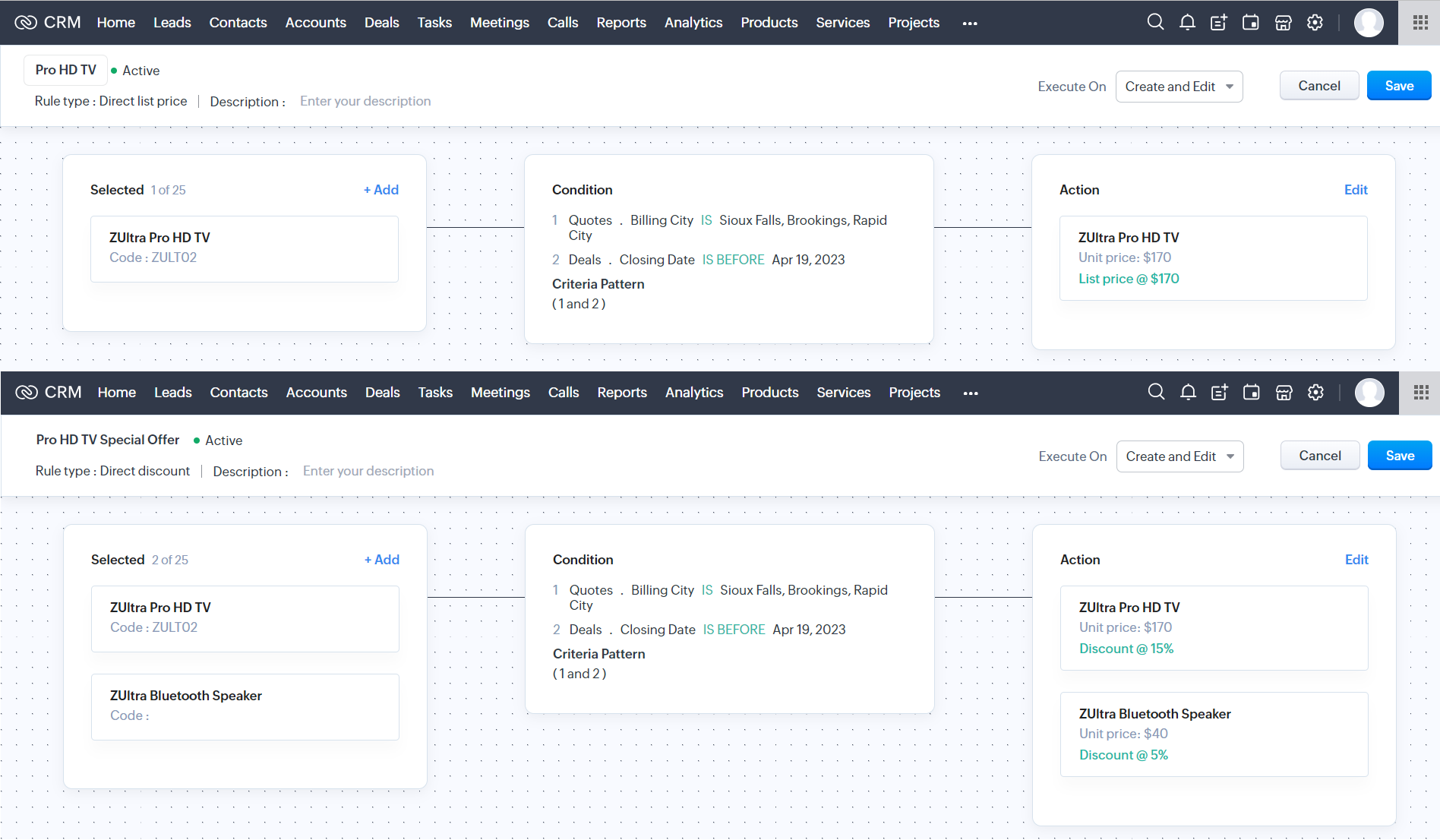
Price Rules help to accommodate conditional pricing; i.e., you can pre-set list prices and discounts for products that meet specific conditions. It can also qualify price rules according to cross-module conditions.
After you configure your rules in CPQ, the pre-defined actions are executed automatically when your salespeople create quotes in Zoho CRM. Watch this video for a quick overview of CPQ:
Guided Selling
Guided selling in CPQ quickly refines the results from the product catalogue based on the customer's requirements. For this, you just have to create a series of sequential questions and map the input answers to appropriate fields across various CRM modules—namely, the Contacts, Accounts, Deals, and Products modules. So during quote creation, salespeople just have to specify the product requirements, and the Guided Selling functionality in CPQ suggests the right product.
How can you benefit from a CPQ solution?
It's essential for businesses today to keep up with prospects' evolving needs and offer solutions quickly before they move on to other alternatives. One aspect of sales conversion is sending a customized quote to your prospect while making necessary modifications when required. And relying on outdated legacy systems and manual effort can only lead to more errors and delays. A CPQ solution ensures your salespeople can generate customized quotes quickly and thereby enhance the purchase experience.
- A CPQ solution, along with Zoho CRM's built-in inventory management functionalities, enables you to build a more comprehensive sales cycle.
- It expedites your quote management process, enabling your salespeople to save time and effort.
- It minimizes the risk of errors due to misinformation or typos during quote calculation.
Watch our recorded webinar to get an overview of Zoho CRM's CPQ feature and how it works.
Resources: Help docs
Topic Participants
Ankitha Nair
Kevin Flynn
sundeep mohana
Ivan Staykov
Chester Hull
Sticky Posts
Announcing Early Access to "Zoho CRM for Everyone" — A new and exciting update to Zoho CRM
Update : Zoho CRM For Everyone's Nextgen Interface gets an upgrade! Hello everyone, We’ve updated the Zoho CRM for Everyone Nextgen interface based on your feedback. The UI is now simpler with a unified sidebar, a more visible global search and features[Early Access] Voice of the Customer (VoC) for Zoho CRM
Happy new year, everyone! We have an exciting addition to our suite of features and would like to introduce you to VoC (Voice of the Customer) for Zoho CRM, powered by Zia. 2023 is definitely the best time to be a customer with rapid innovations and advancementsAdding calls as a channel in Voice of the Customer
Dear All, We hope you're well! It's been almost a year since we opened Zoho CRM's Voice of the Customer solution up for early access. We are grateful for the reception and support you have been showing us with regards to its adoption and feedback. Since
Recent Topics
What's New - July 2025 | Zoho Backstage
Start smart, end strong. From knowing who’s coming to celebrating who showed up, July’s updates help you run events that feel organized from the first invite to the final thank you. Planning an event used to be like writing a choose-your-own-adventureImage Upload Field API get encrypted ID and sequence number
Hello is there a way to extract the encrypted id and sequence number from image upload fields through the Zoho CRM API? I created a custom script with javascript within Zoho CRM, but I want to extract the encrypted id and sequence number for all my imagesAttention: Changes to 10DLC TCR pricing and new authentication requirements
Hi everyone, Starting August 1, 2025, The Campaign Registry (TCR) is introducing new pricing changes and a mandatory brand verification process called Authentication+ 2.0, which will affect how you register and manage your 10DLC messaging services. TheseBetter Time Tracking
We need better time tracking customization for IT MSPs. We also need reporting that is built in, rather than having to try and fumble with creating custom reports. We also need to be able to mark whether a ticket has been billed or not, I don't thinkScheduled Tickets Need Updated
There is a very clunky manual way to create reoccurring scheduled tickets. This should be created to be easy for the administrator to create. We create several (10 to 12) reoccurring tickets per account for biweekly and monthly auditing purposes.. TheTeam Feeds Improvements
Team Feeds needs to show a feed of every action within the department. Currently it seems that the feed will only show a ticket that I've personally commented on or interacted with/followed. A feed should be that, a feed. As a manager I would like toBetter Security, Better User Experience | Help Center Update | June'25
As part of our commitment to enhancing user experience and security, we are happy to announce updates to our authentication mechanism. This update introduces several key enhancements designed to improve the password recovery process and streamline theUpload Logo to Account Page
It would be nice to set a logo for an AccountView Agent Collision on Ticket List Page
It would be nice from the ticket listing page (views) to see what agents are working on what tickets rather than having to click into each ticket throughout the day to see what agents are working on what tickets. This functionality would also be desiredRestrict user from viewing the detail standard view
Is there any way to restrict a user(it can be user-field-based) from viewing the detail standard view? Basically, I have created a canvas detailed view so that on some conditions I can hide some data from the users but the standard view client scriptUpload Picture to Contact
It would be nice to upload a profile picture to a contact.Allowing Pictures for Client Contacts
Do you have any plans to allow us to add pictures of our client contacts? There is a silhouette of a person there now, but no way that I can see where I can actually add a picture of the individual.Agent name Alias
I am seeing that Full name of my staffs are written on every ticket response which is not good for some reasons. It is possible to user like this: Manny P. (First Name with Last Name's First Letter) or Manny (First Name) This is want we want to showUnable to add attachments to tickets through Desk API
I able to use the Desk API to generate tickets. However when I try to use the tickets/{ticketId}/attachments endpoint, I always get an Unauthorized error. My app has Desk.Tickets.ALL included in its scope so this should not be an issueWhat's wrong with this COQL?
What's wrong with this COQL? Code returns "invalid operator found". SELECT id, Name, Stage, Account, Created_Time, Tag FROM Production_Orders WHERE (Account = '4356038000072566002' AND Stage NOT LIKE '%customer%') ORDER BY Created_Time DESC LIMIT 200[Feature Request] Add support for internationalized top-level domains mail hosting
This is an important request to add support for internationalized domains mail hosting to https://www.zoho.com/mail/ In this case, that is only limited to domain name/mail address however currently it's already possible for us send mails etc using belowAdd Enable/Disable to Field Rules and other Rules
Hi, Sometimes I have rules setup for fields, and until I want to enable them for use, I can set the fields to Hidden but rules still show them, today you have to delete rules and then recreate them again, would be nice to have a toggle for Enabled/DisabledSyncing stuck for days
Hello when I made an account a few days ago and synced all my notes to it, it is still syncing. My app is only 400mb so I do not know why it is taking so long. Please helpWorkflow runs on every edit despite not ticking the field repeat this workflow whenever a parent is edited.....
Hi, It is my understanding that this workflow should only trigger once. Why is this triggering on every edit of the field? Based on another support query - directly from Zoho, If i tick the box 'repeat this workflow whenever a parent is edited' it shouldHow do you add or update tags on Zoho CRM records via n8n? (Workarounds or best practices?)
Hi all, I’m running into some limitations with the Zoho CRM node in n8n and was wondering how others have handled this: From what I see, the standard Zoho CRM node in n8n doesn’t allow you to add or update tags when creating or updating contacts/leads.API PARAMETER FOR TICKET CLOSED TIME
Hi, Is there a parameter for filtering tickets by closed time in zoho api, i can see closed time in the API response i get, but can't get tickets by that field while calling. Regards, Anvin AliasReply to email addresses wrong.
I have setup my Zoho mail account using my main domain and I also have an Alias setup from a different domain. In Settings - Mail - Compose I have selected to the option "For replies, send using The same email address to which the email was sent to".Meeting integration with Otter.ai
Would love for an integration with an AI transcription service like Otter.ai to be integrated with Zoho Meeting. ThanksHow to close/delete a free creator account?
I have a free zoho creator account associated with my email address that is not being used. I want to become a user of another paid zoho creator account but I can not associate with the paid account with the same email. I assume if I can close or delete the free account I will be able to use the paid account. I have emailed support but no response. Suggestions?Zoho books and zapier causes Invalid data provided
I have been using zoho books with zapier for over 2 years now, everything was working fine. On September 13th my zaps stopped working. Now on step create sales invoice in zoho books i get an error: Failed to create a create_invoice_v2 in Zoho Books TheCRM report
Is it possible to pull a contacts report that also includes the company industry, as well as the company name? I’m having trouble combining company and contact fields – any help is appreciated. Thank you, SamEnhancements to Client script?
Hi Zoho CRM, I've been extensively using Client Scripts to enhance our Deal form experience, particularly for real time validations and auto updating fields based on specific logic. However, I've encountered a challenge regarding permission boundaries.Add views to new CRM UI navigation + Unlimited Webtabs
Zoho CRM is so close now to being the ultimate business application with the new UI, as soon as this one feature is added. This is probably where Zoho is headed but if it's not I want to BEG for this to be incorporated. What we need is to be able to putE-Mail Distribution List
How do I create an e-mail distribution list in Zoho Mail?Custom "create meeting" button with more functionality than Zoho currently has?
I'm looking for a little help/direction in how to do this. Even just some general high level pointers on how this might be able to be done. The current Zoho Meeting Activity functionality is not ideal for my org's workflow. I'd like to try and createError Code 4: Invalid value passed for JSONString
Okay, I want to start by saying I know I'm a terrible scripter, so sorry if this is a dumb mistake. I just can't figure it out, even with LLM help. Here's my code: // --- Input Variables --- customer_id = salesorder.get("customer_id"); so_id = salesorder.get("salesorder_id");Organizing contacts/members by company
I work for a membership organization (representing businesses) and am trying to use Zoho CRM more effectively for managing the points of contact for our members. Currently, our members are listed in our CRM by the primary point of contact's name, butUnable to search in Zoho Email
I've started using Zoho Email (free version) recently and realized that it doesn't have email search functionality. Am I missing anything here? I've gone through the Zoho tutorial which does show the search bar on the right top of the Zoho UI. But inResponse Time Report
From data to decisions: A deep dive into ticketing system reports Every organization that interacts with its customers should have an established timeframe for how soon an agent is expected to send the first response and any reply to any follow-up messages.Zoho - Outlook plugin
Does anyone know if there is a way to modify the autofill in the Zoho plugin in outlook? When we create a contact, it enters the correct email address and name, but then pulls information from our own signature line to add phone number, address, etc.Zoho Books - Sales Person Information
Hi Team, On Invoices, Quotes, etc... I can include the Sales Person, but it only shows their name and not their email or phone number. It would be great to have place on invoice templates where we can manage what sales person information should be showsOffline working in Zoho Creator portal
Zoho's help says that offline working is only available in the Creator mobile app and not in the portal app. But I can see offline options in the portal app too and it seems to work when I test it. My portal users are often in areas where there is poorFetch Records using Dynamic Criteria
Hi, I have a form that builds a filter based on user input. I need to fetch the records based on dynamic criteria. How would I accomplish this as there is no eval function? For example: desiredRecord = Form1[dynamicCriteria];Url filter Report date (pivot chart)
Hello. Is it possible to filter the data in pivot char using parameters in the url? I'm trying but I should not doing very well. Something like: https://creator.zoho.com/.../....../#Report:MyPivotChartReport?MyDate=01-Jan-2012;31-Jun-2012;MyDate_op=58 SaludosSending gmail to a particular person fails because the address gets changed to "gmaill", with a second "l" typo somewhere
I send to bob@gmail.com (example) and get an error sending to bob@gmaill.com, only for this one person. Note the extra "l" in the email the system tried to send to, which was not in the address I entered. Can't find a typo in the contact or anywhere elseNext Page