Introducing Configure, Price, Quote (CPQ) in Zoho CRM | Public early access 2023
Greetings Customers!
We're excited to announce that the CPQ feature will soon be available in Zoho CRM and accessible to all accounts using the Professional, Enterprise, and Ultimate editions. We've opened this feature to select customers, and it'll be available to all within a week. As we move ahead, you can expect further enhancements and added functionalities.
Please note that while the CPQ feature will be enabled to all customers, one of its components, called Guided Selling, will be available upon request. Guided Selling is a holistic way of filtering the product selection to meet the customer's requirements. It presents a series of product-specific questions and narrows down a list of products based on the user's responses.
-------------EDIT As on 17/10/2023--------
Guided Selling in CPQ, which was available on Request-based Early Access, has now been released to all eligible users across DCs. Guided Selling is as accessible as other features in CPQ. Please learn more about Guided Selling from here: https://help.zoho.com/portal/en/kb/crm/cpq/articles/guided-selling
-------------------------------------------------------
What is Configure, Price, Quote (CPQ)?
CPQ is a sales tool that helps you share customized and accurate quotes with customers in just a few clicks. Pre-configure product combinations and price rules and create bespoke quotes, along with applicable taxes and discounts. This is a transformative tool for businesses with multiple product lines. Please note that currently, the CPQ feature only supports Zoho CRM's native inventory modules.
How to access CPQ in Zoho CRM
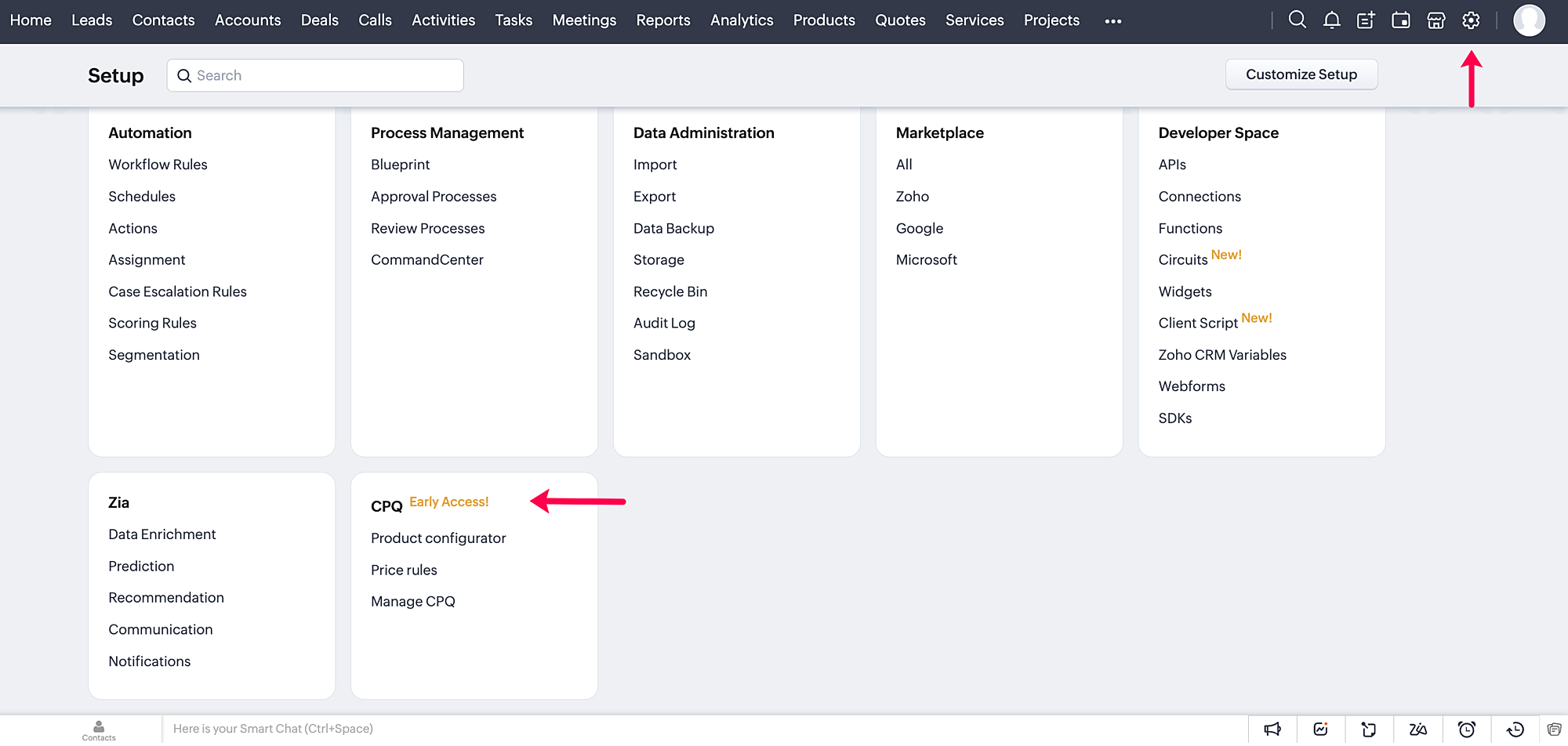
Click on the gear icon in the top-right corner of your Zoho CRM account. On the Setup page, you can access your CPQ settings and configure your product and price rules.
How does CPQ in Zoho CRM work?
CPQ centralizes the pricing and product inclusions in quotes salespeople generate, allowing them to sell more quickly and efficiently. In addition to Zoho CRM's built-in inventory management, CPQ expedites quote creation and enhances the customer's purchase journey. The two building blocks of the CPQ solution are the Product Configurator and Price Rules.
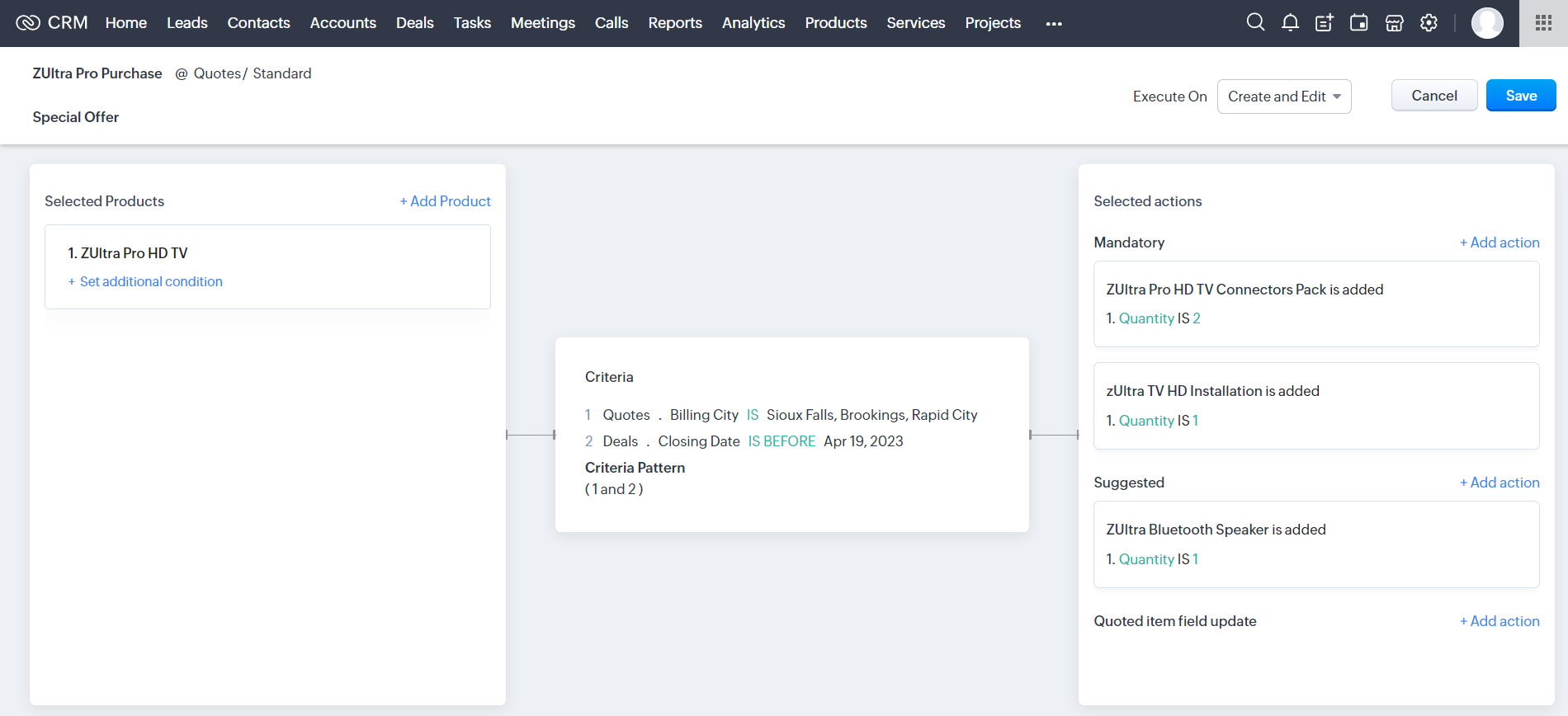
The Product Configurator enables you to pre-define automated actions like product additions, suggestions, and field updates for a single product or a combination of products. You can set multiple criteria to qualify these product rules across various modules in CRM. This cross-module capability enables salespeople to customize quote generation by including different record types, such as deal amount, region, vendors, and so on.
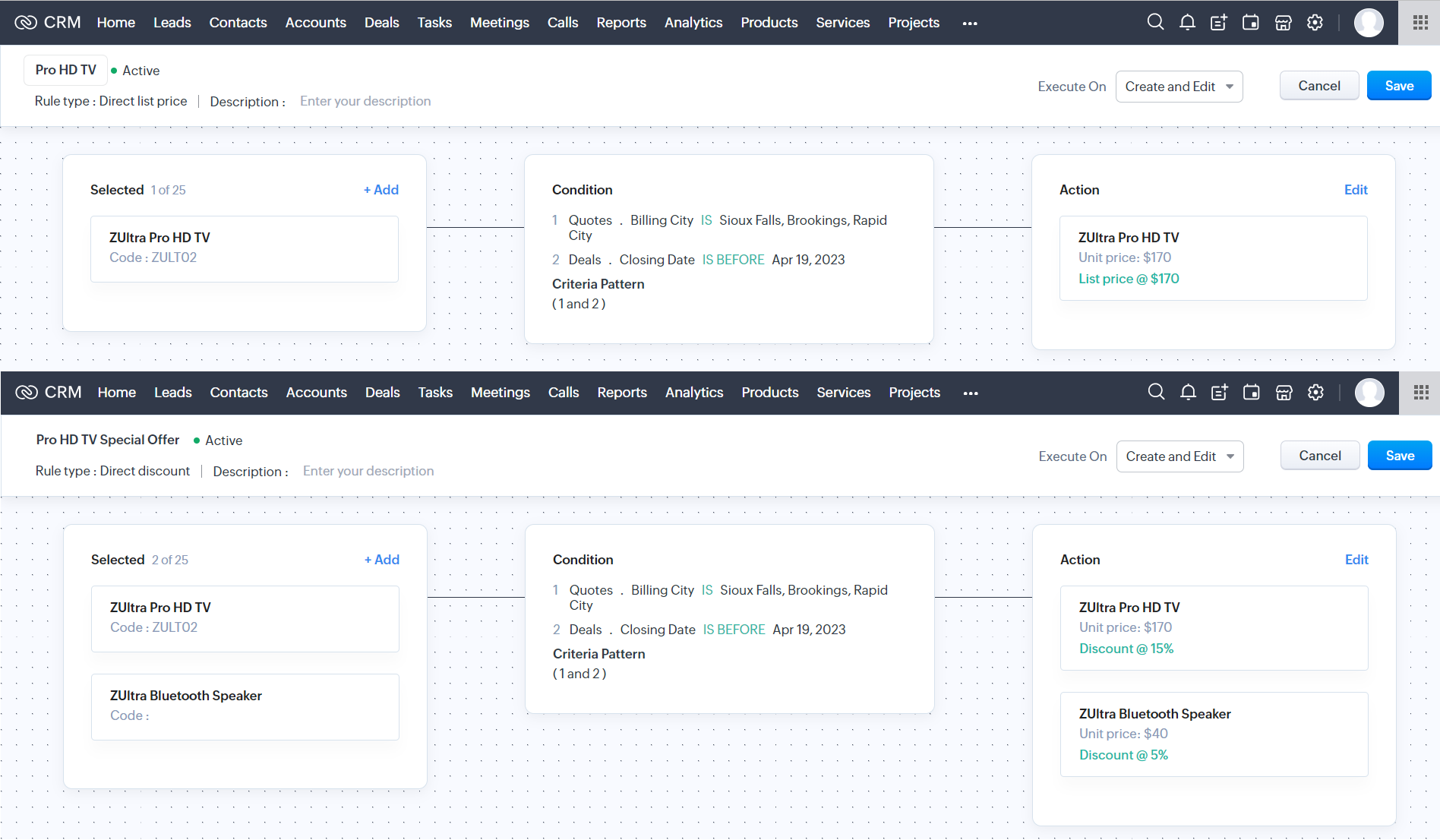
Price Rules help to accommodate conditional pricing; i.e., you can pre-set list prices and discounts for products that meet specific conditions. It can also qualify price rules according to cross-module conditions.
After you configure your rules in CPQ, the pre-defined actions are executed automatically when your salespeople create quotes in Zoho CRM. Watch this video for a quick overview of CPQ:
Guided Selling
Guided selling in CPQ quickly refines the results from the product catalogue based on the customer's requirements. For this, you just have to create a series of sequential questions and map the input answers to appropriate fields across various CRM modules—namely, the Contacts, Accounts, Deals, and Products modules. So during quote creation, salespeople just have to specify the product requirements, and the Guided Selling functionality in CPQ suggests the right product.
How can you benefit from a CPQ solution?
It's essential for businesses today to keep up with prospects' evolving needs and offer solutions quickly before they move on to other alternatives. One aspect of sales conversion is sending a customized quote to your prospect while making necessary modifications when required. And relying on outdated legacy systems and manual effort can only lead to more errors and delays. A CPQ solution ensures your salespeople can generate customized quotes quickly and thereby enhance the purchase experience.
- A CPQ solution, along with Zoho CRM's built-in inventory management functionalities, enables you to build a more comprehensive sales cycle.
- It expedites your quote management process, enabling your salespeople to save time and effort.
- It minimizes the risk of errors due to misinformation or typos during quote calculation.
Watch our recorded webinar to get an overview of Zoho CRM's CPQ feature and how it works.
Resources: Help docs
Topic Participants
Ankitha Nair
Kevin Flynn
sundeep mohana
Ivan Staykov
Chester Hull
Sticky Posts
Announcing Early Access to "Zoho CRM for Everyone" — A new and exciting update to Zoho CRM
Update : Zoho CRM For Everyone's Nextgen Interface gets an upgrade! Hello everyone, We’ve updated the Zoho CRM for Everyone Nextgen interface based on your feedback. The UI is now simpler with a unified sidebar, a more visible global search and features[Early Access] Voice of the Customer (VoC) for Zoho CRM
Happy new year, everyone! We have an exciting addition to our suite of features and would like to introduce you to VoC (Voice of the Customer) for Zoho CRM, powered by Zia. 2023 is definitely the best time to be a customer with rapid innovations and advancementsAdding calls as a channel in Voice of the Customer
Dear All, We hope you're well! It's been almost a year since we opened Zoho CRM's Voice of the Customer solution up for early access. We are grateful for the reception and support you have been showing us with regards to its adoption and feedback. Since
Recent Topics
Idea: Workflow Rule Trigger Only When Subform Row Is Updated (Thanks to New Inline Row Feature)
Hi Zoho team and community, With the recent update to Zoho CRM, we can now add or delete rows inside subforms without entering edit mode, using the inline Add row button. This is a fantastic improvement for user experience — seamless, fast, and efficient.Auto add new section based on document choices
Hi team, I'm wondering if the below is a possilibity within Zoho sign. We have an application process to become a customer of ours, we currently use Zoho Sign to manage this application and this works quite well. However, if the customer indicates 'YES'Change rate after xxxx kilometers
Is there a way to change the miileage rate after a certain mileage. After 5000 kilometers, we want the rate to automaticly change. Thank !Subform Entry Limit from a Subform Field (A different Subform on the same Form)
Hi, I would like to be able to use a Subform 1 Field as the Dynamic Entry Limit for Subform 2. Even better would be able to use some code with the values, so for example using the Subform 1 Qty Field as the Max Entry limit for Subform 2, BUT only theSlow Zobot response time
Hi, We launched the Zobot on our site to sit along with the regular Live Chat but had to take the Zobot down as the response time was very slow. The bot was slow to begin then once the chat had been initiated the response was very slow. The bot typinghow to show data of 3 table in pivot
Based on engineer name i want to get the data from 3 different tables like Service , amc, installation , but Every table contain Engineer name As Common , based that from the service table i want to take service amount , and count of service based onCustom Status for Purchase Orders
Currently Zoho books has functionality to create custom statuses for Sales Orders. Can this be extended to include custom status for purchase orders as well? It was a great decision to add this functionality to sales orders. Our use case is for trackingAsk the Experts 22: Scale up your customer support with integrations & extensibility
Hello everyone! The foundation is set. Build the beams. Raise the pillars. Set the walls. The Zoho Desk architecture stands tall. Let's discuss integration within Zoho Desk, extensions from the Marketplace, creating connections between Zoho Desk and otherIs there no way to duplicate an entire workflow or even custom function across multiple departments?
Is there no way to duplicate an entire workflow or even a custom function from one department to other departments, like it is done for field duplication from one department layout to other department layouts?Automated reply on any new ticket raised by customer
Hi ZohoDesk team, Can we set up an automation so that whenever a new ticket is created against our support email; ZohoDesk immediately sends our standard acknowledgement, including the expected TAT for resolution? If that’s possible, could you share theCreate Invoice With More Than One Item/Product
I was trying to use Zoho Flow to automatically create an invoice when an opportunity is marked won in Zoho CRM. However, you can only add one item/product using the Create invoice module. Is it possible to add more than one item/product to the same invoice?Zoho equipment rental - just like Booqable
Hi Zoho Team, is it possible to create a module or a system like booqable? our business starts renting our IT equipment assets that have been recently used for Events and Projects, we are having ZOHO books so its easy to integrate if you create one. BooqableProfit Margin Scheme
I'm a tourism company operating in the aviation and outbound tourism sectors. Typically, taxes are 0% as our operations are outside the country. However, the state has now imposed a tax on the profit margin. This means if the selling price of an airlineVisibility and Enforcement for Outdated Plug Parameters in Zobot Canvas
Dear Zoho SalesIQ Team, Greetings, We’d like to suggest an important usability and quality improvement for working with Plugs inside Zobot. Current Behavior: When we update the code of an existing Plug, any Zobot card using that Plug requires manual resaving.Announcement: Zoho DataPrep to Deprecate Password-Only Authentication for Snowflake Connections on July 31, 2025
As part of our ongoing commitment to security and in alignment with Snowflake's pledge to the Cybersecurity and Infrastructure Security Agency (CISA) Secure by Design initiative, Zoho DataPrep will no longer support single-factor password authentication.Text on Zoho Sign confirmation dialouge is very small compared to text used everywhere else on Zoho Sign.
I've reported multiple times through Zoho's support email that the text on this notification is very small in contrast to all the other text on the Zoho Sign app. I think it's a bug and it just needs the font size to be increased. It's very minor butError Message: None of the rows can be imported
I have been using zoho sheets to download my CSV file for about 2 years now, this month, October 2021, for some reason when I download it to upload to zoho books I get a message saying "None of the rows can be imported". I have been using the same process,Invalid Element place_of_contact, Invalid Element gst_no, Invalid Element gst_treatment
so this is the body contact_name: orderData.customerName, company_name: orderData.customerName, email: orderData.email, contact_type: 'customer', currency_code: 'INR', gst_treatment: 'business_gst', gst_no: 'i using proper gst no i just removed it fromNot able to item an item to non taxable via api, despite sending is_taxable as false
Hi everyone, I'm trying to update an item via books api and even when sending is_taxable as false, the item still shows Taxable in zoho, I get no errors as well when I update, any help appreciated in this!Collection & Payment Mapping Automation
We book Sales Invoices and Purchase Invoices against Same Projects. Both Sales Invoices & Purchase Invoices can have one or multiple Projects mentioning the Project ID. We prefer to Make vendor Payments Once we have received The Collections from ClientsNested Sub-forms (Subform within subform)
Hi Team, Whether there is any possibilities to add sub-form with in another sub-form like Main Form -> Sub form A ->Sub form B If we tried this, only one level of sub form only working. Any one having any idea about this? Thanks Selvamuthukumar RRestore Trashed Records Anytime Within 30 Days
Access the recycle bin from the Data Administration tab under the settings page in Zoho Projects, which gives better control over the trashed data. When records like projects, phases, task lists, tasks, issues, or project templates are trashed, they areAvoiding Inventory Duplication When Creating Bills for Previously Added Stock
I had created several items in Zoho Books and manually added their initial stock at the time of item creation. However, I did not record the purchase cost against those items during that process. Now, I would like to create Purchase Orders and convertApplying EUR Payments to USD Invoices in Zoho Books
Hello, I have a customer to whom I issue invoices in USD. However, this customer makes payments in both EUR and USD. I have already enabled the multi-currency feature in Zoho Books Elite, but I am facing an issue: When the customer makes a payment inHow to prevent users from editing mail merge templates from Zoho crm
We want users to use public mail merge templates. They should not be able to edit templates but only preview data merge and send emails. We did prohibit "manage mail merge template" in the user profile. But they can still edit the template in the zohoCustomer Addresses cannot be edited/deleted in invoices
In the invoices we have an option to change the customer address and add a new address Now I dont know why for some reason if we add an address through this field, the address doesn't appear in the customer module We cannot delete the addresses addedCustom Fields connected to Invoices, Customers, Quotes, CRM
I created the exact same custom fields in Books: Invoices, Customer, Quotes, and in CRM but they don't seem to have a relationship to one another. How do I connect these fields so that the data is mapped across transactions?Accelerate Github code reviews with Zoho Cliq Platform's link handlers
Code reviews are critical, and they can get buried in conversations or lost when using multiple tools. With the Cliq Platform's link handlers, let's transform shared Github pull request links into interactive, real-time code reviews on channels. ShareHeads up: We're going to update the VAT Summary table's visibility (UK and Germany Editions)
Hello users, Note: This change only applies to organisations using the UK and Germany editions of Zoho Books. Currently, if you've enabled the VAT Summary table in a template, it will be displayed only in PDFs sent to your customers whose default currencyPartial payment invoicing
Greetings I have questions related to payments and retainer invoices: 1. When I want to issue a partial payment invoice, I can't specify the portion to be paid or already paid, then balance to be shown as Due. 2. Retainer invoice is only available asInputting VAT Pre-Registration expenses for first VAT Return
Hi Zoho, I've just registered for VAT and am setting up Zoho to handle calculations and VAT return submissions. I'm struggling to figure out how to input the last 4 years worth of expenses into Zoho so that they're calculated in the VAT module. When IAnyone else experiencing very slow loading of pages in Zoho Projects?
I reported this yesterday only to be told there are no issues but is anyone else experiencing stupidly slow loading of pages. On our loading screen, it is taking often as long as 60 seconds to load a page and just stays on this screen for ages! OtherZoho Desk Lookup Field Reporting
Thank you for adding the ability to add additional lookup fields for desk tickets. My question is how do you report against these fields? For example: Associating related accounts to the primary desk ticket account, I am not able to add the lookup fieldsIntegrating asana will cause notification messages to pop up continuously
When I create or edit a task in Asana, the Asana bot keeps updating messages to group chat, which causes the cliq to keep popping up notifications.Entire notebook that had notes has disappeared
I don't know how tf this happened. All I did was uninstall and reinstall the mobile app after fixing a bug I had. After I reinstalled the app, everything was synced back except for one folder which had a bunch of notes in it. None of those notes are inMy site has disappeared from web builder
www.mproperties.uk My site above is still working. However it has completely disappeared from my Zoho sites' web builder. I am therefore unable to edit my site whatsoever. Please help.Trying to trigger email notification based on rollup summary field
Hi there, I'm trying to trigger an email notification via Workflow Rules wherever the rollup summary field "Total Shipments" goes from empty to not empty. However this field is not available from the picklist of options in the Workflow rule. Can anyonezia data enrichment - switch to webamigo Extension
Hello, I have so far used data enrichment via Zia. Now I have installed the Webamigo extension to expand personal data. Unfortunately, nothing has changed after the installation; are there any additional steps needed to switch from the previous methodExport Timeline
With the new Timeline features, it would be really helpful to have the option to export a timeline. When handling customer complaints, having the full breakdown of everything that happens on a module is great but we usually have to send this to anotherInteractions Tab in Zoho CRM: A 360° Omnichannel View of Every Customer Touchpoint
Hello Everyone, Hope you are well! We are here today with yet another announcement in our series for the revamped Zoho CRM. Today, we introduce Interactions Tab a new way to view all customer interactions from one place inside your CRM account. CustomersNext Page