Introducing Configure, Price, Quote (CPQ) in Zoho CRM | Public early access 2023
Greetings Customers!
We're excited to announce that the CPQ feature will soon be available in Zoho CRM and accessible to all accounts using the Professional, Enterprise, and Ultimate editions. We've opened this feature to select customers, and it'll be available to all within a week. As we move ahead, you can expect further enhancements and added functionalities.
Please note that while the CPQ feature will be enabled to all customers, one of its components, called Guided Selling, will be available upon request. Guided Selling is a holistic way of filtering the product selection to meet the customer's requirements. It presents a series of product-specific questions and narrows down a list of products based on the user's responses.
-------------EDIT As on 17/10/2023--------
Guided Selling in CPQ, which was available on Request-based Early Access, has now been released to all eligible users across DCs. Guided Selling is as accessible as other features in CPQ. Please learn more about Guided Selling from here: https://help.zoho.com/portal/en/kb/crm/cpq/articles/guided-selling
-------------------------------------------------------
What is Configure, Price, Quote (CPQ)?
CPQ is a sales tool that helps you share customized and accurate quotes with customers in just a few clicks. Pre-configure product combinations and price rules and create bespoke quotes, along with applicable taxes and discounts. This is a transformative tool for businesses with multiple product lines. Please note that currently, the CPQ feature only supports Zoho CRM's native inventory modules.
How to access CPQ in Zoho CRM
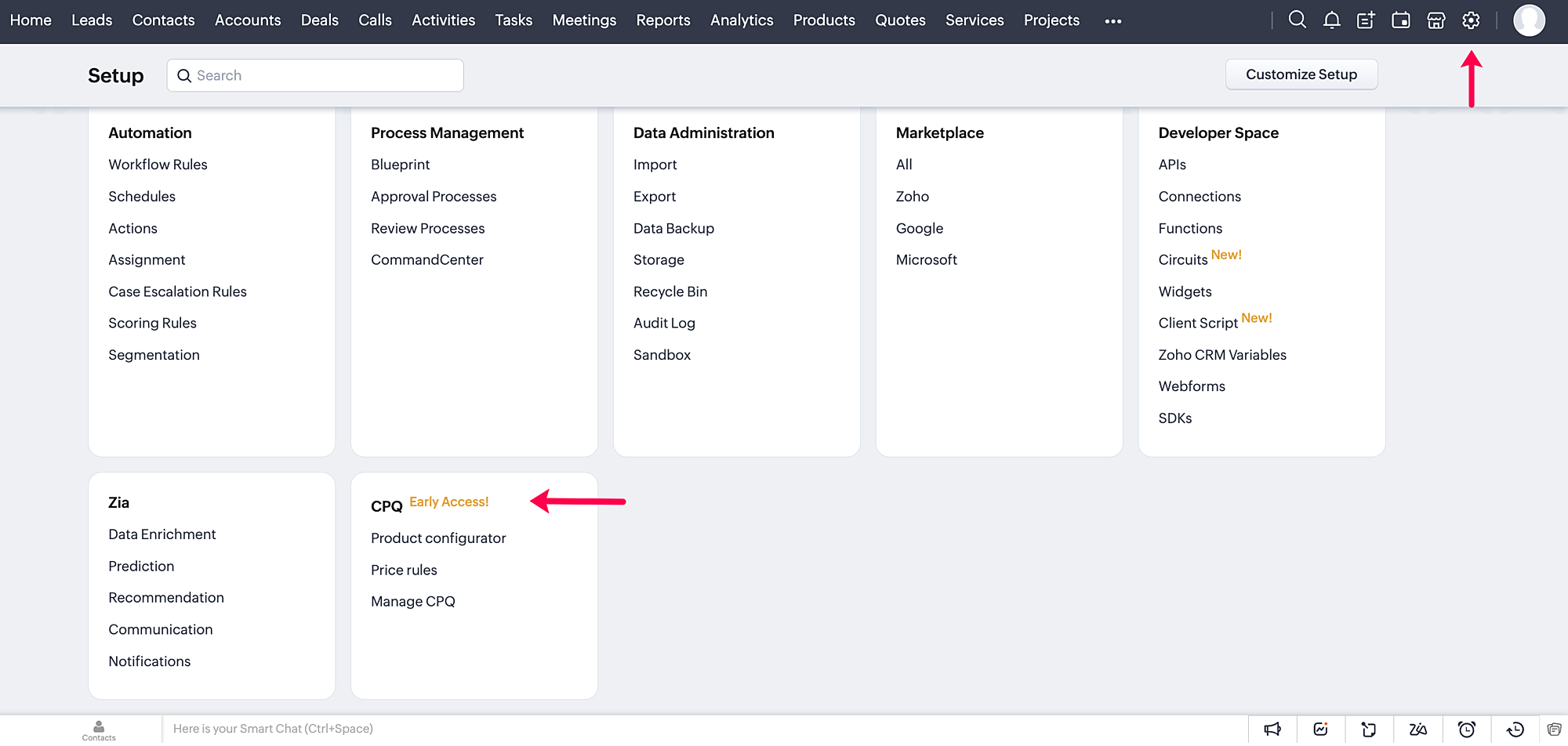
Click on the gear icon in the top-right corner of your Zoho CRM account. On the Setup page, you can access your CPQ settings and configure your product and price rules.
How does CPQ in Zoho CRM work?
CPQ centralizes the pricing and product inclusions in quotes salespeople generate, allowing them to sell more quickly and efficiently. In addition to Zoho CRM's built-in inventory management, CPQ expedites quote creation and enhances the customer's purchase journey. The two building blocks of the CPQ solution are the Product Configurator and Price Rules.
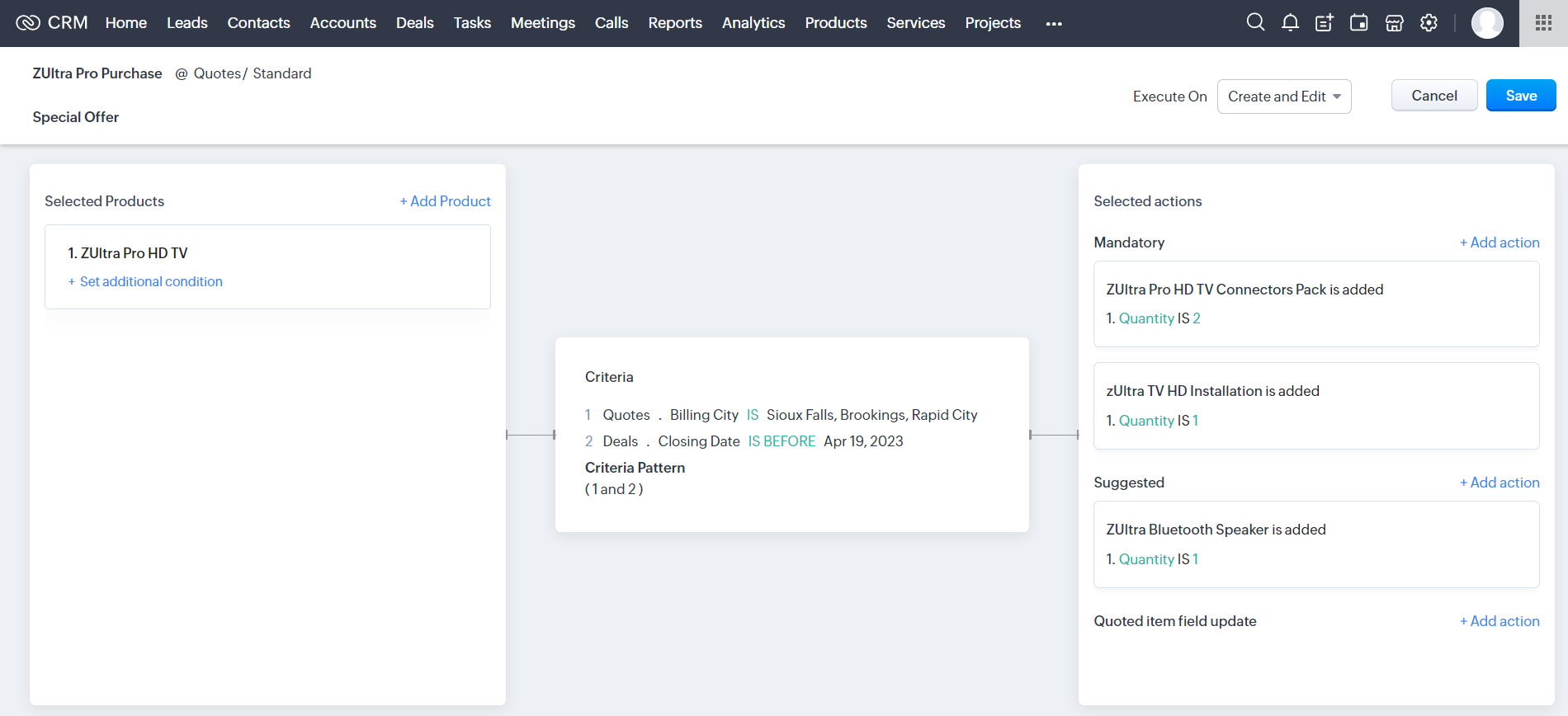
The Product Configurator enables you to pre-define automated actions like product additions, suggestions, and field updates for a single product or a combination of products. You can set multiple criteria to qualify these product rules across various modules in CRM. This cross-module capability enables salespeople to customize quote generation by including different record types, such as deal amount, region, vendors, and so on.
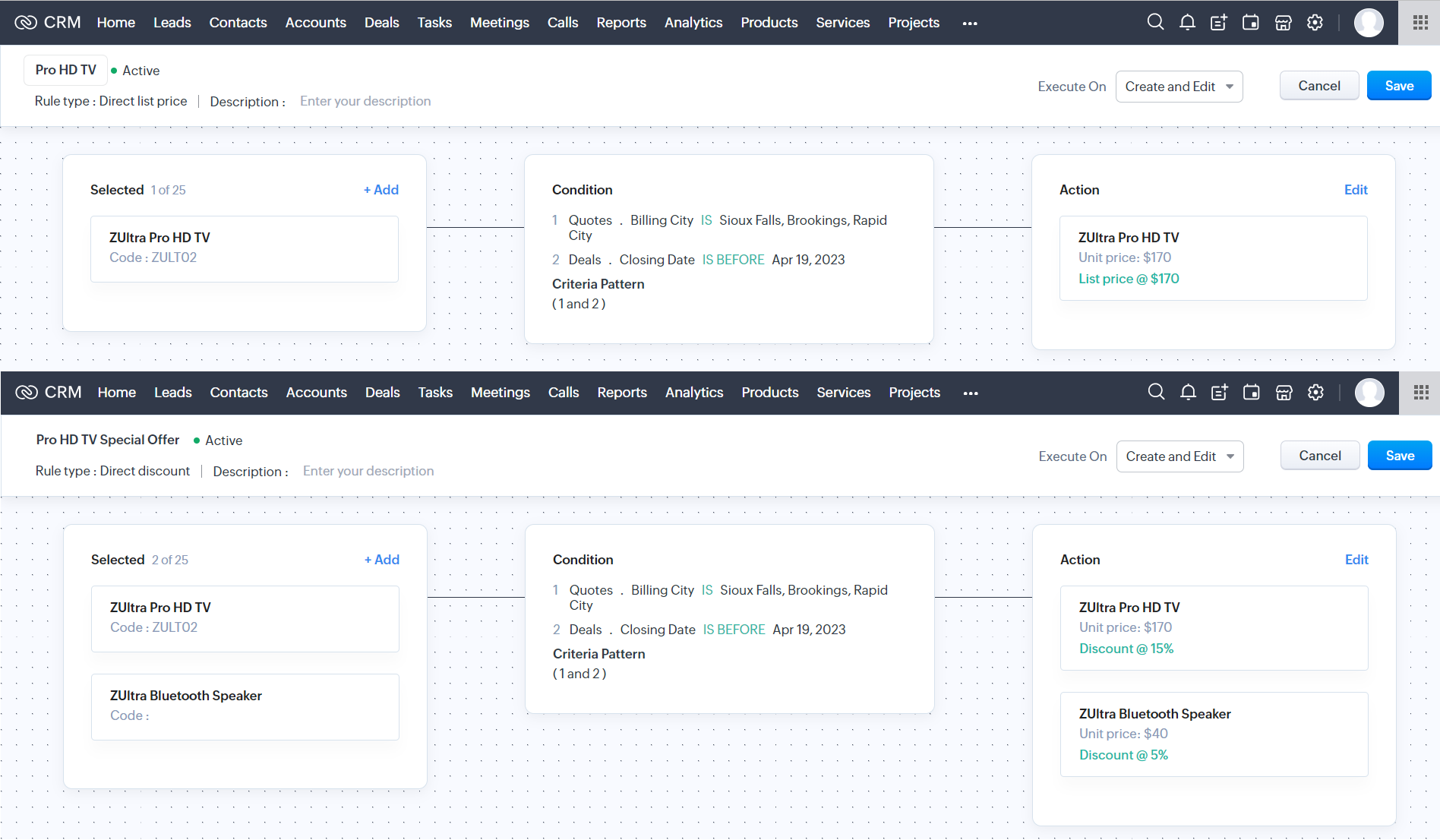
Price Rules help to accommodate conditional pricing; i.e., you can pre-set list prices and discounts for products that meet specific conditions. It can also qualify price rules according to cross-module conditions.
After you configure your rules in CPQ, the pre-defined actions are executed automatically when your salespeople create quotes in Zoho CRM. Watch this video for a quick overview of CPQ:
Guided Selling
Guided selling in CPQ quickly refines the results from the product catalogue based on the customer's requirements. For this, you just have to create a series of sequential questions and map the input answers to appropriate fields across various CRM modules—namely, the Contacts, Accounts, Deals, and Products modules. So during quote creation, salespeople just have to specify the product requirements, and the Guided Selling functionality in CPQ suggests the right product.
How can you benefit from a CPQ solution?
It's essential for businesses today to keep up with prospects' evolving needs and offer solutions quickly before they move on to other alternatives. One aspect of sales conversion is sending a customized quote to your prospect while making necessary modifications when required. And relying on outdated legacy systems and manual effort can only lead to more errors and delays. A CPQ solution ensures your salespeople can generate customized quotes quickly and thereby enhance the purchase experience.
- A CPQ solution, along with Zoho CRM's built-in inventory management functionalities, enables you to build a more comprehensive sales cycle.
- It expedites your quote management process, enabling your salespeople to save time and effort.
- It minimizes the risk of errors due to misinformation or typos during quote calculation.
Watch our recorded webinar to get an overview of Zoho CRM's CPQ feature and how it works.
Resources: Help docs
Topic Participants
Ankitha Nair
Kevin Flynn
sundeep mohana
Ivan Staykov
Chester Hull
Sticky Posts
Announcing Early Access to "Zoho CRM for Everyone" — A new and exciting update to Zoho CRM
Update : Zoho CRM For Everyone's Nextgen Interface gets an upgrade! Hello everyone, We’ve updated the Zoho CRM for Everyone Nextgen interface based on your feedback. The UI is now simpler with a unified sidebar, a more visible global search and features[Early Access] Voice of the Customer (VoC) for Zoho CRM
Happy new year, everyone! We have an exciting addition to our suite of features and would like to introduce you to VoC (Voice of the Customer) for Zoho CRM, powered by Zia. 2023 is definitely the best time to be a customer with rapid innovations and advancementsAdding calls as a channel in Voice of the Customer
Dear All, We hope you're well! It's been almost a year since we opened Zoho CRM's Voice of the Customer solution up for early access. We are grateful for the reception and support you have been showing us with regards to its adoption and feedback. Since
Recent Topics
Power of Automation :: Implementing Deadline-Based Task Scoring with Custom Fields
Hello Everyone, A custom function is a software code that can be used to automate a process and this allows you to automate a notification, call a webhook, or perform logic immediately after a workflow rule is triggered. This feature helps to automateZoho Forms - Subform Integration with Zoho CRM?
I created a form in Zoho Forms that includes a sub-form for information that I want to integrate with the CONTACTS module. I am unable to find a way integrate/map the fields in the sub-form with the Contacts module in Zoho CRM. Is there a way to do thisFilter by user in Pivot Chart
I have a Pivot chart where the data should be filtered by user. The user enters the system and should see only the data that correspond to it. Can anyone help me?Is ZeptoMail Still Supported? No Response to API Query in Over a Week
Is ZeptoMail Still Supported? No Response to API Query in Over a Week I’m posting here to express my growing frustration and concern over the lack of professionalism I’ve experienced with Zoho's ZeptoMail support. On July 21st, I received a response askingAdd ID to the recycling bin page
Feature request to add the ID to the recycling bin page. This would be helpful for reference when trying to recover things. This is the long zoho ID for each item. - ticket ID - contact ID - account ID - etc.Remove System Defined Ticket Layout
Hi ZohoDesk, I have created a new Ticket Layout and made it the default and I want to remove the original default one so there is only one to choose from. It won't allow me to do this, or go into the options and take the tick out of the show in Help Center.ZOHOLICS Japan 2025 開催のお知らせ
ユーザーの皆さま こんにちは、Zoho コミュニティチームの中野です。 年に一度の自社最大イベント、「ZOHOLICS Japan 2025」(ゾーホリクス)の開催が決定しましたので、こちらでお知らせします。 今年の開催回は、特別ゲストやZoho のエキスパートが、 最新のDX事情や皆さまのビジネスプロセス改善、業績アップのヒントとなる情報をお届けします。 Zoho コミュニティからは、Zoho Championの西尾さん(@西尾 真言)、 コミュニティアンバサダープログラム(ZCAP)メンバーの箕輪さんにご登壇いただき、Unable to connect Zoho Learn to other Zoho Tools
Hello Zoho, Can you work on Zoho Learn. I am unable to connect it with other Zoho tools like Zoho people or even Zoho SalesiQ. This is needed, especially if I am connect Ai to my systems. Please work on connecting your applications better, especiallyChatbot for Urdu language
Hello, I have successfully set up Zoho Desk and integrated it with Moodle using ASAP. I am now looking for a chatbot that supports the Urdu language to enhance student support. My goal is to enable the chatbot within ASAP so that students can ask questions,Multi Level Hierarchical Query
Hi guys I have a situation where i am trying to extract the descendants of a particular entry. So long story short, i have the Account table with Agency (A) id = 1, and that has child Agency (B) id = 2. This child agency (B) has a child agency (C) idAI-Powered Grouping and Tagging of Related Issues and Tasks in Zoho Projects
Dear Zoho Projects Team, Greetings, We would like to suggest a feature that would greatly enhance how we manage feature requests and bug reports submitted through the Zoho Desk to Zoho Projects integration. Use Case: Our support agents handle customerHow to change side bar from dark mode to light mode?
The side bar on the left side in workdrive doesn't appear to have a way to fix it from dark mode - is there a way to? I can't read in dark mode without excessive headaches, and I would really like to be able to see while I have workdrive open, as workdriveHow to see history on Bulk send of Customer Statements
Hi, We bulk send statements to customers every month via Books - every month we have customers emailing requesting a statement. Currently I have no visibility on if a customer was sent the statement or not and if our process is being followed or overlookedHow to add buttons elements in the Header
I am trying to add CTA (Call to Action) buttons in the right side of the main navigation menu. This is a common practice for sites but I can't seem to figure this out for Zoho Sites. Is there a custom workflow that could be shared with me?Automatic back up - Zoho Recruit, books, people,crm, analytics
Hello, Has anyone found a good way of automatically backing up Zoho (CRM, expense, recruit, people, books, analytics).? I have found with tool that does, but it doesn't include recruit or analytics It's a bit annoying and time consuming having to go todelete departments on zoho desk
I created test departments on zoho desk. how can i delete them now?Validation, checking if a file has been attached to the ticket
A very useful option would be to allow checking, under specific conditions, whether the user has attached a file to the application, e.g., a bug report. Some applications require files to be attached, and the system could enforce this after the systemAI & Zoho Recruit
Hello, I guess we all are using AI in our personal and professional lives. Now, let's imagine. Recruitment is just a succession of stages and steps. For which step would you like to see AI implemented into Zoho Recruit ? I'll start : - Automatic translationZoho Flow not handling Boolean properly
Hi, I have a checkbox in one system that I'm trying to sync with a checkbox in Zoho CRM. The value from the source system comes in as blank (unticked) or 1 (ticked). I've written the following custom function to convert the output to either boolean falseQuotes Module - import data
Hello Zoho, is it possible to import Quotes records? I was trying and i have no results. Raport shows no data imported. Could you help me please how to do it?Balance Sheet - Zoho Analytics
Hi Team, I’m looking to implement a feature that captures the conversion rate based on the filters applied. By default, it should fetch the most recent conversion rate, and when a filter (such as a timeline filter) is applied, it should return the conversionfiles sent will not open for recipient
work files (done in writer) which previously opened will not open for the recipientMigration of Mails from Pipedrive
Hi, so far the migration from Pipedrive to ZOHO works pretty good. For full completeness of the migration we miss all the mails linked to Deals, Contacts, Customers, ... What possibilities do we have to have Pipedrive fully migrated to ZOHO? Best Regards,Published sheets don't work anymore
Hi, Published sheets don't work anymore. The display of values is very very slow and calculations are not displayed at all. Thanks!#1 Zoho Billing vs. Zoho Books: Which one should I choose?
Managing your business finances isn't just about sending invoices. It's about keeping everything organized, accurate, and moving towards your organization's goals. At Zoho, we understand the complexity, which is why we offer two powerful yet distinctIs Zoho tables still being developed?
Has this product been abandoned? I haven't seen any useful new features or stability improvements over the past six months or more. I think Tables is a great concept, filling a niche between spreadsheets and full database tools, but the current implementationHow to connect oracle ADW with Analytics
I want to add Oracle ADW as a data source in Zoho Analytics, but I couldn't find any relevant documentation. Can anyone suggest how to do it, or let me know if it's even possible? Thanks!!add attachments to automated emails?
Hi, I'm looking for a way to have documents saved under an account, be grabbed and sent to an email address once a specific status has been updated. For example we have a tab we've labeled as sales orders, when the status is changed to shipped, it emails the customer the tracking number and estimated delivery date. I'd like it to also grab pdf docs (COA, BOL, etc) from that order and send in that email. Currently we have to go into zoho change the status to shipped, then email all the docs to[Action Required] Zendesk - Zoho Analytics integration requires re-authentication
Dear Zendesk integration users, Zendesk is transitioning to a new OAuth model that uses refresh tokens for improved security and stability (read more). As a result, all Zendesk users in Zoho Analytics must re-authenticate their Zendesk connections onRerun Migration?
I migrated a mailbox a few days ago, but didn't do the cutover on the MX records until today. How can I rerun the migration to sync the mailboxes? The old account has had a fair amount of activity since the first migration. I am used to other systemsطلب حذف الدومين والمؤسسة من حساب zoho
السلام عليكم، أود طلب حذف الدومين التالي من حسابي في Zoho، حيث لا يظهر لي خيار الحذف في لوحة التحكم: اسم الدومين: hudajstore.com البريد المرتبط: [contact@hudajstore.com] علمًا بأنني المسؤول عن المؤسسة، ولا أستخدم الدومين حاليًا، وأرغب في إلغاء ربطه وحذفMicrosoft Outlook Add-in Update: Enhancing Efficiency for Recruiters
We've released an update to the Zoho Recruit Microsoft Outlook Add-in, which brings a host of features designed to streamline your recruiting process and boost productivity. Let's delve into the details: Associate Emails with records in Zoho Recruit YouNew integration: Zoho Books + Zoho Forms
Hello Zoho Forms community! We are thrilled to announce the addition of another integration that brings speed and efficiency to your financial workflows. Zoho Forms can now be integrated with Zoho Books! Here’s a quick rundown on Zoho Books! For anyoneWitness Sign - Automation with Zoho Creator
Hi there, I used to be able do automatically send a Zoho Sign document from Zoho Creator where each signer had one witness. The action code was as follows for each signer and witness: // CLIENT eachActionMap1 = Map(); eachActionMap1.put("signing_order","1");Announcing: custom color palette + free workshop
Hello everyone, We're excited to share new feature in Zoho Bookings—a color palette within booking page themes. You'll find this option under Manage Bookings > Workspaces > Booking Page Themes. You can customize the color of every element in your booking page and even alter the transparency of your background image. Please note that this is a paid feature included in the Basic and Premium plans. At the moment, it's available only under the Modern Web theme. This means you can create billions (7,Removing To or CC Addresses from Desk Ticket
I was hoping i could find a way to remove unnecessary email addresses from tickets submitted via email. For example, a customer may email the support address AND others who are in the helpdesk notification group, in either the TO or CC address. This resultsAbility to Export Field Dependency Structure in Zoho Desk
Hi Zoho Team, We’d like to request a feature enhancement in Zoho Desk that would greatly improve configuration management for organizations like ours: Requested Feature: The ability to export the full structure of Field Dependencies, especially for multi-level[URGENT] Allow reorder (drag&drop) of subform record
Very simple user case: a wedding planning app where you want to send your client a form to fill with information about their wedding. Form includes some field for general purpose information and a subform for event pacing/schedule. Clients are invited to create a new row (When? - What? - Where? - Who?) for each thing happening during their wedding chronologically. Ex: When What 10h Something TBD Speech After speech Yet another thing happeningDepartments in Zoho
I'm trying to set up a department. It looks like Departments have been removed from Zoho One. Is there another option? We have our main account setup, but want to set up a separate small department that can't see our tabs.Add Timer for Agent Status Duration in Zoho Desk Dashboard
Hello Zoho Desk Team, We hope you're doing well. We would like to submit a feature request to further enhance the agent status tracking functionality within the Zoho Desk Dashboard. 🎯 Current Functionality As it stands, Zoho Desk allows us to view theNext Page