Introducing Configure, Price, Quote (CPQ) in Zoho CRM | Public early access 2023
Greetings Customers!
We're excited to announce that the CPQ feature will soon be available in Zoho CRM and accessible to all accounts using the Professional, Enterprise, and Ultimate editions. We've opened this feature to select customers, and it'll be available to all within a week. As we move ahead, you can expect further enhancements and added functionalities.
Please note that while the CPQ feature will be enabled to all customers, one of its components, called Guided Selling, will be available upon request. Guided Selling is a holistic way of filtering the product selection to meet the customer's requirements. It presents a series of product-specific questions and narrows down a list of products based on the user's responses.
-------------EDIT As on 17/10/2023--------
Guided Selling in CPQ, which was available on Request-based Early Access, has now been released to all eligible users across DCs. Guided Selling is as accessible as other features in CPQ. Please learn more about Guided Selling from here: https://help.zoho.com/portal/en/kb/crm/cpq/articles/guided-selling
-------------------------------------------------------
What is Configure, Price, Quote (CPQ)?
CPQ is a sales tool that helps you share customized and accurate quotes with customers in just a few clicks. Pre-configure product combinations and price rules and create bespoke quotes, along with applicable taxes and discounts. This is a transformative tool for businesses with multiple product lines. Please note that currently, the CPQ feature only supports Zoho CRM's native inventory modules.
How to access CPQ in Zoho CRM
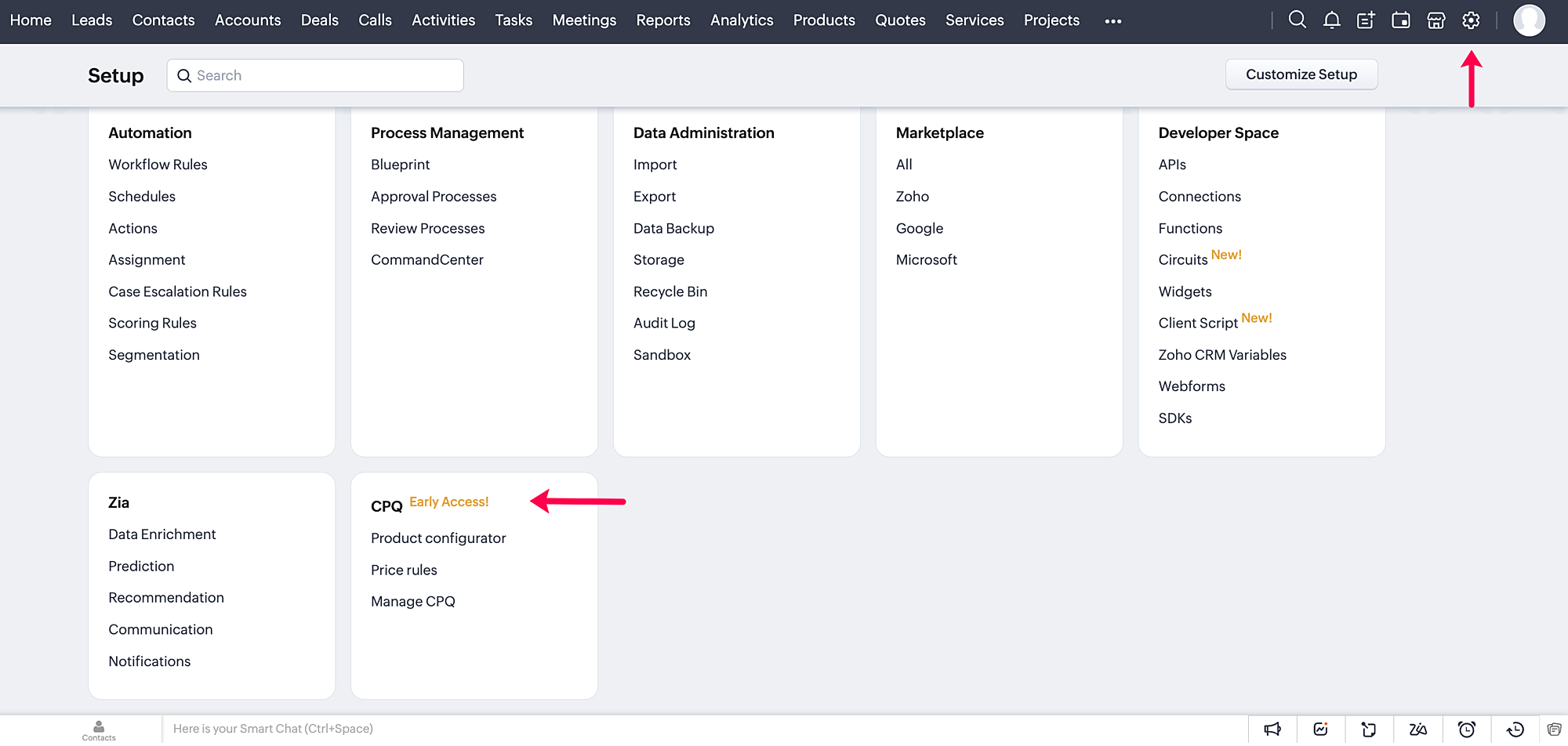
Click on the gear icon in the top-right corner of your Zoho CRM account. On the Setup page, you can access your CPQ settings and configure your product and price rules.
How does CPQ in Zoho CRM work?
CPQ centralizes the pricing and product inclusions in quotes salespeople generate, allowing them to sell more quickly and efficiently. In addition to Zoho CRM's built-in inventory management, CPQ expedites quote creation and enhances the customer's purchase journey. The two building blocks of the CPQ solution are the Product Configurator and Price Rules.
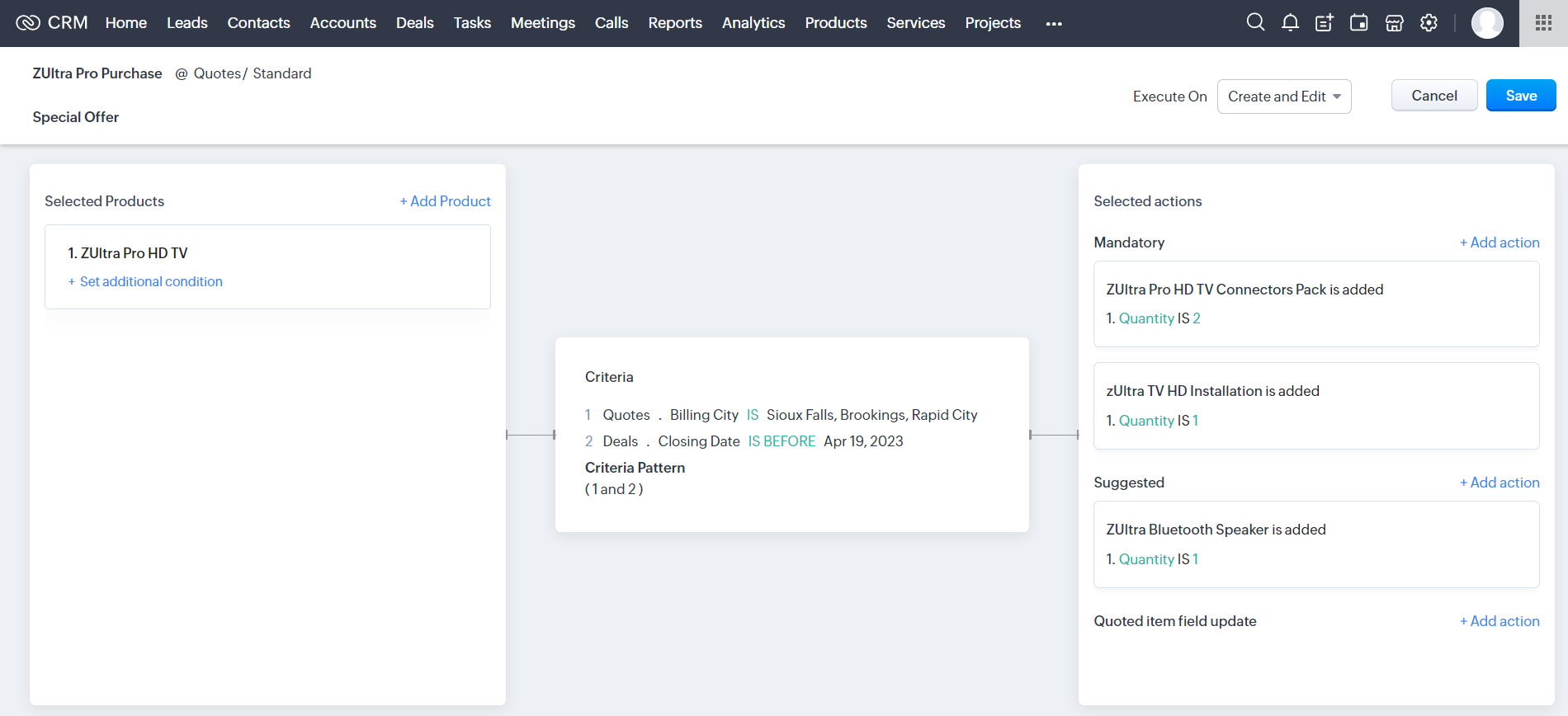
The Product Configurator enables you to pre-define automated actions like product additions, suggestions, and field updates for a single product or a combination of products. You can set multiple criteria to qualify these product rules across various modules in CRM. This cross-module capability enables salespeople to customize quote generation by including different record types, such as deal amount, region, vendors, and so on.
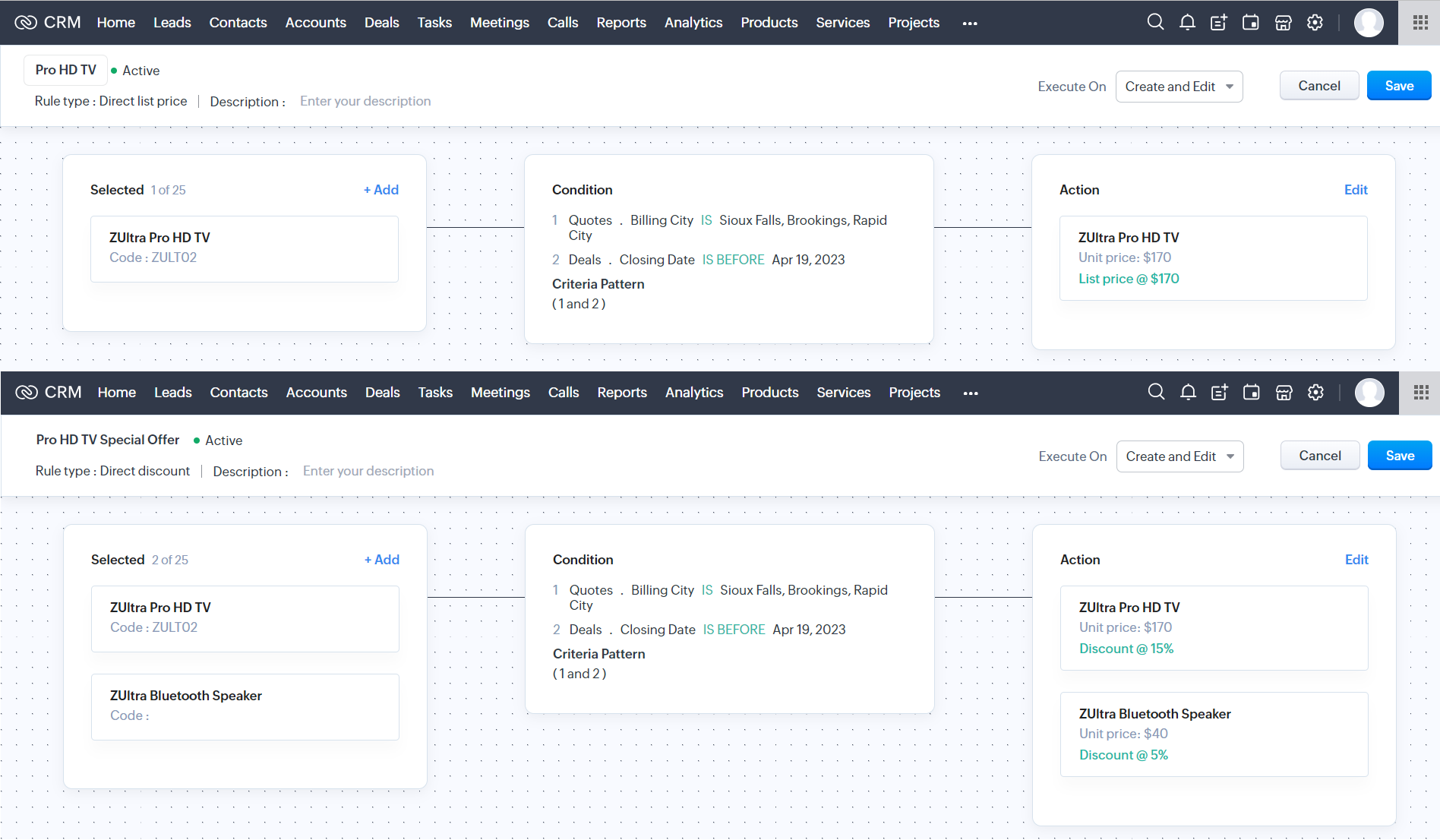
Price Rules help to accommodate conditional pricing; i.e., you can pre-set list prices and discounts for products that meet specific conditions. It can also qualify price rules according to cross-module conditions.
After you configure your rules in CPQ, the pre-defined actions are executed automatically when your salespeople create quotes in Zoho CRM. Watch this video for a quick overview of CPQ:
Guided Selling
Guided selling in CPQ quickly refines the results from the product catalogue based on the customer's requirements. For this, you just have to create a series of sequential questions and map the input answers to appropriate fields across various CRM modules—namely, the Contacts, Accounts, Deals, and Products modules. So during quote creation, salespeople just have to specify the product requirements, and the Guided Selling functionality in CPQ suggests the right product.
How can you benefit from a CPQ solution?
It's essential for businesses today to keep up with prospects' evolving needs and offer solutions quickly before they move on to other alternatives. One aspect of sales conversion is sending a customized quote to your prospect while making necessary modifications when required. And relying on outdated legacy systems and manual effort can only lead to more errors and delays. A CPQ solution ensures your salespeople can generate customized quotes quickly and thereby enhance the purchase experience.
- A CPQ solution, along with Zoho CRM's built-in inventory management functionalities, enables you to build a more comprehensive sales cycle.
- It expedites your quote management process, enabling your salespeople to save time and effort.
- It minimizes the risk of errors due to misinformation or typos during quote calculation.
Watch our recorded webinar to get an overview of Zoho CRM's CPQ feature and how it works.
Resources: Help docs
Topic Participants
Ankitha Nair
Kevin Flynn
sundeep mohana
Ivan Staykov
Chester Hull
Sticky Posts
Announcing Early Access to "Zoho CRM for Everyone" — A new and exciting update to Zoho CRM
Update : Zoho CRM For Everyone's Nextgen Interface gets an upgrade! Hello everyone, We’ve updated the Zoho CRM for Everyone Nextgen interface based on your feedback. The UI is now simpler with a unified sidebar, a more visible global search and features[Early Access] Voice of the Customer (VoC) for Zoho CRM
Happy new year, everyone! We have an exciting addition to our suite of features and would like to introduce you to VoC (Voice of the Customer) for Zoho CRM, powered by Zia. 2023 is definitely the best time to be a customer with rapid innovations and advancementsAdding calls as a channel in Voice of the Customer
Dear All, We hope you're well! It's been almost a year since we opened Zoho CRM's Voice of the Customer solution up for early access. We are grateful for the reception and support you have been showing us with regards to its adoption and feedback. Since
Recent Topics
Zoho Desk - Cannot Invite or Register New User
Hi who may concern, we encountered a problem that we cannot invite user or the visitor cannot register for a user at all through our help center portal, with the snapshot shown as below and the attachement. It always pops up that "Sorry, Unable to processCustom domain issue
I recently changed records for my support area custom domain for a few months, I then wanted to come back to Zoho, but now I can't connect it and I can't login as it's having an SSL issue. I cannot get a good response from support, as I've been notifiedHow do you generate personalized certificates and save them in dynamic folders using Writer's mail merge?
Zoho Writer's mail merge feature can help you enhance the certificate management process. It's a great way to save time and effort! Merge certificates and maintain a well-organised repository with personalised certificates stored in separate folders forZoho Editor
Zoho PDf Editor is not working I am clicking on EDIT PDf then it again bringing me back to the same page. again and again.The present is a "present"
The conversation around mental health has been gaining attention in recent years. Even with this awareness, we often feel stuck; the relentless pace of modern life makes us too busy to pause, reflect, and recharge. In the world of customer support, thisMarket cap
Market cap formula?? Kaise nikaleCreate project (flow) and assign to person without account (company)
Hi Zoho Support & Community, I'm trying to automate a process using Zoho Flow to create a Zoho Project and link it directly to a Zoho CRM Contact. This reflects our B2C workflow where we primarily deal with individual Contacts, not Companies/Accounts.Mail and OS
Jai Hind! Zoho is doing good by creating good software (made in india) on par with other tech giants. 🥰 Suggestion: 1. Whenever we sign up on zoho mail its asking for other mail id. It shouldn't be like that. You should ask general details of a userNeed Help to setup plugs along with codeless bot buidler. To send sms OTPs to users via Zoho Voice and to verify it
Need Help to setup plugs along with codeless bot buidler. To send sms OTPs to users via Zoho Voice and to verify it. I get leads from our website and we need to make sure those are not junk. So we are using proactive chat bot and we need mobile OTPs toDirect Integration Between Zoho Cliq Meetings and Google Calendar
Dear Zoho Team, We’d like to submit the following feature request based on our current use case and the challenges we’re facing: 🎯 Feature Request: Enable meetings scheduled in Zoho Cliq to be automatically added to the host's Google Calendar, not justZoho sheet
Unable to share zoho sheet with anyone on internet with editer option only view option is showPersonal account created under org account
Hi there, I am Jayesh. We are using ME Central, and we have an account by the email ID soc@kissht.com.. Now I have created a personal account., jayesh.auti@zohomail.in, accidentally. Can you help me to remove this jayesh.auti@zohomail.in from my organizationAdd another account
How to add another mail account to my zoho mail.Recover deleted user
Hi by mistake i have deleted an added user and his email associated. Please help me recover it thank you.No connection to the server
Hello! I can't add a new email address to my mailbox because your server is rejecting me. Please help. I took and added a screenshot of this problem Marek OlbrysEmails missing from desktop but visible on phone
Subject says it all. Windows 11 laptop. Apple phone. all systems up to date.Website Hosting
Hello, I want to host my domain on Hostinger, and I want my emails to run through Zoho Mail. Please provide me with the SPF record, MX record (Type: TXT), and A record, so that I don’t face any issues with my emails. My website is on Hostinger hosting,Can not search zoho mail after update V.1.7.0
i can not search mail on to and cc box from attached picture and then search contacts box can't click or use anything. include replay mail too.How to retreive the "To be received" value of an Item displayed in Zoho inventory.
Hi everyone, We have our own Deluge code to generate a PO according to taget quantity and box quantity, pretty usefull and powerful! However, we want to reduce our quantity to order according to "To be received" variable. Seems like this might not evenKaizen #211 - Answering your Questions | Using Canvas and Widgets to Tailor CRM for Mobile
Howdy, tech wizards! We are back with the final post in addressing the queries you shared for our 200th milestone. This week, we are focusing on a couple of queries on Zoho CRM mobile configurations and custom payment gateway integration. 1. Mobile SDKRemove "Invalid entries found. Rectify and submit again" modal
Following up on a post from a few years back, but can the Zoho team consider either removing the 'Invalid entries found. Rectify and submit again' modal that displays for empty mandatory fields OR allow an admin to change it? I've built a custom errorCadence reports as front-end reports
Hello everyone, We have built a cadence which is connected to the Leads module. There are 11 steps in total, 7 are automatic emails and 4 are tasks for the Lead owners. As admins, we have access to this (very nicely made) 'View Reports' tab where we canShow elapsed time on the thank-you page?
Is it possible to display the total time a user spent filling out a Zoho Form on the thank-you? I’d like to show the difference between the `form submission timestamp` and the `start time` (currently have a hidden Date-Time field set to autofill the dateI need to do crud with snippet html
I need to implement a form with an improved user interface. I would like to use snippets to build a CRUD that allows me to create and update records. How could I achieve this using snippets?Incorrect “correct” password on email client apple mail
I have troubleshot this account several times. I have deleted and re added account. It keeps saying incorrect password. Can you check that it is not locked on your end?Is it possible to lock editing subform rows?
Ideally editing would only be locked after the form has been updated but I still want them to be able to add new subform records at any time and they should be able to delete rows from the subform. It is a named subform if that's relevant however theWhat is the maximum file size of a video upload in Zoho chat?
Can I upload a 20 mb video file and share it with my colleagues?Update a field in ALL all calls under a contact
HI guys! I have written some deluge code to update a field in my calls after i have comepleted the call, i need this field to update in all my scheduled calls as well that are comeing up. I just cant seem to get it to work, i have put teh code below,Verifying Zoho Mail Functionality After Switching DNS from Cloudflare to Hosting Provider
I initially configured my domain's (https://roblaxmod.com/) email with Zoho Mail while using Cloudflare to manage my DNS records (MX, SPF, etc.). All services were working correctly. Recently, I have removed my site from Cloudflare and switched my domain'sFat Download of Ulaa Browser
I just observed that Ulaa Browser is offering an one-capsule big download. These days it is a custom to offer a small bootstrap downloader and based on user customization options an appropriate download completes. And this is particularly common withBilling Management: #8 Usage Billing in Logistics & Delivery Services
The logistics and delivery industry thrives on movement and precision. Every delivery completed, every kilometre driven, and every ton transported is a measurable activity. However, billing often lags behind. Many logistics companies still rely on fixed-rateTags for New Tickets
Hi there, When creating a new ticket, there is currently no way to choose a tag you would like to associate with the new ticket. Being able to associate a tag while creating a new ticket will be very beneficial as it will save time and flow well withZoho Desk: No Incoming email
Is Zoho Desk services down? No incoming email reflect to desk tickets.Zoho CRM - Widgets | Update #3 : Introducing SDK V1.5 along with new ZDK Methods and ZRC Support
Hello everyone! Widgets in Zoho CRM just got a big upgrade! With the release of SDK v1.5, developers can now create more immersive widget experiences. This update elevates Widget development with new ZDK methods for easier interactivity and ZRC supportUnusual activity detected, account blocked
I am unable to send emails and am getting the error "Outgoing blocked: Unusual activity detected. To unblock your account, please and submit a request. Learn more.". I am unsure as to why this is happening since all my activity is legitimate, mainly confirmationUnable to Send Emails – Outgoing Mail Blocked (Error 554 5.1.8)
Description: Hello Zoho Support Team, I am facing an issue with my Zoho Mail account ( admin@osamarahmani.tech ). Whenever I try to send an email, I get the following error: 554 5.1.8 Email Outgoing Blocked I would like to clarify that I have not doneIssue connecting Zoho Mail to Thunderbird (IMAP/SMTP authentication error)
Dear Zoho Support, I am trying to configure my Zoho Mail account on Thunderbird, but I keep getting authentication errors. Account: info@baktradingtn.com Domain: baktradingtn.com Settings used: IMAP: imap.zoho.com, Port 993, SSL/TLS, Normal Password SMTP:Payment issue with Mail Lite plan – personal NIF not accepted as payment info
Hello, I have already contacted Zoho Support by email regarding this, but since I haven’t received any reply yet, I’m sharing it here as well to see if the community can help. I’m facing a payment issue for my Mail Lite plan. I have a personal accountCustomer payment alerts in Zoho Cliq
For businesses that depend on cash flow, payment updates are essential for operational decision-making and go beyond simple accounting entries. The sales team needs to be notified when invoices are cleared so that upcoming orders can be released. In contrast,Figma in Zoho Creator
Hi Team, I’m creating a form using Figma and would like to know how to add workflows like scheduling, custom validation, and other logic to it. Can anyone help me understand how to set this up for a Figma-based Creator UI form?Next Page