Introducing Connected Workflows in Zoho CRM for Everyone : Free Your Teams to Focus on What Matters
Hello Everyone,
We’re thrilled to introduce the next big evolution in Zoho CRM for Everyone -- Connected Workflows. This new feature builds on our commitment to deliver a CRM that’s truly inclusive, adaptable, and designed for consistent collaboration across your entire organization and not just your sales team.
With the launch of Connected Records, we enabled teams to share contextual information and stay aligned through record connections across modules. Now, with Connected Workflows, we’re taking it one step further by enabling Zoho CRM to coordinate work across teams and enable them to deliver their best for customers.
What are Connected Workflows?
While Connected Records make it easy to share customer context across your customer journey, however, many of the processes involved in your customer's journey need to be consistently carried out. That’s where Connected Workflows come in.
Connected workflows help free your teams from manual coordination by enhancing coordination across multiple teams and improving customer relationship management. They allow you to automate your entire customer journey that spans across multiple customer-facing teams.
With Connected Workflows, you can build smooth coordination between departments like Sales, Marketing, Legal, Onboarding, and Training so that each step in the customer journey is coordinated without manual follow-ups or miscommunication.
How to create Connected workflows?
"Users should have the Connected Workflows permission enabled in their profile settings."
Every connected workflow begins with a primary module, either an organization module or a team module, depending on your customer journey.
Triggers : Initiate by setting up triggers by configuring either a single trigger or multiple triggers for a module. The triggers are :
- when a record is created in the module
- When a record is edited record in the module,
- When a record is created or edited in the module, or
- When a field in the record is edited in the module.
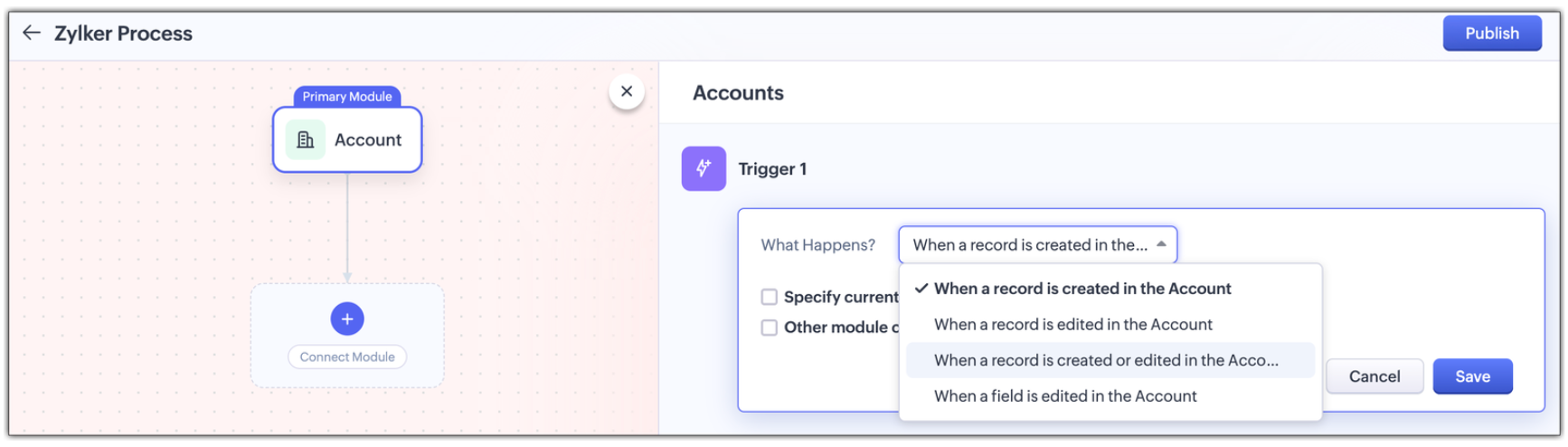
Multi-module criteria for Triggers : You can configure multiple criteria for triggers to execute actions in any other related modules; Enable other module criteria option for this. This ensures actions run when related modules are updated with values matching the trigger.
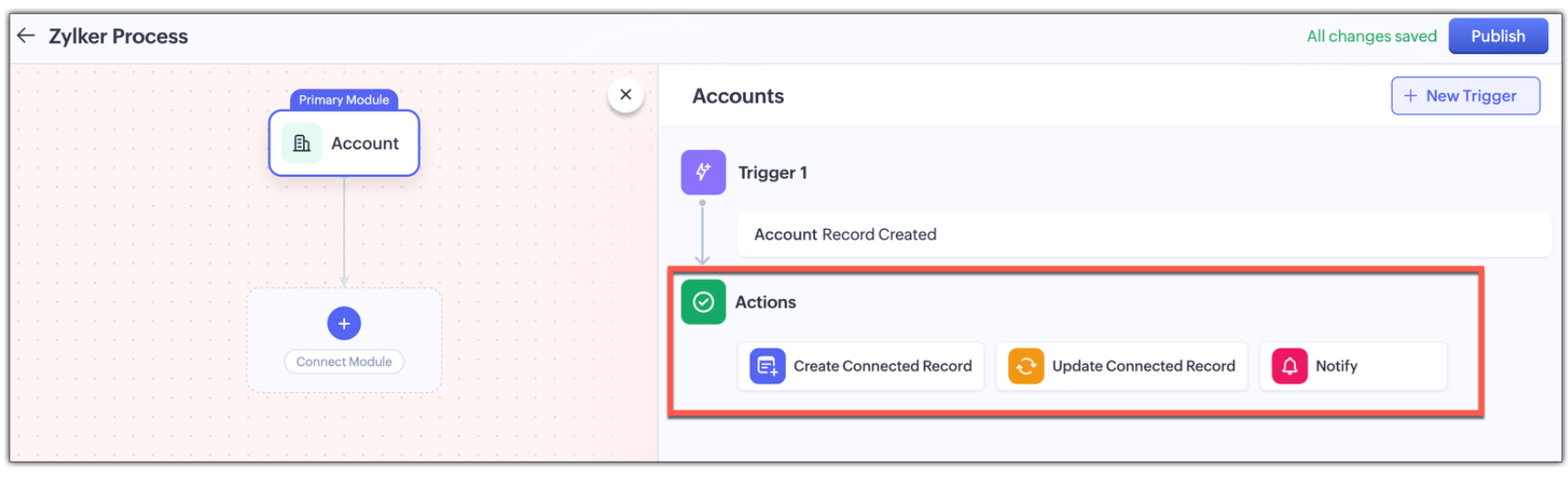
Actions : Assign one or more actions for each trigger . The actions are :
- Creating a new connected record in the associated module
- Updating an existing connected record in the associate module, or
- Notifying users via email.
Use Case: Automating the customer journey from a sales enquiry to customer success
A typical customer journey goes through four stages, and we know that even though the sales team is the initial point of contact, multiple teams are involved and will support the sales team to win the customer.
Involved Teams | |
Initial Evaluation | Sales Team is the point of contact Marketing team supports with customer-facing content in the Case Study Module |
Demo Request | Sales Team schedules a product demo Pre-sales team provides product demos in the Product demo module |
Customer Onboarding | Sales Team updates the sale cycle stage to 'Closed Won' Onboarding team helps the customer get started post-sale in the Onboarding Assistance module |
Product Training | Sales Team arranges for training sessions Training team helps the customer to be fully equipped to use the product in the Training module |
Here's how Connected Workflows can automate the sales process and achieve coordination between the multiple teams involved.
We’ll create a connected workflow with Deals as the primary module and configure three triggers:
Trigger 1: When a new record is created → Create a connected Case Study record for Marketing (Action)
Trigger 2: When Lead Status is "Qualified" → Create a Product Demo record and notify the Pre-sales Team(Action)
Trigger 3: When Deal Stage is "Closed Won" → Create an Onboarding record for handoff prep(Action)
This sets up three connected modules: Case Study, Demo Request, and Onboarding, as shown in the image below.

Now we will configure the associated modules.
- Case Study
Trigger : When status is "Completed" → Notify Sales Team about availability(Action) - Demo Request
Trigger : When status is "Completed" → Notify Sales Team that demo was given(Action) - Feedbacks (manually created from Demo Request)
Trigger : When new record is created → Email lead with feedback form(Action) - Onboarding
Trigger : When status is "Completed" → Notify Training Team to start sessions and Sales Team of onboarding completion; also create a Training record(Action) - Training (automatically created from Onboarding)
Trigger : When new record is created → Update Account type to "Customer" and notify Sales Team of training completion(Action)

Now let's look at how all these modules have been connected to carry out a customer journey in the GIF below.
In this entire customer journey, there is no loss of customer context, no repeated back-and-forth between teams, and no delays due to miscommunication. Each team receives a connected record with all the relevant data they need to execute their part of the process.
Here is another video with a detailed explanation on how connected workflows works :
How Are Connected Workflows Different from Traditional Workflows?
- Connected Workflows go beyond one module; they’re designed to coordinate across team boundaries and hence use multiple modules to build a workflow.
- Connected workflows trigger follow-up tasks/actions in both org and team modules.
- Connected Workflows generate connected records as part of the process, so new requests are automatically created in modules, and those teams will have full context from day one. Users can save the time they take to create requests from the Request tab with this feature.
Why use connected workflows for your business?
- No more manual follow-ups because of automating cross-team coordination and reducing dependency on reminders or emails.
- Achieving consistent execution across your customer's journey.
- Providing end-to-end visibility where teams see the full customer journey, not just their part in the entire journey.
- Above all, providing contextual coordination among multiple teams by minimizing delays between hand-offs.
We believe Connected Workflows will be a game-changer in how you deliver exceptional customer experience. We’re excited for you to start building your first Connected Workflow. Let us know in the comments if you have any queries.
Availability :
- This enhancement is available only in Zoho CRM's new UI.
- The number of connected workflows that can be created edition-wise are :
- Standard Edition. : 2
- Professional Edition : 2
- Enterprise Edition : 10
- Ultimate Edition. : 10
- Click here to learn about others limitations for this feature.
Early Access for Connected Workflows
We are in the process of opening out connected workflows for our customers, however, if you’d like early access to explore and use this feature, we’ve got you covered!
Fill out this form to get early access.
We’d love for you to try it out and share your feedback.
Resource Kit
Regards,
Serena Woolridge
Zoho CRM Marketing Team
Topic Participants
Serena Woolridge
sima
Aishwarya M
Andres
Mani Vembu
Sticky Posts
Introducing Multiple Sandbox Types and Support for Module's Data Population
Register here for the upcoming Focus Group webinar on Multiple Sandbox | Help documentation to learn more about the new enhancements Hello everyone, Sandbox in CRM is a testing environment for users to create and test new configurations like workflowGood news! Calendar in Zoho CRM gets a face lift
Dear Customers, We are delighted to unveil the revamped calendar UI in Zoho CRM. With a complete visual overhaul aligned with CRM for Everyone, the calendar now offers a more intuitive and flexible scheduling experience. What’s new? Distinguish activitiesVoC in Zoho CRM is now data savvy: Explore response drilldown, summary components and participation in CRM criteria
VoC has all the goods when it comes to customer intelligence—which is why we're constantly enhancing it. We recently added the following: A customer drilldown component that shows you the list of prospects and customers behind a chart's attribute ExpandedWrapping up 2025 on a high note: CRM Release Highlights of the year
Dear Customers, 2025 was an eventful year for us at Zoho CRM. We’ve had releases of all sizes and impact, and we are excited to look back, break it down, and rediscover them with you! Before we rewind—we’d like to take a minute and sincerely thank youPresenting ABM for Zoho CRM: Expand and retain your customers with precision
Picture this scenario: You're a growing SaaS company ready to launch a powerful business suite, and are looking to gain traction and momentum. But as a business with a tight budget, you know acquiring new customers is slow, expensive, and often delivers
Recent Topics
Is there a way to update all the start and end dates of tasks of a project after a calendar change?
Hi! Here's my situation. I've built a complete project planning. All its tasks have start dates and due dates. After completing the planning, I've realized that the project calendar was not the right one. So I changed the project calendar. I now haveHow to update task start date when project start date changes?
Hi there, When the start date of a project changes, it's important to update the start dates of the tasks associated with that project to reflect the new timeline. Is there a way to shift the start date of all project tasks when the start date of a projectIssue with Picklist Dropdown Not Opening on Mobile
Hello I am experiencing an issue with picklist values on mobile. While the arrow is visible, the dropdown to scroll through the available values often does not open. This issue occurs sporadically, it has worked occasionally, but it is very rare and quiteusing the client script based on the look up filed i wnat to fetch the record details like service number , service rate
based on selected service look up field iwant to fetch the service serial number in the serice form how i achive using client script also how i get the current date in the date field in the on load of the formZoho Books/Square integration, using 2 Square 'locations' with new Books 'locations'?
Hello! I saw some old threads about this but wasn't sure if there were any updates. Is there a way to integrate the Square locations feature with the Books locations feature? As in, transactions from separate Books locations go to separate Square locationsZoho Commerce - How To Change Blog Published Date and Author
Hi Commerce Team, I'm discussing a project with a client who wants to move from Woo Commerce / Wordpress to Zoho Commerce. They have around 620 blog posts which will need to be migrated. I am now aware of the blog import feature and I have run some tests.Does zoho inventory need Enterprise or Premium subsrciption to make Widgets.
We have Zoho One Enterprise and yet we can't create widgets on inventory.ZMA shows as already connected to Zoho CRM, but integration not working
When I try to connect ZMA with Zoho CRM, it shows as already connected, but the integration doesn’t seem to be working. I’ve attached the screen recording for reference.Automatic Email Alerts for Errors in Zoho Creator Logs
Hello, We would like to request a feature enhancement in Zoho Creator regarding error notifications. Currently, Zoho Creator allows users to view logs and errors for each application by navigating to Zoho Creator > Operations > Logs. However, there isWorkflow Rule - Field Updates: Ability to use Placeholders
It will be great if you can use placeholder tags to update fields. For example if we want to update a custom field with the client name we can use ${CONTACT.CONTACT_FIRSTNAME}${CONTACT.CONTACT_LASTNAME}, etcPassword Assessment Reports for all users
I'm the super admin and looking at the reporting available for Zoho Vault. I can see that there is a Password Assessment report available showing the passwords/weak and security score by user. However I'm confused at the 'report generated on' value. MonitorCan't change form's original name in URL
Hi all, I have been duplicating + editing forms for jobs regarding the same department to maintain formatting + styling. The issue I've not run into is because I've duplicated it from an existing form, the URL doesn't seem to want to update with the newSetting certian items to be pickup only
How do we have some items that are pickup only? I have several items in my item's list that I do not ship. But they need to be on the website to be sold, and picked up in store. Need to be able to do this as one of these products is a major seller forUsing gift vouchers
We would like to be able to offer a limited number of gift vouchers, of varying values, to our customers, and are looking for the best way to do this. We have looked at Coupons and Gift Certificates, but neither seem to fit the bill perfectly. Coupons:Automatically updating field(s) of lookup module
I have a lookup field, which also pulls through the Status field from the linked record. When the lookup is first done, the Status is pulled through - this works perfectly. If that Status is later updated, the lookup field does not update as well. AsZoho Commerce and Third-party shipping (MachShip) API integration
We are implementing a third-party shipping (MachShip) API integration for our Zoho Commerce store and have made significant progress. However, we need guidance on a specific technical challenge. Current Challenge: We need to get the customer input toAdding custom "lookup" fields in Zoho Customization
How can I add a second “lookup” field in Zoho? I’m trying to create another lookup that pulls from my Contacts, but the option doesn’t appear in the module customization sidebar. In many cases, a single work order involves multiple contacts. Ideally,Can you import projects into Zoho Projects yet?
I see some very old posts asking about importing project records into Zoho Projects. But I can't find anything up to date about the topic. Has this functionality been added? Importing tasks is helpful. But we do have a project where importing projectsZoho Inventory. Preventing Negative Stock in Sales Orders – Best Practices?
Dear Zoho Inventory Community, We’re a small business using Zoho Inventory with a team of sales managers. Unfortunately, some employees occasionally overlook stock levels during order processing, leading to negative inventory issues. Is there a way toAutomation #10 - Auto Assign Ticket based on Keywords
This is a monthly series designed to help you get the best out of Desk. We take our cue from what's being discussed or asked about the most in our community. Then we find the right use cases that specifically highlight solutions, ideas and tips on optimizingAutomate attendance tracking with Zoho Cliq Developer Platform
I wish remote work were permanently mandated so we could join work calls from a movie theatre or even while skydiving! But wait, it's time to wake up! The alarm has snoozed twice, and your team has already logged on for the day. Keeping tabs on attendanceReusable Custom Functions Across Department Workflows
Dear Zoho Desk Team, We appreciate the powerful workflow automation capabilities in Zoho Desk, particularly the ability to create and use custom functions within workflows. However, we have encountered a limitation that impacts efficiency and maintainability.Don't Allow Customer to Edit Values After Submitting Ticket
After a customer submits a ticket through the customer portal, they can go into the ticket and see some of the values from the questions they answered in the sidebar. Currently, a customer can edit these values even after they submitted them. This makes no sense. We ask very specific questions that we don't want customers to later change! Please disable the ability for customers to edit the values to their submission questions in the portal. Screenshot attached.Analytics <-> Invoice Connection DELETED by Zoho
Hi All, I am reaching out today because of a big issue we have at the moment with Zoho Analytics and Zoho Invoice. Our organization relies on Zoho Analytics for most of our reporting (operationnal teams). A few days ago we observed a sync issue with thetext length in list report mobile/tablet
Is there a way to make the full text of a text field appear in the list report on mobile and tablet? With custom layouts, the text is always truncated after a certain number of characters.Automation #4 - Auto Delete Tickets based on Rules
This is a monthly series in which we pick some common use cases that have been either discussed or most asked about in our community and explain how they can be achieved using one of the automation capabilities in Zoho Desk. Unwanted tickets spammingZoho Community Digest — Enero 2026
¡Hola, comunidad! 🌟 Aquí os traemos las novedades más interesantes de Zoho durante este mes de enero, incluyendo actualizaciones de productos, integraciones y un recordatorio sobre los workshops certificados que vuelven a España. 🎓 Eventos y ComunidadAutomation #3 - Auto-sync email attachments to tickets
This is a monthly series where we pick some common use cases that have been either discussed or most asked about in our community and explain how they can be achieved using one of the automation capabilities in Zoho Desk. Most of our customers use emailAutomation #11 - Auto Update Custom Fields with Values from Emails
This is a monthly series designed to help you get the best out of Desk. We take our cue from what's being discussed or asked about the most in our community. Then we find the right use cases that specifically highlight solutions, ideas and tips to optimizeAutomation #13 - Auto assign tickets based on agent shift time
This is a monthly series designed to help you get the best out of Desk. We take our cue from what's being discussed or asked about the most in our community. Then we find the right use cases that specifically highlight solutions, ideas and tips to optimizeAutomation #14: Capture Jira Issue Key/ID in a Ticket Custom Field
Hello Everyone! This month's edition brings you a custom function to consolidate your records associated with Jira integration. Jira integration enables support engineers and R&D units to collaborate seamlessly on feature development, product improvement,Automation #16: Automate Ticket Reopening on Scheduled Timestamp
Hello Everyone! This edition uncovers the option to schedule reopening a ticket automatically. Zylker Finance tracks insurance policyholder activities through Zoho Desk. For policyholders who pay monthly premiums, tickets are closed upon payment completion.Automation#19:Auto-Close Tickets Upon Task Completion
Hello Everyone! We’re excited to bring you another custom function this week. In this edition, we’ll show you how to automatically close tickets when all associated tasks are marked as completed. Let’s see how ZylkaPure, a leading water filter company,Automation #15: Automatically Adding Static Secondary Contacts
Rockel is a top-tier client of Zylker traders. Marcus handles communications with Rockel and would like to add Terence, the CTO of Zylker traders to the email conversations. In this case, the emails coming from user address rockel.com should have TerenceImproved UX design for Projects CRM integration
The current integration embeds the entier projects inteface into the CRM this is confusing and allows users to get lost. For example as a user i navigate to an account and go down to the related projects list and want to get information about a specificLink Purchase Order to Deal
Zoho Books directly syncs with contacts, vendors and products in Zoho CRM including field mapping. Is there any way to associate vendor purchase orders with deals, so that we can calculate our profit margin for each deal with connected sales invoicesTransformer vos stocks en décisions intelligentes avec Zoho Inventory et Zoho Analytics
Zoho Inventory permet de suivre facilement les niveaux de stock et d’anticiper les restockages. Pour de nombreuses entreprises, cela suffit à gérer les opérations au quotidien. Mais à mesure que l’activité se développe, cette clarté peut commencer à montrerSecurity Enhancements | Migrate to the Updated Policies
Hello everyone, Zoho Directory's security policies have been updated and reorganized into three new policies with features that enhance the overall organization security. These policies provide a stronger and more secure sign-in methods and improve theBring Zoho Shifts Capabilities into Zoho People Shift Module
Hello Zoho People Product Team, After a deep review of the Zoho People Shift module and a direct comparison with Zoho Shifts, we would like to raise a feature request and serious concern regarding the current state of shift management in Zoho People.Facturation électronique 2026 - obligation dès le 1er septembre 2026
Bonjour, Je me permets de réagir à divers posts publiés ici et là concernant le projet de E-Invoicing, dans le cadre de la facturation électronique prévue très prochainement. Dans le cadre du passage à la facturation électronique pour les entreprises,Next Page