Introducing the all-new email parser!
Greetings,
We are pleased to introduce to you, a brand-new, upgraded version of the Zoho CRM Email Parser, which is packed with fresh features and has been completely redesigned to meet latest customers needs and their business requirements.
On that note, the Old Email Parser will reach end-of-life on June 1, 2023. After EOL, old email parser will not be available in your CRM account. In the spirit of preparing for this deprecation, we encourage all of you to try the all-new email parser at the earliest. In this post, we will discuss key pointers on the following:
— the improvements made in the New Email Parser
— how to prepare for deprecation of the Old Email Parser
What is the email parser?
Email parser is a data extraction tool in Zoho CRM that helps an organization in various business functions such as lead generation and information updates. It is designed to automate the process of adding records to Zoho CRM by extracting information from incoming emails.
Now, let's have a detailed look at the functionalities that we have brought with this enhancement.
Enhancements in the New Email Parser
The following are the enhancements you can now see when you switch to the latest version of the email parser:
1. Single parser email ID for all parser rules
Previously, for each parser rule there was a different parser address. It was often tedious to assign and keep track of a new parser ID for each individual vendors. The logistics involved in tracking and maintaining these parser IDs was itself often time-consuming. However, in the new version of the email parser, there's only a single, common parser email ID for all rules, meaning that regardless of how many vendors you're working with or how many rules you create, you can use one parser ID for all. This makes working with the email parser much easier and cuts down your setup and maintenance time significantly.
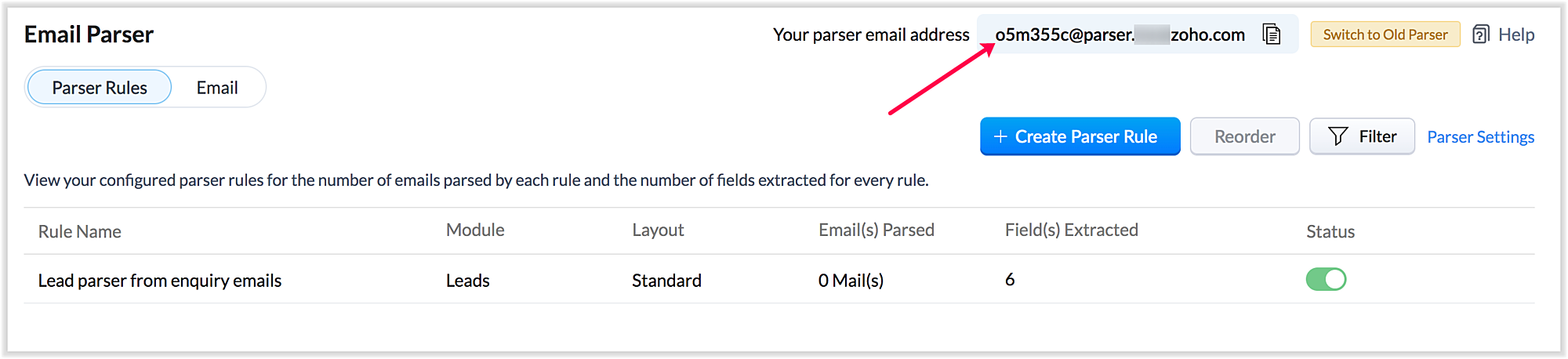
Also, a maximum of five approved parser addresses can be set up in common for all rules early on during the configuration.
2. A more powerful and intuitive configuration interface
In the latest version of email parser, the entire configuration interface allows free parsing and is highly intuitive, powerful, and, most importantly, user-friendly—unlike the previous version, which demanded rigid adherence to delimiters.
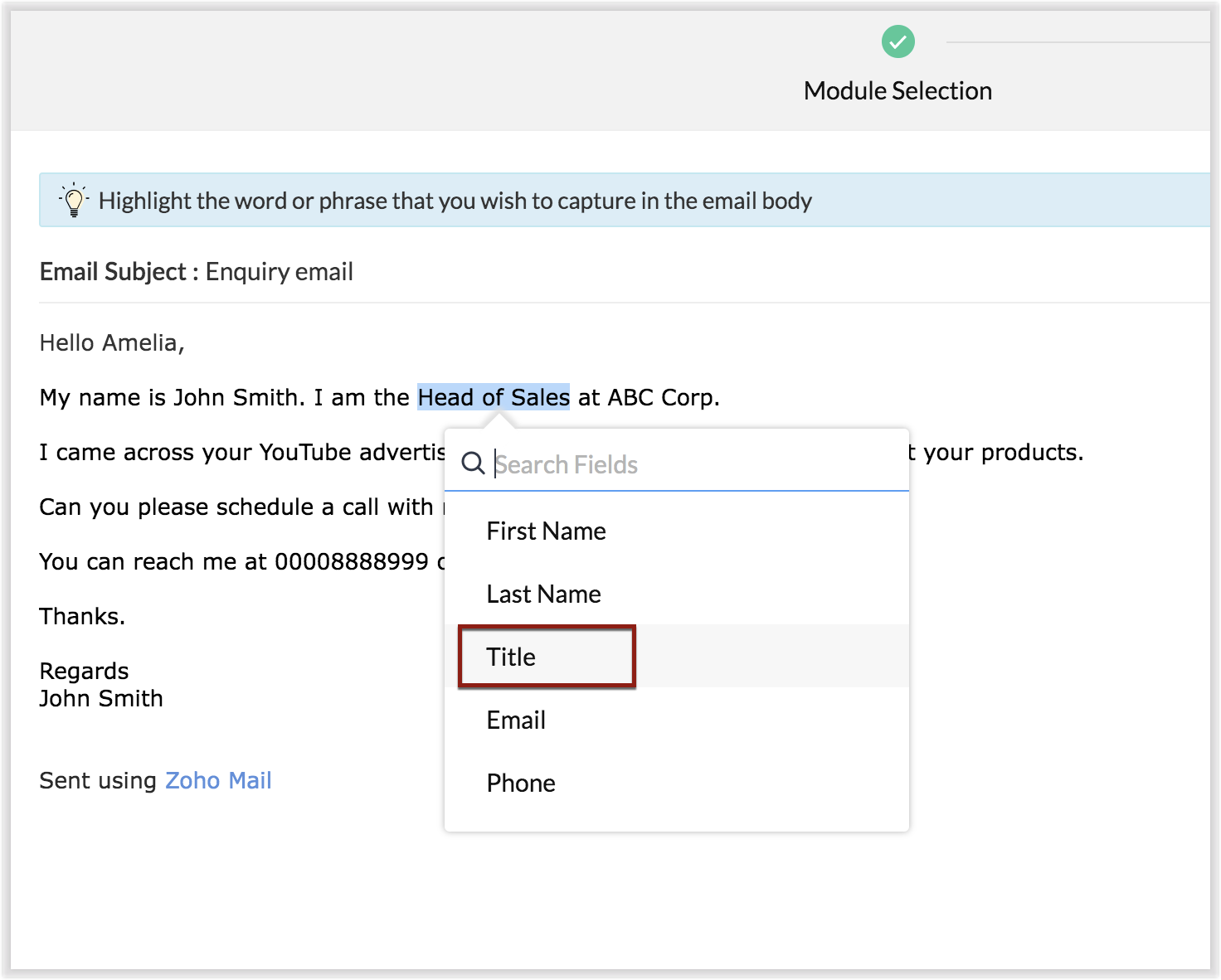
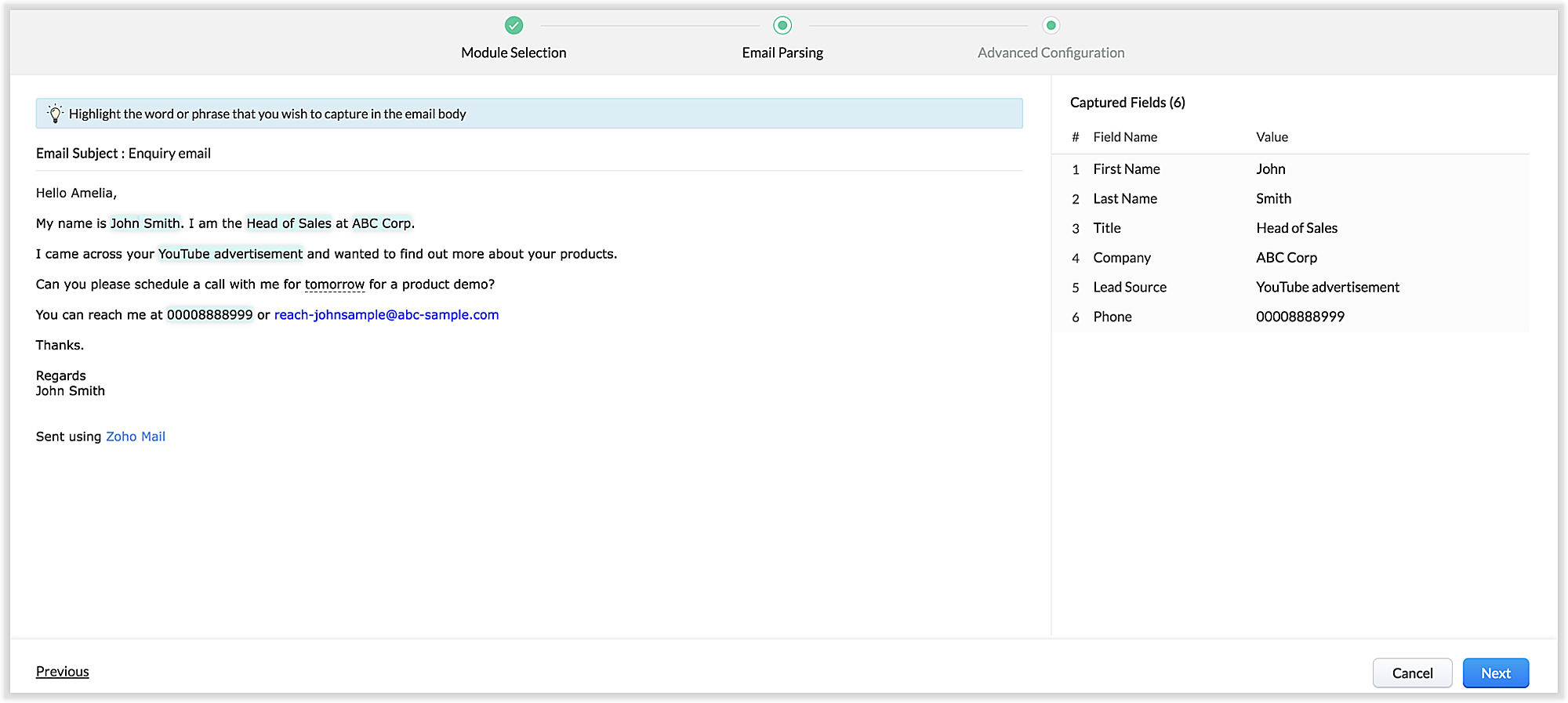
The email parser interface automatically gives you a preview of the parsed data on the same screen where the field mapping occurs, so it's easier to get a snapshot of all the fields that are being parsed.
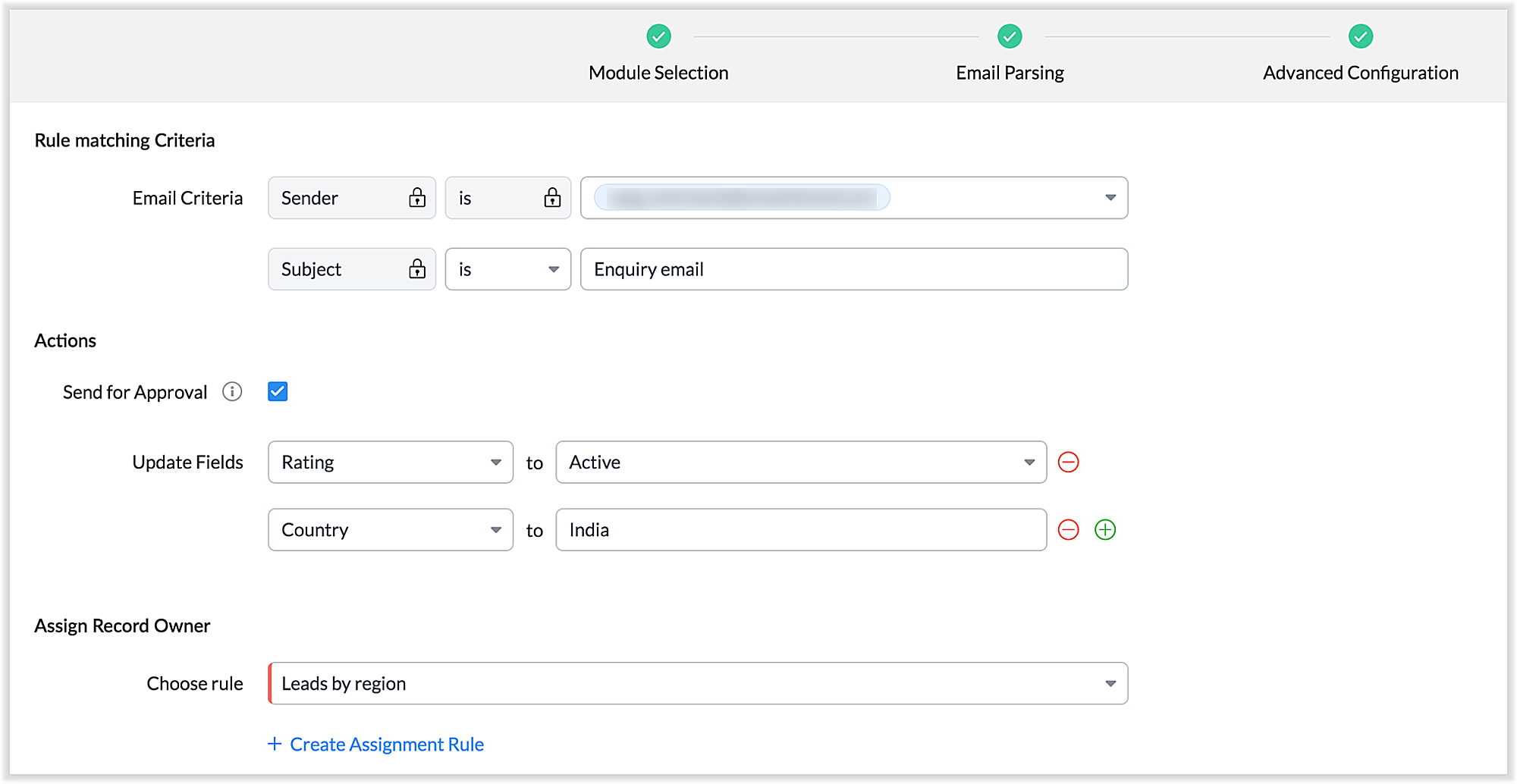
There's also an advanced configuration tab which involves options for filtering emails applicable to the parser based on criteria and associating automated actions, such as sending for approval, updating fields, and assigning records to certain users based on assignment rules.
You can also parse HTML emails directly, as opposed to converting them to plain text emails first—which was necessary for the old parser. You can also create email parser rules for each layout in a module.
3. Custom functions: Configure the email parser without associating a module
The new email parser now supports the execution of custom functions based on parsed data. In this case, the parser rule is not associated with a particular module. Using custom functions helps you with extensibility and interoperability in Zoho CRM. You can extend the email parser function to more than one module within Zoho CRM, and even to connect with other Zoho services. You can also perform ad hoc actions in third-party applications based on the parsed data.
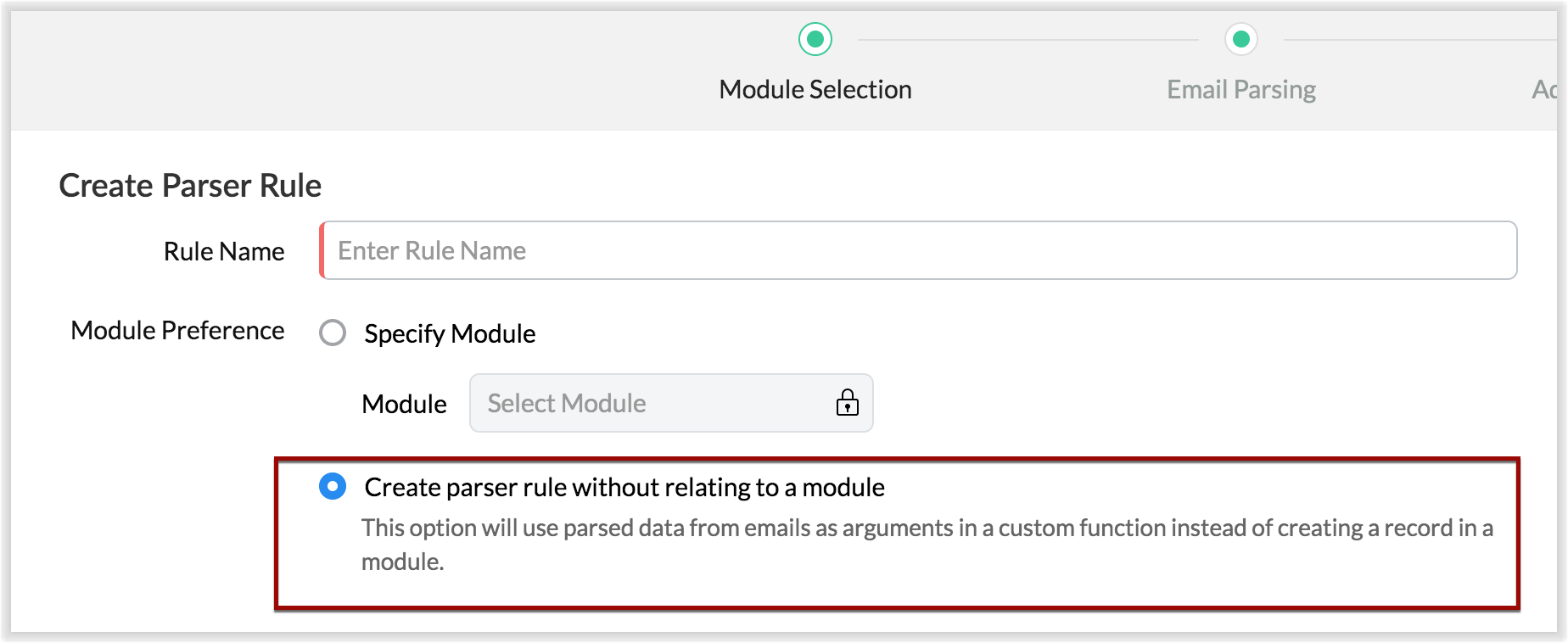
- For example, let's say that based on an incoming email inquiry, a property management company called Zylker wishes to update both Contact and Account records in CRM. The email sender's name, phone number, and address will go to the Contacts module, whereas their company information will go to the Accounts module.
- Let's say also that the same company has another requirement: Based on an incoming email from a customer regarding the status of their property, they want to update corresponding information on a third-party listing website automatically. They can achieve this by using the email parser to execute custom functions.
Once you have the required custom functions written, you can associate them to the parser rule and have the action executed for subsequent incoming emails.
4. Update records and send them for approval
Update Record is a function by which you can update the latest information on a record from an incoming parsed email.
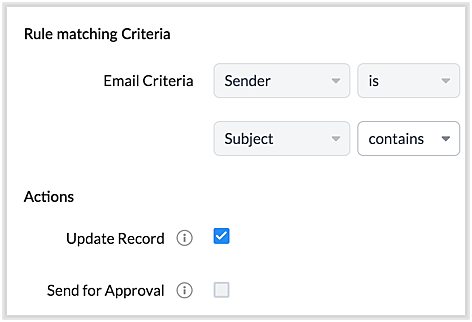
For example, say you receive an incoming email from a prospect named Jane Evans. Normally, a new lead record would be created for a new inquiry email, but if Jane is already in the CRM system, you want the CRM to update Jane's information on the same record as opposed to creating a duplicate record. If this is your expectation, you can check the Update Record option in the parser rule's Advanced Configuration settings.
Note: CRM will use the email field to detect duplicate records. For the Update Record option to show up, you must have first mapped the "Email" field from the email content, which serves as the primary identifier, or a "unique field" for a record.
You can also choose the Send for Approval option—in which case, records parsed via email parser need to be reviewed and approved from the Waiting for Approval tab in the selected module in order to become a part of the CRM system.
5. Informative parser reports
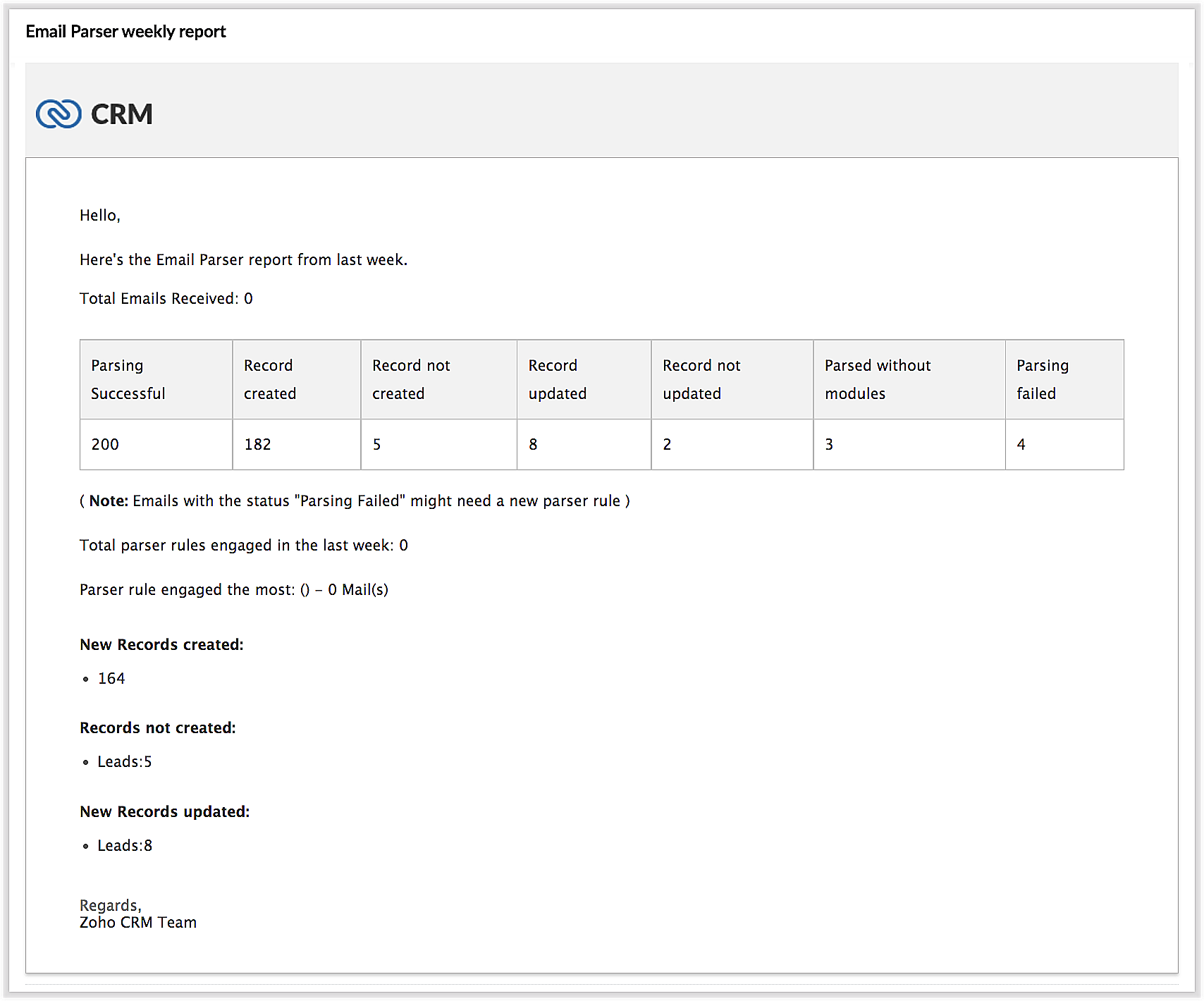
In the new version of the email parser, you're presented with accurate, detailed insights on the number of emails being parsed per rule, the fields extracted, and a list of customized actions associated with the records the parser has created. This detail summary gives you a clear picture of how effective your rules have been and indicates the revisions you may need to make to those rules based on those insights.
Detailed weekly performance reports can be sent to the creator of these rules or a custom email ID. Email reports are also sent upon record creation failure so that the appropriate users can take immediate action.
6. Reorder and filter
You now have an option to reorder the list of parser rules based on your preferred order. This is important because the email parser system is designed to execute only the very first rule whose criteria an incoming email meets. Therefore, the order of the parser rules becomes essential for effective email parser performance.
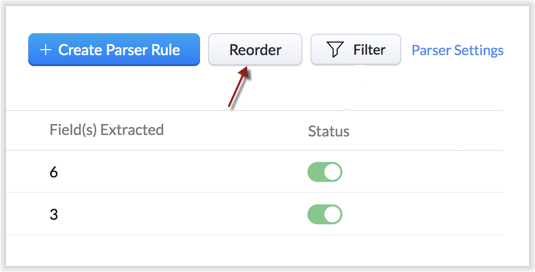
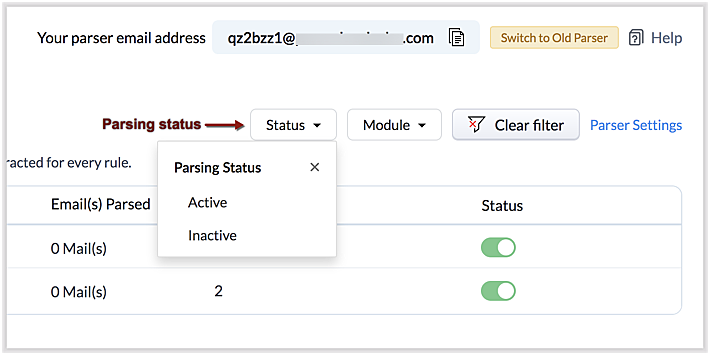
You can also filter rules by status (active/inactive) and also by module.
7. Contextual access to parsed emails
You can view not only the Configuration Info for each parser rule, but also insights based on parsed emails.
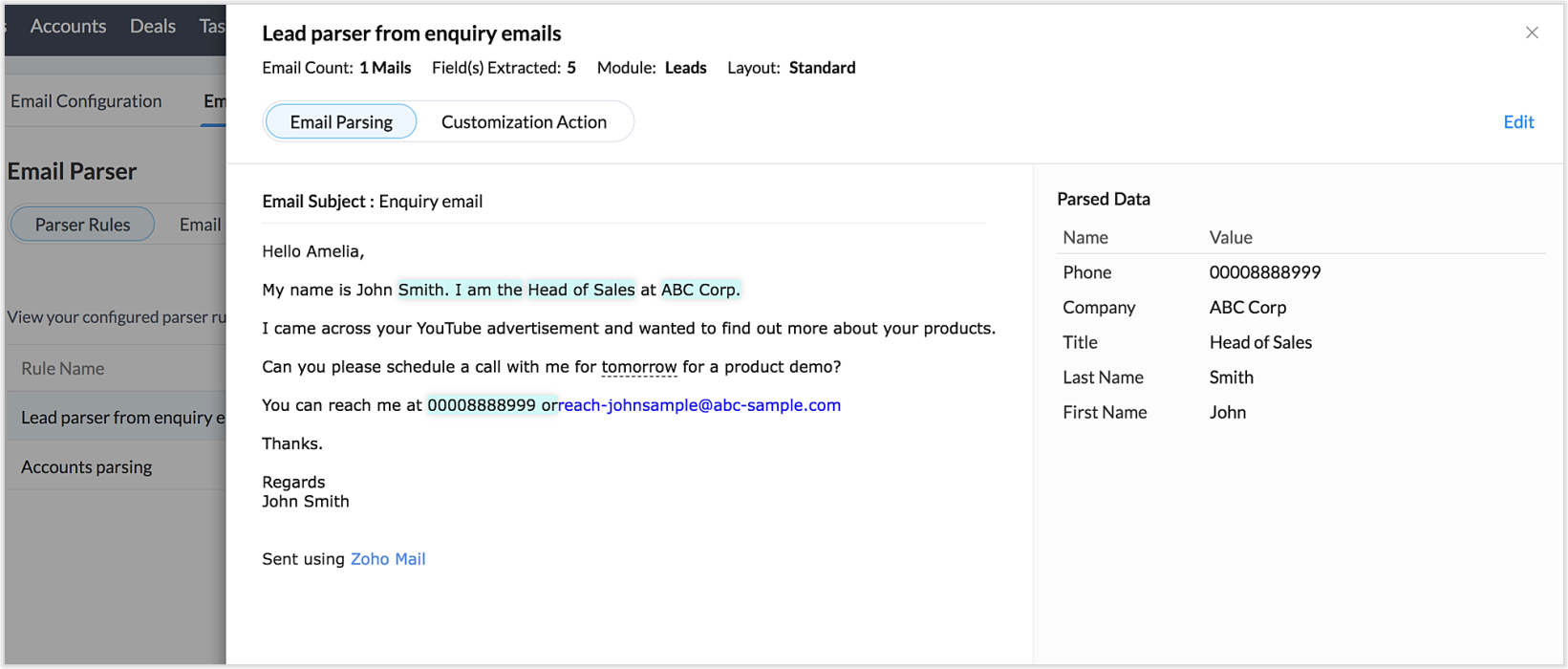
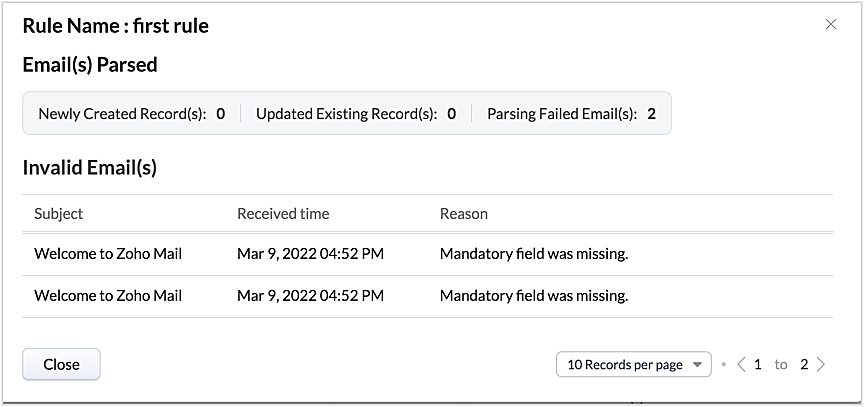
This way, from the perspectives of both parser rules and parsed emails, you can derive useful insights.
The "Email" tab lists the most recent email in your parser inbox, where you can check properties like parsing status, the rule used to parse it, and more. If the email has not met any rule, you may also create a new parser rule contextually from this email page.
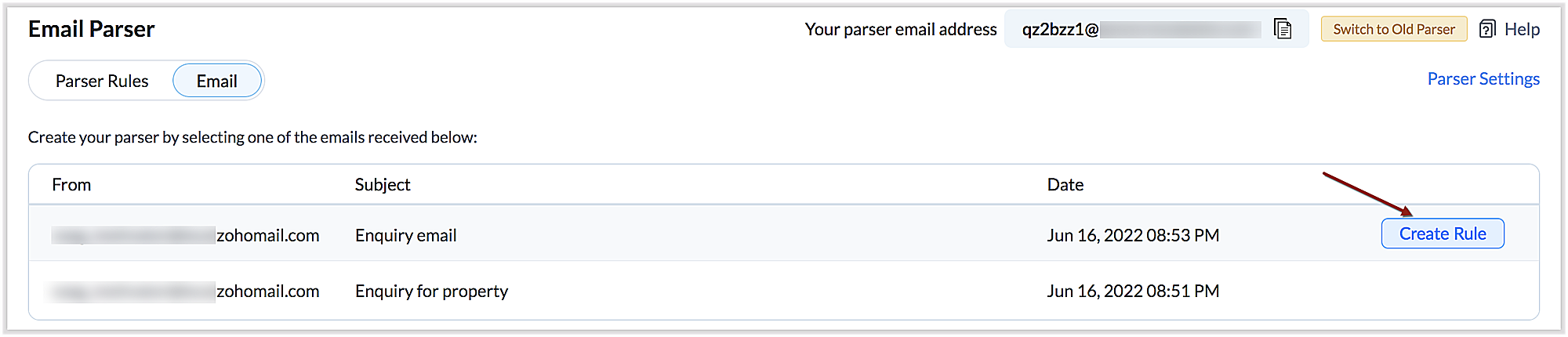
You can also re-run an email in the event of parser failure if there's no match found, as well as parse emails in bulk. (Note that this is applicable only for the emails that have a template match and for which the parsing was unsuccessful.)
Preparing for deprecation of the Old Email Parser
For existing users:
Existing users, who have not already switched to the new parser can do so by clicking on the Switch to New Parser button. Rules available in both the parsers will be working simultaneously until the Old parser is deprecated, but the rules available in the Old parser will not be displayed in the New parser view, and vice versa.

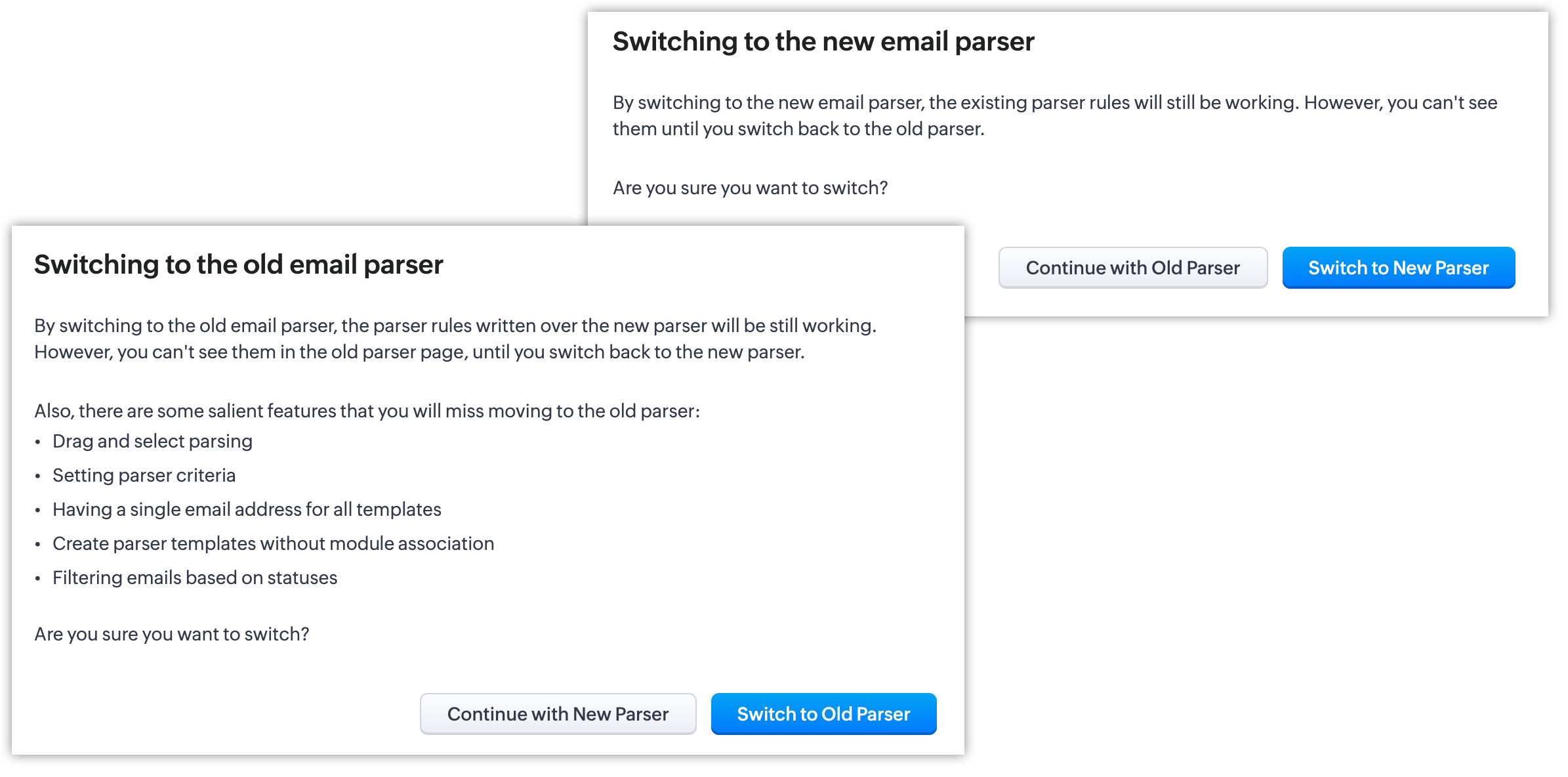
It's essential to manually create the existing rules in the New parser because once the Old parser is deprecated, only the rules present in the new parser will function. Since there won't be any rules from the previous parser available, the new parser will require that you create all rules from scratch.
Please note:
- Until the deprecation of the Old Email Parser on June 1, 2023, both the old and new versions will co-exist, after which, the New Email Parser will become the default version. .
- The rules in the Old Email Parser parser won't be available once it has been deprecated. Therefore, if no rules are added to the New Email Parser , there won't be a parser to run. So be sure to write rules in the New Email Parser before the deprecation. Additionally, keep in mind that once your old rules have become obsolete, they cannot be recovered.
For new signups
For new signups, only the new parser will be available as the default feature, and not the old parser. There is no action required from users in new signups.
Further reading
Thanks, have a great day.
Regards,
Sai Shree | Zoho CRM
Sai Shree | Zoho CRM
Topic Participants
Saishree T K
Ian Imamura
Sunderjan Siddharth
Krizia Tenorio
Emily Bridges
Sticky Posts
Good news! Calendar in Zoho CRM gets a face lift
Dear Customers, We are delighted to unveil the revamped calendar UI in Zoho CRM. With a complete visual overhaul aligned with CRM for Everyone, the calendar now offers a more intuitive and flexible scheduling experience. What’s new? Distinguish activitiesVoC in Zoho CRM is now data savvy: Explore response drilldown, summary components and participation in CRM criteria
VoC has all the goods when it comes to customer intelligence—which is why we're constantly enhancing it. We recently added the following: A customer drilldown component that shows you the list of prospects and customers behind a chart's attribute ExpandedWrapping up 2025 on a high note: CRM Release Highlights of the year
Dear Customers, 2025 was an eventful year for us at Zoho CRM. We’ve had releases of all sizes and impact, and we are excited to look back, break it down, and rediscover them with you! Before we rewind—we’d like to take a minute and sincerely thank youPresenting ABM for Zoho CRM: Expand and retain your customers with precision
Picture this scenario: You're a growing SaaS company ready to launch a powerful business suite, and are looking to gain traction and momentum. But as a business with a tight budget, you know acquiring new customers is slow, expensive, and often deliversCreate and populate a record in an instant: Introducing zero-shot field prompting to Zia's ICR
A couple of months ago, we upgraded our in-house AI image detection and validation tool, Zia Vision, with intelligent character recognition (ICR). By training Zia with sample images, you could create and enrich CRM records with data extracted from standard
Recent Topics
Is it possible to do validation for the Actions added to Reports?
We have an all-around On Validate function that checks all the possibilities before the Created/Edited form submissions. We want to have a button in the report view, so we can change records without entering. We are able to add this button, and it doesAbility to Edit Ticket Subject when Splitting a Ticket
Often someone will make an additional or new request within an existing ticket that requires we split the ticket. The annoying part is that the new ticket maintains the subject of the original ticket after the split so when the new ticket email notificationFunction #11: Apply unused credits automatically to invoices
Today, we bring you a custom function that automatically applies unused credits from excess payments, credit notes, and retainer payments to an invoice when it is created. Prerequisites: Create a Connection named "zbooks" to successfully execute the function.[Free Webinar] Environments in Zoho Creator - Creator Tech Connect
Hello Everyone, We’re delighted to kick off the 2026 edition of the Zoho Creator Tech Connect Series and are excited to continue this learning journey with you. The Creator Tech Connect series is a free monthly webinar featuring deep-dive technical sessionsZoho Voice API SMS
I made a post request in Zapier to try to send an SMS. Authentication appears to be configured correctly. I followed the documentation and I'm getting a 400 Error "Internal Server Error". Not helpful at all. Anyways, I could not find any information onHow do I change (error) display messages
Hi! I would like to edit display messages like "invalid entries" and "enter a value for Nome" and so on into Italian language messages. How can I do that? Already tried on Validate on form submit. Where I am failing? Thanks in advance.Record Overseas Transactions Along with CC charges
Hi All, We receive payments via stripe in multiple currencies and stripe takes around 2.5% fees. The amount is settled in INR into our local bank. What should be the currency of the income account used for Stripe payments? Here is a sample flow that weEasier onboarding for new users with stage descriptions
Greetings, I hope all of you are doing well. We're happy to announce a recent enhancement we've made to Bigin. You can now add descriptions to the stages in your pipeline. Previously, when creating a pipeline, you could only add stages. With this update,Pieds de page personnalisé - Document Zoho Writer
Bonjour à tous, Je rencontre un souci avec l’ajout d’un pied de page personnalisé dans un document Zoho Writer. Je souhaite insérer les informations de mon entreprise (notamment un logo + adresse) dans le pied de page. Le problème, c’est que lorsque j’ajouteCredit card transactions are backwards after importing statements
I am new to Zoho Books so I'm importing my firm's bank and credit card statements in. My credit card statements have a single column with negative numbers so that is the option I chose. But when I went to categorize the credit card transactions, I canPermissions on Views
Having the option of any agent creating custom views is firing back and got a situation where there are a hundred different views across the team and tickets are not being dealt in the most efficient of ways. Tickets seems to be missed by some agents,Function #8: Add additional charges to invoices
Here goes one of the highly sought-after custom functions in Zoho Books. If you find yourself needing to apply additional charges to customers on their invoices (say credit card surcharges, or fuel charges applicable to customers from a certain region,VIsual maindmaps in Zoho notebook Ai
Can I create and export VIsual maindmaps in Zoho notebook Ai1stDibs Integration to Zoho Inventory
Hello is it possible to integrate my Zoho inventory and 1stDibs?Community Question: Renewal vs Invoicing
This is a question for the community. Does anyone else consider there to be a difference between a subscription renewal event and sending out a recurring invoice for a subscription? For example, let's say customer XYZ purchases a 1-year subscription tocloud console support for music websites
Hi Friends, I am not from a very technical background.. So need support from the Zoho family. I want to build a e-commerce website which is in Musical Niche. It will help people learn music & play instruments of all types. There are a few players in the market like Chordify , Guitaa, Guitar Dashboard, ChordU & few others. But I all these websites allow only a few instruments to play. So I want to build a better website than the one I mentioned. So wnated to know what UI & AI should I use so thatScheduled Reports - Do not send empty report
Hello, We are intensively using reports in the CRM, especially for sales managers. When data is empty, they still receive an email. Can you add an option to avoid sending the report when data is empty?Is Zoho One Desktop more secure than Zoho One Web SaaS?
Is Zoho One Desktop more secure than using Zoho One in browser? Inherently, it seems desktop would be unless you don't do things like share your pw or leave pc on. I am concerned about data being on the cloud or someone else's server and database.Reminder Settings - Time Tracker
On the time tracker in Reminder Settings I created a reminder according to the Zoho manual. But a manager asked me to change the message that goes in the email. Is it possible to change the message? I didn't find that in the Zoho manual. Another question: I configured to receive the reminder everyone who logged in less than 40 hours. Does Zoho consider less than 40 hours of the current week or the whole month? Another situation, I put it so that I and another specific user would receive the notification,Create Item group from a composite Item
I have applied my mind for hours but cannot figure this out. Can you have a composite item in an item group?. E.g. We bundle different color and size SKU's together as composite items. Also Using composite items as Bill of Materials. We want to createMain difference of Zoho Recruit Corporte version and Staffing HR vesion
Hi Zoho, I need help to fully understand what is the main key point differences of Recruit Corporate version versus the Staffing HR version? We are currently using Corporate HR version and we are looking on having an insightful automated reporting, doesOut of Stock items showing in Commerce
I have over 6000 items and most are not in stock, but all items are showing up in Commerce whether they are inventory or not. What option or feature can you use to hide items in Commerce at zero or negative quantities? I currently am using Commerce forIs it possible to transfer data from one related list to another within the same module ?
In the Leads module, there is an existing default Product related list that already contains data. Recently, I added a custom multi-lookup field, which created a new related list in the same Leads module. Now, I need to move the existing data from theHow to implement new online payment gateway?
Hello, Can you tell me how to proceed to implement my local payment gateway? DIBS has an open avaiable API that should be easy to implement into ZOHO BOOKS. http://tech.dibspayment.com/dibs_payment_windowFormula working in MS Excel , is not working in Zoho Sheets, Filter fuction which is working in MS sheets per the attached workbook / Daily update.
Filter function , which is working in MS Excel is not working in Zoho sheets. Please help on function of filter of particular class sheets and extract students name who has more than 3.5 hours of study hours on particular day depending on date in D7 cell.New in Smart Prompt: Record Assistant for contextual assistance, and support for new AI models
Smart Prompt helps teams stay informed and move faster by providing relevant suggestions where work happens in CRM. With this update, Smart Prompt becomes more adaptable to your organization’s AI preferences. You can now choose which Large Language ModelImproved Integration Failure Information (And Notification Options)
Hi, When an attachment service for example fails, you just get "Field x - Error", I can check the field it is failing on and find nothing wrong, same file size, type, dimensions, etc. so more information as to the actual issue would be helpful. And anChange User Role in a Form
Hi, When in a form, it would be good (And consistent) to be able to change the user role/permission like you can with Shared Reports, All Entries or the actual User itself, rather than having to delete the users permission and then add it back again withReassign Partially Saved Entries
Hi, I would like to be able to go to Partially Saved Entries and like the option to delete them I would like the option to multi-select and be able to reassign them to another user to complete (Such as when a user has left the company). Thanks DanIncrease the "Maximum Saved Entries per User" Options Limit
Hi, You can create lots of saved entries, yet the Limit when you apply one is 25, we may often expect 32 to be in draft, and therefore want to enforce that, can we increase the limit of this field from 25 to 100 (As you can just turn it off and have moreDynamic Field Folders in OneDrive
Hi, With the 2 options today we have either a Dynamic Parent Folder and lots of attachments all in that one folder with only the ability to set the file name (Which is also not incremented so if I upload 5 photos to one field they are all named the sameProduct Updates in Zoho Workplace applications | December 2025
Hello Workplace Community, Let’s take a look at the new features and enhancements that went live across all Workplace applications this December. Zoho Mail Block emails without notifying the sender Block emails without sending a rejection notificationZoho CRM for Gmail Extension Not Working in Brave Browser?
Is anyone able to get the Zoho CRM Chrome Extension working in the Brave browser? They're both built on the Chromium platform and every other Chrome Extension works with the exception of Zoho CRM for Gmail so any ideas here?Set Frozen Cells in the Report Settings
Hi, It would be nice to be able to set the frozen cells in the report Settings, and have an option if this is fixed or can be changed after loading (On the next load it still goes back to the Settings). Thanks DanMicrosoft Teams now available as an online meeting provider
Hello everyone, We're pleased to announce that Zoho CRM now supports Microsoft Teams as an online meeting provider—alongside the other providers already available. Admins can enable Microsoft Teams directly from the Preferences tab under the MeetingsTip of the week #26: Import/ Export calendars in Zoho Calendar.
Any calendar on the web or calendars that you create in any other calendar application can be imported in to Zoho Calendar. This will help you to add the events from the calendars that you import to your Zoho Calendar. You also have the option to exportAdd Zoho Forms to Zoho CRM Plus bundle
Great Zoho apps like CRM and Desk have very limited form builders when it comes to form and field rules, design, integration and deployment options. Many of my clients who use Zoho CRM Plus often hit limitations with the built in forms in CRM or Desk and are then disappointed to hear that they have to additionally pay for Zoho Forms to get all these great forms functionalities. Please consider adding Zoho Forms in the Zoho CRM Plus bundle. Best regards, Mladen Svraka Zoho Certified Consultant andSocial icons, open in new tab?
Hello, I have two social icons on my footer, Facebook and Psychology Today. Clicking on the Facebook icon opens a new tab, the Psychology Today icon does not. I would like them both to open a new tab. Am I missing a setting somewhere?Real-Time Screen Annotation During Zoho Cliq Screen Sharing
Hi Zoho Support Team, Hope you're doing well. We’d like to request the addition of real-time screen annotation tools during screen sharing sessions in Zoho Cliq video calls. 🔍 What We're Looking For: The ability for the presenter—and optionally, otherAutofill address using smart fields mapped over the pdf document
Hi, I'm using mail merge to map smart fields onto PDF documents I plan to distribute for signing. I already have a Zoho Sign subscription. When mapping smart fields from the Employee form, I only see the permanent and current addresses which include theNext Page