Let’s Talk Recruit: Forms that think before you do!
Welcome back to our Let's Talk Recruit series. In our previous post, we shared highlights from our community meetups held across India.
This time, we’re talking about something that often gets overlooked but makes a huge difference once you set it up right: Webforms and Form Rules.
Let’s say you're rolling out a hiring drive or posting jobs on multiple channels. Candidates start pouring in—but half of them forget to attach their resumes, a few skip critical questions, and some apply to the wrong roles altogether. And that’s before you’ve even started shortlisting.
That’s exactly the kind of cleanup Webforms and Form Rules are built to prevent. They help you collect the right details, personalize the experience for candidates, and automate the little things that usually slow you down. And once you get the hang of them, you'll wonder why you didn’t start sooner.
The Problem
If your team still relies on email attachments or inconsistent spreadsheets to gather applicant info, chances are you’re wasting time fixing errors that shouldn’t exist in the first place.
Candidates entering outdated contact details
Missing info on key fields like skill set, location, or availability
Manually categorizing candidates for different roles or hiring pipelines
Without a structure in place, things slip through the cracks. And when you're hiring at scale, that’s a problem.
Why Webforms matter
A webform is often the first step a candidate takes to engage with your company. Whether it’s embedded on your careers page, linked on a social post, or shared during campus drives — it sets the tone.
But a lot of recruiters still use basic forms. Candidates fill them out, and then it’s a game of manual edits, sorting, and follow-ups.
What if the form did more? What if it already knew:
Which fields to show and when?
Whom to assign the record to?
Whether the candidate should be redirected after submission?
That’s where form rules come in.
What are Form Rules?
Form rules let you customize the candidate’s experience while they’re filling out the form by triggering actions based on their input.
Actions include: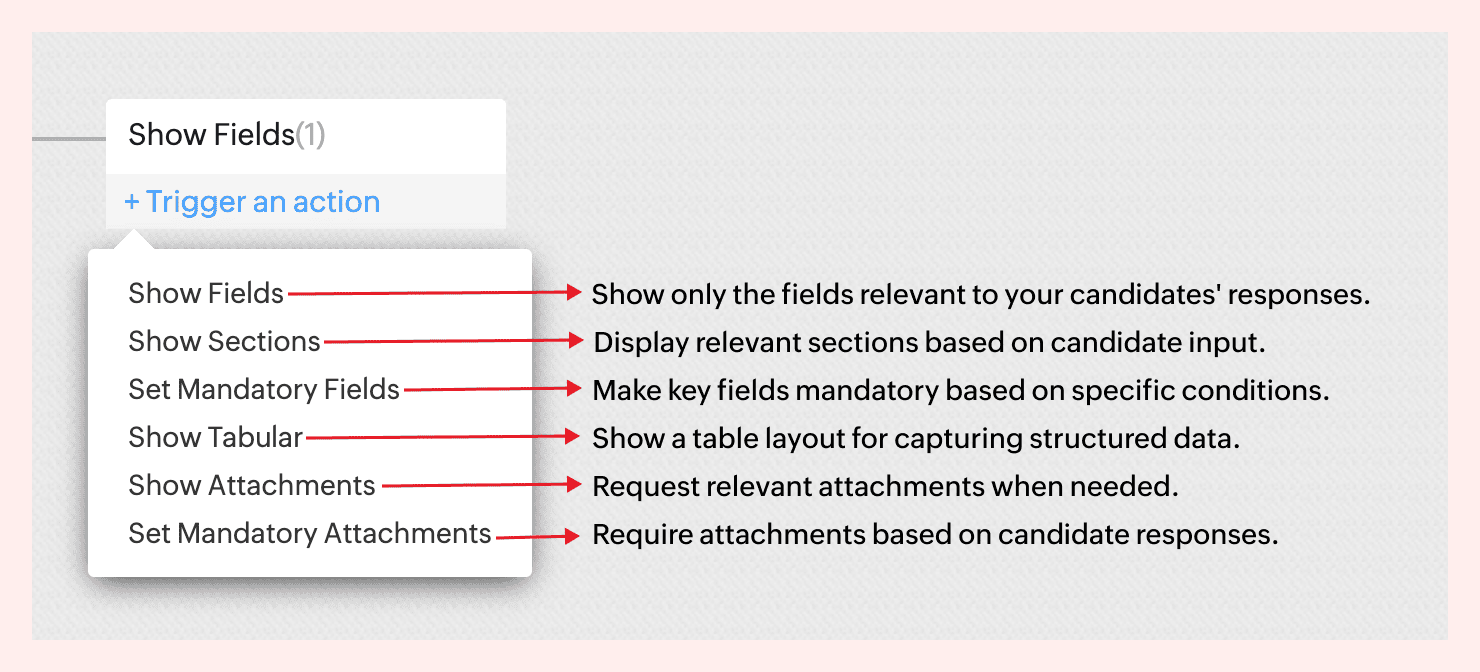
For instance, not all candidates come with the same background—and your forms shouldn’t treat them like they do.
If a candidate indicates they’re a fresher, there’s no need to show fields like Work History or Current Salary. But if they’re experienced, you might want to ask about key projects, past employers, or management experience.
With form rules, you can create this branching logic in just a few clicks—keeping the form clean for early talent and detailed where it matters.
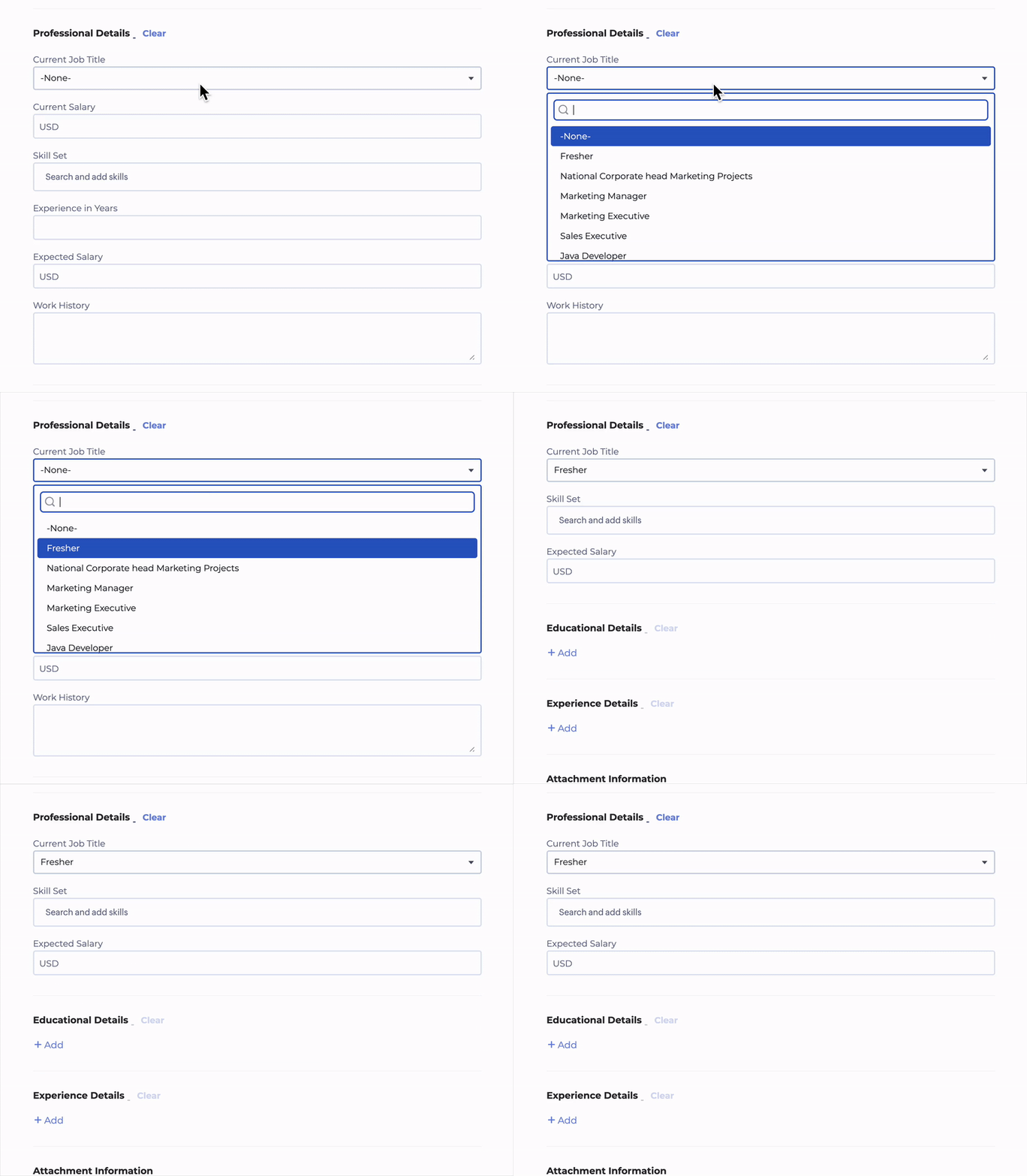
No code required. Just simple logic-based conditions.
→ Learn more
A few use cases to consider
Client Intake to Job Requisition
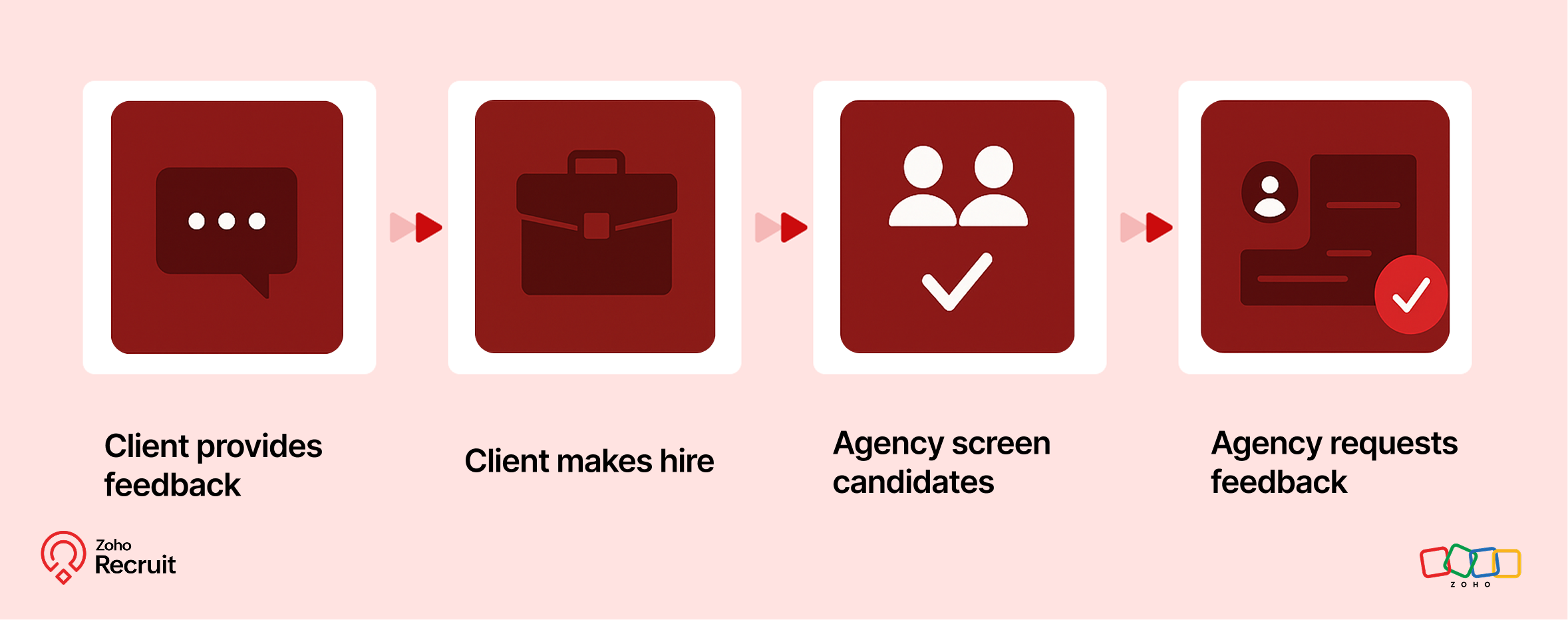
Step 1: Client submits contact form
Embed a Contact webform on your website to capture leads—clients who want to work with your staffing agency.
Step 2: Client shares job details
Once onboarded, clients can submit job requirements through a Job Requisition form. These details feed directly into your system.
Step 3: Agency hires candidates
Use the shared job details to source, match, and hire candidates for the role.
Step 4: Agency requests feedback
After successfully filling positions, request feedback from clients using a Feedback webform.
Candidate Onboarding & Documentation
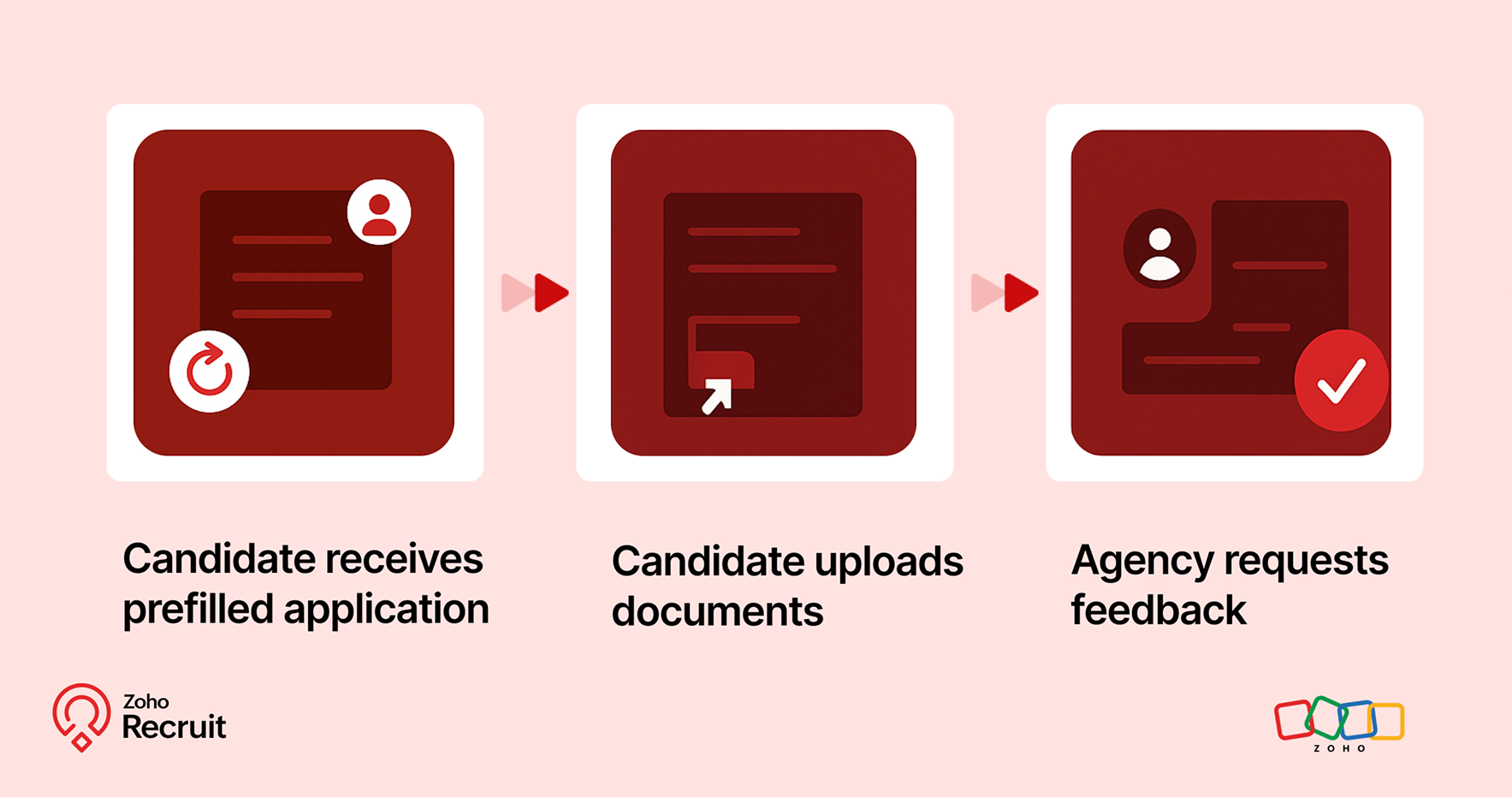
Step 1: Candidate receives prefilled application
Once candidates are selected, use known data to prefill details into a Background Check form.
Step 2: Candidate uploads documents
Share the form with candidates to collect necessary documents—ensuring accuracy and reducing redundant data entry.
Step 3: Agency requests feedback
After onboarding is complete, send a Feedback webform to capture the candidate’s experience.

A quick look at the numbers
Webforms and Form Rules aren’t just about convenience — they actually influence how well candidates interact with your hiring process.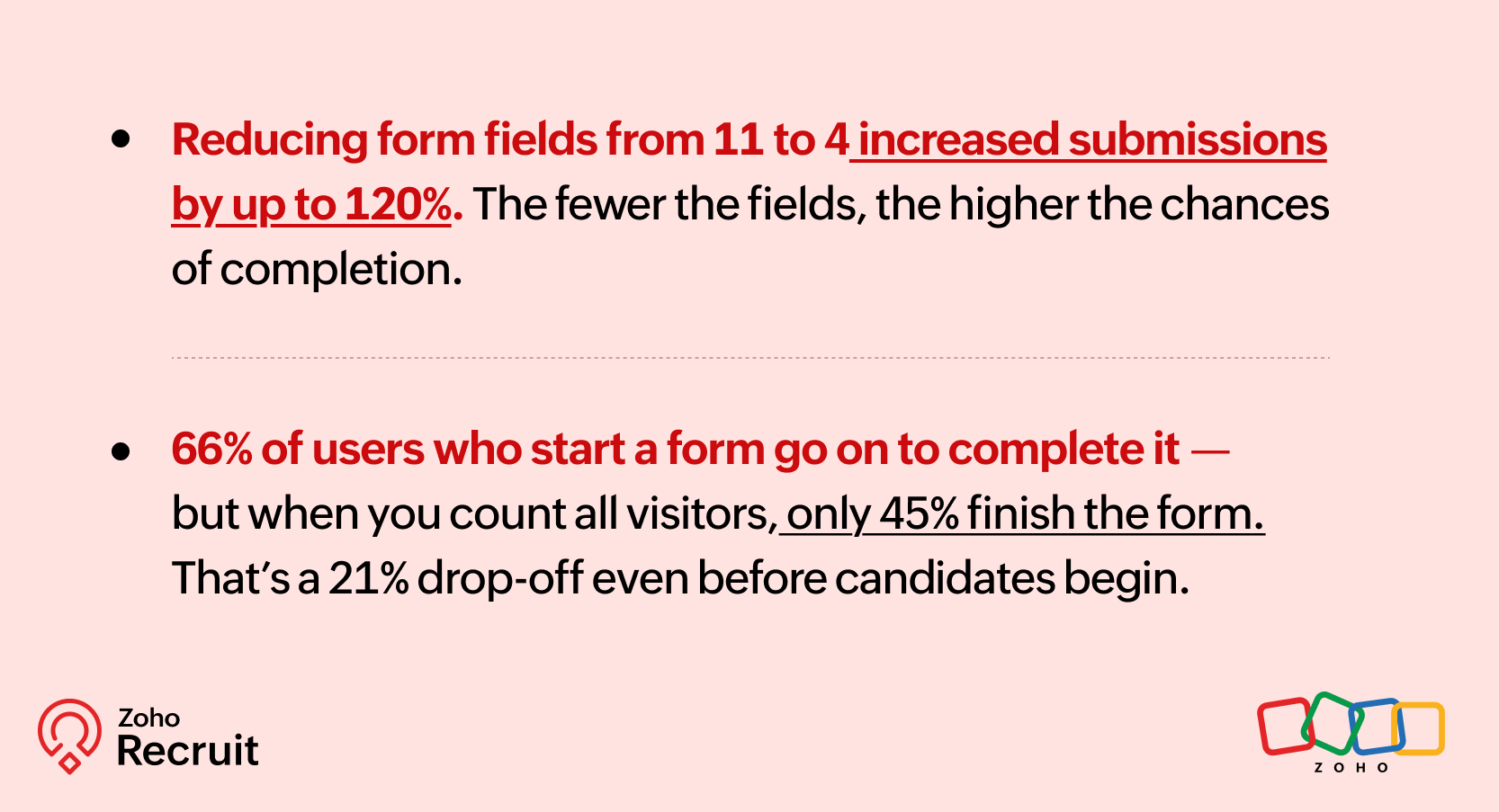
These numbers reinforce what we already know — clearer, shorter, and smarter forms can keep more candidates moving forward.
Getting started: A few setup tips
If you’re new to webforms or haven’t reviewed your setup in a while, here are three things to check:
Do you have job-specific forms?
A generic form might be easier to maintain — but it might also be collecting unnecessary or missing important info.Have you mapped fields correctly?
Ensure that all form fields map directly to your Recruit modules (Candidate, Job Opening, etc.) to avoid duplicates or errors.Are you using rules to simplify things?
Even one simple rule — like showing a “Notice Period” field only for full-time roles — can improve form quality.
Need help setting this up? Here’s how to build a webform and how to configure Form Rules.
Let’s Talk Recruit!
Do you already use Webforms in your hiring flow? Have you explored conditional form rules yet—or is that still on your to-do list?
Drop your experience below or tell us what kind of form use case you'd love to automate—we're all ears (and maybe one of our product folks will drop in with a tip or two!).
Topic Participants
Akshaya P
Sticky Posts
Zoho Recruit Community Meet-up - India (Venues Finalised)
Zoho Recruit Community Meet-up - India (Venues Finalised) Namaste, India. 🙏🏼 The Zoho Recruit team is hitting the road—and we're absolutely excited behind the scenes. Join us for the Zoho Recruit India Meet-up 2026, a morning designed to make your recruitingZoho Recruit Community Meetup - London 🇬🇧 (Venue Finalised)
Hello Recruiters! We’re excited to announce that the Zoho Recruit team is coming to the UK for an in-person Zoho User Group (ZUG) Meetup in London! This is your chance to connect with fellow Zoho users, learn from experts, and walk away with actionableAn update to improve email delivery | Email Authentication & Relay
Update Rollout Latest Update: Enterprise users (8th July, 2025) This update is now live for Enterprise plan users in all regions. This includes People Plus, but not Zoho One, which will be covered in an upcoming update. Professional users (31st May 2025)Zoho Recruit User Group Meet-up | INDIA 2025 (Venue Finalised)
Hello Zoho Recruit users from India, We’re pleased and excited to announce our 2025 edition of Zoho user group meet-up in India in five cities! In this meet-up, our team of experts will help you understand the intricate nuances to use Zoho Recruit better,Zoho Recruit is coming to the UK | Zoho Community Learning Series
Customers from the United Kingdom, Exciting news: We will be in London for the Zoho Recruit user meet up. Our team will help you better understand the intricate nuances of Zoho Recruit to help you hire faster, inform about new and upcoming features, and
Recent Topics
Introducing parent-child ticketing in Zoho Desk [Early access]
Hello Zoho Desk users! We have introduced the parent-child ticketing system to help customer service teams ensure efficient resolution of issues involving multiple, related tickets. You can now combine repetitive and interconnected tickets into parent-childSeparate Items & Services
Hi, please separate items and services into different categories. Thank youLog a call: Call Duration for Inbound is mandatory but inbound is optional
Hi Team Can you advise on why the call duration for the inbound call type is a mandatory field? We have a use case where we are manually logging a call but do not use the call duration field. The field does not have the option to make it non mandatoryZoho Sign 2025–2026: What's new and what's next
Hello! Every year at Zoho Sign, we work hard to make document signing and agreement execution easy for all users. This year we sat down with our head of product, Mr. Subramanian Thayumanasamy, to discuss what we delivered in 2025 and our goals for 2026.New Account, Setting up Domain Question
Hello, I recently set up a new account with a custom domain. But after paying and setting up my account, it says OpenSRS actually owns the domain, and I have to sign up with them to host my site. But OpenSRS wants to charge me $95, which is ridiculous.【開催報告】東京 Zoho ユーザー交流会 NEXUS vol.1 ~ データドリブン経営・少人数組織のCRM活用・AIエージェントの最前線 ~
ユーザーの皆さん、こんにちは。 コミュニティグループの中野です。 2026年3月27日(金)、東京・新橋にて「東京 Zoho ユーザー交流会 NEXUS vol.1」が開催されました。 今回は「マーケティング領域のZoho 活用法 × AI」をテーマに、ユーザーさん2名による事例セッション、Zoho 社員によるAIセッションなどを実施しました。 ご参加くださったユーザーの皆さま、ありがとうございました! この投稿では、当日のセッションの様子や使用した資料を紹介しています。残念ながら当日お越しいただけなかった方も、ぜひチェックしてみてください。Monthly Webinar : Getting Started with Zoho LandingPage
Our monthly Getting Started with Zoho LandingPage webinar is back! If you're building your first page and want a little guidance, this is where to start. Learn how landing pages fit into your strategy, generate leads, and improve conversions. Here’s whatMass emails - Allow preview of which emails will receive the email based on the criteria
Feature request. Please allow us to view and confirm the exact recipients of the mass emails based on the criteria we've chosen before sending. It can be quite sensitive if you send the mass email to some wrong accounts accidently, so it would be greatLimitation in Dynamic Constant Sum Based on Previous Question Selections in Zoho Survey
Zoho Survey supports the Constant Sum question type, allowing respondents to distribute a fixed total (such as 100) across a set of options. However, it does not support dynamically populating these options based on selections made in a previous question.SAP Business One(B1) integration is now live in Zoho Flow
We’re excited to share that SAP Business One (B1) is now available in Zoho Flow! This means you can now build workflows that connect SAP B1 with other apps and automate routine processes without relying on custom code. Note: SAP Business One integrationsync two zoho crm
Hello everyone. Is it possible to sync 2 zoho crm? what would be the easiest way? I am thinking of Flow. I have a Custom Module that I would like to share with my client. We both use zoho crm. Regards.Import MSG to Yandex Mail Account | Fast & Reliable Solution
If you are facing problem to import MSG files to Yandex Mail account can be challenging if done manually, especially when handling multiple files. A reliable solution is using the MacGater Mac MSG Converter, which simplifies the entire process with accuracyCopy all reports in a folder
I currently have a database that I need to create multiple charts filtered by market. All of the charts are identical, I just change to of the filters and then I have the next market's set of charts. The only way I've been able to copy charts (reports)OpenURL working Intermittently
Never had this issue before, everything was working fine up to a few days ago. We have a buttons on reports to open forms with pre-filled fields. Now, there are instances where it will throw and error and gives no feedback. What is really strange is notZoho Recruit mailserver get blocked by Microsoft!
Hi, We have experienced this issue twice now, where Zoho Recruit outbound IP addresses are being blocked by Microsoft. We are confident that Microsoft is the blocking party, as all outbound emails to candidates with @hotmail.com, @live.com, and @outlook.comCalculate Hours Minutes Sec in Zoho Creator Using Deluge
check_In = "8-Aug-2023 10:00:00".toDateTime().toLong(); checkout = "8-Aug-2023 18:00:00".toDateTime().toLong(); //difference = start.timeBetween(end); check_In = "8-Aug-2023 17:56:50".toDateTime().toLong(); checkout = "8-Aug-2023 18:00:00".toDateTime().toLong();Build Smarter Apps with AI in Zoho Creator
Build Smarter Apps with AI in Zoho Creator This is truly the era of AI, and businesses that adapt now will lead tomorrow. Zoho is already moving ahead in this direction, continuously evolving its platform with powerful AI capabilities. With Zoho Creator,Zia Dashboard Insights : turn your dashboard into decisions
When you look at a chart or KPI in a dashboard, you would possibly see something like: Revenue: $2.4M ↓ 18% vs last month. It can be a positive growth or a negative one, or a dip in revenue, a spike in deals, a slowdown in renewals—all you usually seeTickets without registration
Hi, would it be possible to give customers the opportunity to be able to read their tickets without registration?Zoho Desk Answer Bot vs. Zia Agents – Knowledge Base & Ticket Access
Hi everyone, I’m currently evaluating AI options in Zoho Desk and ran into some limitations with the Answer Bot: Answer Bot limitations Only uses Knowledge Base articles No access to tickets Limited control over sources: Either one Help Center or allComo estruturar automações eficientes no Zoho Creator
Como estruturar automações eficientes no Zoho Creator Introdução No contexto de aplicações empresariais, automação não é apenas uma conveniência, é um fator crítico para ganho de produtividade, redução de erros e escalabilidade operacional. O Zoho CreatorChanging the status of a work-order
Is there a way to change the status of a work-order?Online Payment Fees
We don't take many online credit card payments so the merchant service provider (PayPal) charges us the 2.9% fee for processing the amount. I would like the ability for the fee to be automatically added to the total amount for "ease of payment". We'dWhat is a realistic turnaround time for account review for ZeptoMail?
On signing up it said 2-3 business days. I am on business-day 6 and have had zero contact of any kind. No follow-up questions, no approval or decline. Attempts to "leave a message" or use the "Contact Us" form have just vanished without a trace. It stillZia Agents in Zoho CRM: a better way to set up digital employees
Hello everyone, If you've been using Zia Agents in Zoho CRM, so far using Connections was the only deployment method you're familiar with. You create an agent in Zia Agents (define its objective, write instructions, use tools, add knowledge base) andBank Feeds
Since Friday my bank feeds wont work. I have refreshed feeds, deactivate and reactivate and nothing is workingLogged out
Hi, just been working on a sheet when a pop up box appeared telling me I'm going to be logged out in x number of seconds and if I reload I may lose any edits, or words to that effect. It did indeed log me out and I did indeed lose my last edits. Any ideaZoho API
I have little experience with API. I'm trying to get a Custom API working with Zoho creator. I have created a Custom API and created an Endpoint URL, but i get a 9400 error code "The provided HTTP method is not valid for this custom API". Based off the#157127950
Where did my initial question go?Zoho writer unable to merge documents to PDF with basic fonts in Hebrew or fonts from my computer
I created several forms that will be merged into PDF files through Zoho Writer and I am unable to receive the PDF in the basic fonts of the Hebrew language or in the fonts I have on my computer. The writer exports to PDF an exchange font that looks veryHow I Implemented Subscription-Based Access Control and Expiry Handling in Zoho Creator
I recently worked on a use case where users come into the application to request a service, but they should only be able to continue the process after completing a subscription. The challenge was not just controlling access, but also making sure thatZoho Forms API
Is there any way to get all form entry list using API? Looking forward to hear from youZoho Projects : Task should auto-update to 'In Progress' if timer started
Namaskaram. Right now, if a Task's timer is started, the Task stays in 'Not Started' status. One has to manually update it to 'In Progress'. From a #uxdesign standpoint, it is an unnecessarily two step process to start working on a task. It would be better that, if I start the timer on a task, it should automatically change to 'In Progress' status. Crafted with ❤️ Zoho Gurus | Zoho One Practice Team @ CubeYogi Zoho Authorised Partner | 7+ Yrs | 200+ Projects | 100+ CustomersLaatste facturen en betalingen niet zichtbaar in mijn account
Wij gebruiken ZOHO invoice al jaren, maar sinds afgelopen week is mijn laatst verzonden factuur niet zichtbaar in mijn account, en tevens de laatst betaalde facturen zie ik niet. Hoe kan dit? Ik heb de pagina al diverse keren gerefreshed.Undelivered Mail uncategorized-bounce errors when sending invoices
Recently we have been getting Undelivered Mail bounce notification when sending invoices. Reason: uncategorized-bounce Some go through no problem some bounce back. We recently sent 10 invoices, 6 received bounce notifications. After reaching out to theCan I import MSG files into Microsoft 365 without Outlook?
Yes, absolutely. You do not need Outlook installed to import MSG files into Microsoft 365. Aryson MSG file Converter is a dedicated tool that eliminates the Outlook dependency entirely, making the migration process simple and efficient for all users.Feature Request - A Way To Search Item Groups
Hi Inventory Team, I can't find any way to filter or search by fields of Item Groups. It would be great to see that functionality added. I have a use case where a single product might come from 5 or more suppliers and each supplier's item is an Item inZoho Books/Inventory - Update Marketplace Sales Order via API
Hi everyone, Does anyone know if there is a way to update Sales Orders created from a marketplace intigration (Shopify in this case) via API? I'm trying to cover a scenario where an order is changed on the Shopify end and the changes must be reflectedTicket id issues
When I reply a ticket from desktop, it doesn't have ticket id in the subject and it's great. When I reply a ticket from Zoho desk mobile, Zoho adds ticket id in the subject and I don't want that. Please help in this matter.Advanced email configuration - agent's name vs. department name
We currently have all four Advanced Configuration options turned ON at the Global-level (Channels > Email > Advanced Configuration) - including the "Show Agent name in Ticket replies and outgoing emails" option. We also had that same option turned ONNext Page