Leverage layout rules to customize workflow
 Layout rules in Zoho Sprints primarily aim to customize the field layout of your creation forms to meet complex requirements. But it doesn't stop there. Its customization can push the boundaries of how your fields behave, how data is gathered, how processes are branched out, and how workflow is channeled.
Based on conditions, you can tailor field behavior, direct the life cycle of an item, mandate specific actions, restrict the field options, or auto-assign users. The possibilities are aplenty.
We've tried to provide a few sample scenarios that help you automate your data collection and progress tracking flow. If you have any specific requirements, please state them in the comments, and we'll find out if layout rules can help you.
Use case 1: Restricting item statuses based on work item types
With layout rules, each item type can have its own workflow. This means it can have its own unique set of statuses that align with its specific lifecycle.
Let's assume you have three item types: Bug, Story, and Task.
Each type follows its own lifecycle, represented by the following statuses.
- Bug goes through the To Do, In Progress, Bug Fixing, Bug Testing, and Done statuses.
- Story has To Do, Ideation, In Progress, Development, Review, and Done.
- And Task moves through a simple To Do, In Progress, and Done.
To align with these flows, certain statuses should not be available to specific item types. For instance, a story or a task should not be moved to the Bug Fixing status. Similarly, a bug or a task should not be moved to the Development status.
To enforce this, we can create layout rules that control which statuses are available based on the item type.
So, we'll create three conditions with each item type as the primary field.
- If the item type is Bug, specify the condition with the trigger action to restrict the status pick list to To Do, In Progress, Bug Fixing, Bug Testing, and Done.
- If the item type is Story, specify the condition with the trigger action to restrict the status pick list to To Do, Ideation, In Progress, Development, Review, and Done.
- If the item type is Task, specify the condition with the trigger action to restrict the status pick list to To Do, In Progress, and Done.
Together, these conditions control the status progression for each item type. So, when you create a bug, it will only progress into the statuses that belong to the Bug lifecycle.

Use Case 2: Restricting future statuses based on the item's current status
When your team requires a pre-defined strict workflow where an item can be moved from a specific status to only a few statuses, layout rules can help implement this. For example, an item in the Bug Fixing status should only move to Bug Testing, and no other status. This way, each status controls the next status in the workflow.
To ensure this, create layout rules specifying conditions for each of the item status:
- If the status is To do, specify the condition with the trigger action to restrict the status pick list to In progress and Rejected.
- If the status is In progress, specify the condition with the trigger action to restrict the status pick list to In progress and Development.
- If the status is Development, specify the condition with the trigger action to restrict the status pick list to Review Level 1.
- If the status is Review Level 1, specify the condition with the trigger action to restrict the status pick list to Reopen and Review Level 2.
- If the status is Reopen, specify the condition with the trigger action to restrict the status pick list to In progress.

Use case 3: Making a field mandatory based on item status or item type
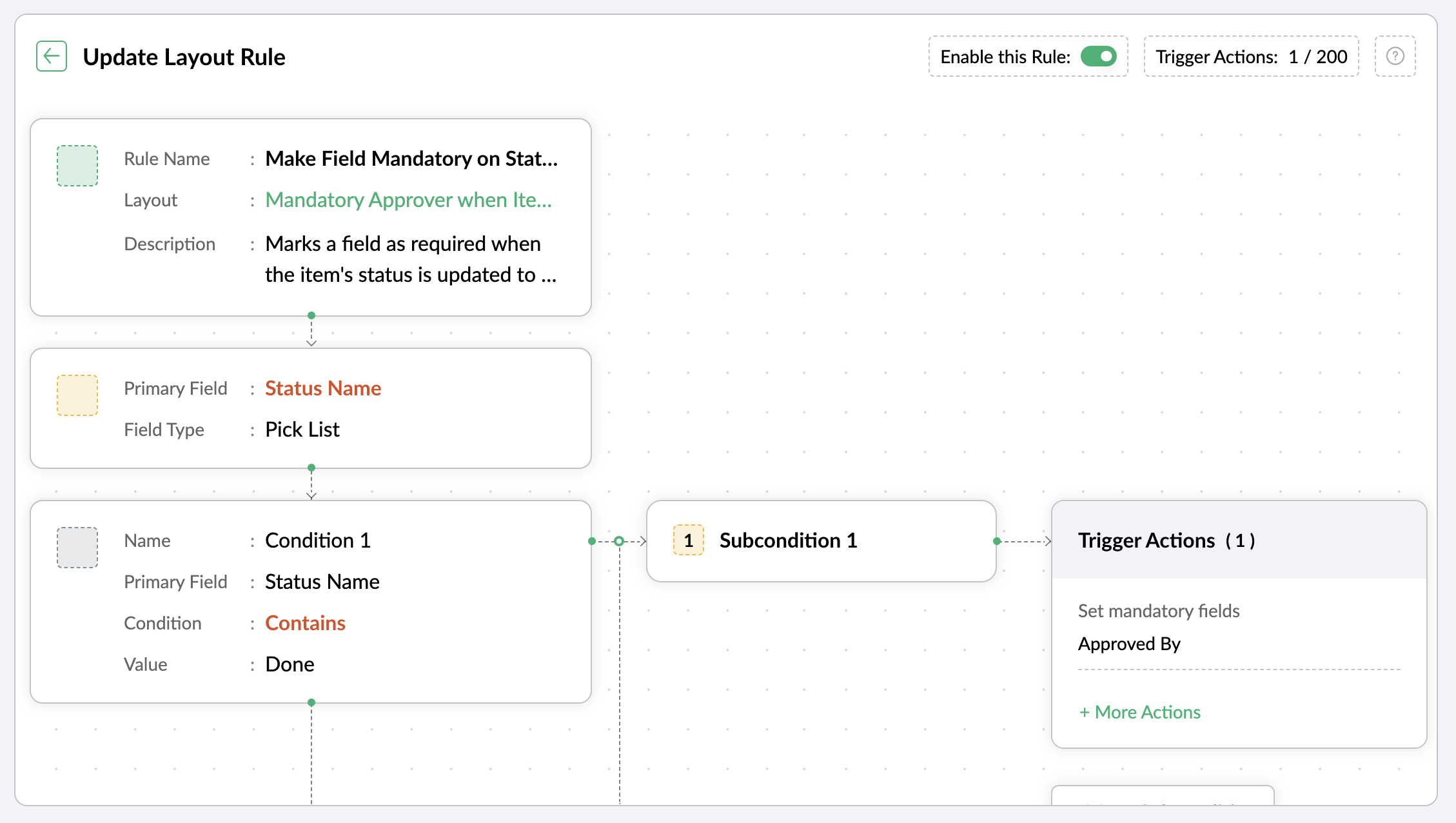
Let's assume you want a field to be made mandatory only when the item is moved to one particular status. Which implies the field will remain non-mandatory during other statuses and will be mandatory only at that particular status. So, the progress to that status must be allowed only when the mandatory field is updated.
For instance, when an item is moved to the Done status, the Approver field must become mandatory to record completion approval. To ensure that this process is executed, you can create a layout rule where the primary field is the Status Name. If the status field is updated to Done, specify the condition with the trigger action to set the Approver field as mandatory.
Use case 4: Showing or hiding a section or field based on item types
Layout rules enable you to show or hide fields or sections based on item type conditions.
Let's say a section with fields related to a new feature should only be visible when the item type is New Feature.
Similarly, when the item type is Security Issue, the section with fields related to Security issue must be visible.
To achieve this, create a layout rule with Item Type as the primary field.
- Create a condition for the New Feature item type with a trigger action to show the New Feature Details section.
- Create a condition for the Security Issue item type with a trigger action to show the Security Issue Details section.

Use case 5: Selecting specific assignees for item types and priorities
Layout rules can help you assign users based on the item type and priority. Let's say your team has a group of developers with varied levels of experience and expertise. You want to assign the high priority items to a more experienced member like John, while assigning low priority items to a novice like Peter.
If the item type is Bug and the priority level is Critical, you can assign the bug to John. If the priority level is High, it goes to Peter.
To meet this requirement, you can create a layout rule with Item Type as the primary field.
- Create a condition for the item type Bug with a subcondition where the priority level is Critical and the trigger action has the Set Field Value Assignee as John.
- For the same condition, add a subcondition where the priority level is High and the trigger action has the Set Field Value Assignee as Peter.
Similarly, say you want the Task item type with a medium priority level to go to Helen, and a low priority level should go to James.
- Create a condition for the item type Task with a subcondition where the priority level is Medium and the trigger action has the Set Field Value Assignee as Helen.
- For the same condition, add a subcondition where the priority level is Low and the trigger action has the Set Field Value Assignee as James.

These are just a few examples of how layout rules can streamline your project management. Do you have any particular scenario that needs resolution? Please share it with us.
Thanks,
Zoho Sprints Team
Topic Participants
Neethinila R
Sticky Posts
Tip #28 - Plan less and deliver more using WIP limit in Zoho Sprints
Hello, It's been a while since we met with a quick, interesting tip. As the saying goes, "Too much of anything is good for nothing", today the focus is on delivering your outcomes with the right amount of planning. Your plan should be practical, calculative, and achievable for driving a qualitative success. Laura's plan Laura has a habit of planning her project deliverables before assigning work to her team-mates. Once the plan is finalized, she schedules a general meeting with her team andTip # 3- Working on the Scrum board
Continuing from our Tip #2 on leading to a sprint, let's see how to manage the work items on the Scrum board. Once you start the sprint your work items are automatically displayed on the Scrum board where you will actually manage the work items. It is a snapshot of the backlog items identified for the current sprint. The layout of the Scrum board Simply put, the scrum board is just like a physical board with sticky notes on which the work items of the active sprint are displayed. The scrum boardTip#2- Leading you to a Sprint
Product Backlog After the user stories are written and finalized, they are sorted to create the Product Backlog for the project during the Backlog Grooming meeting. This is a master list of all the work items that have been identified for the project and sorted by priority. Requirements are not constant during this period.The Product Backlog is dynamic and is an ongoing process. Every user story in the Product Backlog is customer centric. The Product Backlog includes: User centric stories based onTip #1- Why swimlanes?
Lanes define a clear path to reach your destination. In Agile, swimlane is one such concept that sets a simple and clear process of the work that you do. The concept of swimlane can be related to the pool, where the swimmers gather in their respective lanes to start off. Similar to the pool, work items are grouped in different categories. Each category is referred as a lane and is displayed in horizontal format. Swimlanes are effective in categorizing the work items with respective to specific
Recent Topics
Is there a way to request a password?
We add customers info into the vaults and I wanted to see if we could do some sort of "file request" like how dropbox offers with files. It would be awesome if a customer could go to a link and input a "title, username, password, url" all securely and it then shows up in our team vault or something. Not sure if that is safe, but it's the best I can think of to be semi scalable and obviously better than sending emails. I am open to another idea, just thought this would be a great feature. Thanks,Single Task Report
I'd like a report or a way to print to PDF the task detail page. I'd like at least the Task Information section but I'd also like to see the Activity Stream, Status Timeline and Comments. I'd like to export the record and save it as a PDF. I'd like theAuto-response for closed tickets
Hi, We sometimes have users that (presumably) search their email inbox for the last correspondence with us and just hit reply - even if it's a 6 month old ticket... - this then re-opens the 6 month old ticket because of the ticket number in the email's subject. Yes, it's easy to 'Split as new Ticket', but I'd like something automated to respond to the user saying "this ticket has already been resolved and closed, please submit a new ticket". What's the best way to achieve this? Thanks, EdHow to Push Zoho Desk time logged to Zoho Projects?
I am on the last leg of my journey of finally automating time tracking, payments, and invoicing for my minutes based contact center company - I just have one final step to solve - I need time logged in zoho desk to add time a project which is associatedCannot access KB within Help Center
Im working with my boss to customize our knowledge base, but for some reason I can see the KB tab, and see the KB categories, but I cannot access the articles within the KB. We have been troubleshooting for weeks, and we have all permissions set up, customersExport to excel stored amounts as text instead of numbers or accounting
Good Afternoon, We have a quarterly billing report that we generate from our Requests. It exports to excel. However if we need to add a formula (something as simple as a sum of the column), it doesn't read the dollar amounts because the export storeswhy my account is private?
when i post on zohodesk see only agent onlyGetting ZOHO Invoice certified in Portugal?
Hello, We are ZOHO partners in Portugal and here, all the invoice software has to be certified by the government and ZOHO Invoice still isn´t certified. Any plans? Btw, we can help on this process, since we have a client that knows how to get the software certified. Thank you.500 Internal Server Error
I have been trying to create my first app in Creator, but have been getting the 500: Internal Server Error. When I used the Create New Application link, it gave me the error after naming the application. After logging out, and back in, the application that I created was in the list, but when I try to open it to start creating my app, it gives me the 500: Internal Server Error. Please help! Also, I tried making my named app public, but I even get the error when trying to do that.Client Script | Update - Client Script Support For Portals
Dear All! We are excited to announce the highly anticipated feature: Client Script support for Portals. We understand that many of you have been eagerly awaiting this enhancement, and we are pleased to inform you that this support is now live for allProfessional Plan not activated after payment
I purchased the Professional Plan for 11 users (Subscription ID: RPEU2000980748325) on 12 September 2025, and the payment has been successfully processed. However, even after more than 24 hours, my CRM account still shows “Upgrade” and behaves like aAuto Update Event Field Value on Create/Edit
Hi there, I know this question has been posted multiple times and I've been trying many of the proposed similar scripts for a while now but nothing seems to work... what might I do wrong? The error I receive is this: Value given for the variable 'meetingId'Pre-orders at Zoho Commerce
We plan to have regular producs that are avaliable for purchase now and we plan to have products that will be avaliable in 2-4 weeks. How we can take the pre-orders for these products? We need to take the money for the product now, but the delivery willPayroll and BAS ( Australian tax report format )
Hello , I am evaluating Zoho Books and I find the interface very intuitive and straight forward. My company is currently using Quickbooks Premier the Australian version. Before we can consider moving the service we would need to have the following addressed : 1.Payroll 2.BAS ( business activity statement ) for tax purposes 3.Some form of local backup and possible export of data to a widely accepted format. Regards Codrin MitinProblem with Email an invoice with multiple attachments using API
I have an invoice with 3 attachments. When I send an email manually using the UI, everything works correctly. I receive an email with three attachments. The problem occurs when I try to initiate sending an email using the API. The email comes with onlyPage Layouts for Standard Modules like CRM
For standard modules like quotes, invoices, purchase orders, etc, it would be a great feature to be able to create custom page layouts with custom fields in Zoho Books similar to how you can in Zoho CRM. For example, and my current use case, I have aNon-depreciating fixed asset
Hi! There are non-depreciable fixed assets (e.g. land). It would be very useful to be able to create a new type of fixed asset (within the fixed assets module) with a ‘No depreciation’ depreciation method. There is always the option of recording landFixed asset management
I want to know if there is any individual module for fixed assets managementOne time sale item in billing automatically detects as service
if i have some items which i don't want to add in my "item" list because its sold only for one time. but when i type item name in invoice, it (system) automatically takes it as a service and despite of HSN , it shows SAC code to be entered. if its selectable i.e. either item or service , it would be very helpful and a must have feature.Project template after project creation
How can I apply a project template AFTER the project has been created?convert the project to templet
i have some deployment ME product for different customer , i need to create a fixed template for use it rather then keeping creating this template every timeRelated Module in Sharing Rules
Zoho CRM team recently added the feature to filter records by Related Records It will be really beneficial if we can have this feature for Sharing Rules as wellAssignment Thresholds Resetting After Lead Conversion
Hello everyone, We're facing an issue with Zoho CRM's lead assignment thresholds that makes them unsuitable for our workflow. I'm hoping to find a potential workaround or solution from the community. Here’s our current process: A new lead is created automaticallyTerritory view for custom modules?
I have recently activated territories however I can't seem to find how to use territories for custom modules? These modules have territories: Contacts / Accounts / Opportunities These modules don't have territories: Buildings (custom module) andApproval Process Comments
Is it possible to view the comments entered during the approval or rejection of a record in the approval process? If not, is there a way to require a field to be completed upon approval or rejection?Login for test case
Had a few questions regarding authentication test cases and couldn't find an answer in the the docs. 1. If an app like Zoho Creator requires authentication before providing access, do I need to create a login function and add it to each test case? 2.Customer members area
Does FSM support a customer members area? If not what do you propose we use if we want the data used in FSM for customers to give them an area / login to see past orders, create new orders and general announcements.Notes created in mobile can no longer be accessed in desktop
Working with a 2013 Mac running OS 10.14.6; Desktop Notebook version 4.5.3. Using Motorola Moto G Power 5G - 2024; Android app version 6.7 I have been using Notebook for some years. Starting several weeks ago, the notes newly created ion the phone canFunction #49: Manage varying installment payments using Zoho Books
. Hello everyone, and welcome back to our series! Last week, we discussed automating the collection of fixed installment payments in Zoho Books. But what if your payment structure involves charging varying percentages of the invoice total as installments?Is it possible for contacts to "Re-enter" a workflow in Zoho Campaign?
We are currently working on a way to automatically add users to from one list to other lists based on specific criteria, but can't seem to find a native way of doing this so we are trying to use Workflows to do this. So, for example, if a user's status is set to "Active," then they should be added to the list "Active Users." If the same user's status is then set to "Paused," they should be added to the list "Paused Users" and removed from the list "Active Users." This works fine for the first goBulk upload images and specifications to products
Hi, Many users have asked this over the years and I am also asking the same. Is there any way in which we can bulk upload product (variant) images and product specifications. The current way to upload/select image for every variant is too cumbersome.Out of Office for Just One of My Alias Email
Can I set up the Out of Office Reply for Just One of my Alias Email Addresses?Can I map multiple Surveys into the CRM using the same fields?
Hello, We are a healthcare practice that offers two distinct services (Nutrition and Primary Care). We use Zoho Survey for our lead generation form (Get Started Survey), which allows people to express interest in one of the two services and even allowsDealing with API responses where integers have more than 16 digits
Hi there How do I deal with an api response contaning an int or float with more than 16 digits (before any decimal places for a float). I constantly receive the response "Unable to cast the 'BigInteger' value into a 'BIGINT' value because the input isAdd Zoho Mail for users who do not need Zoho One
We have licenses for ZOho One for teams that need to use the suite of products that Zoho One offers. We have 8 more people who only need email access and we would like to add just a Zoho Mail. They do not need the Zoho One license. We are currentlyZML vs HTML Snippet - which is better?
Are there certain use cases where one is better than the other?Auto CheckOut Based On Shift.
This Deluge script runs on a scheduled basis to automatically set the 'Actual_Check_Out' time for employees who haven't manually checked out. If the current time is past their scheduled 'Shift_End_Time', the script updates the check-out time to matchLoad PO_Date field (Purchase Order) with current date in Deluge
Hi, I'm not a full time developer, just helping to customize our CRM, in the small company I work for. There must be something wrong with me, because I can't do something so simple as complete a field with the current date in a function using Deluge.Zoho CRM in Microsoft Power Automate Custom Connector
Hi everyone, I’m building a Power Automate flow that integrates Microsoft Bookings with Zoho CRM. The goal is to automatically create a meeting (event) in Zoho CRM whenever a new appointment is booked via Microsoft Bookings. To achieve this, I createdSpell check sucks
Come on guys, it's 2024 and your spell check is completely retarded. You gotta fix it.Next Page