Building extensions #1: Creating and testing extensions for Zoho Finance Suite applications
Hello developers!
We're excited to announce a new series called "Building extensions" to assist developers in creating efficient extensions for Zoho Finance Suite products. We'll support and guide you through the process of creating an extension and using the features offered in the developer portal.
What are extensions?
Extensions are installable plugins or add-ons that help enhance the existing functionality of your Zoho product or seamlessly integrate and interact with third-party applications for data transmission.
How can you build extensions?
Zoho offers a developer platform called Zoho Developer that allows you to build different types of applications. Sigma is a platform offered within Zoho Developer that is specifically designed for creating extensions for various Zoho products. Throughout this series, we'll look at how to create and develop extensions for the Zoho Finance Suite applications using Sigma.
Get to know all about extensions and building them further in detail.
Sigma extension support
The Zoho Finance Suite consists of seven applications: Zoho Books, Zoho Inventory, Zoho Expense, Zoho Invoice, Zoho Billing, Zoho Checkout, and Zoho Payroll. Currently, the Sigma platform supports creating and building extensions for these five Zoho Finance applications:
- Zoho Books
- Zoho Inventory
- Zoho Expense
- Zoho Invoice
- Zoho Billing
Creating an extension
- Log in or sign up at developer.zoho.com.
- Go to Sigma and access your workspace.
- Once you enter your workspace, you'll be taken to the Extensions section in Sigma.
- Click the New Extension button to start building an extension.
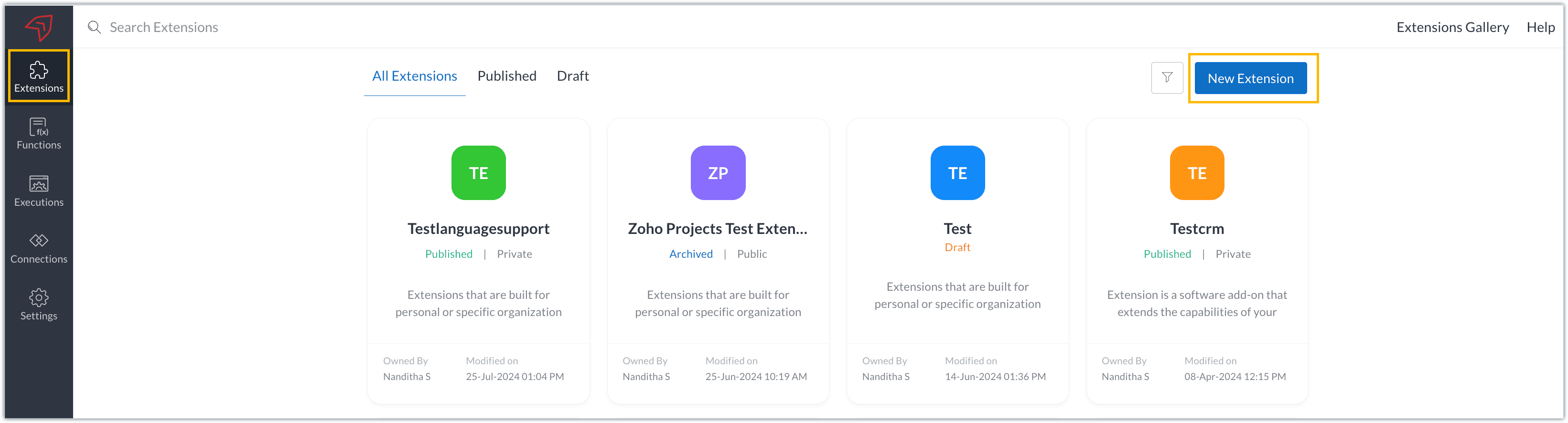
- Enter a name and description for the extension and choose the service you want to build the extension for. As mentioned earlier, Sigma offers support for Zoho Books, Zoho Invoice, Zoho Inventory, Zoho Billing, and Zoho Expense.
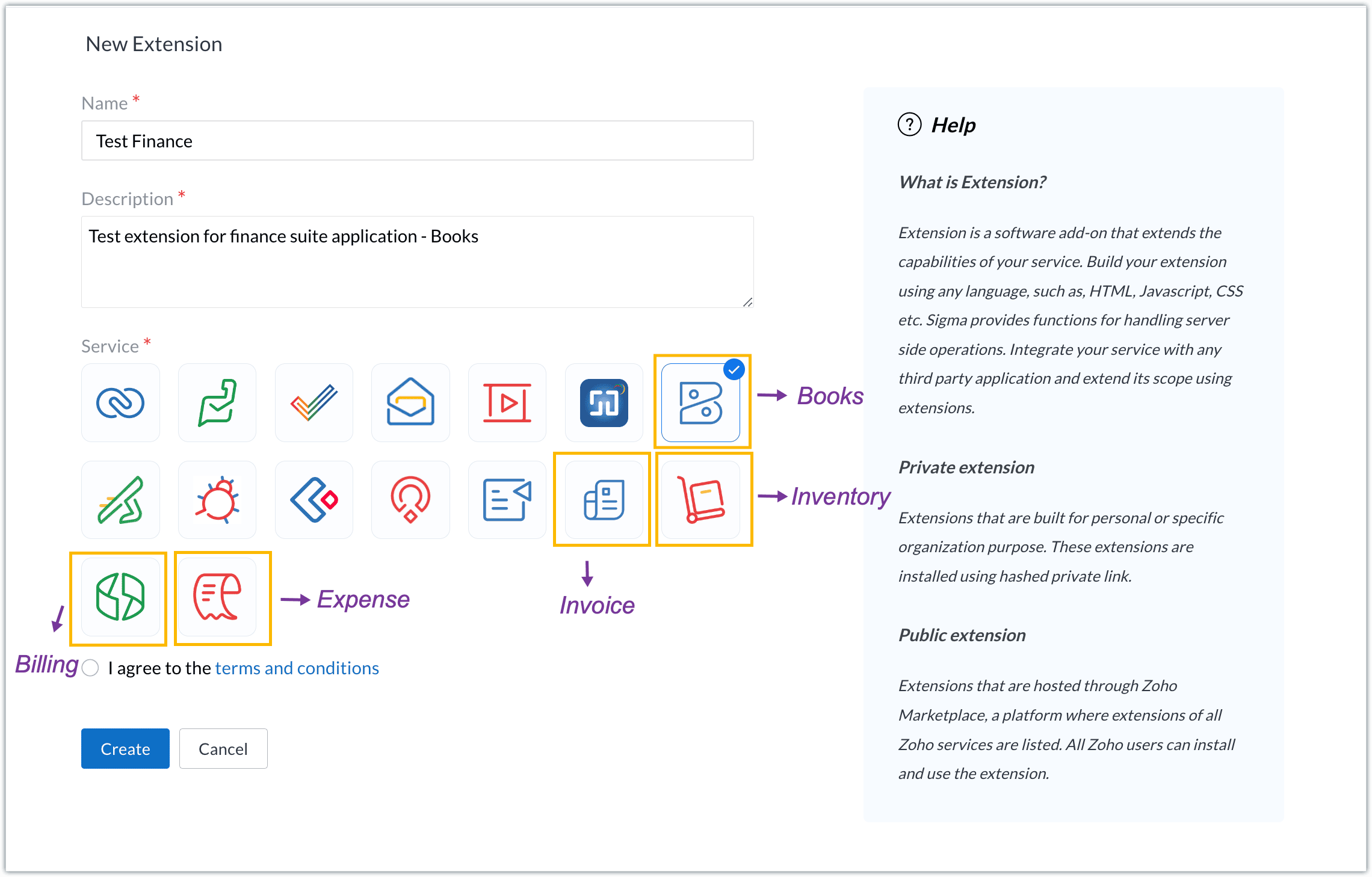
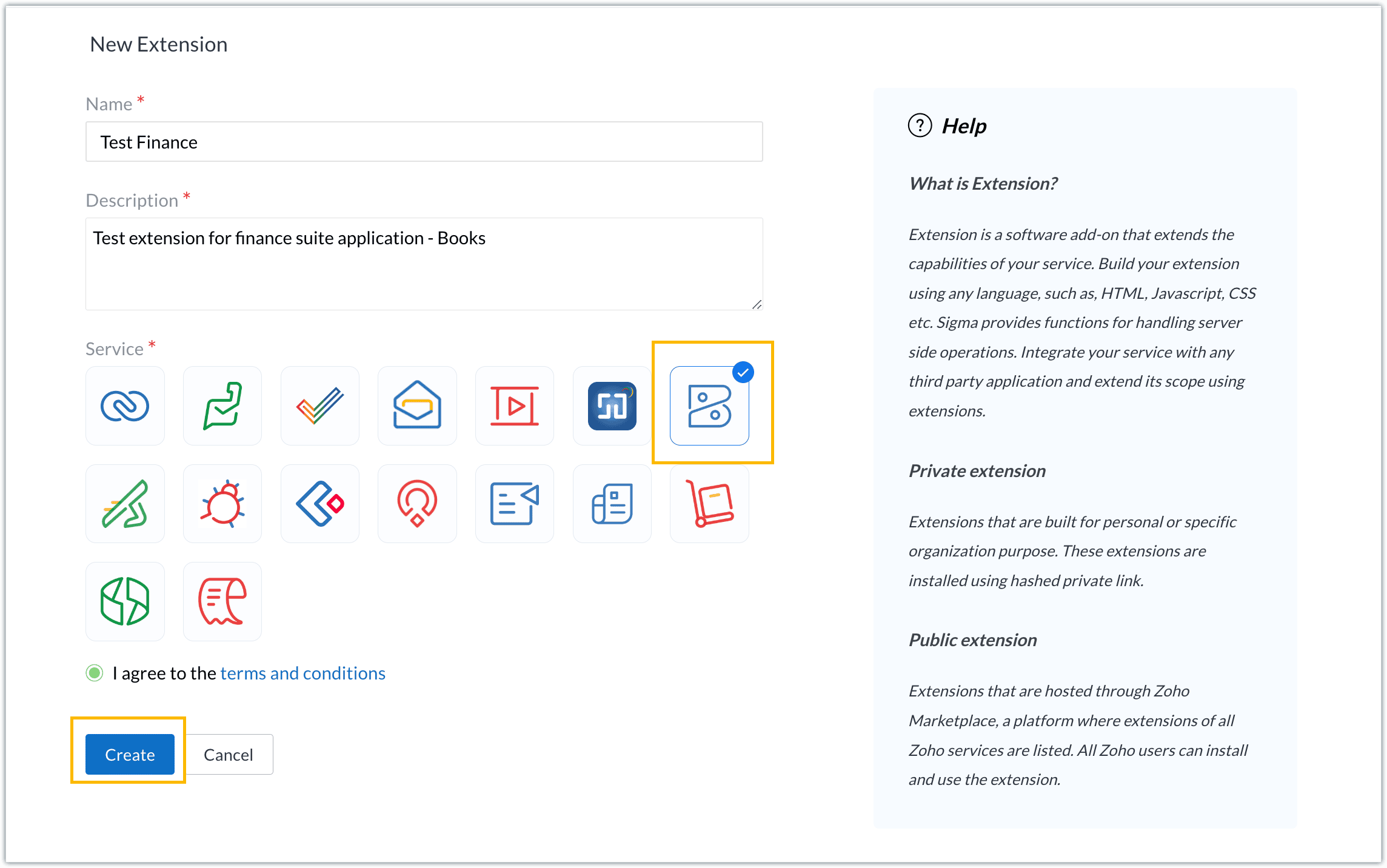
- For our demo, let's choose the service as Zoho Books. Accept the terms and conditions, and then click Create.
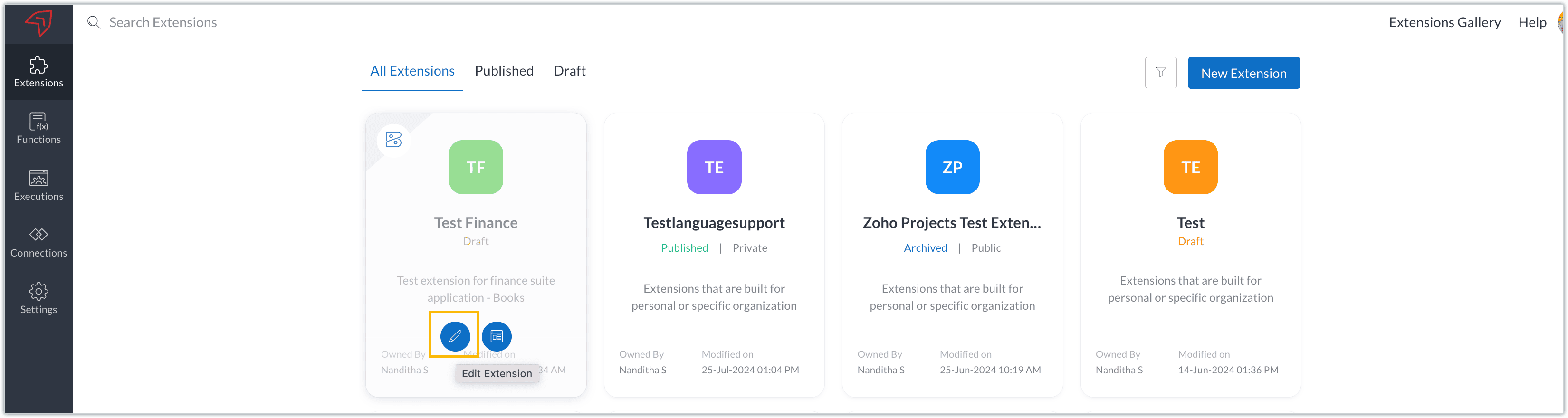
- The extension is successfully created. You can click the Extension Details icon to see an overview of the extension.
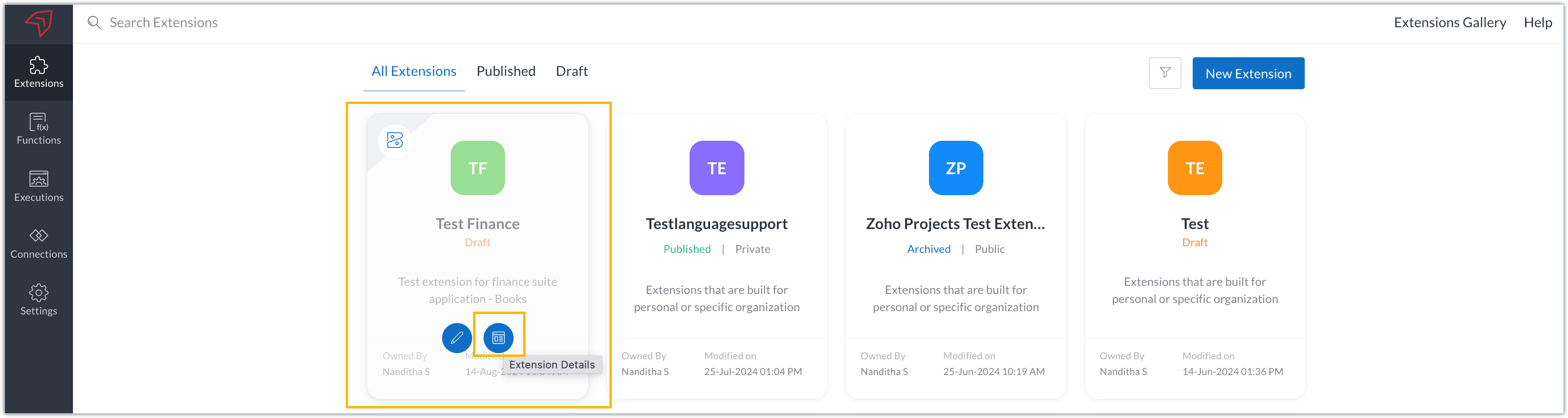
The extension details page shows the general details of the extension, such as creation date, creation time, and version, and allows you to associate developers with the extension.
- Click the Edit Extension icon to start developing the extension.
- The Zoho Books Developer Portal opens with the options and native features available to customize, curate, and develop your extension.
Zoho Books Developer Portal sections
The developer portal has four different sections to help customize and build your extension.
Learn: This section lists the native Zoho Books capabilities that can be used to create and develop extensions. Clicking the Set up Now button next to each feature will take you to the feature's development setup page.

Build: This is the development setup section, which includes customization, automation, and components like connections, widgets, schedules, webhooks, and signals. You can customize your extension preferences, establish connections to integrate with other applications, and design custom interfaces to enhance user experience.

Configure: This section assists with handling your extension's required configurations, whether they are generic settings or customizations required from the user. You can add global fields, which can be incorporated as either variables that store static data or through custom widgets that retrieve user inputs. You can also define functionalities that happen during installation and uninstallation.

Publish: Once the extension has been built and configured, you can use this section to publish it for either private or public use. In both cases, the Zoho Books team will review the extension; for public extensions listed on Zoho Marketplace, the Zoho Marketplace approval team will also review them. You can share your privately published extension with other users using the Shared List option.

We will explore more about each of these sections and their features in upcoming posts.
Testing an extension
The Zoho Books Developer Portal offers a dedicated testing environment for each extension, allowing you to test and validate it before publishing.
As a developer, you can use the Test Your Extension option in the top right corner of the portal to access your extension's sandbox environment.

This will redirect you to the sandbox testing environment for the extension you're developing, which is similar to Zoho Books and contains relevant modules to test with.

You can populate necessary data and test your extension functionality. Once everything is validated, you can go ahead and publish your extension for private or public use.
For support or questions related to Zoho Finance Suite extension development, you can email developer@zohofinance.com.
We hope you found this guide useful. Keep following this space for more information!
Topic Participants
Nanditha Somasundaram Somasundaram
Sticky Posts
Building extensions #5: Creating custom connections for extensions
In our previous post, we discussed the significance of connections, identified their types, developed a predefined connection, and demonstrated how it can be integrated with Zoho Books using an example. In this post, we'll walk through the process ofBuilding extensions #4: Integrating Zoho Books with applications using connections
In our last post, we looked at an overview of the key features available for creating a Zoho Books extension, including connections. In this post, we'll go over connections in depth, including their types and applications. What are connections? "Connections"Building extensions #3: Fundamental features of a Zoho Books extension
In our earlier posts, we covered how to create, test, and publish an extension for Zoho Finance suite applications. Moving forward, we'll look specifically at instances relating to one of the products from the Zoho Finance suite: Zoho Books. In this post,Building extensions #2: Publishing an extension
Hello developers, Welcome to our next post about building extensions for Zoho Finance Suite applications. In our previous post, we looked at extensions, their purpose, and how to create and test them. To recap, extensions are installable plugins or add-onsBuilding extensions #1: Creating and testing extensions for Zoho Finance Suite applications
Hello developers! We're excited to announce a new series called "Building extensions" to assist developers in creating efficient extensions for Zoho Finance Suite products. We'll support and guide you through the process of creating an extension and using
Recent Topics
【開催報告】 福岡 ユーザー交流会 2025/8/8(金)
皆さま、こんにちは。コミュニティチームの中野です。 8/8(金)に、福岡 ユーザー交流会を開催しました。 本投稿では、その様子をお届けします。当日の登壇資料などもこちらに共有しますので、参加できなかった皆さまもご参照ください。 今年初の開催となる福岡 ユーザー交流会では、CreativeStudio樂合同会社 前田さんによるZoho CRM / Sign / Survey の事例セッションのほか、 Zoho社員セッションでは、Zoho Forms の活用法を解説。 さらに、「見込み客・顧客データの管理/活用方法」をテーマに参加者同士でZohoError: Invalid login: 535 Authentication Failed
I have used zoho with nodemailer. const transporter = nodemailer.createTransport({ host: 'smtp.zoho.com', port: 465, secure: true, auth: { user: 'example@example.com', pass: 'password' } }); While sending the mail, it shows the following error: Error:Zoho Renewal
Hello, If I am not going for zoho email renewal. will i get back my free zoho account? and if yes then is it possible to get back my all free user. how many user get back 10 or 25?Not reciving emails
Apparently i cannot recive emails on my adress contact@sportperformance.ro I can send, but do not recive. The mail i'm trying to send from mybother adress gets sent and doesn't bounce back... but still doesn't get in my inbox. Please adviseNot receiving MailChimp verification e-mail
It seems that their verification e-mails are blocked. I can receive their other e-mails, but not their verification of domain ownership e-mail. I've checked and double checked how I typed the e-mail, using different e-mails (my personal e-mail can receive it), white listing the domain and all that is left is for the IP's to be white listed, but I don't have that power. If a staff member could take a look at this -> http://mailchimp.com/about/ips/ And perhaps white list them for me, that would beCreating my 2nd email account
After creating my first email address, I decided to get another email address. I would like to use this new address as the primary address too. I don't know how to set it up there doesn't seem to be an option for thatCannot - create more email account - Unusual activity detected from this IP. Please try again after some time
Hello, I come across the error message in Control Panel. Unusual activity detected from this IP. Please try again after some time and i cannot create any more users We are an IT company and we provide service for another company Please unlock us."Unable to send message;Reason:553 Relaying disallowed. Invalid Domain"
Good day. When I try to send mail through ZOHO mail I get the following error : "Unable to send message;Reason:553 Relaying disallowed. Invalid Domain" I need help with this. My zohomail is : @eclipseweb.site Thank you,Transfert de domaine pour création des comptes emails
Bonjour , je ne parviens point à créer des mails avec le domaine 'raeses.org' suite à la souscription du domaine auprès d'un autre hébergeur, dont j'ai fait la demande du code de transfert qui est le suivant : J2[U8-l0]p8[ En somme, attente de l'activationHelp! Unable to send message;Reason:554 5.1.8 Email Outgoing Blocked.
Kindly help me resolved this issue that i am facing here.How are people handling estimates with Zoho inventory?
We are often using Zoho Books for estimates that then get converted to invoices within Books. We would like the sales team to migrate entirely to Zoho Inventory and no longer need to use Zoho Books so that they are only on one system. How are people managingRelative Date Searches
Currently in the search options, it has "date", "from date" and "to date". I think it would be great if there were options like "date greater than x days ago" and "date less than x days ago". I realise that as a once off you can just use the existingAsk the Experts 23: Customize, utilize, and personalize with Zoho Desk
Hello everyone! It's time for the next round of Ask the Experts (ATE). This month is all about giving Zoho Desk a complete makeover and making it truly yours. Rebrand Zoho Desk with your organization’s details, customize ticket settings based on yourPlease review and re-enable outgoing emails for my domain
Hello Zoho Support, I have recently purchased a new domain and set up email hosting with Zoho. However, my account shows "Outgoing Email Blocked". I am a genuine user and not sending bulk/spam emails. Please review and re-enable outgoing emails for myPayroll without tax integrations (i.e. payroll for international)
It seems as though Zoho waits to develop integrations with local tax authorities before offering Zoho Payroll to Zoho customers in a country. Please reconsider this approach. We are happy Zoho Books customers, but unhappy that we have to run payroll ingoingout e mail block
info@ozanrade.com.trIncoming mails blocked
Zoho User ID : 60005368884 My mail Id is marketing#axisformingtechnology.com .I am getting following message "Your Incoming has been blocked and the emails will not be fetched in your Zoho account and POP Accounts. Click here to get unblocked." PleaseConfiguring Email Notifications with Tautulli for Plex
Hi I'm new to Zoho. I am from Canada and I have a I use a web based application called Tautulli for Plex that monitors my Plex media server. It also sends a newsletter to my followers. To set this up they require a "From" email address., a smtp serverHow to Set Up Zoho Mail Without Cloudflare on My Website
I'm having some trouble with Cloudflare here in Pakistan. I want to configure Zoho Mail for my domain, but I'm not sure how to set it up without going through Cloudflare. My website, https://getcrunchyrollapk.com/ , is currently using CF, but I'd likeSpam is Being Forwarded
I am filtering a certain sender directly to the Trash folder. Those messages are still being forwarded. Is this supposed to happen?IMAP Block
My two accounts have been blocked and I am not able to unblocked them myself. Please respond to email, I am traveling and this is urgent."DKIM not configured"
Hello. I have been attempting get the DKIM verified but Toolkit keeps sending the message that it is not configured, but both Namecheap and Zoho show it as configured properly. What am I missing?Zoho mail with custom domain not receiving email
i registered zoho mail with my own domain. I can login and access the mail app. I tried to send email from an outlook email account and an icloud email account. Both emails were not received. My plan is free. I also tried to send email from this zohoA Sales Ebook to help Sales representatives increase Sales.
I worked in sales for twenty years with the same company. I was an outdoor sales representative selling health insurance. My first Year I made it into the company's President's club. I wrote an Ebook sharing how I was able to achieve success in salesWaterfall Chart
Hello, I would like to create a waterfall chart on Zoho analytics which shows the movement in changes of budget throughout a few months, on a weekly basis. Should look something like the picture below. Does anyone know how to?Issue with Importing Notes against Leads
Hi, I am attempting to import some Notes into Zoho CRM which need to be assigned to various Leads. I have created a csv file which I am testing that contains just one record. This csv file contains the following columns: Note Id Parent Id (I haveOption to Hide Project Overview for Client Profiles
In Zoho Projects, the Project Overview section is currently visible to client profiles by default. While user profiles already have the option to restrict or hide access to the project overview, the same flexibility isn’t available for client profiles.Creator Add Records through API - Workflows not triggered ?
Hi Everyone, I am trying to add records to my Creator application through a third party app that I am developing. Currently, I am testing this through Postman. The records I need to add have a lot of workflows to run to populate dropdowns, fields, useImportant Update: Changes to Google Translate Support in Zoho SalesIQ
We’re updating our default chat translation options across all Zoho SalesIQ data centres to offer a more secure, in-house solution for your translation needs. What’s changing? We will be offering Zoho Translate (our in-house tool) as the default translationZoho CRM Community Digest - July 2025 | Part 1
Hey everyone, The start of July 2025 marked a special milestone: 200 posts in our Kaizen series! For those new here, Kaizen is a go-to series for Zoho CRM developers, where we regularly share best practices, tips, and expert insights to help you buildWhat’s New in Zoho Expense (April – July 2025)
Hello users, We're happy to bring you the latest updates and enhancements we've made to Zoho Expense over the past three months, which include introducing the Trip Expense Summary report in Analytics, extending Chatbot support to more editions, rollingWeekly Tips: Insert frequently used phrases in a jiffy using Hotkeys
You often find yourself using similar phrases in an email —like confirming appointments or providing standard information. Constantly switching between the mouse and keyboard interrupts your flow and slows you down.Instead of typing the same phrases overUndo Command in Notebook
It would be handy to have an Undo in the row of icons at the bottom of the notes.Narrative 9: GC—Meaningful conversations that benefit your customers
Behind the scenes of a successful ticketing system - BTS Series Narrative 9: GC—Meaningful conversations that benefit your customers Customers often seek immediate solutions, which is why self-service options are essential. Guided Conversations providesFSM App Oddity
We recently rolled out FSM to our technicians, and only one technician is having an issue. He's using an iPhone with iOS 18.6 installed. When he goes to service appointments using the calendar icon at the bottom of the app, he gets a list view only. Typically,Cliq Not Working !
Zoho Cliq has been experiencing connectivity issues since this morning. The app is unable to establish a connection with the server.Injecting CSS into ZML pages
Is there a way to inject CSS into ZML pages? Use case: 1. Dashboard displays 'Recent Activities' card displaying a list of newly added records 2. Each item in list links to the record onClick 3. When a user points the cursor over an item in the list,Power of Automation :: Automated Weekly Notifications for Unapproved Timesheets
Hello Everyone, A custom function is a software code that can be used to automate a process and this allows you to automate a notification, call a webhook, or perform logic immediately after a workflow rule is triggered. This feature helps to automateExtracting Data from Sitelink APIs
Hi All, I'm working to pull data on Sitelink using API calls but i can't seem to extract it. If you click expand, you will see it has a lot of data in it. I tried extracting from the map but it's not giving me anything. Is there a workaround on this orExport a list of fields for all modules in a spreadsheet with specific field data
Many of my clients are using spreadsheets to create lists of fields for all modules when starting a new implementation or when updating an existing setup. This is a useful process but also a very time consuming one. It would be good a list of fields couldNext Page