Building extensions #1: Creating and testing extensions for Zoho Finance Suite applications
Hello developers!
We're excited to announce a new series called "Building extensions" to assist developers in creating efficient extensions for Zoho Finance Suite products. We'll support and guide you through the process of creating an extension and using the features offered in the developer portal.
What are extensions?
Extensions are installable plugins or add-ons that help enhance the existing functionality of your Zoho product or seamlessly integrate and interact with third-party applications for data transmission.
How can you build extensions?
Zoho offers a developer platform called Zoho Developer that allows you to build different types of applications. Sigma is a platform offered within Zoho Developer that is specifically designed for creating extensions for various Zoho products. Throughout this series, we'll look at how to create and develop extensions for the Zoho Finance Suite applications using Sigma.
Get to know all about extensions and building them further in detail.
Sigma extension support
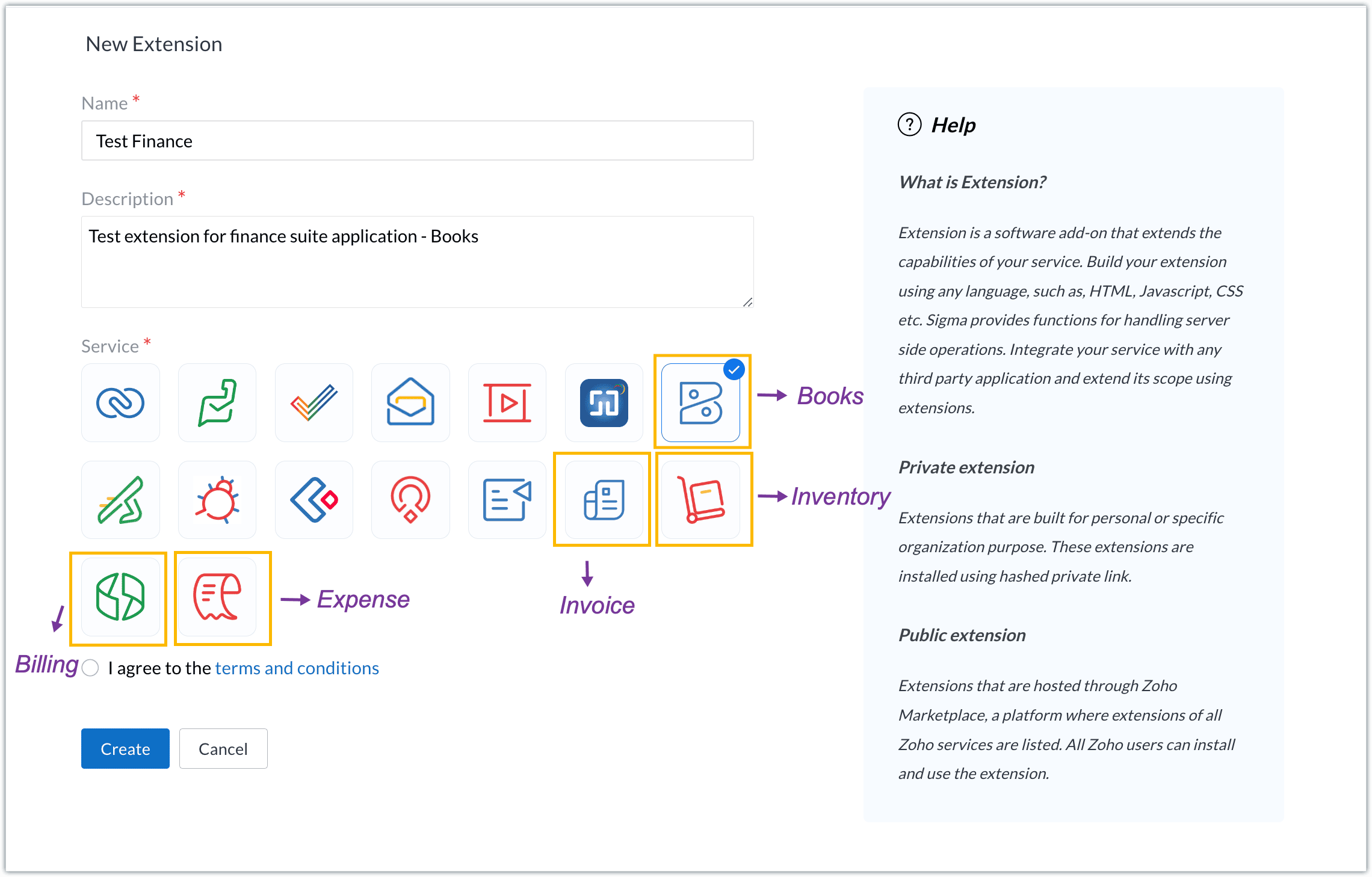
The Zoho Finance Suite consists of seven applications: Zoho Books, Zoho Inventory, Zoho Expense, Zoho Invoice, Zoho Billing, Zoho Checkout, and Zoho Payroll. Currently, the Sigma platform supports creating and building extensions for these five Zoho Finance applications:
- Zoho Books
- Zoho Inventory
- Zoho Expense
- Zoho Invoice
- Zoho Billing
Creating an extension
- Log in or sign up at developer.zoho.com.
- Go to Sigma and access your workspace.
- Once you enter your workspace, you'll be taken to the Extensions section in Sigma.
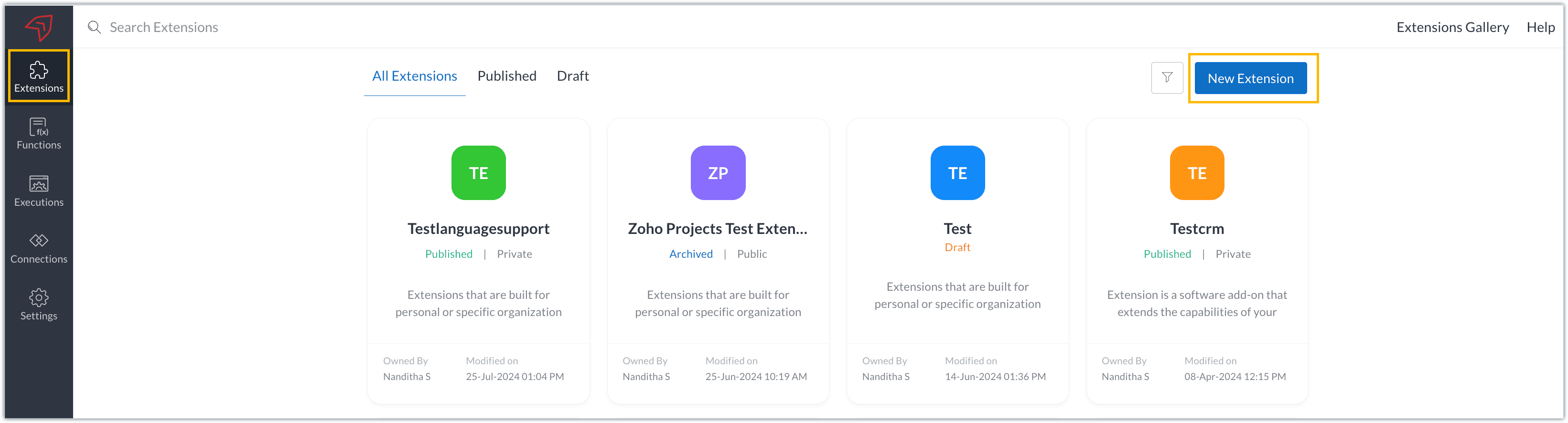
- Click the New Extension button to start building an extension.
- Enter a name and description for the extension and choose the service you want to build the extension for. As mentioned earlier, Sigma offers support for Zoho Books, Zoho Invoice, Zoho Inventory, Zoho Billing, and Zoho Expense.
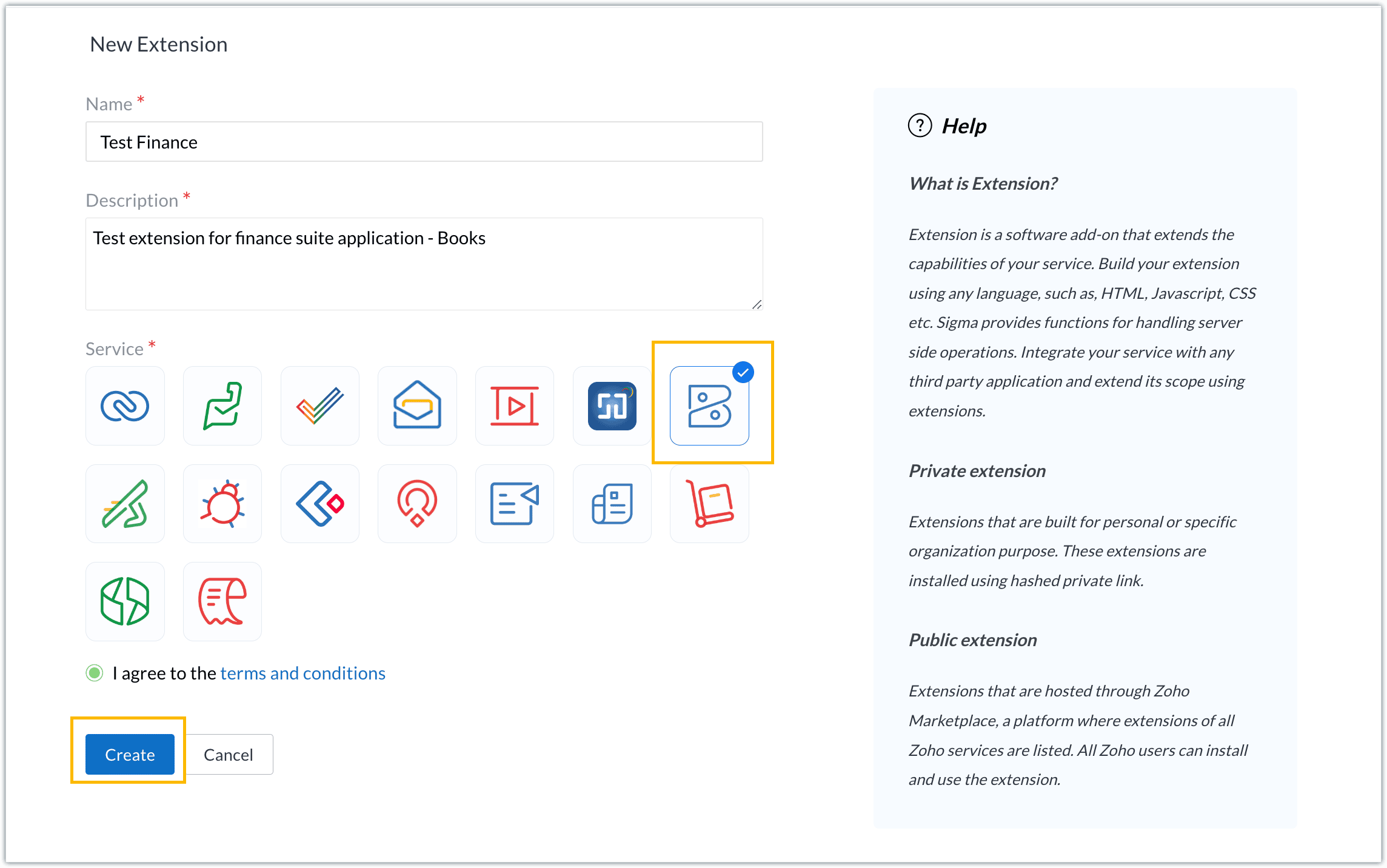
- For our demo, let's choose the service as Zoho Books. Accept the terms and conditions, and then click Create.
- The extension is successfully created. You can click the Extension Details icon to see an overview of the extension.
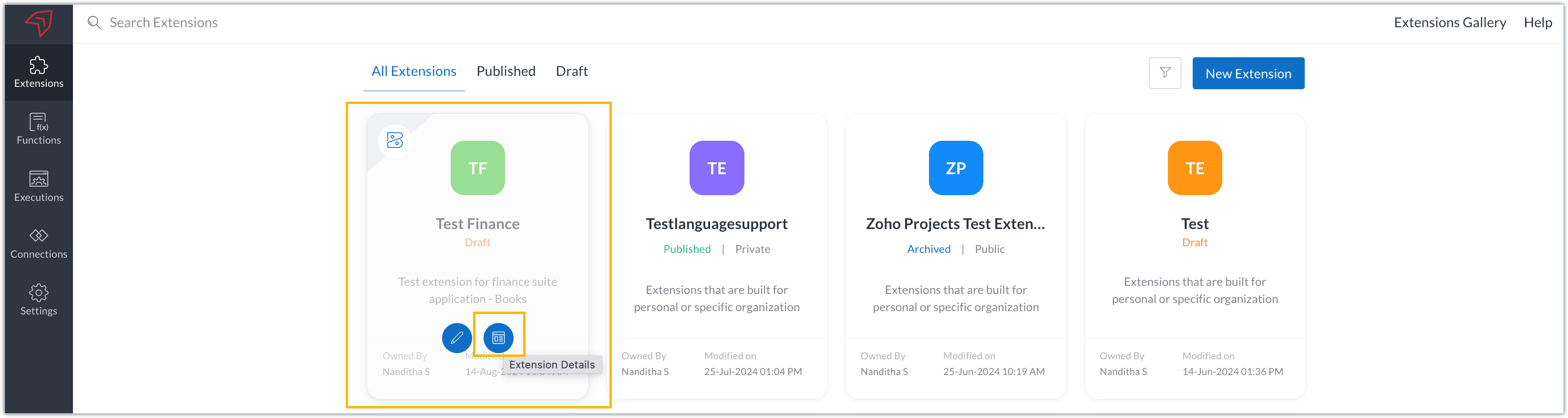
The extension details page shows the general details of the extension, such as creation date, creation time, and version, and allows you to associate developers with the extension.
- Click the Edit Extension icon to start developing the extension.
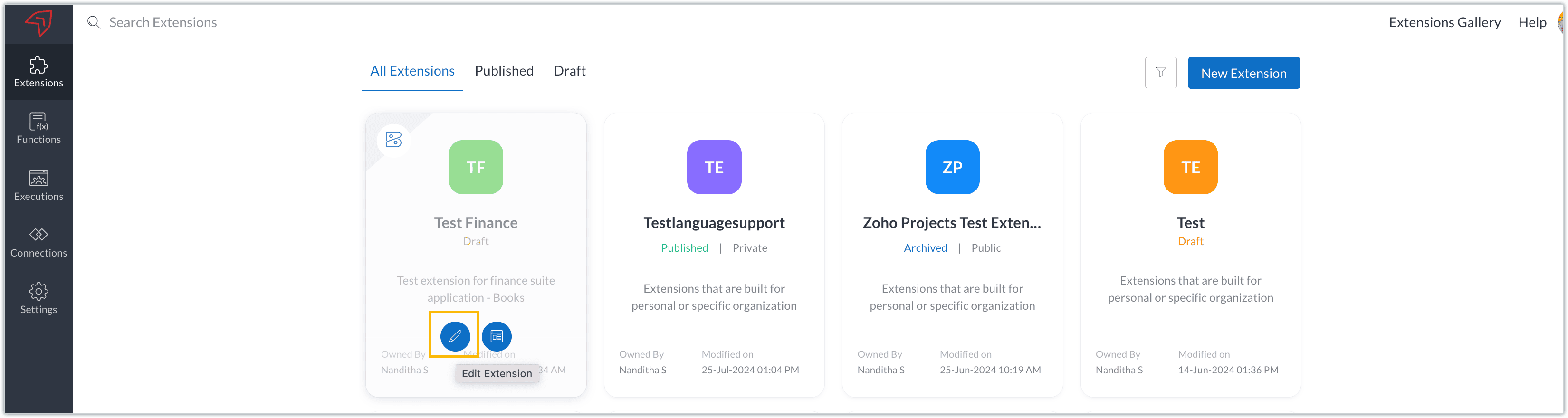
- The Zoho Books Developer Portal opens with the options and native features available to customize, curate, and develop your extension.
Zoho Books Developer Portal sections
The developer portal has four different sections to help customize and build your extension.
Learn: This section lists the native Zoho Books capabilities that can be used to create and develop extensions. Clicking the Set up Now button next to each feature will take you to the feature's development setup page.

Build: This is the development setup section, which includes customization, automation, and components like connections, widgets, schedules, webhooks, and signals. You can customize your extension preferences, establish connections to integrate with other applications, and design custom interfaces to enhance user experience.

Configure: This section assists with handling your extension's required configurations, whether they are generic settings or customizations required from the user. You can add global fields, which can be incorporated as either variables that store static data or through custom widgets that retrieve user inputs. You can also define functionalities that happen during installation and uninstallation.

Publish: Once the extension has been built and configured, you can use this section to publish it for either private or public use. In both cases, the Zoho Books team will review the extension; for public extensions listed on Zoho Marketplace, the Zoho Marketplace approval team will also review them. You can share your privately published extension with other users using the Shared List option.

We will explore more about each of these sections and their features in upcoming posts.
Testing an extension
The Zoho Books Developer Portal offers a dedicated testing environment for each extension, allowing you to test and validate it before publishing.
As a developer, you can use the Test Your Extension option in the top right corner of the portal to access your extension's sandbox environment.

This will redirect you to the sandbox testing environment for the extension you're developing, which is similar to Zoho Books and contains relevant modules to test with.

You can populate necessary data and test your extension functionality. Once everything is validated, you can go ahead and publish your extension for private or public use.
For support or questions related to Zoho Finance Suite extension development, you can email developer@zohofinance.com.
We hope you found this guide useful. Keep following this space for more information!
Topic Participants
Nanditha Somasundaram Somasundaram
Sticky Posts
Building extensions #5: Creating custom connections for extensions
In our previous post, we discussed the significance of connections, identified their types, developed a predefined connection, and demonstrated how it can be integrated with Zoho Books using an example. In this post, we'll walk through the process ofBuilding extensions #4: Integrating Zoho Books with applications using connections
In our last post, we looked at an overview of the key features available for creating a Zoho Books extension, including connections. In this post, we'll go over connections in depth, including their types and applications. What are connections? "Connections"Building extensions #3: Fundamental features of a Zoho Books extension
In our earlier posts, we covered how to create, test, and publish an extension for Zoho Finance suite applications. Moving forward, we'll look specifically at instances relating to one of the products from the Zoho Finance suite: Zoho Books. In this post,Building extensions #2: Publishing an extension
Hello developers, Welcome to our next post about building extensions for Zoho Finance Suite applications. In our previous post, we looked at extensions, their purpose, and how to create and test them. To recap, extensions are installable plugins or add-onsBuilding extensions #1: Creating and testing extensions for Zoho Finance Suite applications
Hello developers! We're excited to announce a new series called "Building extensions" to assist developers in creating efficient extensions for Zoho Finance Suite products. We'll support and guide you through the process of creating an extension and using
Recent Topics
I Want migarte all invoice details to zoho sheets
I want to migrate all existing invoice details to Zoho Sheet, and automatically update the sheet whenever a new invoice is created.were can i find my invoices i need this for my accountant
were can i find my invoices i need this for my accountant, how can i get id direct to my email?ONLY email field not populating Writer fillable document (randomly)
I have a Zoho Writer fillable document that has pulled all my data from my Zoho Sheets file, EXCEPT the email column. It pulled every data before and after that column with no issues. Screenshots attached. It's not my first time using the app or the feature,My number is marked as spam
Hello Zoho Mail Support, My phone number was incorrectly flagged as “spam” during sign-up. This is my personal number, and I have not engaged in any spam activities. Kindly review and verify my account so I can proceed with my email setup. Thanks.Personnalisation des paramètres dans Zoho Mail
Pourquoi cela compte-t-il ? La personnalisation des paramètres dans Zoho Mail permet aux administrateurs de configurer l’environnement de messagerie en fonction des besoins spécifiques de leur organisation. Que ce soit pour alléger l’interface pour certainesHow To Save Data Into Zoho CRM Sandbox
Hi Community, I want to save data into my zoho sandbox , for this I am using this api endpoint - https://www.zohoapis.com/crm/v8/Patients but I am getting this error - { "success": false, "message": "Zoho API request failed", "error": { "code": "INVALID_MODULE",Question about retrieving unsubscribed contacts (outside of lists) via API
Hello, I am currently using Zoho Marketing Automation and would like to integrate it with our company’s core system. For this purpose, I am exploring the API options available to retrieve contact information. Specifically, I would like to know if thereGetting “mandatory field missing: Service_Line_Items” When Creating Work Order via Zoho Flow Deluge
Hi Team, I’m trying to create a Work Order in Zoho FSM with only a Service Line Item (no Parts). However, I keep getting this error: Work Order Response: {"code":"MANDATORY_NOT_FOUND","details":{"api_name":"Service_Line_Items"},"message":"required fieldHow to customize the colors of the Client Portal login screen and add the company logo?
As title, how to customize the colors of the Client Portal login screen and add the company logo?Daily updates/fixes and how to see what was changed?
When I receive the notification that zoho was updated and I need to refresh it. How can I see what was changed or fixed? Sometimes they change things that effect my books and I need to know what they did. For example over this past weekend something wasUpcoming Change: Snowflake Username/Password Authentication Deprecation – Action Required
Hello Users, Snowflake has officially announced that username and password-based authentication will be deprecated by November 2025. You can find the official announcement [here]. If you're using a Snowflake connection in Zoho Analytics to import data,Why should I choose Zoho Inventory vs Odoo?
Hello there! I have used Zoho in different companies I've worked in, and I have a positive perception of it. I am starting a new import business for pipes, tubes, fittings, valves, elbows, etc., which all have serial numbers, cast numbers, etc., so IProduct Updates in Zoho Workplace applications | July 2025
Hello Workplace Community, Let’s take a look at the new features and enhancements that went live across all Workplace applications this July. Zoho Mail Import bookmarks from Pocket Worried about losing your Pocket bookmarks? Don't worry we have got you.PLEASE FIX YOR BUGS
PICTURES ARE BEING REJECTED DESPITE THEM FOLLOWING THE GUIDELINES ON DIMENTIONS.Kaizen# 204 - Answering Your Questions | Perform Field Updates before Blueprint transition via Client Script
Hello everyone! Welcome back to another exciting Kaizen post. One of the questions we received through your Kaizen feedback was: “How can I update fields before Blueprint transition and how to prevent a transition based on a condition using Client Script?”Create online meetings for Booking Pages with Zoho Meetings and Zoom
Greetings, We hope you're all doing well. We're excited to share some recent enhancements to Bigin's Booking Pages. As you know, Booking Pages let you create public pages to share your availability so that your customers can easily book time slots withFilters in audit logs
Greetings, I hope all of you are doing well. We're happy to announce a few recent enhancements we've made to Bigin. We'll go over each one in detail. Previously, there were no filters available to narrow down data in audit logs. Now, we've introducedEnhanced help options in Bigin
Greetings, We're excited to introduce a new enhancement to Bigin's Help section: a comprehensive Help Options panel that brings together all your support resources in a single, well-organized space. Previously, the Need Help? menu provided only a limitedZoho FSM API Developer Needed
Hi, I’m looking for a developer with experience using Zoho FSM APIs. Scope: Connect WordPress website booking form to Zoho FSM Check availability (date, time, region) Create Work Orders + Service Appointments automatically Notify both customer and schedulerRevenue Management: #4 What if there are uncertainties in project or service delivery?
Our previous post taught us how Zoho Billing makes life easy for businesses with its automated revenue recognition rule. However, certain businesses have more challenges that an automated system cannot handle, and there are certain situations where automatedThis mobile number has been marked spam. Please contact support-as@zohocorp.com
Bom dia, estou tentando colocar o número 11 94287-6695 e esta com erro "This mobile number has been marked spam. Please contact support-as@zohocorp.com" pode me ajudar, por favor?Items Serial Tracking Issue
We enabled Zoho Items inventory tracking then disabled it after some time now we want to enable it again When I check the missing serial number reports I see one item But I cant see any option to Add the serial numbers Where and how to add the serialZoho Payroll integration with Zoho Books - unable to match multiple bank feeds to one wage payment
For one employee's wage, I make two partial payments. Those bank feed transactions come into Zoho Books via bank integration. I make one pay-run for the month in Zoho Payroll and that comes into Zoho Books via the Zoho integration. Zoho Books doesn't let me match multiple bank feed transactions against a single wage item. Please fix urgently. I can't complete my books because of this.Add Checkbox Selection & Bulk Actions to Delivery Challans Module
Hi Zoho Team, I’ve noticed that in the Sales Orders module, there are checkboxes beside each entry that allow users to select multiple records for bulk actions such as print, email, or delete. However, in the Delivery Challans module, this option appearsCan't be able to check-in in laptop
even after giving location access still i can't be able to check-in in laptop.Compensation Cess on Coal ₹400 per tonne. ?????
The compensation cess rate varies by the type of product. And the cess is calculated based on the value of the product without GST. Coal, for example, comes with a cess of ₹400 per tonne. That means that if you sell 2 tonnes of coal that have a value7 month over zoho book purchase but still not immpliments Golive
7 month over zoho book purchase but still not immpliments Golive one problems zoho team short out then other problems come still very poor mangments and immliments team . struggling with the templates in ZOHO Books. Especially with the placement of someParent & Member Accounts (batch updating / inheritance)
Hello, I find the Parent Account functionality very useful for creating custom views and reports, but was wondering if I can also carry out batch editing on all members (aka children) of a Parent Account at the same time. Alternatively, can I set members to automatically inherit the values of the parent? For example: We have a chain of supermarkets that buy our products. These supermarkets are all members of a Parent Account in our CRM. We release a new product and all of the member stores wish toEdit Legend of Chart
I would like to edit the legend of the chart. Every time I enable the legend, I get a very unhelpful (1), and when I try to type to change to what I would desire, nothing happens, which is very frustrating. I've gone through your online tutorials and nowhere can I find a legend settings button. This seems a simple fix, where can edit the legend? Thanks.Extended timeouts for APIs beyond 40secs for to accomodate LLMs
A 40 second max response time for API calls is fine when connecting to most services, however is unsuitable when dealing with LLMs (ChatGPT/Claude/Gemini) where the response timing is very uncertain. Is there any way to increase this? It would be greatDeletion of Zoho Account
To whom it may concern, Good day, My account has been created incorrectly in Zoho and I am not able to join my Company's Zoho account - attached screenshot for your kind reference Alphatronmarine - Portal Kindly advise procedure to delete this currentWorkflow for deposit to bank account
Hello, Is it possible to make a workflow when a deposit is made to your bank account which is coupled to Zoho books? I want Zoho to sent an email each time a deposit is made to our bank account via a workflow. Regards, StevenMarking Retainer invoice paid through Deluge
Hey Everyone, We have a scenario where we are collecting deposit payments on our website. Now, in zoho books, we need to create a retainer invoice and mark it as paid automatically using deluge just like we can mark normal invoices as paid. I have triedCreate a new record in custom module vi custom button
I have zoho books premium plan . I have 2 custom modules in zoho books. 1. Goods Receipt 2. Delivery Order, I need to select multiple records from Goods Receipt and create a new Delivery order from these multiple records. (like multilple sales order intoProfile date settings
At present I have "EEE, MMMM dd, yyyy" but this takes an exessive amount of column space, we should be able to input our own format. I would like to use "EEE, MMM dd, yy" - a much shorter version of the above but with the same abbreviated info, requiringDelivery Method Field in Sales Order Module
In Books and in Sales orders, the "Delivery Method" field seems to allow for anything to be entered and it seems to store those entries for future use. When you chose to convert a sales order to a purchase order, the related field is now called "ShipmentEditing / Removing stages for pipeline
Hello, I'm trying to create a new pipeline. I created a new stage and made an error when entering the probability. How can I edit fields in stages that I created? Can I delete these stages from "Add Stages" list?Dynamically Filter User Lookup in CRM Subform
We have a subform called Pricing Calculator in the Zoho CRM Opportunity module and need some assistance. Current Setup: First column: Picklist (Level) Second column: User Lookup field When a Level is selected, we want the User lookup to display only userschange time zone
can't seem to figure out how to change the time zone of the projectBigin iOS app update: Built-in telephony and RingCentral support
Hello everyone! We are excited to introduce Built-In Telephony and RingCentral support in the latest iOS version(v1.11.13) of the Bigin mobile app. Once the integration is completed on the Bigin desktop site(bigin.zoho.com), you can choose the Built-InNext Page