Building extensions #1: Creating and testing extensions for Zoho Finance Suite applications
Hello developers!
We're excited to announce a new series called "Building extensions" to assist developers in creating efficient extensions for Zoho Finance Suite products. We'll support and guide you through the process of creating an extension and using the features offered in the developer portal.
What are extensions?
Extensions are installable plugins or add-ons that help enhance the existing functionality of your Zoho product or seamlessly integrate and interact with third-party applications for data transmission.
How can you build extensions?
Zoho offers a developer platform called Zoho Developer that allows you to build different types of applications. Sigma is a platform offered within Zoho Developer that is specifically designed for creating extensions for various Zoho products. Throughout this series, we'll look at how to create and develop extensions for the Zoho Finance Suite applications using Sigma.
Get to know all about extensions and building them further in detail.
Sigma extension support
The Zoho Finance Suite consists of seven applications: Zoho Books, Zoho Inventory, Zoho Expense, Zoho Invoice, Zoho Billing, Zoho Checkout, and Zoho Payroll. Currently, the Sigma platform supports creating and building extensions for these five Zoho Finance applications:
- Zoho Books
- Zoho Inventory
- Zoho Expense
- Zoho Invoice
- Zoho Billing
Creating an extension
- Log in or sign up at developer.zoho.com.
- Go to Sigma and access your workspace.
- Once you enter your workspace, you'll be taken to the Extensions section in Sigma.
- Click the New Extension button to start building an extension.
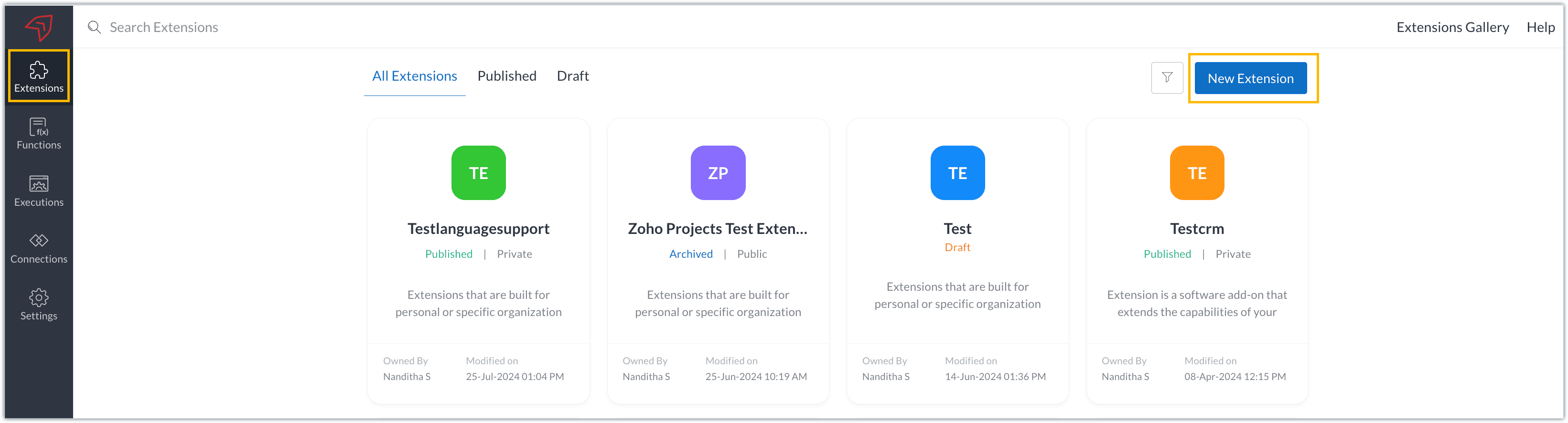
- Enter a name and description for the extension and choose the service you want to build the extension for. As mentioned earlier, Sigma offers support for Zoho Books, Zoho Invoice, Zoho Inventory, Zoho Billing, and Zoho Expense.
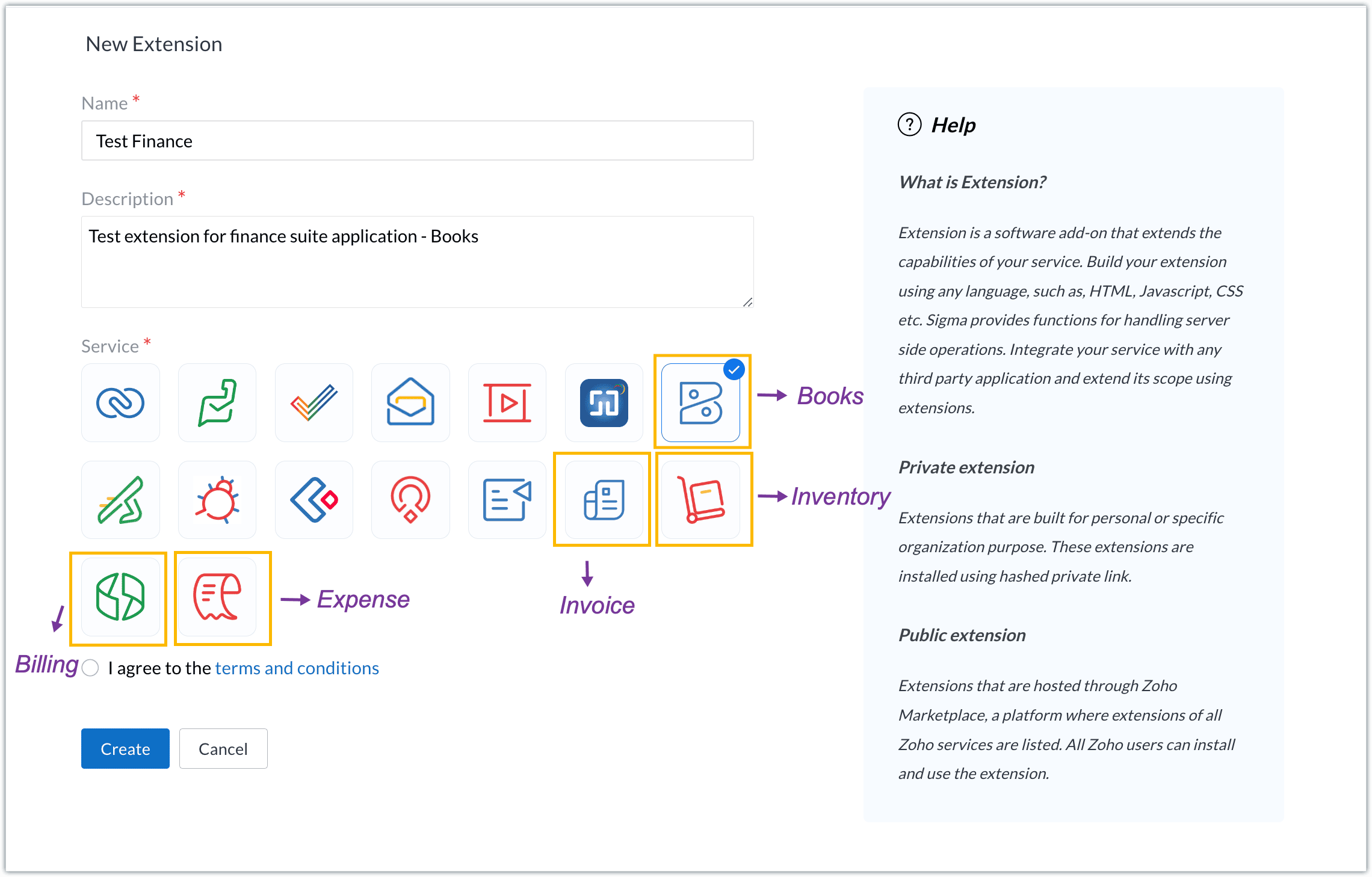
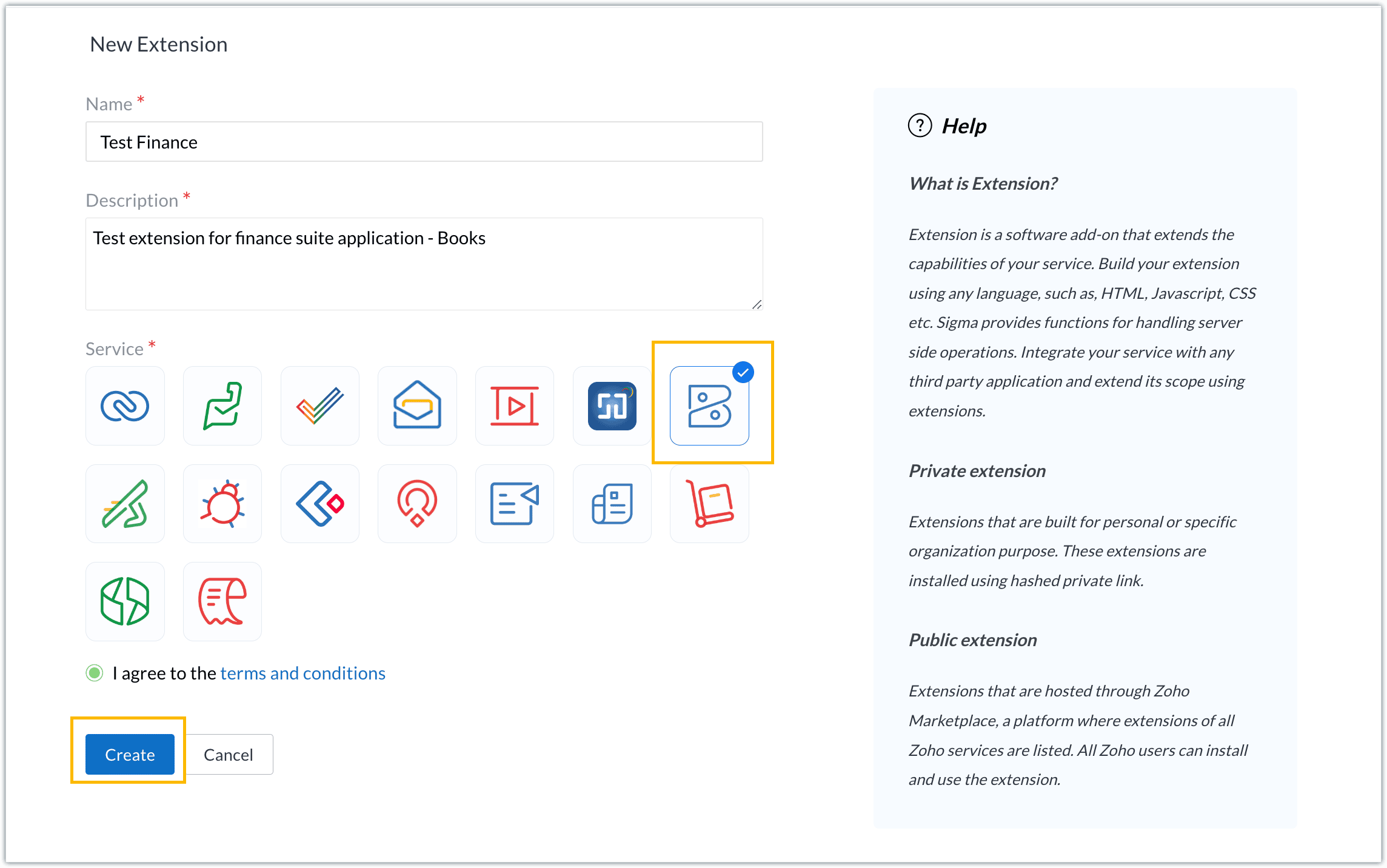
- For our demo, let's choose the service as Zoho Books. Accept the terms and conditions, and then click Create.
- The extension is successfully created. You can click the Extension Details icon to see an overview of the extension.
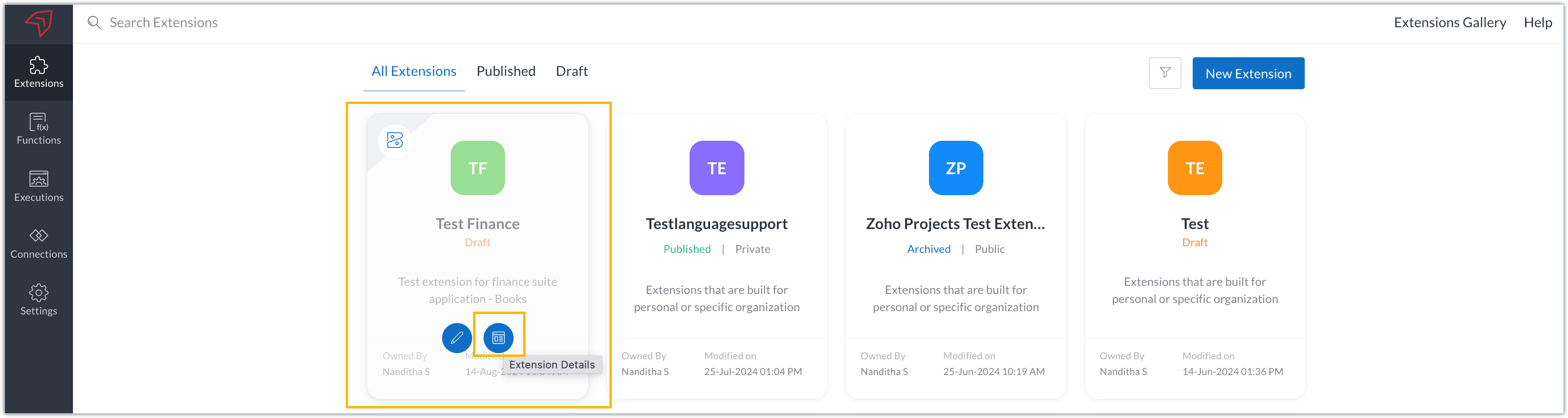
The extension details page shows the general details of the extension, such as creation date, creation time, and version, and allows you to associate developers with the extension.
- Click the Edit Extension icon to start developing the extension.
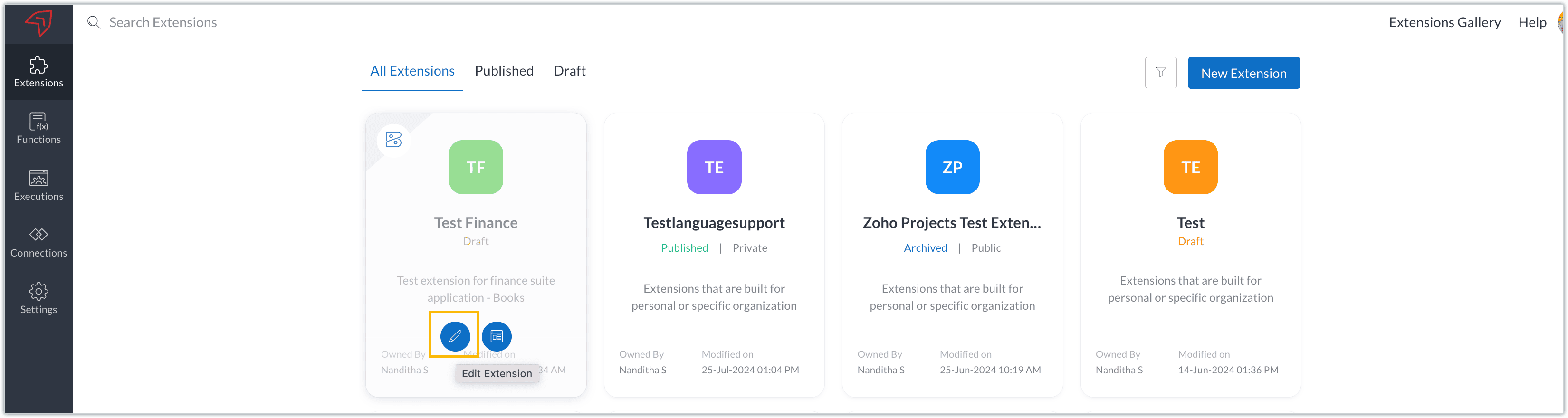
- The Zoho Books Developer Portal opens with the options and native features available to customize, curate, and develop your extension.
Zoho Books Developer Portal sections
The developer portal has four different sections to help customize and build your extension.
Learn: This section lists the native Zoho Books capabilities that can be used to create and develop extensions. Clicking the Set up Now button next to each feature will take you to the feature's development setup page.

Build: This is the development setup section, which includes customization, automation, and components like connections, widgets, schedules, webhooks, and signals. You can customize your extension preferences, establish connections to integrate with other applications, and design custom interfaces to enhance user experience.

Configure: This section assists with handling your extension's required configurations, whether they are generic settings or customizations required from the user. You can add global fields, which can be incorporated as either variables that store static data or through custom widgets that retrieve user inputs. You can also define functionalities that happen during installation and uninstallation.

Publish: Once the extension has been built and configured, you can use this section to publish it for either private or public use. In both cases, the Zoho Books team will review the extension; for public extensions listed on Zoho Marketplace, the Zoho Marketplace approval team will also review them. You can share your privately published extension with other users using the Shared List option.

We will explore more about each of these sections and their features in upcoming posts.
Testing an extension
The Zoho Books Developer Portal offers a dedicated testing environment for each extension, allowing you to test and validate it before publishing.
As a developer, you can use the Test Your Extension option in the top right corner of the portal to access your extension's sandbox environment.

This will redirect you to the sandbox testing environment for the extension you're developing, which is similar to Zoho Books and contains relevant modules to test with.

You can populate necessary data and test your extension functionality. Once everything is validated, you can go ahead and publish your extension for private or public use.
For support or questions related to Zoho Finance Suite extension development, you can email developer@zohofinance.com.
We hope you found this guide useful. Keep following this space for more information!
Topic Participants
Nanditha Somasundaram Somasundaram
Sticky Posts
Building extensions #5: Creating custom connections for extensions
In our previous post, we discussed the significance of connections, identified their types, developed a predefined connection, and demonstrated how it can be integrated with Zoho Books using an example. In this post, we'll walk through the process ofBuilding extensions #4: Integrating Zoho Books with applications using connections
In our last post, we looked at an overview of the key features available for creating a Zoho Books extension, including connections. In this post, we'll go over connections in depth, including their types and applications. What are connections? "Connections"Building extensions #3: Fundamental features of a Zoho Books extension
In our earlier posts, we covered how to create, test, and publish an extension for Zoho Finance suite applications. Moving forward, we'll look specifically at instances relating to one of the products from the Zoho Finance suite: Zoho Books. In this post,Building extensions #2: Publishing an extension
Hello developers, Welcome to our next post about building extensions for Zoho Finance Suite applications. In our previous post, we looked at extensions, their purpose, and how to create and test them. To recap, extensions are installable plugins or add-onsBuilding extensions #1: Creating and testing extensions for Zoho Finance Suite applications
Hello developers! We're excited to announce a new series called "Building extensions" to assist developers in creating efficient extensions for Zoho Finance Suite products. We'll support and guide you through the process of creating an extension and using
Recent Topics
Button or Links order
Is there a way to re-order the buttons or links that are created?'Pin' notes, so that specific ones are always visible at the top of the 'notes' tab.
It doesn't appear Bigin has the functionality to 'pin' a note to then have it always show at the top of the notes tab section of a record. Often times we have a large number of records, but key information we may want to have easily visible to all atRequest for Subform Support in Zoho CRM Webforms
Hi Team, I hope you're doing well. I would like to bring to your attention that currently, Zoho CRM Webforms do not support Subforms, which limits our ability to send forms that mirror the actual structure used within Zoho CRM. This feature is extremelyMaxima Address on FSM Customer
Im trying to add probably 50 customers from one company but couldn't make it since it has limit..how do i add the limit?How to Track Inventory Usage from Zoho FSM to Zoho Inventory?
Hi everyone, We’re currently working on integrating Zoho FSM with Zoho Inventory, and we’ve encountered a challenge we’re hoping the community can help us understand better. Here’s the context: When we create a Work Order in Zoho FSM that involves partsView subform entries without viewing a record in Zoho CRM | Kiosk Studio Session #8
In a nutshell Have you ever wanted to take a quick peek at a record's subform? Examples might be invoiced items in an invoice, ordered items in a sales order, or purchased items in a purchase order. Let's say you're viewing your list of invoices in ZohoTransforma tu Inventario: Control Inteligente y Funciones Clave en Zoho Inventory (Spanish Webinar)
¿Tu empresa necesita mayor trazabilidad y control en almacenes? Conoce cómo gestionar tu inventario con eficiencia y automatización... ¡y descubre las sorpresas que trae Zoho Analytics! Participa en nuestro webinar gratuito en español, este 19 de agostoMails are not being sent from custom Deluge function
We are having troubles to implement sending Invoices / Sales_Orders etc. automatically using following deluge script: attachment_template_id = "aaaa"; record_id = "bbbb"; mail_template_id = "cccc"; //NEW aproach fileUrl = "https://www.zohoapis.com/crm/v8/settings/inventory_templates/"Deposit on invoice
I'm trying to figure out how to customize an Estimate to include a Deposit/Retainer Invoice line within the Estimate. I tried creating my own custom field called "Deposit" where I manually inputted the deposit amount, which was nice. However, my employerCurrency transition
We are using Zoho CRM in Curacao, Dutch Caribbean. Our currency is currently the ANG. Curacao will be transition ing from using the ANG (Antillean Guilder) to using the XCG currency (Caribbean Guilder) on March 31st 2025, see: https://www.mcb-bank.com/caribbean-guilder.Notes and Attachments visibility can now be restricted based on profiles
Dear All, We hope you're well! We are here with a quick update about Notes and Attachments profile permissions. In the past, a record's Notes and Attachments were visible by default to all users with record access. However, as notes and attachments canZoho webinar--hard for agencies
So, this is just a dive into our use case, and why we've been disappointed in Zoho webinar. We are a small marketing agency, and we wanted to add webinars to the services we provide, as many of our clients want to learn to use them as part of their contentCelebrating Raksha Bandhan with Zoho Desk: A Bond of Trust, Protection, and Service
Raksha Bandhan, celebrated across India, symbolizes the sacred bond of protection and affection between siblings. “Raksha” means protection, “Bandhan” means bond or knot: together, it represents a knot of care and security. On this occasion, we'd likeCreate project (flow) and assign to person without account (company)
Hi Zoho Support & Community, I'm trying to automate a process using Zoho Flow to create a Zoho Project and link it directly to a Zoho CRM Contact. This reflects our B2C workflow where we primarily deal with individual Contacts, not Companies/Accounts.Banking > Import statements with a csv file
Good morning, I am regularly using the "import statement" option to match my transactions. I've been using csv files produced by my bank online and was able to import my transactions. Until now. Thank you for your help for fixing this ! Alex.Has anyone successfully added Microsoft Graph API Oauth2 as a connection?
I'm having trouble getting Microsoft Graph API created as a connection in zoho crm. Has anyone successfully added Microsoft Graph API Oauth2 as a connection? My issue is not necessarily on the Zoho side, but understanding how to set up the Microsoft sideSyncing Timesheets between Projects and Desk
All users able to see their own timelog entries from all apps in one place, synced immediately. All managers able to view total/all time entries from one place. This is something that has come up for us and multiple clients. Example: we have a clientSpell Check default language
Hello All, Is it possible to set the Spell Check default language? I can't find it in the settings. Thanks a lot! LeventeZoho Backstage 3.0 - Boostez vos événements avec des outils malins
Zoho Backstage vous accompagne dans l’organisation d’événements réussis, avec des outils qui simplifient la planification, optimisent l’exécution et renforcent la connexion avec votre public. La version 2.0 a apporté une nouvelle interface, plus de flexibilitéPortal user activity reporting
Aside from the metrics section in the admin dashboard, is there a way to view/create reports for portal user activity? Im looking for a more granular option to see exactly what users are utilizing the portal. Thanks!Admins to set Agents Picture
Admins should not have to rely on agents to set a nice profile picture for them. Admins get the headshot pictures from HR and should be able to upload and set their picture, not rely on them to: 1) upload a picture at all 2) upload a good picture 3) uploadTime Tracking Reporting and Billing
I wish for the time tracking module to be enhanced further. Currently it is independent of Support Plans and Contracts. Support Plans and Contracts are also mostly separate. We need a better dashboard of this with the ability to natively mark billed orEnhanced Email Signature Folding
We have departmental signatures setup which are great, however, when viewing ticket details, it gets very overwhelming when scrolling though threads and conversations where you scroll past ten different signatures of your own team, then ten signaturesHow to add formatting in zoho.cliq.postToUser(...) message?
In a CRM Deluge function, I'm trying to use the message formatting guidelines given here: https://www.zoho.com/deluge/help/cliq/posting-to-zoho-cliq.html#message-formats My message is: message: #Title text. The result in Cliq is: #Title text. (no largeZia Agents/End of Day Reports
As a manager or owner it would be nice if Zia analyzed today's (or this week's tickets) and gave an end of the day report to management team. - what important tickets were worked on or submitted today? - what agents were unproductive today and answeredProject Cost Tracking
I see there are questions/concerns that Zoho doesn't track costs to a tasks in a project. We are a manufacturer and are in the early stages of tracking costs to project. I would like to expand out the COGS Chart of accounts in Books and record costs viaHow to record if the payment made is return due to transaction failed.
So there is Bill of $2000, and a payments made transaction to clear the bill. The amount is actually deducted from bank account. However, a few days later, I found the bank returned only $1750 cause there are $250 bank service charge for this failed transaction.Help Center Customization UI
The customization screens for the help center needs the UI improved. It looks straight out of 2004. The Zoho Desk normal UI is great. All it takes is uniform fonts and colors across all parts of the tool... I compare this to Zendesk Guide.Este domínio já está associado a esta conta
Fui fazer meu cadastro na zoho e quando digitei meu domínio recebi essa mensagem que meu domínio estava associado a uma conta que eu nem faço idéia de quem seja. Como que faço pra resolver isso? Atenciosamente, Anderson Souza.I need some help in Expenses Per Diem Policy
this is my script written for restricting the PerDiem Components. Say if Lodging and Per Day Allowance both is selected from Per Diem Page then the report should gets auto rejected. When Im trying to executing it says the following error {"code":11,"message":"TheAdding Photos to Dashboards on Zoho Analytics
I am creating a dashboard to showcase data from survey results from focus groups. I am creating a focus group participant profile tab where it is filtered by the name of the participant and showcases information about them using KPI widgets. I am runningWhat is the difference between Retainer invoice and Advance Payments?
Retainer invoice seem like they are just advance payments with extra details. Instead of creating a Sales Order with order details, a retainer is created. It feels like they are a workaround to link advance payments with sales orders. Is there any advantageExporting record notes in bulk
Hi team, Is it possible to bulk export the notes attached to a record? i.e to a CSV file or otherwise. Our use case is exporting all notes for our lead/account/Deal records. We have another system we'd like to import these notes to but I can't seem toField customization
Hi Team Good day! I am a commission agent who sell and purchase goods from vendors, while in purchasing invoices I am not able to deduct the expenses such as commission and other expenses on actual amount. Kindly help me to customize the invoice basedError: Invalid Element gst_no, Invalid Element gst_treatment, Invalid Element place_of_contact
so i am creating a new contact post request and i want add gst infomation when amount is above 50000 and if pass gst info in request body then i get this errors > Error: Invalid Element gst_no, Invalid Element gst_treatment, Invalid Element place_of_contactAdd multiple Billing Addresses under one GST number
My client owns multiple businesses in various locations but they all come under one GST. Is there a way to add multiple billing addresses for the same GST? Managing this by adding multiple Shipping addresses is not an option. The client wants the GSTZoho Mail API - Upload Attachment
https://www.zoho.com/mail/help/api/post-upload-attachments.html I followed the steps from the API documentation and wrote a backend in JavaScript to send emails. Normal emails are sent without any problems. However, I can’t send emails with attachments.Unable to create custom fields for shipment order
I'm unable to create custom fields for shipment orders, even though the custom fields are set up correctly. A request to the following endpoint: https://www.zohoapis.com/inventory/v1/settings/preferences/customfields?organization_id=${ZOHO_ORGANIZATION_ID}&entity=shipment_orderKaizen #202 - Answering Your Questions | Testing and Using REST APIs in Widgets
Hello Developers! Welcome back to a fresh week of Kaizen! Thank you for your active participation in sharing feedback and queries for the 200th milestone. This week, we will look at the following queries related to widget: Widget Testing Using REST APIIntroducing the 'Send as Email' option on the Zoho Desk iOS mobile app
Hello everyone! In the latest version(v2.10.2) of the Zoho Desk iOS app, we have brought in support for the 'Send as Email' option while creating a ticket. This feature enables you to reach out to the customers by sending outbound emails. The emails areNext Page