What’s New in Zoho Analytics – September 2025
Hello Users!!
In this month’s update, we’re raising the bar across multiple touchpoints, from how you bring in data, plan and track projects to how you design and brand your dashboards.
We’ve added the all-new Gantt chart for project visualization, expanded our database integrations, introduced support for modern file formats, redesigned key user experiences with a visual refresh, and a brand new guide for white label solutions.

Let’s dive into what’s fresh this month!
Introducing Gantt Chart 
Manage projects more effectively with the brand-new Gantt Chart in Zoho Analytics. Use it to track tasks, monitor progress, and quickly identify delays in project execution.
You can customize your Gantt charts with:
- Different chart styles to suit your project needs
- Color schemes to visually distinguish tasks in progress and completed tasks
- Flexible date display ranges to match your preferred project view
Click here to learn more.

Database Connectivity
We’ve expanded our support to help you bring in data from more sources, more flexibly.
- Cassandra
You can now import data from Cassandra, a distributed NoSQL database widely used for handling high-volume, high-velocity data. Zoho Analytics automatically normalizes the collections into parent-child table structures, making it easy to analyze your data once imported.
Learn more about importing from Cassandra.
- SAP HANA & ClickHouse

Now import data directly from cloud-hosted SAP HANA and ClickHouse databases. Alongside local server connection, we’ve added cloud server connection as an additional option to give you more flexibility with how and where you connect.
Learn more about importing from SAP HANA.
Learn more about importing from ClickHouse. - Cloud Database Synchronization – Failure Notification Settings
You can now configure synchronization settings to trigger a failure notification when a chosen number of table imports fail. Simply set the value for “n” failed tables, and Zoho Analytics will notify you when the condition is met. This gives you more control over monitoring imports and helps avoid missing critical sync issues.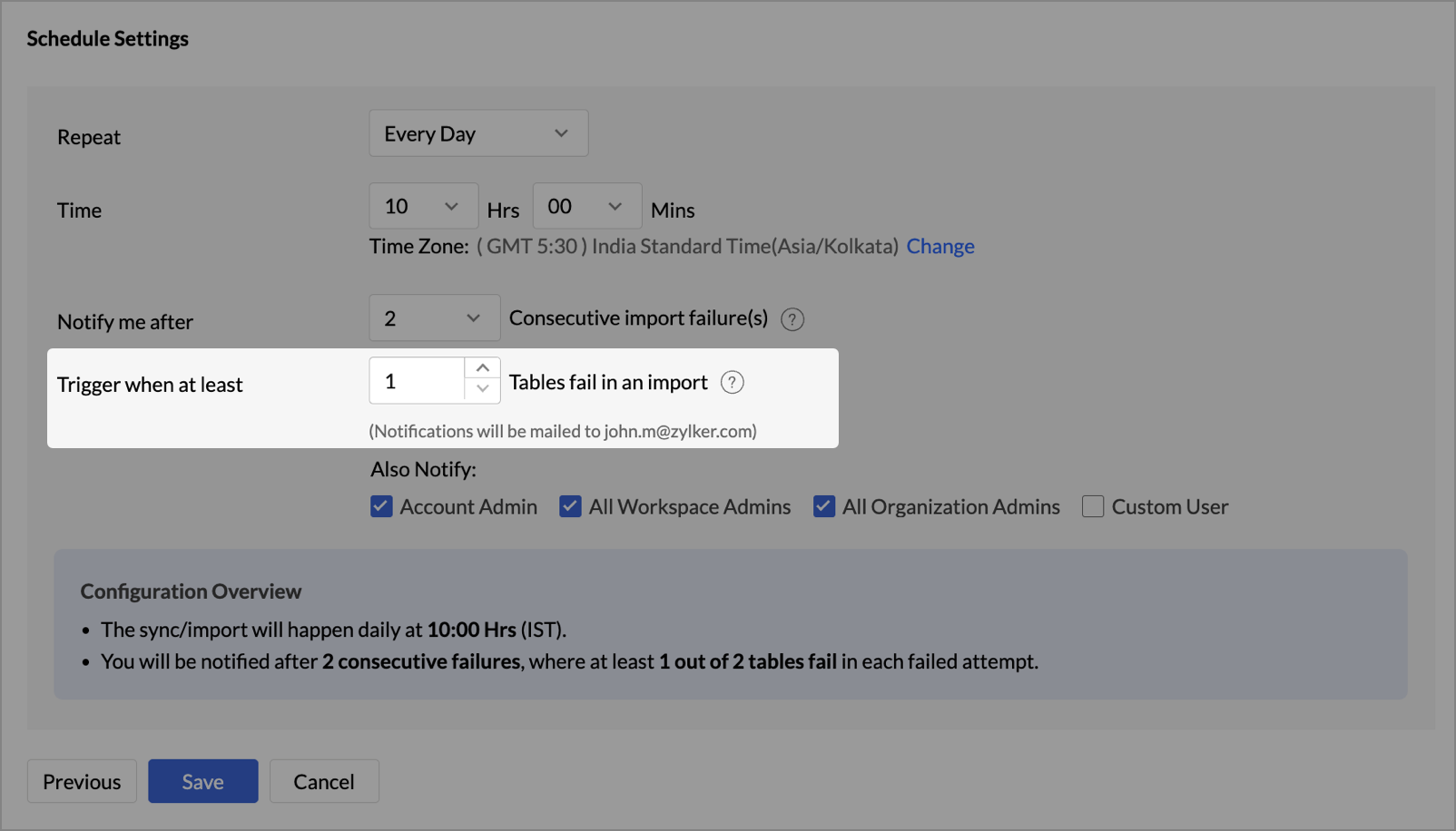
- Snowflake - New Authentication options
Zoho Analytics now supports two new authentication methods for connecting to your Snowflake data: - Private Key
- OAuth
These options provide more flexibility and enhanced security when configuring your Snowflake connections.
Learn more about Snowflake integration.
Local File Formats
Working with local files is now more powerful and flexible.
- New File Format Support - Parquet and Avro

You can now import Parquet and Avro files. These modern, columnar file formats are optimized for analytical workloads and are commonly used in big data pipelines.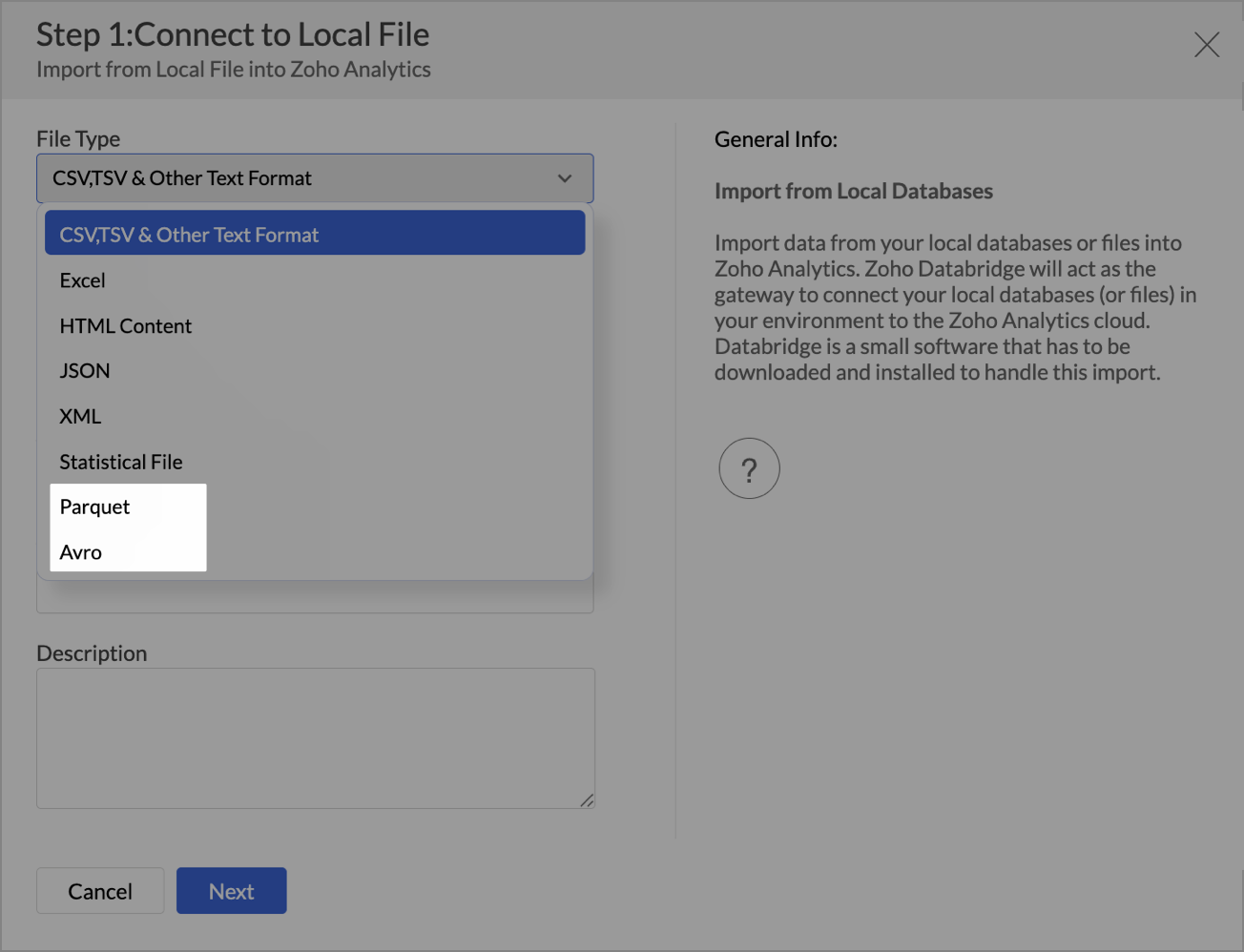
- Larger file uploads
Until now, Zoho Analytics supported large file uploads only for CSV files. With this update, you can now upload files larger than 100 MB for the following formats through Zoho Databridge: - Excel
- HTML
- JSON
- XML
- Statistical files
This enhancement removes the hassle of file size limits when working with heavy datasets across multiple formats.
Learn more about local file formats
Invitation-based User Invite Flow
Zoho Analytics now uses an invitation-based model for adding users to your organization.
You can invite users in multiple ways, based on your workflow:
- From the Organization Settings or Workspace Settings
- While sharing reports or dashboards using email addresses
- By adding users to Groups
Invited users will receive an email and must accept the invitation to join. Access to your organization and its shared content will be granted only after they accept the invite. This ensures better control and visibility over user access.
Learn more about inviting users.

Dashboard Background Image Customization
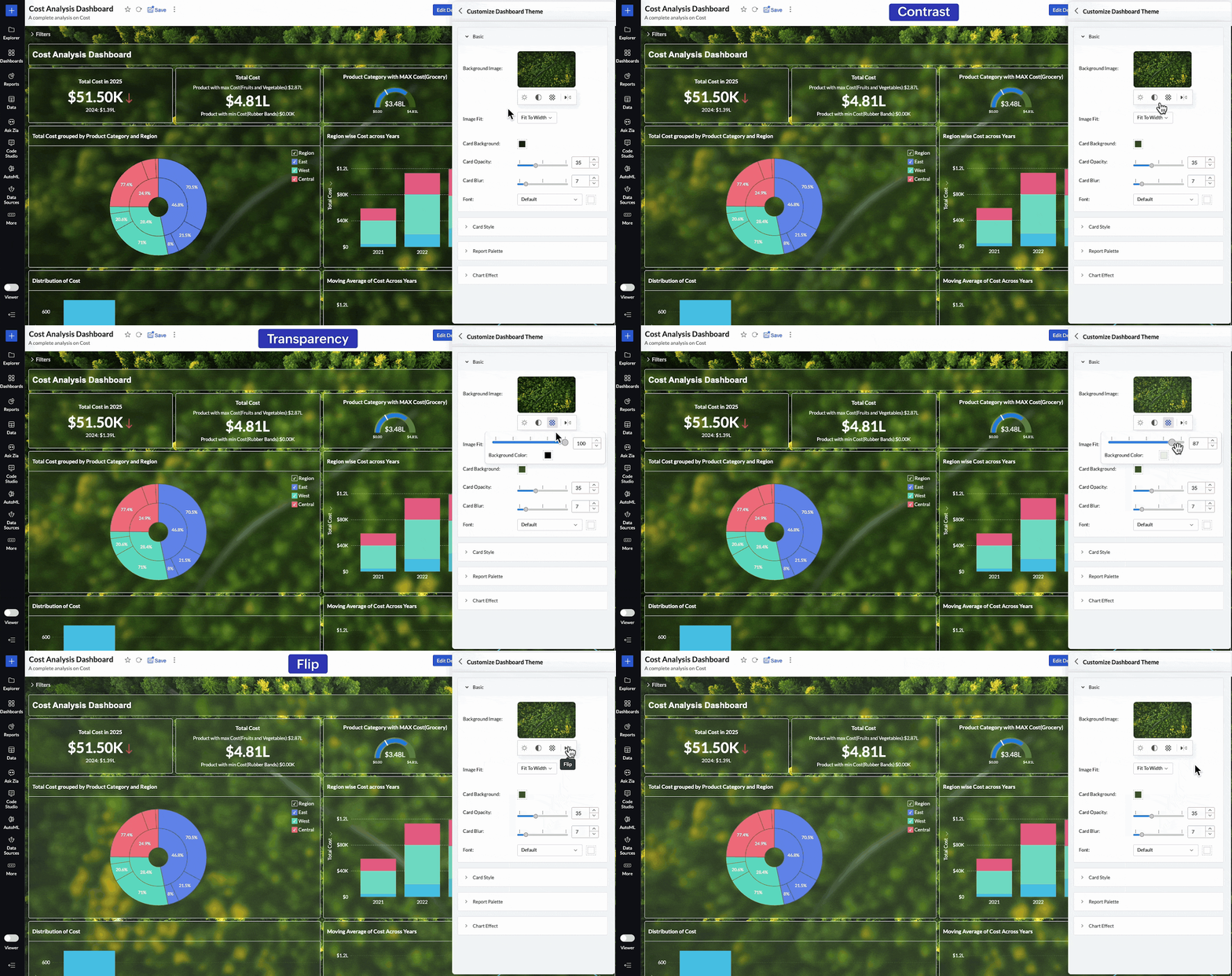
Personalize your dashboards like never before with new background image adjustment options. You now have greater control over how background images appear across your dashboards, helping you fine-tune visual impact and maintain readability.
You can now adjust:
- Brightness – Lighten or darken the image for visual balance
- Contrast – Enhance details and visual clarity
- Transparency – Soften the background to highlight dashboard elements
- Flip – Mirror the image horizontally for better composition
These controls allow you to create cleaner, brand-aligned dashboards that look professional and feel polished.
Learn more about dashboard customization.
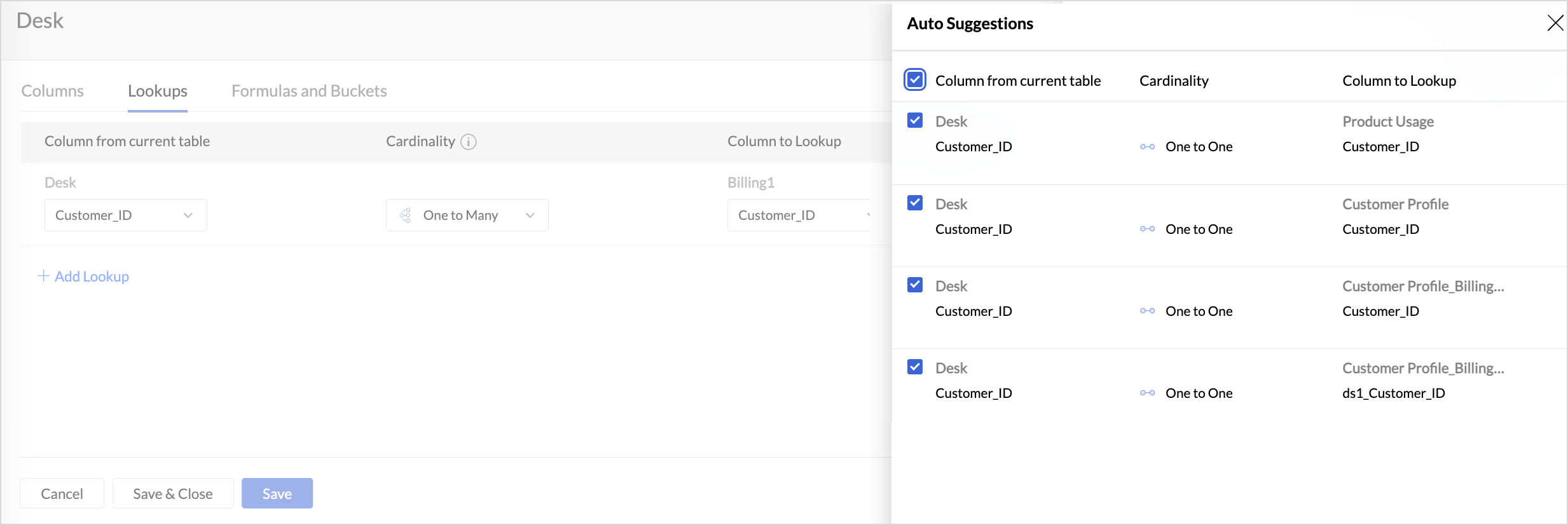
Lookup Suggestions
Creating relationships between tables is now even easier.
Zoho Analytics now offers lookup suggestions based on your table’s metadata. These smart recommendations help you:
- Quickly identify potential relationships between tables
- Reduce manual guesswork
- Simplify your data modelling process
Learn more about Lookup Suggestions
White Label Updates
We have introduced a more modern and consistent experience for white label.
- Zoho Analytics latest UI is now available for White Label
Users who opt for white label deployment can now offer the latest Zoho Analytics user interface to their end users. This includes the updated layout, navigation, and overall design, providing a seamless and branded analytics experience.
Click here to learn more. - Dedicated White Label Guide
To help you make the most of white label capabilities, we’ve introduced a comprehensive guide covering everything from setup to branding best practices. This guide is now available as a separate resource for quick reference.
Click here to access White Label guide.
Access Log Support for Zoho Analytics Mobile BI App
Zoho Analytics now extends access log tracking to the Mobile BI App, giving admins greater visibility into how users interact with reports and dashboards from mobile devices.
These updates are designed to make your Zoho Analytics experience more connected, customizable, and intelligent.
As always, we’re just a click away if you need help or have feedback to share.
Topic Participants
Pradeepkumar R
Sticky Posts
What's New in Zoho Analytics - November 2025
We're thrilled to announce a significant update focused on expanding your data connectivity, enhancing visualization capabilities, and delivering a more powerful, intuitive, and performant analytics experience. Here’s a look at what’s new. Explore What'sWhat's New in Zoho Analytics - October 2025
Hello Users! We're are back with a fresh set of updates and enhancements to make data analysis faster and more insightful. Take a quick look at what’s new and see how these updates can power up your reports and dashboards. Explore What's New! ExtremeWhat’s New in Zoho Analytics – September 2025
Hello Users!! In this month’s update, we’re raising the bar across multiple touchpoints, from how you bring in data, plan and track projects to how you design and brand your dashboards. We’ve added the all-new Gantt chart for project visualization, expandedAnnouncing Agentic AI - Ask Zia!
We are delighted to roll out the new agentic AI capabilities in Ask Zia, where every stage of the BI workflow is assisted by AI. With a human-in-the-loop approach, Ask Zia ensures that you’re in command of the decision, while AI handles the complexity.Invitation-Based User Access in Zoho Analytics
Hello everyone, We’re rolling out an important update on how users are added to your Zoho Analytics Organization and Workspaces. Previously, when admins added users, they were automatically added to the organization. Moving forward, to improve security
Recent Topics
Copy paste from word document deletes random spaces
Hello Dear Zoho Team, When copying from a word document into Notebook, often I face a problem of the program deleting random spaces between words, the document become terribly faulty, eventhough it is perfect in its original source document (and withoutDesktop app doesn't support notecards created on Android
Hi, Does anybody have same problem? Some of last notecards created on Android app (v. 6.6) doesn't show in desktop app (v. 3.5.5). I see these note cards but whith they appear with exclamation mark in yellow triangle (see screenshot) and when I try toApproval Button in Subform
Hi Team, I’m working on a subform-based requirement where users will submit requests, and these requests must go through approval by multiple team managers. Each line item in the subform needs to be individually approved or declined based on the user'sSetting checkbox value on template in Sign from Creator
Good day, Please help me understand how do I set a tick from a checkbox in Creator into a checkbox on a Sign template. Below is the only values on the Sign template and the code from Creator, "field_boolean_data": {}, "field_date_data": {}, "field_radio_data":Zoho Projects - Unread Comment Icon
Hi Projects Team, It would be great if there was a notification I con on the comments icon so it's easy to see which tasks have new comments. Something like a red circle with a number of unread comments would be great. Thanks for considering my feedZoho Projects - Update Feed via API
Hi Projects Team, Please consider adding an API to allow update and retrieval of messages to the Feed. Thank youAutomated log-out/session end
I'm concerned about security of our data. Is it possible to set an automatic time-out for user sessions on Zoho CRM, after a certain period of inactivity or when the session reaches a certain duration (12 hours perhaps)?Subform auto populate values
Hi Team, I’m trying to retrieve values from Zoho People using API functions and dynamically populate them into a subform. For example, I’ve created a form with several fields that users will fill out. Based on their input, I need to fetch records fromWhat is New in CRM Functions?
What is New in CRM Functions? Hello everyone! We're delighted to share that Functions in Zoho CRM have had a few upgrades that would happen in phases. Phase 1 An all new built-in editor for better user experience and ease of use. ETA: In a couple of days.Gantt Chart - Zoho Analytics
Are there any plans to add Gantt Charts capabilities to Zoho Analytics?WhatsApp Calling Integration via Zoho Desk
Dear Zoho Desk Team, I would like to request a feature that allows users to call WhatsApp numbers directly via Zoho Desk. This integration would enable sending and receiving calls to and from WhatsApp numbers over the internet, without the need for traditionalIdentify long running sync jobs/tables
My sync process causes strain on my production database and I'd love some tools/alerts to help me identify which tables are taking the longest. The current screen only shows 3 tables at a time and truncates the last fetch time so that it is very cumbersomeTemporarily rate limited due to IP reputation.
We have suddenly started receiving the following Mail Delivery Status Notification: Diagnostic-Code: 4.7.650 The mail server [136.143.184.12] has been temporarily rate limited due to IP reputation. For e-mail delivery information, see https://aka.ms/postmasterZOHO Books
Hi there, Why after I upgrade my Zoho invoice > Books then i wanted to add plugin which i cannot do. Please advise.Automatically CC an address using Zoho CRM Email Templates
Hi all - have searched but can't see a definitive answer. We have built multiple email templates in CRM. Every time we send this we want it to CC a particular address (the same address for every email sent) so that it populates the reply back into ourSolution to Import PST File into Office 365.
MailsDaddy OST to Office 365 Migration Tool is an outstanding solution to recover OST files and migrate them into Office 365 without any hassle. Using this software users can multiple OST files into Office 365 with complete data security. It offers usersBest-practice setup in Zoho One for managing combined candidate pools and exporting anonymised CVs
We are new users of the Zoho One bundle and operate a consulting and engineering company. Our workforce model includes a mix of permanent employees, active job applicants, and freelance/independent consultants. All three groups need to be searchable,Associate emails from both primary and secondary contacts to deal
We need to associate emails from multiple contacts to a deal. Please advise how this can be achieved. At present, only emails from primary contacts can be associated. ThanksNew integration: Zoho Sign for Zoho Projects
Hey there! We’re excited to announce the brand-new Zoho Sign integration for Zoho Projects! With this integration, users can now send documents for signatures, track their progress, and manage approvals—all without leaving Zoho Projects. This bridgesUpdate to attachment display in ticket threads
This enhancement will provide faster access for support teams and end-users, significantly boosting productivity for everyone. Get ready for a more efficient and satisfying experience! Immediate benefits Faster ticket rendering reduces wait times andNarrative 15: Blueprint - Automate, guide, and transform your support processes
Behind the scenes of a successful ticketing system: BTS Series Narrative 15: Blueprint - Automate, guide, and transform your support processes Even organizations that deliver quality products and services can face low customer satisfaction when theirDifferent MRP / Pricing for same product but different batches
We often face the following situations where MRP of a particular product changes on every purchase and hence we have to charge the customer accordingly. This can't be solved by Batch tracking as of now so far as I understand Zoho. How do you manage it as of now?Batch/lot # and Storage bin location
Hi I want to ask for a feature on Zoho inventory I own a warehouse and I've gone through different management software solutions with no luck until I found Zoho, it has been a game changer for my business with up to the minute information, I'm extremely happy with it. It's almost perfect. And I say Almost because the only thing missing for me (and I'm sure I'm not alone) is the need of being able to identify the lot number of my inventory and where it is located in the warehouse. Due to the natureZOHO BOOKS - RECEIVING MORE ITEMS THAN ORDERED
Hello, When trying to enter a vendor's bill that contains items with bigger quantity than ordered in the PO (it happens quite often) - The system would not let us save the bill and show this error: "Quantity recorded cannot be more than quantity ordered."Good news! Calendar in Zoho CRM gets a face lift
Dear Customers, We are delighted to unveil the revamped calendar UI in Zoho CRM. With a complete visual overhaul aligned with CRM for Everyone, the calendar now offers a more intuitive and flexible scheduling experience. What’s new? Distinguish activitiesSync desktop folders instantly with WorkDrive TrueSync (Beta)
Keeping your important files backed up and accessible has never been easier! With WorkDrive desktop app (TrueSync), you can now automatically sync specific desktop folders to WorkDrive Web, ensuring seamless, real-time updates across devices. Important:Writer update results in BitDefender blocking it as malware
After updating Writer to latest update, Bitdefender blocked the app and writer no longer runs.REPORT THAT SHOWS SOH FOR ITEMS THAT HAVE ZERO SALES
When we started Zoho we imported a lot of inventory lines directly off our suppliers price list and have never ordered / sold. I want to clean up our data base and remove all these lines. What reeport will show me what lines have zero sales as well asRefresh frequency
Dear Zoho Team, I really, truly appreciate that Zoho Books gets frequent updates. As a matter of fact this is how a good SaaS company should stay on top. However, I feel that I have to hit refresh almost every day. This was exciting at the beginning butRefund
My plan expired today, and I updated my payment details with a new credit card. At the same time, I wanted to downgrade, but the system wouldn’t allow the downgrade until the payment details were updated. As a result, I was charged for the same plan beforeCalling Function via REST API with API Key gives 401 using Zoho Developer
Hi, I created a couple of functions using the one month trial of Enterprise edition, which I was able to call using the API Key method from Postman and from an external site. Now that my trial has expired, I have created the same functions in the DeveloperError due to - 'Internal Exception' when uploading Sign-generated PDF file to workdrive via Deluge in Zoho CRM
Hi I wasnt getting this error a few days ago and my code had not changed, so I'm wondering if there's a Zoho bug somewhere? I am downloading a PDF file from a Zoho Sign url using invokeurl and then uploading it to a Workdrive folder using zoho.workdrive.uploadFile.Embed CRM record images in email templates
I have email templates that I want to embed dynamic images in their body - not as an attachment. For the context, the image is a QR code individual to each contact. So there are couple of challenges for which I think there is no solution in CRM: 1/ IAssign multiple departments to multiple helpcenters
Hi there! I have a reseller company for a software and I'm using Zoho Desk as my helpcenter and ticket management system. The software is great and I would like to make a suggestion! With multi-branding activated, your departments that visible in helpZoho Desk Training
Hello, We've had Zoho desk for a while now, but we run into issues occasionally, and I was wondering if there was a customer who currently uses it and really enjoys the functionality, that would be wiling to chat with us?Edit default "We are here to help you" text in chat SalesIQ widget
Does anyone know how this text can be edited? I can't find it anywhere in settings. Thanks!PO Based Advance payment to Vendor
We recommend to introduce a provision at PO to make advance payment to vendors and auto apply that advance paid later at the time of Vendor Bill submission for that PO. This will help us track PO-wise Total Payments.Converting Customer Invoice to Purchase Bill
Hi, In my service-based business, I sometimes create the customer invoice first, and later I receive the purchase bill from the vendor for the same job. Is there any option in Zoho Books to: Convert a customer invoice into a purchase bill, or Link/associateGetting Project Template List using the REST API
I am trying to confirm that I can use the REST API to create a project using a project template. The API documentation indicates this is possible by providing the Template ID, but it is not clear at all how to get a list of available Project TemplatesHow to get Quickbooks Desktop Info into Zoho?
Our team has used Quickbooks desktop for years and is looking at switching to Zoho books in 2026. I want to bring all old sales history over since we use Zoho CRM. I can export Item sales history and generic sales orders from Quickbooks desktop. How doNext Page