A/B Testing Idea #2: Make your headlines sound super cool.
Hello everyone,
We're back with our second post in the CRO testing idea series. If you missed the first post, please check it out here: "Place irresistible and clear CTAs." In today's post, we'll look at how to effectively A/B test your headline content.

Some people say "you only get one chance to make a first impression" while others contend that it only takes seven seconds to make an impression about someone or something. Well, the same concept applies to your website.
A good first impression on your website is crucial for making visitors trust in your products/services and keeping them tied to your business forever. Creating this first impression depends on many factors like structure, colors, spacing, symmetry, amount of text, and fonts. But, of everything else, a good headline plays a major role in the success of your website.
Your headline is the first thing that readers see as soon as they land on your site; it holds the power to make or break a deal at first visit. Even if your content is truly unique and innovative, a weak headline can ruin its chances of being super successful in terms of conversions. So how do you create a strong headline that drives more traffic and clicks on your website?
Here are a few aspects to consider as you A/B test your site's headline content:
A good first impression on your website is crucial for making visitors trust in your products/services and keeping them tied to your business forever. Creating this first impression depends on many factors like structure, colors, spacing, symmetry, amount of text, and fonts. But, of everything else, a good headline plays a major role in the success of your website.
Your headline is the first thing that readers see as soon as they land on your site; it holds the power to make or break a deal at first visit. Even if your content is truly unique and innovative, a weak headline can ruin its chances of being super successful in terms of conversions. So how do you create a strong headline that drives more traffic and clicks on your website?
Here are a few aspects to consider as you A/B test your site's headline content:
Communicate your brand's purpose
Often we just assume that the visitors fully understand everything about our website and its product offerings. However, that’s not always the case, especially for new visitors. With hundreds of websites selling products/services online, it's important to make sure that the primary headline on your homepage tells visitors what your website has to offer and how it aligns with their expectations—all in a few short seconds. Tweaking and testing headline copy that clearly communicates your brand's purpose and differentiates yourself from the competitors can encourage your visitors to take the desired action without another thought.
Example:
Say you own a website testing and analytics software solution that offers a set of tools to grow an online business. Take a look below at the old and new versions of the same headline message. Notice that while the first tells people what the product is, the second tells people what the product will actually help them do.
Say you own a website testing and analytics software solution that offers a set of tools to grow an online business. Take a look below at the old and new versions of the same headline message. Notice that while the first tells people what the product is, the second tells people what the product will actually help them do.

Extra tip: The easiest way to determine if your brand message is clear to your visitors is by assuming your audience knows nothing about the business you're running.
Try different headlines for different set of target audiences
Each website caters to a specific type of audience. So understanding which audience group you cater to, where they come from, what their interests are, and what information they are hoping to find on your site is another major parameter to consider before starting to test your headline content. Testing and optimizing your headline copy based on a particular set of audience segments like demographics (such as location, gender, age, etc), personal interests, and past engagements with your site can help you deliver personalized content for each category of visitors, which is more likely to generate conversions.
Example:
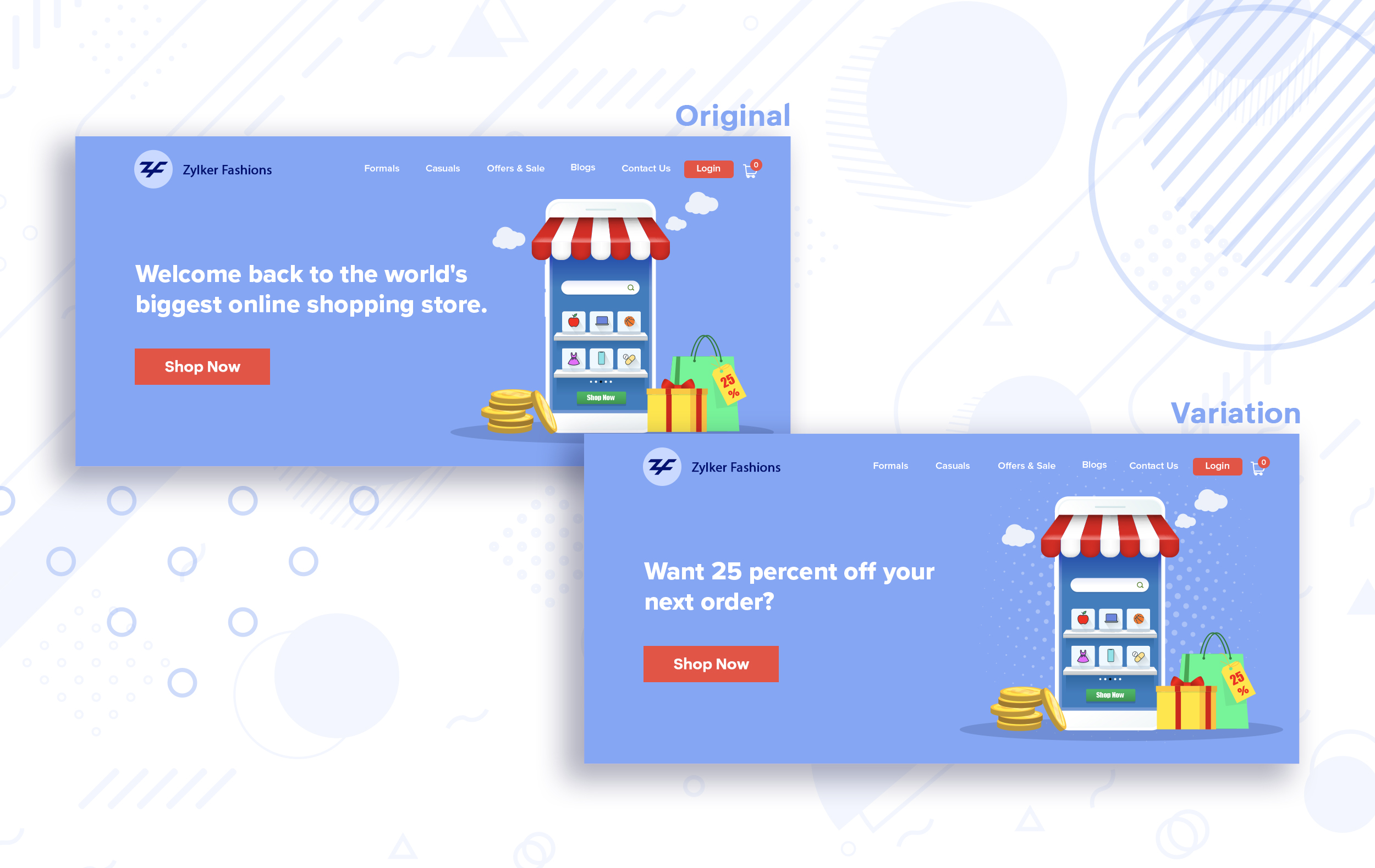
Say you run an ecommerce business and want to A/B test your headline copy with enticing offers for returning visitors to see which one convinces them to fulfill your conversion goals.
Say you run an ecommerce business and want to A/B test your headline copy with enticing offers for returning visitors to see which one convinces them to fulfill your conversion goals.
Extra tip:
- You can target your A/B test in PageSense using a variety of audience segments such as visitor type, device used, JS variable, day of the week, and more to learn which version grabs your audience's attention immediately and performs best for each segment.
- To know your target audience better, you can set up polls on your website using PageSense and learn your visitor’s business (or personal) needs and how your product can help achieve them. Later, you can use this feedback to test and optimize your website content.
Match your headline with your ad copy
When a visitor clicks on an ad, it's of the utmost importance to match the message on that ad to the headline content on your post-click landing page. If your headline doesn't match the offers and features that you promised in your ad copy, you're wasting all your marketing investment and conversion opportunities. A/B testing your headline by incorporating relevant keywords that resonate with your ad copy can help you reassure people that they've come to the right place. It can also later persuade them to take the desired action on your site more quickly. Further, this type of testing is more likely to generate increased clickthrough rates, conversions, and revenue for your website.
When a visitor clicks on an ad, it's of the utmost importance to match the message on that ad to the headline content on your post-click landing page. If your headline doesn't match the offers and features that you promised in your ad copy, you're wasting all your marketing investment and conversion opportunities. A/B testing your headline by incorporating relevant keywords that resonate with your ad copy can help you reassure people that they've come to the right place. It can also later persuade them to take the desired action on your site more quickly. Further, this type of testing is more likely to generate increased clickthrough rates, conversions, and revenue for your website.
Example:
Say you're running a Facebook Ad for older travelers, and the post-click landing page shows the most relevant tourist packages, flights, and hotel stays based on their interests. Now compare the old and new headline messages below to see which version of the message sounds better.
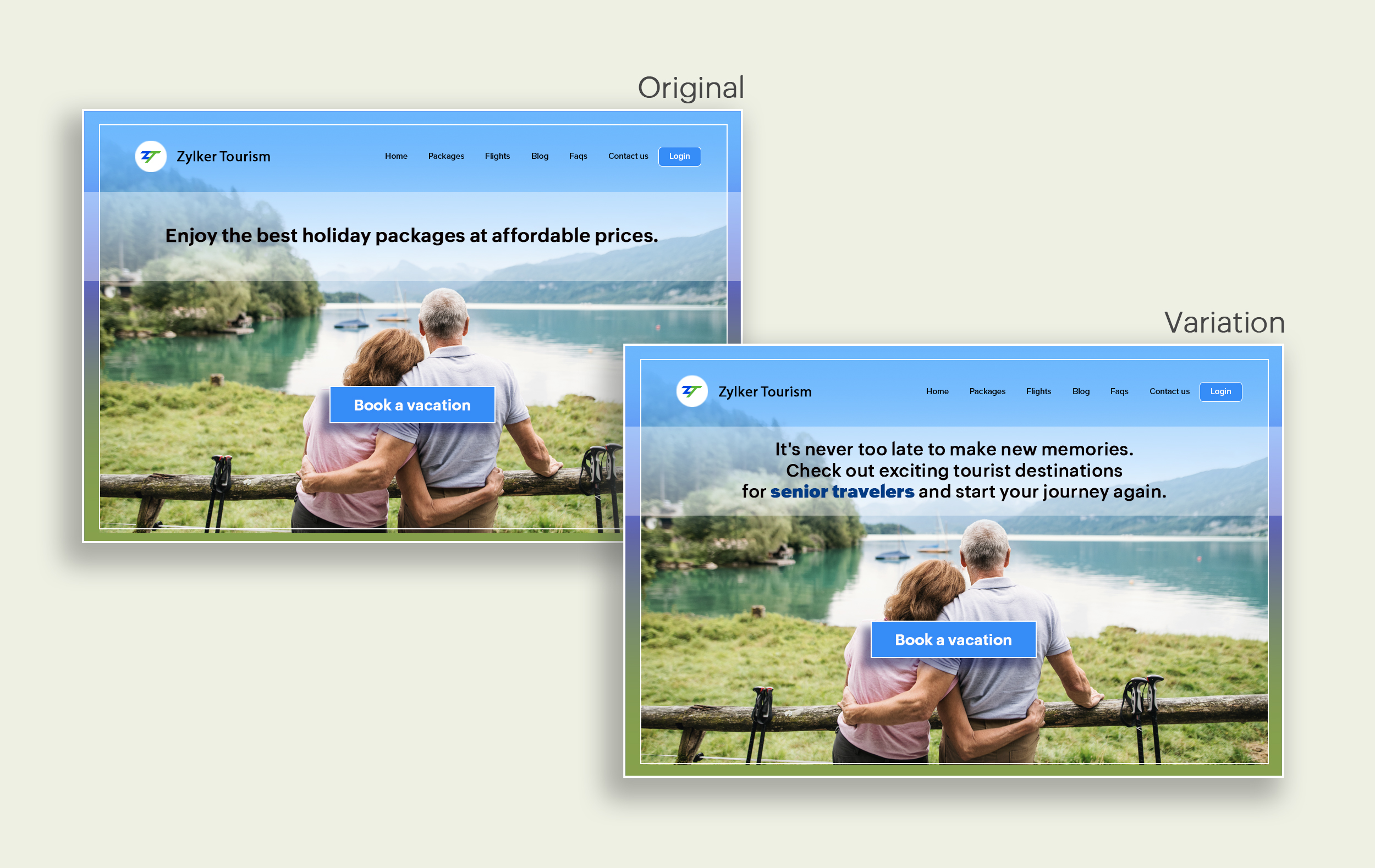
Say you're running a Facebook Ad for older travelers, and the post-click landing page shows the most relevant tourist packages, flights, and hotel stays based on their interests. Now compare the old and new headline messages below to see which version of the message sounds better.
Include stats and numbers
Numbers in your headlines are a great way to grab attention by spontaneously triggering curiosity in your targeted audience. When you use symbols like %, $, or digits instead of words to express percentages, dollars, or numbers in your headlines, it creates specificity around the duration, size, value, etc. of what you're offering customers, which is more attractive than a generic offering. This is a powerful psychological tactic that spotlights your headlines and immediately hooks the reader's interest, which results in more traffic.
Example:
Consider the pricing page of your website and see how adding a number to the headline can increase reader engagement.

Follow the problem-solving methodology
Solving your customers' problem is the easiest and fastest way to reach their heart. Crafting a headline that addresses an issue and provides a cutting-edge solution to solve the problem can make optimizing your website easier. Intriguing your readers like this can make them look for more information on the rest of your site. Further, when done well, it can build a solid emotional bond between you and your customer for a longer term.
Example:
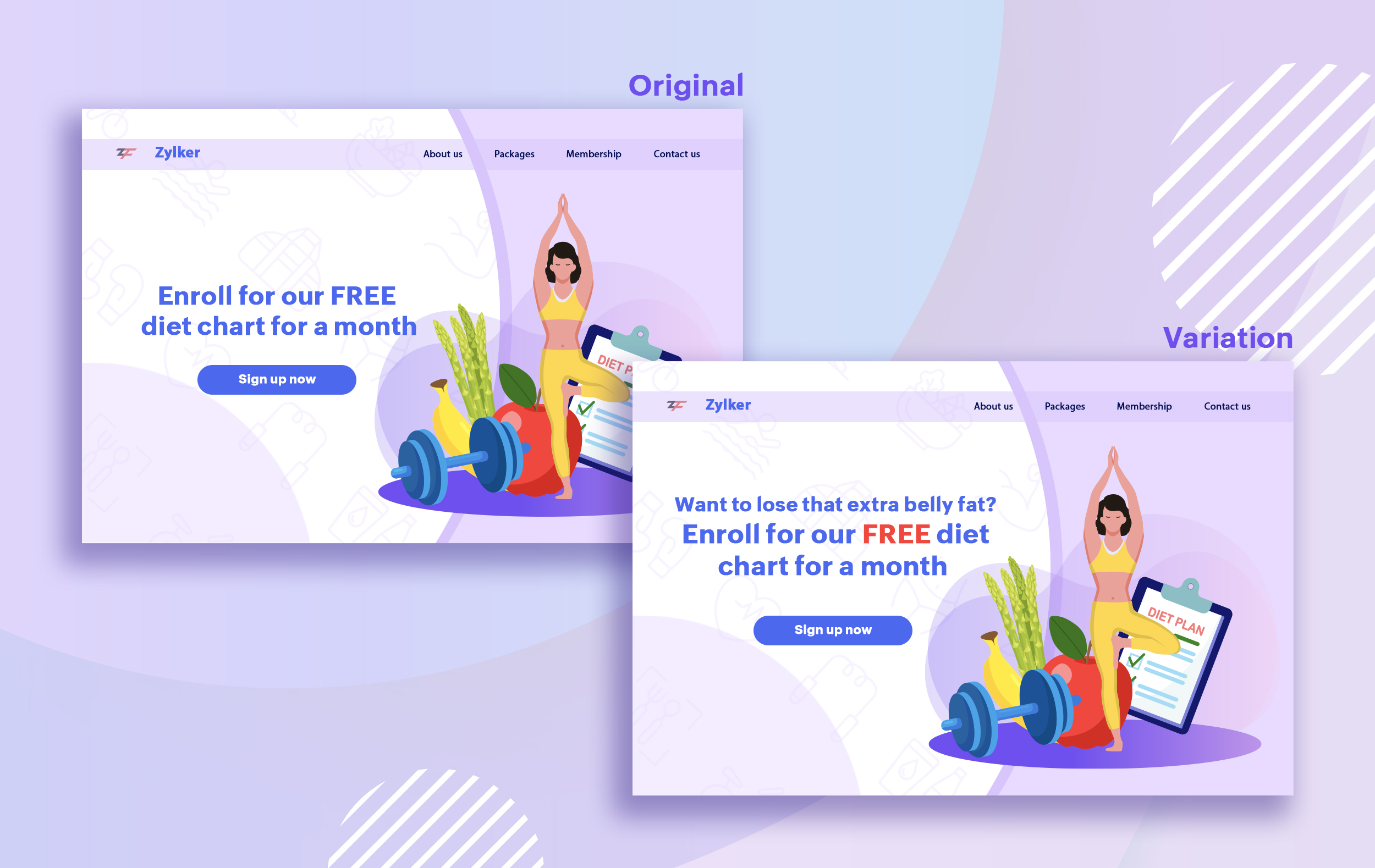
Take a look at the image below to see how implementing the problem and solution technique in your fitness website can make your headline sound more interesting.
Solving your customers' problem is the easiest and fastest way to reach their heart. Crafting a headline that addresses an issue and provides a cutting-edge solution to solve the problem can make optimizing your website easier. Intriguing your readers like this can make them look for more information on the rest of your site. Further, when done well, it can build a solid emotional bond between you and your customer for a longer term.
Example:
Take a look at the image below to see how implementing the problem and solution technique in your fitness website can make your headline sound more interesting.
Test with power words and sentiments
Sometimes the right audience is just one word away. Using forceful positive or negative power words in your headlines has the potential to kindle your customers' emotions and inspire action on your website in no time. Also, these words can guarantee more clicks and make your headlines stand out from the rest. You can test your headlines depending on two groups of power words:
Sometimes the right audience is just one word away. Using forceful positive or negative power words in your headlines has the potential to kindle your customers' emotions and inspire action on your website in no time. Also, these words can guarantee more clicks and make your headlines stand out from the rest. You can test your headlines depending on two groups of power words:
- Negative headlines: This type of headline tends to intrigue your customers by setting a stage to avoid a miserable situation. It includes words like never, stop, worst, avoid, or do not.
- Positive headlines: This type of headline tries to build a relationship with feel good emotions. It includes words like best, always, fastest, easiest, most, greatest, largest, funniest, hottest, strongest, biggest, and ever.
Example:
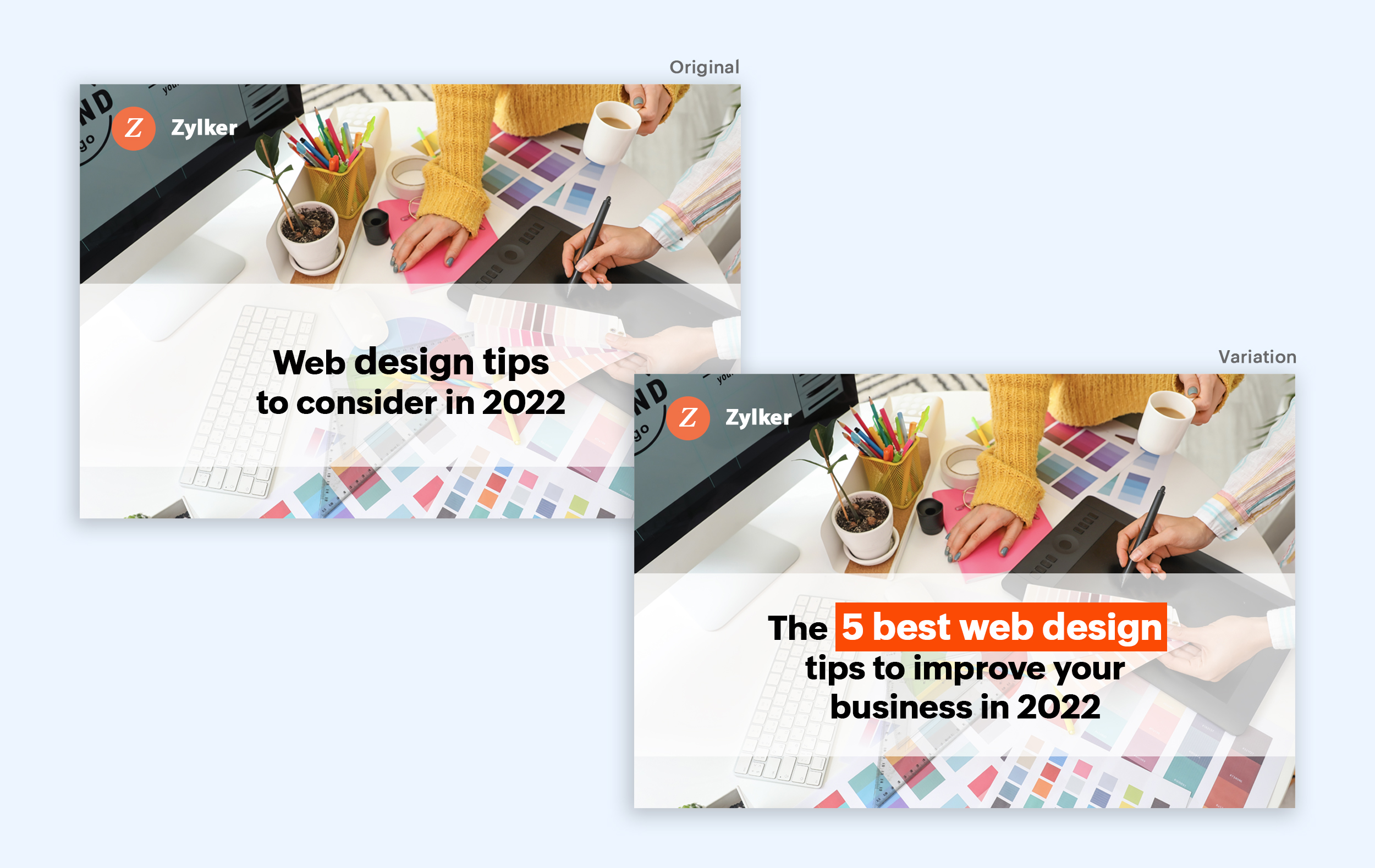
Take a look at the image below to see how the choice of words can invoke a positive feeling as you read the headline.
Test the font and appearance of your headline
The presentation (color, fonts, and layout) of your headline copy has a huge impact on the performance of your site. Below are a few points to consider while testing the appearance of your headline:
- Use title case. Avoid writing your headlines in all caps as it can reduce the readability of your text.
- Choose a font style and size that matches your website's personality. The most popular font style is sans-serif and font size is 20 - 36 pixels.
- Apply colors that contrast (while complimenting) your website's background well and focus on the legibility of your content.
- Align your headline perfectly with your body content for a bigger impact. Centered headlines are most powerful visually, while left-centered are more conservative and formal.
Example:
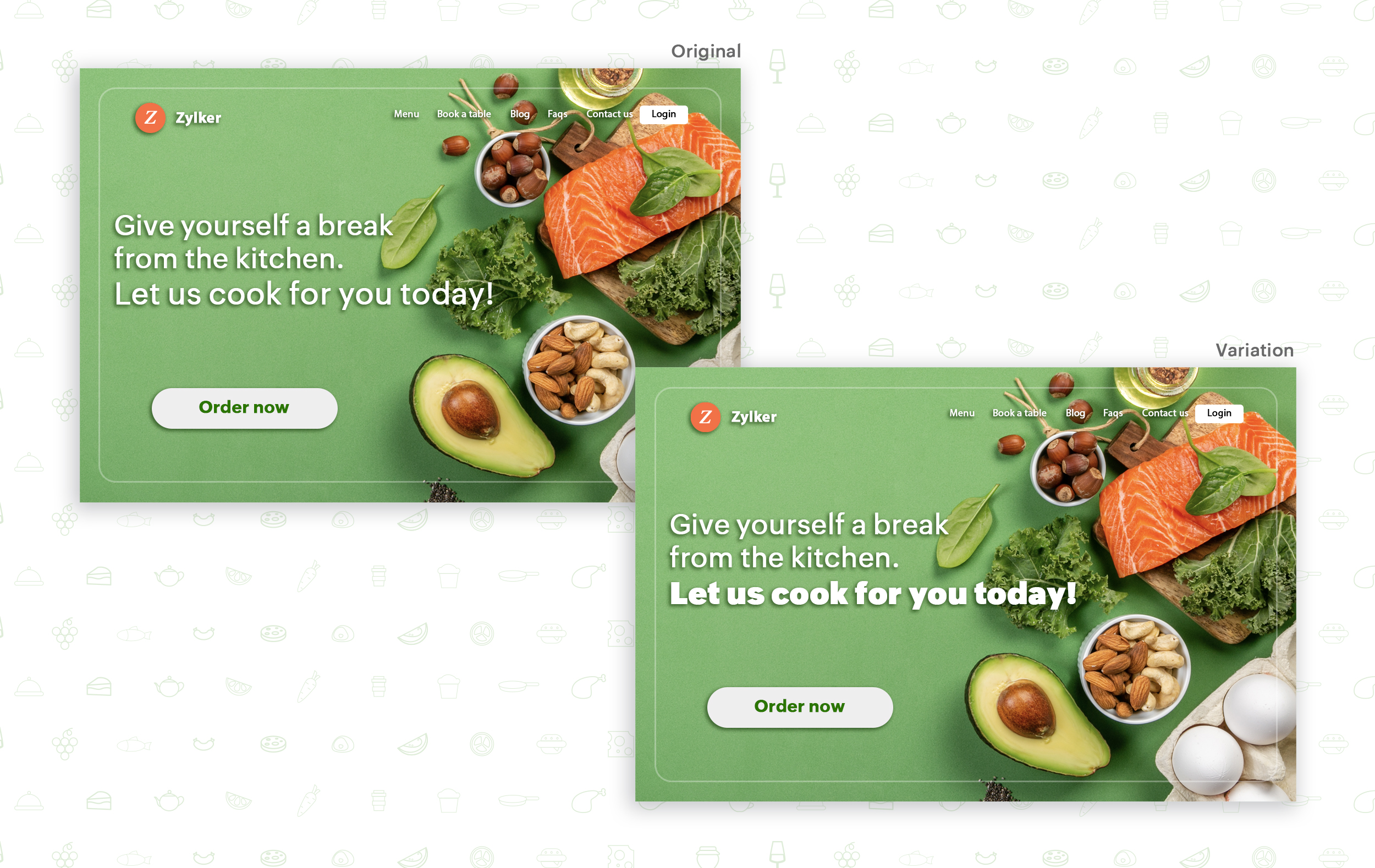
Say you own an online food delivery website, and you want to test the color and font of your homepage headline for better clickthrough rates. Take a look at the before and after images of the headline below. Which one you think will attract more eyeballs?
Try out the two-part strategy
Don't forget your supporting cast! Successful headlines act in two parts. Including a persuasive subheadline copy below your headline can be another winning strategy to pull your customers deeper into your website. You can test different versions of your subheadings to see which best suits your visitors, such as explaining a bit more about your product or services, emphasizing your product benefits, or encouraging visitors to click the CTA button placed on your site.
Example:
Take a look at the main headline and the subheading of a customer support software website as shown below. In this case, your subheadline re-affirms how your software helps your customers and adds emphasis about different product features.

Test the headline length and SEO compatibility
Test your headline for the right length, SEO keywords, and sentiments. Keeping a headline no longer than six words will help readers easily process your text and attain the goal of your website. Using free headline analyzer tools such as Coschedule or Sharethrough can help you effortlessly understand your website's performance. They analyze important factors (like searchable keywords, word balance, and sentiments) and assign a percentage score based on how good your headline is. They'll help you identify the factors you need to improve for more productive headlines.
Test your headline for the right length, SEO keywords, and sentiments. Keeping a headline no longer than six words will help readers easily process your text and attain the goal of your website. Using free headline analyzer tools such as Coschedule or Sharethrough can help you effortlessly understand your website's performance. They analyze important factors (like searchable keywords, word balance, and sentiments) and assign a percentage score based on how good your headline is. They'll help you identify the factors you need to improve for more productive headlines.
Example:
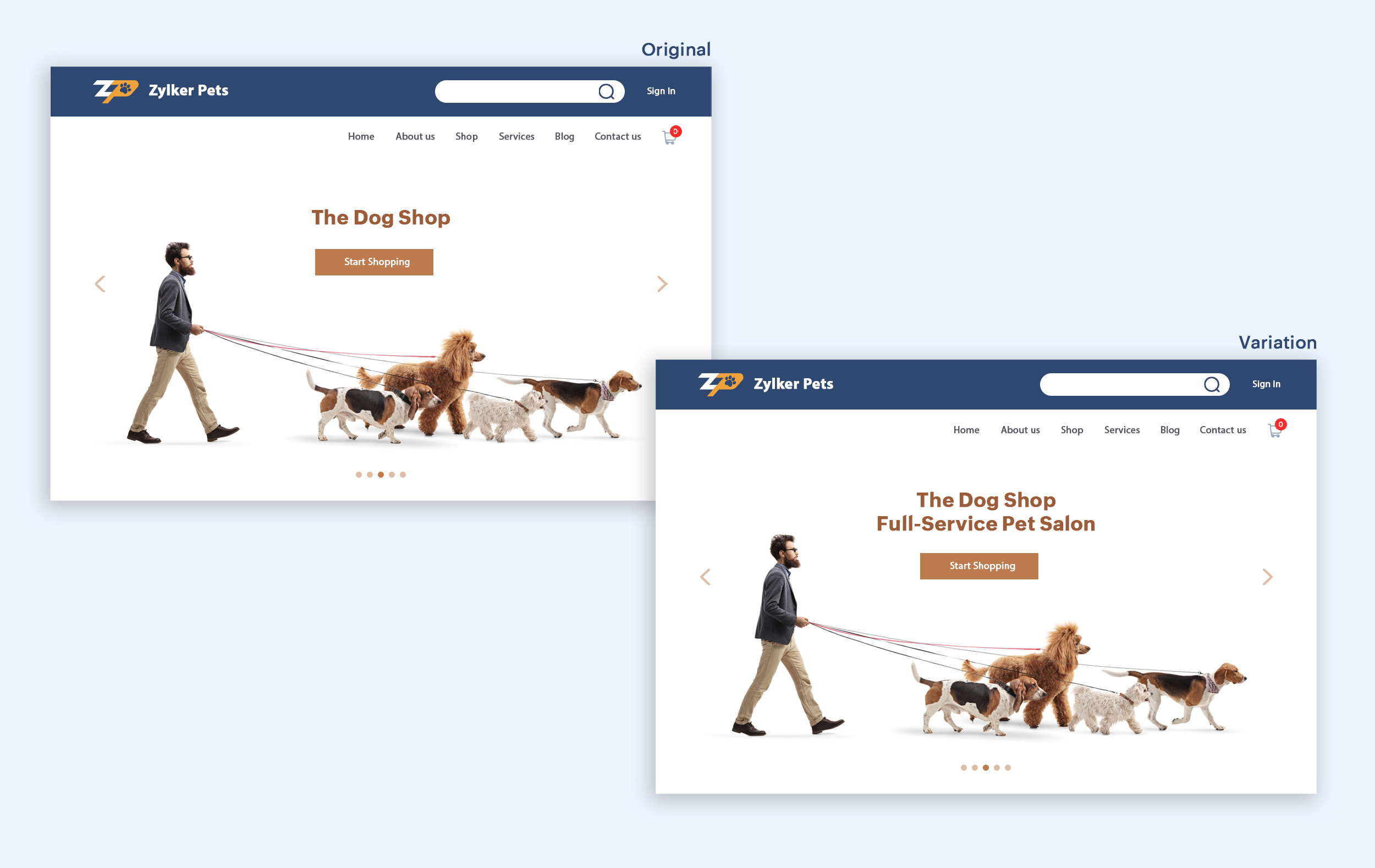
Let's say you own an online pet supply store and you want to test the headline of your homepage to attract more visitor traffic. The screenshots below show the performance of both the old and new versions of the headline in terms of length.
Bonus tips:
- Create a sense of urgency in your headline with words like "today," "now," and "last-minute offer."
- Use comparison phrases like "versus" to reinforce the benefits and features of your products/services.
- Research your competitor's headlines to add more value and optimize your headlines better.
We hope you found this article useful. What is your favorite headline tester? Have you had any success with headline A/B testing? Do share with us in the comments box below.
Happy testing. Happy converting!
Thank you.
Topic Participants
Balarohini Paulraj
info
Sticky Posts
[Live Webinar] How to maximize your conversions using existing website traffic
Hello all, Did you know that on an average only 0.1% of your traffic converts? The rest are either heading towards your competitors or dropping off without being able to find what they came for. When you want to increase your conversions, it's naturalA/B Testing Idea #2: Make your headlines sound super cool.
Hello everyone, We're back with our second post in the CRO testing idea series. If you missed the first post, please check it out here: "Place irresistible and clear CTAs." In today's post, we'll look at how to effectively A/B test your headline content.A/B Testing Idea #1: Place irresistible and clear CTA buttons
Are you wasting much of your time and effort A/B testing every single idea that pops into your head, yet you're not generating sufficient traffic to your website? Don't worry—we've got you. We'd like to introduce you to the A/B Testing Ideas learningDid you know?#3: How to target and run your experiment based on custom audience segments in PageSense
Whatever kind of online business you're running, defining your target audience is the key factor to delivering relevant messages and further positioning your brand in the industry. Most marketing efforts revolve around this basic strategy of segmentingDid you know?#2: How to filter your report by custom date range in PageSense
Do you want to quickly view your experiment analysis or responses over different time periods? Want to effortlessly compare the performance of your website by specific weeks, months, or years? Also, see whether your new marketing strategies or efforts
Recent Topics
Cisco Webex Calling Intergration
Hi Guys, Our organisation is looking at a move from Salesforce to Zoho. We have found there is no support for Cisco Webex Calling however? Is there a way to enable this or are there any apps which can provide this? Thanks!Designing a practical Zoho setup for a small business: lessons from a real implementation
I recently finished setting up a Zoho-based operating system for a small but growing consumer beauty business (GlowAtHomeBeauty), and I wanted to share a practical takeaway for other founders and implementers. The business wasn’t failing because of lackDKIM (Marketing emails) UNVERIFIED (Zoho One)
I'm having a problem with Zoho One verifying my Marketing Email DKIM Record for MYFINISHERPHOTOS.COM. I have removed and re-entered the ownership, DKIM (Transactional emails), SPF and Marketing DKIM and all of them come back verified except the DKIM (MarketingZoho Recruit Community Meet-up - India
Namaste, India. 🙏🏼 The Zoho Recruit team is hitting the road—and we 're absolutely excited behind the scenes. Join us for the Zoho Recruit India Meet-up 2026, a morning designed to make your recruiting life easier (and a lot more effective). Date CityGenerate a Zoho Sign link
From time to time I get a response "I never received your you e-document for electronic signature" is there a way to generate a Zoho Sign link to share.Is it possible to create a word cloud chart in ZoHo Analystics?
Hi there, I have a volume of transaction text that I would like to analyse using word cloud (or other approcah to detect and present word frequency in a dataset). For example, I have 50,000 records describing menu items in restaurants. I want to be ableHow to Fix the Corrupted Outlook 2019 .pst file on Windows safely?
There are multiple reasons to get corrupted PST files (due to a power failure, system crash, or forced shutdown) and several other reasons. If You are using this ScanePST.EXE Microsoft inbuilt recovery tool, it only supports the minor corruption issue[Webinar] A recap of Zoho Writer in 2025
Hi Zoho Writer users, We're excited to announce Zoho Writer's webinar for January 2026: A recap of Zoho Writer in 2025. This webinar will provide a recap of the features and enhancements we added in 2025 to enhance your productivity. Choose your preferredHow to drag row(s) or column(s)?
Hi. Selecting a row or column and then dragging it to a new position does not seem to work. Am i missing something or this is just not possible in Zoho Sheet? Cheers, JayBuilding Toppings #5 - Creating and configuring custom service connections in Bigin Toppings
Hello Biginners, Integrating Bigin with external applications extends its capabilities and enables customized functionalities. In our last post, we saw how to create a default service connection. Today, we'll see how to create a custom service connectionOptimising CRM-Projects workflows to manage requests, using Forms as an intermediary
Is it possible to create a workflow between three apps with traceability between them all? We send information from Zoho CRM Deals over to Zoho Projects for project management and execution. We have used a lookup of sorts to create tasks in the past,Marketing Tip #15: Rank better with keyword-rich URLs for product pages
Your product page URL is a small detail that can make a surprisingly big difference. Clean, readable URLs help in two ways: They’re easier for customers to trust and remember (no one likes clicking a link that looks messy or random). They help searchConditional fields when converting a Lead and creating a Deal
Hi, On my Deal page I have a field which has a rule against it. Depending on the value entered, depends on which further fields are displayed. When I convert a Lead and select for a Deal to be created as well, all fields are shown, regardless of the valueATE Session on Payment Gateways: Our experts are live now. Post your questions now!
Hello everyone, Our experts are all excited to answer all your questions related to payment workflows. Please feel free to join this session and learn more about this topic. If you have a query at anytime, please post them here.Upload data deleted all Zoho form data that we manage
Good morning. Let me introduce myself, I'm Iky from Indonesia. I'm experiencing an error or problem using Zoho Forms. I manage Zoho Forms, but I previously encountered an error when I misclicked the delete button in the upload format. It apparently deletedZOHO FORMにURL表示ができない
初心者です。 ZOHO FORM で宿泊者名簿を作っています。 ゲストが、URLをクリックするとStripeで支払いができるようにURLを表示をしたいのですが、 上手くできません。 やり方が分かる方、ぜひ教えてください。Custom module - change from autonumber to name
I fear I know the answer to this already, but thought I'd ask the question. I created a custom module and instead of having a name as being the primary field, I changed it to an auto-number. I didn't realise that all searches would only show this reference.No Automatic Spacing on the Notebook App?
When I'm adding to notes on the app, I have to add spaces between words myself, rather than it automatically doing it. All my other apps add spacing, so it must be something with Zoho. Is there a setting I need to change, or something else I can do soHolidays - Cannot Enter Two Holidays on Same Day
I have a fairly common setup, where part-time employees receive 1/2 day's pay on a holiday and full-time employees receive a full day's pay. Historically, I've been able to accommodate this by entering two separate holidays, one that covers full-timeCampaigns set up and execution assistance
Hello Community, Can someone recommend a professional who can assist with the completion of my set up and deployment of Campaigns? Looking for a person or company that is not going to ask for big dollars up-front without a guarantee of performance toZobot with Plugs
Hello, I am having a problem with Zobot using Plugs. Here is my current flow: When I run the flow, I should immediately see the messages from the initial cards (Send Message cards), then after running the plug, and finally, see the messages after theKaizen #223 - File Manager in CRM Widget Using ZRC Methods
Hello, CRM Wizards! Here is what we are improving this week with Kaizen. we will explore the new ZRC (Zoho Request Client) introduced in Widget SDK v1.5, and learn how to use it to build a Related List Widget that integrates with Zoho WorkDrive. It helpsRemove Powered by Zoho at the footer
Hi, I've read two past tickets regarding this but it seems that the instructions given are outdated. I assume the layout keeps on changing, which makes it frustrating for me to search high and low. Please let me know how exactly do I do this now? ThError AS101 when adding new email alias
Hi, I am trying to add apple@(mydomain).com The error AS101 is shown while I try to add the alias.No Need To Fix Something That Is Working
Zoho Books is a great financial tool which helps businesses to become more efficient and productive with day-to-day operations. As such, every change, upgrade, improvement needs to be carefully thought before implemented in the software and I'm sure ZohoUsing email "importance" as workflow-criteria
I'd like to set up a workflow that triggers if an incoming email has been flagged as "high importance" but I'm not seeing any way to do that. Hopefully I'm just missing something obvious...?This domain is not allowed to add. Please contact support-as@zohocorp.com for further details
I am trying to setup the free version of Zoho Mail. When I tried to add my domain, theselfreunion.com I got the error message that is the subject of this Topic. I've read your other community forum topics, and this is NOT a free domain. So what is theWhat is Resolution Time in Business Hours
HI, What is the formula used to find the total time spent by an agent on a particular ticket? How is Resolution Time in Business Hours calculated in Zohodesk? As we need to find out the time spent on the ticket's solution by an agent we seek your assistanceCheck & Unchecked Task Segregation in Export
It must have a feature to represent checked and unchecked tasks as [ ] and [✅] respectively when exporting it to Arratai or WhatsApp ; as Keep Notes by Google contains…WorkDrive Download Issue
My client has been sending me files via WorkDrive, which generally has worked fine. Recently files won't download at all. If you try and individually select and download a file, a popup will appear in the bottom right saying it's preparing and then itResolution Time Report
From data to decisions: A deep dive into ticketing system reports What are time-based reports? Time-based reports are valuable tools that help us understand how well things are going by breaking down key metrics over specific periods. By tracking, measuring,Support Custom Background in Zoho Cliq Video Calls and Meetings
Hello Zoho Cliq Team, We hope you are doing well. We would like to request an enhancement to the video background capabilities in Zoho Cliq, specifically the ability to upload and use custom backgrounds. Current Limitation At present, Zoho Cliq allowsAdd RTL (Right-to-Left) Text Direction Button in Zoho Cliq
Greetings Zoho Team, We would like to request the addition of an RTL (Right-to-Left) text direction button in Zoho Cliq, similar to what is already available in other Zoho apps like Zoho Desk. Currently, while using Zoho Cliq with the English interface,Enable Backgrounds and Video Filters for 1:1 Cliq Calls Across All Zoho Entry
Hello Zoho Cliq Team, We hope you are doing well. We would like to request an enhancement related specifically to 1:1 video calls in Zoho Cliq. Current Behavior Zoho Cliq currently provides background and video filter options in the following scenarios:Zoho Flow: Stripe a Zoho Marketing Automation
Hola! Quiero hacer un flujo con Zoho Flow, para que cuando se haga un pago en Stripe, añada el lead en Zoho Marketing Automation. Lo he configurado, configurando el disparador como "Payment created" y mapeando el campo de Stripe "Receipt email address".Need Customer Item Inward Module along with QC
Need Customer Item Inward Module along with QC 1. Using Transfer Orders hit the item balance sheet 2. Items without inventory it becomes difficult for tracking purpose. 3. Custom Modules become tedious to capture multiple items, item subforms are notLESS_THAN_MIN_OCCURANCE - code 2945
Hi I'm trying to post a customer record to creator API and getting this error message. So cryptic. Can someone please help? Thanks VarunZoho email
I need a list of email addresses of all contacts on my zohoShift-Centric View for Assigning and Managing Shifts in Zoho People
Hello Zoho People Product Team, Greetings and hope you are doing well. This feature request is related to Zoho People - please don't move it to zoho one! We would like to submit a feature request regarding the shift assignment and management view in Zohocant upload images in signature- urgent help needed. ta!
HI, I have been trying to insert the company logo in the signature. i have tried it several times since yesterday, the longest I waited was 1 hour and 12 minutes for the pop up window to upload a 180 KB .jpg file. what am i doing wrong.. an urgent replyNext Page