Automating Attendance Tracking with Zoho Cliq Developer Platform
I wish remote work were permanently mandated so we could join work calls from a movie theatre or even while skydiving! But wait, it's time to wake up! The alarm has snoozed twice, and your team has already logged on for the day.

How does this solution benefit a business?
- Real-time reminders reduce instances of ghost check-ins and ensure accurate recording of everyone's logged hours.
- Essential for attendance tracking, payroll accuracy, compliance with labour laws, and audits.
- The entire team stays informed, fostering a cohesive workflow that eliminates the need for micromanagement.
Before beginning to script the code below, we must create a connection in Cliq with Zoho People. Once a connection is created and connected, you can use it in Deluge integration tasks and invoke URL scripts to access data from the required service.
Create a Zoho People default connection with any unique name with the scopes - ZohoPeople.Attendance.ALL , ZohoPeople.forms.ALL and ZohoPeople.leave.ALL
ⓘ Document for reference : Connections in Cliq
How to obtain or locate the channel unique name in Cliq?
Navigate to the top right corner of the channel and locate the three dots. Click it.
In the menu that appears, select "Channel info" and a pop-up will open, displaying detailed channel information.
- After a successful login in Cliq, hover to the top right corner and click your profile. Post clicking, navigate to Bots & Tools > Schedulers.
- On the right, click the "Create Scheduler" button.
- To learn more about schedulers and their purposes, refer to the Introduction to Schedulers.
- Create a scheduler using your preferred name. Specify the following details: the scheduler name and a description.

- For the recurring period, choose the type "Weekly." Select Monday through Friday and set the time of execution to 11 AM or any other time that aligns with your company's check-in time, or customise the recurring period based on your specific use case.
- Finally, click "Save & edit code" and paste the following code.
- currentDate = zoho.currentdate;
- currentDateString = currentDate.toString("dd-MMM-yyyy");
- fromIndex = 1;
- toIndex = 200;
- // Get all active users
- users = zoho.people.getRecords("employee",fromIndex,toIndex,{},"{CONNECTION_LINK_NAME}");
- usersList = List();
- usersList.addAll(users);
- iterations = {1,2,3,4,5,6,7,8,9,10,11,12,13,14,15,16,17,18,19,20,21,22,23,24,25};
- // Get All Employees ( 4000 MAX )
- if(users.size() == 200)
- {
- for each iteration in iterations
- {
- fromIndex = fromIndex + toIndex;
- toIndex = toIndex + 200;
- users = zoho.people.getRecords("employee",fromIndex,toIndex,{},"{CONNECTION_LINK_NAME}");
- if(users.size() > 0 && users.size() == 200)
- {
- usersList.addAll(users);
- }
- else if(users.size() > 0 && users.size() < 200)
- {
- usersList.addAll(users);
- break;
- }
- else
- {
- break;
- }
- }
- }
- // Get all the employees checkedin from the morning.
- getAttendenceEntries = invokeurl
- [
- url :"https://people.zoho.com/api/attendance/fetchLatestAttEntries?duration=240"
- type :GET
- connection:"{CONNECTION_LINK_NAME}"
- ];
- latestAttendanceRecords = getAttendenceEntries.get("response").get("result");
- checkedInUsers = List();
- for each userRecord in latestAttendanceRecords
- {
- checkedInEmployeeEmail = userRecord.get("emailId");
- checkedInUsers.add(checkedInEmployeeEmail);
- }
- // Get all the employees who applied for leave both approved and pending ( Remove PENDING to exclude only the leave approved employees )
- leaveApprovedEmployees = invokeurl
- [
- url :"https://people.zoho.com/api/v2/leavetracker/leaves/records?from=" + currentDateString + "&to=" + currentDateString + "&dateFormat=dd-MMM-yyyy&approvalStatus=[APPROVED,PENDING]"
- type :GET
- connection:"{CONNECTION_LINK_NAME}"
- ];
- info leaveApprovedEmployees;
- leaveApprovedEmployeesList = List();
- for each member in leaveApprovedEmployees.get("records")
- {
- leaveApprovedEmployeesList.add(member.get("EmployeeId"));
- }
- info leaveApprovedEmployeesList;
- // Add the users to yet to checkin list if they are not checked from the morning and not applied for leave
- usersYetToCheckIn = list();
- for each user in usersList
- {
- employeeEmail = user.get("EmailID");
- employeeId = user.get("EmployeeID");
- employeeStatus = user.get("Employeestatus");
- if(!checkedInUsers.contains(employeeEmail) && !leaveApprovedEmployeesList.contains(employeeId) && employeeStatus.equals("Active"))
- {
- usersYetToCheckIn.add(employeeEmail);
- }
- }
- // Mention the list of users in the channel.
- if(usersYetToCheckIn.size() == 0)
- {
- info "No users were found yet to checked-in at 11 PM today. Great to see everyone wrapping in on time! ✅";
- }
- else
- {
- usersYetToCheckInString = "";
- for each user in usersYetToCheckIn
- {
- usersYetToCheckInString = usersYetToCheckInString + "[" + user + "](mail:" + user + ") \n";
- }
- usersYetToCheckInString = usersYetToCheckInString.subString(0,usersYetToCheckInString.length() - 2);
- response = Map();
- card = Map();
- card.put("title","Employees who haven’t checked in yet ( " + usersYetToCheckIn.size() + " )");
- card.put("thumbnail","https://i.pinimg.com/originals/85/e9/f3/85e9f3f5ac31fc5aab586e208297f43d.gif");
- card.put("theme","modern-inline");
- response.put("card",card);
- response.put("text",usersYetToCheckInString);
- info zoho.cliq.postToChannel("{CHANNEL_UNIQUE_NAME}",response);
- }
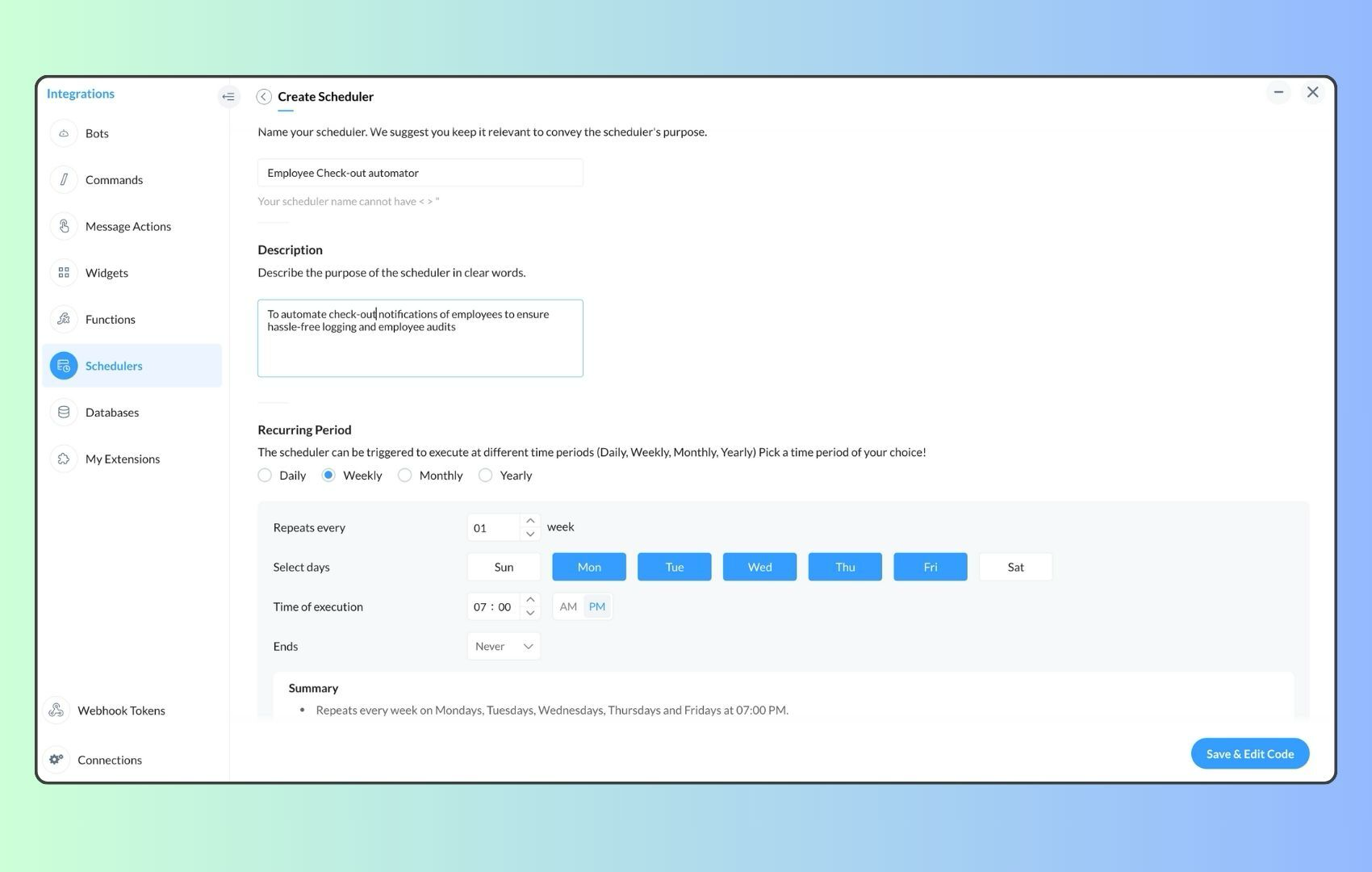
- Now, let's follow the same steps and create a scheduler for checkout reminders. Under the recurring period, choose the type as "Weekly." Select Monday through Friday and set the time of execution to 7 PM or any other time that aligns with your company's checkout time, or customise the recurring period based on your specific use case.
- Click "Save & edit code" and paste the following code.
- attendanceResponse = invokeurl
- [
- url :"https://people.zoho.com/api/attendance/fetchLatestAttEntries?duration=600"
- type :GET
- connection:"{CONNECTION_LINK_NAME}"
- ];
- info attendanceResponse;
- todayDate = zoho.currenttime.toString("YYYY-MM-dd");
- latestAttendanceRecords = attendanceResponse.get("response").get("result");
- usersWithoutCheckout = list();
- if(latestAttendanceRecords.size() > 0)
- {
- for each userRecord in latestAttendanceRecords
- {
- userEmail = userRecord.get("emailId");
- dailyEntries = userRecord.get("entries");
- for each dailyEntry in dailyEntries
- {
- if(dailyEntry.containsKey(todayDate))
- {
- todayEntryDetails = dailyEntry.get(todayDate);
- attendanceLogs = todayEntryDetails.get("attEntries");
- for each logEntry in attendanceLogs
- {
- if(!logEntry.containsKey("checkOutTime"))
- {
- usersWithoutCheckout.add("{@" + userEmail + "}");
- }
- }
- }
- }
- }
- }
- usersWithoutCheckoutString = usersWithoutCheckout.toString("\n");
- if(usersWithoutCheckoutString.trim().length() == 0){
- usersWithoutCheckoutString = "No users were found checked-in after 7 PM today. Great to see everyone wrapping up on time! ✅";
- }
- response = Map();
- card = Map();
- card.put("title","List of users who remain checked in ( " + usersWithoutCheckout.size() + " )");
- card.put("thumbnail","https://media.tenor.com/Hd8nLZZTPRYAAAAi/alarm-clock-alarm.gif");
- card.put("theme","modern-inline");
- response.put("card",card);
- response.put("text",usersWithoutCheckoutString);
- info zoho.cliq.postToChannel("{CHANNEL_UNIQUE_NAME}",response);
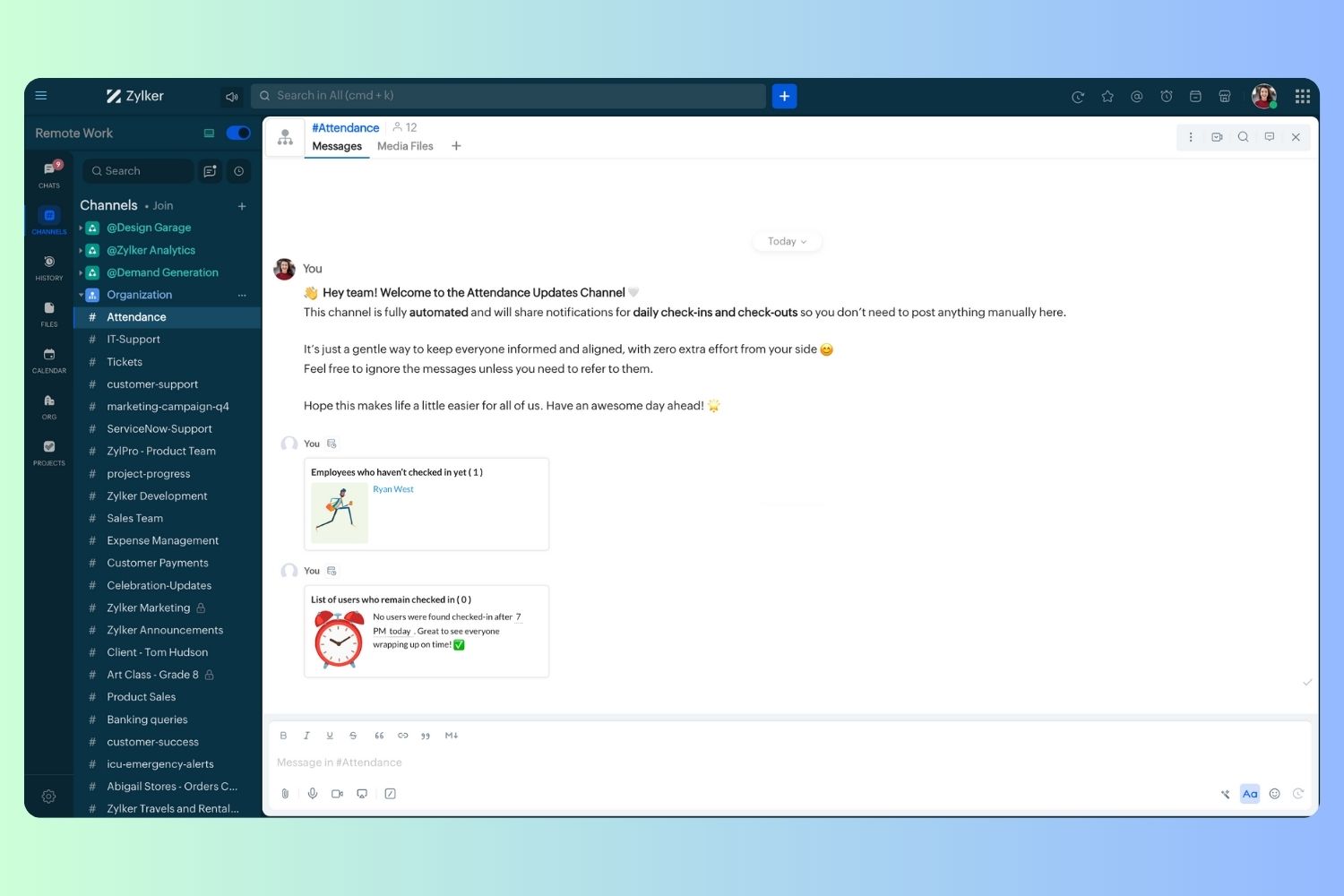
Wrapping up and checking out for the day, hopefully
Topic Participants
Harsha SS
Ram Freedman
Sticky Posts
Automate attendance tracking with Zoho Cliq Developer Platform
I wish remote work were permanently mandated so we could join work calls from a movie theatre or even while skydiving! But wait, it's time to wake up! The alarm has snoozed twice, and your team has already logged on for the day. Keeping tabs on attendanceAutomating Employee Birthday Notifications in Zoho Cliq
Have you ever missed a birthday and felt like the office Grinch? Fear not, the Cliq Developer Platform has got your back! With Zoho Cliq's Schedulers, you can be the office party-cipant who never forgets a single cake, balloon, or awkward rendition ofCustomer payment alerts in Zoho Cliq
For businesses that depend on cash flow, payment updates are essential for operational decision-making and go beyond simple accounting entries. The sales team needs to be notified when invoices are cleared so that upcoming orders can be released. In contrast,Accelerate Github code reviews with Zoho Cliq Platform's link handlers
Code reviews are critical, and they can get buried in conversations or lost when using multiple tools. With the Cliq Platform's link handlers, let's transform shared Github pull request links into interactive, real-time code reviews on channels. ShareApp Spotlight : PagerDuty for Zoho Cliq
App Spotlight brings you hand-picked apps to enhance the power of your Zoho apps and tools. Visit the Zoho Marketplace to explore all of our apps, integrations, and extensions. In today's fast-paced world, seizing every moment is essential for operational
Recent Topics
Displaying related quotes in sales order and back
Hi, My colleague liked to see to which sales orders, the quote has been converted. Quote shows Invoices, but not SO. Same, they would like to see the quotes in the sales order, as they can see invoices, packages, shipment, How can we achieve this ? ThankTip of the Week #71–Auto-move incoming messages to the right inboxes with keywords
We all know that customer-facing teams, especially your sales and support teams, can’t afford to miss even a single customer conversation. But sometimes, sales queries or support requests can easily get lost in a crowded inbox or even end up in the wrongClearing Fields using MACROS?
How would I go about clearing a follow-up field date from my deals? Currently I cannot set the new value as an empty box.Migrating a Zoho Forms form into Zoho Creator
Hi, How can I migrate my Zoho Forms form into Zoho Creator? Thanks. Truly, EmadIs there any way to recall an email sent using Zoho CRM?
If an email is sent using Zoho Mail, there is a recall option/functionality that is available to the sender. Is there any way to recall an email if it was sent using Zoho CRM? I can't seem to find that option. Any help would be appreciated.Problem with reports due to "Connected" items change - Yes this IS a problem
Now that the change has been made to use "connected" items I can no longer run the reporting I need in CRM. I should be able to start with Deals as the parent, connect down to the Account (Account_Name) on the deal as the child, then to any child itemsIntroducing notifications in the vendor portal
Imagine this: You're a recruiter working with multiple vendors on a high-volume hiring project. You’ve just updated a job description after a last-minute change from the hiring manager. One of your vendors, however, is still working off the older versionAnalytics for notes created
Is there a way I can see how many notes were created per day? Via reporting or analytics?Cannot update Recurring_Activity on Tasks – RRULE not accepted
Hello, I am trying to update Tasks in Zoho CRM to make them recurring yearly, but I cannot find the correct recurrence pattern or way to update the Recurring_Activity field via API or Deluge. I have tried: Sending a string like "RRULE:FREQ=YEARLY;INTERVAL=1"Add image to report...
Greetings, I send a weekly color coded report via Creator email. I would like to add the legend somewhere in the report. Header, footer where ever. I have the legend saved on Google Drive and can access it via shared link. Sure someone has wanted to addMore controls for User Fields in CRM
Dear All, We are here with a minor but crucial enhancement to the user fields—now set accessibility permissions to the records for user field. User field allows you to extend co-ownership of records to your peers. You can collaborate with them for certainCalls to accounts rather than leads or contacts?
So..... We have a dilemma and I'm hoping someone has encountered this before and figured out a fix. We have just migrated to Zoho. It's great.....expect for how "Calls" are handled.... We are B2B. We do not use the leads module. A "Lead/Prospect" forImage Upload Field | Zoho Canvas
I'm working on making a custom view for one of our team's modules. It's an image upload field (Placement Photo) that would allow our sales reps to upload a picture of the house their working on. However, I don't see that field as a opinion when buildingPower of Automation :: Automated 'Delayed & Closed' Status Update Based on Due Date
Hello Everyone, A custom function is a software code that can be used to automate a process and this allows you to automate a notification, call a webhook, or perform logic immediately after a workflow rule is triggered. This feature helps to automateRange names in Zoho Sheet are BROKEN!
Hi - you've pushed an update that has broken range names. A previously working spreadsheet now returns errors because the range names are not updating the values correctly. I've shared a video with the support desk to illustrate the problem. This spreadsheetpopulate email address and name in zoho desk?
Is it possible to populate the email address and name in the zoho desk widget? We only use it in the context of an authenticated user, so we already know the user's name and email. Thanks,Are there default/pre-built dashboards in Zoho Desk?
Hi, I am looking for some pre-built dashboard templates in Zoho Desk, similar to what we can find in CRM/Projects, etc Thank youSAP S/4 HANA to CRM Integration - change the SAP Client ID
Hi I am trying to push the business partners from SAP S/4 HANA to ZOHO CRM module. The SAP Client ID is 421 in my case....kindly let me know how do I specify the sap client because it's a dropdown with specific values as of now. Thanks Ravi AswaniAdding branded signature to tickets reply
Hi, i am unable to figure out how to add signatures with logo to tickets reply. please advice .How to share ticket numbers across different ticket types
I'm running an event and have three different ticket types. Add on Event + Main Event - Early bird Main Event only - Early bird Add on Event only - Early bird And Standard class - shown but not available until early bird finishes Add on Event + Main EventAdding Social Media Buttons to Basic Campaigns
Hi, I'm quote new to using Zoho Campaigns and I can't work out how to add Social Media Buttons into my basic campaign? In MailChimp there's a button that brings the icons into your campaign for you. I've tried adding the social media icons as 'buttons' in Zoho but it's not looking great. Can anyone help? Thanks!Hide Inactive Social Sign-In Providers from Login Screen
Hello Zoho Team, We hope you are doing well. Currently, Zoho One allows admins to configure security policies and enable or disable Social Sign-In options for third-party providers such as Apple, Google, Microsoft, LinkedIn, Yahoo, Twitter, Facebook,[Free Webinar] AI Agents in Zoho Creator - Creator Tech Connect
Hello Everyone! We welcome you all to the upcoming free webinar on the Creator Tech Connect Series. The Creator Tech Connect series is a free monthly webinar that runs for around 45 minutes. It comprises technical sessions in which we delve deep intoDownload All Attached Files
It would be extremely useful to have "download-all" functionality for downloading files attached to a task, subtask, comment, forum post or hosted in the "Documents" section etc. We've instructed our users to zip multiple files prior to uploading, but of course they forget all the time. Having to download lots of files one-at-a-time off a comment or task wastes a lot of time.Ship via Carrier Not Working Since Commerce Update
Since the recent update to the Commerce platform, I can no longer use the ship via carrier function. It will take me to the address screen and let me verify them but when I go to save and move tot he next screen it will not do anything. This is happeningautomations: Can I execute a step on a specific date?
I have created a form in Zoho forms, and created a contacts list. I have also begun setting up an automation with the intention of sending the form to the contact list on a specific date every month (via email) for the entire year (essentially sendingZoho Expense - The ability to add detail to a Trip during booking
As an admin, I would like the ability to add more detail to the approved Trips. At present a requestor can add flights, accommodation details and suggest their preferences. It would be great if the exact details of the trip could be added either by theAdding Folders in Android App
Is it possible to create a new email folder within the Zoho Mail Android app? Or can this only be done from the desktop version of Zoho Mail? Cheers!Schedule Exports for Regular Project Updates
Tracking project data often means exporting data at regular intervals. Instead of manually exporting data every time, users can schedule exports for Phases, Tasks, and Tasks in Zoho Projects. These exports can be set to run once, daily, weekly, or monthlyQuestion about custom fields using Pivot Tables.
I have created a pivot table showing annual revenue of a client and how much payment that client is paying my company. Is there a way using pivot table to add an additional field that subtracts those to fields / shows me a percentage of that difference?Request for Light/Dark Mode
Would love the ability to switch between Light and Dark mode similar to Zoho CRM. https://help.zoho.com/portal/en/community/topic/introducing-dark-mode-light-mode-a-new-look-for-your-crmJourney Email - Ignored Contacts
I have a journey setup which simply sends a string of emails over time. For some reason I am getting large amounts of the contacts who enter the first email being ignored and I can't find anywhere in reports or audit logs why these contacts are notInvolved account types are not applicable when create journals
{ "journal_date": "2016-01-31", "reference_number": "20160131", "notes": "SimplePay Payroll", "line_items": [{ "account_id": "538624000000035003", "description": "Net Pay", "amount": 26690.09, "debit_or_credit": "credit" }, { "account_id": "538624000000000403", "description": "Gross", "amount": 32000, "debit_or_credit": "debit" }, { "account_id": "538624000000000427", "description": "CPP", "amount": 1295.64, "debit_or_credit": "debit" }, { "account_id": "538624000000000376", "description":Zoho Books - Include Payment Terms as a Custom View filter
It would be great if you could created a custom view based on Payment Terms. This would be really handy for seeing a list of customers who have credit terms. A workaround is not required. I could do something with a creditor checkbox, but it would beHow to update changed purchase account of item in invoice
I have selected the wrong purchase account for various articles and created invoices. I had to adjust the purchase account in the article afterwards, but the old purchase account is still posted in the transaction-journal of the invoice. To adjust theHelp - Zoho CRM notification on mobile (IOS/Android)
Hello Community! Can I get the IOS/Andoid CRM app to notify me of events, calls, etc. due as I can with MANY other apps? I am running the free Zoho I would like this to be native to the Zoho CRM app. I do not want to write a sep. mobile appZoho Books Idea - Include another field in Bank Details for Address
Hi Books team, Currently use the Description field in the Bank Details to store the bank's address. This works fine but it would be great if you could add another field for Bank Address, so that other notes about the bank account could be stored in thea question about the COQL API v8
When I specify eight or more values in a WHERE IN clause and execute it, an error occurs. Is there a limit to the number of values that can be specified in a WHERE IN clause? ↓Error select * FROM Vendors WHERE (id in (1, 2, 3, 4, 5, 6, 7, 8, 9)) ↓SuccessZoho Books Idea - Bank Details Button on Banking
Hi Books team, Sometimes I'm asked to share bank details with a customer or a colleague. So I go to the Banking Module, find the correct bank account, click Setting > Edit, then copy and paste the bank details. Wouldn't it be great if there was a buttonJS SDK 8.0 – TypeError: Cannot read properties of undefined (reading 'getCacheStore') with sample code
Hello Zoho Support Team, I’m integrating the Zoho CRM JavaScript SDK v8.0 and I’m getting the error below when running your official sample. I tested directly from: https://github.com/zoho/zohocrm-javascript-sdk-8.0/blob/main/samples/create_records_sample/create_records.jsNext Page