In our last post,
we discussed the essential features that a Zoho Projects extension can provide. Starting with this post andin every subsequent post going forward, we'll go through each of those features in depth, one by one, with an example use case.
In this post, we'll explore the Connections feature in detail.
Connections: When and why?
Creating a tightly coupled integration requires the establishment of a secure connection between applications. To achieve this secured connection, the Sigma platform provides the Connection feature that can be used to establish a secure link and perform data operations across applications seamlessly and efficiently through an extension.
Use case
Working on development-related tasks might require dealing with a variety of files, such as code snippets, help documents, or service level agreements. While several file management applications are available to securely store and organize data, manually handling file storage between applications remains challenging.
For our example, let's use Zoho Projects to manage all tasks, and Dropbox to manage and store data.
What is the difficulty faced?
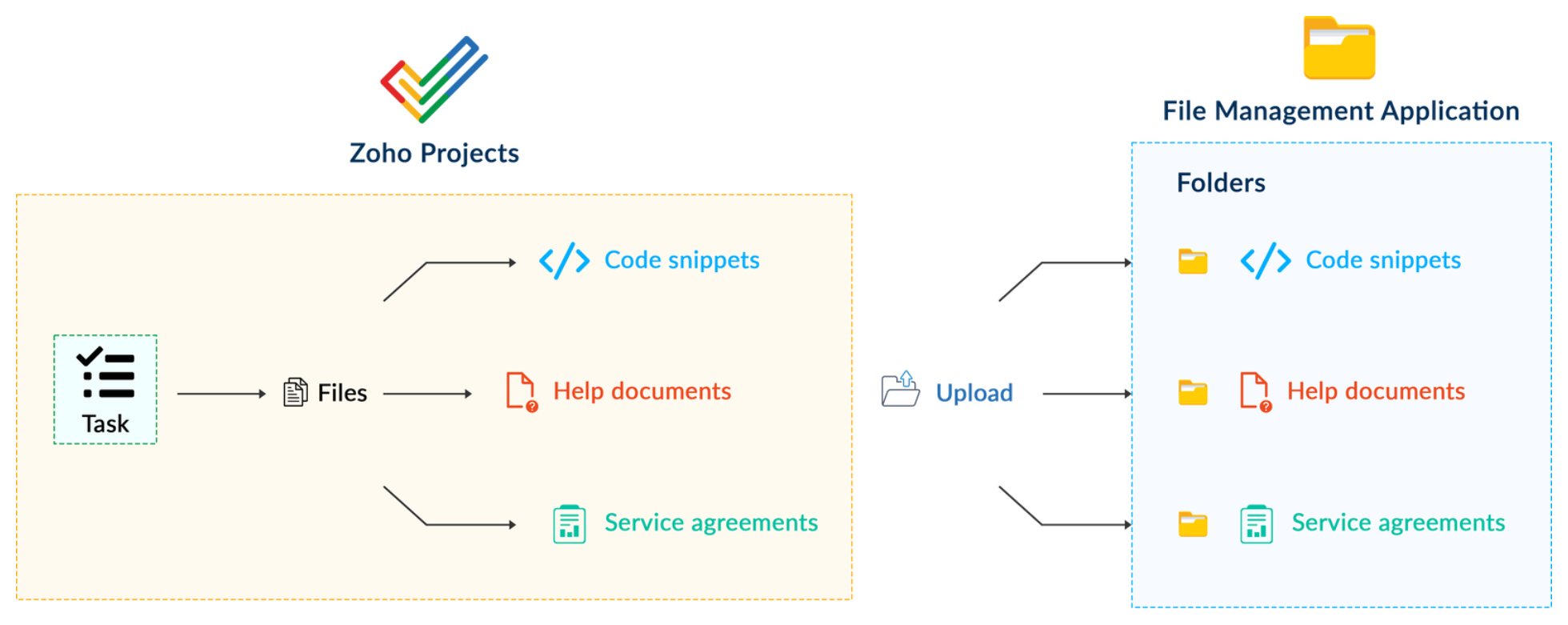
Dropbox offers a file request feature that allows you to collect files and organize them into folders. However, as we talked about in our previous post, manually categorizing and uploading task-related files to their respective file request folders in Dropbox would be a time-consuming and laborious activity. Instead, it would be more efficient to integrate Dropbox with Zoho Projects so that uploading task files to Dropbox file request folders can be done instantly from within Zoho Projects. 
How can it be sorted?
You can create a connection between Zoho Projects and Dropbox. With the secure connection setup, the file request folders available in Dropbox can be listed on the task details page of Zoho Projects through an extension. You may then easily upload files from Zoho Projects to their corresponding folders in Dropbox, saving time and making you more organized.
What are the components required to achieve this use case?
- A connection between Zoho Projects and Dropbox.
- An extension configuration that includes:
- Creating an extension
- Configuring the plugin manifest
- Setting up the widget code to display the Dropbox file request folders inside the Zoho Projects task details page.
Now, let's see how we can achieve each of these components.
1. Creating a secure connection using the Connection feature
- Log in or sign up into developer.zoho.com.
- Go to Sigma and access your workspace.
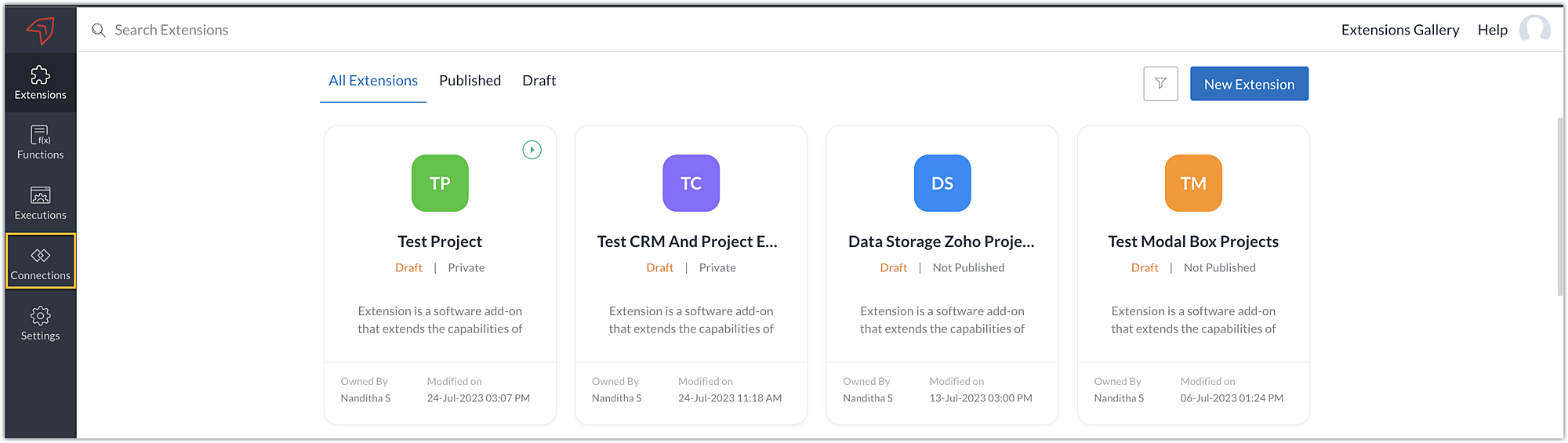
- Once you enter your workspace, select the Connections section in Sigma.
Note: Connections created in Zoho Projects are also accessible within the Connections section in Sigma. These connections can be used in extensions to connect with other applications.
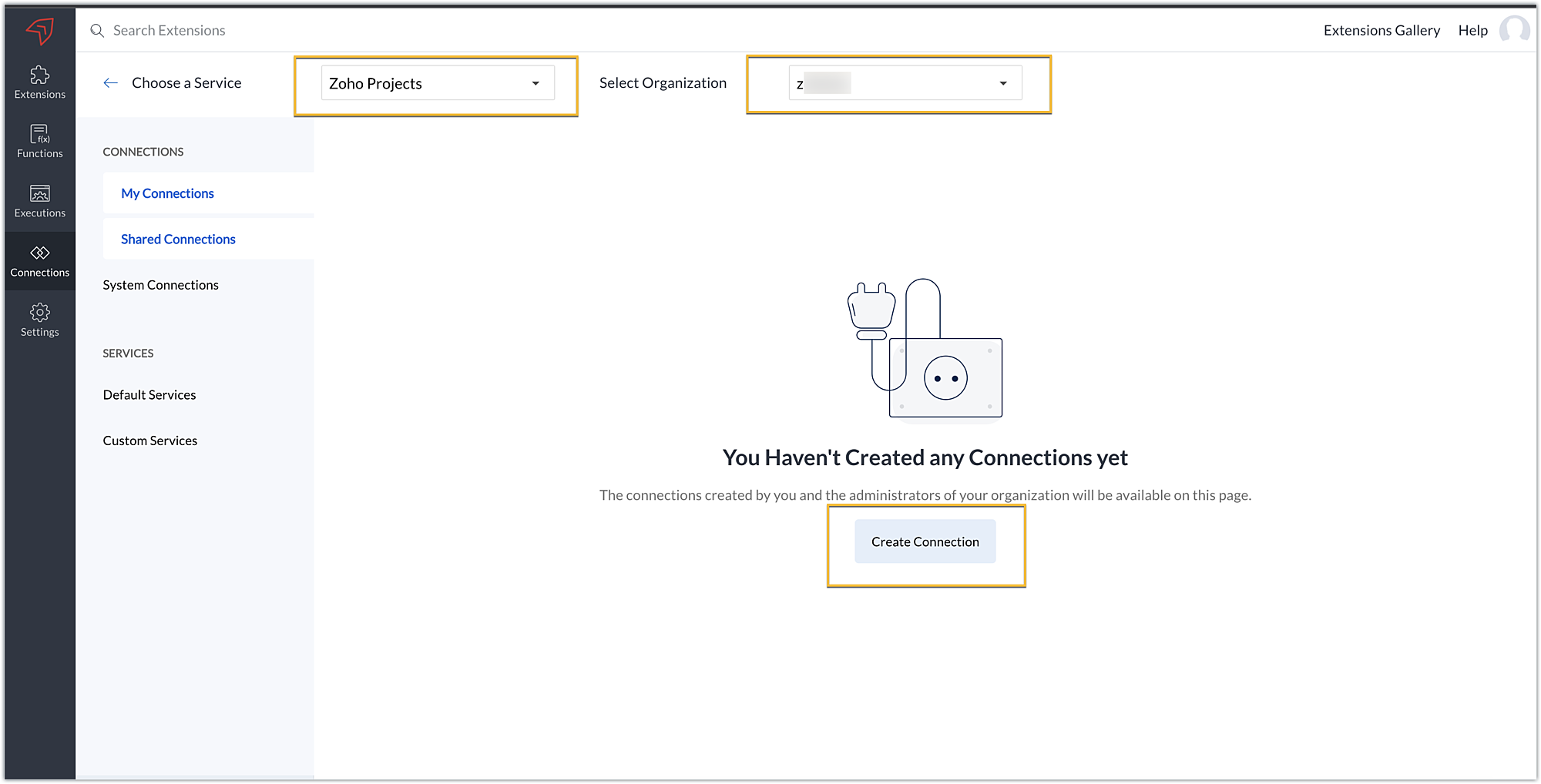
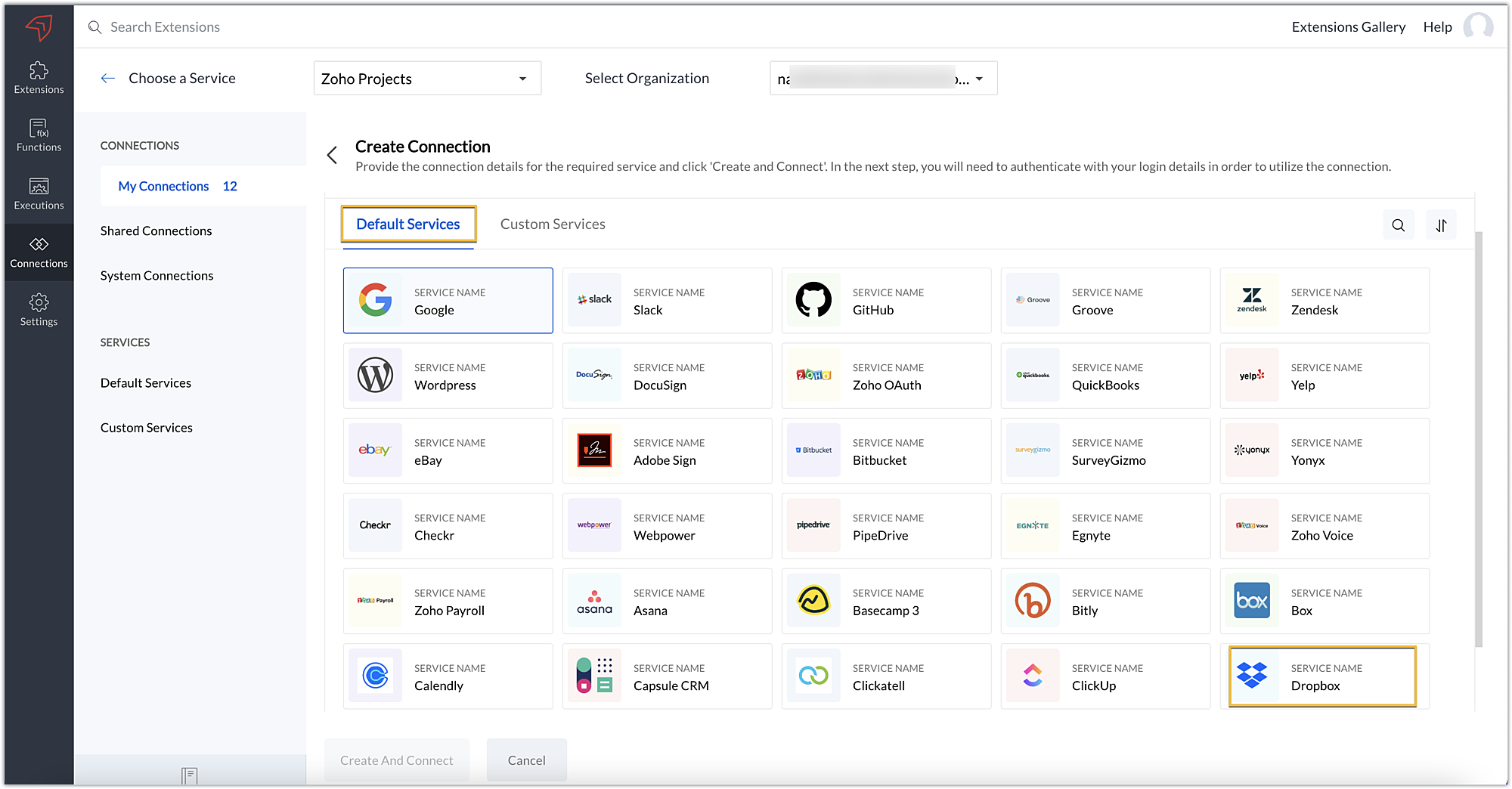
- Choose the service as Zoho Projects and select your Zoho Projects organization. Click on Create Connection.
- Sigma offers a list of default services from which you can choose and easily connect with Zoho Projects. If the application you want to integrate isn’t in the default list, you can add and build a connection with it using the custom services option.
Note: If you’re looking to connect Zoho Projects with another Zoho Product that also follows the OneAuth authentication mechanism, select the service Zoho OneAuth from the Default Services list to create the connection.
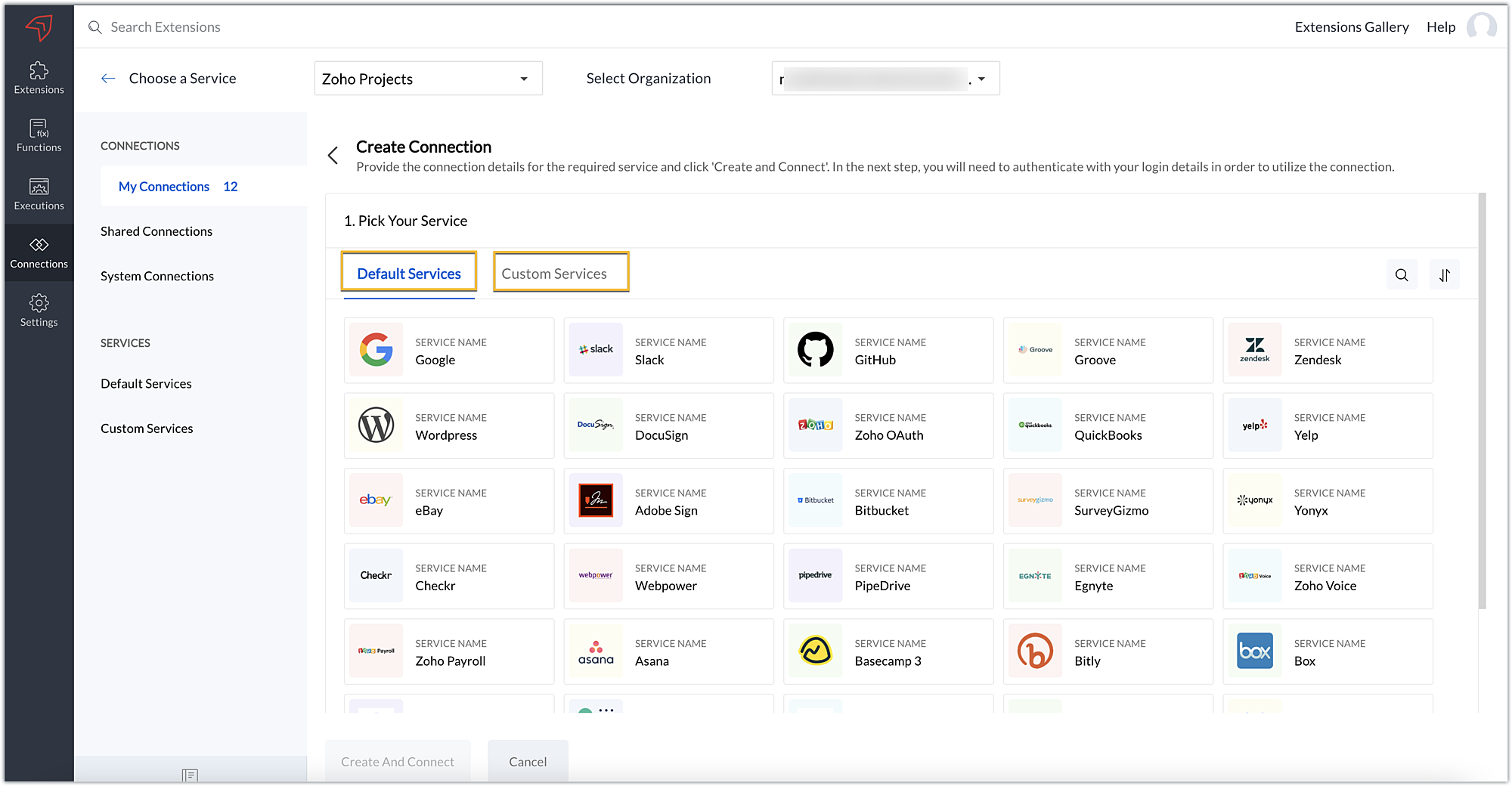
- In our example, the application to connect with Zoho Projects is Dropbox, and because it’s in the Default Services list, go ahead and choose Dropbox.
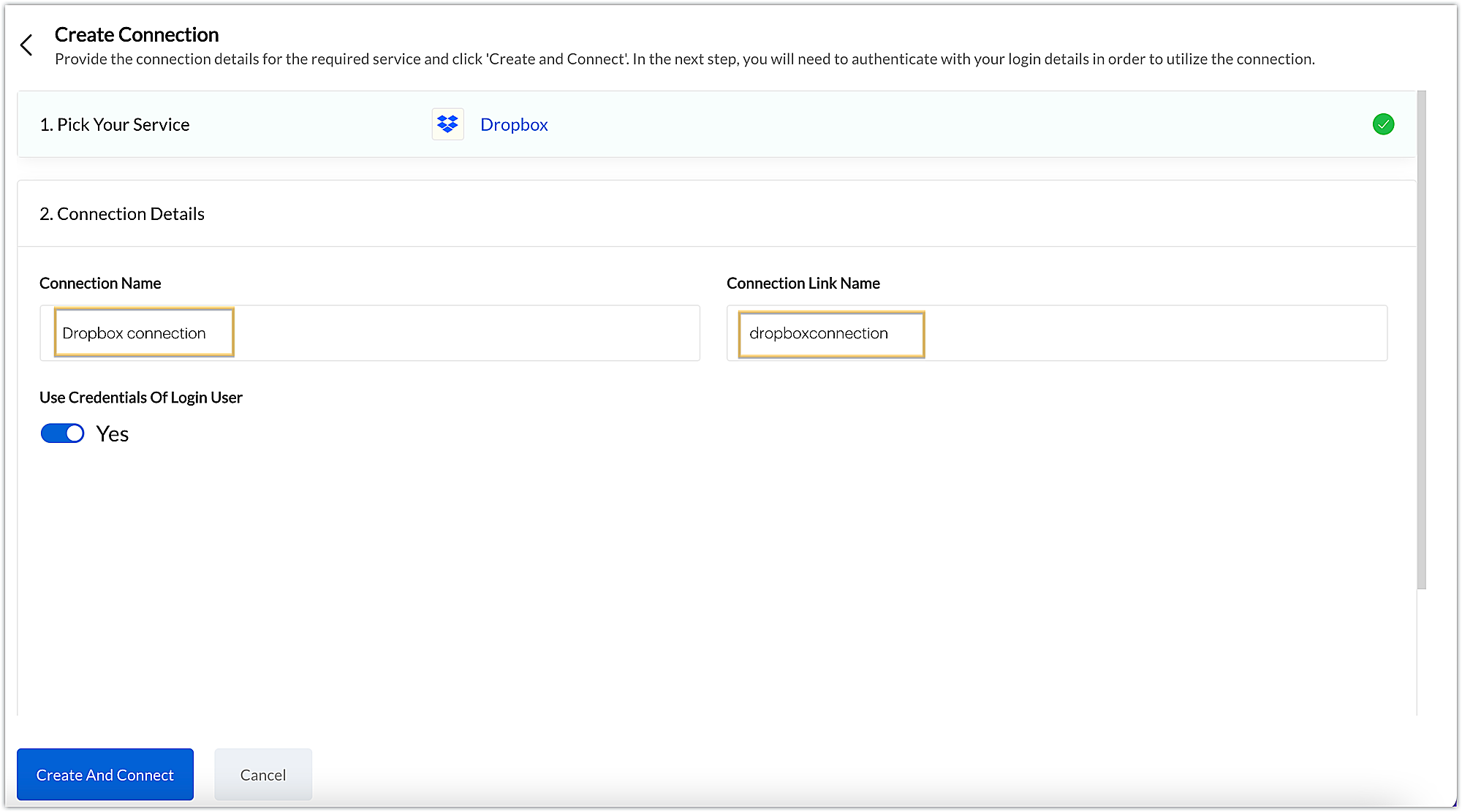
- After choosing the service, enter the connection name. A connection link name will be populated automatically.
- Toggle Use credentials of login user to Yes if you want every user installing the extension to access the connection using their own login credentials, or No if admin credentials are enough to access the connection.
- In our example, we'll proceed with the former. So toggle to Yes, and then click Create and connect.
Note: For services in which the option to choose the scopes is displayed, choose the necessary scopes, and then click Create and connect.
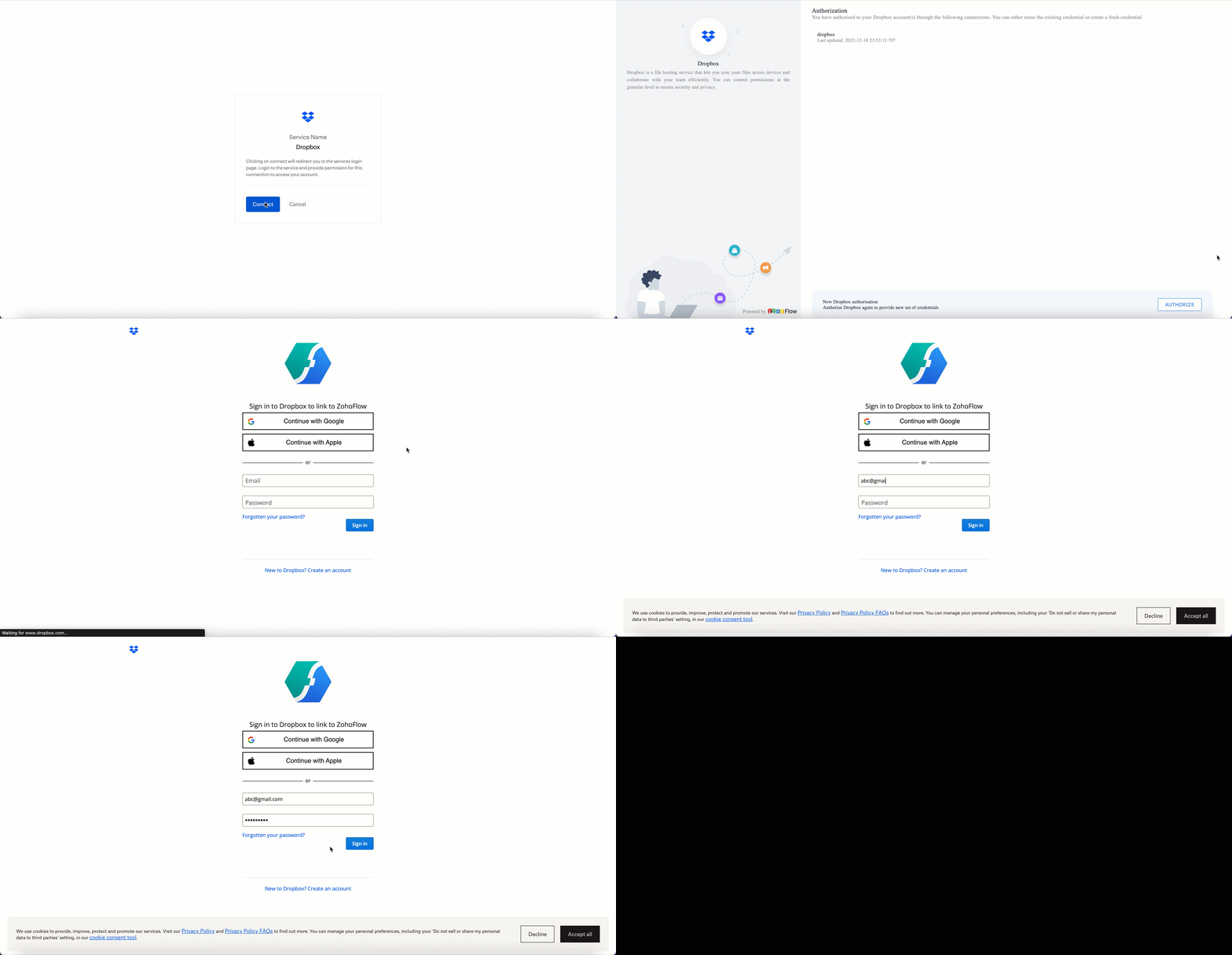
- You’ll be directed through a series of authorization steps before being prompted to connect with Dropbox by entering your login information.
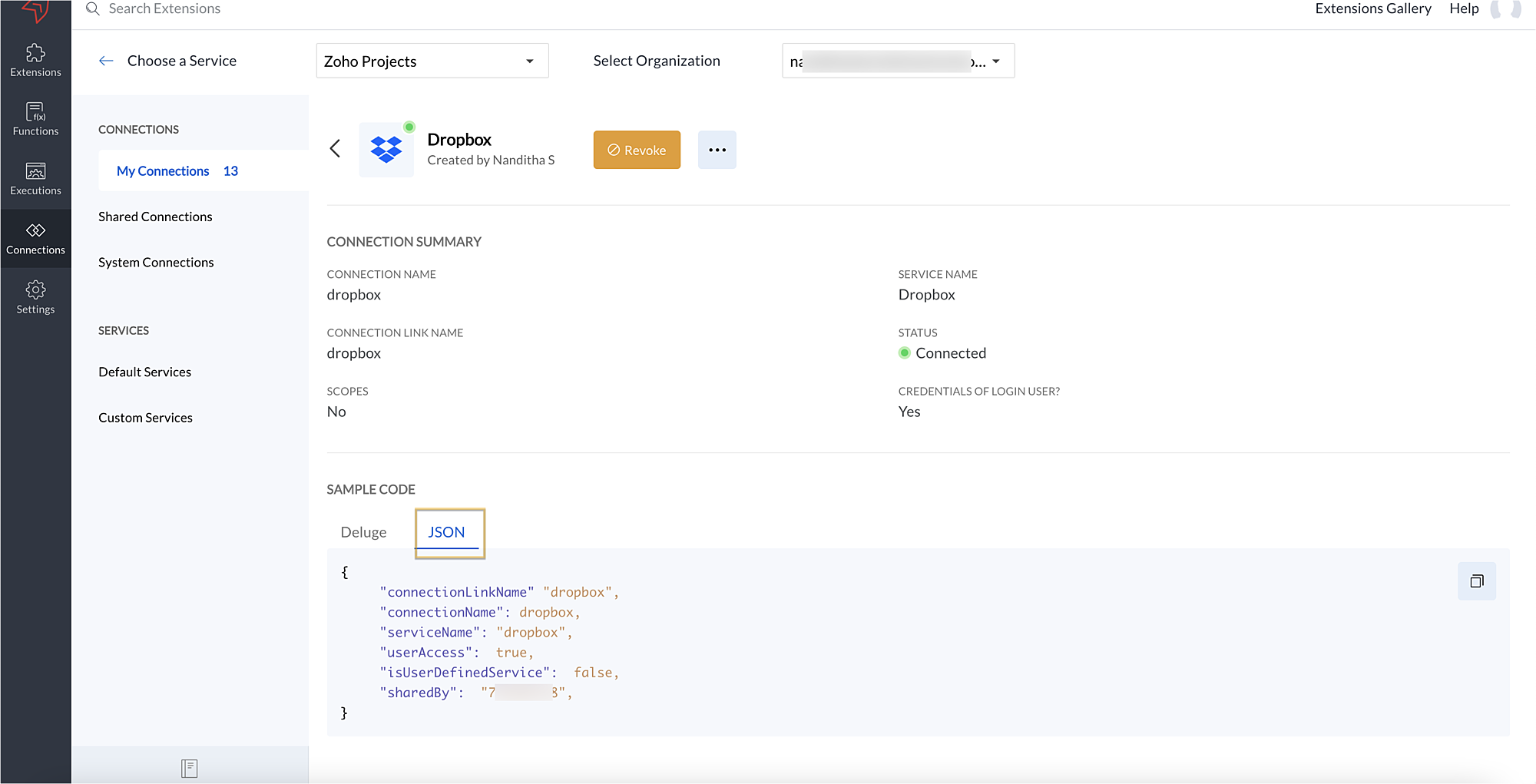
- The connection will be established successfully once you sign in with Dropbox, and you will be redirected to the Connection Summary details page in Sigma.
- To access this connection as part of an extension, you’ll need to configure the sample code provided under the JSON section in the plugin-manifest.json file. We’ll explore this in the next section.
2. Extension configuration
Now that we've successfully established our connection, let's look at how we can achieve our use case feature of displaying the Dropbox file request folder within the Zoho Projects task detail page. As mentioned earlier, to accomplish this, we’ll need to implement the following measures.
A. Create an extension
B. Configure the plugin-manifest.json file
C. Set up the widget code
Let's explore these steps in order.
A. Create an extension
B. Configure the plugin-manifest.json file
- As previously stated, to access the connection established between Zoho Projects and Dropbox, the connection must first be configured in the plugin-manifest.json file.
- Copy the JSON sample code from the Connection Summary Details page and paste it into the plugin-manifest.jsonfile as the value for the connections key.
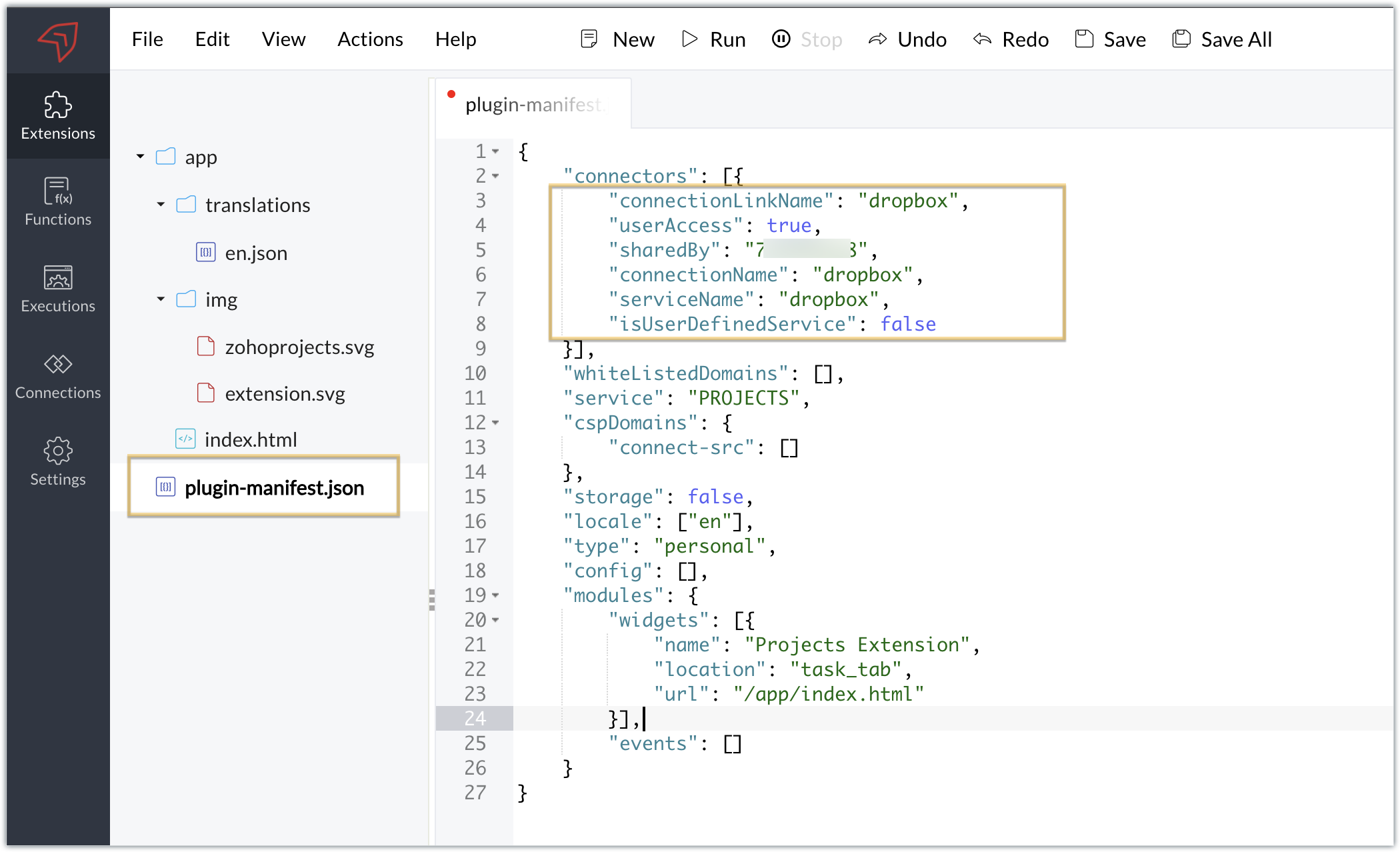
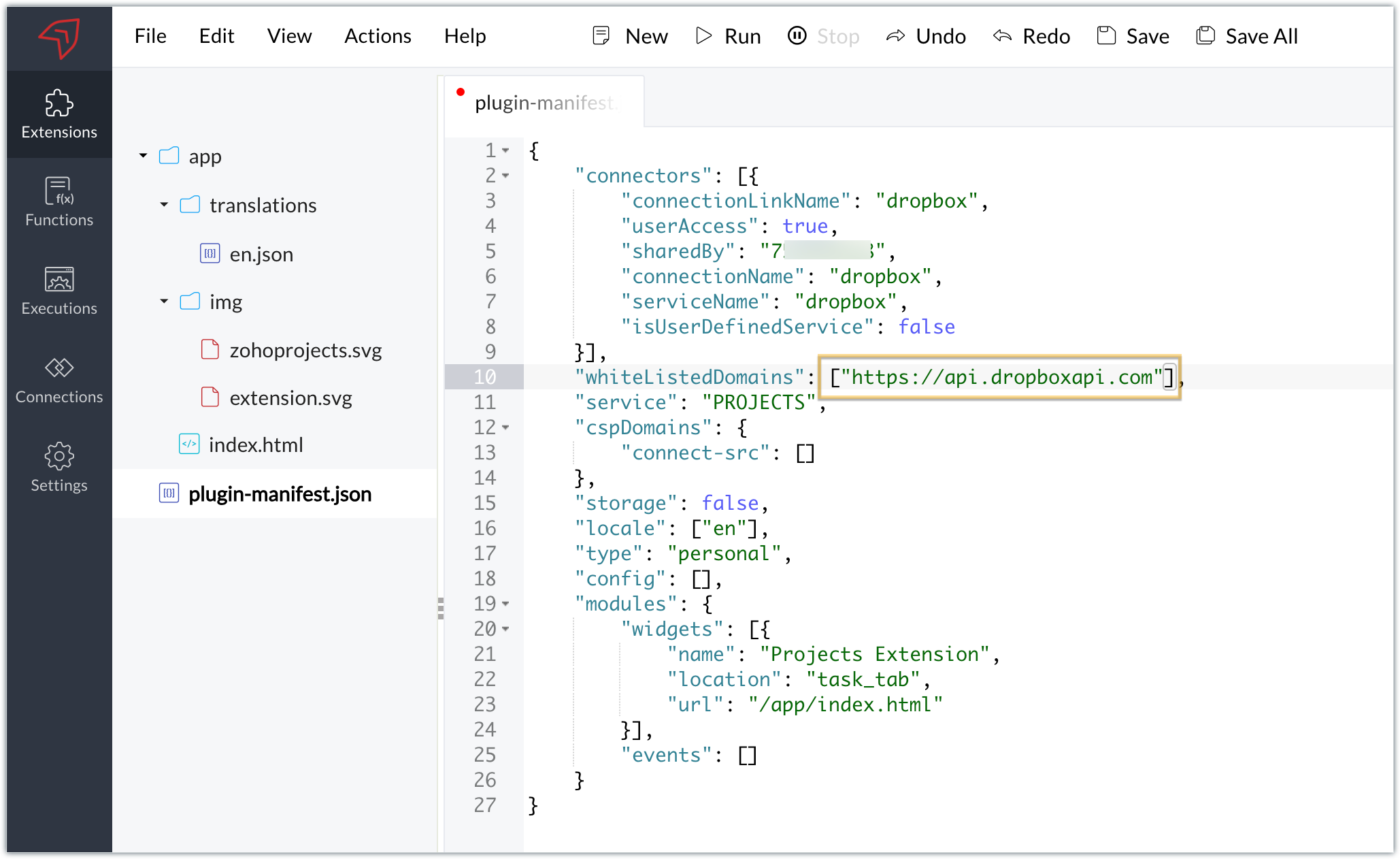
- You will also need to white list the Dropbox domain for Dropbox calls to be processed without being blocked.
- Include the domain in the plugin-mainfest.json file as the value for the whiteLitsedDomains key.
- As we saw in our earlier post, the plugin-manifest.json file includes a widget called Projects Extension by default. For our example, because we’re connecting with Dropbox and constructing a widget that will include Dropbox request folders to upload files, enter the widget name and location.
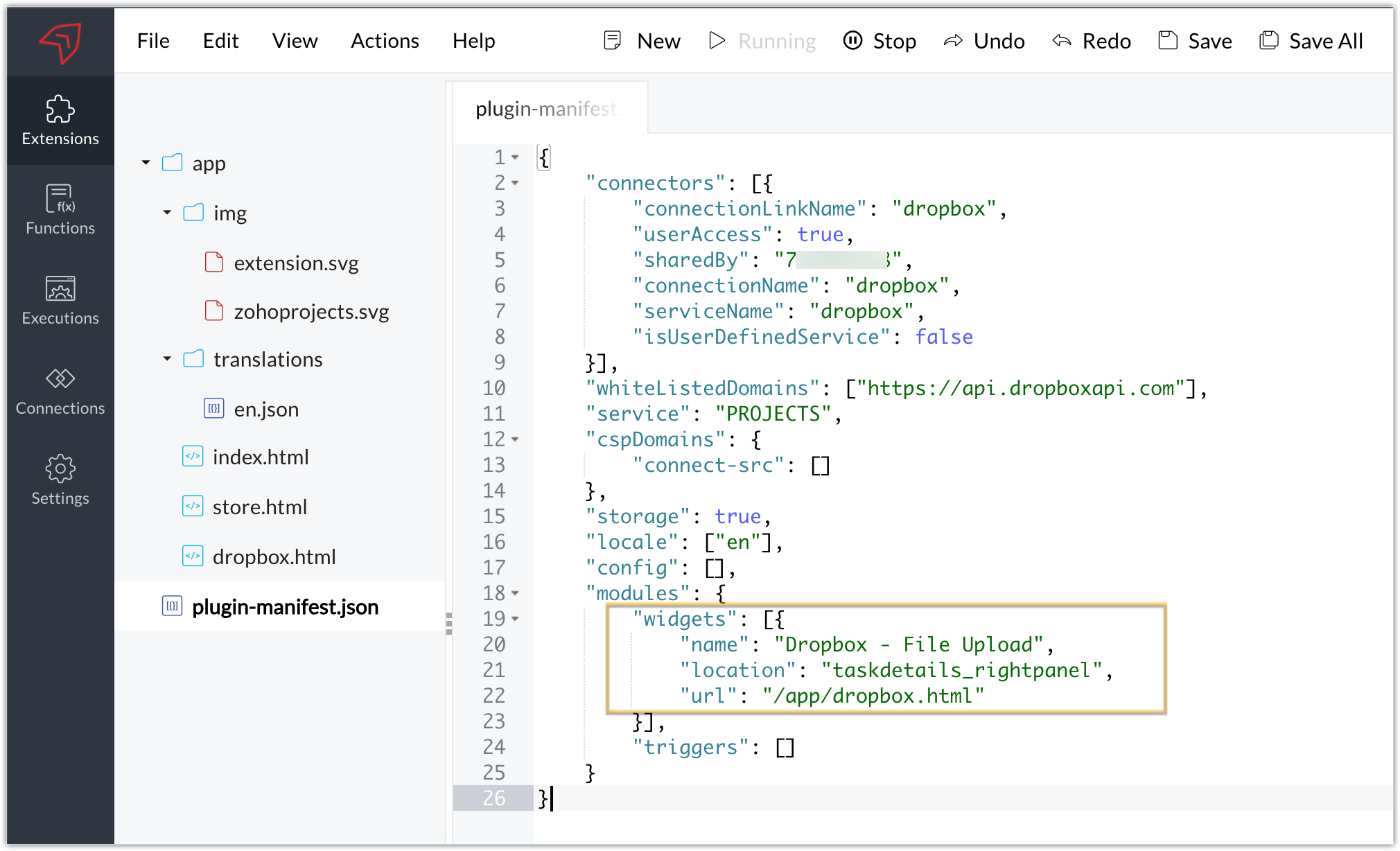
- The final configured plugin-manifest.json file for our example would be as follows:
- {
- "connectors": [{
- "connectionLinkName": "dropbox",
- "userAccess": true,
- "sharedBy": "xxxxxxx",
- "connectionName": "dropbox",
- "serviceName": "dropbox",
- "isUserDefinedService": false
- }],
- "whiteListedDomains": ["https://api.dropboxapi.com"],
- "service": "PROJECTS",
- "cspDomains": {
- "connect-src": []
- },
- "storage": true,
- "locale": ["en"],
- "config": [],
- "modules": {
- "widgets": [{
- "name": "Dropbox - File Upload",
- "location": "taskdetails_rightpanel",
- "url": "/app/dropbox.html"
- }],
- "triggers": []
- }
- }
C. Setting up the widget code
Now, that we’ve created an extension and configured the plugin manifest file, let's finally set up the widget code in order to display all Dropbox file request folders inside our task details right panel.
Dropbox.html widget code: Please find the widget code snippet as an attachment in this post.
- In this widget code, we’ve invoked the Dropbox API to list file request folders by constructing and passing the required data along with the connection we had established for Dropbox.
- The API will be invoked and return all of the file request folders in the task details right panel, from which users can click on the link and directly upload files to Dropbox from within a task in Zoho Projects itself.
Sample output
- Once the code is setup, publish and install the extension to check the functionality in the Zoho Projects portal.
- Enter a task and click the extensions icon in the right panel.
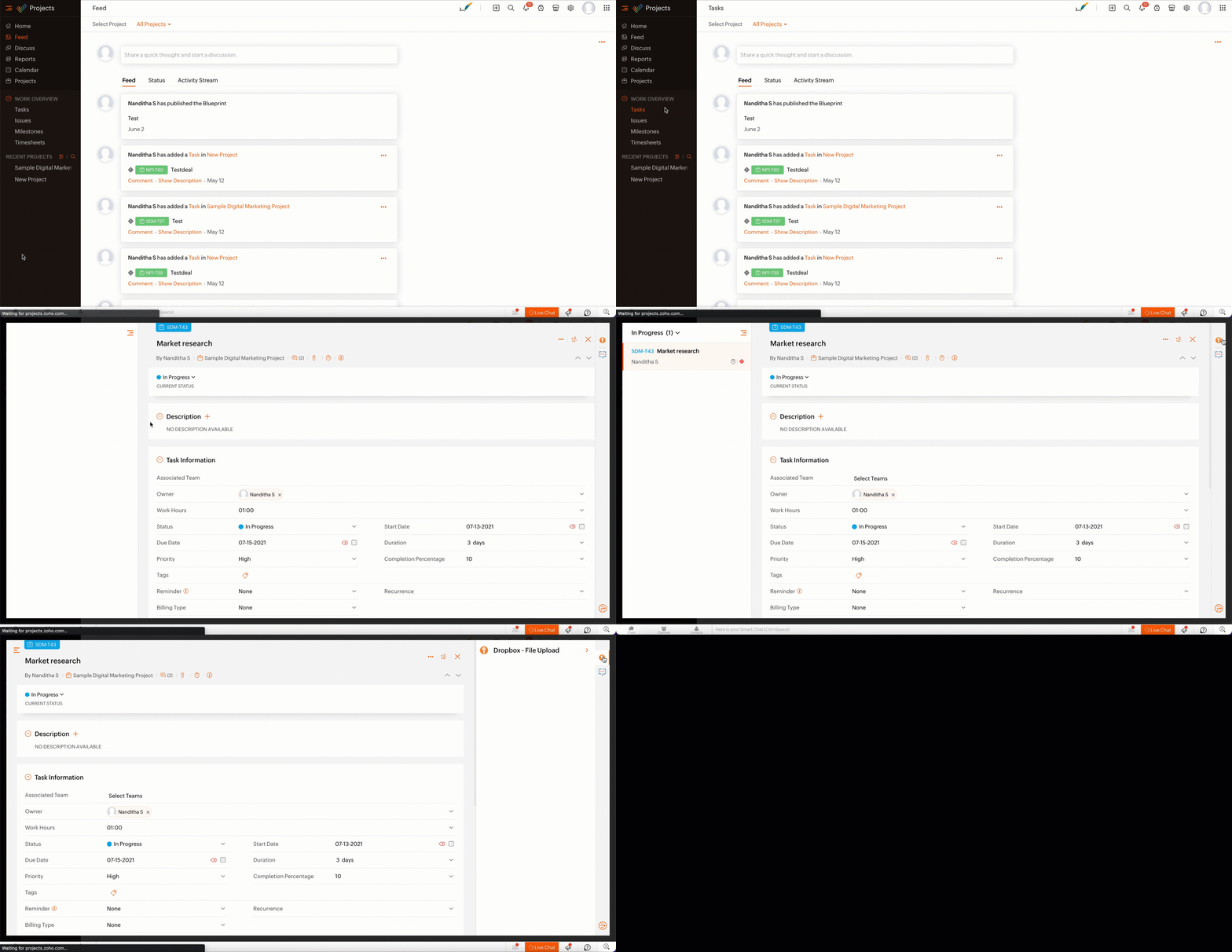
- From the lists of your Dropbox file requests, select the requests to which you wish to upload files.
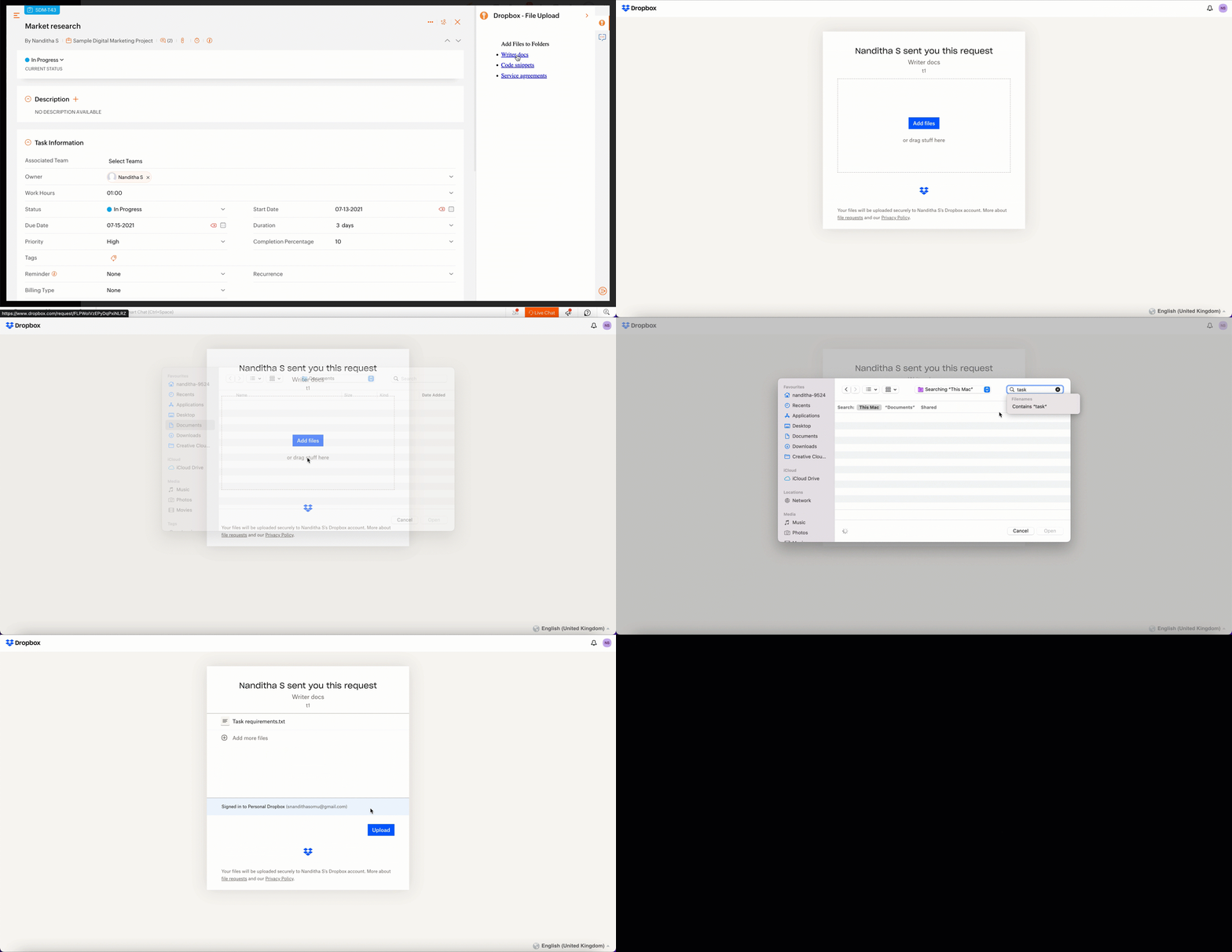
- The file will be successfully uploaded in the respective Dropbox file request.
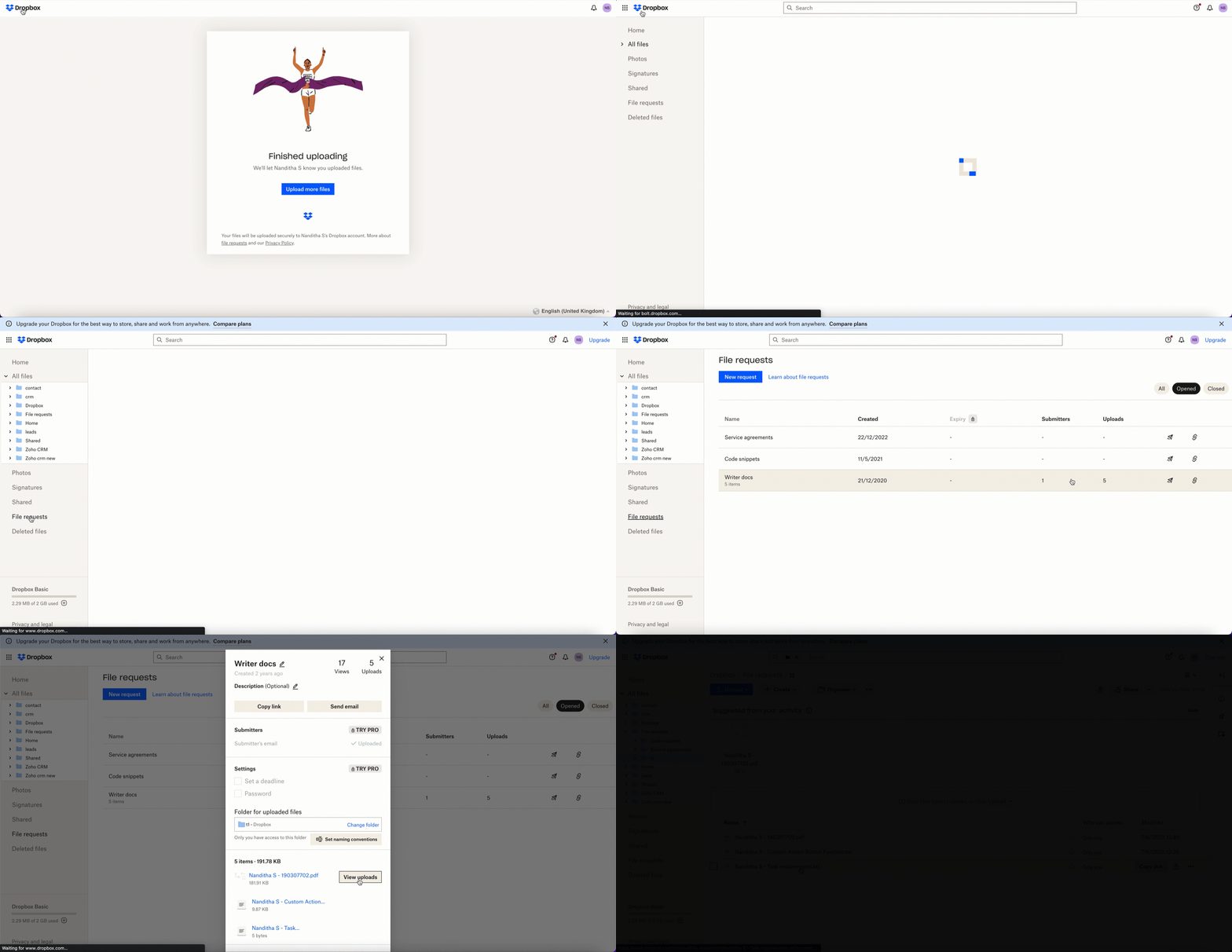
We’ve demonstrated how to upload files directly to Dropbox file request folders from within Zoho Projects in this example. As part of your extension, you can use the Connections feature to do a variety of tasks, some of which are highlighted below.
- View and update files associated with a certain request.
- Create Dropbox folders and share them with collaborators.
Connections, therefore serves as a powerful tool that assists you in establishing a connection with other apps and performing smooth data transactions across your applications, thereby improving business functions and optimizing your work.
We hope this information was useful to you. Continue to follow us for further updates!

Sign up for a
Zoho Developer account and start developing extensions for Zoho products using Sigma.
SEE ALSO
Recent Topics
👍 Zoho CRM's Notes now gets Reactions and a new look
Available in SA and JP DCs. Rolling out to other DCs in phases. Hello everyone, Notes help users capture important updates, collaborate with teammates, and maintain context for records. Now with Note Reactions, users can quickly acknowledge updates, express
All new Address Field in Zoho CRM: maintain structured and accurate address inputs
Availability Update: 29 September 2025: It's currently available for all new sign-ups and for existing Zoho CRM orgs which are in the Professional edition exclusively for IN DC users. 2 March 2026: Available to users in all DCs except US and EU DC. 24
Zoho books and venmo
Hi, Is there a way to hook Venmo into zoho books? I have a Venmo business account and want to be able to sync that. I know you can do it with the paypal integration but I dont want to use paypal for the fees and that doesnt allow me use/integrate my current
Updating Unit Code for New Item Creation, Quote and Invoicing is so inconvenient
The Zoho Team has implemented many updates, but these updates should be optional. Before rolling out any new feature, they should already have a solution in place that allows users to remove or disable it if they choose not to use it. Just yesterday,
Payroll needs to automatically remit taxes, not just give me the calculations
Wagepoint, PayEvo, Waveapps, etc... All your competitors deposit employee payroll, but they ALSO remit taxes automatically. Get with the program, your Payroll app is extremely sparse.
Creating new Teams meeting from CRM doesn't enable Team functions in the meeting
Hi I'm trying to set up the meeting integration and I've seen that when I create a Meeting in the CRM and set the location to Online and the Provider to Teams, and complete the boxes, add a participant etc, whilst the meeting is created in Teams, the
Approval Process configuration is now more flexible and fully customizable
The Approval Process is back with an improved user experience designed to make it easier to build structured, flexible, and intuitive approval workflows. Here’s a look at some of the key enhancements: Name Your Rules & Stages You can now give each approval
Admin Logging in as another User
How can a Super Admin login as another user. For example, I have a sales rep that is having issues with their Accounts and I want to view their Zoho Account with out having to do a GTM and sharing screens. Latest Update (27th April 2026): With the early
Introducing Approval SLA for Approval Processes
Approvals can sometimes be delayed when approvers do not respond within the expected timeframe, which can slow down your recruitment processes. With the new Approval SLA in Zoho Recruit, you can set deadlines for approval requests and define automated
Introducing Microsoft Word Integration in Zoho Contracts
We are excited to announce a new feature that brings contract authoring and negotiation in your familiar environment — the Microsoft Word Integration. What This Integration Brings The Microsoft Word Integration connects Zoho Contracts with the Microsoft
Map My Client Locations for Zoho CRM Extension: Turn CRM Addresses Into Action
Hello everyone, Your CRM knows who your customers are. Now, see where they are on the interactive map directly from Zoho CRM. Introducing Map My Client Locations for Zoho CRM, an extension built for businesses that rely on sales visits, field service,
Scheduled and Automated Report Delivery from Zoho Projects
Zoho Projects has useful reports including task reports, timesheet summaries, and workload charts. However, there is currently no way to schedule these reports to be automatically delivered to stakeholders on a recurring basis. This means: Project managers
Collaborate Visually with Whiteboard in Zoho Projects
Whiteboard in Zoho Projects allows you to collaborate visually by creating diagrams, annotating designs, and sketching project workflows using shapes, text, and images within project modules. Team members can work simultaneously, improving productivity
Fields in MS-Word Template
With the new MS-Word integration, how does one create fields in an imported MS-Word document which can then automatically be populated with an Intake Form?
Zoho Bookings Flow Step not Triggering on Appointment booked
I noticed yesterday that my appointment booked flows were not triggering when we had booked appointments in Zoho Bookings. I checked the trigger and noticed the trigger values updated to be defined to a workspace and service event rather than our whole
UCP: Why We Killed the Multi-Portal Mess and Simplified Customer Self-Service
Let's talk about the multi-portal mess nobody wants to admit that it exists. Your customer needs an invoice from one app, wants a ticket update from another, and has a project waiting in a third, each behind its own login, its own UI, its own "was it
Zoho Tables is now available in Zoho One!
Hello Zoho One users, We’re excited to announce that Zoho Tables is now included as a part of Zoho One suite! As teams grow, managing projects, approvals, inventories, campaign trackers, and operational workflows across multiple spreadsheets become difficult.
Zoho Publish is now available in Zoho One!
Hello Zoho One users, We’re excited to announce that Zoho Publish is now included as part of the Zoho One suite! As businesses grow, managing Google Business Profiles across many locations becomes challenging. Business information needs to stay accurate,
📣 Ask the team behind Zoho SalesIQ: Summer '26 Q&A
Hi everyone! Following our recent webinars, Summer '26 Release: What's New in Zoho SalesIQ—where we walked you through all the new features, what they do, and how they work—and Driving the AI Evolution: Building Smarter Customer Experiences with Zoho
Upcoming update to field values in Zoho Books - Zoho Analytics integration
Hello Users, We'd like to inform you of an upcoming update to the tax_category values in the Zoho Books integration for Zoho Analytics from October 20, 2026. What's Changing? tax_category field values are being renamed to align with the conventions already
Announcing the new SKILL.md for Zoho CRM and the updated OAS repository!
We are introducing a new zoho-crm skill to make working with Zoho CRM Developer tools (like APIs, functions, widgets, client scripts, queries etc) easier and faster, with the help of AI in your preferred AI harness like Claude Code, Codex, Cursor, VSCode
Kaizen #259 - Working with Zoho CRM APIs using zoho-crm skill
In the previous Kaizen, we introduced the zoho-crm skill and discussed how it can work with different CRM developer capabilities. The zoho-crm skill makes it easier to work with Zoho CRM without having to remember every API endpoint, request structure,
How can I populate dropdown data with information from another source or app?
I want to maintain a list of items in another app (say in excel or another database) and sync those as items in a drop down menu, instead of copy pasting to import. Is this kind of a feature available?
Zoho Community Digest - September 2026 | Part 1
Hi everyone, and welcome back! September opens with a strong set of updates. Zoho CRM brings workflow automation down to the subform row level and ships a new SKILL.md for AI-assisted development, Zoho Desk introduces conditional branching with Automation
Tip #88 – Manage Incoming Support Requests Efficiently with the Service Queue – 'Insider Insights'
Hello Zoho Assist Community! Not every team has a dedicated IT department or a fully built-out sysadmin setup. For smaller teams, when something breaks, there's no internal ticket system to log into, no helpdesk queue to route through, and no clear way
Delete CRM Portal
How do I delete portals from my CRM? I created one just to test, it is not in use and is disabled but it's existence is preventing me from marking fields in modules as "required" unless I make it 'read/write' in the portal first. I'd rather just delete
Zoho Books | Product updates | July 2026
Hello users, We’re excited to bring you the latest updates in Zoho Books for July 2026! This month's release introduces Terminal Payments, CMP-08 filing for composition taxpayers, SEPA Credit Transfer support, and Self-Billed Credit Notes and Debit Notes
Calendar invites from Contacts not being assigned to Account in CRM
Hi all It's that time of year again when I try to get calendar and meetings sorted in CRM. I have two way sync enabled. I have the option set to check for customer meeting invitation mail and to add them as meetings. However, whilst those meetings show
Kaizen #258 - Getting Started with zoho-crm SKILL.md
Howdy tech wizards, Welcome to a fresh week of Kaizen. This week, we are taking a look at the zoho-crm SKILL.md, an Agent Skill designed to help AI coding agents work with Zoho CRM’s developer capabilities. What is zoho-crm SKILL.md? The zoho-crm skill
Zoho Tables is now live in Australia & New Zealand!
Hey everyone! We’ve got some great news to share — Zoho Tables is now officially available in the Australian Data Center serving users across Australia and New Zealand regions! Yes, it took us a bit longer to get here, but this version of Zoho Tables
Dashboard/Component filter by probability
Hi all Can I request the ability to add a Component or Dashboard filter for Deal Probability? Would be useful to be able to see data of deals more than 60% probable. Olly
Stock (on-hand) Items not updated after using Composite items
Hi there, I created a Composite item (consist of 3 items). After I created the Composite item, I invoiced it and shipped the items. However the actual stock on hand of the 3items didn't change at all. Have you guys encountered this? Thank you Regards,
Is there a way to show contact emails in the Account?
I know I can see the emails I have sent and received on a Contact detail view, but I want to be able to see all the emails that have been sent and received between all an Accounts Contacts on the Account Detail view. That way when I see the Account detail
Important changes for users with Zoho accounts in the UAE and other Data Centers
What's changing? Previously, the same email address could be used to create separate Zoho accounts in both the UAE data center and another Zoho data center (such as US, EU, IN, AU, JP, CA, SA or SG). With this change, an email address can be associated
Conditional Layouts On Multi Select Field
How we can use Conditional Layouts On Multi Select Field field? Please help. Moderation update: Multi-select picklist fields are now supported in Layout Rules. Additionally, Layout Rules is now available in the Professional Edition. These updates have
Zoho Marketing Automation WhatsApp Campaign Import Sync for Zoho Analytics
WhatsApp is a critical channel in modern marketing, yet WhatsApp Campaign metrics from Zoho Marketing Automation currently cannot be natively imported into Zoho Analytics via the default advanced analytics connector. Integrating this into the standard
merge the Multiple POs to single PO if Vendor of PO"s --in Zoho Inventory
HI Merge the Multiple POs to single PO if Vendor of PO"s are Same ----in Zoho inventory Please provide any work around to achive this .
Is there a CRM Deluge function available to convert an RTF (rich text field) to plain text (with no formatting tags)?
I know that we can run reports so that RTF fields can either show as plain text or the text or the text with the formatting fields included (which is wonderful, btw, as it helps me adjust tags when I need to troubleshoot and just see what I need to see
【Zoholics Japan 2026】ITreview 口コミ投稿キャンペーンを実施します!
ユーザーの皆さま、こんにちは! 2026年9月25日(金)開催の「Zoholics Japan 2026」会場にて、 Zoho CRM・Zoho Workplace・Zoho Mail を対象とした「ITreview 口コミ投稿キャンペーン」を実施します! Zoholics にご来場いただく皆さま、ぜひこの機会に普段お使いの Zoho 製品について、率直なご感想をお聞かせください。 【キャンペーン内容】 対象製品: ・Zoho CRM ・Zoho Workplace ・Zoho Mail キャンペーン実施時間:
Contact removed when picking ticket template.
hi new to Desk rolling out to company, replacing Freshdesk. Is there way to keep the in context contact when selecting a template? When you choose a template you lose the contact!
Next Page