Connect - Messages et flux

Zoho Connect vous permet de créer des messages à deux niveaux : celui de l'organisation et celui du groupe.
Le mur de l'entreprise ou du réseau est un endroit idéal pour découvrir toutes les activités pertinentes qui se font. Tenez tous les membres de votre réseau au courant de ce qui se passe dans l'entreprise en partageant des mises à jour sur le mur du réseau. Tous les messages publiés sont accessibles à tous les membres du réseau. Les messages peuvent également être consultés sur la page Mon fil d'actualité de chaque membre.
Le mur du groupe est un espace de communication au sein du groupe. Le mur du groupe est réservé aux membres des groupes privés, alors que dans un groupe public, les personnes extérieures au groupe peuvent également consulter le mur du groupe et y publier des messages.
Mon Flux
La page Mon flux vous donne un aperçu de toutes les conversations et mises à jour qui vous concernent. Cette page vous permet de voir les mises à jour des groupes auxquels vous appartenez, des membres que vous suivez, des messages et des commentaires qui vous @mentionnent et des messages publiés sur le mur du réseau.
Publier une annonce
Les annonces sur le mur de l'entreprise ou du groupe de Zoho Connect permettent aux équipes de ne rater aucune mise à jour importante. Vous pouvez fixer une date jusqu'à laquelle l'annonce s'affichera au-dessus de tous les autres messages sur le mur en question. Dès qu'une annonce est faite, une notification par e-mail est envoyée à tous les membres du réseau (pour les annonces sur le mur de l'entreprise) ou aux membres du groupe (pour les annonces sur le mur du groupe).
À partir de l'onglet "Permissions" sous la page paramètres, les administrateurs du réseau et du groupe peuvent décider qui peut publier des annonces sur leurs murs respectifs.
- Passez par l'icone "+" en haut à droite de votre portail Zoho Connect.
- À partir de la liste déroulante, sélectionnez "Faire une annonce".
- Saisissez votre annonce, joindre des documents si nécessaire à partir de l'icône du trombone. La limite de taille par fichier est de 30 Mo.
- Vous pouvez épingler l'annonce en haut jusqu'à une date précise. Après avoir défini la date, l'annonce s'affichera en haut de tous les autres messages publiés sur ce mur particulier jusqu'à la date définie. Cela permet de s'assurer que personne ne rate les annonces.
- Sélectionnez le mur du groupe ou de l'entreprise sur lequel vous souhaitez publier.
- Cliquez sur la flèche à côté du bouton de partage pour programmer une publication à un moment précis et partagez.
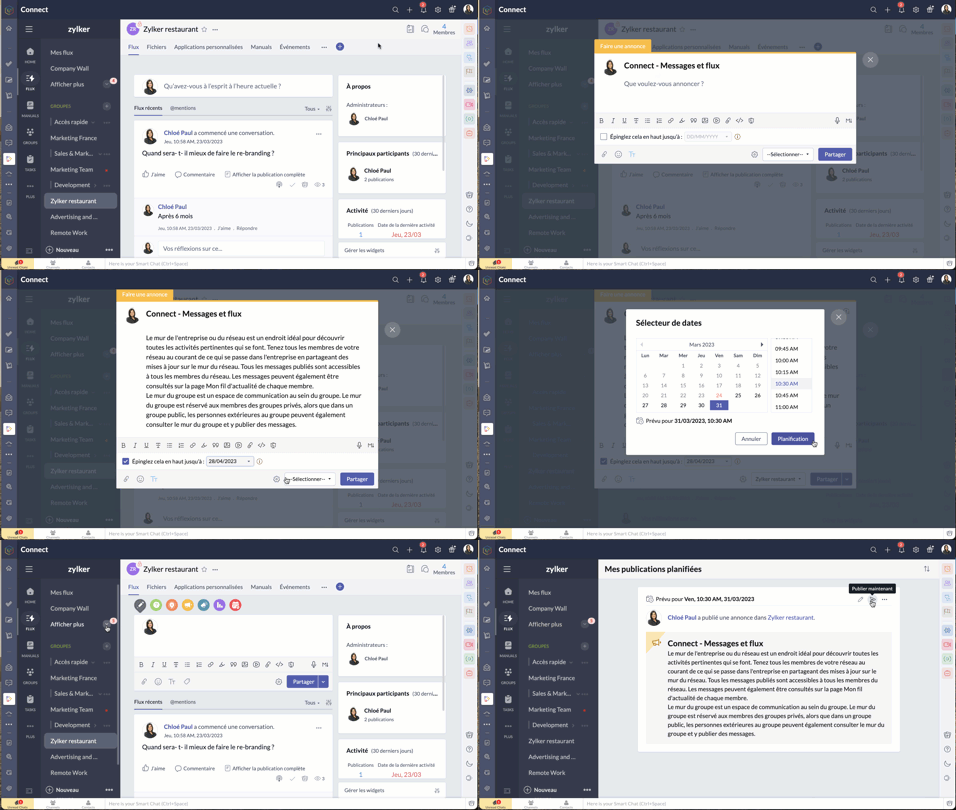
- Pour connaître la liste des membres qui ont consulté votre annonce, cliquez sur l'icône en forme d'œil dans le coin en bas à droite de l'annonce.
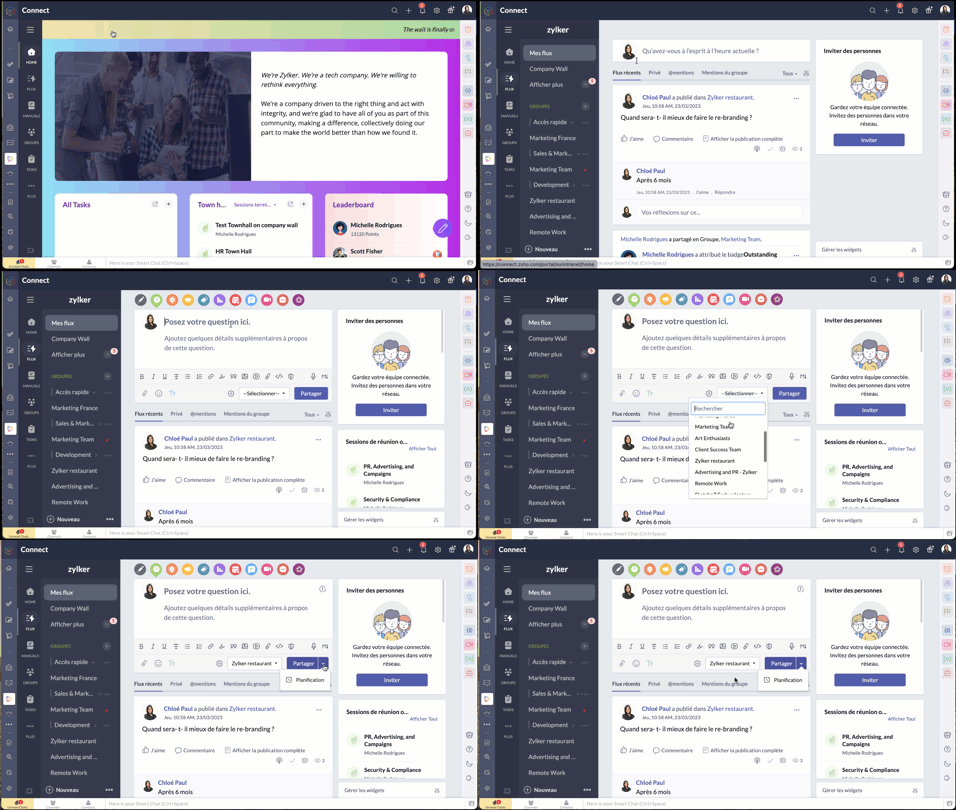
Poser votre question dans Zoho Connect
Pour trouver des réponses à vos questions, il vous suffit de les poster dans votre réseau. Les réponses sont ajoutées sous forme de commentaires et vous pouvez choisir la meilleure réponse à votre question.
- Passez par l'onglet "flux" depuis le panneau à gauche.
- Cliquez sur l'icône de question dans l'éditeur de message en haut de la page. Les réponses partagées sont ajoutées en tant que commentaires.
Démarrer un sondage
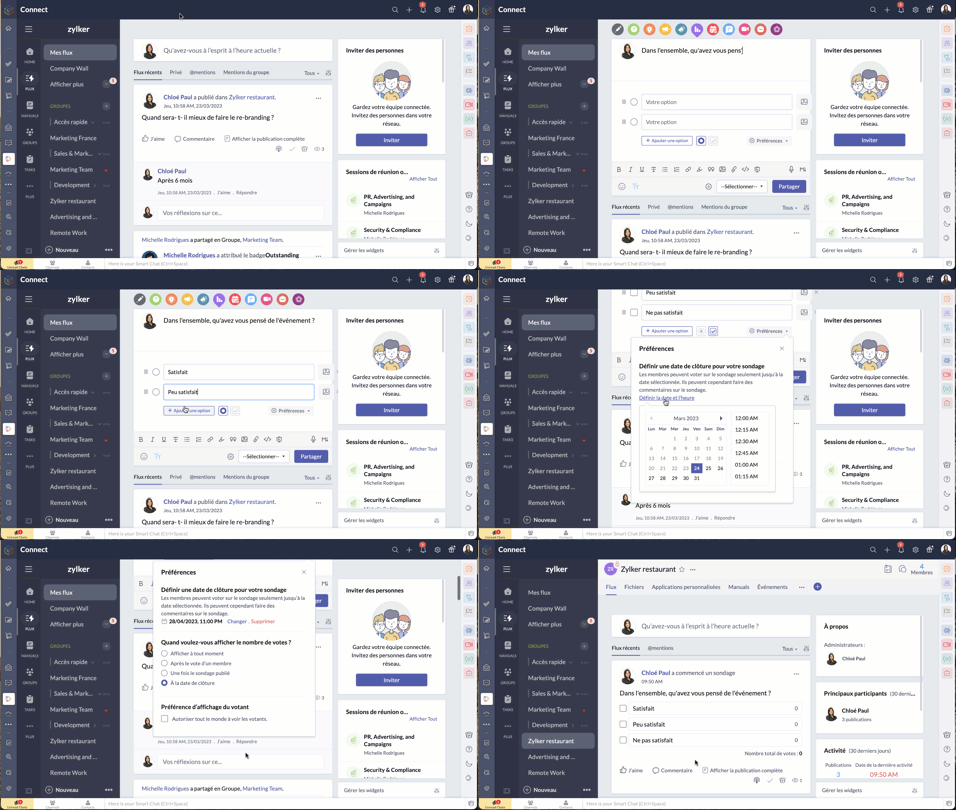
- Organisez un sondage et demandez aux membres de votre réseau de voter pour la meilleure idée ou solution.
- Comme expliqué ci-dessus, à partir de l'éditeur de message, sélectionnez l'icône de sondage.
- Saisissez la question et les options.
- Le bouton "Preferences" vous permet de définir la date et l'heure de la clôture, préférences d'affichage du votant et plus encore.
- Choisissez le groupe à qui s'adresser, et partagez.
Bon à savoir
- La limite de caractères pour la question du sondage est de 10 000, et celle pour les options du sondage est de 200. Il est possible d'ajouter jusqu'à 25 options à un sondage.
- Si vous n'avez pas fixé de date de clôture pour le sondage, vous pouvez le cesser à tout moment.
- Zoho Connect vous permet de prolonger la date de clôture du sondage.
- Vous pouvez choisir d'afficher en permanence le nombre de votes reçus pour chaque option ou de ne pas afficher le nombre de votes jusqu'à la clôture du sondage.
- Si vous souhaitez permettre aux membres de modifier leur choix après avoir voté pour une option, utilisez la case à cocher dans la section "Préférences" du sondage.
Partager des commentaires et des messages par e-mail
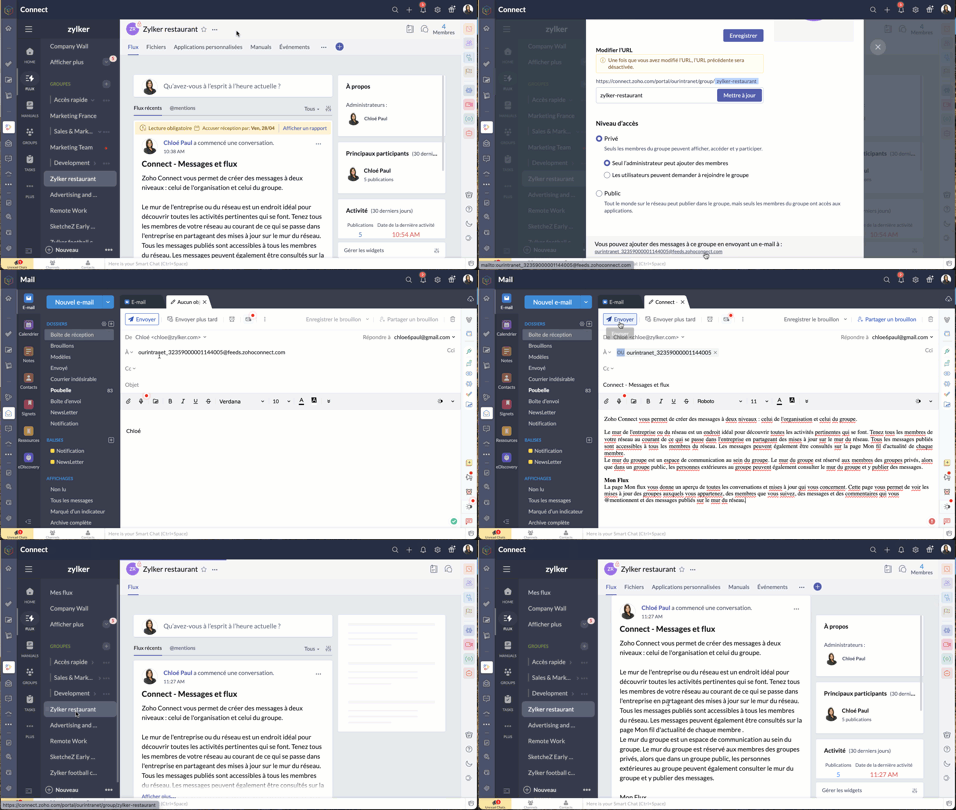
Les messages par e-mail
Vous pouvez ajouter des messages sur Zoho Connect par e-mail à l'adresse indiquée dans la page de configuration d'un groupe.
Les commentaires par e-mail
Vous pouvez ajouter des commentaires dans les messages et les forums en répondant à la notification par e-mail que vous avez reçue. Cette option est disponible par défaut si les notifications par e-mail est activée dans le réseau, si bien qu'il n'est pas nécessaire que les administrateurs la configurent séparément pour leur réseau.
Bien à savoir
- Bien que cette fonctionnalité soit disponible par défaut, les réseaux qui utilisent des adresses e-mail avec le domaine de leur entreprise (exemple : user@zylker.com) doivent ajouter un enregistrement SPF et un signe DKIM dans le gestionnaire de domaine pour s'assurer que cette fonctionnalité fonctionne.
- Cette option n'est pas prise en charge pour la réponse automatique et la redirection d'e-mail.
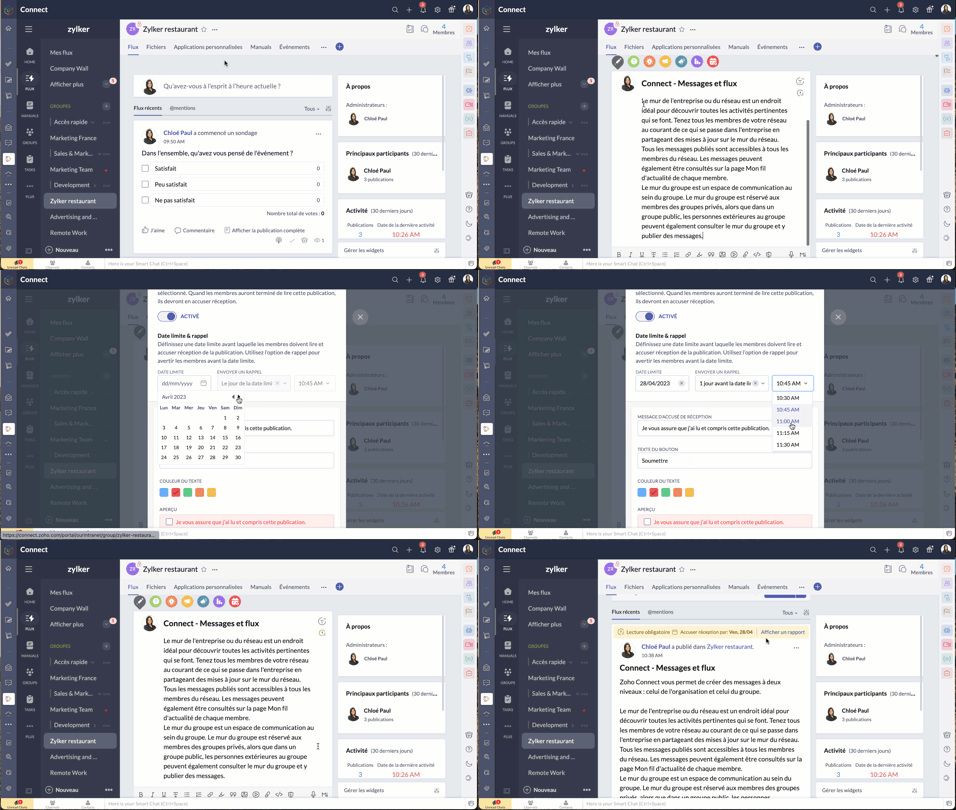
Messages à lire obligatoires
Comme son nom l'indique, un message marqué comme obligatoire doit être lu par les membres. Cela permet aux organisations de tenir leurs employés informés de certaines annonces essentielles. Il est également possible pour les administrateurs de savoir qui a lu ce message et d'envoyer des rappels aux membres qui ne l'ont pas encore lu.
Il n'y a que les administrateurs de réseau qui peuvent marquer un message comme lecture obligatoire dans le mur du réseau, tandis que les administrateurs de groupe peuvent marquer un message en lecture obligatoire dans leurs groupes respectifs.
- À partir de l'éditeur de message, passez par le bouton "Lecture obligatoire", activez-le.
- Configurez la date limite et le message de rappel.
- Choisissez le thème de couleur que vous souhaitez utiliser pour les accusés de réception et enregistrez.
- Le message aura une étiquette obligatoire pour aider les utilisateurs à le distinguer des autres messages. Les membres recevront une notification concernant le message. Après avoir lu le message, ils devront compléter l'action d'accusé de réception. Celle-ci ne s'applique pas à l'utilisateur qui a créé ou marqué le message à lecture obligatoire.
N'hésitez pas à nous faire part de la fonctionnalité de Zoho Connect que vous utilisez le plus dans votre organisation et de quelle manière.
L'équipe Zoho France
Topic Participants
Kinjal Lodaya
Stéphanie
Sticky Posts
Collaboration sans faille avec Zoho One
Bonjour à tous, Dans cet article nous allons voir comment Zoho One permet une collaboration à différents niveaux . La façon dont nous travaillons évolue. À mesure que les entreprises se mondialisent, la plupart des activités sont menées en équipe.
Recent Topics
Tracking Snippet not working in Zoho Marketing Automation!
First off, the fact that you have to wait about 12-24 hours for every response is terrible. How are we supposed to conduct business? Second, we have been trying for several days to get the Tracking Code Snippet in marketing automation to work, to no avail.Is there any way to send an Excel received by email to Dataprep?
Every day I receive an email alert with an Excel file that I want to process through a Dataprep pipeline. To do this, I need to: -Save the file to disk -Open the pipeline -Run the pipeline -Update the source -Several clicks to select and open the savedRead webpage - MSXML2.ServerXMLHTTP
I have the following VBA script, put together from various sources (mainly zoho forum/help/support, so it once worked, I guess): private Sub GetListOfSheets() Dim url As String Dim xmlhttp As Object Dim parameters As String Dim html As String range("B1").valueZoho Creator Form Search
I'm new to Zoho Creator and so far i do like it but im shocked there seems to be no easy way to add a search function and/or navigation to there forms as this readily available in every platform i have used in the past. Anyway i have a form which i haveHow to setup DKIM / SPF in Zoho Mail
Hello there! I'm having a hard time understanding how to setup the TXT records for SPF and DKIM with Zoho Mail. I'm following the instructions here: https://www.zoho.com/campaigns/help/setup-spf-dkim.html Specifically, when it comes to the value for theMass update cant trigger a workflow?
Hello there, Is this a normal Creator behaviour? In a report, if I manually edit each data row, it will pass those changes to all other reports. However, if I perform a Mass Update on a few data rows at once, the new data is not pushed to other reports.search and Smart Bar both missing in Mail
One of the users on my account does not have the search bar at the top right or the Smart Bar at the bottom left of the desktop Mail app. Any ideas how to get those back?Let us add Lookup fields in the Blueprint Transitions
We are unable to add Lookup Fields in the blueprint transitions in Zoho Desk, we wanted to make it a requirement for our workflow but since it's not available in the transition we cannot. The lookup field exists in the Layout: But it cannot be added/selectedZoho Projects API Scope for Issue Attachments
I try to download issue attachments via the API, unfortunately I always get the following error code when trying to download the file from the supplied URL: {"ERROR_MESSAGE":"INVALID_OAUTHSCOPE","ERROR_CODE":401} indicating an auth scope error. I've triedHow to fetch custom fields for time entries in Zoho Project API v3
In the previous Zoho Projects REST API, we were able to retrieve custom field details for time entries, including picklist options, using the endpoint: GET /restapi/portal/[PORTAL_ID]/timesheetcustomfields In the new Zoho Projects API v3, we tried usingZoho Survey Enhancements
We love Survey. We use it a ton. It needs some enhancements. Maybe some of these are already on the roadmap? API - this is crucial. We have some complex surveys that take place and need to update records, trigger other functions/automations, etc. I wouldImages Don't Display on Blog
Hi, I've just posted a new blog entry, but regardless of format (png or jpeg) Images that display in Preview mode do not display on any browser in the published post. I've not done anything different with this post than others regarding images, please advice. Thanks! Edit: I've discovered that moving the image files from a my sub directory folder "Pics for Blog" to the top level of the "Files" folder on my site allows the images to display live. This, even though my other blog posts are correctlyCheckbox Field Mapping Zoho Forms to Zoho Sign
I have an application that will be filled out via Forms that I am mapping into a PDF Filler on Zoho Sign. I need to have a series of checkboxes mapped to the corresponding fields in Sign and I only see single checkboxes available via the mapping, thoughBooks P&L by Customer
Lately, we have found that the Customer field filter for the Profit & Loss report in Zoho Books is no longer available. We have several projects with the same customer and look at the P&Ls by project AND by Customer (overall). Can you please add back in this field selection alongside the Project field to the P&L report filter? Thanks! -GinaSent mail sort by date disappeared
Hello, We used to be able to sort the emails by date in the sent folder, but this feature has recently disappeared. Can we bring it back?I cannot check out to Zoho People.
When I tried to check out today, there's prompt that inhibits me to check out: To add entry in Attendance, log time for any of your jobsPricing Strategies: #2 Plan your Service Offerings using Plans
Meet Harvey & Mia, hailing from the same Tech school, carrying the dream of setting up their own IT maintenance firm in their location. They drew up a clear business plan and put their business in motion on New Year's Eve. They had great reception rightOpen a record to edit based on another form being edited
Hi all, I am trying to edit a record based on another record being edited. It works out like this: When I create a Monthly_Update and then submit I open the Monthly_Levels form and pass the ID from the Monthly_Update to a field called mu. I want it toProblem with signature on zoho survey
Hello, I'm trying to export individual responses with signatures on zoho survey. But the signatures on some of my surveys are not exported as the original image, but as a generic image, same for all (screen joins). Is there a solution to have the signaturesChange in Zoho CRM API?
Hello, I am using the Zoho API trough the PHP SDK v2.1 Since few days, I noticed that I have to change the way I pass the data to the API when I create, update, or upsert a record. Dates Before I was passing a PHP date object to "$record->addKeyValue(...)",MTA - BAD IP reputation by outlook/hotmail
Messages to Microsoft email servers are bouncing back due to poor reputation. Message: 4.7.650 The mail server [136.143.188.206] has been temporarily rate limited due to IP reputation. For e-mail delivery information see https://postmaster.live.com (S775)QuickBooks Extension for Zoho CRM - Advanced Features -2025
Hello Everyone, We’re happy to announce the latest version of our QuickBooks Extension for Zoho CRM, now officially live on the Zoho Marketplace! This release introduces one-click data sync, a user-friendly UI, enhanced performance, and a powerful setChanging Department often causes the Firefox tab to freeze
Title, it doesn't seem to happen with neither Opera nor Chrome. And even in Firefox, sometimes it just lets me change the department I'm in no problem, even to All Departments which is probably the most, like, resource heavy? But most of the time, theNeed to integrate Zoho Mail Mobile app with Zoho Meeting Mobile App for Android and Apple
Hello Zoho Team, Please bring integration of Zoho Mail Mobile app with Zoho Meeting for Android and Apple Thanks¡Muchas gracias por participar a los Meetups de Usuarios de Zoho! Y Novedades del ecosistema Zoho
¡Hola Comunidad de Zoho en Español! 👋 Después de un breve lapso de tiempo, volvemos con una nueva edición de nuestro Community Digest, donde te contamos las novedades de los productos de Zoho en los últimos meses. Estas mejoras se centran en nuestrosAnyway to move mail from one account to another yet?
Hello, Is there any way to move email from one mailbox account to another mailbox account in zoho yet? Thanks, Ryan.Using a CRM Client Script Button to create a Books Invoice
Hello, I need help handling error messages returned to my client script from a function. The scenario I have setup a client script button which is available from each Deal. This CS executes a crm function, which in turn creates an invoice based on theBuilding Toppings #2 - Learn how to use Bigin's Developer Console to build toppings
Hey Biginners, In our last post, we discussed what toppings are, why they're essential to extending Bigin's capabilities, and how the Bigin Developer Center serves as the starting point for building them. As a cloud platform, the Developer Center empowersLinks are incorrect when sent out
I'm adding in hyperlinks into my eDM. When I send a test email, it's all correct. However, when I send out the eDM, all the hyperlinks jump up one space so none of the links are opening to the correct page. Why is this happening and how can I fix it?Tip of the week #16 - Search and filter threads based on criteria
Zoho TeamInbox lets you search and filter threads with any information that you have about the thread. You just have to input the criteria and Zoho TeamInbox will list all the threads that match the condition. Firstly, there is a global search you canIntroducing recipient authentication via Stripe Identity in Zoho Sign
Hi everyone! It's important to authenticate your recipient's identity before they access and sign important documents to ensure the highest level of compliance. Zoho Sign already helps businesses do this with various authentication methods: SMS OTP EmailKeep Converted Leads
How do I keep the converted leads in the Leads Module after conversion (converting it to account, contact, deal). I want to add it in a converted stage in the leads module in order to get a report or dashboard and see all converted leads from my pipCustomizing Global Search Settings for All Users
Hi Our team use the brilliant global search functionality within CRM many many times daily. But, we struggle with the out-of-the box columns that CRM gives you. We are always telling users to customize this look to more suit our business, to show theIntroducing Formula Fields for performing dynamic calculations
Greetings, With the Formula Field, you can generate numerical calculations using provided functions and available fields, enabling you to derive dynamic data. You can utilize mathematical formulas to populate results based on the provided inputs. ThisTip of the Week #77– Stay informed of the activities happening in your organization
Whenever a message is handled in Zoho TeamInbox, every action is recorded in the Activity Log. This ensures you always know what’s happening across your teams and inboxes. To access it, simply click the Audits icon on the left pane’s top bar after loggingZoho Logs - Not seeing logs since 30 Nov
Hi, we have a few functions running, I am testing some new ones and noticed that although I can see executions, I cannot see any logs, even when the first line on the functions is a log. I reviewed some existing functions, one of which is invoked on aWorkdrive MS Office integration
Have installed subscribed version of Zoho WorkDrive VSTO runtime not found is the error when I try to install Zoho_WorkDrive_For_Office Unable to open work files in Excel and Word Urgent, since I have migrated all my OneDrive files to work drive alreadyHow to change Zoho Vault password
I am searching where I can change the Vault Password after having changed the Zoho account password. I don't see this option anywhere in my account. It should be simple and accessible! Please help. Thanks!Zoho Workdrive - Communication / Chat Bar
Hi Team, Please consider adding an option to allow admins to turn on or off the Zoho Communication Bar. Example of what I mean by Communication Bar: It's such a pain sometimes when I'm in WorkDrive and I want to share a link to a file with a colleagueWhen Marking a Multiple Choice Answer Exclusive - Not Following My Survey Disqualification Logic
Using a multiple choice (many answers) question and I created survey disqualification logic that was working as intended. My question: Disqualification page logic is: If (QUESTION) is "any one of the following" then (OPTIONS) - a custom message populatesNext Page