DYK 7 - Set dependency from Gantt and List view

DYK 7 - Set dependency from Gantt and List view

Did you know task dependencies in Zoho Projects can be managed across different task views?

In a project, multiple teams work together towards the same goal but team members prefer accessing data with different perspectives depending on their responsibilities. The List view gives a granular view for users who work across multiple tasks, whereas the Gantt view helps users to plan visually and track progress across timelines. With Zoho Projects, task dependencies can be set from both the views, helping teams link tasks efficiently.

Let's assume a law firm that manages property purchases. The manager of the firm would prefer to use the timeline in the gantt view to create and plan tasks. While planning tasks, a Finish to Start dependency between tasks such as site inspection and document verification can be linked directly from the Gantt view by clicking and dragging a connection between the ends of two task bars. This ensures that any delay in site inspection automatically reschedules document verification, eliminating manual adjustments.
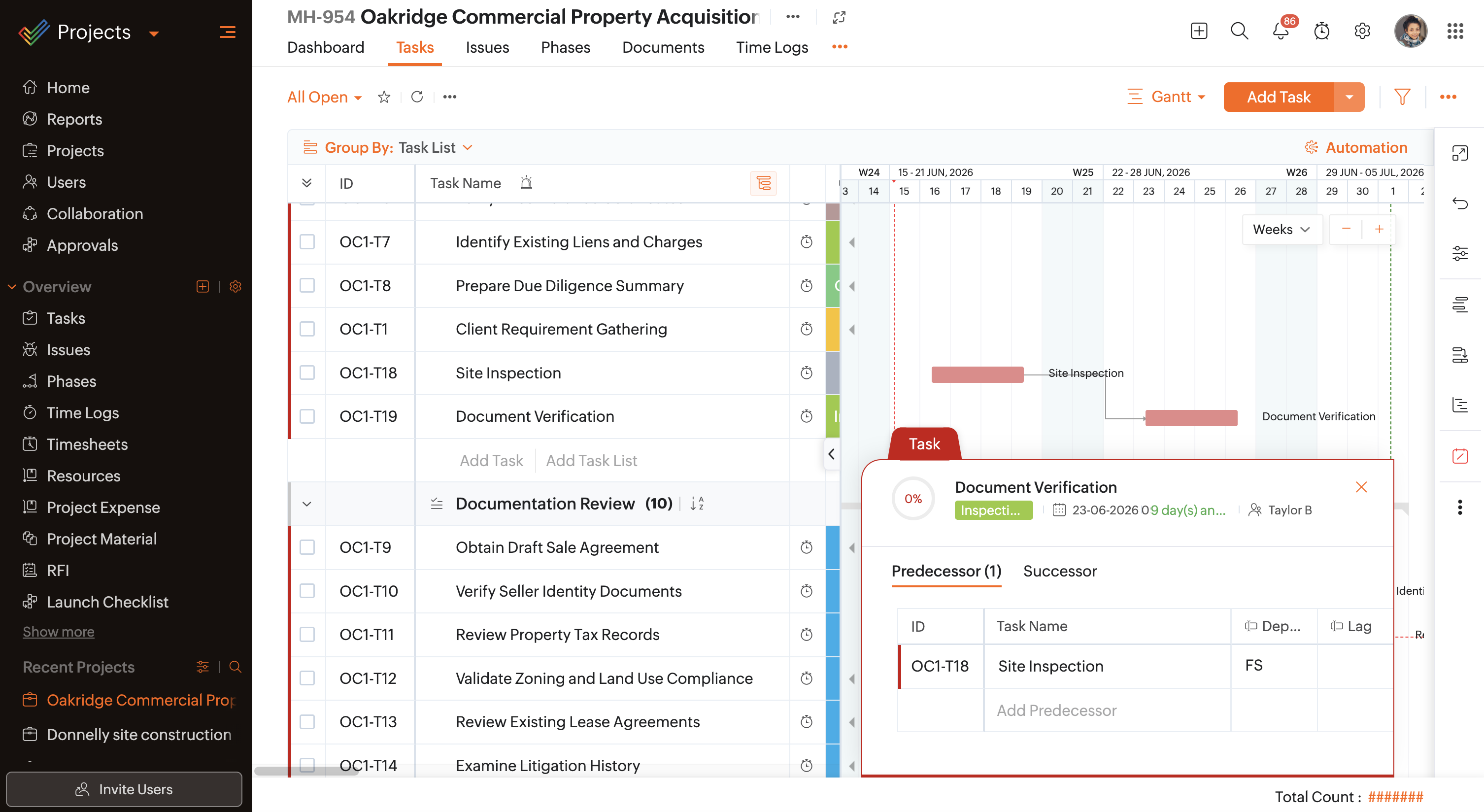
Gantt View

In the same case, as associates work through tasks in the List view, they can link tasks on the go by hovering over the task and entering the dependent task's ID or name in the Predecessor or Successor column. For tasks like seller background verification and property tax clearance that must be completed in parallel, a Finish to Finish dependency type directly from the List view can achieve this outcome enabling a structured process.

List View

The dependency type is automatically assigned based on the Default Dependency Type configured in the portal or project settings. If set to Automatic, the dependency type can be selected from the dropdown directly from the List view while linking tasks.
Notes
If the Predecessor or Successor column is not available by default in the list view, click on Notes and add the required columns.
As much as dependencies control task execution flow, task views influence how users view, set up, and modify them based on their needs.

Click this link to learn more about the different types of dependencies and when to use them. Have questions? Reach out to us support@zohoprojects.com.
    • Sticky Posts

    • Improve User Onboarding in Zoho Projects with Zoho DAP

      Rolling out new processes or onboarding new users in the tool comes with a familiar challenge: the employees need guidance at the moment they are doing the work. Traditional training sessions and knowledge sharing often require users to leave the application.
    • Introducing the Zoho Projects Learning Space

      Every product has its learning curve, and sometimes having a guided path makes the learning experience smoother. With that goal, we introduce a dedicated learning space for Zoho Projects, a platform where you can explore lessons, learn at your own pace,
    • Create Custom Module Using AI in Zoho Projects

      Every team has its own way of managing work. While standard modules support common project management needs, many business processes require their own structure, fields, and terminology. With AI-powered Custom Modules in Zoho Projects, users can create
    • Update on V2 API End-of-Life Timeline

      Dear Users, Earlier this year, we shared the launch of the V3 APIs and requested users to migrate from the older V2 APIs by December 2025. We have received valuable feedback from our users and partners regarding their migration timelines. We are happy
    • Automation Series: Auto-assign Task Followers

      As task progresses, several users are required to stay aware of the updates to plan their upcoming work items efficiently. Manually adding users as followers for an active task might create additional overhead. With this automation, followers can be added
    • Recent Topics

    • Creating Email template that attaches file uploaded in specific field.

      If there's a way to do this using Zoho CRM's built-in features, then this has eluded me! I'm looking to create a workflow that automatically sends an email upon execution, and that email includes an attachment uploaded in a specific field. Email templates
    • What's New in Zoho Billing | July 2026

      July brings a new set of updates to Zoho Billing to make your billing operations more efficient. These include a redesigned checkout experience, expanded Hosted Payment Page capabilities, compliance improvements, enhanced reporting, and more. Enhancements
    • Zoho CRM Community Digest - July 2026 | Part 1

      Hello everyone, July is here! The first two weeks brought six CRM updates ranging from privacy-ready webforms to a significantly more powerful Layout Rules engine, two community wins worth a look (a dashboard workaround for spotting leads with no activities,
    • Zoho CRM - Email/Message icon for Deal List View

      Hi Team, My idea is to include a message icon at the start of the row of Deals when an unread message has been received. This would really help highlight the Deals where urgent action is required. Thanks for considering this request. Regards, Ashley
    • Email notification for followers

      Is there a way to enable email notification for followers of a support ticket? ie: Ticket #123 is owned by Agent#1, Agent#2 adds themselves as a follower. Whenever ticket #123 receives an email from the customer, Agent#1 receives an email. Agent#2 would
    • Introducing parent-child ticketing in Zoho Desk [Early access]

      Hello Zoho Desk users! We have introduced the parent-child ticketing system to help customer service teams ensure efficient resolution of issues involving multiple, related tickets. You can now combine repetitive and interconnected tickets into parent-child
    • Desk Contact Name > split to First and Last name

      I am new to Zoho and while setting up the Desk and Help Center, I saw that new tickets created or submitted from the Help Center used the Contact Name field. This would create a new Contact but put the person's name in the Last Name field only. The First
    • Vendor payment unexpectedly routed through Prepaid Expenses instead of Accounts Payable

      Hello, We are investigating an unexpected accounting behavior in Zoho Books. We created vendor bills and vendor payments for two suppliers using what appears to be the same workflow, but the journal entries are different. Vendor 1 – UZ Store (works correctly)
    • Dashboard Metric Drill-Down Shows Stale Data

      Summary: When clicking between different metric components on a custom dashboard, the drill-down list shows data from the previously opened metric instead of the one just clicked. Steps to Reproduce: Create a custom dashboard with multiple pre-defined/templatized
    • Managing Shopify Payout Balances in Zoho Books

      I am recording my Shopify orders as Invoices and once Shopify credits my bank account I reconcile the payout to the specific invoices and create a new transaction to account for the Shopify Merchant Fee. That is fairly straightforward to me. How should
    • Charging for WhatsApp replies starting in October 2026

      Meta has announced that it will charge for reply messages on WhatsApp starting October 1, 2026, and the free 24-hour window will no longer exist. How will Zoho SalesIQ handle this billing? https://developers.facebook.com/documentation/business-messa
    • Upcoming Change: Increased character limits for module and field labels

      To provide greater flexibility in customizing your CRM, we are increasing the maximum character limits for module labels and field labels in Zoho CRM. What's changing? Label Current Limit New Limit Module Label 25 characters 50 characters Subform Module
    • Change of Blog Author

      Hi, I am creating the blog post on behalf of my colleague. When I publish the post, it is showing my name as author of the post which is not intended and needs to be changed to my colleague's name. How can I change the name of the author in the blogs?? Thanks, Ramanan
    • Q3 USA ZUG Meetups - Build AI Agents with Zoho

      Hi everyone! What if you could build your own AI agent from scratch in just one session? That's exactly what we're going to do at the upcoming ZUG Meetups across the United States, where you'll get hands-on experience with Zia Agents and explore how AI
    • SPAM (and some other) folders missing on three of my Zoho Mail accounts

      I have four email accounts with Zoho Mail. Three days ago, the Spam folder on three of these accounts vanished. It is gone on the Windows and Linux desktops as well as the web-based and Android versions, and I have tried it on multiple machines. The only
    • Using data from multiple sheets

      I am looking for a way to automate the process of taking multiple Zoho sheets and collating the data into one combined sheet (such that no duplicates occur). Currently I can only think of importing all the sheets into Excel and then running a macro to perform the task. Is there a simpler way offered by Zoho?
    • Cliq iOS can't see shared screen

      Hello, I had this morning a video call with a colleague. She is using Cliq Desktop MacOS and wanted to share her screen with me. I'm on iPad. I noticed, while she shared her screen, I could only see her video, but not the shared screen... Does Cliq iOS is able to display shared screen, or is it somewhere else to be found ? Regards
    • Error 1011 saving website personalisation — blocking all changes (corrupted "home_page.content" field)

      When trying to save changes under Settings → Brands → MY COMPANY → Website → Personalisation → Messenger, I receive the following error: "Either the request parameters are invalid or absent" upon checking on the developer console of the browser I get
    • Tip #7 - Siri shortcuts in Zoho CRM

      Hello Everyone, Here is a tip about the 'Siri Shortcuts' feature and how it works in the iOS version of the Zoho CRM mobile app. What are Siri shortcuts? Siri Shortcuts are quick actions across your apps on iOS. They can perform an action automatically
    • Delete Field that is used in a Zoho Flow connection

      I'm trying to delete a Field used in a Webhook created by Zoho Flow with CRM Connection and i get the following alert: When going to the alert i get to the following issue, can't edit it since its been deployed by a pluggin But yes i have here the prompted
    • Automatic Department and Employee Sync Between Zoho One and Zoho People

      Dear Zoho Support, I'm writing to propose a valuable feature request that would streamline data management and improve user experience within the Zoho ecosystem: automatic synchronization between departments and employees in Zoho One and Zoho People.
    • Nothing triggers a Journey

      I have been on the phone with Zoho support and they claim their development team needs to investigate more. However, I've found this is a pretty standard answer after a call takes any amount of time. After that, it's days and even weeks before it actually
    • Manually Backorder Sales Order and/or Change Sales Order Status

      Is there an option to manually 'backorder' a sales order, or otherwise change it's status?  In some cases, we receive orders for products that are out of stock, but we already have issued POs to our suppliers for replenishment.   Ex- we created a PO on
    • Backorder process review - Automating Removal of Sales Order from "On Hold" When PO is Received

      Hello Zoho Inventory Team, Currently, sales orders in On Hold status are released only when the bill for the purchase order is created. In our workflow, it would be much more efficient if the sales order could automatically move out of On Hold as soon
    • Kaizen #254 - Building a Temporal Lead Score Decay System in Zoho CRM

      Hello, CRM Wizards! Welcome to a fresh week of Kaizen. In this post, we will build a temporal lead score decay system that works alongside your existing scoring rules by introducing percentage-based score decay driven solely by customer inactivity. By
    • Metadata API Access to Functions

      I think it would be incredibly helpful to have api access to every function's code. Our team primarily uses deluge functions to update fields across modules according to business logic. I would like to create a visual dependancy model for our CRM, but
    • API actions/approvals endpoint returns UNAPPROVABLE despite user having full permissions and being the assigned approver

      Hi Team, We are trying to programmatically approve a record via the CRM API but consistently receive an UNAPPROVABLE error, even though the same user can approve the record without issue from the UI. Endpoint called: POST https://www.zohoapis.com/crm/v6/{module}/{record_id}/actions/approvals
    • Get a realistic picture of your revenue with Forecast Adjustments in Zoho CRM

      #crm25q1 Dear Customers, We hope you're doing well! Today, we're here with an important enhancement for business decision makers: forecast adjustments. Let's get straight to it! With technology on the rise and CX at its core, businesses are constantly
    • I am not able to check in and checkout in zoho people even location access allowed

      This issue i am facing in mackbook air m1, I allowed location in chrome browser and i also tried in safari but getting similar issue. Please have a look ASAP.
    • WhatsApp Vendors Module

      Hello, so WhatsApp works with the below, mainly with the customer side modules. Can we get functionality on the vendor side modules, i.e., PO, Bills, Vendor Credits, Payments Made, Purchase Received? WhatsApp is often the preferred method of communication
    • Upload ticket attachments via Drag-&-Drop

      Hello, if you want to upload a file to the ticket attachment you need to click the button and use the file browser to select and upload the desired file. In many cases, it would be much more efficient if you could simply drag the file to the browser window...
    • Elevate your Radar experience: Best practices part 3

      In the Spotlight: Zoho Desk's Radar app Customer support requires human intelligence combined with emotional intelligence. How about these coupled with contextual intelligence? These elevate the customer support experience. When providing support through
    • Migrating my email from GMAIL to ZOHO MAIL..........

      I am a long time GMAIL user and I really only understand how they operate, but after reviewing your tutorials and forums online, it is quite unbelievable how much more and how much more streamlined ZOHO mail is, not to mention ZOHO's wonderful, more advanced capabilities. I do have several questions about transitioning over to ZOHO.  Primarily, where is the best place to start, what do I do first? And how hard is it actually to move all my business and personal accounts over here?  When I sign up
    • Unable to send message;Reason:553 Relaying disallowed. Invalid Domain

      Hi, Now when I try to reply to an email, I see the Unable to send message;Reason:553 Relaying disallowed. Invalid Domain voicemessagedownloader.com error. I tested sending an email when I set it up in the past and it worked. I have checked the Zoho Organization
    • Set Custom Icon for Custom Modules in new Zoho CRM UI

    • RFID Scanner/Adapter Solution for barcode scanning

      Hello, We will be trialing using barcode scanning for item verification during our picking process. Using a phone or a tablet is awkward and uncomfortable. Are there any Zoho compatible RFID scanners, or an RFID device/adapter that will connect with a
    • Approval Process not retriggering after rejection when stage is manually changed back

      We have an Approval Process on the Opportunities module that triggers when Stage is changed to Negotiation (Execute on: Edit Only). On rejection, a field update action reverts Stage back to Proposal. The issue: after rejection, AE can manually changes
    • Data Guardian for Zoho CRM – Auto-validate Emails, Phones, and Addresses. Get a 0-100% Health Score & automated tasks.

      I totally understand your frustration. Zoho CRM doesn't have a native way to auto-validate phone numbers or addresses, which leaves sales reps wasting time on bad data. I actually ran into this exact problem and ended up building a free extension called
    • Free Webinar Alert! Workdrive + Office Suite in Zoho Workplace: Create, co-edit and collaborate

      Hello Zoho Community! Looking for a better way to create, manage, and collaborate on your business documents? Join our upcoming webinar to discover how Zoho WorkDrive and the Zoho Office Suite (Writer, Sheet, and Show) help teams to work together from
    • Updating Sales orders on hold

      Surely updating irrelevant fields such as shipping date should be allowed when sales orders are awaiting back orders? Maybe the PO is going to be late arriving so we have to change the shipment date of the Sales order ! Not even allowed through the api - {"code":36014,"message":"Sales orders that have been shipped or on hold cannot be updated."}
    • Next Page