Extension pointers #15: Create blueprints to carry out business processes smoothly
When the various stages of a business process are well-planned and executed efficiently, the entire process runs smoothly and the overall functionality is efficient.
Blueprint is a useful feature available in Zoho CRM that is currently supported in the Zoho Developer platform. It allows you to plan different stages of a business process and set up predefined transitions between the stages to achieve the desired results. Along with defining the stages for a blueprint, you can associate people to each stage, guide them through the process, mandate information, validate information, and automate routine processes if necessary.
Components of a blueprint
A blueprint is made up of two major components or blocks: states and transitions. We’ll discuss each below.
State
A business process might involve one or more stages that need to be crossed for its completion. A state is a stage that is involved in a business process. It’s a particular condition/stage that a process is in at a given point of time.
Transition
A transition acts as a connecting factor or link between stages. It consists of the conditions that must be met to move from one stage to another.
Let's consider an example that demonstrates how blueprints can be effectively implemented/incorporated through an extension to achieve desired business processes.
Assume you run a campaign management organization. Several companies hire (outsource) you as a vendor to work on campaigns to help their businesses grow. Depending on your clients’ business needs, you manage the processes involved in preparing these campaigns using the Campaigns module in Zoho CRM. Campaigns can be of different types, such as webinar, advertisements, emails, etc.
Each of these campaign types will require following a different flow in order to be organized and executed. For example, for a webinar, you’ll need to check on resource availability and target audience, whereas for advertisements, you must check on content and banner design. It would be difficult to manually ensure that all of your team members assigned to a client’s campaign follows the correct flow each time.
A blueprint would be useful in this situation because a fixed process can be designed for a specific campaign type. This way, whenever one of your team members is assigned to handle that campaign type, they follow the defined process flow to execute it.
Similarly, different blueprints can be designed for different campaign types and collectively rendered as an extension to help your campaign management process as a whole. In this post, we'll build the overall blueprint flow for a webinar-type campaign.
A company contacts your campaign management organization about organizing a webinar to promote their business. You plan a webinar idea based on the needs of the company, gather the requirements to organize the campaign, generate or execute your campaign plan and share it with the manager, decide whether the plan is active or inactive based on feedback and discussion, and, finally, complete the campaign by finalizing (active) or closing (inactive) based on discussion.
Creating a blueprint for the Campaigns module in Zoho developer console
Here are the process steps for creating a blueprint flow:
- Go to the Extension's detail page in the Zoho Developer console.
- Choose Workflow under Automate from the left panel of the Zoho CRM console under Build, and then click Blueprint.
- Click Create Blueprint.
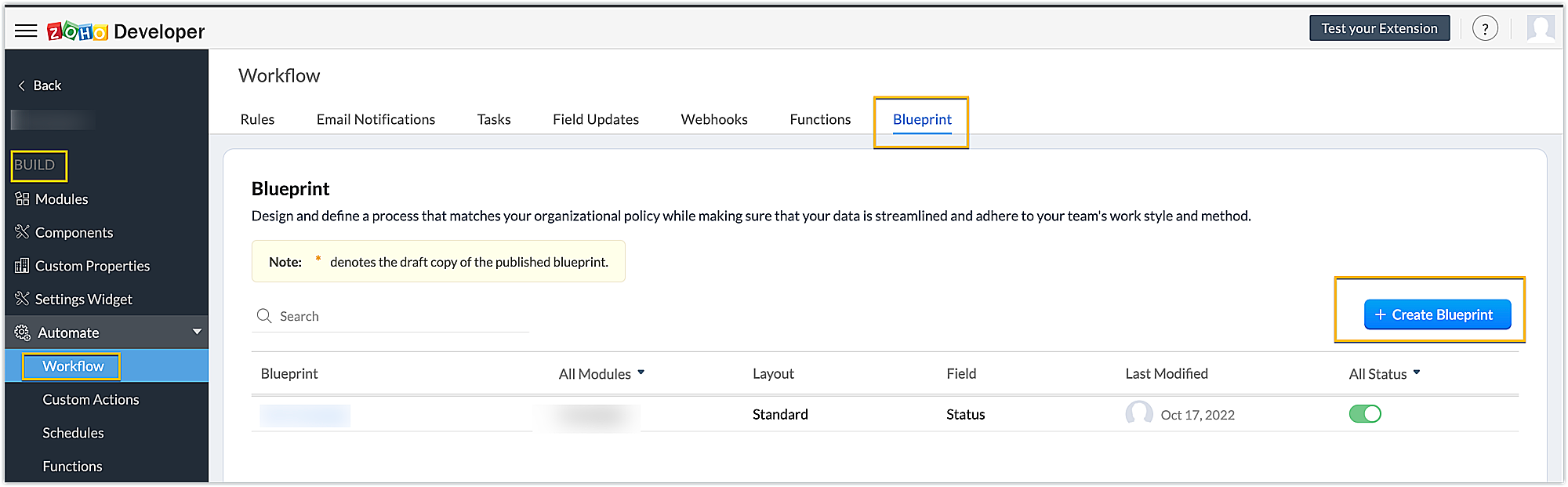
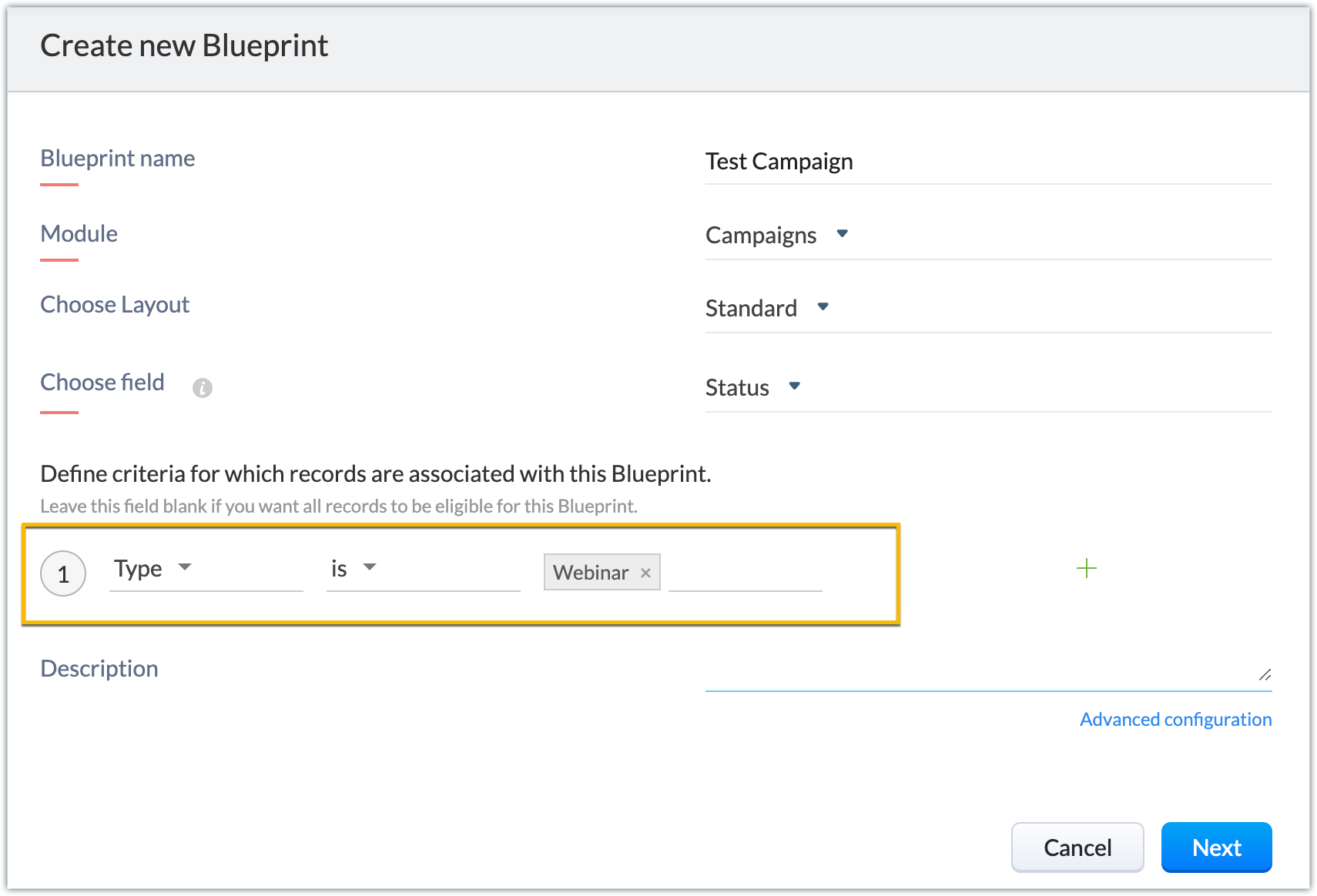
- Enter the necessary details. You can refer to this link to get detailed information on creating a blueprint. In our example, the module is Campaign, the layout is Standard and the field is Status.
Note: You can create picklist fields through the extension and choose them as the field for the blueprint. This helps you run blueprints specific to your campaign’s organization-related Zoho CRM fields as well.
- When the basic details are filled in, next you’ll define the criteria based on which records will be associated with this blueprint. In our example, we choose the campaign records of the webinar type to be associated with this blueprint.
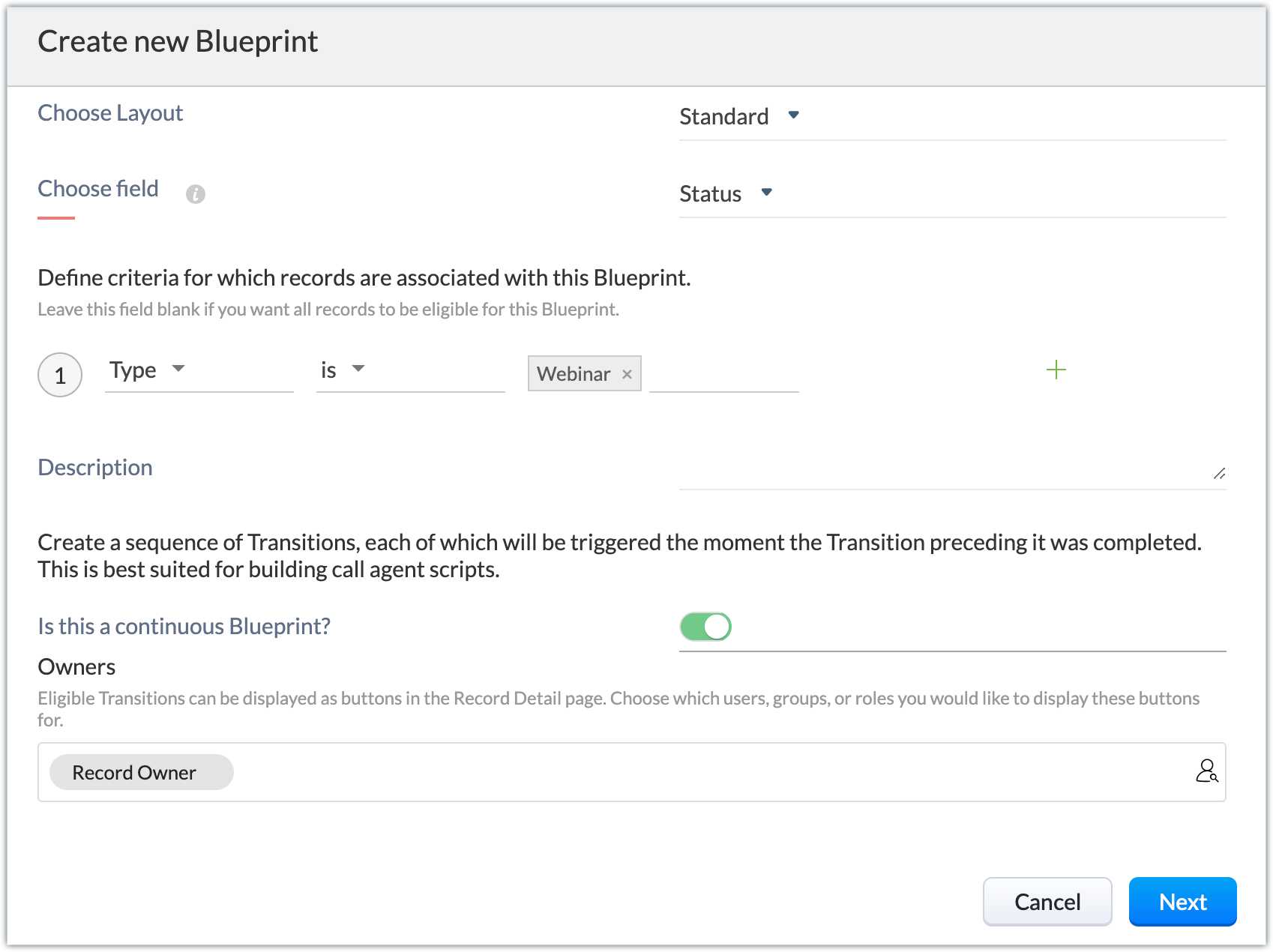
- There’s an option to create continuous blueprints, i.e., with the completion of a transition the next transition is automatically triggered, and so on. To achieve this, click Advanced configuration. Enable the Is this a continuous Blueprint? option. Choose the owners who will be eligible to view the transitions as buttons in the record's detail page.
Note: In our example, we don't enable this option; we manually execute transitions one after the other when the preceding transition's conditions are met and the next one is ready to be implemented. Click Next.
- Below is the blueprint created for our example.
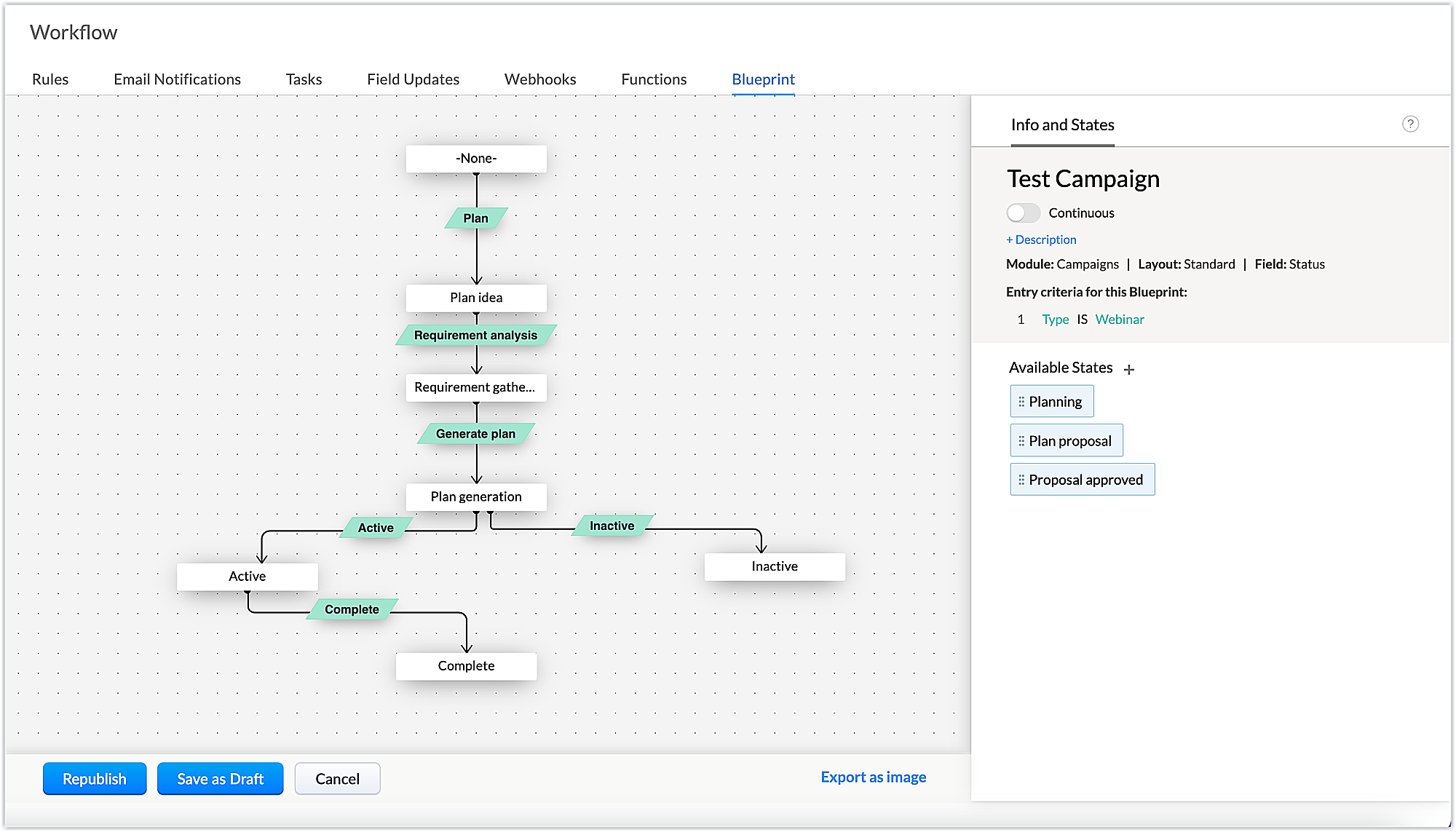
- The states and the transitions involved in our example are listed below.
States | Transitions |
Plan idea | Plan |
Requirement gathering | Requirement analysis |
Plan generation | Generate plan |
Active | Active |
Inactive | Inactive |
Complete | Complete |
- Next, add the criteria to be met at different stages of the transition (BEFORE, DURING, and AFTER). These transitions are conditions to be met to cross from one state to another, and will appear as buttons on the record details page.
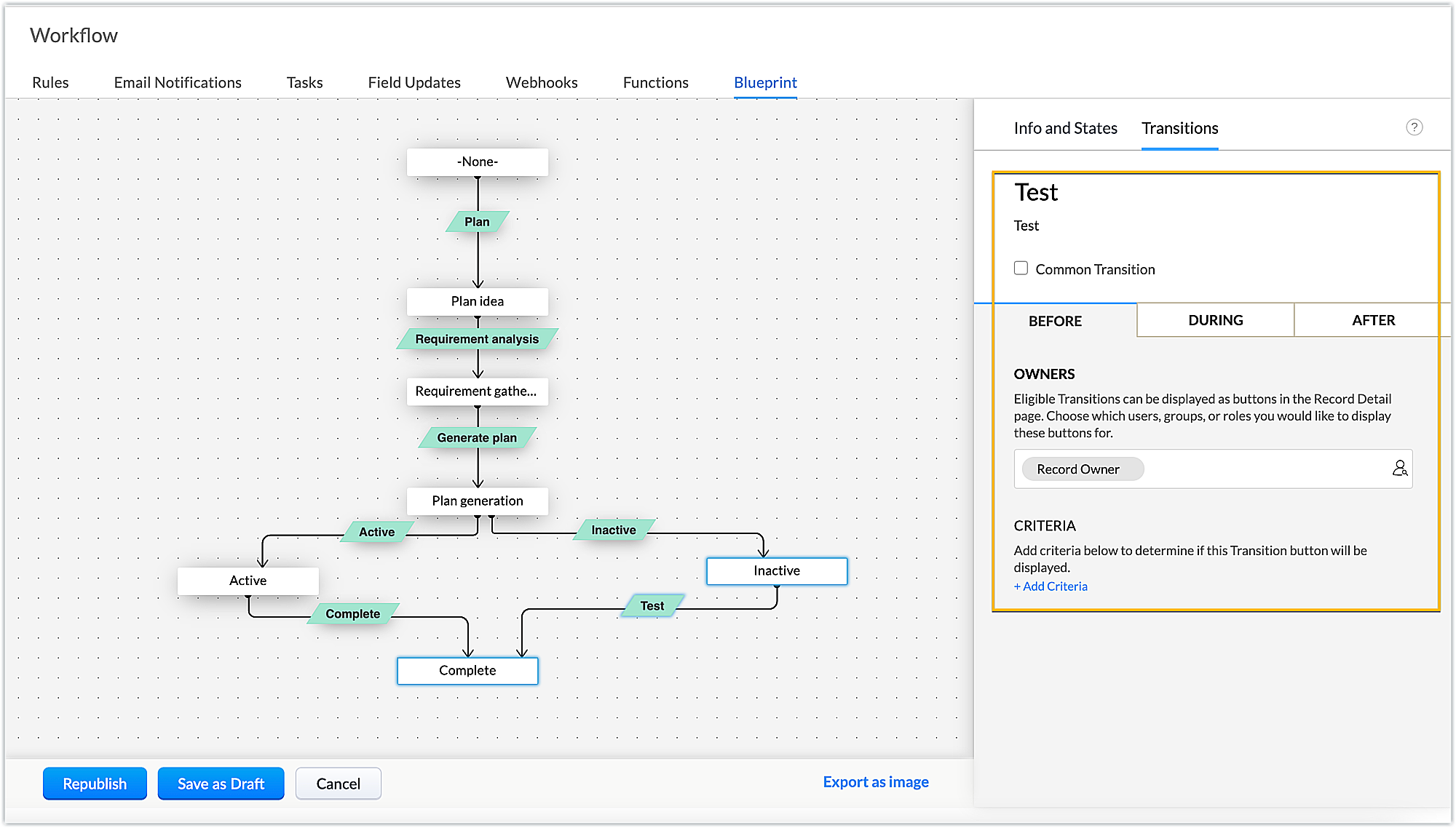
- Let's see the criteria involved in our example for each transition.
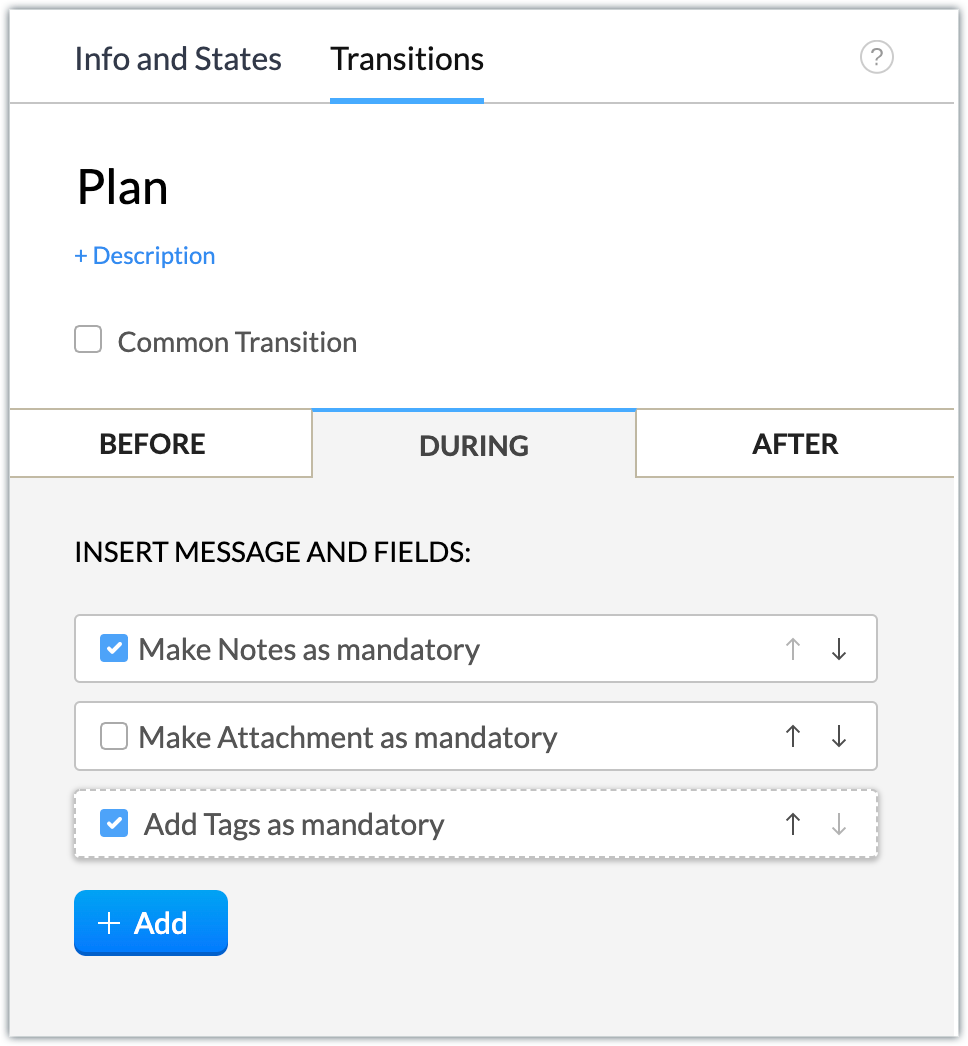
Plan: Notes on the webinar plan and tags are mandatory during this transition.
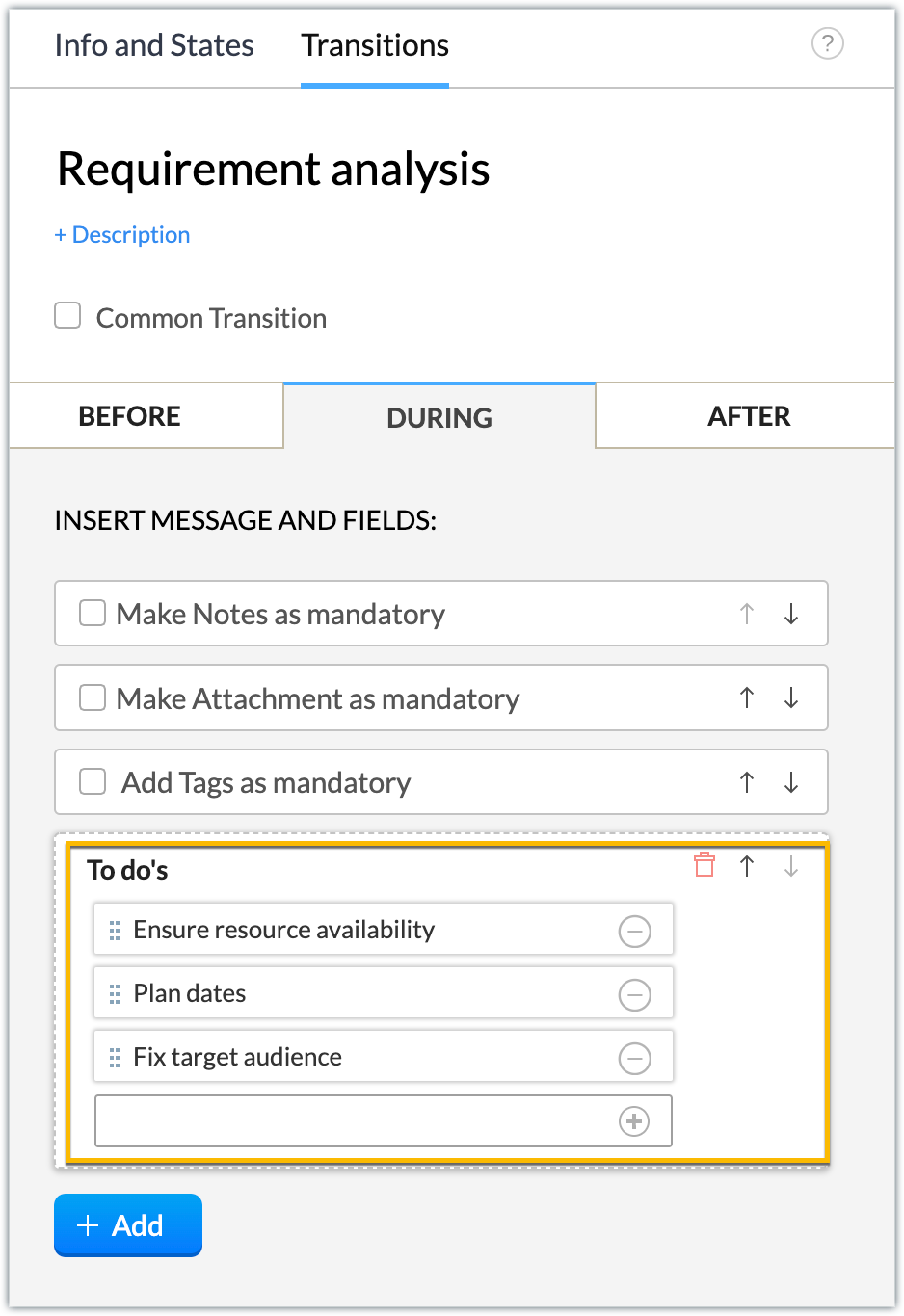
Requirement analysis: Create a checklist for analyzing the requirements by using the Add > Checklists during the transition.
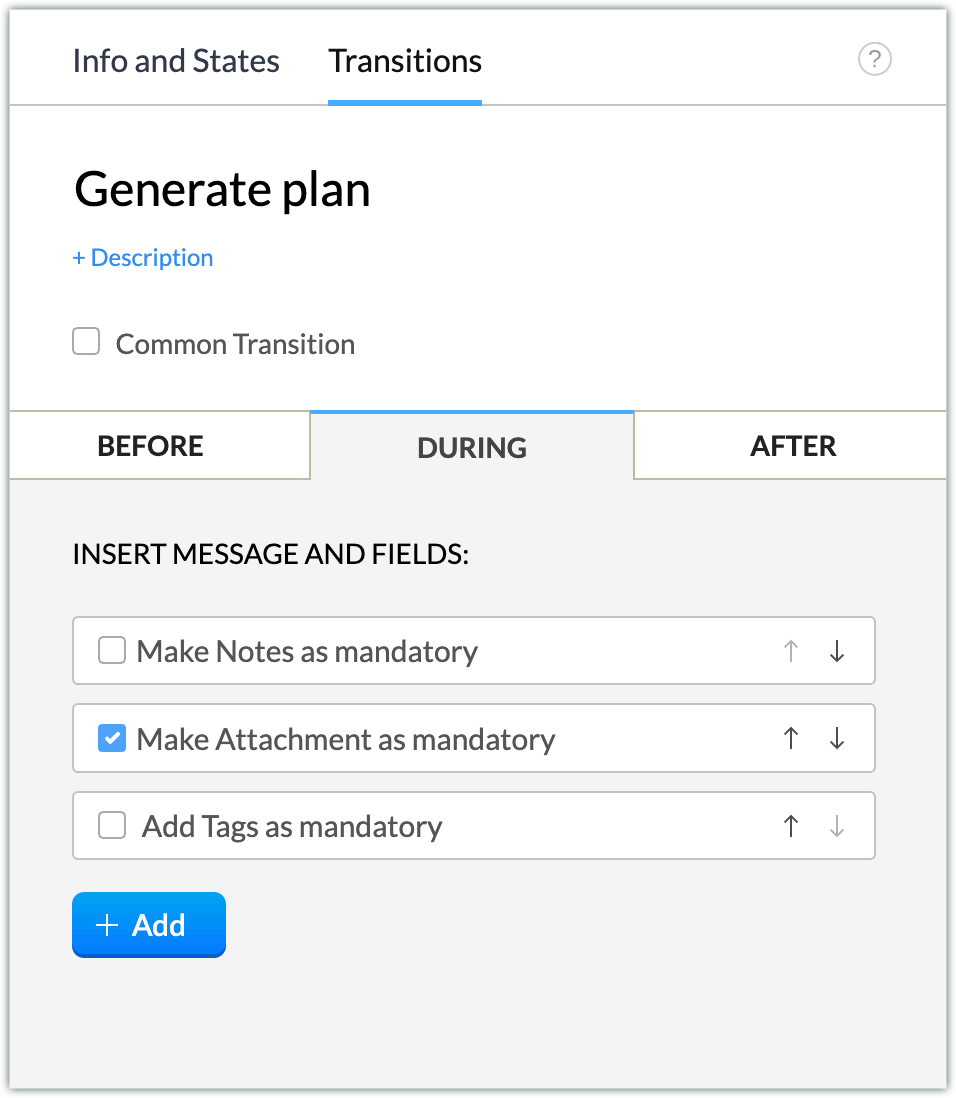
Generate plan: Make attachments of the contents or related documents required for the webinar mandatory during the transition.
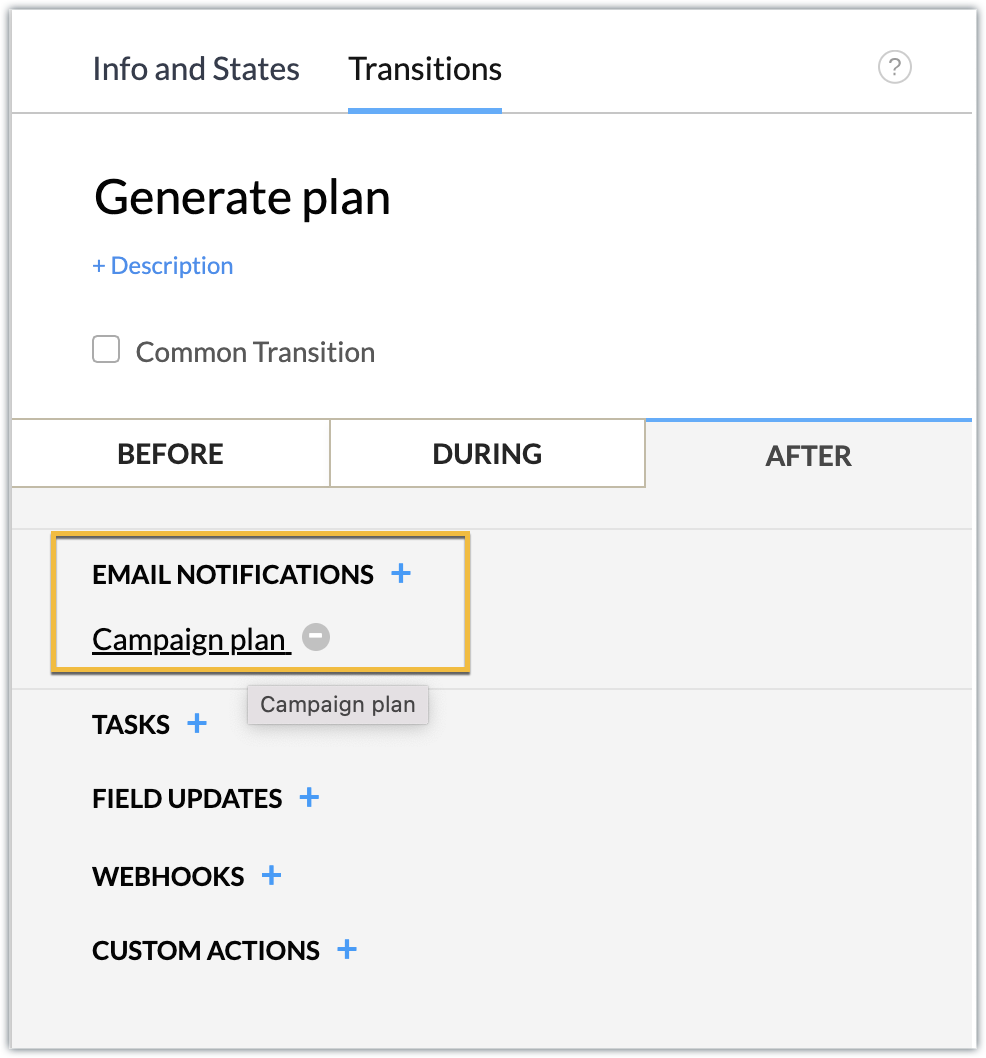
After the transition, generate an email notification to your manager with the campaign plan details. We’ve associated a campaign plan email template that includes the description of the campaign record as part of the email body.
Active: Upon discussion with the manager, if the plan is approved, the campaign plan is active and is to be executed further. Make tags mandatory during the transition.
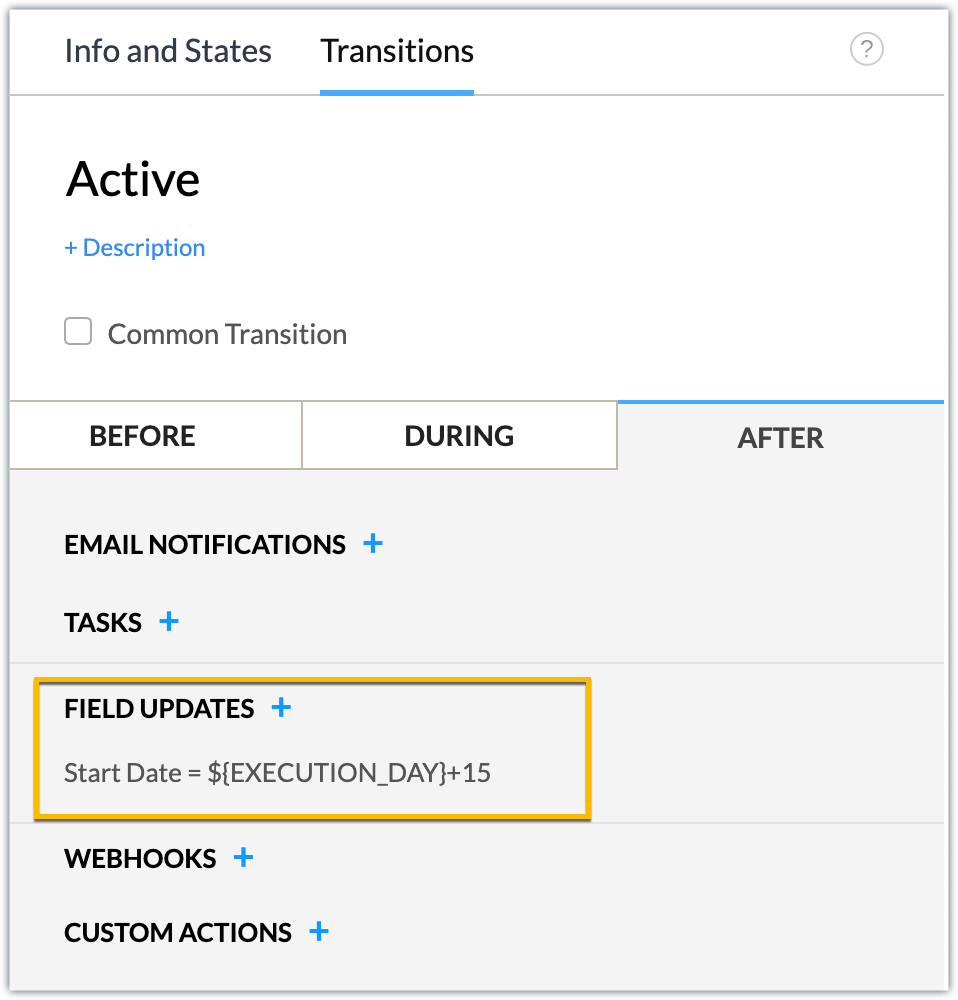
Schedule the campaign start date for 15 days from the current execution date (i.e., the date the plan changes to active status) after the transition is completed.
Inactive: After discussion with the manager, if the plan is not approved, the campaign plan is inactive and is then moved to an inactive state. When you click Inactive, the campaign is automatically moved to Complete status.
Complete: Finally, whether the plan is active and ready to be executed, we can move it to a closed state by making tags mandatory to establish that the record for creating the webinar campaign plan has been completed.
- Now that the blueprint is designed, click Publish.
- You can now publish the extension and install it in your Zoho CRM account.
Sample Output
You can view the sample output attached as a video.
In this manner, any webinar campaign will follow the blueprint process to completion. Similarly, you can create blueprints for each campaign and efficiently manage your campaign management process.
We hope you find this information useful. Keep following us for more inputs!!
Topic Participants
Nanditha Somasundaram Somasundaram
Sticky Posts
Kaizen #222 - Client Script Support for Notes Related List
Hello everyone! Welcome to another week of Kaizen. The final Kaizen post of the year 2025 is here! With the new Client Script support for the Notes Related List, you can validate, enrich, and manage notes across modules. In this post, we’ll explore howKaizen #217 - Actions APIs : Tasks
Welcome to another week of Kaizen! In last week's post we discussed Email Notifications APIs which act as the link between your Workflow automations and you. We have discussed how Zylker Cloud Services uses Email Notifications API in their custom dashboard.Kaizen #216 - Actions APIs : Email Notifications
Welcome to another week of Kaizen! For the last three weeks, we have been discussing Zylker's workflows. We successfully updated a dormant workflow, built a new one from the ground up and more. But our work is not finished—these automated processes areKaizen #152 - Client Script Support for the new Canvas Record Forms
Hello everyone! Have you ever wanted to trigger actions on click of a canvas button, icon, or text mandatory forms in Create/Edit and Clone Pages? Have you ever wanted to control how elements behave on the new Canvas Record Forms? This can be achievedKaizen #142: How to Navigate to Another Page in Zoho CRM using Client Script
Hello everyone! Welcome back to another exciting Kaizen post. In this post, let us see how you can you navigate to different Pages using Client Script. In this Kaizen post, Need to Navigate to different Pages Client Script ZDKs related to navigation A.
Recent Topics
Helper Functions and DRY principle
Hello everyone, I believe Deluge should be able to use 'Helper functions' inside the main function. I know I can create different standalones, but this is not helpful and confusing. I don't want 10000 different standalones, and I dont want to have toZoho CRM Portal Field Level Permission Issue
Hi Support Team, I am using the Zoho CRM Portal and configuring field-level editing permissions. However, we are unable to restrict portal users from editing certain fields. We have created a portal and provided View and Edit (Shared Only) access forHolidays - Cannot Enter Two Holidays on Same Day
I have a fairly common setup, where part-time employees receive 1/2 day's pay on a holiday and full-time employees receive a full day's pay. Historically, I've been able to accommodate this by entering two separate holidays, one that covers full-timePre-orders at Zoho Commerce
We plan to have regular producs that are avaliable for purchase now and we plan to have products that will be avaliable in 2-4 weeks. How we can take the pre-orders for these products? We need to take the money for the product now, but the delivery willIntroducing the Zoho Projects Learning Space
Every product has its learning curve, and sometimes having a guided path makes the learning experience smoother. With that goal, we introduce a dedicated learning space for Zoho Projects, a platform where you can explore lessons, learn at your own pace,Customer ticket creation via Microsoft Teams
Hi all, I'm looking to see if someone could point me in the right direction. I'd love to make it so my customers/ end users can make tickets, see responses and respond within microsoft teams. As Admin and an Agent i've installed the zoho assist app withinZoho Books' 2025 Wrapped
Before we turn the page to a new year, it’s time to revisit the updates that made financial management simpler and more intuitive. This annual roundup brings together the most impactful features and enhancements we delivered in 2025, offering a clearAdd specific field value to URL
Hi Everyone. I have the following code which is set to run from a subform when the user selects a value from a lookup field "Plant_Key" the URL opens a report but i want the report to be filtered on the matching field/value. so in the report there isCan multiple agents be assigned to one ticket on purpose?
Is it possible to assign one ticket to two or more agents at a time? I would like the option to have multiple people working on one ticket so that the same ticket is viewable for those agents on their list of pending tickets. Is something like this currentlyCreate static subforms in Zoho CRM: streamline data entry with pre-defined values
Last modified on (9 July, 2025): This feature was available in early access and is currently being rolled out to customers in phases. Currently available for users in the the AU, CA, and SA DCs. It will be enabled for the remaining DCs in the next coupleRestrict Users access to login into CRM?
I’m wanting my employees to be able to utilize the Zoho CRM Lookup field within Zoho Forms. For them to use lookup field in Zoho Forms it is my understanding that they need to be licensed for Forms and the CRM. However, I don’t want them to be able toZoho removed ability to see all Scheduled Reports!
If you are not the owner of a scheduled report, Zoho recently removed the capability to see each scheduled report. As an admin who relies on seeing all scheduled reports being sent, this is a terrible update. Now I cannot see ANY scheduled reports...even the ones I am being sent!! This should be a setting for admins to control. This is a bad update.Admins cannot see each others' Scheduled Reports?!
Very frustrating that as an admin I cannot see what my reports my fellow admins have created and scheduled. After asking about this on the help chat, I was told the issue is trust and security. By giving someone Admin status, it means we trust them with those responsibilities. Please change this, it is not a good process to have to bother other users to change a report or change users within a report.Add multiple users to a task
When I´m assigning a task it is almost always related to more than one person. Practical situation: When a client request some improvement the related department opens the task with the situation and people related to it as the client itself, the salesmanThis user is not allowed to add in Zoho. Please contact support-as@zohocorp.com for further details
Hi Team, when I,m trying to create a email account (imagixmidia.com.br) it's showing this error >> This user is not allowed to add in Zoho. Please contact support-as@zohocorp.com for further details plz help me thanksEdit default "We are here to help you" text in chat SalesIQ widget
Does anyone know how this text can be edited? I can't find it anywhere in settings. Thanks!Feature Request: Sync Leave Tracker to Zoho Mail / Calendar or provide option to download information
Zoho Leave Tracker offers the option to sync the leave Calendar to Microsoft 365 and Google Calendar. Adding an option to sync to Zoho-Mail Calendar would avoid duplication and add significant value for users. An alternative would be to allow users toCompensation | Salary Packages - Hourly Wage Needed
The US Bureau of Labor Statistics says 55.7% of all workers in the US are paid by the hour. I don't know how that compares to the rest of the world, but I would think that this alone would justify the need for having an hourly-based salary package option.Multiple currencies - doesn’t seem to work for site visitors / customers
I am trying to understand how the multiple currency feature works from the perspective of the website visitor who is shopping on my Zoho Commerce site. My site’s base currency is US Dollars (USD) but my store is for customers in Costa Rica and I wouldArchiving Contacts
How do I archive a list of contacts, or individual contacts?How do people handle using Outlook and Zoho Project calendar at the same time?
We have an ongoing problem in our organisation where we use Zoho Projects to plan all of our projects tasks and that also allows us to look forward using the workload report to see which of our consultants are overstretched etc and which are available.Printing to a brother label maker
I see allot of really old unanswered posts asking how to print to a label maker from a zoho creator app. Has their been any progress on providing the capability to create a customized height & width page or print template or whatever to print labels?10GB Email Storage Limits in Zoho CRM
We’ve had Zoho One for almost 5 years and have always synced our emails from Gmail via IMAP… As of late, we’ve run into issues with our emails not syncing, due to being over the 10GB storage cap… What’s very odd is that we haven’t changed a thing? I knowPerformance is degrading
We have used Mail and Cliq for about three years now. I used to use both on the browser. Both have, over the past 6 months, had a severe degradation in performance. I switched to desktop email, which appeared to improve things somewhat, although initialHow to set page defaults in zoho writer?
hi, everytime i open the zoho writer i have to change the default page settings to - A4 from letter, margins to narrow and header and footer to 0. I cannot set this as default as that option is grayed out! so I am unable to click it. I saved the documentStage-probability mapping feature in custom module
Hi, I'm building a custom module for manage projects. I would like to implement the stage-probability feature that Potentials has. Is this possible?Add Israel & Jewish Holidays to Zoho People Holidays Gallery
Greetings, We hope you are doing well. We are writing to request an enhancement to the Holidays Gallery in Zoho People. Currently, there are several holidays available, but none for Israel and none for Jewish holidays (which are not necessarily the sameAutomatically CC an address using Zoho CRM Email Templates
Hi all - have searched but can't see a definitive answer. We have built multiple email templates in CRM. Every time we send this we want it to CC a particular address (the same address for every email sent) so that it populates the reply back into ourAdd RTL and Hebrew Support for Candidate Portal (and Other Zoho Recruit Portals)
Dear Zoho Recruit Team, I hope you're doing well. We would like to request the ability to set the Candidate Portal to be Right-to-Left (RTL) and in Hebrew, similar to the existing functionality for the Career Site. Currently, when we set the Career SiteUnable to Send Different Email Templates for Different Documents in Zoho Sign
Hello Zoho Community, I am facing a limitation with Zoho Sign regarding email notifications sent to customers when a document is sent for signing. Currently, whenever I send any template/document for signing, the email notification that goes to the customerEnable History Tracking for Picklist Values Not Available
When I create a custom picklist field in Deals, the "Enable History Tracking for Picklist Values" option is not available in the Edit Properties area of the picklist. When I create a picklist in any other Module, that option is available. Is there a specific reason why this isn't available for fields in the Deals Module?ZO25: The refreshed, more unified, and intelligent OS for business
Hello all, Greetings from Zoho One! 2025 has been a remarkable year, packed with new features that will take your Zoho One experience to the next level! From sleek, customizable dashboards to an all-new action panel for instant task management, we’veVault crashes on Android Devices
Vault is continuously closing after entering the master password on my Android device. After several attempts I get a system message that says there is a bug in the app. I've uninstalled and reinstalled the app, and cleared the app cache, but nothing¿Cómo puedo configurar las contraseñas creadas bajo una directiva para que nunca caduquen y no aparezcan como caducadas en los informes?
¿Cómo puedo configurar las contraseñas creadas bajo una directiva para que nunca caduquen y no aparezcan como caducadas en los informes? La razón por la cual contraseña estas no deben caducar es porque su actualización depende de mi cliente y no de mí.Camera access
My picture doesn't appear in a group discussion. (The audio is fine.) The guide says "Click the lock icon on address bar," but I can't find it. Advise, pleaseAre static links available
I'm still using Zoho Meeting in trial mode. My previous webinar software provided a static link, and I made the mistaken assumption that I could send out my link and start a meeting later. Mass confusion, but my fault. With a paid version do you get aPower up your Kiosk Studio with Real-Time Data Capture, Client Scripts & More!
Hello Everyone, We’re thrilled to announce a powerful set of enhancements to Kiosk Studio in Zoho CRM. These new updates give you more flexibility, faster record handling, and real-time data capture, making your Kiosk flows smarter and more efficientThe reason I switched away from Zoho Notebook
My main reason for switching to Zoho was driven by three core principles: moving away from US-based products, keeping my data within India as much as possible, and supporting Indian companies. With that intent, I’ve been actively de-Googling my digitalWhy is Zoho Meeting quality so poor?
I've just moved from Office 365 to Zoho Workplace and have been generally really positive about the new platform -- nicely integrated, nice GUI, good and easy-to-understand control and customisation, and at a reasonable price. However, what is going onCustom Fonts in Zoho CRM Template Builder
Hi, I am currently creating a new template for our quotes using the Zoho CRM template builder. However, I noticed that there is no option to add custom fonts to the template builder. It would greatly enhance the flexibility and branding capabilities ifNext Page