Function #48: Manage fixed installment payments using Zoho Books

Hello everyone, and welcome back to our series!
Businesses offer installment payment options to their customers, particularly for expensive purchases, to ease the financial burden on them. By breaking down the total cost into smaller, more manageable payments, businesses can attract a wider audience who may not be able to afford large upfront payments. This approach not only increases the likelihood of making more sales, but also helps to spread revenue over time, improve cash flow, enhance customer satisfaction and loyalty, and provide a competitive advantage in the market.
We receive numerous requests from our users regarding the handling of these installment scenarios. We heard you loud and clear. Today, we are excited to share a solution that utilizes custom functions to manage installment payments in Zoho Books.
Let's take the example of Mr. John Hector, who wants to buy a 75-inch TV from Zylker Electronics, priced at a hefty $2,300. He is finding it difficult to pay the entire amount upfront. Therefore, Zylker Electronics offers him the option to pay in installments. They mutually decide that John will spread the payment over 5 months, committing to monthly installments of $460 until he settles the entire purchase amount. Let's delve into how this process can be efficiently managed within Zoho Books using custom functions.
Firstly, Zylker Electronics should create a sale invoice of $2,300 in their Zoho Books organization. While creating it, they should input the start date of the installment and the number of installments in two custom fields. For instance, if the sale was made on 01.04.2024 and Mr. John agreed to pay in 5 installments starting on 10.05.2024, the start date should be entered as 10.05.2024, and the number of installments as 5.
Two custom functions will come into play: one to generate the retainer invoices to collect the installment payments and another to apply the retainer payments to the sale invoice.
Based on the number of installments entered the function will determine the amount to be charged as monthly installments.
Installment amount = Total Amount Payable / No of installments = $2300 / 5 = $460.
On the specified start date, the first function will create and send the retainer invoice for the first installment. Once the payment for this installment is recorded, the second function will apply it to the sale invoice, reducing the balance accordingly. The process repeats each month, generating and sending retainer invoices for subsequent installments until all 5 are completed. Each retainer invoice will be for $460 and due on the 10th of every month for 5 consecutive months. As each retainer invoice is paid, the second function will automatically apply it to the sale invoice, thereby recognizing the income.
Prerequisites:
1. Create a Connection named "zbooks" to successfully execute the scheduler. You can watch the GIF attached below to know how to create the connection.

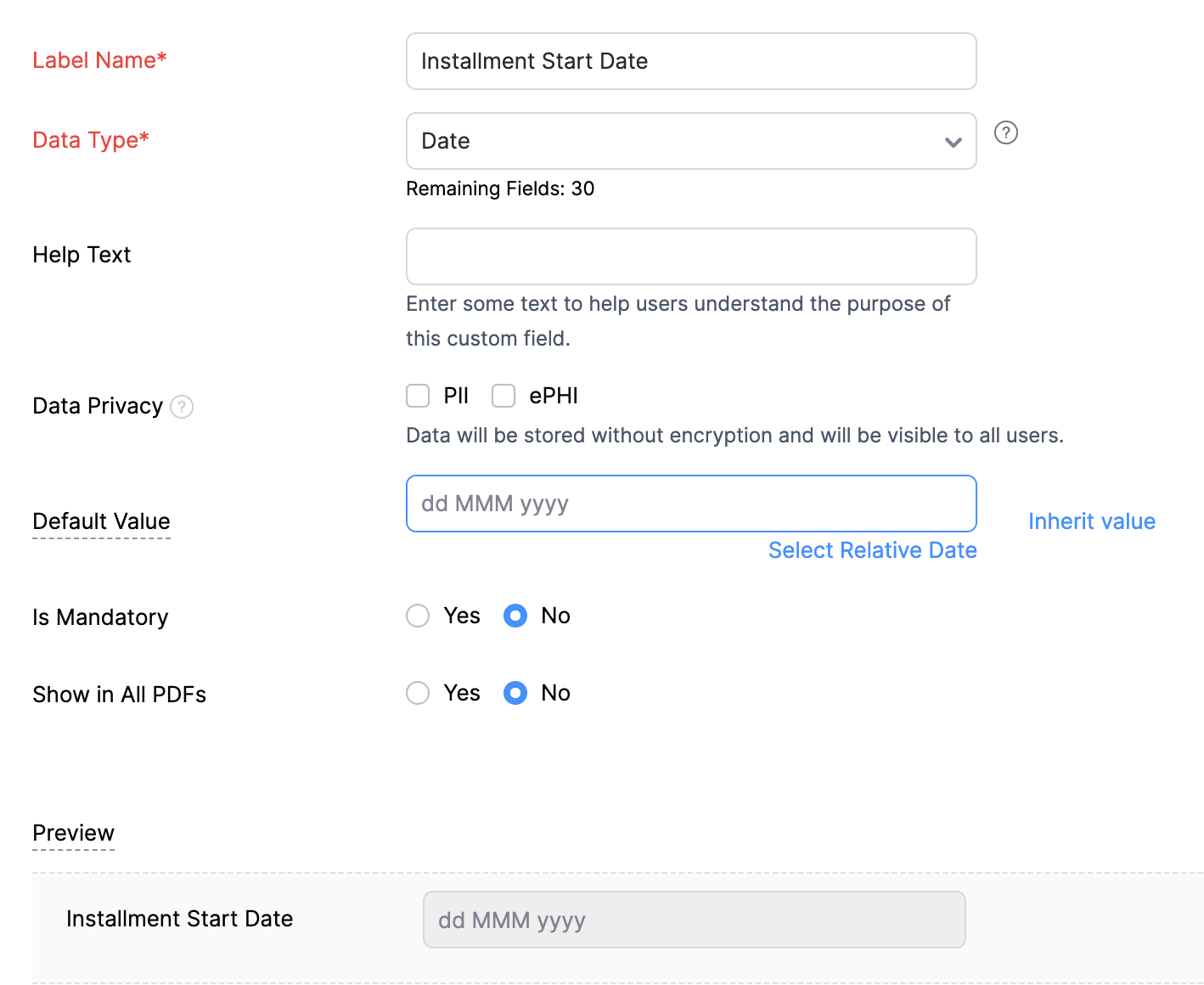
2. Create a Date-type custom field called "Installment Start Date" for the Invoices. This field will be used to input the starting date for installment payments.
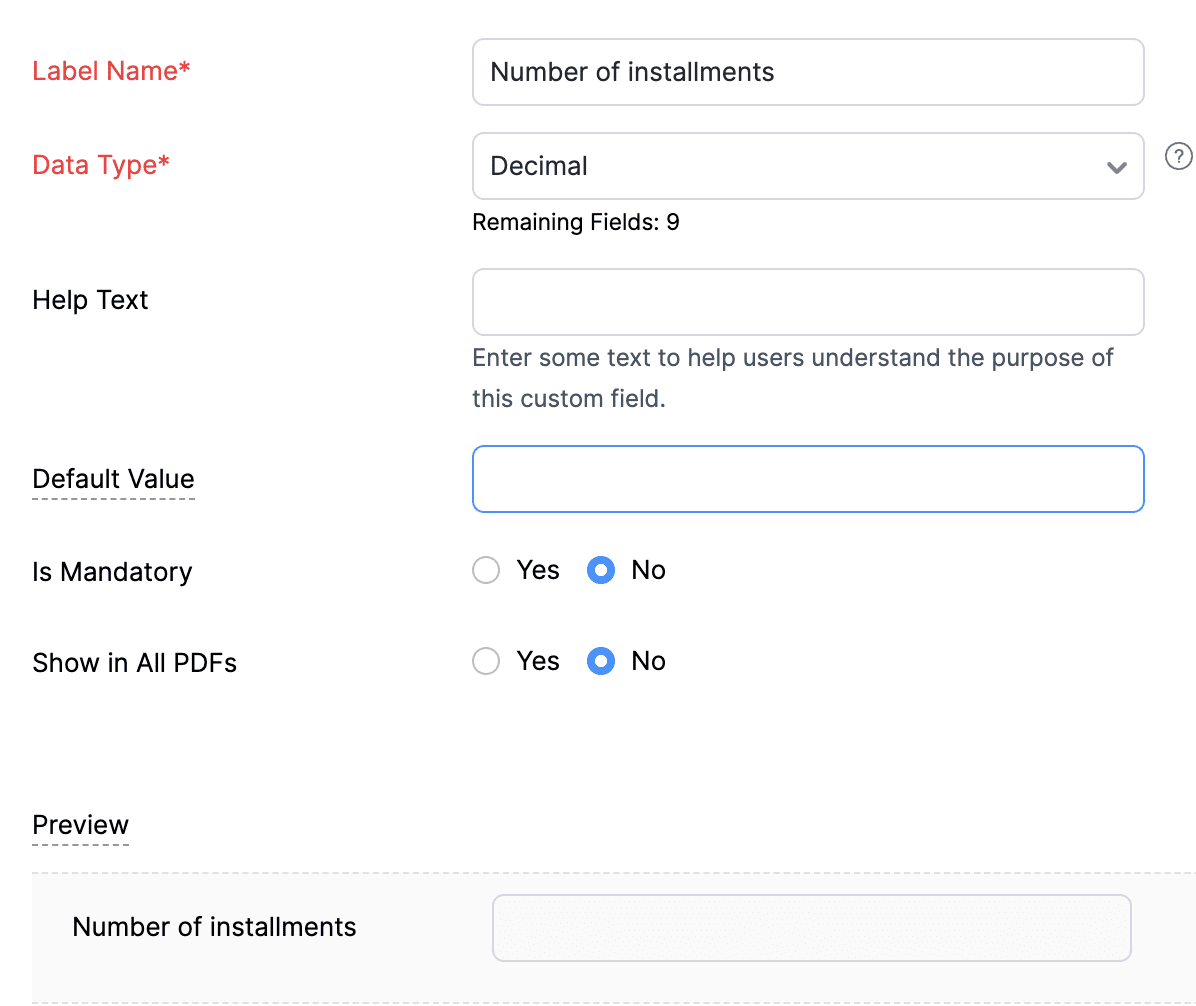
3. Create a Decimal-type custom field called "Number of installments" for the Invoices. Here, you'll specify the agreed-upon number of installments. Using this information and the total invoice amount, the function will determine the monthly installment amount.
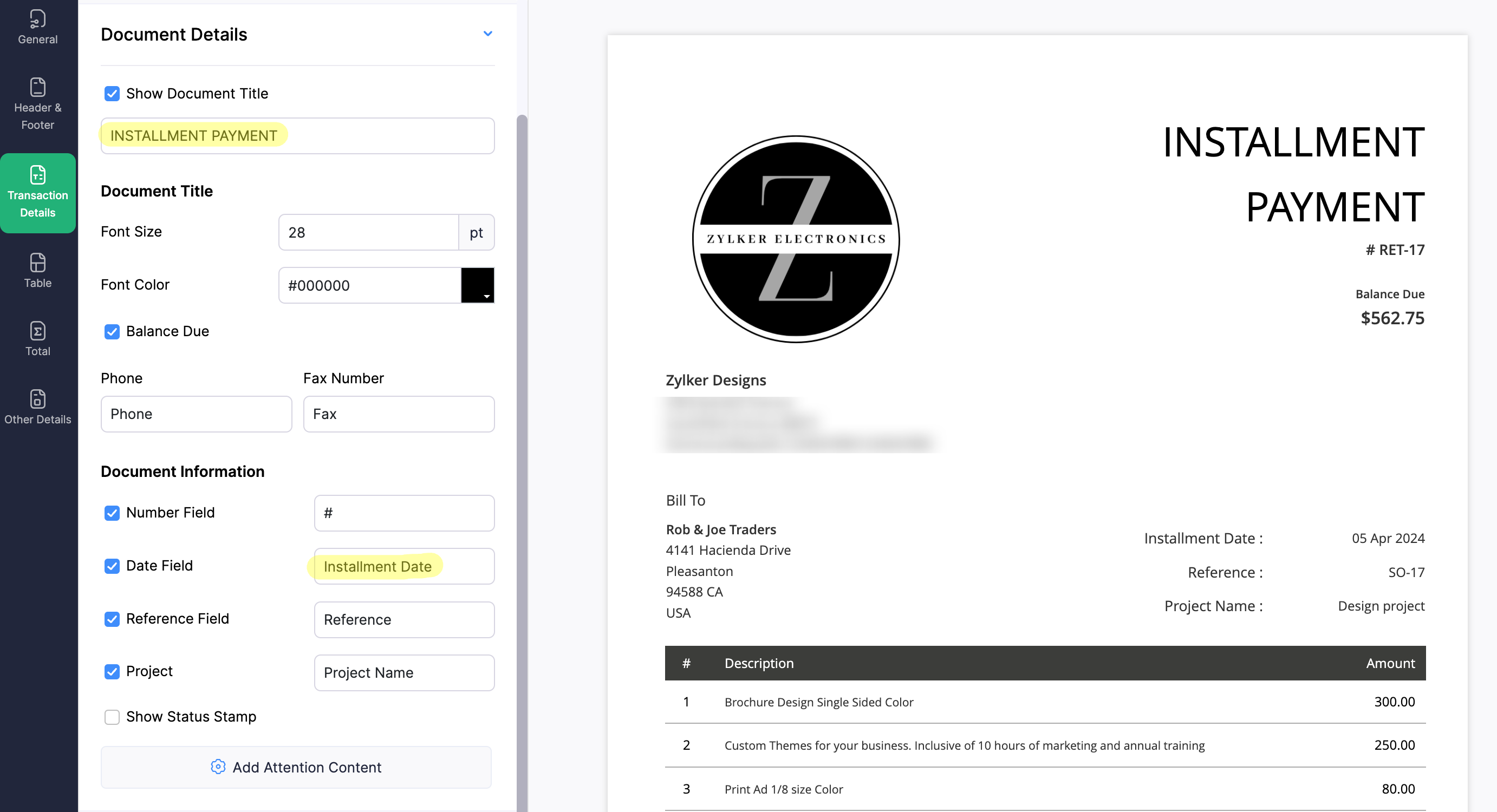
4. Create a new Retainer Invoice template with the document title "Installment Payment". Then, copy the template ID (You can get the ID from the URL of the webpage) and substitute it into line 26 of the first function. This ensures that all the retainers sent for collecting installment amounts are correctly labeled.
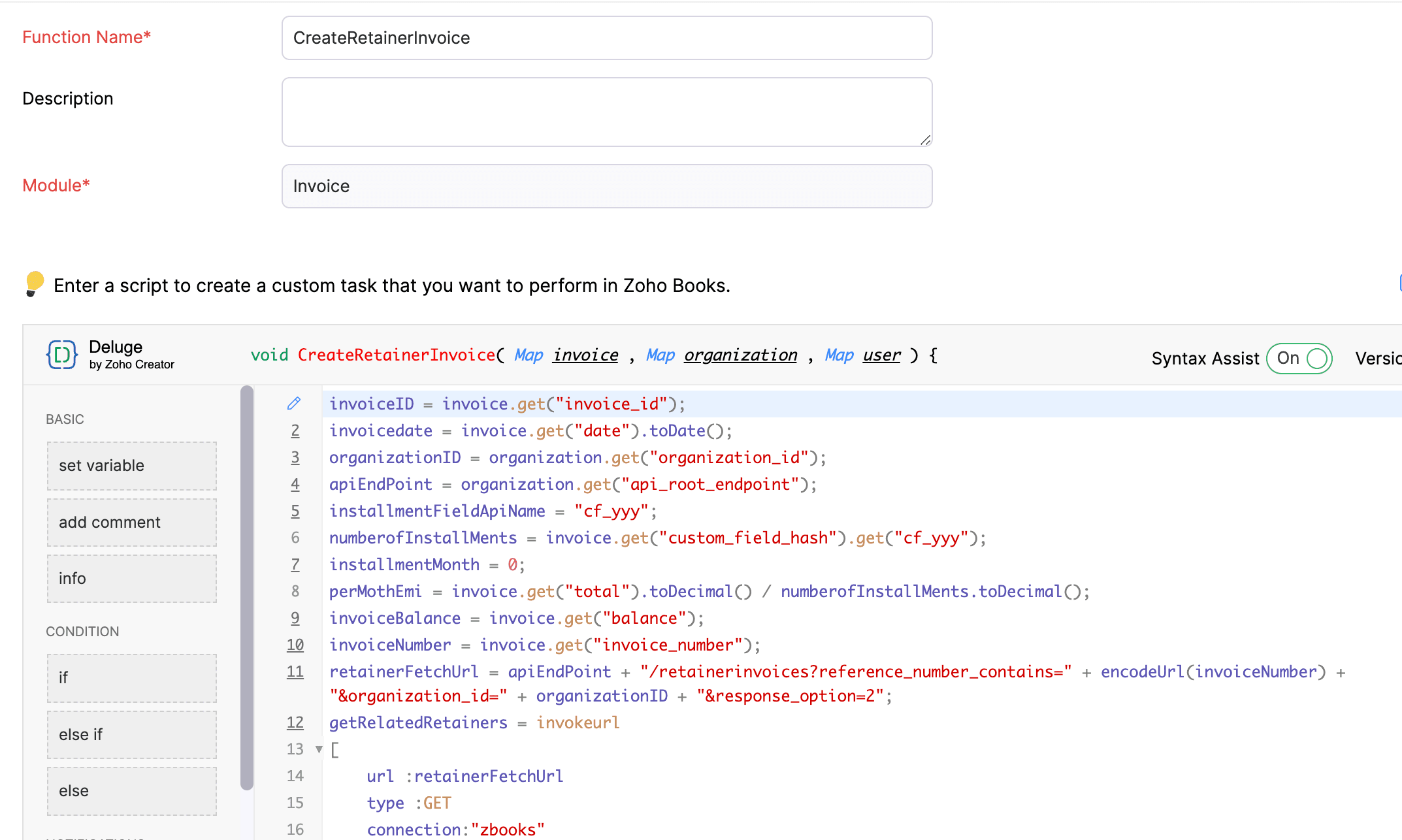
(1) Custom Function to create Retainer Invoices:
Navigate to Settings -> Automation -> Workflow Actions -> Custom Functions -> +New Custom Function -> Module -> Select Invoice -> Add the function code from this GitHub Link -> Save.
(2) Workflow Rule to create Retainer Invoices:
Go to Settings -> Automation -> Workflow Rules -> +New Workflow Rule and set up the workflow rule as shown below:-


In the final step of this workflow rule, associate the custom function you created and then hit Save.
(3) Custom Function to apply installment payments to the sale invoice:
Navigate to Settings -> Automation -> Workflow Actions -> Custom Functions -> +New Custom Function- > Module -> Select Retainer Invoice -> Add the function code from this GitHub Link -> Save.

(4) Workflow Rule to apply installment payments:
Go to Settings -> Automation -> Workflow Rules -> +New Workflow Rule and set up the workflow rule as shown below:-
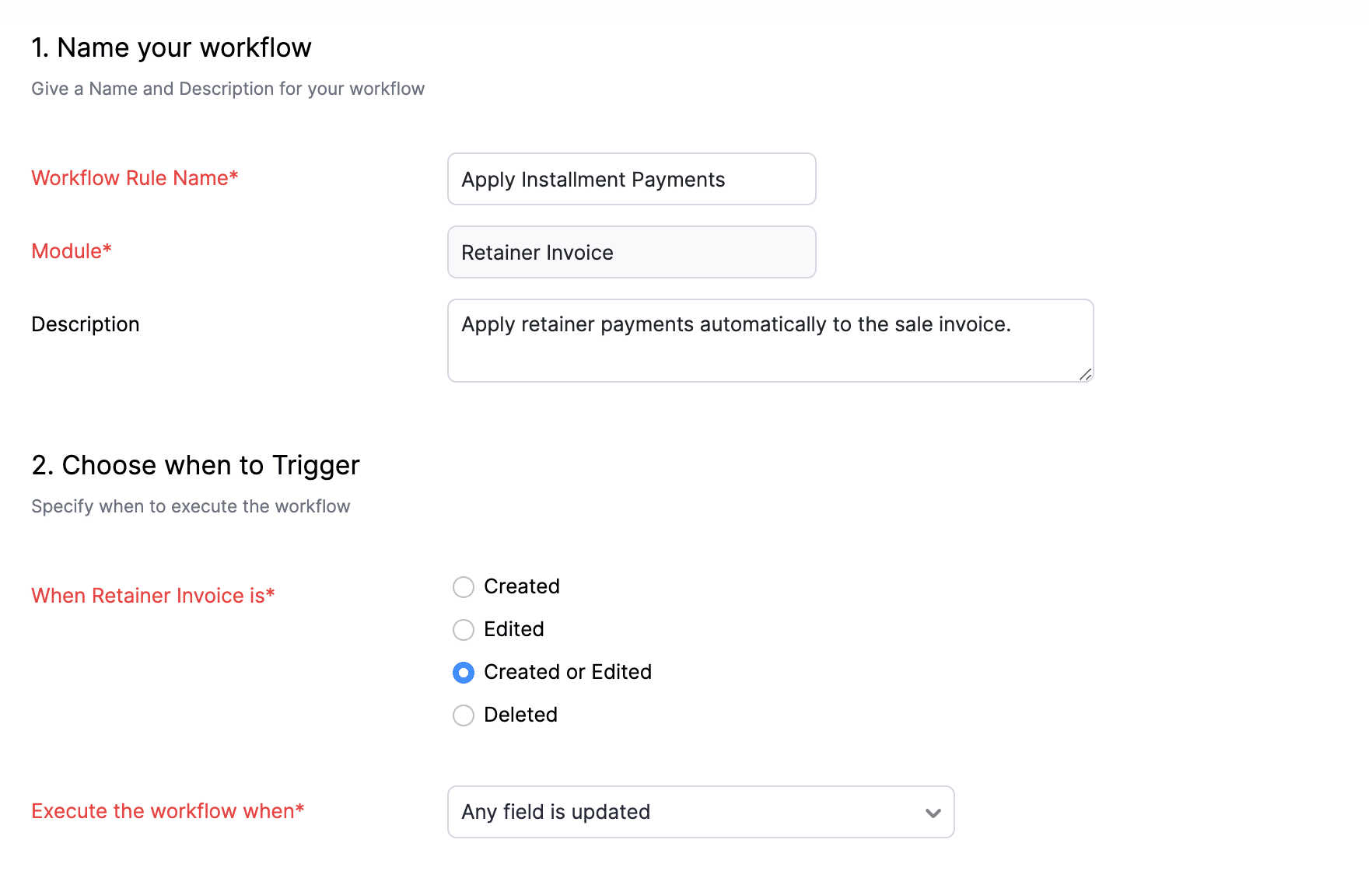
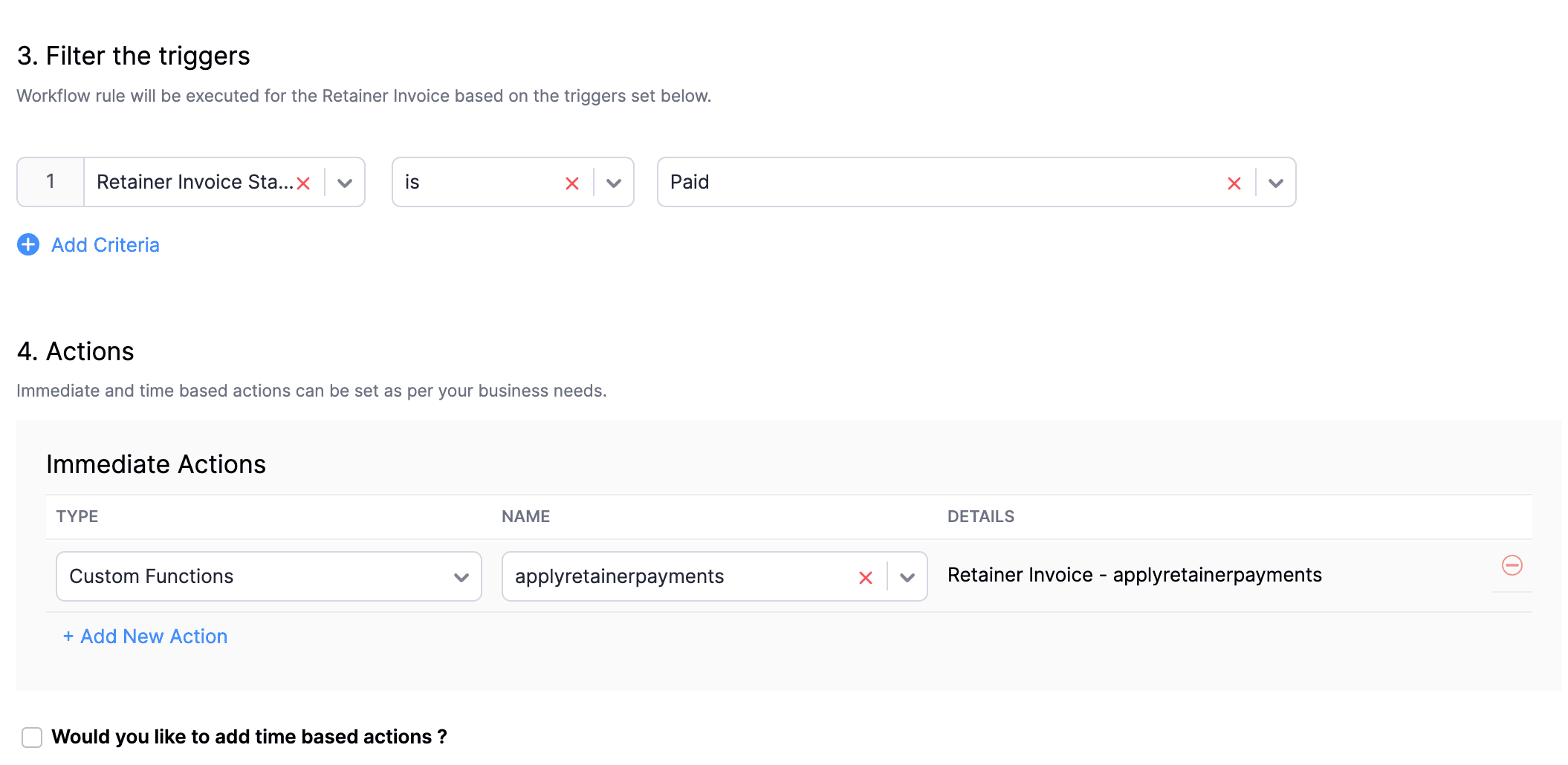
In the final step of this workflow rule, associate the custom function you created and then hit Save.
We really hope that today's functions help you streamline the process of handling installments in Zoho Books. If you need any assistance in customizing the functions to better suit your needs, please do not hesitate to contact us at support[at]zohobooks[dot]com. We are always happy to help you.
Also, for those looking to collect varying percentages of the invoice total as installments, stay tuned!
Regards,
Shireen Farhana
Zoho Books
Topic Participants
Shireen Farhana
Dmitry Solovyev
Dylan Cleppe
Julio Cazaroto
Maj
Sticky Posts
Introducing Invoice Consolidation for Offline Subscriptions
Hello Folks, Glad to announce the feature of Invoice Consolidation for Offline Subscriptions. If you are having multiple subscriptions for your customers, now, you can send a single consolidated invoice for all the Offline Subscriptions that are getting renewed on the same date. Advantage? Customers will be receiving single invoice instead of multiple invoices upon renewal. Also reduces your efforts in follow-up with your customers for payment collections. For Example: If Customer has SubscriptionNew feature: Create back-dated subscriptions
Hello from the Zoho Subscriptions team. :) We’re happy to announce that today marks the launch of a much-awaited feature: creating back-dated subscriptions! From here on out, whenever you create a new subscription with an activation date that is earlier than the present date, you’ll no longer get an error. Instead, you'll be creating a back-dated subscription. This means that the subscription started at that earlier point in time. The next billing date will be calculated automatically based onAnnouncement Regarding Notification Emails
Hello Everyone! This announcement is regarding the admin notification emails which you've been receiving from the email address "support@zohosubscriptions.com". From the 1st of October, 06:00 GMT, the emails with the following subjects will be sent from "no-reply@zohosubscriptions.com". Unable to send invoice for the profile - {profile_name} Unable to process auto payments. If you have set up any filters or workflow in your email account, please add "no-reply@zohosubscriptions.com” and “support@zohosubscriptions.com”Zoho Subscriptions plugin for WordPress
Zoho Subscriptions plugin for WordPress allows you to easily embed your plan specific checkout page in an iframe with just a few mouse clicks and without a single line of code. How can WordPress Zoho Subscriptions Plugin boost your productivity? It's now easier to embed Zoho Subscriptions checkout page in your WordPress site. Forget the old method of logging in to Zoho Subscriptions, copying a URL and scripting to make adjustments. All this can be done automatically through this plugin. A great timeIndian GST organisation Migration Guide
With respect to the new GST regime releasing on July 1, 2017in India, Zoho Subscriptions Indian edition is also gearing up to make your business GST Ready. This article focuses on how to get your existing organisation in Zoho Subscriptions to migrate to the new GST regime. Note: Any organisation created on or after July 1, 2017 will already be GST ready. You wouldn't have to migrate your organisation. Migrating your existing organisation to support GST To migrate your existing organisation to
Recent Topics
Why can't we change the Account type from an Expense to an Asset?
Like the question. Why in QuickBooks for example if I mistakenly created an account as an expenses and I already captured information in those accounts, I can just change the account type from expense to assetIs it possible to do validation for the Actions added to Reports?
We have an all-around On Validate function that checks all the possibilities before the Created/Edited form submissions. We want to have a button in the report view, so we can change records without entering. We are able to add this button, and it doesAbility to Edit Ticket Subject when Splitting a Ticket
Often someone will make an additional or new request within an existing ticket that requires we split the ticket. The annoying part is that the new ticket maintains the subject of the original ticket after the split so when the new ticket email notificationFunction #11: Apply unused credits automatically to invoices
Today, we bring you a custom function that automatically applies unused credits from excess payments, credit notes, and retainer payments to an invoice when it is created. Prerequisites: Create a Connection named "zbooks" to successfully execute the function.[Free Webinar] Environments in Zoho Creator - Creator Tech Connect
Hello Everyone, We’re delighted to kick off the 2026 edition of the Zoho Creator Tech Connect Series and are excited to continue this learning journey with you. The Creator Tech Connect series is a free monthly webinar featuring deep-dive technical sessionsZoho Voice API SMS
I made a post request in Zapier to try to send an SMS. Authentication appears to be configured correctly. I followed the documentation and I'm getting a 400 Error "Internal Server Error". Not helpful at all. Anyways, I could not find any information onHow do I change (error) display messages
Hi! I would like to edit display messages like "invalid entries" and "enter a value for Nome" and so on into Italian language messages. How can I do that? Already tried on Validate on form submit. Where I am failing? Thanks in advance.Record Overseas Transactions Along with CC charges
Hi All, We receive payments via stripe in multiple currencies and stripe takes around 2.5% fees. The amount is settled in INR into our local bank. What should be the currency of the income account used for Stripe payments? Here is a sample flow that weEasier onboarding for new users with stage descriptions
Greetings, I hope all of you are doing well. We're happy to announce a recent enhancement we've made to Bigin. You can now add descriptions to the stages in your pipeline. Previously, when creating a pipeline, you could only add stages. With this update,Pieds de page personnalisé - Document Zoho Writer
Bonjour à tous, Je rencontre un souci avec l’ajout d’un pied de page personnalisé dans un document Zoho Writer. Je souhaite insérer les informations de mon entreprise (notamment un logo + adresse) dans le pied de page. Le problème, c’est que lorsque j’ajouteCredit card transactions are backwards after importing statements
I am new to Zoho Books so I'm importing my firm's bank and credit card statements in. My credit card statements have a single column with negative numbers so that is the option I chose. But when I went to categorize the credit card transactions, I canPermissions on Views
Having the option of any agent creating custom views is firing back and got a situation where there are a hundred different views across the team and tickets are not being dealt in the most efficient of ways. Tickets seems to be missed by some agents,Function #8: Add additional charges to invoices
Here goes one of the highly sought-after custom functions in Zoho Books. If you find yourself needing to apply additional charges to customers on their invoices (say credit card surcharges, or fuel charges applicable to customers from a certain region,Knowledgebase SEO
We have a custom-domain mapped help center that is not restricted via login. I have some questions: a) will a robots.txt file still allow us to control indexing? b) do we have the ability to edit the sitemap? c) do category URLs get indexed by searchVIsual maindmaps in Zoho notebook Ai
Can I create and export VIsual maindmaps in Zoho notebook Ai1stDibs Integration to Zoho Inventory
Hello is it possible to integrate my Zoho inventory and 1stDibs?Community Question: Renewal vs Invoicing
This is a question for the community. Does anyone else consider there to be a difference between a subscription renewal event and sending out a recurring invoice for a subscription? For example, let's say customer XYZ purchases a 1-year subscription tocloud console support for music websites
Hi Friends, I am not from a very technical background.. So need support from the Zoho family. I want to build a e-commerce website which is in Musical Niche. It will help people learn music & play instruments of all types. There are a few players in the market like Chordify , Guitaa, Guitar Dashboard, ChordU & few others. But I all these websites allow only a few instruments to play. So I want to build a better website than the one I mentioned. So wnated to know what UI & AI should I use so thatScheduled Reports - Do not send empty report
Hello, We are intensively using reports in the CRM, especially for sales managers. When data is empty, they still receive an email. Can you add an option to avoid sending the report when data is empty?MRP or Manufacturing Module for Zoho
We have been searching for options for a production planning or MRP that will integrate with Zoho. Zoho Creator is pushed as a platform that can have an MRP built from scratch but we would like to find more of an out of the box solution and modify it to fit our needs. Are there any recommendations? Would Zoho consider creating a custom solution in Creator to support this need?Is Zoho One Desktop more secure than Zoho One Web SaaS?
Is Zoho One Desktop more secure than using Zoho One in browser? Inherently, it seems desktop would be unless you don't do things like share your pw or leave pc on. I am concerned about data being on the cloud or someone else's server and database.Reminder Settings - Time Tracker
On the time tracker in Reminder Settings I created a reminder according to the Zoho manual. But a manager asked me to change the message that goes in the email. Is it possible to change the message? I didn't find that in the Zoho manual. Another question: I configured to receive the reminder everyone who logged in less than 40 hours. Does Zoho consider less than 40 hours of the current week or the whole month? Another situation, I put it so that I and another specific user would receive the notification,Create Item group from a composite Item
I have applied my mind for hours but cannot figure this out. Can you have a composite item in an item group?. E.g. We bundle different color and size SKU's together as composite items. Also Using composite items as Bill of Materials. We want to createMain difference of Zoho Recruit Corporte version and Staffing HR vesion
Hi Zoho, I need help to fully understand what is the main key point differences of Recruit Corporate version versus the Staffing HR version? We are currently using Corporate HR version and we are looking on having an insightful automated reporting, doesOut of Stock items showing in Commerce
I have over 6000 items and most are not in stock, but all items are showing up in Commerce whether they are inventory or not. What option or feature can you use to hide items in Commerce at zero or negative quantities? I currently am using Commerce forIs it possible to transfer data from one related list to another within the same module ?
In the Leads module, there is an existing default Product related list that already contains data. Recently, I added a custom multi-lookup field, which created a new related list in the same Leads module. Now, I need to move the existing data from theHow to implement new online payment gateway?
Hello, Can you tell me how to proceed to implement my local payment gateway? DIBS has an open avaiable API that should be easy to implement into ZOHO BOOKS. http://tech.dibspayment.com/dibs_payment_windowFormula working in MS Excel , is not working in Zoho Sheets, Filter fuction which is working in MS sheets per the attached workbook / Daily update.
Filter function , which is working in MS Excel is not working in Zoho sheets. Please help on function of filter of particular class sheets and extract students name who has more than 3.5 hours of study hours on particular day depending on date in D7 cell.New in Smart Prompt: Record Assistant for contextual assistance, and support for new AI models
Smart Prompt helps teams stay informed and move faster by providing relevant suggestions where work happens in CRM. With this update, Smart Prompt becomes more adaptable to your organization’s AI preferences. You can now choose which Large Language ModelImproved Integration Failure Information (And Notification Options)
Hi, When an attachment service for example fails, you just get "Field x - Error", I can check the field it is failing on and find nothing wrong, same file size, type, dimensions, etc. so more information as to the actual issue would be helpful. And anChange User Role in a Form
Hi, When in a form, it would be good (And consistent) to be able to change the user role/permission like you can with Shared Reports, All Entries or the actual User itself, rather than having to delete the users permission and then add it back again withReassign Partially Saved Entries
Hi, I would like to be able to go to Partially Saved Entries and like the option to delete them I would like the option to multi-select and be able to reassign them to another user to complete (Such as when a user has left the company). Thanks DanIncrease the "Maximum Saved Entries per User" Options Limit
Hi, You can create lots of saved entries, yet the Limit when you apply one is 25, we may often expect 32 to be in draft, and therefore want to enforce that, can we increase the limit of this field from 25 to 100 (As you can just turn it off and have moreDynamic Field Folders in OneDrive
Hi, With the 2 options today we have either a Dynamic Parent Folder and lots of attachments all in that one folder with only the ability to set the file name (Which is also not incremented so if I upload 5 photos to one field they are all named the sameProduct Updates in Zoho Workplace applications | December 2025
Hello Workplace Community, Let’s take a look at the new features and enhancements that went live across all Workplace applications this December. Zoho Mail Block emails without notifying the sender Block emails without sending a rejection notificationZoho CRM for Gmail Extension Not Working in Brave Browser?
Is anyone able to get the Zoho CRM Chrome Extension working in the Brave browser? They're both built on the Chromium platform and every other Chrome Extension works with the exception of Zoho CRM for Gmail so any ideas here?Set Frozen Cells in the Report Settings
Hi, It would be nice to be able to set the frozen cells in the report Settings, and have an option if this is fixed or can be changed after loading (On the next load it still goes back to the Settings). Thanks DanMicrosoft Teams now available as an online meeting provider
Hello everyone, We're pleased to announce that Zoho CRM now supports Microsoft Teams as an online meeting provider—alongside the other providers already available. Admins can enable Microsoft Teams directly from the Preferences tab under the MeetingsTip of the week #26: Import/ Export calendars in Zoho Calendar.
Any calendar on the web or calendars that you create in any other calendar application can be imported in to Zoho Calendar. This will help you to add the events from the calendars that you import to your Zoho Calendar. You also have the option to exportAdd Zoho Forms to Zoho CRM Plus bundle
Great Zoho apps like CRM and Desk have very limited form builders when it comes to form and field rules, design, integration and deployment options. Many of my clients who use Zoho CRM Plus often hit limitations with the built in forms in CRM or Desk and are then disappointed to hear that they have to additionally pay for Zoho Forms to get all these great forms functionalities. Please consider adding Zoho Forms in the Zoho CRM Plus bundle. Best regards, Mladen Svraka Zoho Certified Consultant andNext Page