Function #48: Manage fixed installment payments using Zoho Books

Hello everyone, and welcome back to our series!
Businesses offer installment payment options to their customers, particularly for expensive purchases, to ease the financial burden on them. By breaking down the total cost into smaller, more manageable payments, businesses can attract a wider audience who may not be able to afford large upfront payments. This approach not only increases the likelihood of making more sales, but also helps to spread revenue over time, improve cash flow, enhance customer satisfaction and loyalty, and provide a competitive advantage in the market.
We receive numerous requests from our users regarding the handling of these installment scenarios. We heard you loud and clear. Today, we are excited to share a solution that utilizes custom functions to manage installment payments in Zoho Books.
Let's take the example of Mr. John Hector, who wants to buy a 75-inch TV from Zylker Electronics, priced at a hefty $2,300. He is finding it difficult to pay the entire amount upfront. Therefore, Zylker Electronics offers him the option to pay in installments. They mutually decide that John will spread the payment over 5 months, committing to monthly installments of $460 until he settles the entire purchase amount. Let's delve into how this process can be efficiently managed within Zoho Books using custom functions.
Firstly, Zylker Electronics should create a sale invoice of $2,300 in their Zoho Books organization. While creating it, they should input the start date of the installment and the number of installments in two custom fields. For instance, if the sale was made on 01.04.2024 and Mr. John agreed to pay in 5 installments starting on 10.05.2024, the start date should be entered as 10.05.2024, and the number of installments as 5.
Two custom functions will come into play: one to generate the retainer invoices to collect the installment payments and another to apply the retainer payments to the sale invoice.
Based on the number of installments entered the function will determine the amount to be charged as monthly installments.
Installment amount = Total Amount Payable / No of installments = $2300 / 5 = $460.
On the specified start date, the first function will create and send the retainer invoice for the first installment. Once the payment for this installment is recorded, the second function will apply it to the sale invoice, reducing the balance accordingly. The process repeats each month, generating and sending retainer invoices for subsequent installments until all 5 are completed. Each retainer invoice will be for $460 and due on the 10th of every month for 5 consecutive months. As each retainer invoice is paid, the second function will automatically apply it to the sale invoice, thereby recognizing the income.
Prerequisites:
1. Create a Connection named "zbooks" to successfully execute the scheduler. You can watch the GIF attached below to know how to create the connection.

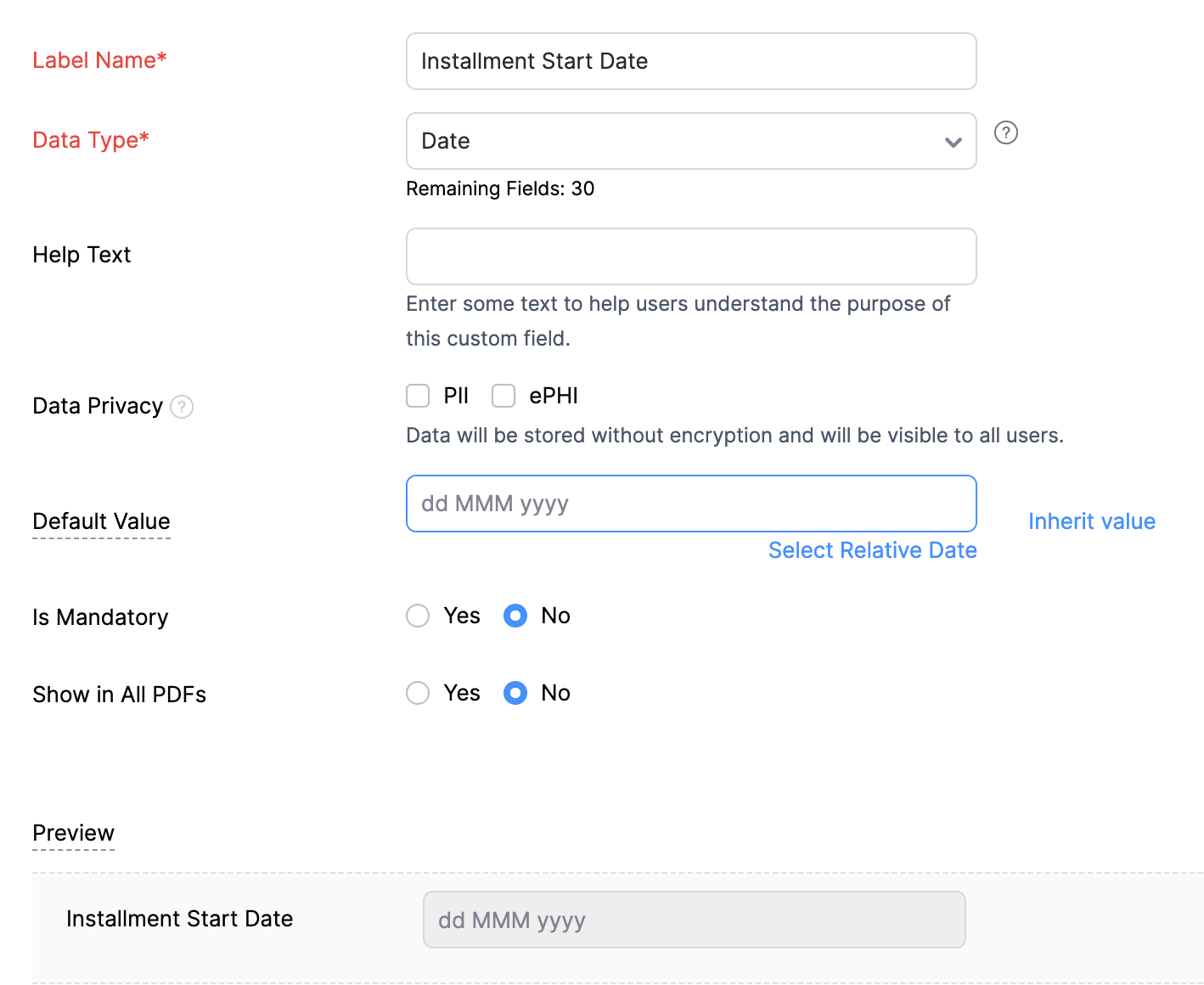
2. Create a Date-type custom field called "Installment Start Date" for the Invoices. This field will be used to input the starting date for installment payments.
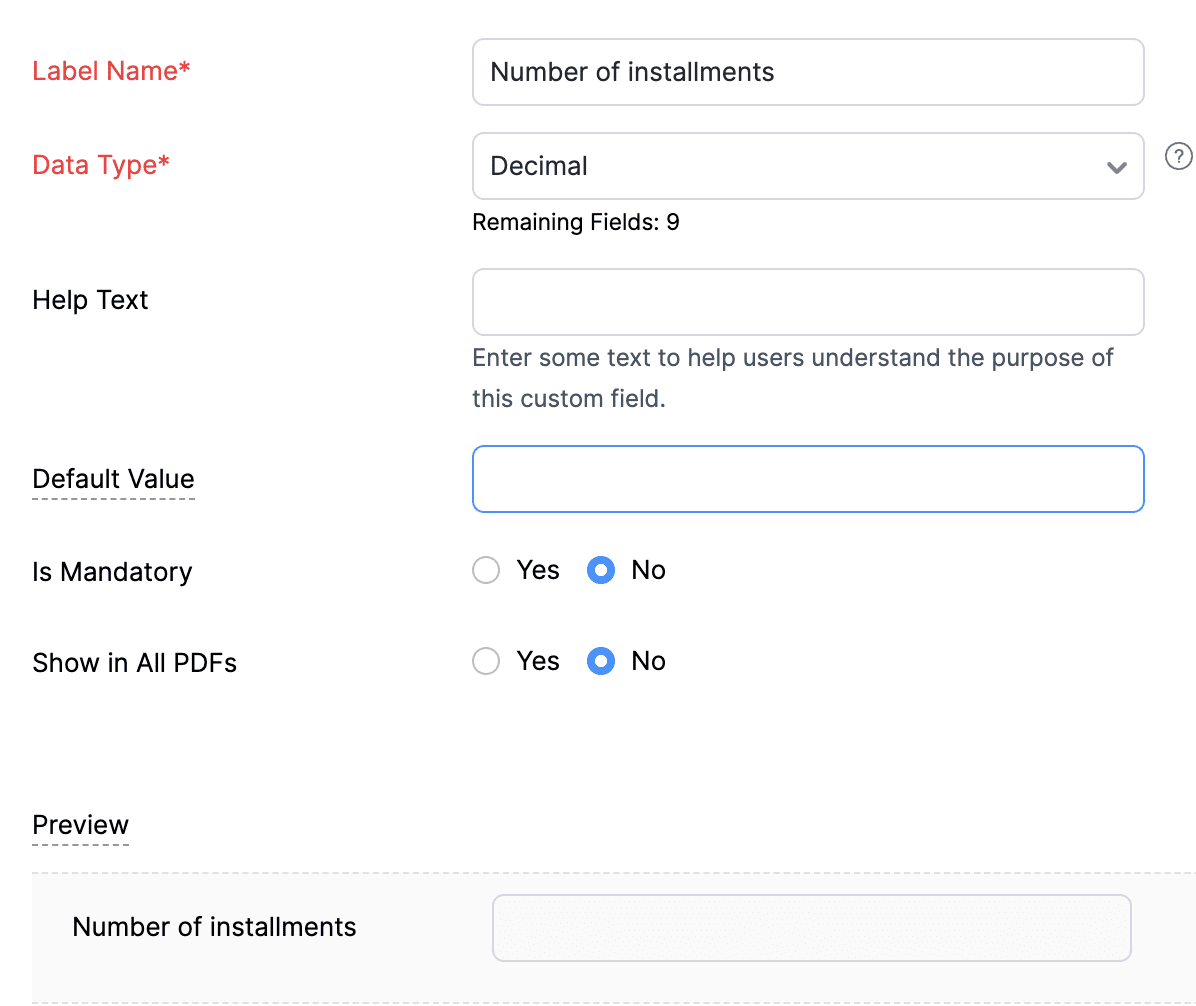
3. Create a Decimal-type custom field called "Number of installments" for the Invoices. Here, you'll specify the agreed-upon number of installments. Using this information and the total invoice amount, the function will determine the monthly installment amount.
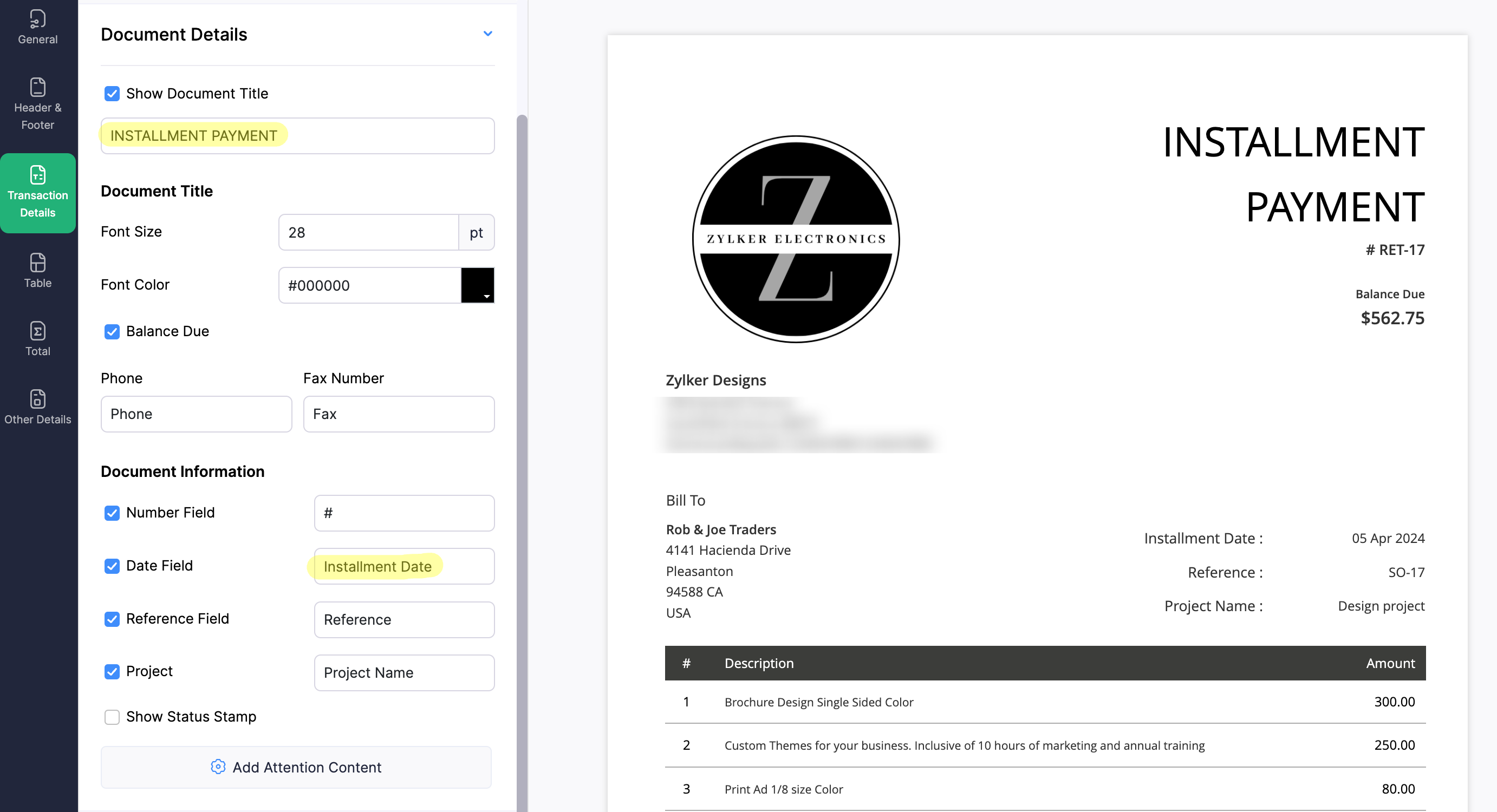
4. Create a new Retainer Invoice template with the document title "Installment Payment". Then, copy the template ID (You can get the ID from the URL of the webpage) and substitute it into line 26 of the first function. This ensures that all the retainers sent for collecting installment amounts are correctly labeled.
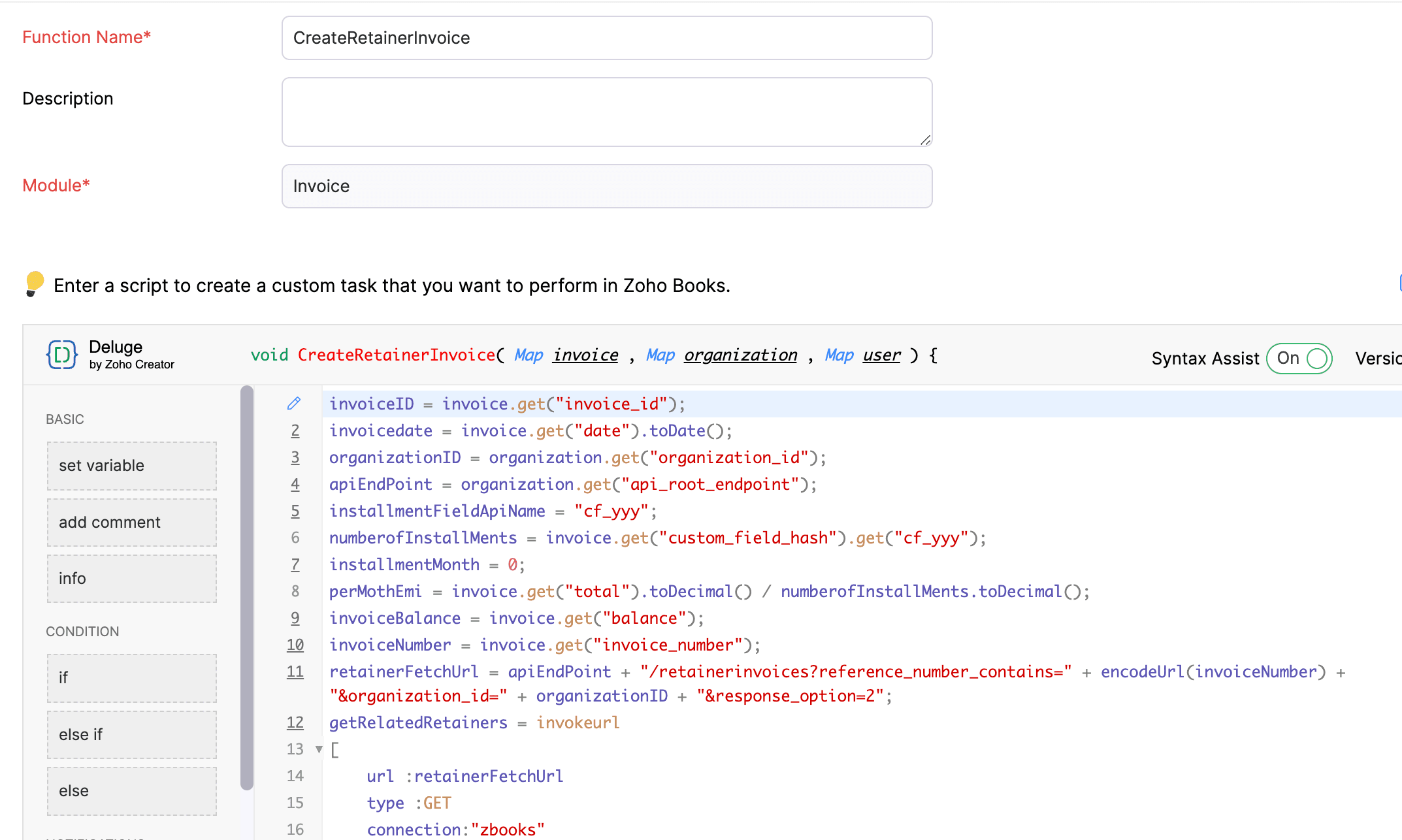
(1) Custom Function to create Retainer Invoices:
Navigate to Settings -> Automation -> Workflow Actions -> Custom Functions -> +New Custom Function -> Module -> Select Invoice -> Add the function code from this GitHub Link -> Save.
(2) Workflow Rule to create Retainer Invoices:
Go to Settings -> Automation -> Workflow Rules -> +New Workflow Rule and set up the workflow rule as shown below:-


In the final step of this workflow rule, associate the custom function you created and then hit Save.
(3) Custom Function to apply installment payments to the sale invoice:
Navigate to Settings -> Automation -> Workflow Actions -> Custom Functions -> +New Custom Function- > Module -> Select Retainer Invoice -> Add the function code from this GitHub Link -> Save.

(4) Workflow Rule to apply installment payments:
Go to Settings -> Automation -> Workflow Rules -> +New Workflow Rule and set up the workflow rule as shown below:-
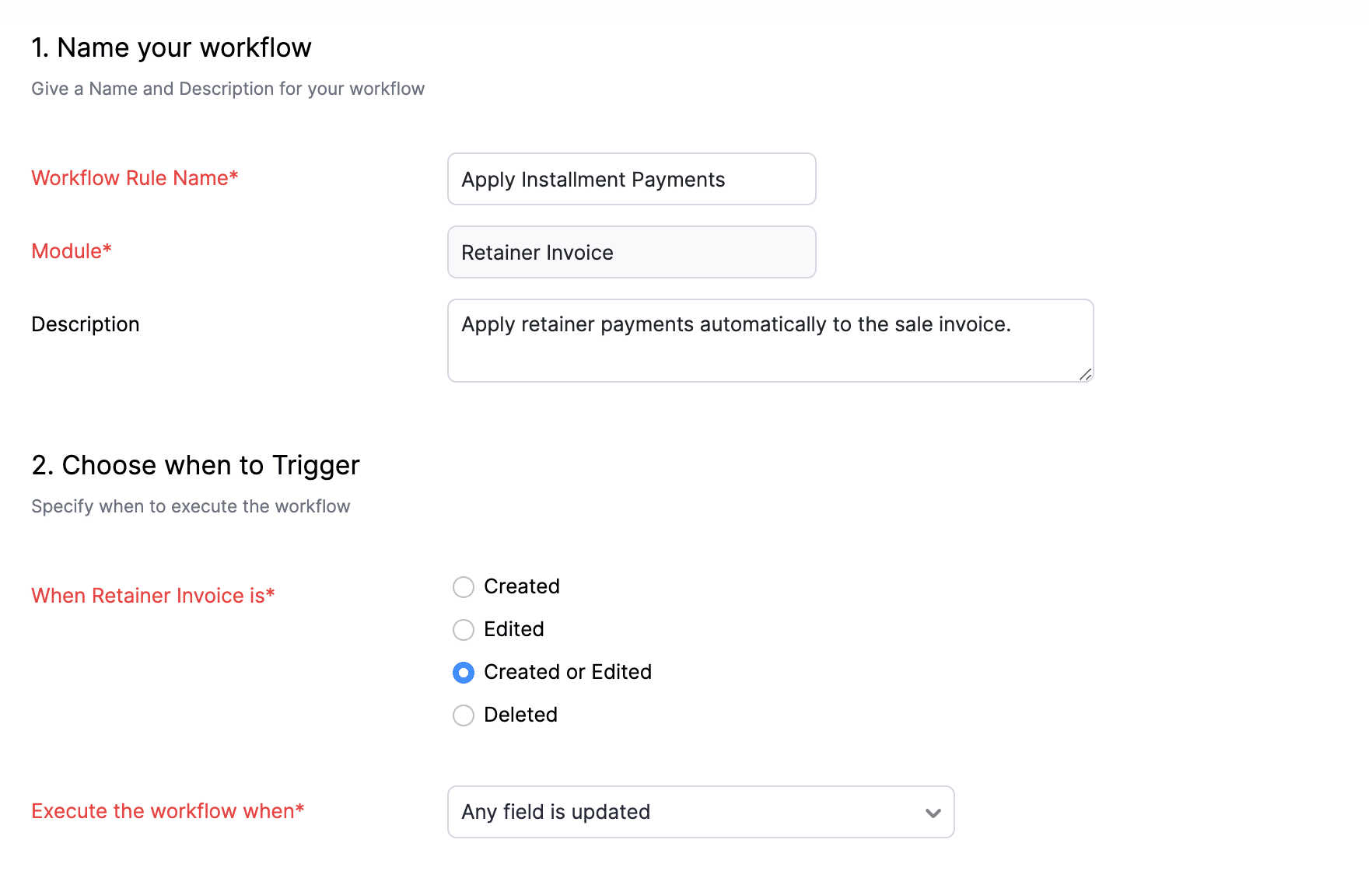
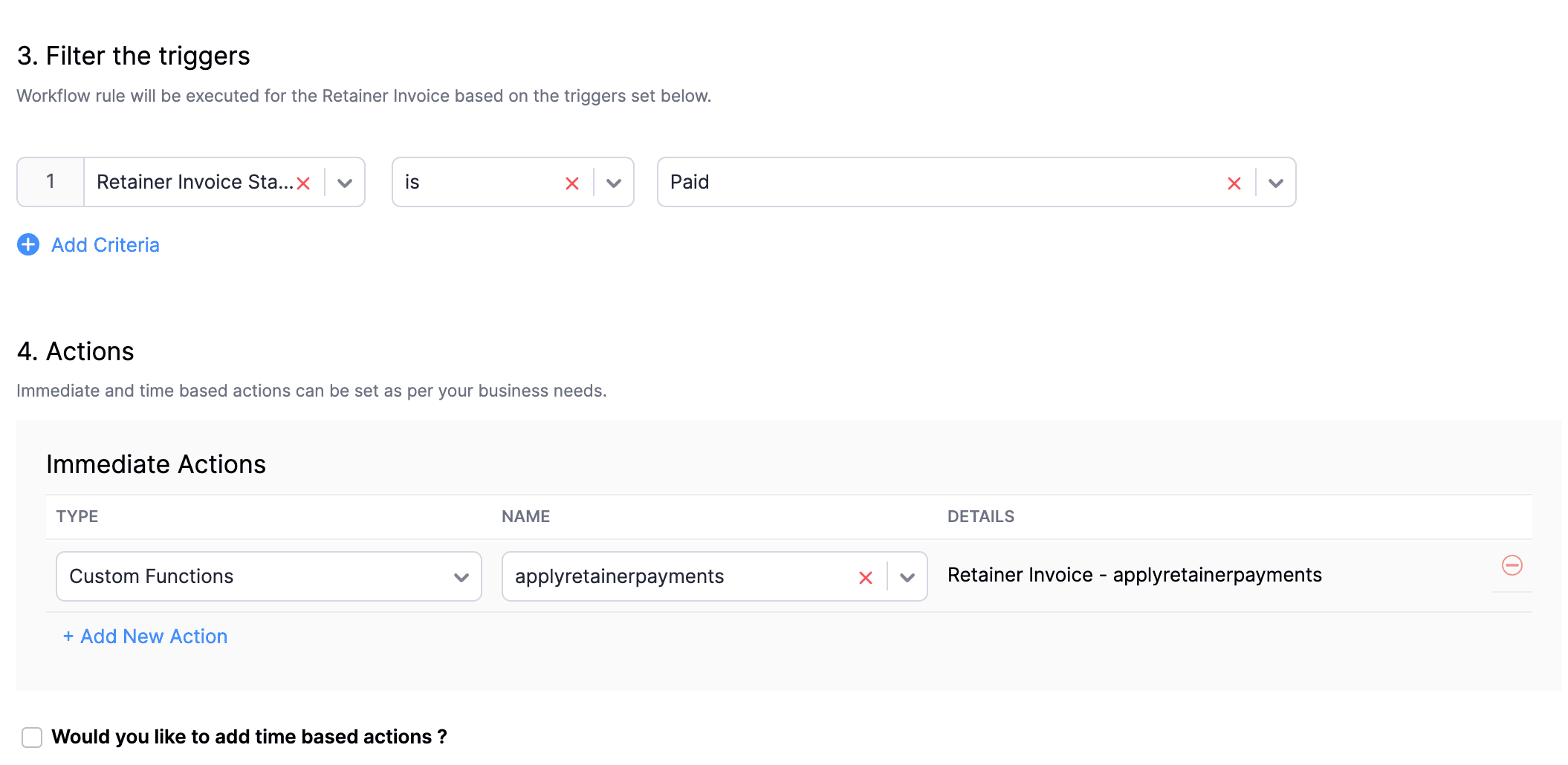
In the final step of this workflow rule, associate the custom function you created and then hit Save.
We really hope that today's functions help you streamline the process of handling installments in Zoho Books. If you need any assistance in customizing the functions to better suit your needs, please do not hesitate to contact us at support[at]zohobooks[dot]com. We are always happy to help you.
Also, for those looking to collect varying percentages of the invoice total as installments, stay tuned!
Regards,
Shireen Farhana
Zoho Books
Topic Participants
Shireen Farhana
Dmitry Solovyev
Dylan Cleppe
Julio Cazaroto
Maj
Sticky Posts
Introducing Invoice Consolidation for Offline Subscriptions
Hello Folks, Glad to announce the feature of Invoice Consolidation for Offline Subscriptions. If you are having multiple subscriptions for your customers, now, you can send a single consolidated invoice for all the Offline Subscriptions that are getting renewed on the same date. Advantage? Customers will be receiving single invoice instead of multiple invoices upon renewal. Also reduces your efforts in follow-up with your customers for payment collections. For Example: If Customer has SubscriptionNew feature: Create back-dated subscriptions
Hello from the Zoho Subscriptions team. :) We’re happy to announce that today marks the launch of a much-awaited feature: creating back-dated subscriptions! From here on out, whenever you create a new subscription with an activation date that is earlier than the present date, you’ll no longer get an error. Instead, you'll be creating a back-dated subscription. This means that the subscription started at that earlier point in time. The next billing date will be calculated automatically based onAnnouncement Regarding Notification Emails
Hello Everyone! This announcement is regarding the admin notification emails which you've been receiving from the email address "support@zohosubscriptions.com". From the 1st of October, 06:00 GMT, the emails with the following subjects will be sent from "no-reply@zohosubscriptions.com". Unable to send invoice for the profile - {profile_name} Unable to process auto payments. If you have set up any filters or workflow in your email account, please add "no-reply@zohosubscriptions.com” and “support@zohosubscriptions.com”Zoho Subscriptions plugin for WordPress
Zoho Subscriptions plugin for WordPress allows you to easily embed your plan specific checkout page in an iframe with just a few mouse clicks and without a single line of code. How can WordPress Zoho Subscriptions Plugin boost your productivity? It's now easier to embed Zoho Subscriptions checkout page in your WordPress site. Forget the old method of logging in to Zoho Subscriptions, copying a URL and scripting to make adjustments. All this can be done automatically through this plugin. A great timeIndian GST organisation Migration Guide
With respect to the new GST regime releasing on July 1, 2017in India, Zoho Subscriptions Indian edition is also gearing up to make your business GST Ready. This article focuses on how to get your existing organisation in Zoho Subscriptions to migrate to the new GST regime. Note: Any organisation created on or after July 1, 2017 will already be GST ready. You wouldn't have to migrate your organisation. Migrating your existing organisation to support GST To migrate your existing organisation to
Recent Topics
Zoho flow - Webhook
If I choose an app as a trigger in Zoho Flow, is it still possible to add a webhook later in the same flow?Zoho Flow + Bigin + Shopify
We are testing Zoho Flow for the first time and want to create a flow based in first purchases. When a client makes his first order, we're going to add the "primeiracompra" (first order) tag to his account in Shopify (it's not efficient, but that's theIs it The Flow? Or is it me?
I want to do some basic level stuff, take two fields from a webhook, create a zsheet from a template using one field with date appended, create a folder using both fields as the name, and put the zsheet into that folder. I was going to elaborate - butHaving problem with data transferring from Google sheet to ZMA
When connecting Google sheet with Zoho marketing automation it is having the email as a mandatory field. Can I change it as non-mandatory field or is there any other way to trasnfer data from google sheet to ZMA. I have leads which we get from whatsapp,Dropbox to Workdrive synchronisation
I want to get all the files and folders from Dropbox to Workdrive and each time a new file or folder is added in dropbox i want it to be available in Workdrive and wise versa. Sync Updates to Files Trigger: "File updated" (Dropbox). Action: "Upload file"Microsoft Planner Task to Service Desk Plus Request - error n4001
Hi there. I'm trying to create a flow that will create a new request in ServiceDesk Plus when a new task is created in Microsoft Planner. I have succesfully connected both Planner and ServiceDesk Plus, and have configured the 'create request' sectionTrailing Space in "Date and time scheduled "
I am trying to use the Zoho Projects - Create event action in a flow. It is failing with the output error as: "Action did not execute successfully due to an unknown error. Contact support for more details." The input is: { "Duration - Minutes": 30, "Project":Project name by deal name; project creation via flow
Hello, I want to create a project in zoho projects using flow by a trigger at the crm. My trigger is the update of a deal (stage). The project name should be the account name/ deal name. But I dont find the solution to it. Can you please give me the answerSlack / Zoho Flow; Repl
I am trying to add a comment in a zoho ticket when someone reply's to a message in a thread. The Message posted to public channel trigger doesn't seem to pick up thread messages. I also cannot use the thread_ts field as it doesn't seem to pull that in.Get Holiday ready with Zoho Mail's Templates
As the holiday season approaches, it’s time to step away from work and unwind. You may not be able to respond to every email or send individual messages to wish everyone holidays greetings—but It is still important to stay connected. How do you send thoughtfulCustomize folder permissions in a Team Folder in a Team Folder via zoho Flow
HI All, on the nth level folder of a team folder I would like to Customize folder permissions when it's created in the flow of Creating folders. That last level I only want to grant access to a specific group, goup ID 201XXXXXXXX. Can you help with aAssociating a Candidate to a Job Listing
Hello, I am trying to use Zoho Forms embedded on my website for candidates to apply for a job opening. I want the form then to tie directly with zoho recruit and have the candidate be automatically inputed into Recruit as well as associated with the specificAutomate reminder emails for events
Hi team, I am trying to automate send event reminders via zoho campaign to my attendees 1 day prior to my scheduled events. I used zoho flow, autoresponder in zoho campaign, as well as I used workflow and automation - but none of these methods are working.Update related module entry Zoho Flow not working with custom module ?
Hi everyone. I am facing an issue here on Zoho Flow. Basically what I am doing is checking when a module entry is being filled in with an Event ID. Event is a custom module that I created. If the field is being filled in I fetch the contact with its IDHow to disable time log on / time log off
Hi We use zoho people just to manage our HR Collaborators. We don't need that each persona check in and out the time tracker. How to disable from the screen that ?Dealing With One-Time Customers on Zoho Books
Hello there! I am trying to figure out a way to handle One-Time customers without having to create multiple accounts for every single one on Zoho Books. I understand that I can create a placeholder account called "Walk-In Customer", for example, but IZoho Flow - Add to Google Calendar from trigger in Zoho Creator App
Hello! New to Zoho Flow, but I believe I have everything setup the way it should be however getting an error saying "Google Calendar says "Bad Request". Any idea where I should start looking? Essentially some background: Zoho Creator app has a triggerEmail authentication
أريد التحقق من البريد الإلكترونيWhat’s New in Zoho Analytics – December 2025
December is a special time of the year to celebrate progress, reflect on what we have achieved, and prepare for what’s ahead! As we wrap up the year, this month’s updates focus on refining experiences, strengthening analytics workflows, and setting theMarketing Tip #12: Earn trust with payment badges and clear policies
Online shoppers want to know they can trust your store. Displaying trust signals such as SSL-secure payment badges, return and refund policies, and verified reviews shows visitors that your store is reliable. These visual cues can turn hesitation intoThe improved portal experience: Introducing the template view for inventory modules, enhanced configurations, and PDF export support
Availability: Open for all DCs. Editions: All Hello everyone, You can now achieve a seamless, brand-aligned portal experience with our enhanced configuration options and the new template view for inventory modules. Your clients will now be able to viewZoho Analytics Bulk Api Import json Data
HI, I’m trying to bulk-update rows in Zoho Analytics, and below are the request and response details. I’d like to understand the required parameters for constructing a bulk API request to import or update data in a table using Deluge. Any guidance onProject Management Bulletin: December, 2025
The holiday cheer is in the air and it’s time to reflect on the year that was. At Zoho PM Suite, we've been working behind the scenes on something huge and exciting all year and now we are almost ready—with just a bit of confetti—for our grand releaseInventory batch details
Hi there, I'm trying to get the batch details of an item, here's what I've done so far. I've sent cUrl request to the below endpoint and I get a successful response. Within in the response I find the "warehouses" property which correctly lists all theAuto check out after shift complete
i'm just stuck here right now, i wanna know how to do this thing, now tell me, how can i configure a custom function that runs after complete shift time if employee forget to check-out ?How to create a flow that creates tickets automaticaly everyday based on specific times
Hi guys Does anyone know how to create a flow that will create tickets automaticaly in ZOHO Desk when a certain time is reached. Im havin a hard time configuring a flow that will create tickets automaticaly everyday during specific hours of the day ForZOHO FLOW - ZOHO CREATOR - ZOHO WRITER : Get Related records
Bonjour, J'ai besoin que vous m'ajoutiez la solution "Get related Records" dans la liste de choix de zoho creator (sous Zoho flow). En effet, j'ai besoin de récupérer les champs d'un sous formulaire pour l'ajouter à l'impression de mon document. MerWill zoho thrive be integrated with Zoho Books?
titleConnecting email for each department in ZohoDesk
Hi! Could someone help me to go through connecting emails for each department?How do I trigger a Flow based on a campaign response?
Is there a way to trgiider a Zoho Flow based upon a lead opening an email sent via Zoho Campaigns? I see that the data is recorded in the 'Campaigns' section of Zoho CRM under 'Member Status' and I want to trgigger a flow based upon that record changing.All Zoho Flows are filtered
My two flows operate perfectly when I run them as a test, but when they're activated each run ends with a status of neither success, nor fail, but filtered. I haven't set up any filters. I don't see where to turn off filters. When I test run on a sequenceCreating Multiple Items on Sales Order
Hi, I’m trying to automate some processes using Zoho Flow, specifically the creation of sales orders in my Zoho Inventory. However, Zoho Flow's Create Sales Order function can only add one item. I would like to include multiple items in a single salesProblem Connection from Zoho Flow and Gravity Form
I obtained my API key from Gravity Forms via WordPress. However, when I enter my Zoho Flow, it states: Gravity Forms says, 'You are not authorised to access the API." I tried recreating a new API key, but it is still not working.Eventbrite Email Field in Zoho Flow Returns "Info Requested" Instead of Actual Email
Hi Zoho team, I'm using Zoho Flow to connect Eventbrite with Zoho CRM. My goal is to automatically add event attendees as leads in Zoho CRM. I’ve set up the flow and mapped the ${trigger.profile_email}} field to the Email field in CRM. However, I'm running"Invalid value passed for Product ID" Error in Zoho Flow "Create Sales Order" Node
Hello Zoho Community, I’m facing an issue with Zoho Flow while trying to create a sales order in Zoho Inventory using the "Create Sales Order" node. Here’s a detailed explanation of my setup and the problem: What I’m Trying to Achieve I’m building anAssociating Project with an Account via Flow
I'm using flow to create a Project based on a Deal status update using flow. The fields exist to pass the Account Name through properly, but when you view the Projects module in a CRM Account Record it doesn't automatically associate the new Project RecordHow to follow up a member in a meeting?
Hello, I make weekly meeting online with a lot of people. I want(I've been using calendly to do it). I want to do a follow-up to it. I want to send messages via Zoho-flow to all the member that participated in the meeting. How can I do it?Setting Delays in Invoice Reminder Flow
I am currently working on a flow that sends reminders for unpaid invoices. The flow is designed to delay actions until specific intervals before the due date: A reminder should be sent 7 days before the due date. A second reminder should be sent 3 daysGet Sales Orders Related to Inventory Item
Dear Team, I'm just wondering if there is a way to get a list of all Sales Orders related to a specific Inventory Item. I did search all articles but couldn't find any article that could help.Endpoint Central Cloud Asset Update from Fresh Service
All, Does anyone use the asset management feature in Fresh Service? I'd like some help on building a flow to update asset attributes in Endpoint Central Cloud based off of an update to that same asset in Fresh Service. The trigger is "asset is updated"Next Page