Gain control over record sharing with portal users through our new enhancement: criteria-based data exposure
Dear Customers,
We hope you're well!
Portals is a self-service avenue through which your clients can access and manage their direct and related data in Zoho CRM. This empowers them to be more independent and enables them to experience a sense of transparency with your business.
Here, the key term to notice is direct and related data. The current portal setup serves clients only with their own primary and related data via a lookup field. Here's a pictorial representation of the current setup: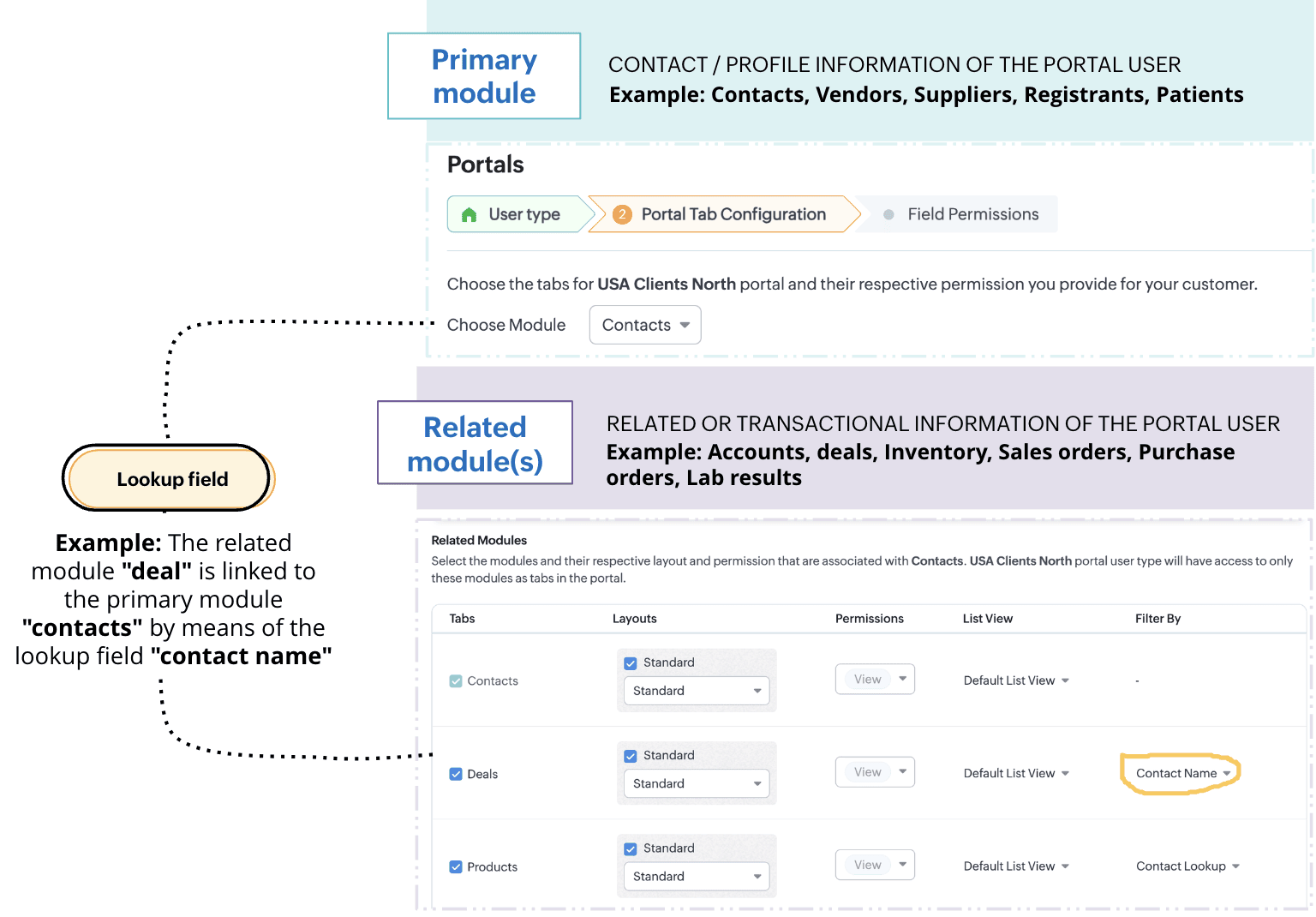
While having access only to their records gives customers authority over their information, it presents some notable challenges.
Challenge #1: Lack of control
A record undergoes two types of processes: customer-driven processes like conversion, negotiation, winning a deal, and more, and internal processes like approvals, discussions, and rejections. While the former keeps customers informed about the progress of their deals, the latter reveals the business' internal decision-making process. Administrative information isn't necessarily meant to be seen, but the current portal setup exposes each stage a record goes through, unconditionally. This poses a problem: The business lacks control over the kind of information that's shared.Imagine this scenario: Patricia is your customer. She has access to her profile, deals, and quotes. She can manage data all by herself and track records as they progress. While having access to her own records empower her with independence, witnessing all the process changes—including approvals and rejections of discounts that aren't yet final—might cause her some anxiety. It also violates the business's privacy policies.
Challenge #2: Lack of flexibility
The portals you have now only enable you to share clients' personal and transactional records. Clients can only see their own data. But what if they want to access information other than their own? Or what if they want to view records with a particular trait?
Say, for example, your business sells multiple products across Canada, and you want your portal users to see only the products available in their regions. This is a specific request that's based on the location of the customer. The current setup limits this requirement and fails to preserve context for the customer.Thus, to give the admins control over any exposed information and simultaneously provide portal users with both flexibility and independence, we've developed an exciting addition to portals' data-sharing functionality: criteria-based data exposure.
Introducing criteria-based data exposure
Criteria-based data exposure is the ability to expose modules and data based on conditions that you use to control what data should be exposed and when, or to render contextual results for portal users.Technically speaking, in addition to linking a primary module and a related module using lookup fields, admins can now define two types of criteria to expose other records with a particular trait in the module: match with fields and match with values.
Match with value: This criterion should be familiar to you as a seasoned Zoho CRM user. You can determine record eligibility by defining a field, operator, and qualifying value.
Example: Deal type is new business. All those deals that are new businesses will be displayed to the portal user.
Example: Implementation agent servicing area is the client's billing city.
Let's understand these criteria by addressing our initial challenges:
Solution for challenge #1 (lack of control)
By matching with value, we can allow Patricia to view her quote only after it reaches the approved stage. This way, your business's internal correspondence stays internal, and Patricia can track her quotes without any impact on her experience.
Below is how you can configure this feature. Again, let's suppose Patricia is your customer and that you want her to have access to her transactional data:
- Create a mutual lookup field called "Contact name" between the Contacts and Quotes modules.
- To control who can access this information, use the match by value criterion and add two conditions:
- Quote stage is approved
- Quote stage is not negotiating
This way, Patricia's quote is visible only when it reaches the approved stage.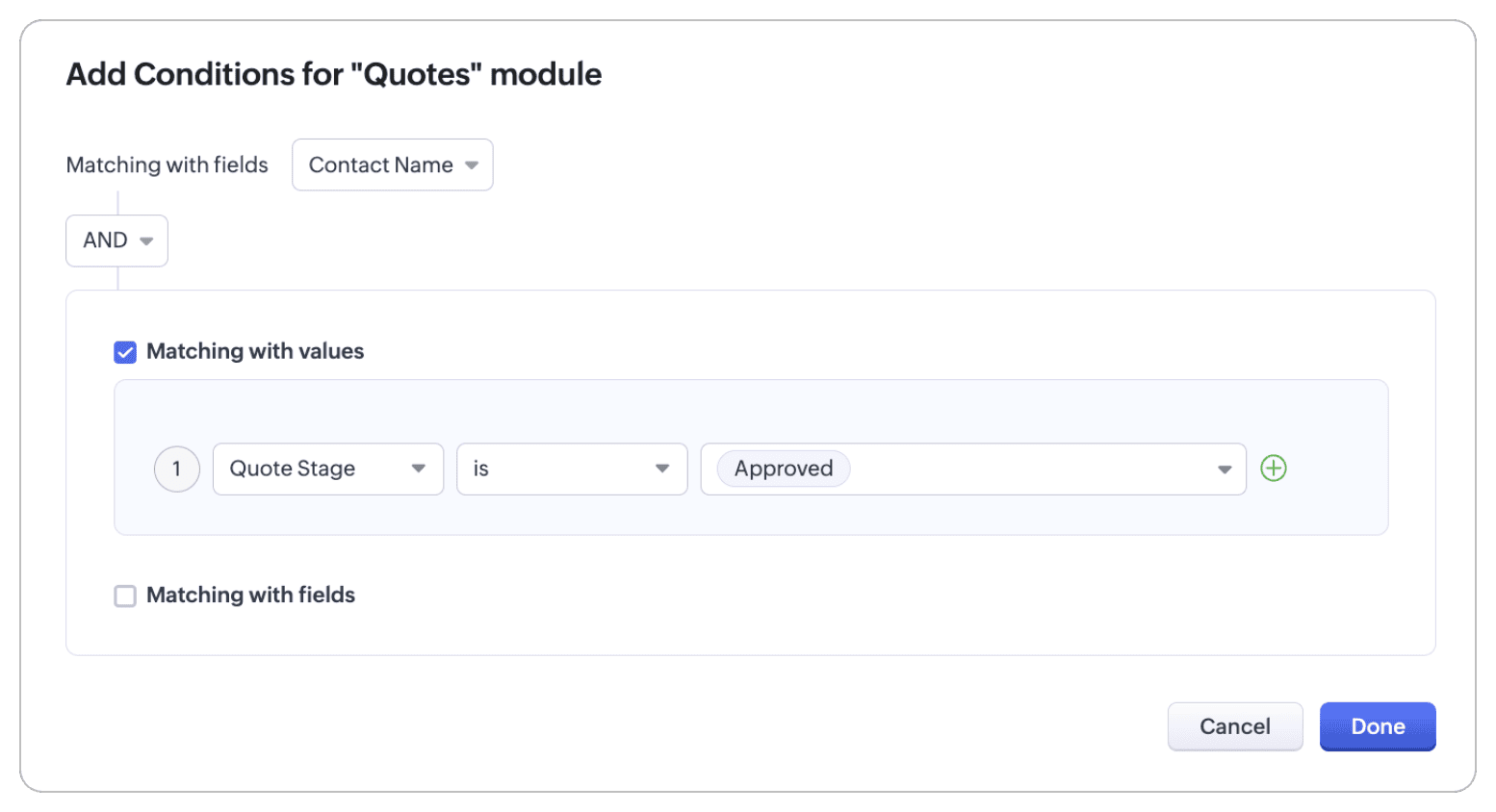
Solution for challenge #2 (lack of flexibility)
With the match with field criterion, your portal user can view all products that are available in Canada.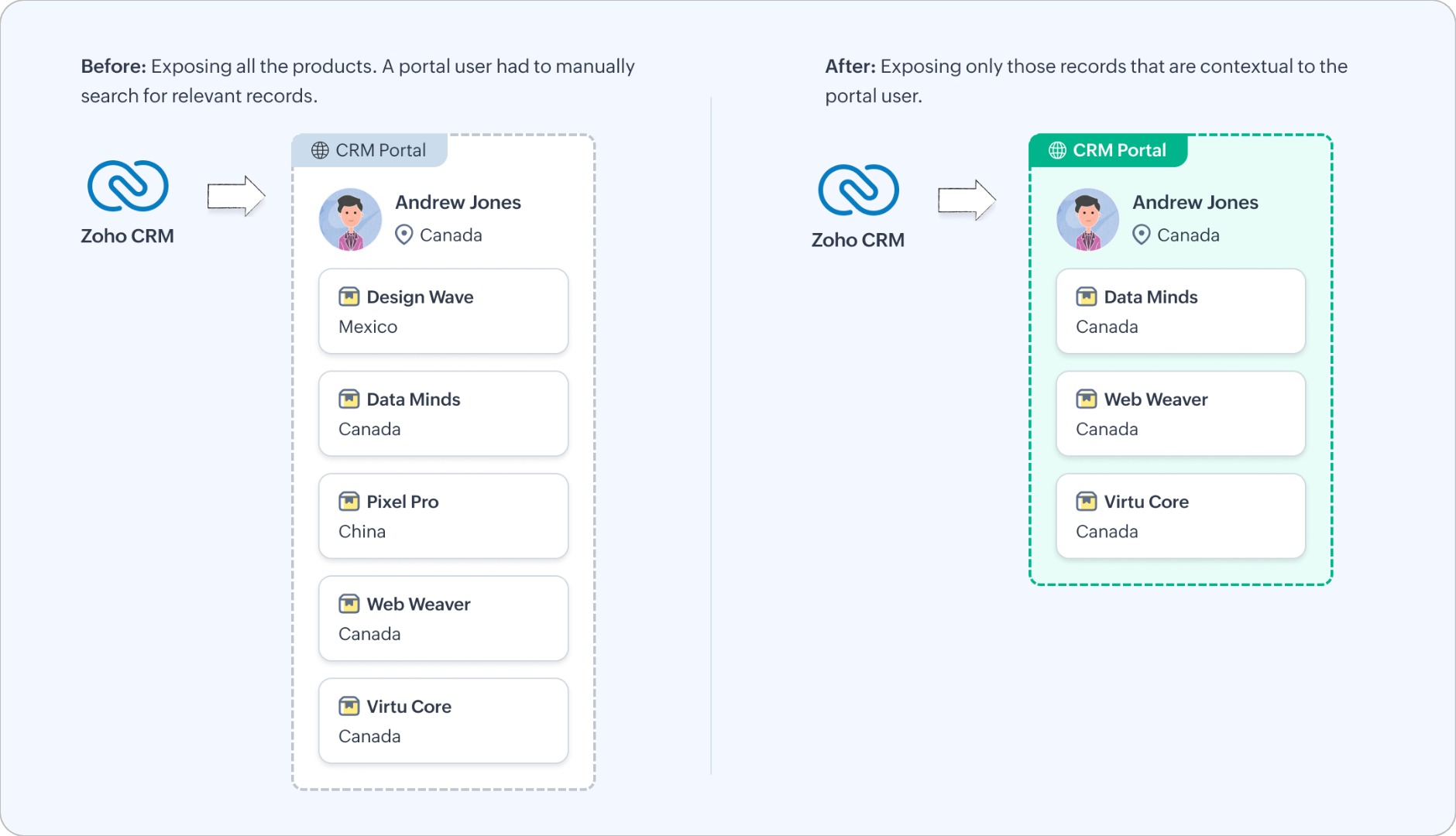
Let's look at how you can configure this functionality.
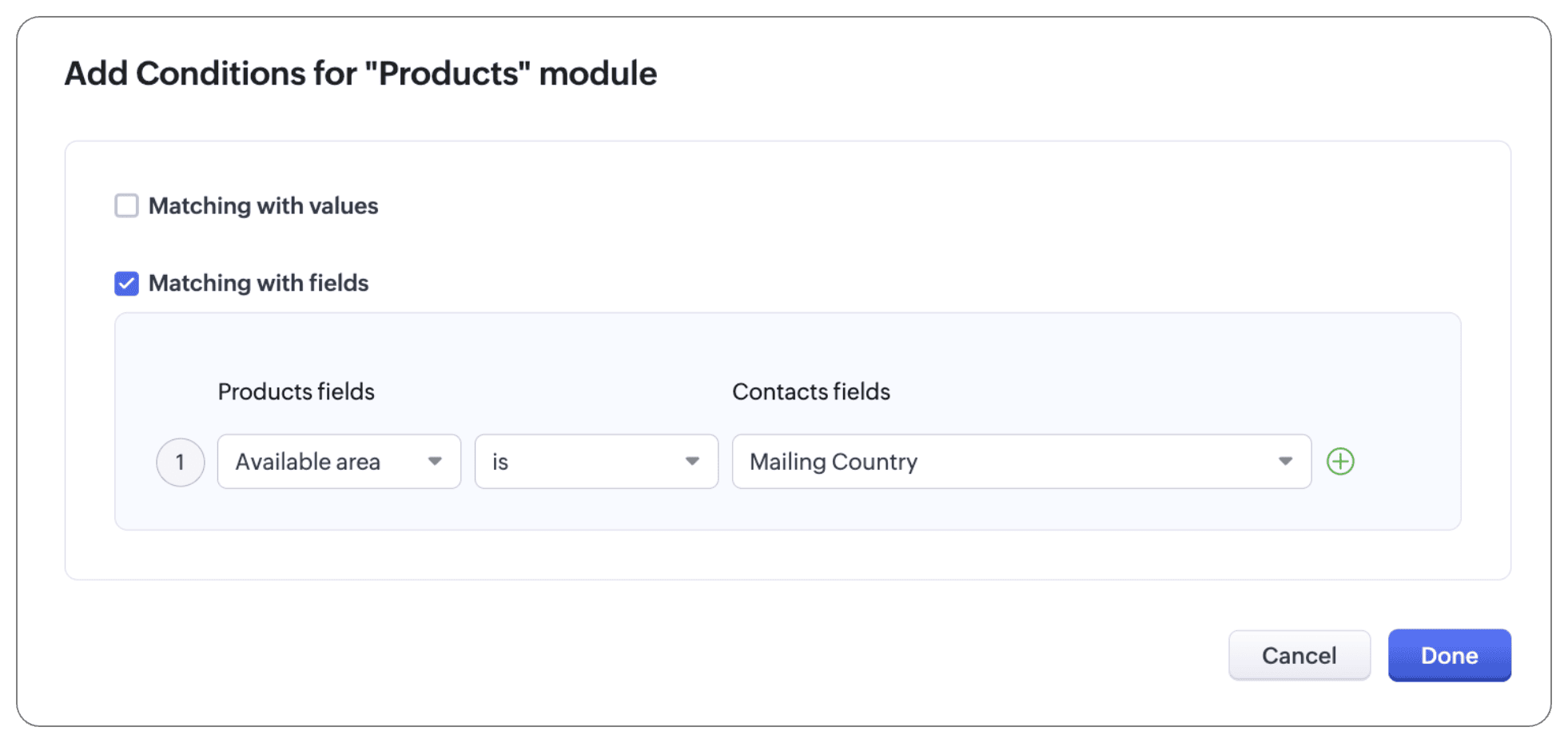
The Products module is a public module, accessible to all portal users, irrespective of their relationship to that module. To bring context to this setup, add a condition using the match by field criterion:
- Available area is mailing country
Note:
In addition to configuring criteria, you can also use an "and/or" conditional to follow these criteria. That is, you can use both criteria and lookup, or either of the three (criteria, or match with values, or match with fields), or one of the criteria and lookup.
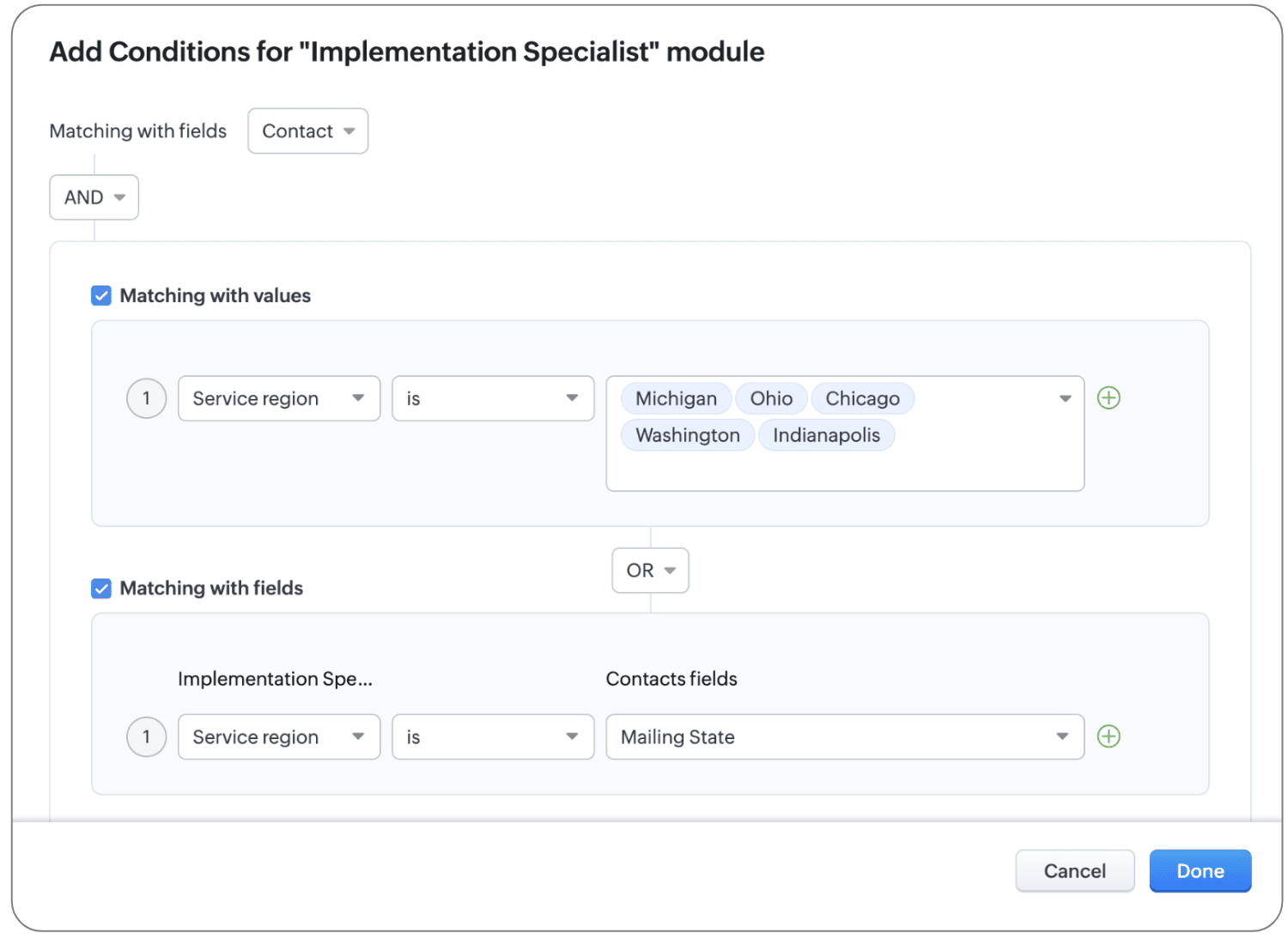
For example, let's say your Implementation Specialist module has an exhaustive list of agents that implement servers in different areas, with varying levels and types of expertise. To display the agents the user hired as well as other agents for reference, we can configure conditions, as shown below:
- The primary module and the related module can be linked using the native lookup field to bring up agent records that users have hired directly.
- To display other agents in the location, let's use conditions:
- If the record matches with values, the customer can see all agents who belong to Michigan, Ohio, Chicago, Washington, and Indianapolis will be displayed.
- If the record matches with fields, the customer can see all agents whose service region matches the contact's mailing state.
Thanks to these new criteria, we've updated the UI of the configuration page as well. What used to be called Filter by column (where the lookup value is selected) has been renamed to Linked as and conditions.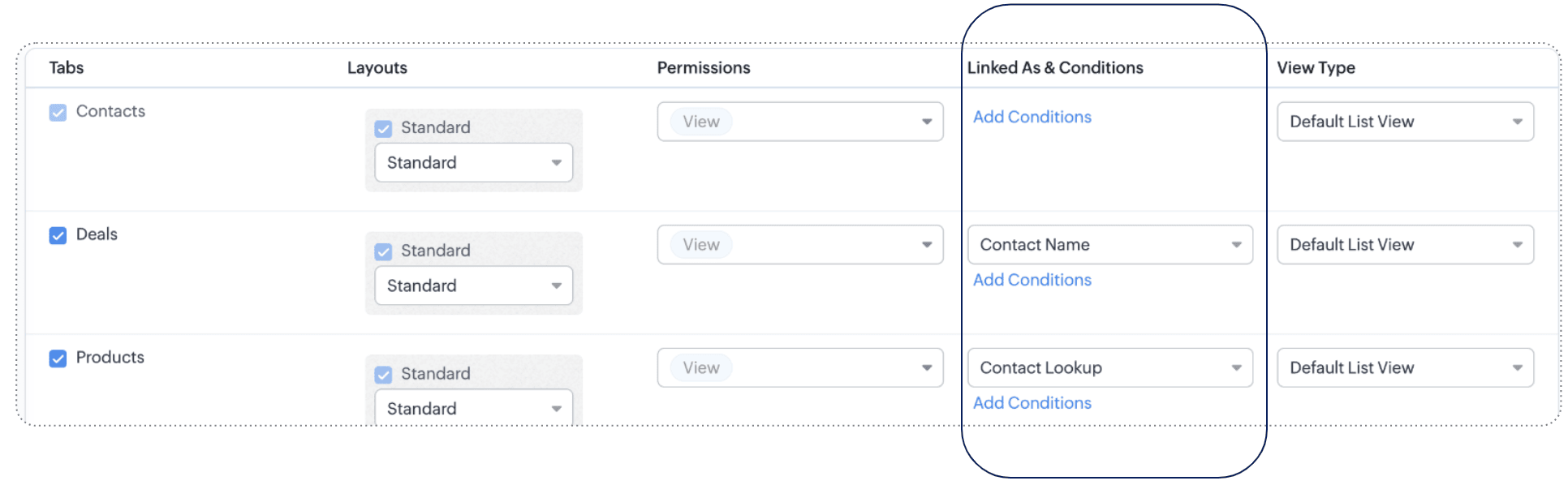
To understand the scope and impact of this enhancement, let's look at a couple more examples.
Example 1: Match with value
Let's say you sell electronics and accessories in bulk for large enterprise organizations. You've extended the following modules in portals for enterprise customers:
- Primary module: Contacts
- Related modules: Products, Invoices, Cases, Appointments
- Public module: Channel partners
So that customers can look at all the products applicable for enterprise customers, you've formulated some criteria: Lookup and Match by value. Customer type is Enterprise.
Now clients can see their contact records, their products (thanks to the lookup connection), and products for enterprise customers (thanks to the match by value criterion), as well as invoices, cases, and appointments related to them, and, finally, all channel partners.
Example 2: Match by field
Saint Laurent Hospital is a multi-specialty hospital in Iowa. They let their patients manage their profiles, view their prescriptions, order medicines from the pharmacy, view lab results, and book appointments with doctors using a dedicated portal.
This is their setup:
- Primary module: Patient's profile
- Related modules: The Prescriptions module, Lab Results module, and Appointments module are related with the primary module via lookup fields, and the Doctors module via the Match by field criterion.
- Public modules: Medicines
As you can see, records with personal data (prescriptions, lab results, appointments) are directly linked to the patient's profile using lookup fields, and to map the doctors to the patients' ailments, the complaint field from the patient's profile is linked to doctors whose specialization is also the same as the ailment. This means that the patient can see all the doctors whose specialization matches their complaint.
(i.e.) Specialization contains Complaint. IBS specialist contains IBS
That's all for this enhancement to the Portals configuration.
We hope these criteria will enhance your clients' experiences with your business. If you have any questions or concerns, please drop a comment. Let's connect!
Release plan: This enhancement is available for users in all DCs.
Resources: Portals in Zoho CRMThanks and kind regards,
Saranya Balasubramanian
Topic Participants
Saranya Balasubramanian
Yaali Bizappln Solutions
Jim Canto
Ishwarya SG
Andres
Sticky Posts
Wrapping up 2025 on a high note: CRM Release Highlights of the year
Dear Customers, 2025 was an eventful year for us at Zoho CRM. We’ve had releases of all sizes and impact, and we are excited to look back, break it down, and rediscover them with you! Before we rewind—we’d like to take a minute and sincerely thank youGood news! Calendar in Zoho CRM gets a face lift
Dear Customers, We are delighted to unveil the revamped calendar UI in Zoho CRM. With a complete visual overhaul aligned with CRM for Everyone, the calendar now offers a more intuitive and flexible scheduling experience. What’s new? Distinguish activitiesPresenting ABM for Zoho CRM: Expand and retain your customers with precision
Picture this scenario: You're a growing SaaS company ready to launch a powerful business suite, and are looking to gain traction and momentum. But as a business with a tight budget, you know acquiring new customers is slow, expensive, and often deliversCreate and populate a record in an instant: Introducing zero-shot field prompting to Zia's ICR
A couple of months ago, we upgraded our in-house AI image detection and validation tool, Zia Vision, with intelligent character recognition (ICR). By training Zia with sample images, you could create and enrich CRM records with data extracted from standardIn-person ZUG Meetups for Real Estate Professionals - US Q1 2026
The Real Estate Zoho User Group is going on a multi-city, in-person meetup tour across the US, and we’d love to see you there! These meetups are a great opportunity to: Connect with fellow real estate professionals using Zoho Share challenges and discover
Recent Topics
Right-Click Pipeline to Open in New Tab
Please add the ability to right-click on a pipeline to open it in a new tabAdjusting Physical Inventory
Not getting very far with support on this one, they say they are going to fix it but nothings happened since November. Please give this a thumbs up if you would like to see this feature or comment if you have some insight. Use Case: Inventory set to beDeluge date time issue
The deluge function info zoho.currentdate.toString("MMM/YYYY") returns Dec 2026 instead of 2025Sending automated messages that appear in the ticket's conversation thread
Good morning, esteemed Zoho Desk community, warm greetings Today I am here to raise the following problem, seeking a solution that I can implement: I need to implement an automation that allows me to send reminder messages to customers when I am waitingIssue with Zoho Creator Form Full-Screen View in CRM Related List Integration
Hi Team, We have created a custom application in Zoho Creator and integrated it into Zoho CRM as a related list under the Vendor module, which we have renamed as Consignors. Within the Creator application, there is a form named “Pickup Request.” Insidesync views to sheet
Im looking to sync my views aka reports in analytics to zoho sheets, when data is updated in analytics it also should be updated in sheets, till now zoho sheets only offer raw data connection and it is not enough as these reports are difficult to re-doHow to update the Status in a custom module?
Hi, I have a custom module "cm_payment_registry" in Billing, I am trying to change the status which is "Draft" with: array = {"custom_status":"Approved"}; zoho.billing.update("cm_payment_registry",organization.get("organization_id"), XXXXXXXXXXXXXX, array,"connectionname");how to add email to existing organization i w
I am already registered my organization and i have an email id. I need one more email id but i can't find anywhere .i want the cheapest email id . how to add ?is it possible to add more than one Whatsapp Phone Number to be integrated to Zoho CRM?
so I have successfully added one Whatsapp number like this from this User Interface it seems I can't add a new Whatsapp Number. I need to add a new Whatsapp Number so I can control the lead assignment if a chat sent to Whatsapp Phone Number 1 then assignReplace Zoho Invoice with QuickBooks
We are implementing Zoho FSM for a cleaning business in the US with 50+ field workers. This business has been using Quickbooks for accounting for decades and will not migrate to Zoho Books. A major issue in the integration is the US sales tax calculation.2025 Highlights: A Year of Steady Progress and Significant Developments
As we come to the end of 2025, let's take a moment to reflect on the significant progress and developments we've made to improve your travel and expense management. In the Spotlight Introducing Online Booking (US edition only - Early access) Enable onlinee-mail bloqueado
Estou com meu e-mail lucas@peplus.me bloqueado, preciso desbloquear para retorno de usos em minhas atividades.¿Cómo puedo configurar las contraseñas creadas bajo una directiva para que nunca caduquen y no aparezcan como caducadas en los informes?
¿Cómo puedo configurar las contraseñas creadas bajo una directiva para que nunca caduquen y no aparezcan como caducadas en los informes? La razón por la cual contraseña estas no deben caducar es porque su actualización depende de mi cliente y no de mí.Function #42: Show the actual rate of items on invoices
Hello everyone, and welcome back to our series! In Zoho Books, you have the ability to create Price Lists, wherein you can mark up and mark down the item rates by a specific percentage or set custom rates. Generally, when you apply a price list to anAbility to Set Text Direction for Individual Cells in Zoho Sheet
Dear Zoho Sheet Team, We hope you are doing well. We would like to request an enhancement in Zoho Sheet that allows users to set the text direction (right-to-left or left-to-right) for individual cells, similar to what is available in Google Sheets. UseNew in CRM: Dynamic filters for lookup fields
Last modified on Oct 28, 2024: This feature was initially available only through Early Access upon request. It is now available to all users across all data centers, except for the IN DC. Users in the IN DC can temporarily request access using this formWarehouse fast processing
Hey guys, would anyone be interested in something like the attached image ? If there's any interest I'd be willing to develop it further for others to use, it's much faster than using Zohos native solutions, it can part pack, pack in full, part ship,Can't change form's original name in URL
Hi all, I have been duplicating + editing forms for jobs regarding the same department to maintain formatting + styling. The issue I've not run into is because I've duplicated it from an existing form, the URL doesn't seem to want to update with the newStart/Stop Timmer in Chrome Extension
The chrome extension is great and allows you to do allot however one of the most common things employees working on projects need to do is track their time. Having an easy start/stop timer to track time would be great.Invalid collection string
I haven't changed anything in one of my functions. I'm trying to run it manually and suddenly "Invalid collection string" appears. My code has 6 lines and the error says that the error is on 7th line. Why? What does this error mean? Nothing has been changedZoho Directory 2025: New Features | Security Enhancements | Enriched UI
Hello everyone, Greetings from the Zoho Directory team! 2025 has been a highly successful year for Zoho Directory. We are delighted to introduce a fresh set of features, an enriched UI, and major product enhancements. These updates aim to deliver a smootherBulk Schedule for Posting TikTok
Hallo, We have a client whose business is a social media agency specifically TikTok. Currently they are handling 30 TikTok accounts from. I think zoho Social can handle it with Agency License + with Add on 10 Brands. Their concern is related to postingzoho people 5 report
How do I customize my report in Zoho People Report? I understand that I can get the results of multi-table queries through SQL join statements, but I don't know the relationship between each table. I tried to create a report using Attendance User ReportLeave Report Emailed Weekly
I am wondering if someone knows how to have a report generated either weekly or monthly or both for department heads and ownership of upcoming employee leave. For instance, it would be nice to get an emailed report on Friday for the upcoming week of whoZoho Flow Decision Continuing Despite Not Meeting Conditions
I have a picklist field called Lead Status in the leads module, with the following lead Statuses: New Lead Attempted Contact - 1 Attempted Contact - 2 Attempted Contact - 3 Attempted Contact - 4 Attempted Contact - 5 Attempted Contact - 6 Attempted Contactzoho labels api not working
We're using n8n to automte email reply using zoho api. I'm facing issue with label api. I added the required scopes but its not working. i followed zoho api documentation but didn't work. also, where do i find/how do i create zoho oauth token mentioneeedZoho Books Sandbox environment
Hello. Is there a free sandbox environment for the developers using Zoho Books API? I am working on the Zoho Books add-on and currently not ready to buy a premium service - maybe later when my add-on will start to bring money. Right now I just need aAre static links available
I'm still using Zoho Meeting in trial mode. My previous webinar software provided a static link, and I made the mistaken assumption that I could send out my link and start a meeting later. Mass confusion, but my fault. With a paid version do you get aTip #55- Accessibility Controls in Zoho Assist: Exploring Vision Settings- 'Insider Insights'
As we approach the end of the year, it’s a good moment to reflect on how we can make our tools more inclusive and easier to use for everyone. Remote support often involves long hours in front of screens, varied lighting conditions, and users with differentZoho Recruit Slow and Freezing on all screens
We have had an issue with Zoho Recruit for weeks being extremely slow and at times freezing. We have 100 mega internet, and I went into each computer and updated the virtual memory so there is more available. Also restarted all computers daily. Still having the issues. Almost unable to work.Credit Management: #2 Configuring Right Payment Terms for Credit Control
Think about the last time you ordered something online and saw that little note at the checkout, "Pay on Delivery" or "Pay later". It's simple, but it actually sets the tone. As a business owner, you know exactly when payment is expected. Now, imagineDependent (Conditional) Fields in Zoho Bookings Forms
Hello Zoho Bookings Team, Greetings, We would like to request the ability to create dependent (conditional) fields in Zoho Bookings registration forms. Current Limitation: There is currently no way to make one field’s available options depend on the valueBug Report: Search fails to find existing notes after Evernote import
Hello, I recently migrated from Evernote (~2600 notes across 23 notebooks), but the search functionality is currently broken. The Issue: I can manually browse to a specific note and see it exists. However, when I type the exact or partial title of thatMarketing Tip #13: Win repeat customers with post-purchase emails
The relationship with your customer doesn’t end after the sale; that’s when it begins. A thoughtful post-purchase message shows customers you appreciate them, keeps your brand top of mind, and can even lead to another sale. You can thank them, ask forZoho Form
I have problem with Zoho Form. One of form i don't received the PDF version. Others okay except this one. W904533Create & Update Zoho Vault Passwords via Zoho Flow
Hi Zoho Flow / Zoho Vault Team, We’d like to request an enhancement to the Zoho Vault integration in Zoho Flow. Current Limitation: At the moment, Zoho Flow supports only the following selected Zoho Vault actions, such as: Fetch passwords, Share passwordsStreams/Shared email doesn't show up in windows trident app. It works fine on MAC. Is there any difference between 2 install ?
I can see streams/share email boxs on my MAC version of trident app but i can't see them in windows version of trident app. Is there any difference between 2 install? I try to find setting but not able to see any setting to add stream/share email boxes.Credit Note for Shipped and Fatoora pushed invoices
We have shipped a Sales Order and created an Invoice. The Invoice is also pushed to Fatoora Now we need to create a credit note for the invoice When we try it, it says we need to create a Sales Return in the Zoho Books, we have already created a SalesCliq iOS can't see shared screen
Hello, I had this morning a video call with a colleague. She is using Cliq Desktop MacOS and wanted to share her screen with me. I'm on iPad. I noticed, while she shared her screen, I could only see her video, but not the shared screen... Does Cliq iOS is able to display shared screen, or is it somewhere else to be found ? RegardsCustom Related List Inside Zoho Books
Hello, We can create the Related list inside the zoho books by the deluge code, I am sharing the reference code Please have a look may be it will help you. //..........Get Org Details organizationID = organization.get("organization_id"); Recordid = cm_g_a_data.get("module_record_id");Next Page