Gestion des clients et des fournisseurs

Chaque entreprise accorde une grande importance à ses données clients et fournisseurs et il est désormais essential d'enregistrer les coordonnées de ces derniers pour créer des transactions rapidement et conclure des affaires.
Le module "Clients/ Fournisseurs"de Zoho Inventory vous permet d'enregistrer des détails tels que le nom, l'adresse e-mail, le numéro de téléphone, ládresse de facturation et d'expédition, les informations sur le site web. En complément de ces informations, vous pouvez envoyer des e-mails, consulter les relevés des clients et créer des transactions de vente pour le client dans la page de coordonnées elle-même.
Créer un client/ fournisseur
Il existe plusieurs façons d'ajouter de nouveaux clients/fournisseurs dans Zoho Inventory :
À partir du module "Clients"
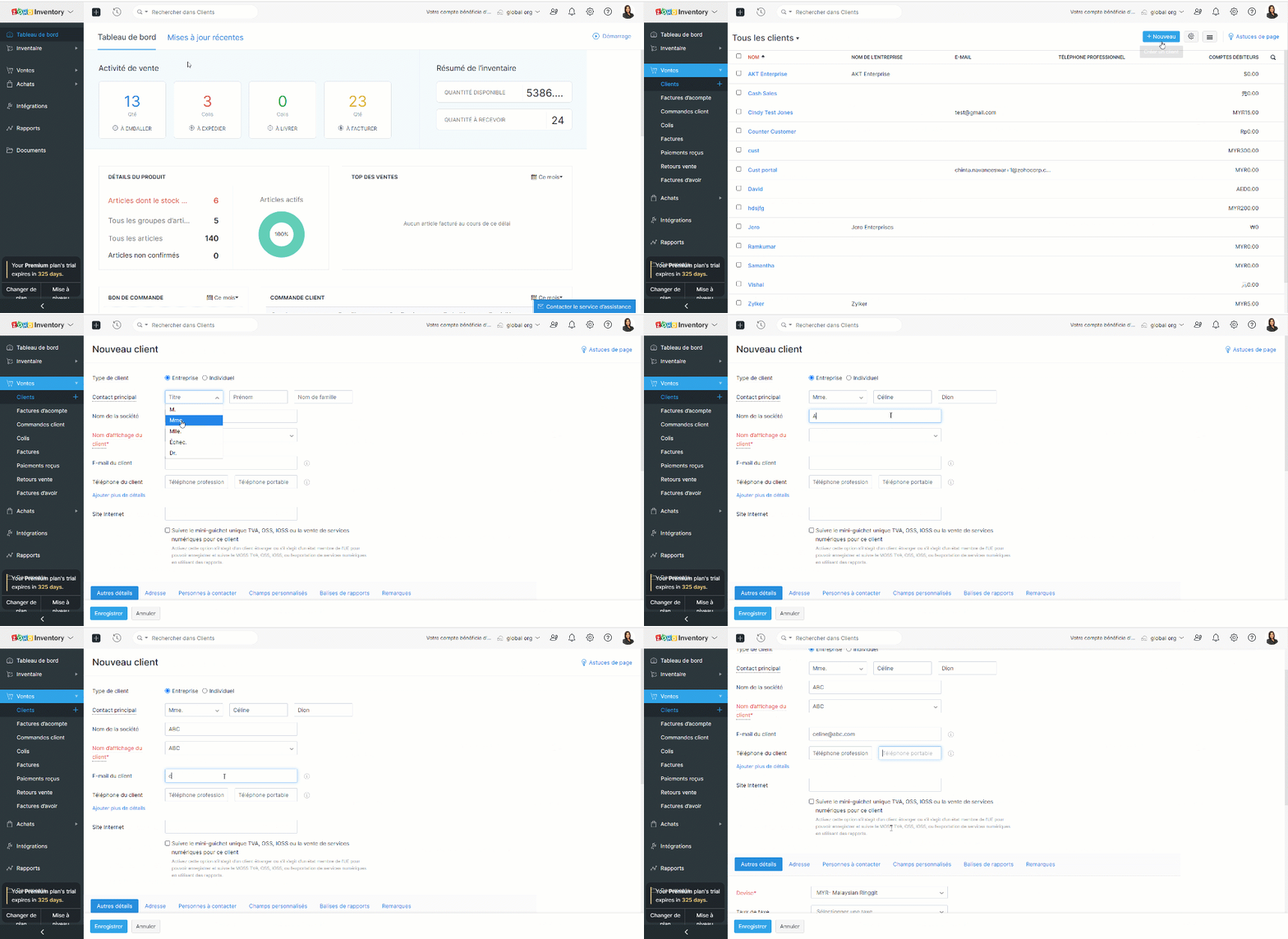
- Sélectionnez le module "Clients" dans le panneau de gauche.
- Cliquez sur "+ nouveau".
- Saisissez les informations du client.
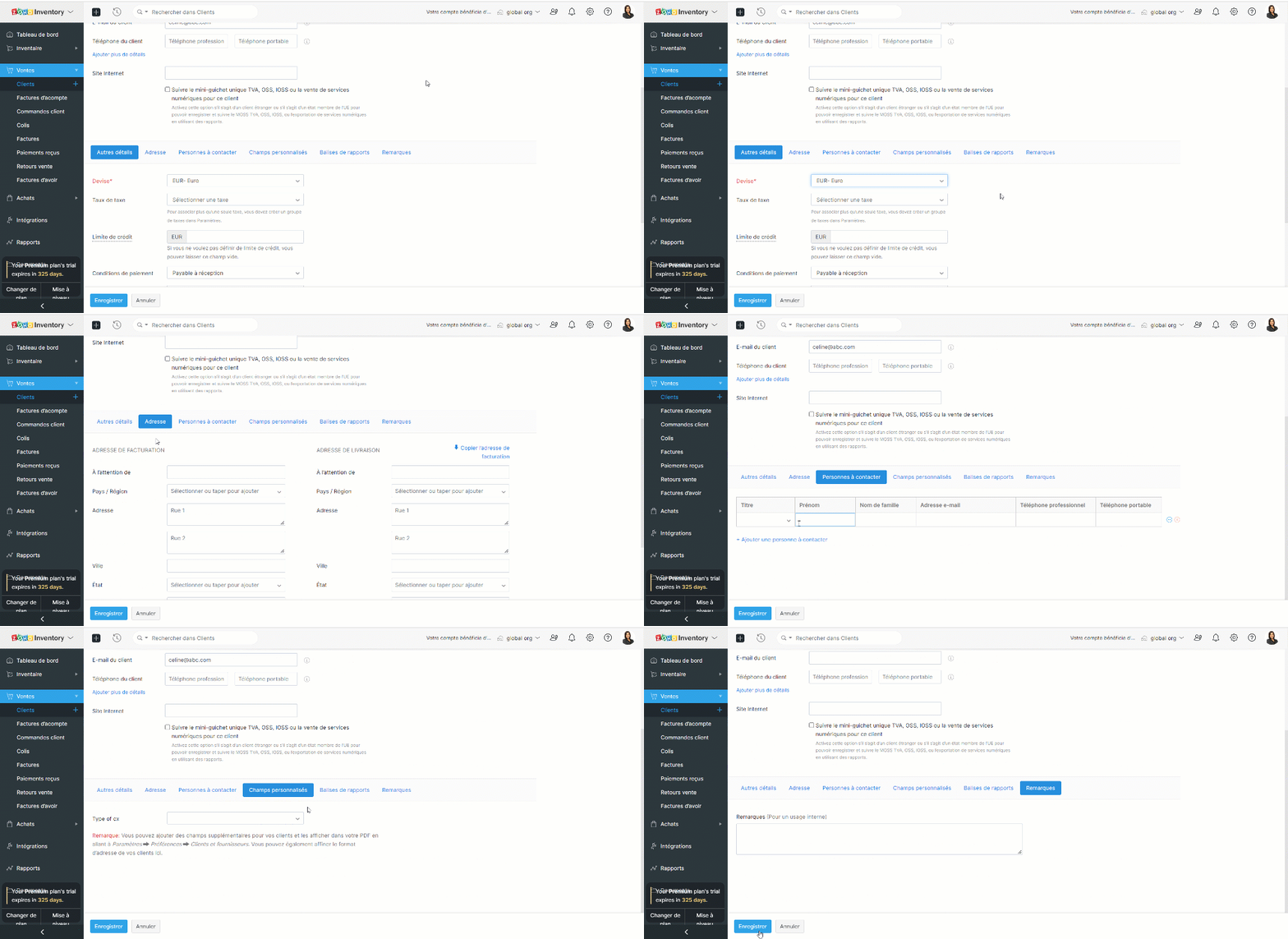
- Sous la section "Autres détails", vous pouvez saisir la devise et les conditions de paiement du client. Cette section comprend également des éléments permettant de saisir les détails des taxes et les liens vers les médias sociaux officiels de votre client.
- L'onglet "Adresse" vous permet de saisir les adresses de facturation et d'expédition de votre contact. Si l'adresse d'expédition est la même que l'adresse de facturation, cliquez sur "Copier l'adresse".
- L'onglet "Personnes à contacter" vous permet d'ajouter des coordonnées supplémentaires de votre client.
- Sous l'onglet "Champs personnalisés", vous pouvez afficher les champs que vous avez ajoutés dans votre préférence de contact. Les champs personnalisés sont des champs supplémentaires que vous ajoutez pour inclure des informations complémentaires concernant votre client. Avant de pouvoir ajouter ces informations ici, vous devez créer des champs personnalisés dans la section "Préférences".
- Sous l'onglet "Remarques", vous pouvez ajouter des notes sur ce client donné pour votre référence interne.
À partir du module "Fournisseur"
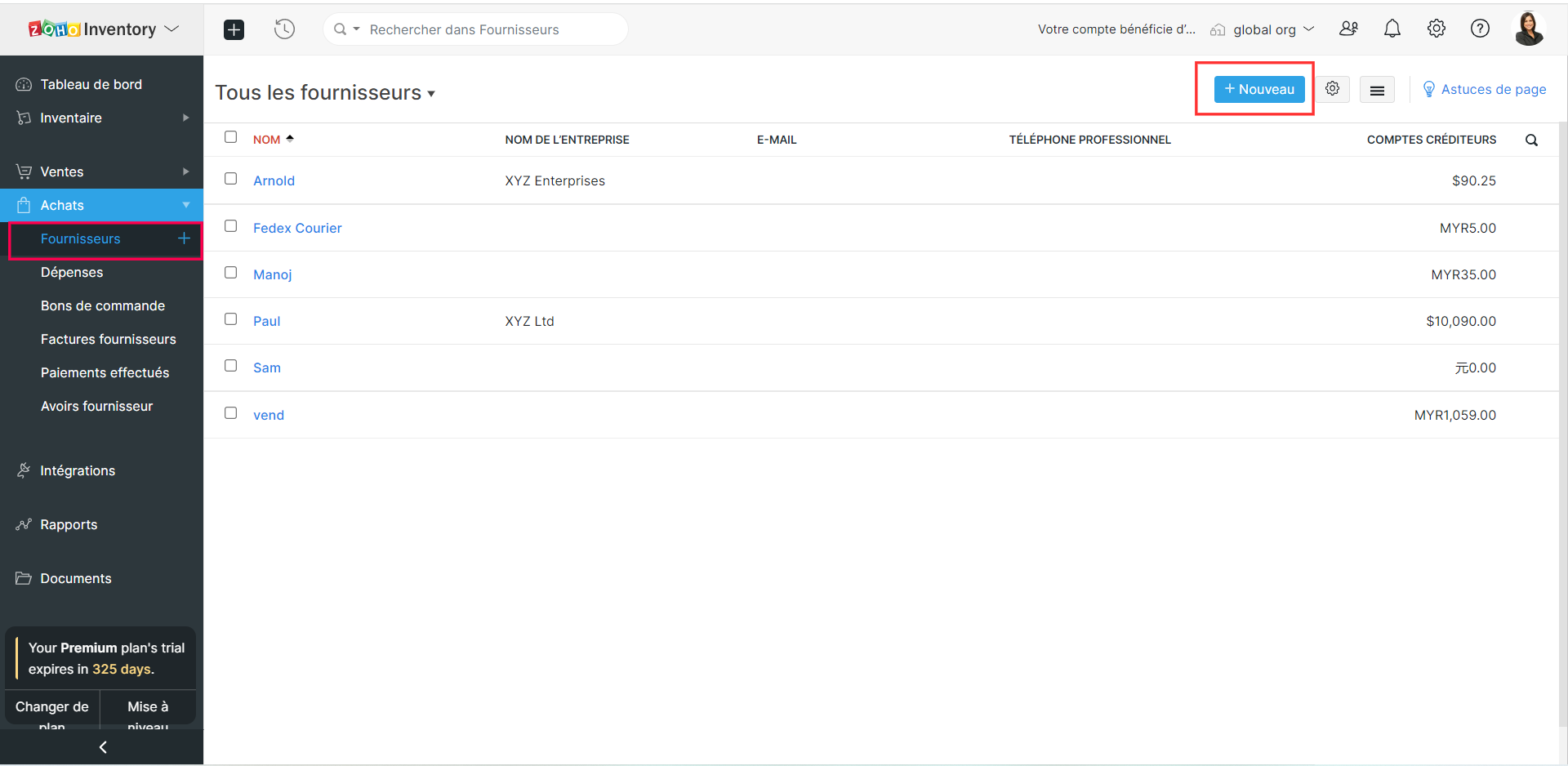
- Sélectionnez le module "Fournisseur" depuis le panneau de gauche.
- Suivez les étapes comme indiqué ci-dessus et enregistrez.
Créer des clients/ fournisseurs à partir d'une transaction
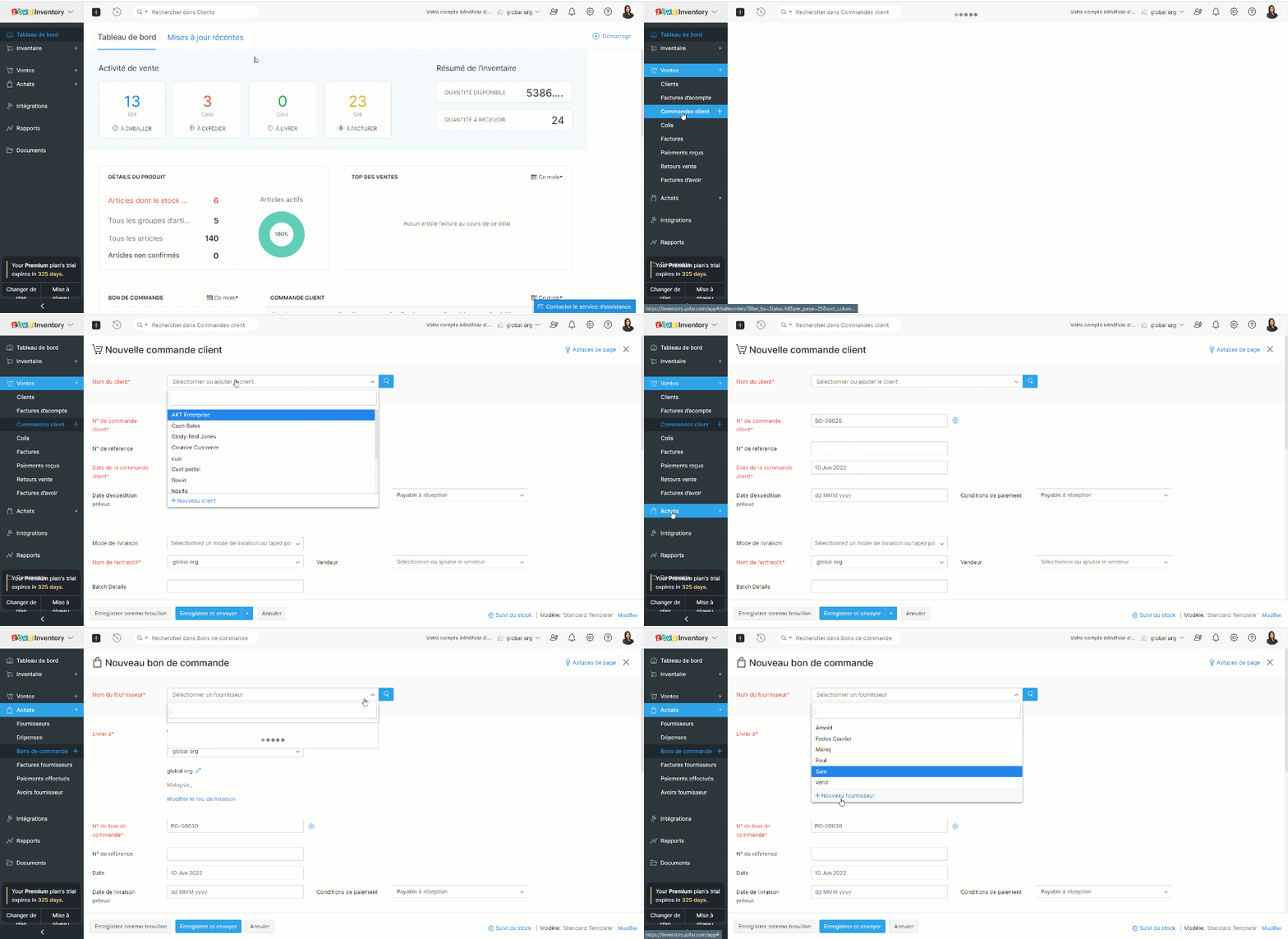
- Prenons un exemple, vous avez rempli les informations de la commande mais vous n'avez pas créé un client/fournisseur plus tôt.
- Créez une nouvelle transaction depuis l'onglet "Commande Client"/ "Bons de commande".
- Cliquez sur la liste déroulante dans le champs "Nom du client" / "Nom du fournisseur".
- Sélectionnez l'option "+ Nouveau client" / "+ Nouveau fournisseur".
- Suivez les étapes comme indiqué ci-dessus et enregistrez.
Importer des clients et des vendeurs
Si vous migrez d'un système existant vers Zoho Inventory, vous pouvez importer tous vos contacts sous la forme d'un fichier .CSV ou .TSV. La limite de fichier est de 1 MB.
Importer depuis Zoho Books
Les applications Zoho Inventory et Zoho Books sont parfaitement intégrées : toutes vos données seront synchronisées, c'est-à-dire que lorsque vous ajoutez un nouveau contact dans Zoho Books, le contact sera disponible dans Zoho Inventory et vice-versa.
Importer depuis Zoho CRM
Zoho Inventory peut être intégré avec votre compte Zoho CRM. En utilisant cette intégration, vous serez en mesure de synchroniser vos comptes, contacts et fournisseurs dans Zoho CRM, avec le module de contacts dans Zoho Inventory. Il s'agit d'une intégration bidirectionnelle. Ainsi, lorsque vous convertissez un prospect en client dans Zoho CRM, il est automatiquement ajouté comme client dans Zoho Inventory lors de la prochaine synchronisation. De même, lorsque vous obtenez un nouveau client dans Zoho Inventory, ce client est ajouté à votre base de données Zoho CRM.
Page de détails des clients et des vendeurs
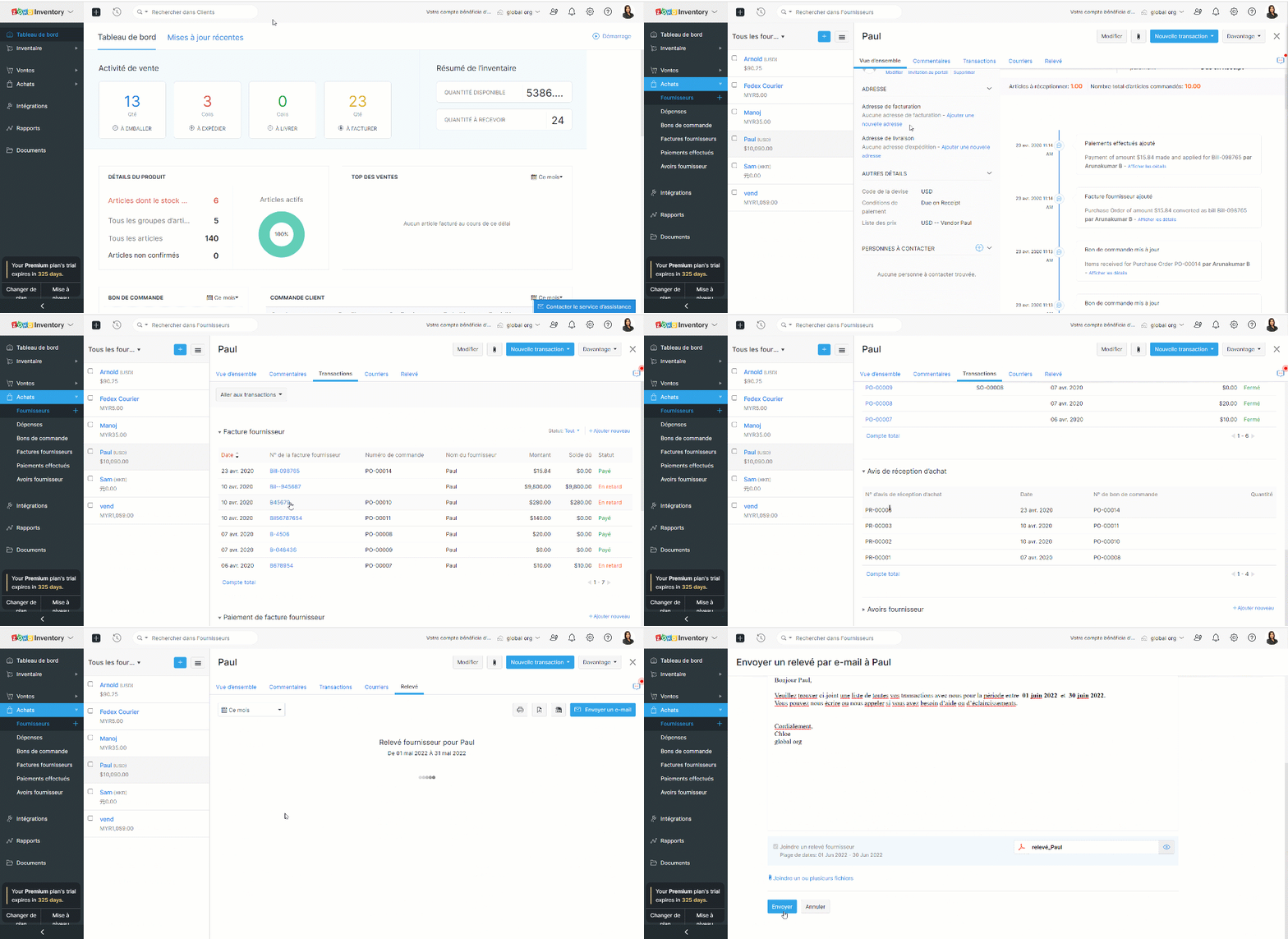
Cette page donne un aperçu des détails essentiels d'un client/fournisseur tels que le nom, l'adresse e-mail, le numéro de téléphone, l'adresse, les personnes de contact, le résumé de la transaction et les activités récentes. Vous pouvez également créer des transactions, enregistrer des paiements, envoyer des e-mails et des relevés à partir de cette page.
L'équipe Zoho France
Topic Participants
Kinjal Lodaya
admin sebban
Ramona Gheorghiu - MOBIXSAS
Horth
Stéphanie
Sticky Posts
Collaboration sans faille avec Zoho One
Bonjour à tous, Dans cet article nous allons voir comment Zoho One permet une collaboration à différents niveaux . La façon dont nous travaillons évolue. À mesure que les entreprises se mondialisent, la plupart des activités sont menées en équipe.
Recent Topics
Are downloadable product available in Zoho Commerce
Hi all. We're considering switching to Zoho Commerce for our shop, but we sell software and remote services. Is there a features for downloadable products? I can't find any information about this. Thank you very much AliceCustom image for each contact using merge tag
Hi, I'm wondering if it's possible to set up an email campaign to display a different image for each contact using a custom field for the image url. I tried inserting custom html: <img src='$[UD:APP_IMAGE_URL||]$'/> but the editor seemed to reject this and did not actually add anything to the email template. Has anyone got any ideas? cheers, JeremyComment Reactions like a Thumbs Up
Can we please have the ability to emoji react on comments or at the very least, thumbs a comment up? Literally every other project management system out there can support this and it is very much needed to just acknowledge a comment instead of completelyZoho Mail Search Engine Sucks
Hello There! I really like all the features of Zoho Mail and I believe is way better than Gmail except for the Search Function. I believe Zoho Mail has a very poor search function, if you misspelled a word in the search box, Zoho Mail won't display anyAllow Subtasks and Task Lists to have their own Layout
I'd like to have the ability for subtasks and task lists to have their own layout. A subtask for us doesn't require all the fields that a parent task has. The subtask seems cluttered with all the extra fields. Within a project Task List had different purposes. I'd like the task layout to be different for some task lists.How to update Customers in Zoho Books through Zoho Flow?
Updating customers in Zoho Flow using a "update customer" action is deleting contact persons in Zoho Books.How to transfer credit between customers?
Hi All, We have a slightly odd situation. It happens that we have two separate customers that are related to each other personally. One customer has an amount of credit, and would like to use that credit to pay the *other* customers invoice. How wouldZoho Books Reports: Basic report with total items sold and Cost of goods sold
How can books show a report with Item Name || Qty Sold || Total Revenue || Total Cost of Goods Sold || Margin I need to factor in also invoices that have been credited where customers returned good. This seems like such a basic report, I'm sure I'm missingThe amount entered is more than the balance due for the selected bills."
Hi Team i am trying to record payments for vendors using API and getting this error in response as { "code": 28011, "message": "The amount entered is more than the balance due for the selected bills." } JSON is prepared according to Documentation andVBA handling named ranges
In VBA I'm able to work with a single cell named range. E.g. Set Jr = Range ("Year").Value. Also other options are working fine, like Range("Year").Address shows $L$3. However a named range refering to multiple cells is not working for me. Eg. tbl_TestKaizen #176 - Optimizing the Use of Record ID Variables in Zoho CRM Queries
Hello everyone! Welcome to another week of Kaizen! Since the release of Queries, we have covered Handling Query Variables in Zoho CRM, Serialization and Schema Management, and Leveraging the 'crmAPIResponse' object in Queries in previous posts. Today,Unbilled Items Report?
Hello! Is there any way to display a list of items that remain unbilled, without creating an invoice for each customer to see if the unbilled items box is displayed? ;-) BenConsolidation of Multi currency
Would like to discuss on the possibility of consolidating the ZOHO companiesLanded Cost Allocation / Custom Duty manual data entry
My client is an import business. They must manually enter the duty for each item with landed cost allocation in Bill. This is because customs duties cannot be allocated based on Quantity, Value, Weight, and Dimensions. Manual data entry is highly time-consumingTerritories Just Don't Work
I have been on chat and screenshare support for the past 3 days and am getting no resolution so hopefully, someone here can help me. I am the Super Admin of my organization. We publish books globally. I want to break down the books into territories soNegative Opening Balance
How can I add Negative Opening balance - meaning a credit balance to a Customer or a debit balance to a vendor? If I go thru Sales-->Customers, and if the opening balance is Rs. 1000 (credit balance), it does not allow me to enter a "minus" sign or mentionSingle-Line Invoicing from Sales Order Despite Multiple SKUs Shipped
We deal mostly with Government Tenders And Lets say we got a tender that needs 125 XYZ Laptops Then we found 95 Laptops with a different SKUs and 30 Laptops with different SKUs We talk with the IT department of the government company and they approve📣📣 Zoho Bookings Schedulathon 2025 is here!
Hey Zoho Bookings fam, We're excited to invite you to our first-ever hackathon: Yes, Zoho Bookings Schedulathon 2025 is live now. This is a virtual event and you can participate anywhere from the world. Businesses should be able to set up meetings fromI want to send out a new newsletter each month
Without rebuilding a whole journey is there a way to create a new newsletter that is sent to an existing journey monthly?Reinstalling Workdrive Truesync client
Hi, I attempted to update to the beta version of TrueSync, but it was unstable and kept crashing, so I need to revert to the stable version. How do I properly reinstall TrueSync on a Windows PC? I couldn't install the 3.15.x version directly over theEvaluating Creator; yesterday fine; today connection times out
Yesterday I spent hours creating a new app, and it worked fine. Today I cannot access creator.zoho.com. Is this common? I'm in the evaluation mode, but I'm thinking I'm going to keep looking. It worked from my home computer, and now I'm checking it from my work computer. My work computer always works just fine, so I shouldn't htink there would be special settings or anything. If there are, how to find out what they could be? Using Chrome on Windows XP The error I get is: The webpage at https://creator.zoho.comPivot Chart seems to show "old" data - how do I make it update?
I wonder how to make a Pivot Chart "update" its data contents. Here is the background: I need to report a subset of data that is so complicated that it is easier to make a calculation and put the result in a "reporting form", and then display the data from that form. So, I get data from the "original form" GRANTS, make some calculations and put the result in the "reporting form" PERIOD. Now I can watch the result in a list called LIST, which works fine. The list LIST shows that form PERIOD containsUpcoming Changes to LinkedIn Parsing in Resume Extractor
Starting 31 July 2025, the Zoho Recruit Resume Extractor will no longer support direct parsing of candidate data from LinkedIn profiles. Why Is This Change Needed? In accordance with LinkedIn’s platform policies, extracting profile data through browserhow to create view in leads module to that will show all leads + converted leads?
is it possible to make custom view that combine all leads + converted leads? how to do thatAvalara Sales Tax integration - AVATAX
Just wondering if anyone else is having troubles with this integration? Seems as though Avalara changed their billing process, unbeknownst to Zoho, and now ALL transactions are counted by Avalara, not just transactions in a taxable jurisdiction. This caused a huge price adjustment billed to us by Avalara within a month of us signing up. And Avalara is not cheap to begin with! Avalara has been great in waiving that increase, but there seems to be no fix. Zoho is aware of the problem, but slowInvalid value passed for description
Dear Sir, When I am entering the purchase bill , the following message showing "Invalid value passed for description" what should I do ? I am attaching screenshot. With Regards, Harish harish@cracku.in 7978841636Zoho Creator - 2024 Release Projection 1
Hello everyone! As we enter 2024, we'd like to extend our warmest wishes for success and prosperity. Your fantastic response to our Product Roadmap page last year has been incredibly motivating. Continuing on this path, we're excited to share a glimpseAutomation Assistance for Zoho Form Integration and Workflow
Hi, We are currently using a Zoho Form to send out our Global Credit Application and would like to automate the process further. Specifically, we’d like the ABN number submitted through the form to automatically populate the GST/VAT Number field in ZohoCOQL does not return queryable value if the result set is empty
See linked video for running code illustration of the problem: https://workdrive.zohoexternal.com/external/d49bb40033b43b288d56fdf843095b7c65b28391d3ec5d09c854f416d853003d Moderation update: We are appending the comment that was removed, to add contextZoho CRMでの商談の管理のしかたについて初歩的な質問です。
先月からZoho CRMを試験的に導入して運用しています。 商談の管理(運用?)の仕方について教えてください。 商談の数が増えてくると、ダッシュボードの「ステージ別進捗状況」にどんどん過去の商談が蓄積されてくると思うのですが、 現在動きのあるものを中心に確認したくなる気がします。 そのあたりについては、どのように運用が一般的なのでしょうか? アドバイスいただけるととてもありがたいです。 よろしくお願いします。Composite Items & Purchase Orders
The Composite Item is great way to bundle different products and services into a single line and sell it as a single line item in Estimates, Sales Orders and Invoices. However, on the other side - i,e,. Purchasing - this item creates quite a bit of ausing custom function is it possible to update the created by field in Zoho Crm custom module
using custom function is it possible to update the created by field in Zoho Crm custom moduleSlow Sloww Slowwww Responses
Good day, Has anyone been experiencing slow responses from support? Since Thursday I migrated my Whats app to Sales Iq and I had to synch with Social to get the otp they were sending. Apparently What's app can't be automatically added so I reached outYou have exceeded the maximum number of attempts for this action. Please retry doing the same in 30 minutes.
When one of Zoho Books user tries to select a vendor, recording a new bill, these message appears: You have exceeded the maximum number of attempts for this action. Please retry doing the same in 30 minutes. Other user, at the same time, but differentEnable Conversation Context Retention for SalesIQ Answer Bots
Hello Zoho SalesIQ Team, We hope you are doing well. We have noticed that SalesIQ bots currently fail to maintain conversation context in Hebrew. For example, when we follow up on a previous answer or ask for clarification in Hebrew, the bot either providesAutomatic Hebrew Small Talk Setup Without Duplicate Term Errors & Manual Configuration
Dear Zoho SalesIQ Team, Greetings, We would like to request an enhancement to the Small Talk feature in Zoho SalesIQ, specifically for Hebrew language support. Current Challenge: When setting up Small Talk for Hebrew, we encounter multiple issues: SimpleTrouble fetching custom fields from Zoho Booking
I'm following the instructions from here : https://help.zoho.com/portal/en/kb/flow/user-guide/app-specific-documentation/articles/zoho-bookings#1_Problem_with_accessing_custom_fields But I can't get this to work. Here is the result of a test booking :Should I Add Leads in Bigin?
ok, first off I'm new here. I just started using Bigin. I'm debating if it's appropriate to enter leads. by leads I mean a list of contacts that I have not yet reached out to...it's a cold calling list. if I enter them I can track them (I understandZoho Books - Perform a validation check before an invoice is marked as sent or sent
Allow the validation rules to apply to button actions. For example: an invoice could not be sent or marked as sent if it has an empty value in a custom field. (The field could remain blank while it is being worked on.)Flow error "given url is wrong"
when I setup a flow to update a task status, I get an error when it runs that says "given url is wrong."Next Page