Gestion des clients et des fournisseurs
Chaque entreprise accorde une grande importance à ses données clients et fournisseurs et il est désormais essential d'enregistrer les coordonnées de ces derniers pour créer des transactions rapidement et conclure des affaires.
Le module "Clients/ Fournisseurs"de Zoho Inventory vous permet d'enregistrer des détails tels que le nom, l'adresse e-mail, le numéro de téléphone, ládresse de facturation et d'expédition, les informations sur le site web. En complément de ces informations, vous pouvez envoyer des e-mails, consulter les relevés des clients et créer des transactions de vente pour le client dans la page de coordonnées elle-même.
Créer un client/ fournisseur
Il existe plusieurs façons d'ajouter de nouveaux clients/fournisseurs dans Zoho Inventory :
À partir du module "Clients"
- Sélectionnez le module "Clients" dans le panneau de gauche.
- Cliquez sur "+ nouveau".
- Saisissez les informations du client.
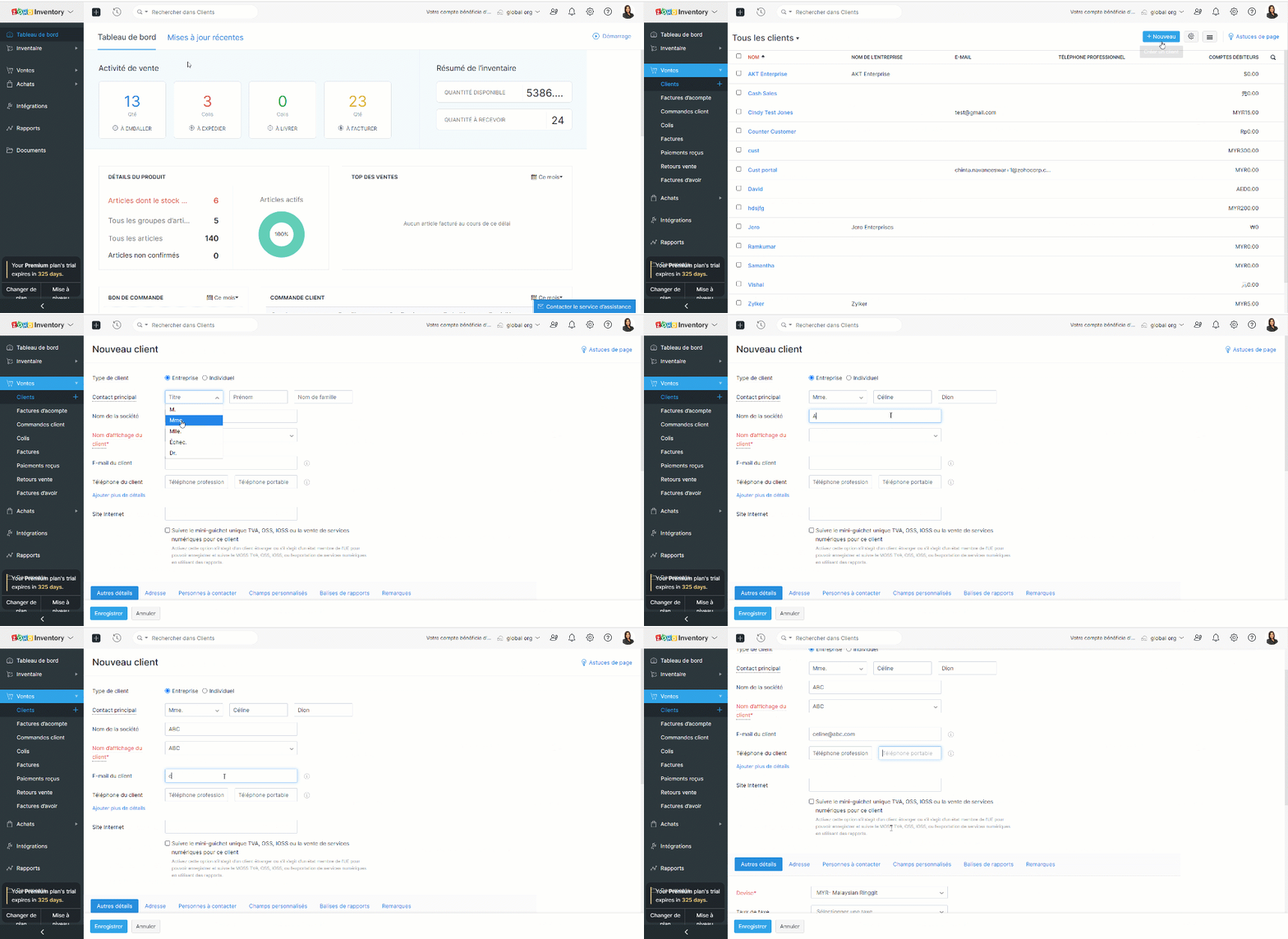
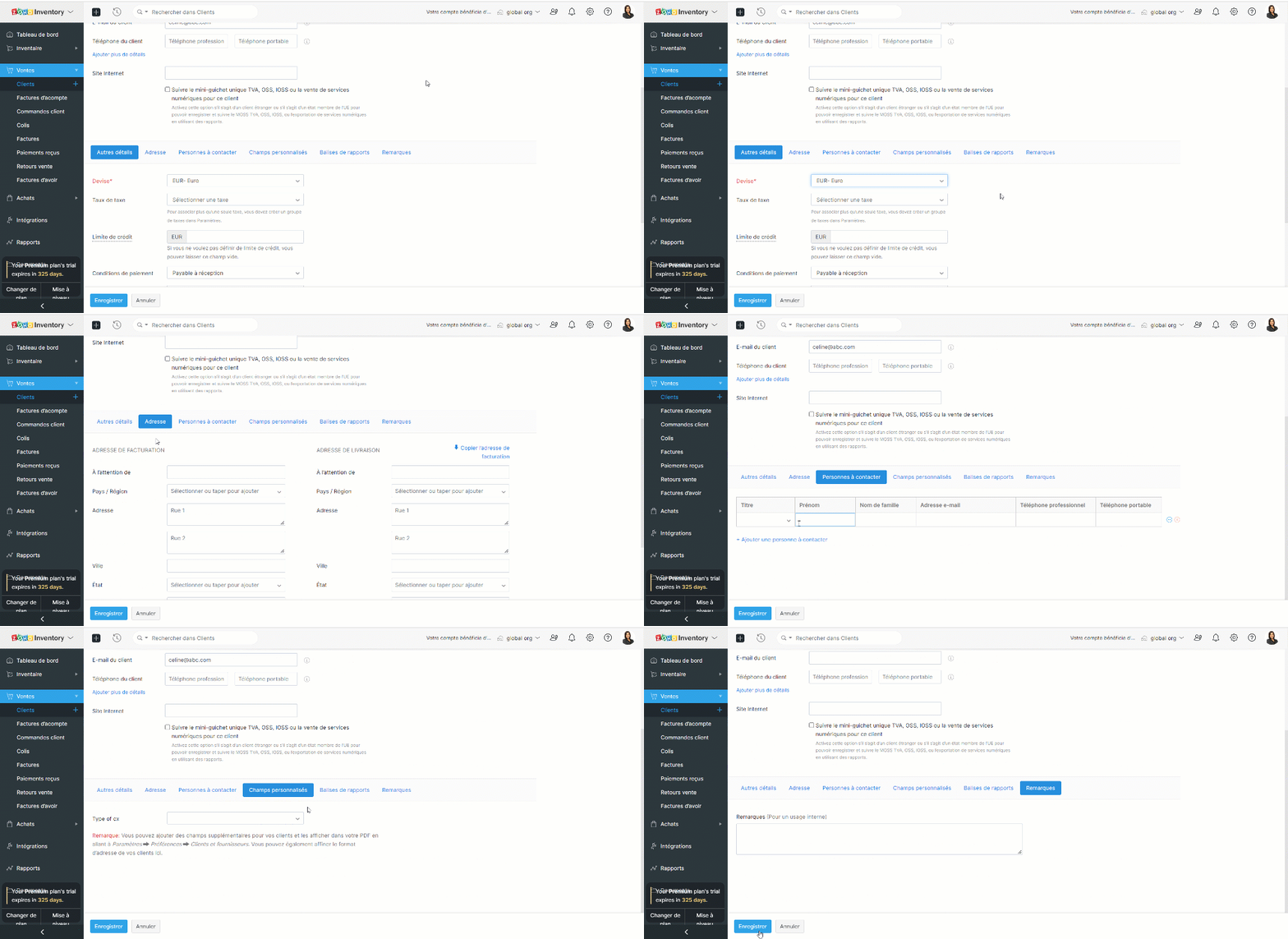
- Sous la section "Autres détails", vous pouvez saisir la devise et les conditions de paiement du client. Cette section comprend également des éléments permettant de saisir les détails des taxes et les liens vers les médias sociaux officiels de votre client.
- L'onglet "Adresse" vous permet de saisir les adresses de facturation et d'expédition de votre contact. Si l'adresse d'expédition est la même que l'adresse de facturation, cliquez sur "Copier l'adresse".
- L'onglet "Personnes à contacter" vous permet d'ajouter des coordonnées supplémentaires de votre client.
- Sous l'onglet "Champs personnalisés", vous pouvez afficher les champs que vous avez ajoutés dans votre préférence de contact. Les champs personnalisés sont des champs supplémentaires que vous ajoutez pour inclure des informations complémentaires concernant votre client. Avant de pouvoir ajouter ces informations ici, vous devez créer des champs personnalisés dans la section "Préférences".
- Sous l'onglet "Remarques", vous pouvez ajouter des notes sur ce client donné pour votre référence interne.
À partir du module "Fournisseur"
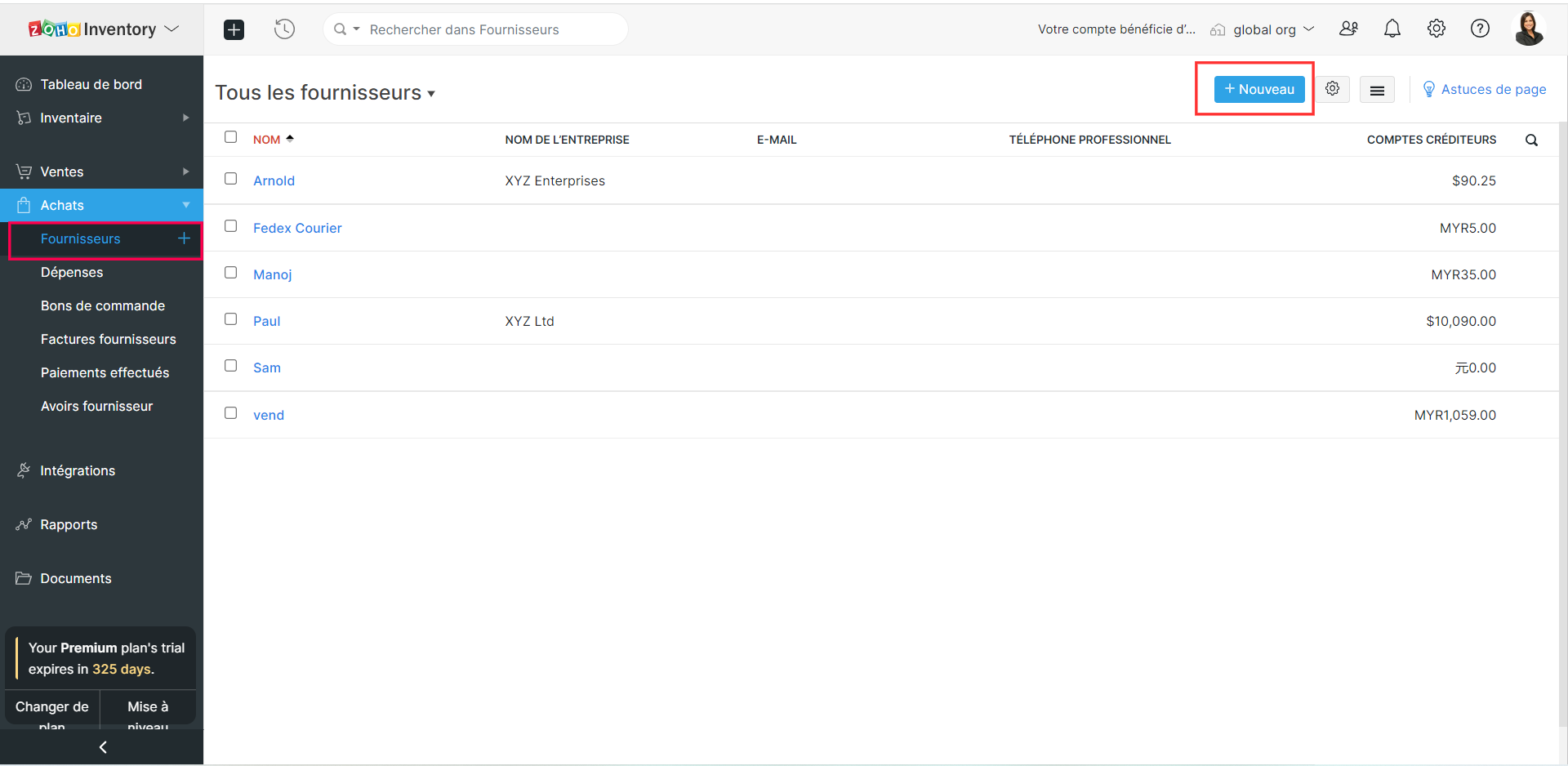
- Sélectionnez le module "Fournisseur" depuis le panneau de gauche.
- Suivez les étapes comme indiqué ci-dessus et enregistrez.
Créer des clients/ fournisseurs à partir d'une transaction
- Prenons un exemple, vous avez rempli les informations de la commande mais vous n'avez pas créé un client/fournisseur plus tôt.
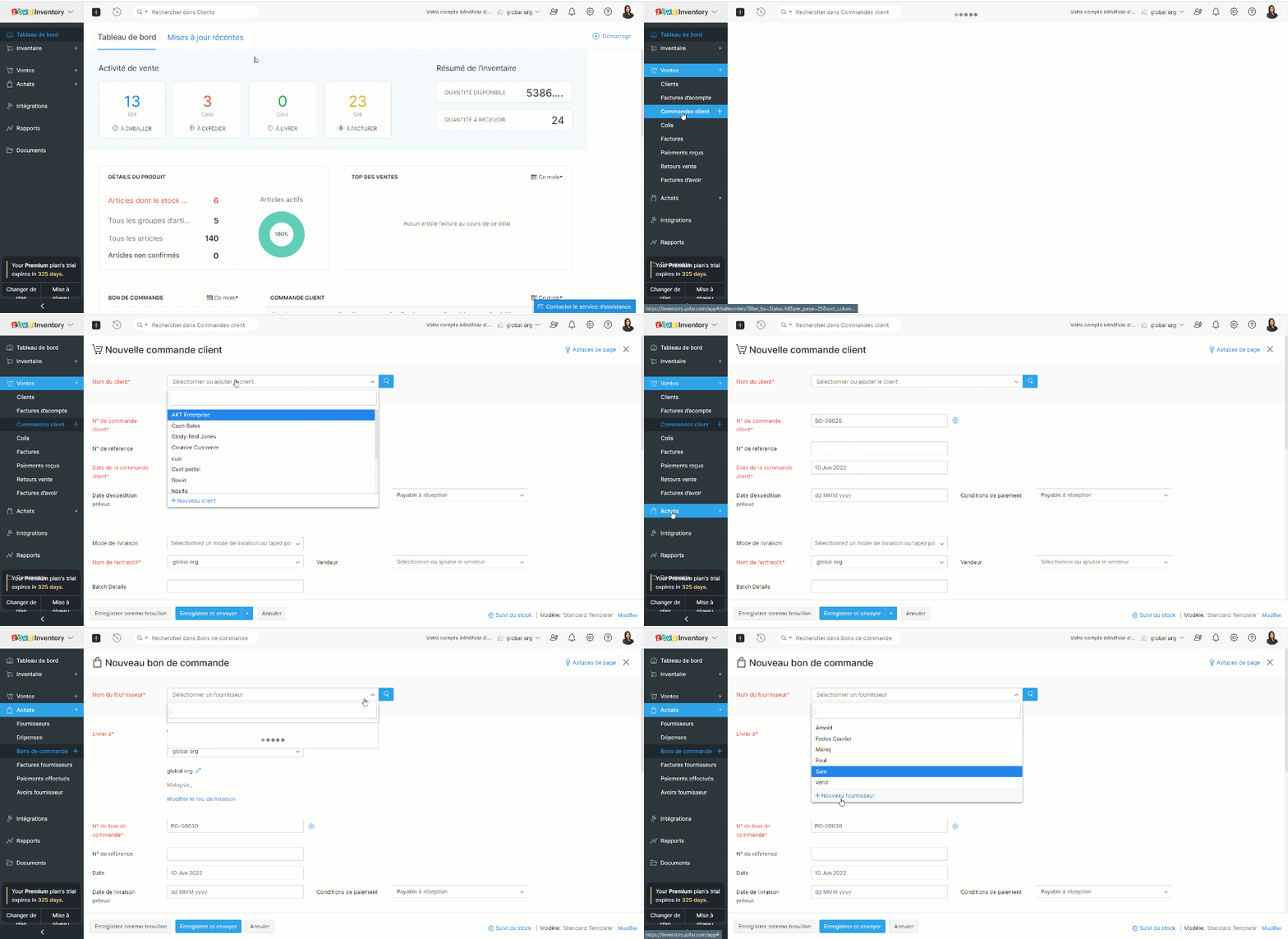
- Créez une nouvelle transaction depuis l'onglet "Commande Client"/ "Bons de commande".
- Cliquez sur la liste déroulante dans le champs "Nom du client" / "Nom du fournisseur".
- Sélectionnez l'option "+ Nouveau client" / "+ Nouveau fournisseur".
- Suivez les étapes comme indiqué ci-dessus et enregistrez.
Importer des clients et des vendeurs
Si vous migrez d'un système existant vers Zoho Inventory, vous pouvez importer tous vos contacts sous la forme d'un fichier .CSV ou .TSV. La limite de fichier est de 1 MB.
Importer depuis Zoho Books
Les applications Zoho Inventory et Zoho Books sont parfaitement intégrées : toutes vos données seront synchronisées, c'est-à-dire que lorsque vous ajoutez un nouveau contact dans Zoho Books, le contact sera disponible dans Zoho Inventory et vice-versa.
Importer depuis Zoho CRM
Zoho Inventory peut être intégré avec votre compte Zoho CRM. En utilisant cette intégration, vous serez en mesure de synchroniser vos comptes, contacts et fournisseurs dans Zoho CRM, avec le module de contacts dans Zoho Inventory. Il s'agit d'une intégration bidirectionnelle. Ainsi, lorsque vous convertissez un prospect en client dans Zoho CRM, il est automatiquement ajouté comme client dans Zoho Inventory lors de la prochaine synchronisation. De même, lorsque vous obtenez un nouveau client dans Zoho Inventory, ce client est ajouté à votre base de données Zoho CRM.
Page de détails des clients et des vendeurs
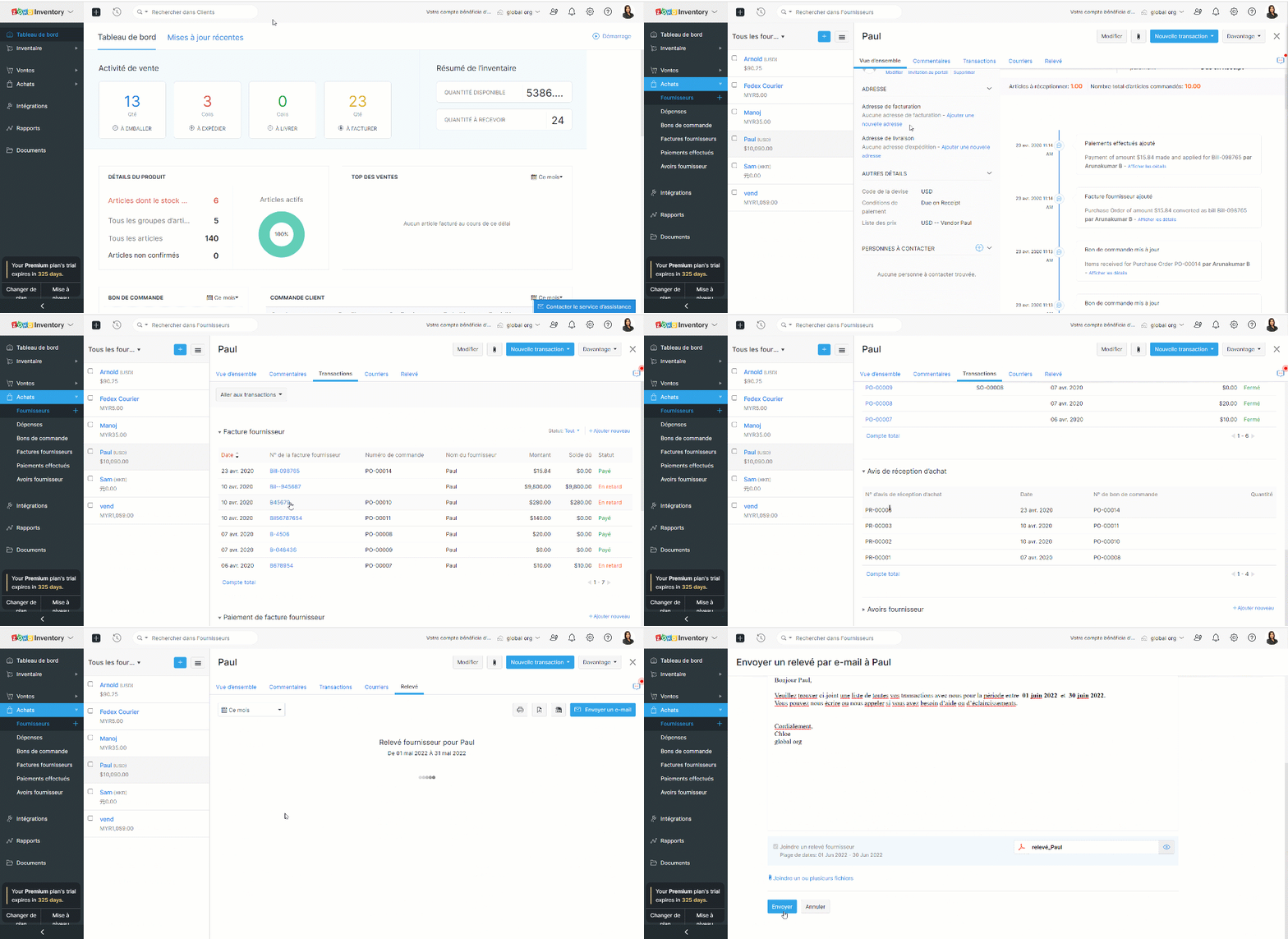
Cette page donne un aperçu des détails essentiels d'un client/fournisseur tels que le nom, l'adresse e-mail, le numéro de téléphone, l'adresse, les personnes de contact, le résumé de la transaction et les activités récentes. Vous pouvez également créer des transactions, enregistrer des paiements, envoyer des e-mails et des relevés à partir de cette page.
L'équipe Zoho France
Topic Participants
Kinjal Lodaya
admin sebban
Ramona Gheorghiu - MOBIXSAS
Horth
Stéphanie
Sticky Posts
Collaboration sans faille avec Zoho One
Bonjour à tous, Dans cet article nous allons voir comment Zoho One permet une collaboration à différents niveaux . La façon dont nous travaillons évolue. À mesure que les entreprises se mondialisent, la plupart des activités sont menées en équipe.
Recent Topics
CRM report
Is it possible to pull a contacts report that also includes the company industry, as well as the company name? I’m having trouble combining company and contact fields – any help is appreciated. Thank you, SamEnhancements to Client script?
Hi Zoho CRM, I've been extensively using Client Scripts to enhance our Deal form experience, particularly for real time validations and auto updating fields based on specific logic. However, I've encountered a challenge regarding permission boundaries.Add views to new CRM UI navigation + Unlimited Webtabs
Zoho CRM is so close now to being the ultimate business application with the new UI, as soon as this one feature is added. This is probably where Zoho is headed but if it's not I want to BEG for this to be incorporated. What we need is to be able to putE-Mail Distribution List
How do I create an e-mail distribution list in Zoho Mail?Custom "create meeting" button with more functionality than Zoho currently has?
I'm looking for a little help/direction in how to do this. Even just some general high level pointers on how this might be able to be done. The current Zoho Meeting Activity functionality is not ideal for my org's workflow. I'd like to try and createError Code 4: Invalid value passed for JSONString
Okay, I want to start by saying I know I'm a terrible scripter, so sorry if this is a dumb mistake. I just can't figure it out, even with LLM help. Here's my code: // --- Input Variables --- customer_id = salesorder.get("customer_id"); so_id = salesorder.get("salesorder_id");Organizing contacts/members by company
I work for a membership organization (representing businesses) and am trying to use Zoho CRM more effectively for managing the points of contact for our members. Currently, our members are listed in our CRM by the primary point of contact's name, butUnable to search in Zoho Email
I've started using Zoho Email (free version) recently and realized that it doesn't have email search functionality. Am I missing anything here? I've gone through the Zoho tutorial which does show the search bar on the right top of the Zoho UI. But inResponse Time Report
From data to decisions: A deep dive into ticketing system reports Every organization that interacts with its customers should have an established timeframe for how soon an agent is expected to send the first response and any reply to any follow-up messages.Zoho - Outlook plugin
Does anyone know if there is a way to modify the autofill in the Zoho plugin in outlook? When we create a contact, it enters the correct email address and name, but then pulls information from our own signature line to add phone number, address, etc.Zoho Books - Sales Person Information
Hi Team, On Invoices, Quotes, etc... I can include the Sales Person, but it only shows their name and not their email or phone number. It would be great to have place on invoice templates where we can manage what sales person information should be showsOffline working in Zoho Creator portal
Zoho's help says that offline working is only available in the Creator mobile app and not in the portal app. But I can see offline options in the portal app too and it seems to work when I test it. My portal users are often in areas where there is poorFetch Records using Dynamic Criteria
Hi, I have a form that builds a filter based on user input. I need to fetch the records based on dynamic criteria. How would I accomplish this as there is no eval function? For example: desiredRecord = Form1[dynamicCriteria];Url filter Report date (pivot chart)
Hello. Is it possible to filter the data in pivot char using parameters in the url? I'm trying but I should not doing very well. Something like: https://creator.zoho.com/.../....../#Report:MyPivotChartReport?MyDate=01-Jan-2012;31-Jun-2012;MyDate_op=58 SaludosSending gmail to a particular person fails because the address gets changed to "gmaill", with a second "l" typo somewhere
I send to bob@gmail.com (example) and get an error sending to bob@gmaill.com, only for this one person. Note the extra "l" in the email the system tried to send to, which was not in the address I entered. Can't find a typo in the contact or anywhere elseEmoji Support in Bigin CRM
We request the implementation of emoji support across Bigin CRM. This feature should allow users to seamlessly use emojis in text fields, headlines, and deals. It would enhance communication, improve the visual appeal of records, and bring more personalizationBigin Booking Pages enhancements
I would like to ask for several enhancements for the brand new (and promising) Booking feature. 1. Add "Contact/Mobile" Field to Booking form We use Mobile as key (id), but unfortunately it is missing from the Booking form, only Home Phone is available.Amount in words in Indian format
Hi, I had coded the following code to convert amount in words. But in the code in the format of US like million. But i need in Lakh and Crore. So pls suggest ideas r post corrected code string Num2Words(int val) { val_s = input.val.toString(); th = {"", "thousand", "million", "billion", "trillion"}; // uncomment this line for English Number System // th = {"","thousand","million", "milliard","billion"}; dg = {"zero", "one", "two", "three", "four", "five", "six", "seven", "eight",What are people using to send Service based emails?
Zoho Campaigns is for marketing. Users can unsubscribe from these emails. Service based emails need to be delivered and can without the worry of Can-spam act. What are people using to send service based emails? My mailing list is derived from a databaseStandalone LMS tool
Will Zoho release a standalone LMS (Learning management System) than can be used by external parties (guest)?Announcing Kiosk 1.1 - Customize screen titles, configure new fields & actions, use values from your Kiosk to update fields, and more.
Hello all We are back again with more enhancements to Kiosk. So what's new? Enhancements made to the Components Add titles for your Kiosk screens and adjust its width to suit your viewing preferences. Three new fields can be added to your screen: Percentage,An Overview of Dario Schiraldi Deutsche Bank Executive
Hello Community, Dario Schiraldi is an executive at Deutsche Bank, focused on advancing the firm’s financial services and crafting its global strategic vision. With 20 years of expertise in leadership roles, he has spearheaded successful market acquisitionsEmailing a document to WorkDrive
Does WorkDrive include the ability to upload a document by sending an attachment to an email address? (Books and Expenses include this functionality) If it doesn't is it under consideration? on the Road Map?Allow Changing Appointment Status from "Completed" to "No Show" or Other Valid States
Hi Zoho Bookings Team, We hope you're doing well. We would like to submit a feature request regarding appointment status management in Zoho Bookings. 🎯 Use Case Sometimes, an appointment is mistakenly marked as Completed, but later we realize that theZoho One and Tally Integration
Has Anyone in this forum done any implementation with Zoho CRM and Tally accounting software. If so who have you used and how easy was it?Microsoft PowerPoint files Extremely slow to save
I and others on my team have noticed that Microsoft PowerPoint documents are extremely slow to save when using WorkDrive. It always takes over 30 seconds to save a file. Word and Excel files seem to save in a typical length of time, but PowerPoint isHow can users unblock their blocked Zoho Mail accounts?
After the reason for the account block (storage exceeded, spam detection etc.) has been rectified, the user can unblock the account from the UnBlock Me page. Account support@edu2review.com Edu2Review is an education review platform, we rate the qualityAdding additional fields for batch information
Hello, I am looking at adding additional information into our inventory module. we would like to be able to see up to 8 attributes that will be individual & different for each batch (i.e. batch specific information) but currently I seem to only be ableDynamic Pickup List Values using Deluge and Client Script
I would like to dynamically show Pickup List Values For example we need to fetch some data from an on premise application and display it so they can choose and pick This can be done in Creator but I didn't find anything for CRMValidation Rule for Controlled Stage Movement in Deals Module (Deluge Script)
For keeping a control over module stage or status, you can use the below deluge script. The below deluge script defines validation control over deals module stages: // Function to validate allowed stage transitions in the Deals module map validation_rule.LeadStatustValidation1(StringPick List Issues
I have created a pick list that looks at a table in a sheet, it selects the column I want fine. Various issues have come along. The option to sort the pick list is simplistic, only allows an ascending alphabetical sort. Bad luck if you want it descending.Four types of task dependencies
"Nothing is particularly hard if you divide it into small jobs." - Henry Ford Projects, small or large, are driven by simple work units called tasks. Monitoring standalone tasks might look simple but as the workflow becomes elaborate, tasks may start relying on one another. In project management, this relationship between tasks is termed as "Task Dependencies". Dependency between tasks arise1099 tracking
Do zoho books offer feature of tracking for 1099's for contractors, etc? Quick books offers this feature and wondered when/if Zoho books will do sameVAT-type Taxes in US Edition?
I'm located in the US, and I use the Zoho One US edition of Books. We are in the process of registering with Canadian authorities for their GST / HST, which is a VAT-type of scheme. It is not immediately obvious to me how one would deal with input taxSchedule sms to be sent later
When will you make available an option to send sms's at a later time??? You finaly have this option available on emails, so it will be very useful to have it also with sms. Our sms provider, has already this available but we cannot use it because youEcommerce integration with prestashop
Development of campaigns integration with prestahop. When???How to create an article containing images and rich text via the api?
Hi, I'm trying to migrate our kb articles from our previous helpdesk service, and import them to ZohoDesk. Is there any way to create an article that contains images? Is it possible to add formatting to articles created via the API? Thanks, Adam.Number of statement execution limit exceeded on deluge scheduled function
I'm working on a send email functionality in creator that sends out crew work orders at the end of the day each day for the next day. I'm running into the issue that zoho is unable to handle the number of statements that I am doing to be able to successfullyZoho SignForm In Progress But Cannot Be Completed
If a person starts signing a document (via SignForm), but closes the window before submitting, Zoho marks the document "in progress", but how do they finish signing it?How to show Assemblies AND component items in a report
Hi Is there any way in Analytics to create a report that shows the Composite Item AND the Component Items with mapped quantity? It seems that the component item is not exposed in any table that I can find. Also, the same question but for Stock on Hand.....thisNext Page