Response Time Report

Response Time Report

From data to decisions: A deep dive into ticketing system reports

Every organization that interacts with its customers should have an established timeframe for how soon an agent is expected to send the first response and any reply to any follow-up messages. 

It's common for the support team to operate under  a service level agreement that requires the first response to any customer ticket to be sent within one hour of ticket creation.

If a team has 10 agents, the manager does not need to check each ticket to see if the response time SLA is met. Instead, the response time report can help identify whether all responses are sent on time or if there is a delay.

What are time-based reports?

Time-based reports are valuable tools that help us understand how well things are going by breaking down key metrics over specific periods. By tracking, measuring, and visualizing data, these reports allow us to evaluate performance, spot trends, and make better decisions. They enable businesses to monitor efficiency, productivity, and operational effectiveness.

If a ticket was raised on February 23, and the response was sent on February 28, the manager can review the details to understand why there was a delay. This might be due to reasons such as holidays, a mistake by a new agent who is unfamiliar with the process, or unusually high demand for support. By identifying the cause, the manager can offer more training on SLA processes, adjust the way agents' workloads are allocated, or arrange for extra help during holidays to ensure timely customer responses in the future.

Example of response time reports

Suppose a ticket was raised on February 23rd about a patient’s health concern, and the response was sent on February 28th. In this case, the hospital manager can review the details to see why there was a delay in addressing the patient's needs. This delay may be caused by factors such as holidays affecting staffing levels, staff being unfamiliar with the ticketing process related to patient care, or an increased workload resulting from a sudden rise in patients.

By figuring out the cause of the delay, the manager can take proactive steps. For example, they could provide more training on the standard procedures for handling patient inquiries to ensure all staff understand the process. The manager might also adjust the workload by redistributing cases among staff or bringing in temporary help during busy times or holidays.

Another strategy is to form a dedicated task force to handle customer inquiries during peak periods to provide quicker responses. By tackling these issues, the organization can improve its operations and ensure timely responses to ensure customer satisfaction.
Quote
Availability: All paid versions

Specific attributes of the report

  • Ticket ID: Zoho Desk identifies and distinguishes tickets using a unique reference number called a ticket ID.
  • Subject: The ticket subject is typically a summary or description of the issue the customer is experiencing.
  • Ticket owner: Owner of the ticket.
  • Contact name: The customer's contact name.
  • Event owner: The owner of the event.
  • Event team: The change in the ticket's status.
  • Responded by: The name of the agent who responded to the customer's ticket.
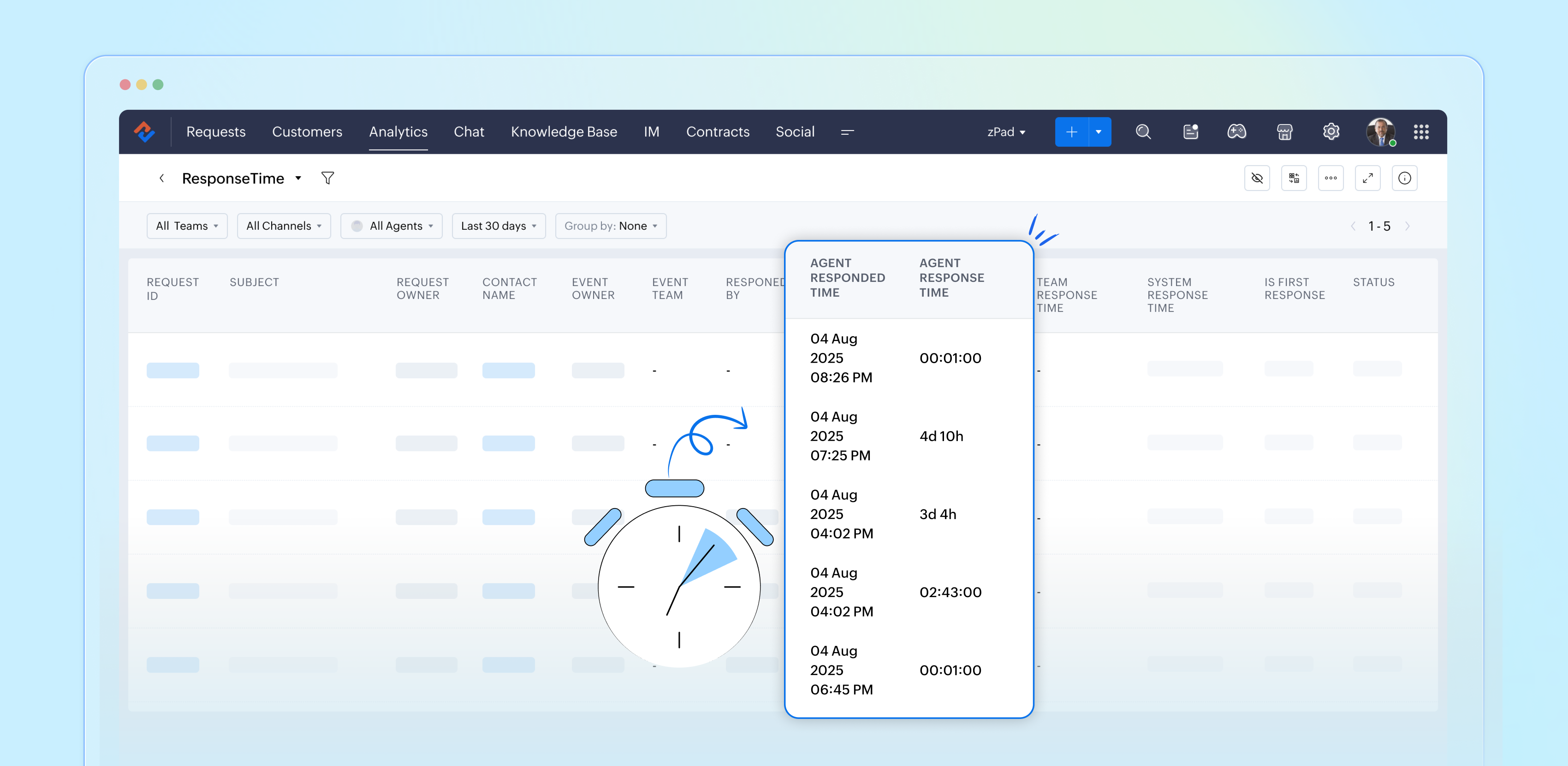
  • Agent responded time: The time the response was sent.
  • Agent response time: The total time taken to respond to the ticket.
  • Team response time: The time the team responded to the ticket.
  • System response time: The total time the team took to respond to the ticket
  • Is first response: Confirms if this is the first response in the conversation's thread.
  • Status: The current status of the ticket.
  • Status during event: The status of the ticket at a particular point in time.
  • Channel: The channel through which the ticket was submitted.

Importance of response time reports

Response time reports are important for support systems. They measure how quickly agents reply to customer inquiries.

  • Enhance customer satisfaction
  • Easily promote customer loyalty
  • Enable performance tracking
  • Drive operational efficiency
  • Support data-driven decisions
  • Reinforce brand reputation

Analyze and improve response times with reports 

By closely examining both our first response times and the tickets that require more attention, the support team can gather valuable insights from every customer interaction. This continual analysis of response time reports allows us to identify patterns and areas for improvement, ultimately enhancing our overall performance and ensuring a superior experience for our customers.


Please stay tuned for more articles in our Desk Reports series.


Regards,


Kavya Rao

The Zoho Desk Team

Idea

Also read:

Time-based reports

    • Sticky Posts

    • Zoho Desk Partners with Microsoft's M365 Copilot for seamless customer service experiences

      Hello Zoho Desk users, We are happy to announce that Zoho Desk has partnered with Microsoft's M365 to empower customer service teams with enhanced capabilities and seamless experiences for agents. Microsoft announced their partnership during their keynote
    • WhatsApp pricing changes: Pay per message starting July 1, 2025

      Starting July 1, 2025, WhatsApp is shifting from conversation-based pricing to per-message billing. That means every business-initiated message you send will count. Not just the first one in a 24-hour window. Pricing updates on the WhatsApp Business Platform
    • Live Webinar - Work smarter with Zoho Desk and Zoho Workplace integration

      Hello customers! Zoho Desk and Zoho Workplace are coming together for a webinar on 14th May, 2024. Zoho Workplace is a suite of productivity apps for email, chat, docs, calls, and more at one single place. Zoho Desk is closely integrated with a few tools
    • Apple iOS 17 and iPadOS 17 updates for Zoho Desk users

      Hello Zoho Desk users! Apple recently announced the release of iOS 17 and iPad OS 17. These latest OS updates will help you stay productive and efficient, through interactive and seamless user experiences. Zoho Desk has incorporated the updates to help
    • Zoho Desk Cheat Sheet For The Year-End

      Check out these Zoho Desk best practices to end this year on a high and have a great one ahead! #1 Set Business (Holiday) Hours - If you have limited working hours, please make sure you restrict your business hours or set them as holidays for the coming days. Let your customers know when you will, and won't, be available. #2 Update the Annual Holiday List - Check the holidays for the new year and update the holiday schedule. Usually, holidays from the current year will be carried over for the next
    • Recent Topics

    • Autofill address using smart fields mapped over the pdf document

      Hi, I'm using mail merge to map smart fields onto PDF documents I plan to distribute for signing. I already have a Zoho Sign subscription. When mapping smart fields from the Employee form, I only see the permanent and current addresses which include the
    • Live Chat for user

      Hi everyone, I’m new to Zoho Creator and wanted to ask if it’s possible to add a live chat option for all logged-in portal users so they can chat internally. I’m trying to create a customer portal similar to a service desk, but for vehicle breakdowns,
    • How do I cap employee leave accrual

      HI there, How do I cap an employee's leave accrual? The policy is that you accrue 15 days leave annually (1.25 days a month) and once you reach 15 days, you wont accrue more until you take leave. Thank you!
    • abou arattai

      I want to use the Arattai app for business purposes, so please convert my account to a business account.I have my own invoice app, and I want to link it with the Arattai app for direct messaging.
    • Zoho Creator Application - New User Not able to access the application

      In Zoho Creator, The newly added user not able to access the " Added Application" - User has received the Invitation Email, but while clicking "confirm Account" in the invitation Email, the following error message has appeared. "Sorry! you cannot accept
    • Open sub form from a button as a popup form

      Is there a way within a form to use similar code as below to show a button in the form when clicked opens the subform for data to be added to the record being viewed in the form OpenUrl("#Form:<Customer_Delivery_Address>?<Delivery_Address>=" + input.ID,"popup
    • Ability to Edit Ticket Subject when Splitting a Ticket

      Often someone will make an additional or new request within an existing ticket that requires we split the ticket. The annoying part is that the new ticket maintains the subject of the original ticket after the split so when the new ticket email notification
    • Timeline Tracking Support for records updates via module import and bulk write api

      Note: This update is currently available in Early Access and will soon be rolled out across all data centers (DCs) and for all editions of Zoho CRM. The update will be available to all users within your organization, regardless of their profiles or roles.
    • Weekly Sales Summary

      Is it possible to generate a weekly report in Zoho Books to show -$$ amount of estimates generated -# of estimates generated by Salesperson -$$ amount of Sales Orders created -$$ amount of Invoices generated
    • Dont have backup option in setting

      Hi guys. I started using zoho book a week ago. I bought premium package yet I don't have backup option in setting. I hope anyone can help me find a solution. Thanks in advance
    • Making Tags Mandatory

      When creating an expense, is it possible to make the Tags field mandatory?  I see the option in settings to make other fields mandatory, like Merchant, Description, Customer, etc, but nothing about Tags. Thanks! Kevin
    • Is there a plan to integrate zoho voice with zoho books?

      Hello, Is there a plan to integrate zoho voice with zoho books? Right now we are using the Twilio SMS integration into zoho books, but have recently decided to switch to zoho voice for calls and sms. Is there a plan to integrate zoho voice natively into
    • Need a Universal Search Option in Zohobooks

      Hello Zoho, Need a Universal Search Option in Zohobooks to search across all transactions in our books of accounts. Please do the needful Thanks
    • Pass variables to Zoho Desk via URL to create a fast new ticket landing page

      We are integrating our phone system into Zoho Desk. Currently when a helpdesk agent answers the phone, a soft client opens a new tab with zoho desk at the new case page. https://desk.zoho.com/support/companyname/ShowHomePage.do#Cases/new We would like
    • Zoho Books Extension: What Happens If Custom Fields Already Exist?

      When developing Zoho Books extensions, what happens if the target Zoho Books organization already has a custom field with the same API name as one defined in the extension? I’m asking because we originally created an on-Books version of this functionality,
    • Ability to add VAT to Retainer Invoices

      Hello, I've had a telephone conversation a month ago with Dinesh on this topic and my request to allow for the addition of VAT on Retainer Invoices.  It's currently not possible to add VAT to Retainer Invoices and it was mutually agreed that there is absolutely no reason why there shouldn't be, especially as TAX LAW makes VAT mandatory on each invoice in Europe!   So basically, what i'm saying is that if you don't allow us to add VAT to Retainer Invoices, than the whole Retainer Invoices becomes
    • Modular Permission Levels

      We need more modular Permissions per module in Books we have 2 use cases that are creating problems We need per module export permission we have a use case where users should be able to view the sales orders but not export it, but they can export other
    • ¡Vuelven los Workshops Certificados de Zoho a España!

      ¡Hola usuarios de Español Zoho Community! Hace ya unos días que hemos dado la bienvenida al 2026, y promete ser un año de lo más emocionante. Y es que nos gustaría haceros nuestro particular regalo de Reyes, aunque lleguemos un poco tarde. 🎁 ¡Nos gustaría
    • Free Webinar on 21 January: Looking back at Zoho Mail in 2025

      Hello Zoho Community! Curious about how Zoho Mail evolved in 2025? Wondering how these updates can make your everyday email work simpler? We’ve got a session you won’t want to miss. In our Zoho Mail 2025 recap webinar, we’ll walk you through the key features
    • Delay in rendering Zoho Recruit - Careers in the ZappyWorks

      I click on the Careers link (https://zappyworks.zohorecruit.com/jobs/Careers) on the ZappyWorks website expecting to see the job openings. The site redirects me to Zoho Recruit, but after the redirect, the page just stays blank for several seconds. I'm
    • Cliq Networks users can see all other network users contact information

      Is there a way to hide user contact information from each user in networks? I would only like the users to see the admin's contact information, not other users. Network users information shared by default
    • Fix the speed

      It takes ages to load on every step even though my dataset is quite small.
    • Zoho Sheet - Printing - Page Breaks and Printing Customization

      I think the title is descriptive enough in that I cannot find help documentation on a simple task of adding in page brakes for separating pages on print. Thanks
    • Missing the "Find & Merge Duplicates" choice

      Hi, I am missing the "Find & Merge Duplicates" choice. I looked under the "More Actions" menu in Contacts, Accounts, Vendors, and Leads and it is not there. I have full permissions. Please assist me on finding this feature. Thanks!
    • OAuth integration issues

      I'm experiencing persistent OAuth errors when trying to connect Make with Zoho API. I've tried multiple approaches but keep encountering the following issues: First error: 'Invalid Redirect Uri - Redirect URI passed does not match with the one configured'
    • Bigin, more powerful than ever on iOS 26, iPadOS 26, macOS Tahoe, and watchOS 26.

      Hot on the heels of Apple’s latest OS updates, we’ve rolled out several enhancements and features designed to help you get the most from your Apple devices. Enjoy a refined user experience with smoother navigation and a more content-focused Liquid Glass
    • Zoho CRM for Everyone's NextGen UI Gets an Upgrade

      Hello Everyone We've made improvements to Zoho CRM for Everyone's Nextgen UI. These changes are the result of valuable feedback from you where we’ve focused on improving usability, providing wider screen space, and making navigation smoother so everything
    • Marketing Tip #16: Ideal sizes and formats for adding images to your online store

      Images can make (or break) your storefront experience. When your banners and product photos follow the right sizes and aspect ratios, your store looks cleaner, loads faster, and feels more trustworthy—especially on mobile. Here are recommended image sizes
    • Improve WhatsApp Module in Zoho CRM

      The current WhatsApp module UI in Zoho CRM feels cluttered and complex, especially when handling high volumes of conversations. It would be great to enhance the WhatsApp module UI/UX by adopting a clean and simplified interface similar to Bigin CRM’s
    • Blueprint transitions on locked records

      We use the ability to automatically lock records (quotes, sales orders, etc.) based on criteria, such as stage. For instance, if a quote has been sent to a client, the quote is then locked for further edits. Our ideal quote stage process is: Draft>Sent>Won.
    • Enhance productivity with the revamped Zoho Sheet View

      Hello folks, For some time now, you've been able to use the Zoho Sheet View to quickly edit multiple records or to insert a batch of new records. Its tabular interface allows users to engage in these tasks productively. Despite this, the existing Sheet
    • No OR Filter for Views with a Related Modules Criteria

      We would like to create a Deal View where the User can see all their deals. For that, we would need an OR to connect the criteria. One of the Fields is a "multiselect User", these (Related Modules Criteria) can only be Filter with an AND. Even between
    • Notes badge as a quick action in the list view

      Hello all, We are introducing the Notes badge in the list view of all modules as a quick action you can perform for each record, in addition to the existing Activity badge. With this enhancement, users will have quick visibility into the notes associated
    • Good news! Calendar in Zoho CRM gets a face lift

      Dear Customers, We are delighted to unveil the revamped calendar UI in Zoho CRM. With a complete visual overhaul aligned with CRM for Everyone, the calendar now offers a more intuitive and flexible scheduling experience. What’s new? Distinguish activities
    • How to apply customized Zoho Crm Home Page to all users?

      I have tried to study manuals and play with Zoho CRM but haven't found a way how to apply customized Zoho CRM Home Page as a (default) home page for other CRM users.. How that can be done, if possible? - kipi Moderation Update: Currently, each user has
    • Limit maximum entries for subform - depending on fields entry

      Hi Zoho! I have a form with a subform in it. I'd like to have limitation for the row number depending on an entry in a drop-down field in the main form (If the field in the main form is marked "Answer1" - Limit the entries to 1 row, if the field is "Answer2" to have 2 rows limitation, "Answer3" = no limitation at all) Can this be done? Thanks Ravid
    • Save HTML Snippet Page as PDF with Dynamic Data in Zoho Creator (Working Solution)

      Hi Zoho Creator Community 👋, I faced a common challenge while working with HTML Snippet Pages — I needed to generate a PDF with dynamic data and save it back into the record automatically. Here’s the working solution that might help others. Use Case
    • How to loop through Multiple Upload and Display Actual File Name

      I have been reading the help on the File Upload Control and reviewed the Deluge help on files and I can not figure out how to loop through the uploaded files and do anything but get the automatically created file names. The code below will run but each
    • Make Camera Overlay & Recording Controls Visible in All Screen-Sharing Options

      Hi Zoho WorkDrive Team, Hope you are doing well. We would like to request an improvement to the screen-recording experience in Zoho WorkDrive. Current Limitation: At the moment the recording controls are visible only inside the Zoho WorkDrive tab. When
    • Cannot connect to imap.zoho.eu on iOS26

      Hey, I recently migrated to another iPhone and since then use iOS26. Every since then, I was not able to connect to "imap.zoho.eu" from Apple Mail. I tried deleting the account and adding it again, did not work. I tried creating an app password, didn't
    • Next Page