Hello everyone!
In this post, we will discuss how to manipulate the Subform data using Zoho CRM APIs.
A Subform is a data section embedded in the primary form to collect details related to the parent record. It helps in maintaining multiple records under a single parent record.
Using subform, you can create a parent-child relationship between modules, where the parent module represents the primary data and the child module contains the related data.
Data Model Representation
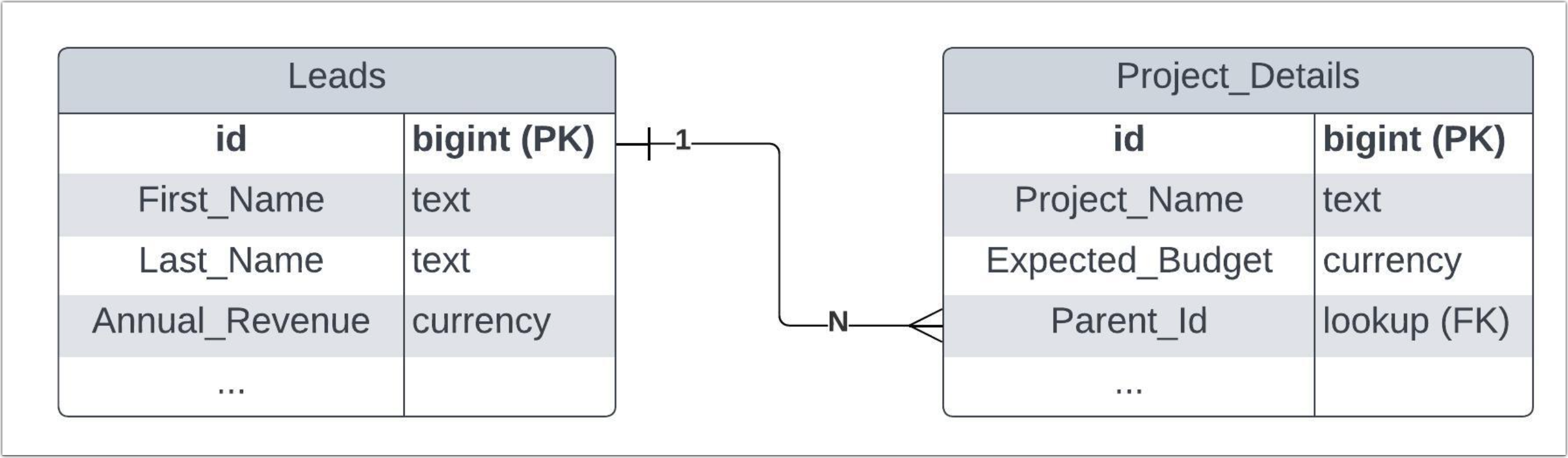
The above diagram shows the data model representation when you create a subform in a module. Consider adding a subform field named Project Details in the Leads module (parent module). Zoho CRM will automatically create
a separate module for the subform field with the specified subform field name - Project Details. Each record within the subform module can have multiple fields, in addition to the system-defined
Parent_Id lookup field, establishing a connection between the
parent (Leads module) and
child (subform module) modules. Through this linking process, one can easily identify which subform record corresponds to which specific lead record.
Use Case
Consider Zylker Consulting organization using Zoho CRM to maintain their leads and their projects. Zylker uses the Project Details subform in the Leads module to collect project-specific information collected from their Leads.
The Project Details subform includes fields such as Project Title,Type, Budget, and Status, in addition to the Parent_Id lookup field.
Now, the Zylker's sales team needs to retrieve all the details of the projects from the Leads module for further project analysis, expected budgets, and status. Let's see how to manipulate these data in CRM using Zoho CRM APIs.
The APIs used in this post
API
| Methods |
Subforms API | GET, POST, UPDATE |
Records API | POST, UPDATE, DELETE |
Search API | GET |
COQL API | POST |
Bulk Read API | POST, GET |
How to retrieve subform records using the Zoho CRM APIs?
To retrieve subform records from the subform module, specify the subform module's API name to access their records or fields.
Step - 1
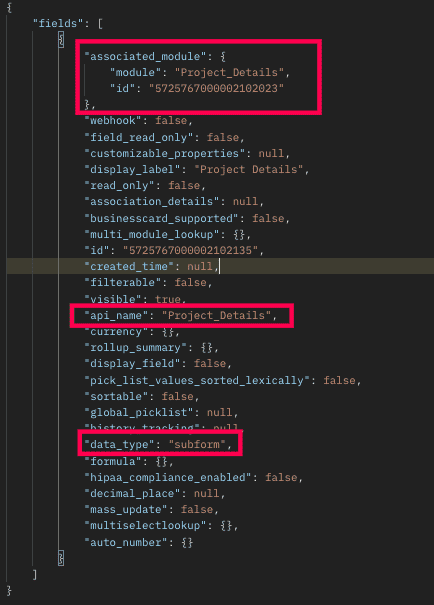
To know the API names of the subform fields in a module, make a GET - Fields Metadata API call. Among all the Leads' fields, subform field can be identified by the json key data_type with the value subform. Corresponding subform module can be found from the json associated_module. Below is the API call & response for such a subform field.
Request URL :
{api-domain}/crm/v6/settings/fields/{subform_field_id}?module=Leads
Request Method: GET
Sample Response:
Step - 2
Using the api_name of the subform module, make a GET Fields metadata API call to get the list of fields (along with their api_name) in the subform. One of the fields of the subform module will be Parent_Id with the data_type as lookup, pointing to the parent module (here it is Leads).
Request URL
Request Method: GET
Sample Response:
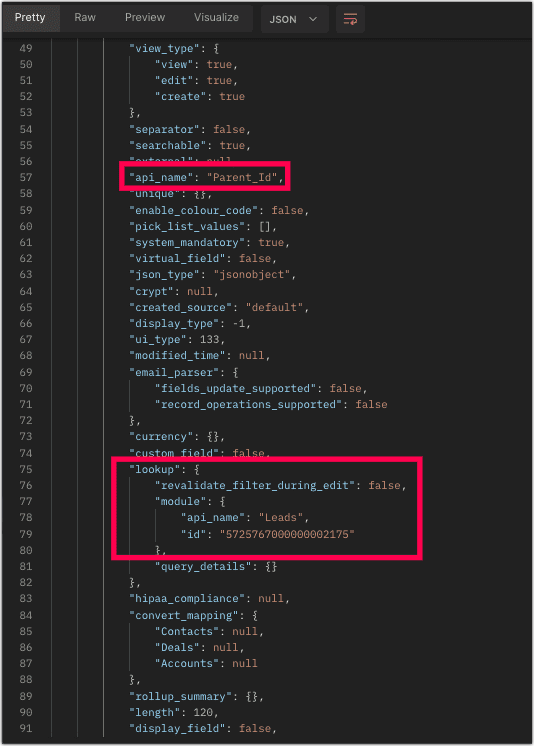
Now you know how to get the API name of the subform and its corresponding fields.
Step - 3
Sample Request and Response to retrieve subform records
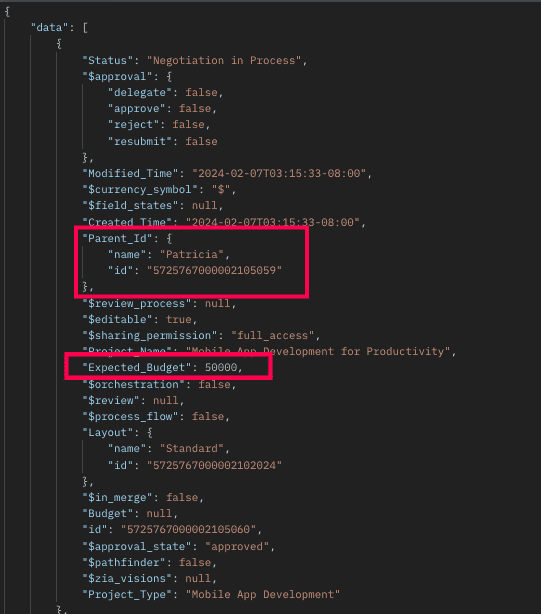
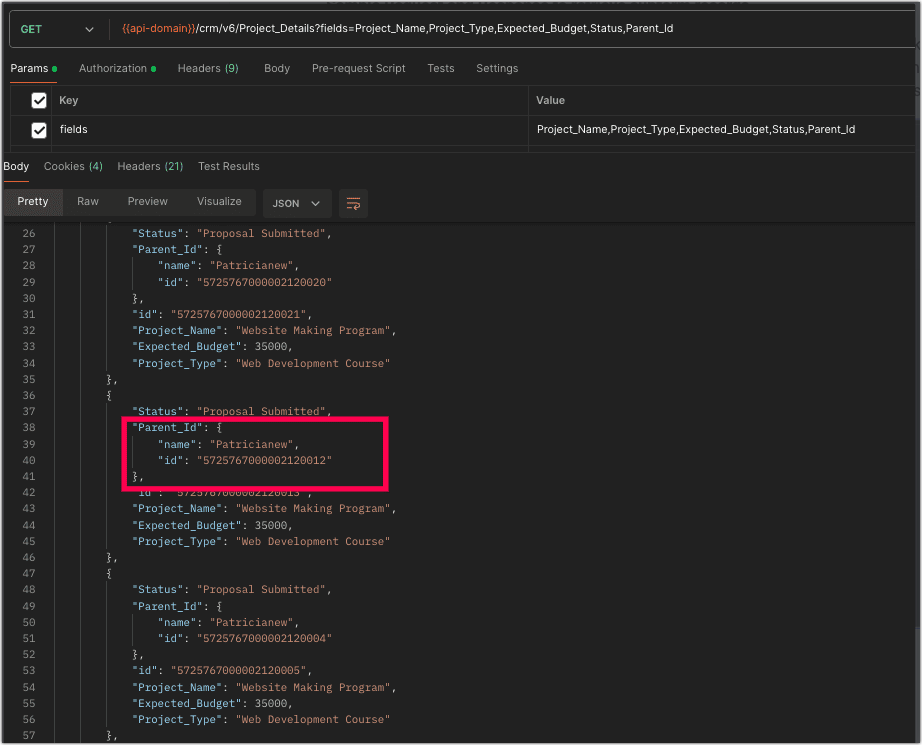
The below request will retrieve all the subform records in the Leads module. The linking of subform record to the Lead's module will be available in the Parent_Id field, which is highlighted. The id key inside the Parent_Id json object is the id of the Leads records.
How to add data to the subforms?
To add records to the subform, you need the API name of the subform and its corresponding field API names.
Request URL:
Request Method: POST
Sample Input
{ "data": [ { "Last_Name": "Patricia", "Company": "Info Technology", "Project_Details": //API name of the subform [ { "Project_Name": "Mobile App Development for Productivity", "Project_Type": "Mobile App Development", "Expected_Budget": 50000, "Status": "Negotiation in Process" }, //API names of the subform fields { "Project_Name": "Big Data Infrastructure Implementation", "Project_Type": "Infrastructure Upgrade", "Expected_Budget": 30000, "Status": "Proposal Submitted" }, { "Project_Name": "Big Data Infrastructure Implementation", "Project_Type": "Infrastructure Upgrade", "Expected_Budget": 30000, "Status": "Proposal Submitted" } ] } ] }
|
The above highlighted syntax is used for adding data to the subform records.
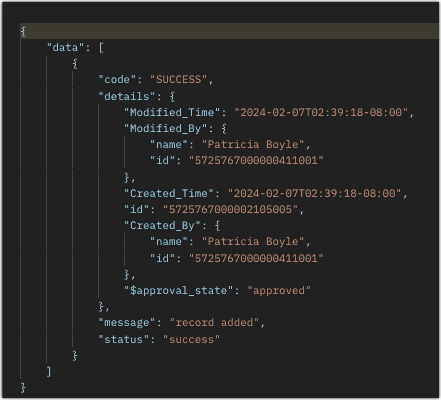
Sample Response:
Kaizen
#33 - Subforms API explains in detail how to Fetch, Update, and Delete the subform data with sample requests, inputs, and responses.
Retrieve Subform Data via Search API and COQL API
There may be situations where you need to fetch records based upon certain conditions.
Criteria :
The sales team wants to retrieve the subform records whose budget is
greater than or equal to $40000. In this case, we will use Zoho CRM's
Search API and
COQL API. Let's see how to achieve this.
Search API
To retrieve the records that match your search criteria, retrieve subform data using its corresponding module API name. Note that using Search API, you can fetch data quickly from a single module.
Request URL:
Request Method: GET
Sample Response :
The above response shows all records that meet the specified criteria.How to retrieve subform records from a particular parent record?
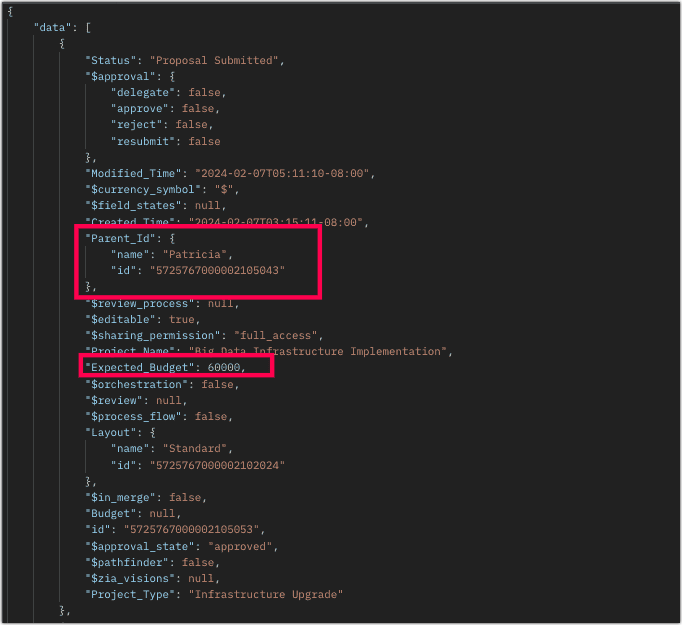
To retrieve subforms records in a particular lead record that meet the above criteria, follow the below sample request.
Sample Request URL:
Sample Response:
Retrieving Subforms Data via COQL API
We know that the subform is maintained in a separate module. So, retrieve subform data by querying the subform module's API name and it's parent module via the Parent_Id lookup field.
Request URL:
Request Method : POST
Sample Input:
{ "select_query" : "select Expected_Budget from Project_Details where ((Expected_Budget >=40000) and (Parent_Id = 5725767000002105043))" } |
Sample Response:
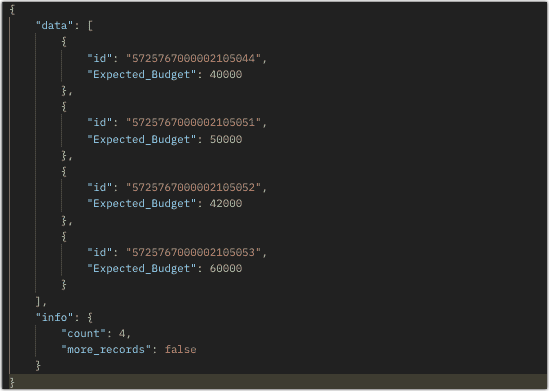
Using a Parent_Id (lookup field pointing to Leads module) in the COQL criteria automatically adds a left join to the child module (Project_Details). With that join, criteria can be applied to the fields of the parent module also. Below example illustrates that we want to fetch the Expected_Budget field of the Project_Details module where the Expected_Budget is greater than or equal to 40000 for the corresponding Leads with Annual Revenue greater than 1000000.
{ "select_query" : "select Expected_Budget from Project_Details where ((Expected_Budget >=40000) and (Parent_Id.Annual_Revenue > 100000 ))" } |
From the SQL perspective, above COQL can be interpreted as
select pd.Expected_Budget from Project_Details as pd left join Leads as l on pd.Parent_Id=l.id where pd.Expected_Budget>=40000 and l.Annual_Revenue > 1000000 |
Bulk Read API
Bulk Read API allows you to fetch a large set of data i.e., you can fetch a maximum of 200,000 records in a single API call.
To export subform records in the Leads module in CSV file format, use the subform's API name.
Request URL:
Request Method: POST
Sample input to export subform records:
{ "callback": { "method": "post" }, "query": { "module": { "api_name": "Project_Details" //API name of the Subform module }, "file_type": "csv" } }
|
Export subform records that meet the specified criteria
To export subform records based on the given criteria above (similar to the criteria for Search and COQL APIs).
Sample Input:
{ . . . "query": { "module": { "api_name": "Project_Details" }, "fields": [ "Project_Name", "Project_Type", "Expected_Budget", "Status" ], "criteria": { "field": { "api_name": "Expected_Budget" }, "comparator": "greater_equal", "value": "40000" //Retrieving subform records with an expected budget greater than or equal to $40,000 } } } |
Export subform records that meet the specified criteria for the particular parent record
To export the subform records of a particular parent record in the Leads module. Check the below sample request.
Sample Input:
{ . . . "query": { "module": { "api_name": "Project_Details" }, "fields": [ "Project_Name", "Project_Type", "Expected_Budget", "Status" ], "criteria": { "group": [ { "field": { "api_name": "Expected_Budget" }, "comparator": "greater_than", "value": "39999" }, { "field": { "api_name": "Parent_Id" }, "comparator": "equal", "value": "5725767000002105043" } ], "group_operator": "AND" } } }
|
As the API is an asynchronous API, the response will not be available instantly; the bulk read job is scheduled, and the status can be checked. Once the job is completed, it'll be notified in the callback URL. The records are available in a downloadable CSV file or ICS file (for events). You can export subform records in a module using the subform module API name. See Kaizen #12 Bulk Read API to know how to view the status of the scheduled job and download the file, along with more sample requests and responses.Frequently Asked Questions
Q. Is the API name of the subform case-sensitive? Also, how can I view the API name of a subform field in the web UI?
Yes, the API name of a subform is case-sensitive. To know the API name of a subform module (e.g. Project Details) Please go to Setup -> Developer Hub -> APIs -> CRM API -> API names -> Click on the parent module where the subform was created (e.g. Leads) and scroll down there you can view the subform field's API name.
Q. I changed the order of subform records and made a GET - Records API call. The system listed the records in the same order as displayed in the UI, rather than the order of their creation. Is this the system design?
When you make a
GET - Records API call for a module, it lists the subform records ordered in the UI. Note that you can re-order the subform records. So, when you retrieve those records via the API, they will be listed in the same order as they are arranged in the UI.
Q. Can we change a subform field's API name via API?
You can change the API name of the subform field only through the UI. Go to Setup -> Developer Hub -> APIs -> CRM API -> API names -> Click on the parent module where the subform was created (e.g. Leads) and go to the Field Label section. There you can view the subform field name and edit the API by clicking on the Edit option.
We trust that this post meets your needs and is helpful. Let us know your thoughts in the comment section or reach out to us at
support@zohocrm.com
Stay tuned for more insights in our upcoming Kaizen posts!
------------------------------------------------------------------------------------------------------------------------------
-------------------------------------------------------------------------------------------------------------------------------
Cheers!
Additional Reading:
Kaizen Posts:
Recent Topics
Open Form in Same window as Page from embedded Report
I have a page that has an embedded report, as shown below. When I click the + sign to add a new record, the form shows up inside the page where the report was embedded. I know that I can add a custom action to the report grid or report detail view and
Auto-Invite Users to Portals in Zoho CRM based on Conditions
Hello Everyone, You can now automate portal invitations in Zoho CRM with the new Auto-Invite users feature in Portal management. No more manually enabling portal access one by one. With this enhancement, you can automatically send invites for users to
Weekly Tips: Secure your attachment downloads with Zoho Mail
Safety is one of our main concerns, whether it’s about device security or online protection. We use tools like fingerprint scanners, facial recognition, and two-factor authentication to keep our devices and email accounts secure. We use methods like OTP
Drag and Drop in Creator Application
Hi, I am in the planning phase of a new application and I would like to use 'Drag and Drop' in the user interface of my new Creator application that I am sketching out, but I don't seem to be able to find any reference that this is available to developers. In my instance I have table of entries and I would like to be able to allow users to move an entry to another table (much like you do in your own interface when creating a Pivot Table report. In addition, I would like the user to be able to re-order
Resend Client Portal Invitation + View Email Delivery Status
Hi Zoho Team, We hope you are doing well. We would like to request two important enhancements related to the Zoho Creator Client Portal invitation process. At the moment, when we add a user to the Client Portal, Zoho Creator automatically sends an invitation
Get user last login
1. Is there a way to programmatically get the last user login to trigger certain workflows? 2. Is there a way to programmatically access the custom fields on a user's account?
Seeking Zoho Creator Expert (Delivery Management App / Logistics Ops) — Built & Deployed Before
Hi everyone, We’re building a Delivery Management App (focused on delivery operations for now) using Zoho Creator. We’re looking for a Zoho Creator expert who has already developed and deployed a similar delivery/workflow system and can assist us with
Automating Employee Birthday Notifications in Zoho Cliq
Have you ever missed a birthday and felt like the office Grinch? Fear not, the Cliq Developer Platform has got your back! With Zoho Cliq's Schedulers, you can be the office party-cipant who never forgets a single cake, balloon, or awkward rendition of
Cliq iOS can't see shared screen
Hello, I had this morning a video call with a colleague. She is using Cliq Desktop MacOS and wanted to share her screen with me. I'm on iPad. I noticed, while she shared her screen, I could only see her video, but not the shared screen... Does Cliq iOS is able to display shared screen, or is it somewhere else to be found ? Regards
Spotlight #7 - Automatic Transitions in Blueprint
Previously, records could not be moved from one state to another without user intervention. With automatic transitions, move records from one state to another automatically, when it elapses its pre-defined time. This Spotlight discusses how automatic
Whatsapp Connection Status still "Pending" after migration
Hello, I migrated my WhatsApp API to Zoho from another provider a day ago. So far the connection status is still “Pending”. There is a problem? How long does it usually take?
Adding Multiple Files to a Zoho Vault Entry
There is a old blog post talking about adding multiple file attachments to one Zoho Vault Secret: https://www.zoho.com/blog/vault/introducing-new-features-in-zoho-vault-powerful-password-sharing-wider-storing.html Is that still possible, I can see how
Dropshipping Address - Does Not Show on Invoice Correctly
When a dropshipping address is used for a customer, the correct ship-to address does not seem to show on the Invoice. It shows correctly on the Sales Order, Shipment Order, and Package, just not the Invoice. This is a problem, because the company being
Add Attachment Support to Zoho Flow Mailhook / Email Trigger Module
Dear Zoho Support Team, We hope you are well. We would like to kindly request a feature enhancement for the Mailhook module in Zoho Flow. Currently, the email trigger in Zoho Flow provides access to the message body, subject, from address, and to address,
Zoho Invoice Customer Login Portal
Are there any plans for a customer portal to Zoho Invoice, ala Freshbooks? I would like customers that I invoice to be able to login to review invoices and invoice history. I have not switched from Freshbooks for this very reason.
the custom domain forwards by default to the old career site / how to switch it off??
dear friends, how to switch off the old version of the career site?? The set up custom domain forwards directly to the old site, so that I cant publish it... Any ideas? Thank you! KR, Victoria
Partner with HDFC And Sbi Bank.
Hdfc and sbi both are very popular bank if zoho books become partner with this banks then many of the zoho books users will benefit premium features of partnered banks.
Can Zoho Flows repeat Actions more than once?
I'm attempting to make an intentional Zoho Flow loop using the below layout. However, when "WithinLimit" condition is met, the program fails to execute the action "Get & Add Request Co..." again. Is this by design? Is Zoho Flows unable to repeat actions
What KPIs Do You Use to Measure Your Support Team’s Performance in Zoho Desk?
Hi everyone, We hope you’re all doing well. We are trying to improve how we measure the performance and effectiveness of our support department, and we would really appreciate learning from the community. We assume there are several common and widely-used
Preserve Ticket Issue Mapping When Migrating from Jira to Zoho Projects
Hello Zoho Projects Team, We hope you are doing well. We are currently exploring a full migration from Jira to Zoho Projects, and we identified a critical limitation during the migration process involving Zoho Desk integration. Current Situation: We use
CRM iOS App Missing Tags support
Hi, I remember reading either a tread on iOS (Maybe Later) & Android (i believe Now Supported) regarding “Tags” in the mobile apps unfortunately I can’t seem to find either. Could we clarify are “Tags” support coming to CRM iOS app as searching the forums
Imported contacts succesful but contacts do not show up in Contacts
I imported +300 contacts. I can see them in import history. When clicking on a contact in import history I see all the imported contact details for any given contact. So import seems to be successful. However the imported contacts do not show up in the contacts tab. Not in All contacts, and not in a filtered view where they absolutely should show up. The search function also does not find any imported contact. Help?
Hotmail is STILL blocking the zoho mail IP
Greetings, as I already mentioned in my last message, my Zoho IP has been blocked by Hotmail for more than 15 days. Although someone said that the issue was "solved," it still isn't, and this amount of time seems neither normal for a "serious" company,
Pre-fill webforms in Recruit
I don't want to use the career site portal (as I have my own already), but I would like to direct users to the application forms for each role, from my website job pages. Is there a way to pre-fill fields in Recruit application forms, so that I only have
Zia Actions: AI-powered Workflow Automation for Faster and Smarter Execution
Hello everyone, Workflows got a notch better with AI-based actions. Actions such as field extraction, prediction, auto reply, and content generation facilitate quick execution with improved speed and accuracy. Zia can intercept useful details in newly
Import KB template OR Export template for zoho desk?
Greetings. Can you tell me if there is a way to get an EXPORT of my KB articles? OR is there a template you supply for importing KB articles into my zoho desk? I am looking for a method of understanding what fields can be imported, and what their possible
This user is not allowed to add in Zoho. Please contact support-as@zohocorp.com for further details
Hello, Just signed up to ZOHO on a friend's recommendation. Got the TXT part (verified my domain), but whenever I try to add ANY user, I get the error: This user is not allowed to add in Zoho. Please contact support-as@zohocorp.com for further details I have emailed as well and writing here as well because when I searched, I saw many people faced the same issue and instead of email, they got a faster response here. My domain is: raisingreaderspk . com Hope this can be resolved. Thank you
XML format to import knowledgebase into Zoho Desk
Hi, We just started to use Zoho Desk and want to import our knowledgebase from our old support system (Freshdesk) to Zoho Desk. Can anyone give us information about the format of xml file to import? There is no explanation on the related page.
Can we add custom fields to portal community profiles?
How do we add custom fields to our profile pages in our portal community? If we have the ability to add custom fields, will we be able to access those fields via API? We want to use our Desk community in our help portal as our primary community and would
Weekly Sales Summary
Is it possible to generate a weekly report in Zoho Books to show -$$ amount of estimates generated -# of estimates generated by Salesperson -$$ amount of Sales Orders created -$$ amount of Invoices generated
Client Portal ZOHO ONE
Dear Zoho one is fantastic option for companies but it seems to me that it is still an aggregation of aps let me explain I have zoho books with client portal so client access their invoice then I have zoho project with client portal so they can access their project but not their invoice without another URL another LOGIN Are you planning in creating a beautiful UI portal for client so we can control access to client in one location to multiple aps at least unify project and invoice aps that would
Restrict Addresses in Zoho Forms?
In the address field, is there a way to restrict the addresses that auto populate (via Zoho Maps or Google Maps) to a specific state (I know it's possible with the country). Additionally, how often does the address in Zoho Maps get updated? Certain addresses
Do Individual Forums within Categories, in Desk Community, Produce Their Own RSS Feed?
Do Individual Forums within Categories, in Desk Community, Produce Their Own RSS Feed? If not, can anyone share a work-around that could help me get an RSS feed for individual category forums?
ASAP Widget Not showing "My Tickets"ed
Hello Team, I have created a ZOHO ASAP Widget and embedded to my portal app.clearvuiq.com , widget renders ok and I can open tickets from widget. However I want my opened tickets to be visible in the widget. How can I achieve that?
Add Zoho Forms to Zoho CRM Plus bundle
Great Zoho apps like CRM and Desk have very limited form builders when it comes to form and field rules, design, integration and deployment options. Many of my clients who use Zoho CRM Plus often hit limitations with the built in forms in CRM or Desk and are then disappointed to hear that they have to additionally pay for Zoho Forms to get all these great forms functionalities. Please consider adding Zoho Forms in the Zoho CRM Plus bundle. Best regards, Mladen Svraka Zoho Certified Consultant and
How to view CRM Sales Orders in Desk
What's the usual way to view all CRM sales orders linked to a contact, when viewing a ticket in Desk? I don't want to have to open a new tab to see the order in CRM. And the Desk CRM sidebar doesn't seem to be configurable. Would I have to use an extension
Kaizen #219: Actions API - Webhooks APIs - Part 1
Hello all!! Welcome back to a fresh Kaizen week. In the previous weeks, we covered Workflow Rules APIs, Actions APIs - Email Notification APIs, Tasks Update API, and Field Update API. This week, we will continue with another Actions API - Webhooks API
Pricing Strategies: #3 Services never Stop with just Plans
"Hey, while you're here, could you also take a look at the vegetable patch?" Aaron hears that line almost every week. He runs a small gardening service, the kind where customers subscribe to a simple monthly plan that includes basic maintenance, mowing,
Presenting ABM for Zoho CRM: Expand and retain your customers with precision
Picture this scenario: You're a growing SaaS company ready to launch a powerful business suite, and are looking to gain traction and momentum. But as a business with a tight budget, you know acquiring new customers is slow, expensive, and often delivers
Lead Blueprint transition in custom list view
Hi, Is It possible to insert the Blueprint transition label in a custom Canvas list view? I am using Lead module. I see the status, but it would be great if our users could execute the Blueprint right from the list view without having to enter the detailed
Next Page